


Turn every policy into automated workflows with built-in enforcement and audit-ready proof.



Best Process Management Software for SMBs

The best process management software for SMBs turns recurring work into a clear system that people can follow, owners can improve, and leaders can verify. It replaces process knowledge scattered across documents, inboxes, chat threads, and individual memory with defined steps, responsibilities, decisions, and evidence.
Process Street is the strongest overall option for small and midsize businesses that need workflows to execute consistently, especially when approvals, forms, deadlines, conditional paths, and audit history matter. Pipefy is a good visual intake and pipeline option, while ClickUp and monday work management suit teams that want process work inside a broader work-management platform.
This guide compares eight products across process design, execution, automation, documentation, external participation, reporting, pricing, and implementation effort. The goal is not to find the longest feature list. It is to find the smallest system that can run your important processes reliably as the company grows.
In this article, we cover:
- Best process management software for SMBs at a glance
- How to choose process management software for an SMB
- 1. Process Street
- 2. Pipefy
- 3. Kissflow
- 4. monday work management
- 5. ClickUp
- 6. SweetProcess
- 7. Tallyfy
- 8. Cflow
- How to implement process management software
- FAQs
Best process management software for SMBs at a glance
The short version: Choose Process Street when the process must be followed and proven, Pipefy when visual request pipelines are the priority, Kissflow when you need low-code process applications, and ClickUp or monday work management when process work needs to share a workspace with projects. SweetProcess is strongest for SOP documentation, while Tallyfy and Cflow offer focused workflow models for external participation and visual routing.
| Tool | Best for | Standout feature | Pricing |
|---|---|---|---|
| Process Street | SMBs that need recurring processes to run with control and proof | Executable workflows with forms, owners, conditional logic, approvals, scheduled runs, and audit history | Custom-quoted plans with a 14-day Pro trial |
| Pipefy | Small teams that want visual request intake and process pipelines | Process templates, public forms, card-based workflows, basic automations, and request tracking | Free Starter plan; paid Business and Enterprise plans use sales-led pricing |
| Kissflow | Growing companies that need low-code process apps as well as workflows | Workflows, applications, pages, dashboards, reports, analytics, and integrations in a low-code platform | Fixed annual agreements based on the value and rollout scope |
| monday work management | SMBs that want flexible boards for projects and lightweight processes | Configurable boards, views, forms, dashboards, automations, integrations, and AI workflows | Free plan available; Basic starts at $9 per user monthly when billed annually |
| ClickUp | Small teams that want tasks, docs, forms, and automations in one workspace | Tasks, Docs, Forms, templates, Custom Fields, multiple views, and workflow automations | Free Forever plan; Unlimited starts at $7 per user monthly when billed annually |
| SweetProcess | Owner-led businesses focused on documenting SOPs and training staff | Procedures, policies, processes, quizzes, knowledge bases, task assignment, and version history | $82.50 monthly for up to 10 members when billed annually, plus $4.17 for each additional member |
| Tallyfy | Service businesses that coordinate repeatable client-facing workflows | Workflow templates, assigned steps, reminders, forms, guest participation, audit trails, and AI workflow features | Seat-based paid plans with full and light member roles, unlimited guests, and a 14-day trial |
| Cflow | SMBs that prefer a visual no-code workflow designer | Visual workflow and form builders, process stages, parallel paths, rules, templates, reminders, and approvals | 14-day trial with paid plans for small, growing, and enterprise teams |
How to choose the best process management software for SMBs
An SMB rarely needs every BPM feature. It needs enough structure to stop important work from depending on one person’s memory, without creating an administration job larger than the process itself. Start with the recurring process that causes the most rework, delay, risk, or customer pain.
Separate processes from projects
A project has a unique outcome and changes as the work develops. A process repeats: employee onboarding, invoice approval, customer implementation, monthly close, access review, content approval, or equipment inspection. Some products handle both, but the evaluation should use a recurring workflow with a known start, finish, and set of control points.
The examples in process management across real business functions help turn a vague software search into a concrete shortlist. For a wider buying context, small business tools shows where process software fits beside finance, sales, communication, and delivery systems.
Demand execution, not only documentation
A process document explains how work should happen. Process management software should also launch the work, assign it, collect information, enforce decisions, trigger reminders, and show completion. If the product only stores an SOP, the team still needs another system to run it. If it only tracks tasks, the instructions and control logic may drift away from execution.
Test the control points
- Ownership: every step needs a clear role or assignee.
- Required information: forms and fields should prevent incomplete handoffs.
- Routing: conditional logic should send different cases down the right path.
- Approval: high-risk steps should wait for the correct reviewer.
- Timing: due dates, reminders, and escalations should reflect the real service level.
- Evidence: the completed run should show who did what, when, and with which inputs.
When budget is the first constraint, compare the limits in free process management software before moving production work into a free tier. The useful question is whether the plan can test the real workflow, not whether it can create a board.
Keep integration claims practical
Most SMB processes cross several systems. A customer onboarding process might begin in CRM, create work for operations, request documents, notify finance, and update the customer record after completion. Evaluate the trigger, the data passed between systems, error handling, and who can repair a failed automation.
1. Process Street
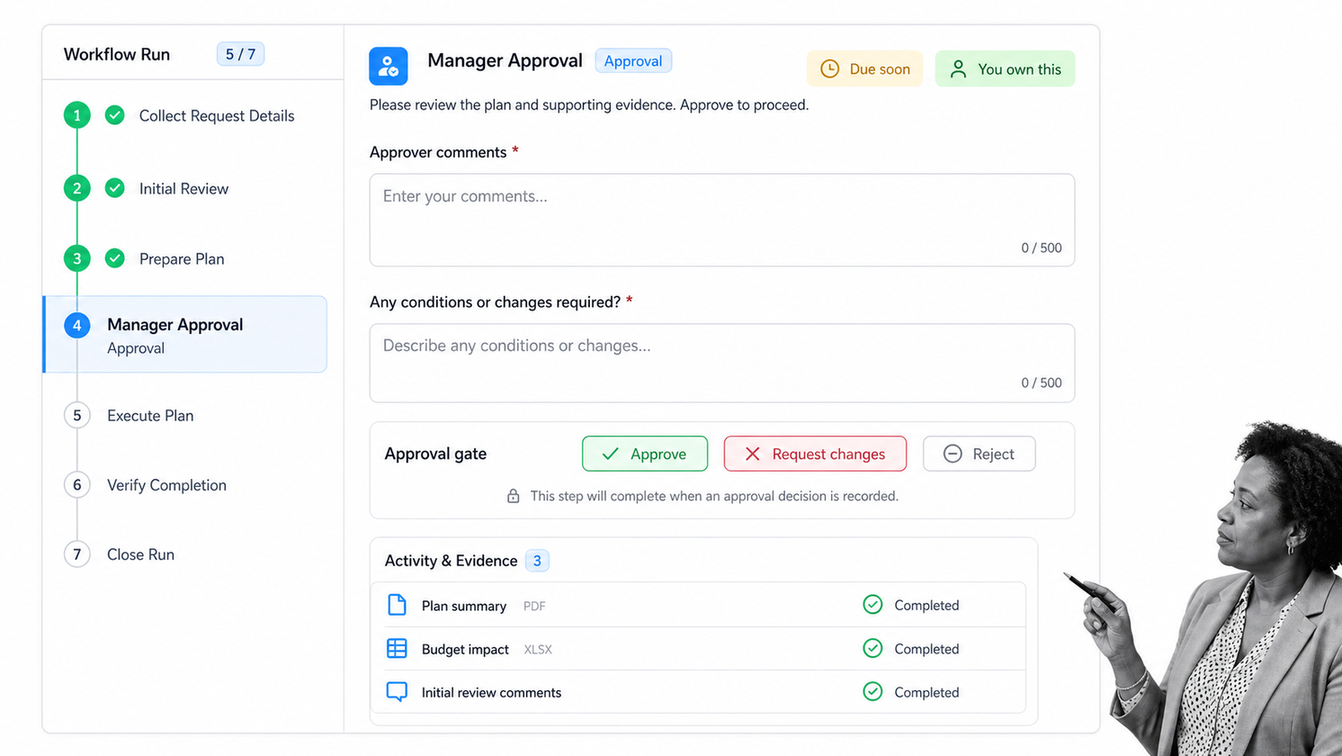
Best for: SMBs that need recurring processes to run with control and proof.
Process Street is the strongest overall choice when an SMB needs recurring work to happen the same way every time. Teams can turn a process into a runnable workflow with instructions, required fields, owners, due dates, conditional paths, approvals, forms, automations, and activity history. That structure works for onboarding, finance approvals, vendor reviews, customer implementation, compliance checks, and any other procedure where a missed step creates real cost. It keeps the process clear for the person doing the work and gives the owner proof that the process finished correctly.
Why Process Street stands out
The defining surface is its controlled workflow run. Executable workflows with forms, owners, conditional logic, approvals, scheduled runs, and audit history. That gives an SMB a concrete operating surface for recurring work instead of another place to store disconnected tasks.
What an SMB should test in Process Street
- Process fit: build one real recurring workflow around the controlled workflow run.
- Adoption: ask a normal operator to complete the process without coaching from the builder.
- Control: test ownership, deadlines, decisions, approvals, exceptions, and completion history.
- Pricing: Custom-quoted plans with a 14-day Pro trial.
Confirm the current package and capability details on the Process Street official page. Pricing and packaging can change, so test the exact configuration your team will buy.
A small team can start from an employee onboarding workflow, vendor onboarding workflow, or customer onboarding workflow and adapt the controls to its own operation. The current conditional logic guide explains how one workflow can handle different cases without duplicating the whole process.
2. Pipefy
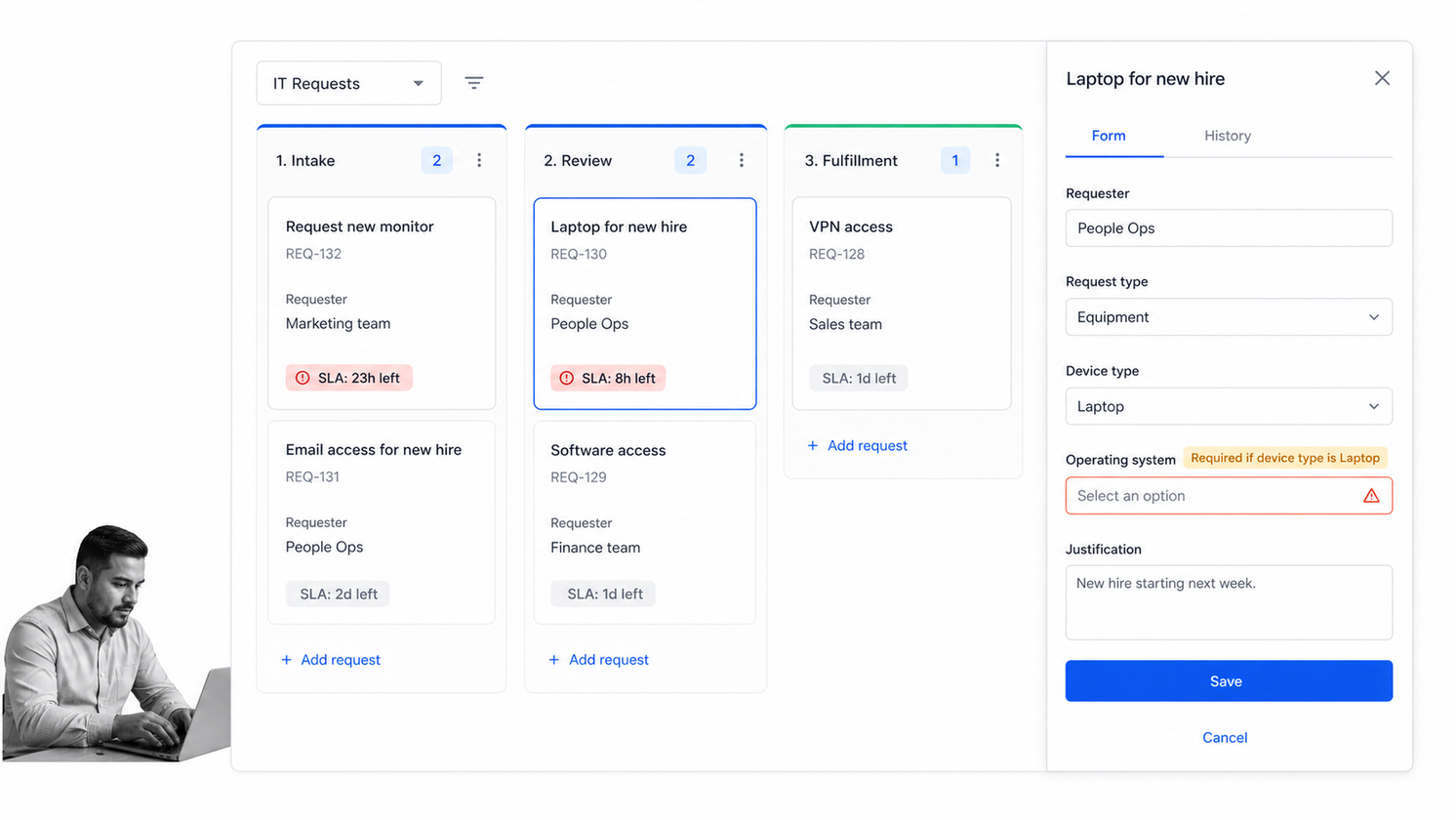
Best for: Small teams that want visual request intake and process pipelines.
Pipefy organizes work as cards moving through a visual process pipeline. An intake form can create a request, fields hold the context, phases represent the process stages, and rules move or assign work as conditions change. The model is easy to explain to a small team because it resembles a board, while the request tracker gives non-users a way to follow progress. The free Starter plan makes it practical to test a few workflows before a broader rollout.
Why Pipefy stands out
The defining surface is its card-based process pipeline. Process templates, public forms, card-based workflows, basic automations, and request tracking. That gives an SMB a concrete operating surface for recurring work instead of another place to store disconnected tasks.
What an SMB should test in Pipefy
- Process fit: build one real recurring workflow around the card-based process pipeline.
- Adoption: ask a normal operator to complete the process without coaching from the builder.
- Control: test ownership, deadlines, decisions, approvals, exceptions, and completion history.
- Pricing: Free Starter plan; paid Business and Enterprise plans use sales-led pricing.
Confirm the current package and capability details on the Pipefy official page. Pricing and packaging can change, so test the exact configuration your team will buy.
3. Kissflow
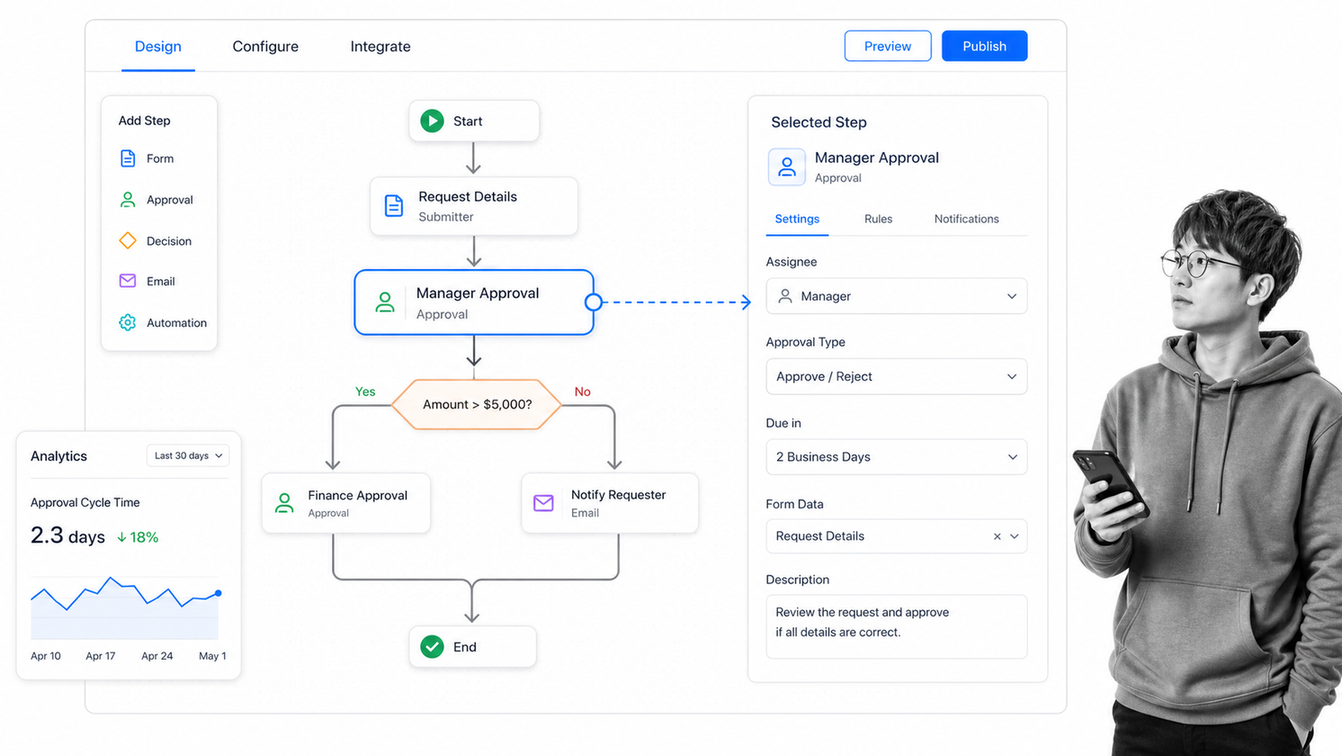
Best for: Growing companies that need low-code process apps as well as workflows.
Kissflow sits closer to a low-code application platform than a lightweight checklist tool. Teams can build workflows, forms, pages, applications, dashboards, reports, and analytics around a business process. That breadth matters when an SMB has outgrown a simple board and needs a more tailored internal application. It also increases implementation scope, so the product fits best when the company has a process owner who can define the data, roles, rules, and reporting before configuration begins.
Why Kissflow stands out
The defining surface is its low-code process application builder. Workflows, applications, pages, dashboards, reports, analytics, and integrations in a low-code platform. That gives an SMB a concrete operating surface for recurring work instead of another place to store disconnected tasks.
What an SMB should test in Kissflow
- Process fit: build one real recurring workflow around the low-code process application builder.
- Adoption: ask a normal operator to complete the process without coaching from the builder.
- Control: test ownership, deadlines, decisions, approvals, exceptions, and completion history.
- Pricing: Fixed annual agreements based on the value and rollout scope.
Confirm the current package and capability details on the Kissflow official page. Pricing and packaging can change, so test the exact configuration your team will buy.
4. monday work management
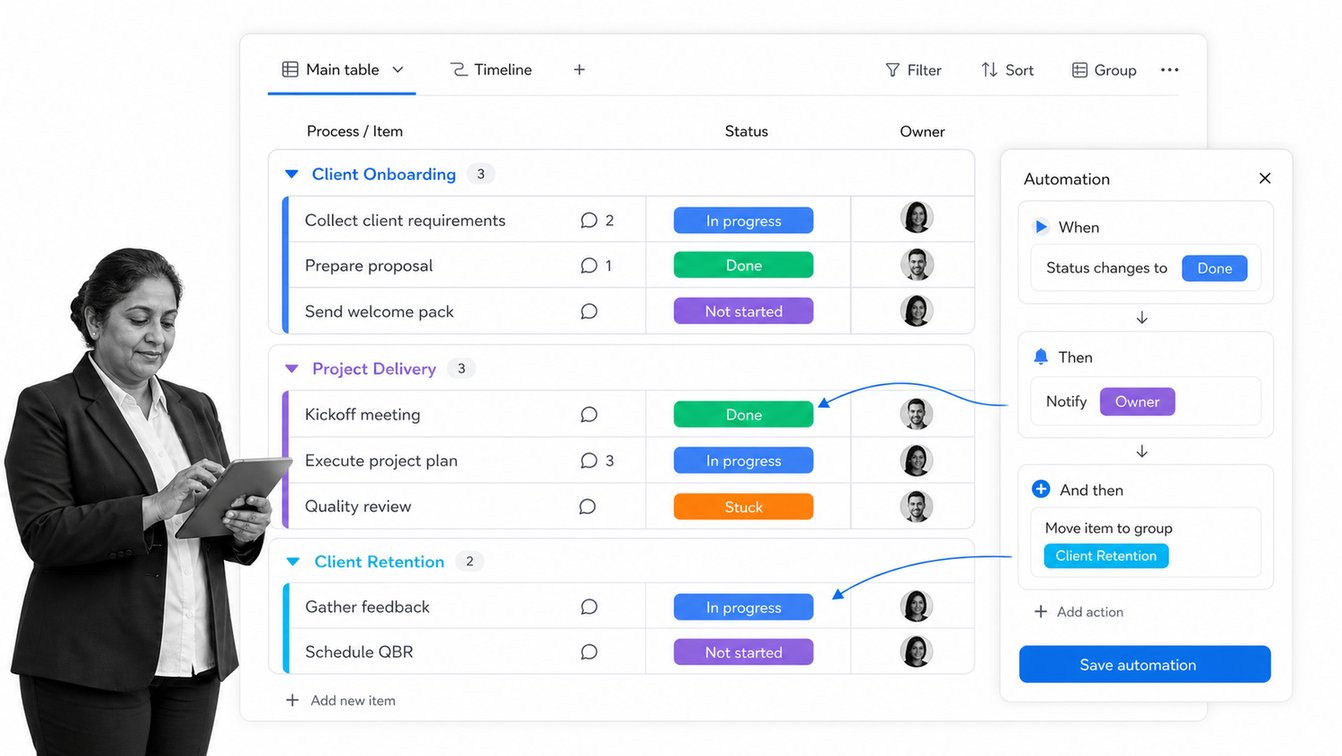
Best for: SMBs that want flexible boards for projects and lightweight processes.
monday work management turns processes into configurable boards with rows, owners, statuses, dates, views, dashboards, forms, and automations. It is approachable for teams already using boards to manage projects, and it can support recurring operational work without introducing a separate specialist platform. The main risk is sprawl. When every department creates its own statuses and board structure, the company loses the consistency that process management was supposed to create.
Why monday work management stands out
The defining surface is its configurable cross-team process board. Configurable boards, views, forms, dashboards, automations, integrations, and AI workflows. That gives an SMB a concrete operating surface for recurring work instead of another place to store disconnected tasks.
What an SMB should test in monday work management
- Process fit: build one real recurring workflow around the configurable cross-team process board.
- Adoption: ask a normal operator to complete the process without coaching from the builder.
- Control: test ownership, deadlines, decisions, approvals, exceptions, and completion history.
- Pricing: Free plan available; Basic starts at $9 per user monthly when billed annually.
Confirm the current package and capability details on the monday work management official page. Pricing and packaging can change, so test the exact configuration your team will buy.
5. ClickUp
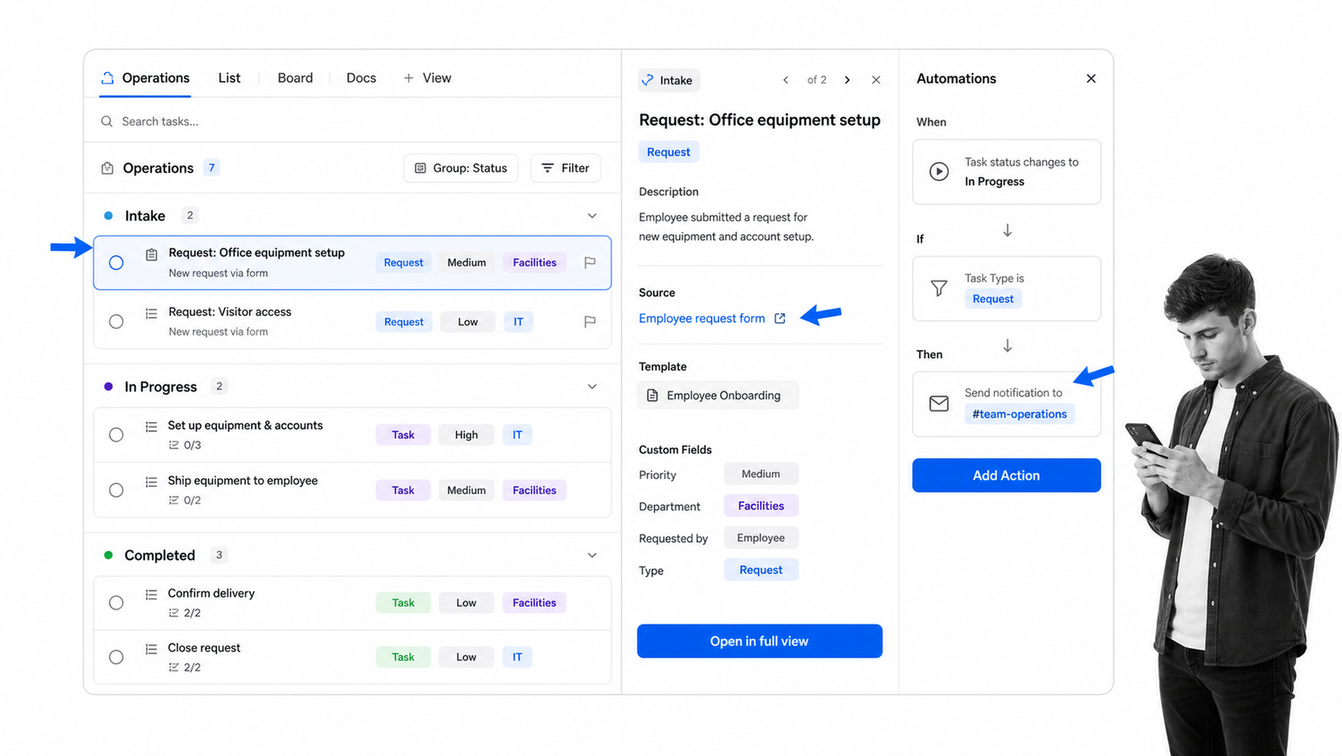
Best for: Small teams that want tasks, docs, forms, and automations in one workspace.
ClickUp combines tasks, documents, forms, templates, custom fields, views, dashboards, and automations inside one workspace. A small team can document the process in Docs, collect work through a Form, create tasks from the request, apply a template, and track the result in List, Board, or Calendar views. It is a strong value option for teams that want project work and process work together, but administrators need to keep the hierarchy and status model simple enough for everyday users.
Why ClickUp stands out
The defining surface is its task-based operations workspace. Tasks, Docs, Forms, templates, Custom Fields, multiple views, and workflow automations. That gives an SMB a concrete operating surface for recurring work instead of another place to store disconnected tasks.
What an SMB should test in ClickUp
- Process fit: build one real recurring workflow around the task-based operations workspace.
- Adoption: ask a normal operator to complete the process without coaching from the builder.
- Control: test ownership, deadlines, decisions, approvals, exceptions, and completion history.
- Pricing: Free Forever plan; Unlimited starts at $7 per user monthly when billed annually.
Confirm the current package and capability details on the ClickUp official page. Pricing and packaging can change, so test the exact configuration your team will buy.
6. SweetProcess
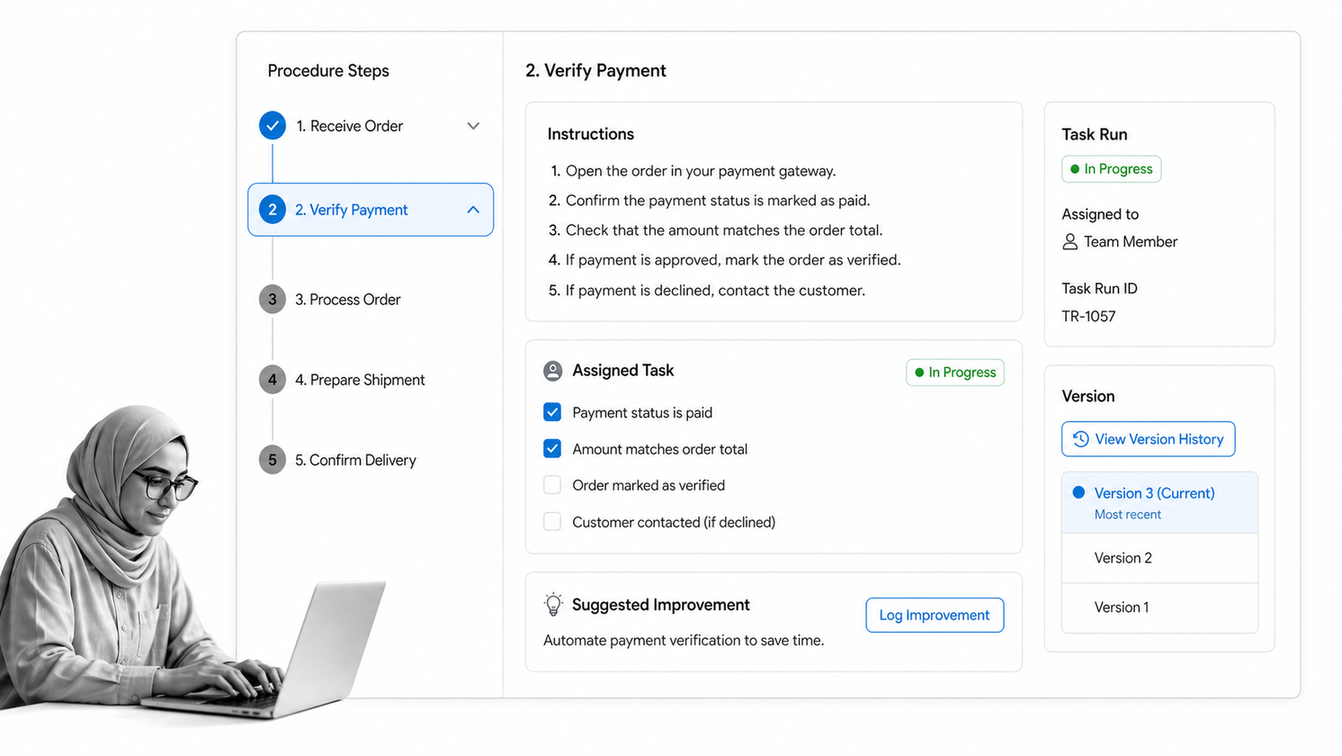
Best for: Owner-led businesses focused on documenting SOPs and training staff.
SweetProcess is built around operational documentation. Procedures capture step-by-step work, processes connect multiple procedures, policies sit beside them, and assigned tasks show whether staff followed the documented method. Quizzes and knowledge bases make it useful for training and onboarding. It fits owner-led businesses that need to get knowledge out of one person’s head, although teams that need complex branching, multi-system automation, or deep operational analytics may need a more execution-heavy platform.
Why SweetProcess stands out
The defining surface is its procedure and task execution workspace. Procedures, policies, processes, quizzes, knowledge bases, task assignment, and version history. That gives an SMB a concrete operating surface for recurring work instead of another place to store disconnected tasks.
What an SMB should test in SweetProcess
- Process fit: build one real recurring workflow around the procedure and task execution workspace.
- Adoption: ask a normal operator to complete the process without coaching from the builder.
- Control: test ownership, deadlines, decisions, approvals, exceptions, and completion history.
- Pricing: $82.50 monthly for up to 10 members when billed annually, plus $4.17 for each additional member.
Confirm the current package and capability details on the SweetProcess official page. Pricing and packaging can change, so test the exact configuration your team will buy.
7. Tallyfy
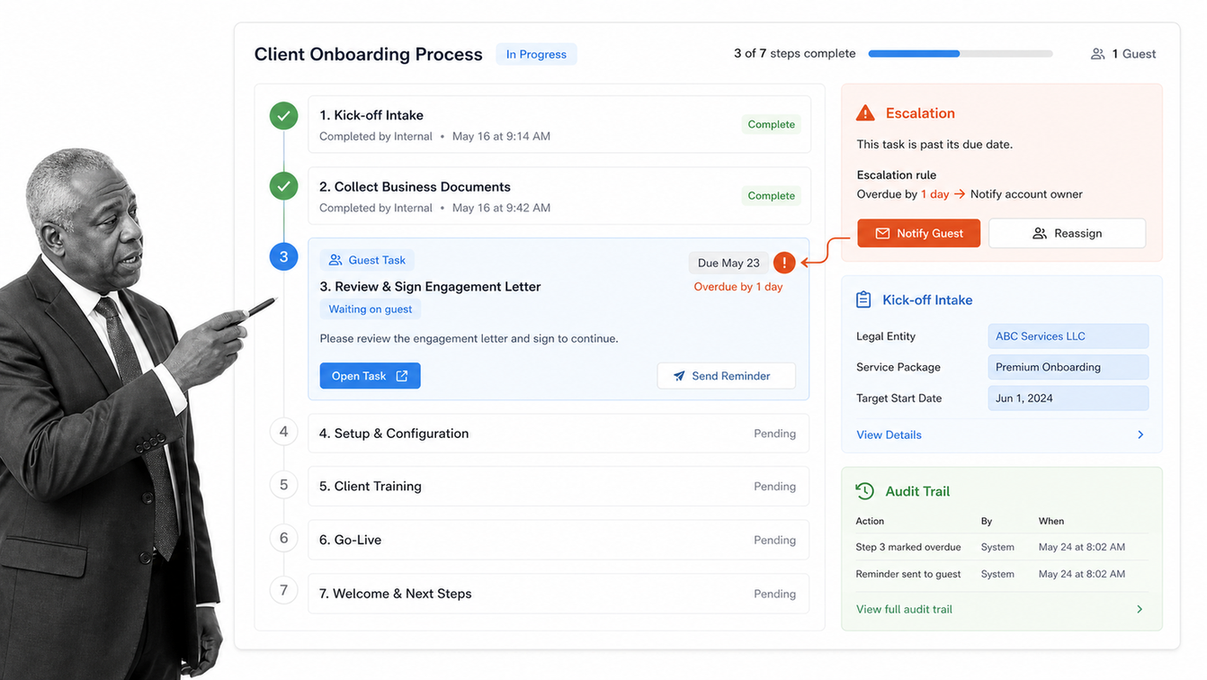
Best for: Service businesses that coordinate repeatable client-facing workflows.
Tallyfy is designed for repeatable workflows that pass between employees, clients, vendors, and other external participants. Templates launch active processes, steps go to the right people, reminders and escalations chase deadlines, forms collect context, and guests can participate without a full account. That makes it useful for agencies, professional services firms, and other SMBs whose process crosses the company boundary. Its full and light member model can also control licensing around who designs workflows and who only completes steps.
Why Tallyfy stands out
The defining surface is its client-facing workflow tracker. Workflow templates, assigned steps, reminders, forms, guest participation, audit trails, and AI workflow features. That gives an SMB a concrete operating surface for recurring work instead of another place to store disconnected tasks.
What an SMB should test in Tallyfy
- Process fit: build one real recurring workflow around the client-facing workflow tracker.
- Adoption: ask a normal operator to complete the process without coaching from the builder.
- Control: test ownership, deadlines, decisions, approvals, exceptions, and completion history.
- Pricing: Seat-based paid plans with full and light member roles, unlimited guests, and a 14-day trial.
Confirm the current package and capability details on the Tallyfy official page. Pricing and packaging can change, so test the exact configuration your team will buy.
8. Cflow
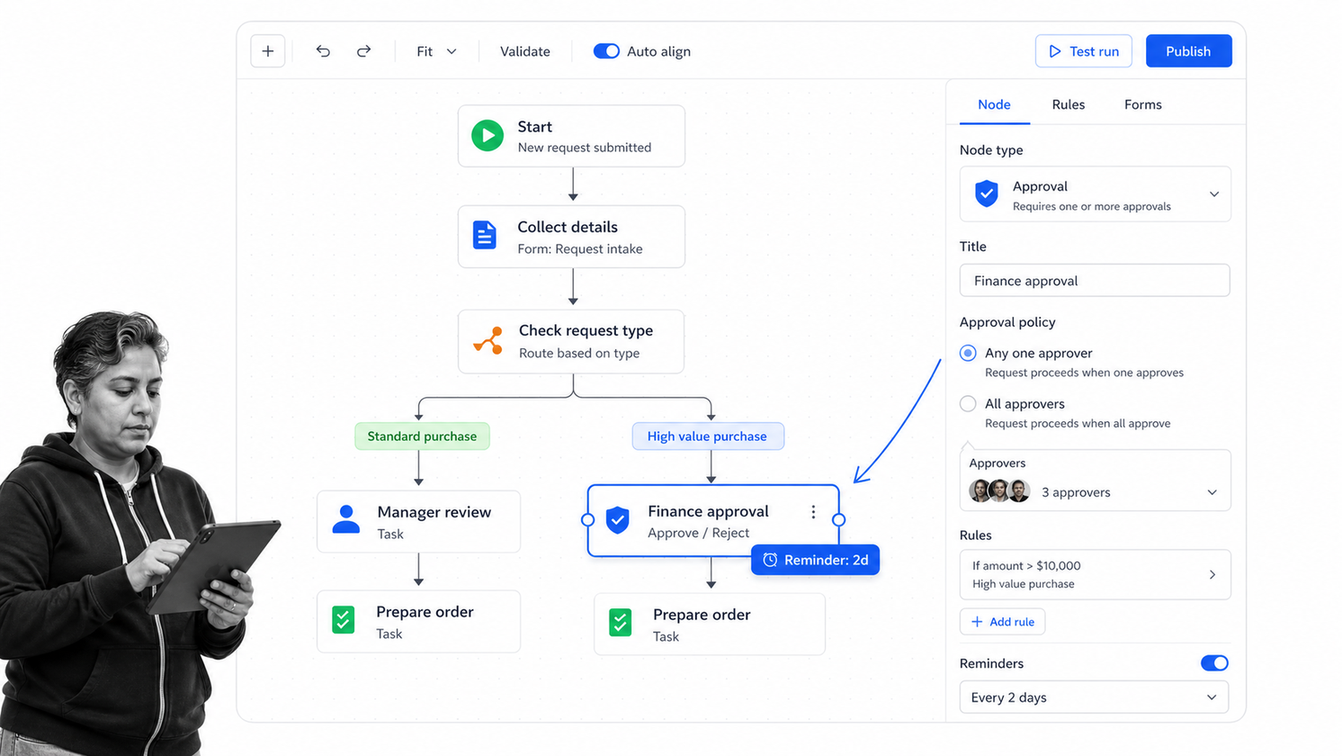
Best for: SMBs that prefer a visual no-code workflow designer.
Cflow gives non-technical users a visual way to map and automate processes. The workflow designer connects stages, rules, approvals, parallel paths, forms, reminders, and notifications in a flowchart-style surface. That is useful when stakeholders need to see the routing logic before agreeing to the automation. SMBs should still start with one process and a limited rule set. A visual canvas can become difficult to maintain when every exception is encoded before the team has proven the basic route.
Why Cflow stands out
The defining surface is its visual workflow designer. Visual workflow and form builders, process stages, parallel paths, rules, templates, reminders, and approvals. That gives an SMB a concrete operating surface for recurring work instead of another place to store disconnected tasks.
What an SMB should test in Cflow
- Process fit: build one real recurring workflow around the visual workflow designer.
- Adoption: ask a normal operator to complete the process without coaching from the builder.
- Control: test ownership, deadlines, decisions, approvals, exceptions, and completion history.
- Pricing: 14-day trial with paid plans for small, growing, and enterprise teams.
Confirm the current package and capability details on the Cflow official page. Pricing and packaging can change, so test the exact configuration your team will buy.
How to implement process management software without slowing the team down
The best process management software for SMBs still needs a focused implementation. The fastest implementation does not digitize every process. It proves one valuable workflow, establishes a repeatable build method, and then expands. That keeps configuration grounded in real work and gives the team a visible win before process governance feels abstract.
Choose one painful recurring process
Choose a process that repeats at least monthly, has a clear owner, crosses two or more people, and creates measurable pain when a step is missed. Onboarding, invoice approval, purchase requests, customer handoffs, quality checks, and access reviews are usually better pilots than a rare strategic procedure.
Use an invoice approval process, operations manual template, or standard operating procedure template to make the first build concrete.
Map the real process, including exceptions
Talk to the people who perform the work and observe one live case. Capture the trigger, required inputs, normal steps, decisions, approval points, common exceptions, output, and system updates. Do not automate an idealized flow that ignores how work actually arrives.
A structured business process analysis finds missing decisions and redundant handoffs before they become software rules. Clear business process documentation also gives the builder a stable source for instructions and policy references.
Build the minimum controlled version
Create the smallest workflow that can complete a real case. Include owners, required information, due dates, the one or two critical decisions, and the evidence needed at the end. Leave rare exceptions manual during the pilot unless they create unacceptable risk.
Pilot with the operators
Run several real cases with the people who will use the system. Watch where they hesitate, leave the workflow to ask a question, enter the same data twice, or bypass a required step. Those moments show where the process or interface needs revision.
Measure the process, then expand
Track cycle time, late steps, rework, exception frequency, completion rate, and operator feedback. Improve the workflow before copying it across departments. Once the build method works, add adjacent processes and reuse the same naming, role, control, and reporting conventions.
The relationship between workflow design and operational improvement is covered in workflow process management. The software matters, but the management system around ownership, review, and change control determines whether the process stays useful.
Process Street gives SMBs a focused way to turn that method into executable workflows. Pricing is custom quoted, so the buying conversation should use the pilot process, expected run volume, team roles, integration needs, and required controls rather than a generic seat comparison.
FAQs
What is the best process management software for SMBs?
Process Street is the strongest overall choice for SMBs that need recurring work to run with owners, forms, conditional logic, approvals, deadlines, and completion history. Pipefy is a strong visual pipeline option, while ClickUp and monday work management suit teams that want process and project work together.
What should an SMB look for in process management software?
Look for process templates, clear ownership, required fields, conditional routing, approvals, reminders, audit history, integrations, and reporting that your team can administer. Test one real recurring workflow before comparing feature lists.
What is the difference between process management and project management software?
Process management software is designed for repeatable work with a defined method and control points. Project management software coordinates unique initiatives, although broad work-management products can support both when their templates and governance are configured carefully.
How much does process management software cost for a small business?
Pricing ranges from free plans and low-cost per-user work management tools to custom-quoted process platforms. Compare the cost of the roles, workflow limits, automation usage, guests, implementation, and required integrations, not only the advertised seat price.
Can a small business automate processes without developers?
Yes. No-code workflow builders let operations teams configure forms, owners, rules, reminders, approvals, and integrations without traditional software development. Complex data transformations and uncommon system connections may still need technical help.
How should an SMB implement process management software?
Start with one painful recurring process, map the real workflow and exceptions, build the minimum controlled version, and pilot it with the people doing the work. Measure cycle time, missed steps, and rework before expanding to the next process.
