


Turn every policy into automated workflows with built-in enforcement and audit-ready proof.



Process Management Examples: How to Run Repeatable Workflows
Process management examples make an abstract idea practical. A process is not just a checklist, a diagram, or a set of instructions. It is recurring work with a trigger, an owner, a sequence of steps, decision points, evidence, and a measurable outcome.
Good process management turns that recurring work into a system people can run consistently. The goal is not to document every possible activity. The goal is to identify the work that matters, make the correct path obvious, automate the handoffs that should not depend on memory, and improve the process when the data shows friction.
This guide covers real process management examples across operations, compliance, finance, HR, service, procurement, and marketing. It also shows how to turn each example into a managed workflow inside a platform like Process Street, where procedures, forms, assignments, automations, AI tasks, and audit evidence live together.
Table of contents
- What are process management examples?
- Why do process management examples matter?
- Core process management examples by team
- How do you build a process management system?
- What should process management software enforce?
- Process management examples in Process Street
- Process management FAQs
What are process management examples?
Process management examples are recurring business workflows that can be defined, assigned, monitored, improved, and audited. Common examples include employee onboarding, customer intake, loan review, procurement approval, incident response, compliance evidence collection, inventory replenishment, and content production.
The best examples share the same structure. They start from a clear trigger, move through a known path, involve specific owners, create a required output, and leave behind proof that the work was done correctly. That is what separates process management from simple task tracking.
IBM describes business process management as a structured way to manage and streamline business processes, and its examples include HR, claims, compliance, finance, procurement, product lifecycle, and quality work. That pattern matters because process management is not limited to one department. It applies anywhere repeatable work affects cost, quality, customer experience, risk, or speed. IBM business process management examples show the same cross-functional spread.
TechTarget makes a similar distinction: BPM can apply to a single process, such as bringing on a customer, or to a larger transformation. For this page, the practical focus is the single process level. Pick one recurring workflow, manage it properly, prove the result, then expand to connected workflows. TechTarget explains BPM scope and practice in more detail.
Why do process management examples matter?
Process management matters because repeated work compounds. A small skipped step in a one-time project is annoying. The same skipped step inside a recurring customer, compliance, finance, HR, or operations process becomes a recurring defect.
Examples make that risk visible. They show where work enters the system, where handoffs happen, where approvals get delayed, where evidence disappears, and where teams rely on tribal memory instead of an enforceable workflow.
The ISO quality management principles include a process approach: organizations perform better when related activities are understood and managed as connected processes. That is the core logic behind process management. You are not improving isolated tasks. You are improving the system that produces the outcome. ISO quality management principles describe the process approach as a foundation for consistent performance.
The practical payoff is simple: clearer ownership, fewer missed steps, easier training, cleaner handoffs, stronger audit trails, and better data for improvement. A managed process gives leaders a live operating record instead of a pile of disconnected emails, spreadsheets, documents, and meeting notes.
Core process management examples by team
The examples below are intentionally concrete. Each one can be run badly as an informal checklist, or managed properly as a workflow with intake, assignments, due dates, approvals, exceptions, records, and continuous improvement.
Employee onboarding
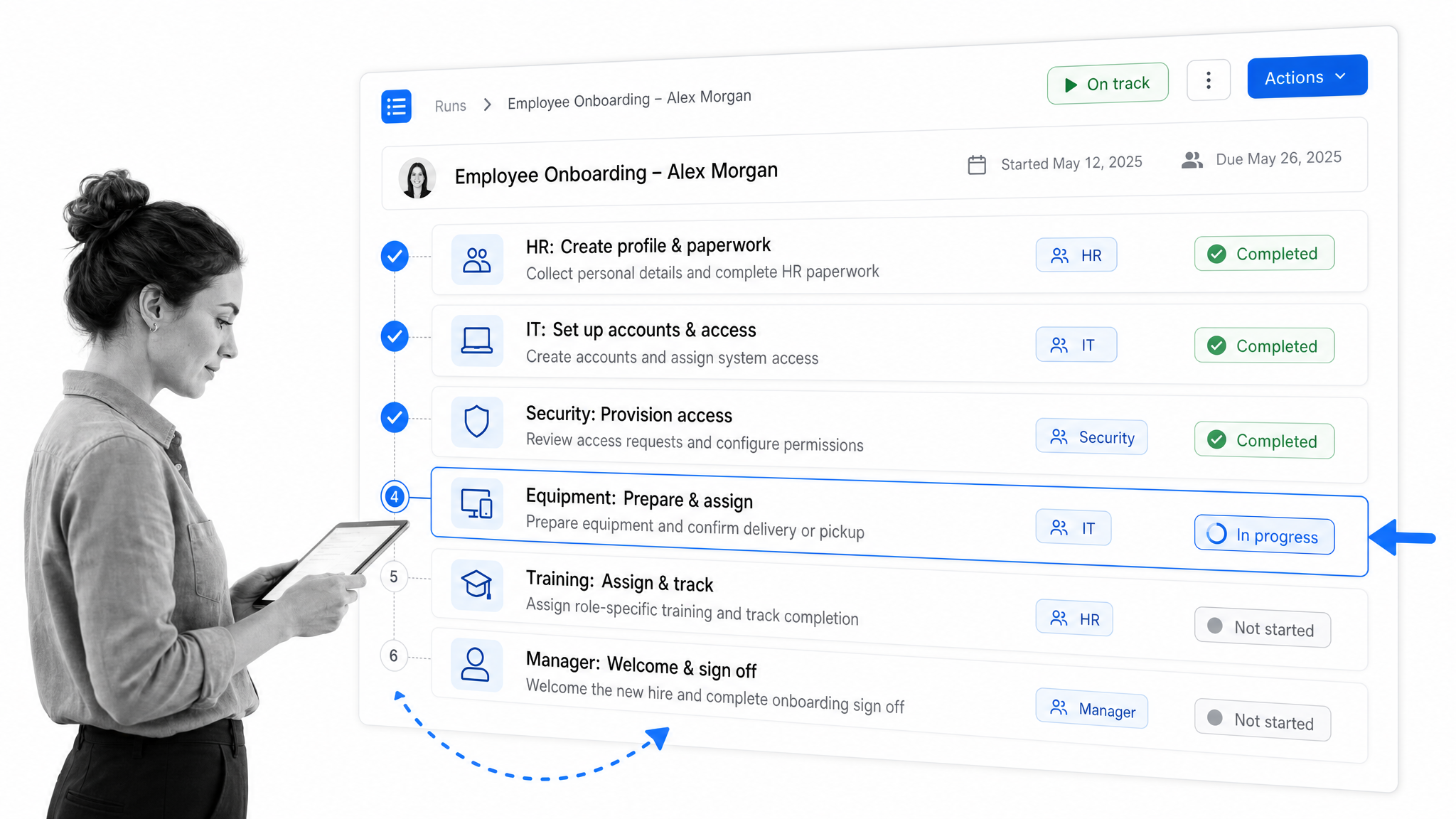
Employee onboarding is one of the clearest process management examples because it touches HR, IT, finance, legal, security, and the hiring manager. The trigger is a signed offer. The output is a productive employee with the right access, equipment, training, documents, and role context.
A managed onboarding process includes steps for collecting employee details, provisioning accounts, ordering equipment, completing tax and policy documents, scheduling training, confirming security access, and capturing manager signoff. If those steps live in separate inboxes, the process depends on people remembering everything. If they live in a managed workflow, every owner can see what is due and what is blocked.
The process also improves over time. If equipment setup is always late, the data points to a lead-time issue. If policy acknowledgments are missed, the workflow can enforce completion before the next step opens. If hiring managers skip role-specific training, the process can assign and track that training by department.
Customer intake and support escalation
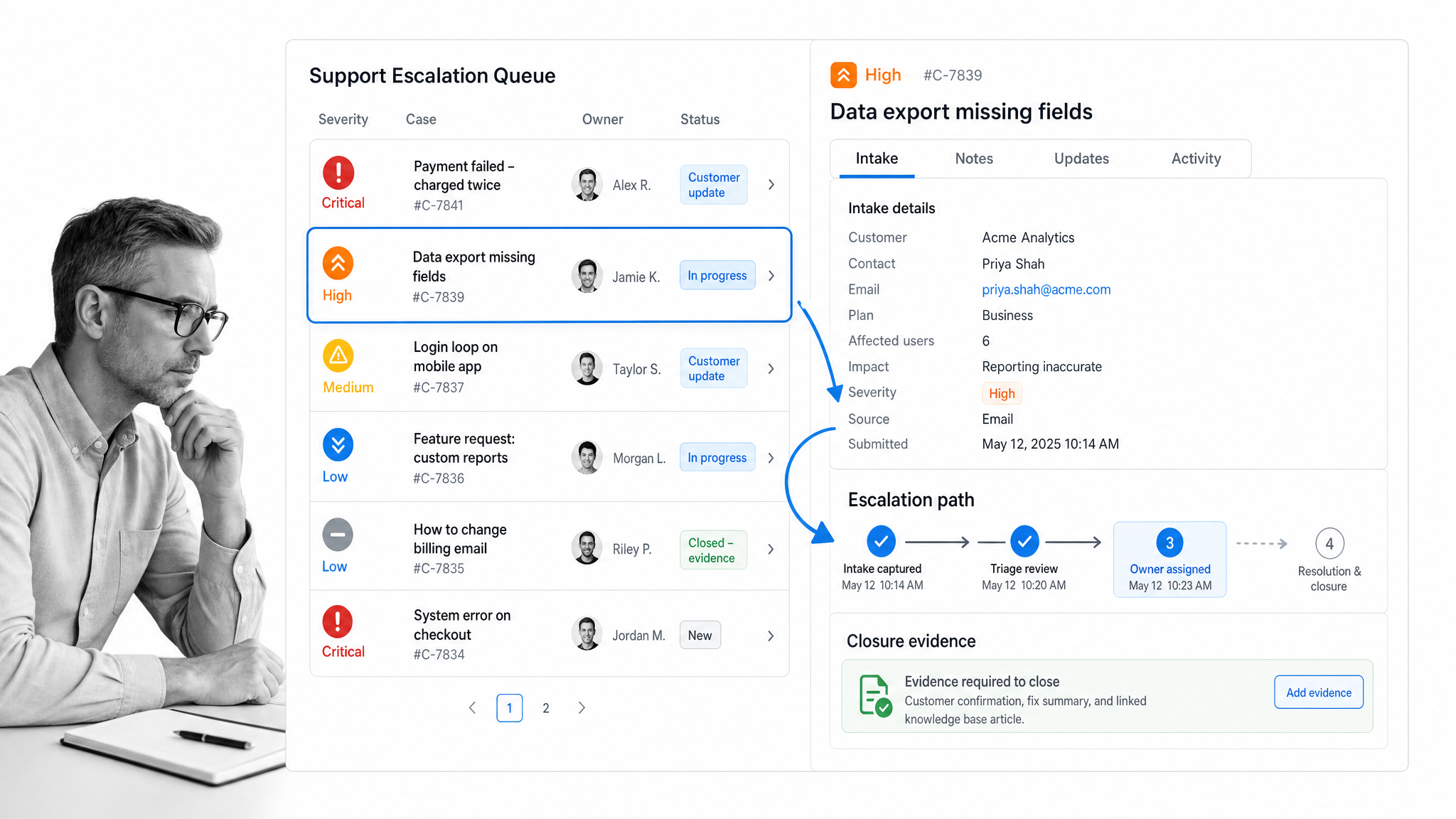
Customer intake starts when a prospect, customer, or internal stakeholder submits a request. In a weak process, the request lands in a shared inbox and someone decides what to do next. In a managed process, the intake form captures the right details, routes the request, assigns the owner, and starts the right workflow automatically.
For support escalation, process management defines severity levels, required evidence, response targets, engineering handoff rules, customer updates, and closure criteria. The workflow keeps the team from improvising under pressure. It also creates a record of what happened, who made each decision, and whether the response met the standard.
This matters most when requests vary in quality. A form can force the minimum useful information before the process begins. The workflow can branch based on severity, customer type, product area, or missing data. The result is faster triage and fewer back-and-forth messages.
Loan or application review
Loan review, grant review, vendor applications, insurance claims, and account approvals all follow the same process-management pattern. A case enters the system, required documents are collected, eligibility is checked, risk is reviewed, approval happens, and the decision is recorded.
The process needs clear gates. Missing documents should stop the review. A high-risk case should route to a senior reviewer. An approval should create evidence, not just a message in chat. If a decision is rejected, the reason should be recorded in a standard field so the team can analyze patterns later.
This is a strong example because it shows why process management is not just efficiency work. It reduces error, improves consistency, and creates defensible proof. When a customer, regulator, auditor, or executive asks why a decision was made, the process record answers the question.
Compliance evidence collection
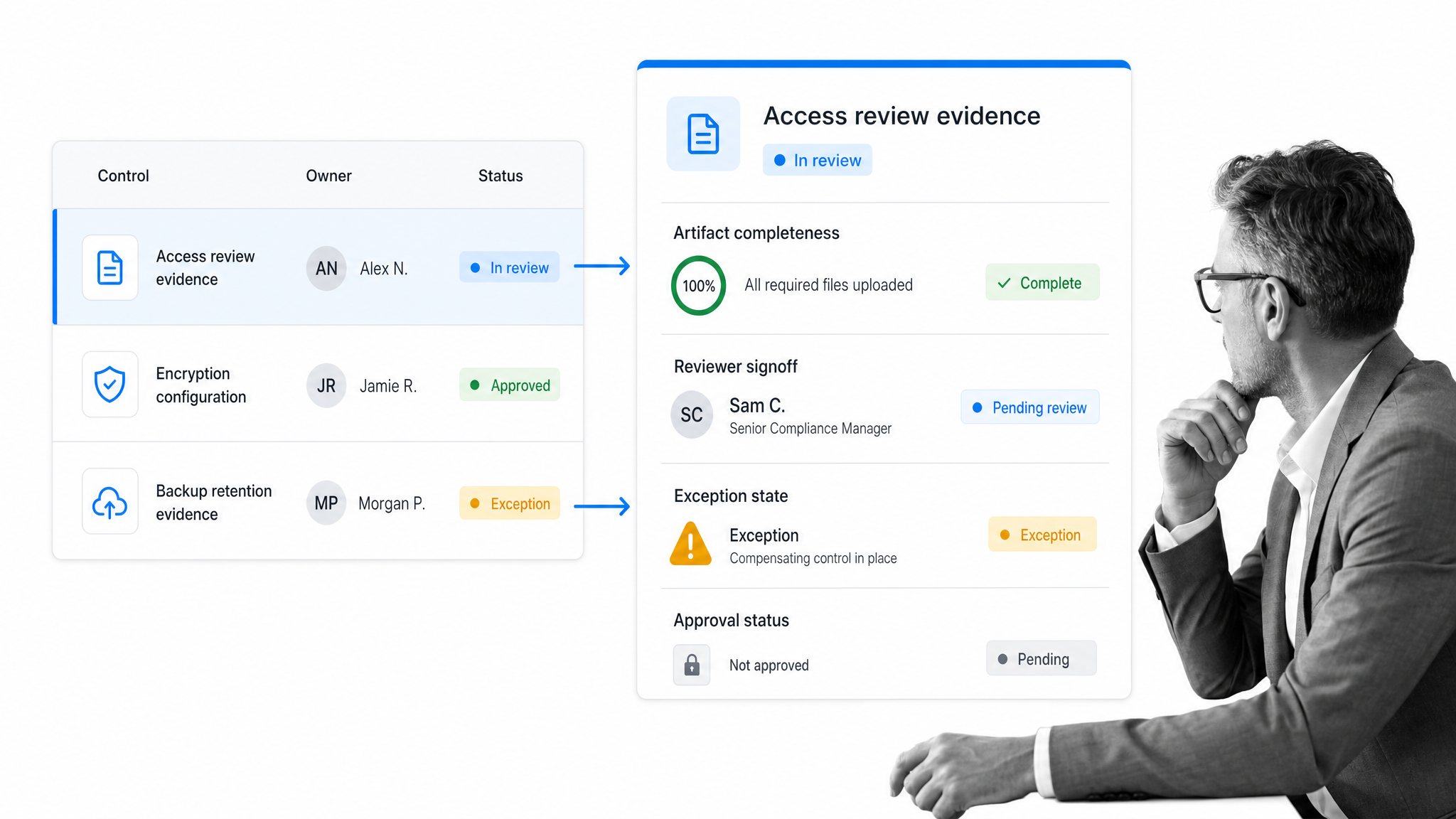
Compliance evidence collection is a recurring process for teams that need to prove policies were followed. The trigger might be a scheduled control review, a vendor assessment, a policy acknowledgment cycle, or an audit request. The output is evidence that is complete, current, approved, and easy to retrieve.
A managed evidence process assigns owners, collects artifacts, routes approvals, records exceptions, and stores proof. It also separates evidence collection from evidence judgment. The person uploading a screenshot, report, signed policy, or system export is not always the same person who should approve it.
The main risk is drift. Evidence gets collected once, then expires. Owners change. Policies move. Screenshots no longer match the control. Good process management turns evidence collection into a recurring workflow with due dates, versioning, reminders, approval gates, and a clear record of completion.
Procurement and vendor approval
Procurement is a process-management example because the same request can involve budget approval, vendor review, security review, legal review, purchase order creation, and renewal tracking. Without a managed process, teams either over-control every purchase or let risky purchases slip through.
A practical procurement process starts with intake. What is being bought? Who requested it? Which department pays for it? Does the vendor touch customer data? Is there an existing contract? Is security review required? The answers determine the path.
Process management keeps procurement from becoming a black box. Requesters can see status, approvers know what they need to review, and finance has the record it needs before payment. Over time, the organization can identify approval bottlenecks, duplicate vendors, renewal surprises, and spend categories that need better controls.
Content and campaign production
Marketing production is often treated as creative work that resists process. In practice, the repeatable parts benefit from process management: brief intake, audience definition, draft review, legal or brand approval, publishing, promotion, and performance review.
The workflow should not flatten judgment. It should protect the work from preventable misses. A campaign process can require a final URL, UTM structure, audience, creative owner, approval owner, launch date, and post-launch review. A content process can route different assets through the right editors and ensure that claims, links, metadata, and images are checked before publication.
This example also shows why process management and project management are different. A campaign may be a project, but the launch checklist, approval path, QA pass, and reporting steps are repeatable processes. Managing those processes well makes every future campaign easier to run.
How do you build a process management system?
Start with one process that is frequent, risky, painful, or expensive when it goes wrong. Do not begin by documenting the whole company. Pick a workflow where better execution would quickly matter.
- Define the trigger: what event starts the process?
- Name the output: what must exist when the process is complete?
- List the required steps: what work must happen every time?
- Assign owners: who is responsible for each step and decision?
- Add rules: what conditions change the path?
- Set evidence requirements: what proof must be captured?
- Measure friction: where do delays, rework, or exceptions happen?
- Improve the workflow: remove unnecessary steps and automate repeatable handoffs.
The key is to move from description to execution. A process map is useful, but it does not run the process. A document is useful, but it does not assign work. A spreadsheet is useful, but it does not enforce the next step. A mature process management system connects all three: the procedure, the running workflow, and the record of execution.
A helpful rule is to make every important process answer four questions: who owns this, what happens next, what can block it, and where is the proof? If the answer lives only in someone’s head, the process is not managed yet.
What should process management software enforce?
Process management software should enforce the parts of recurring work that are too important to leave to memory. It should not simply store a process document. It should help the team run the process correctly.
At minimum, the system should support workflow runs, assignments, due dates, forms, approvals, automations, permissions, reporting, version control, and a clear audit trail. For more complex teams, it should also support conditional paths, connected data, recurring schedules, integrations, and AI-assisted workflow building or task execution.
The most important test is whether the software closes the gap between the process as written and the process as performed. If the system cannot show who did what, when it happened, what evidence was captured, and which exceptions occurred, it is not enough for high-stakes process management.
For a deeper software comparison, see Process Street’s guide to business process management software. For teams focused on procedure quality, the process documentation guide is a useful companion.
Process management examples in Process Street
Process Street is a Compliance Operations Platform for teams that need recurring work to happen correctly, not just visibly. It connects documented procedures, workflow execution, forms, automations, AI tasks, assignments, and reporting so teams can enforce the process and prove completion.
Workflow runs for repeatable execution
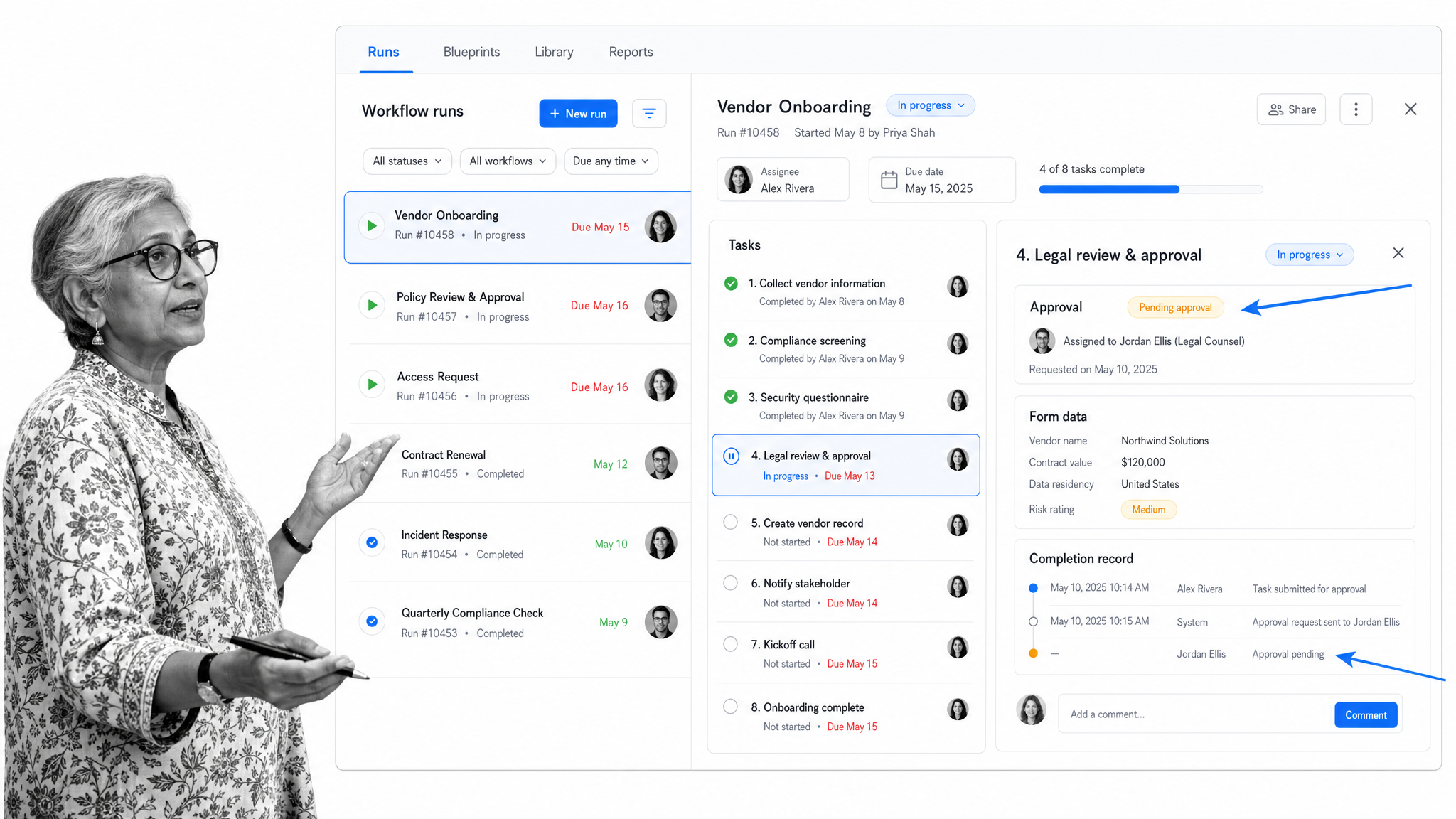
In Process Street, a workflow is the reusable process blueprint and a workflow run is one live instance of that process. That distinction is useful for examples like onboarding, support escalation, compliance review, and procurement approval. The blueprint stays consistent, while each run carries its own assignees, due dates, form data, comments, approvals, and completion record.
Process Street help docs describe multiple ways to run workflows, including running from the app, scheduled runs, multiple runs from a CSV file, run links, email, and automations. That makes a process easier to launch from the places work actually begins, instead of forcing every team to start from a blank page. Running Workflows explains those options.
Forms for structured intake
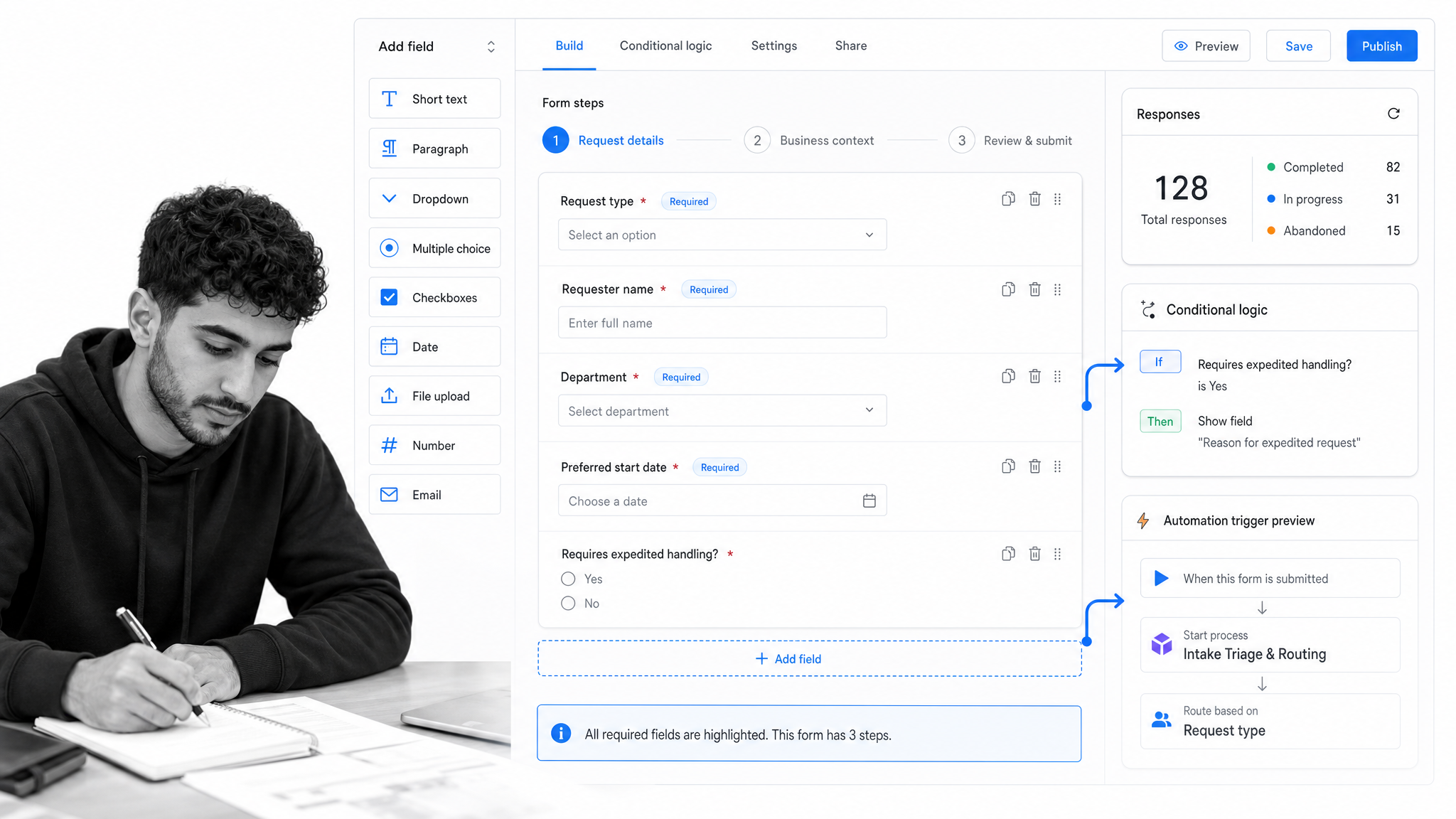
Forms make process intake cleaner. Instead of asking a requester to send a message with incomplete details, a form collects the fields needed to route the work. A form response can start a workflow or send data to another app, which is useful for customer intake, purchase requests, incident reports, employee requests, and internal approvals.
This keeps the process from starting with missing context. It also gives the team a clean record of the request. Process Street’s Forms documentation covers form fields, multi-step forms, conditional logic, publishing, responses, and automations. Forms provides the primary feature reference.
Automations for handoffs
Automations reduce the manual copy-paste work that makes process management fragile. A completed task can start another workflow run. Data can move between workflow runs and other tools. A completed support step can create an engineering ticket. A closed-won sales opportunity can start onboarding.
The purpose is not to automate everything. The purpose is to automate the handoffs that should always happen the same way. Process Street’s workflow automation docs describe field mapping, triggers, connected apps, webhooks, and workflow-to-workflow automation. Workflow Automations is the primary reference.
AI tasks and workflow generation
AI helps when process work starts from messy inputs. A team can use an AI workflow generator to create a first process draft, then edit it into the organization’s real standard. AI tasks can generate, analyze, transform, summarize, and process text inside a workflow.
That is useful for examples like summarizing intake notes, drafting customer updates, extracting structured details from a request, classifying feedback, or creating a first version of a procedure. The workflow still provides the control layer: owners, approvals, due dates, and evidence. Process Street’s AI Workflow Generator and AI Tasks docs provide the primary references.
Reports and continuous improvement
Process management should improve the work, not only run it. Reports show whether workflows are late, blocked, skipped, reassigned, or completed cleanly. That data helps leaders find the processes that need attention.
The right improvement question is not “did people follow the checklist?” It is “where did the process create friction or risk?” If reviews always wait on one owner, redesign the approval path. If intake is consistently incomplete, improve the form. If exceptions cluster around one product, customer segment, or department, the process is telling you where to look.
Process management FAQs
What is process management?
Process management is the practice of defining, running, monitoring, and improving recurring business processes so work happens consistently and leaves a reliable record.
What are common process management examples?
Common process management examples include employee onboarding, customer intake, support escalation, loan review, compliance evidence collection, procurement approval, and content production.
How do you implement process management in a business?
Start with one high-impact recurring workflow. Define the trigger, output, steps, owners, rules, evidence, and metrics, then run it in a system that assigns work and tracks completion.
What is the difference between process management and project management?
Project management handles one-time initiatives. Process management handles repeatable workflows that run again and again, often across many projects, customers, employees, or cases.
How can software improve process management?
Software improves process management by assigning owners, enforcing steps, collecting forms and evidence, routing approvals, automating handoffs, and reporting where work gets delayed or skipped.
Which process should you manage first?
Choose a process that is frequent, risky, cross-functional, or painful when it fails. Onboarding, intake, approvals, compliance reviews, and support escalation are usually strong starting points.
