


Turn every policy into automated workflows with built-in enforcement and audit-ready proof.



Process Management Solution
A process management solution is the combination of methods, ownership, software, controls, and measurement that helps an organization design, run, and improve recurring work. It replaces scattered instructions and informal handoffs with a managed operating system for processes.
The software matters, but it is only one layer. A complete solution also defines who owns each process, how work starts, how decisions are made, which evidence is required, and how performance feeds the next improvement cycle.
This guide explains what a process management solution includes, how it works, how to choose one, and how to implement it without turning process management into an administrative project that nobody uses.
In this article, you will learn:
- What is a process management solution?
- Why organizations need process management
- What a process management solution should include
- How a process management solution works
- How to choose a process management solution
- How to implement a process management solution
- How to measure and improve the solution
- Use Process Street as your process management solution
- FAQs
What is a process management solution?
A process management solution turns the discipline of process management into a repeatable way of operating. It connects the intended process to live work, so teams can manage steps, owners, rules, systems, controls, and outcomes together.
IBM defines business process management as a discipline that includes discovering, modeling, analyzing, measuring, improving, and optimizing processes. A solution makes that discipline usable. It gives process owners a place to translate the model into actions that people and systems can execute.
The method layer
The method layer defines how the organization finds, maps, prioritizes, and improves processes. It creates common language for triggers, inputs, outputs, roles, decisions, exceptions, controls, and measures. Without a method, every team builds processes differently and comparisons become difficult.
The operating layer
The operating layer turns a process into assigned work. It routes tasks, collects information, handles approvals, applies decision rules, triggers actions, and records what happened. This is where a process stops being a diagram and becomes a working system.
The governance layer
The governance layer defines who can change the process, who approves it, how versions are controlled, what evidence must be retained, and when the process is reviewed. Governance should be proportional to risk. A simple internal checklist needs less control than a financial close or regulated quality process.
Why organizations need process management
Organizations usually look for a solution after the same process starts producing different outcomes. People follow different versions, approvals happen in side channels, owners chase updates, and managers cannot tell whether the process failed or was never followed.
- Recurring work depends on memory: experienced people know the steps, but new or occasional operators do not.
- Handoffs create delay: the next owner does not know that work is ready, or receives incomplete information.
- Approvals sit outside the process: decisions happen in email or chat and the record becomes hard to reconstruct.
- Documentation drifts: the written procedure and the work people actually perform no longer match.
- Automation magnifies inconsistency: automating an unclear process makes errors faster, not better.
- Improvement lacks evidence: teams debate bottlenecks because no shared execution record exists.
A mature solution also connects the management discipline to process management software. The discipline explains how processes should be governed and improved. The software helps the organization apply those rules every time the work runs.
The strongest business case is rarely better documentation alone. It is fewer missed steps, clearer accountability, faster handoffs, more reliable approvals, and proof that the process produced the expected result.
What a process management solution should include
A useful solution covers the whole process lifecycle without forcing every workflow into the same level of complexity. Look for the following components and test them against a real process rather than a feature checklist.
Process discovery and mapping
Teams need a consistent way to identify processes, boundaries, owners, inputs, outputs, decisions, and exceptions. A reusable business process management template helps a process owner move from observation to an explicit current-state model.
For complex modeling, Business Process Model and Notation provides a standard vocabulary for events, activities, gateways, and flows. Not every operator needs to read a formal model, but the underlying decisions still need to be clear.
Executable workflows
A process should launch from a clear trigger and guide each owner through the correct next step. Forms capture structured data. Assignments make ownership explicit. Due dates, dependencies, and stop points keep work moving in the intended order.
Rules, approvals, and exceptions
Controlled work needs more than a happy path. Use conditional logic to route different cases, and place approval tasks where a decision must be reviewed before work continues. Exceptions should have an owner and a defined return path.
Automation and integrations
The solution should move information and actions across the systems involved in the process. It might create a record, send a notification, request a signature, update a field, or launch another workflow. Good automation removes routine coordination while preserving judgment at the points where people add value.
Evidence and audit history
The process should retain enough evidence to prove completion and support improvement. That can include submitted fields, uploaded files, approval decisions, timestamps, task history, system actions, and exception notes. Evidence should live with the work, not in a separate folder that someone assembles later.
Performance and improvement
A solution should expose cycle time, wait time, rework, late tasks, exception volume, and completion quality. Those signals make process optimization software useful because the improvement loop starts from observed execution rather than opinion.
How a process management solution works
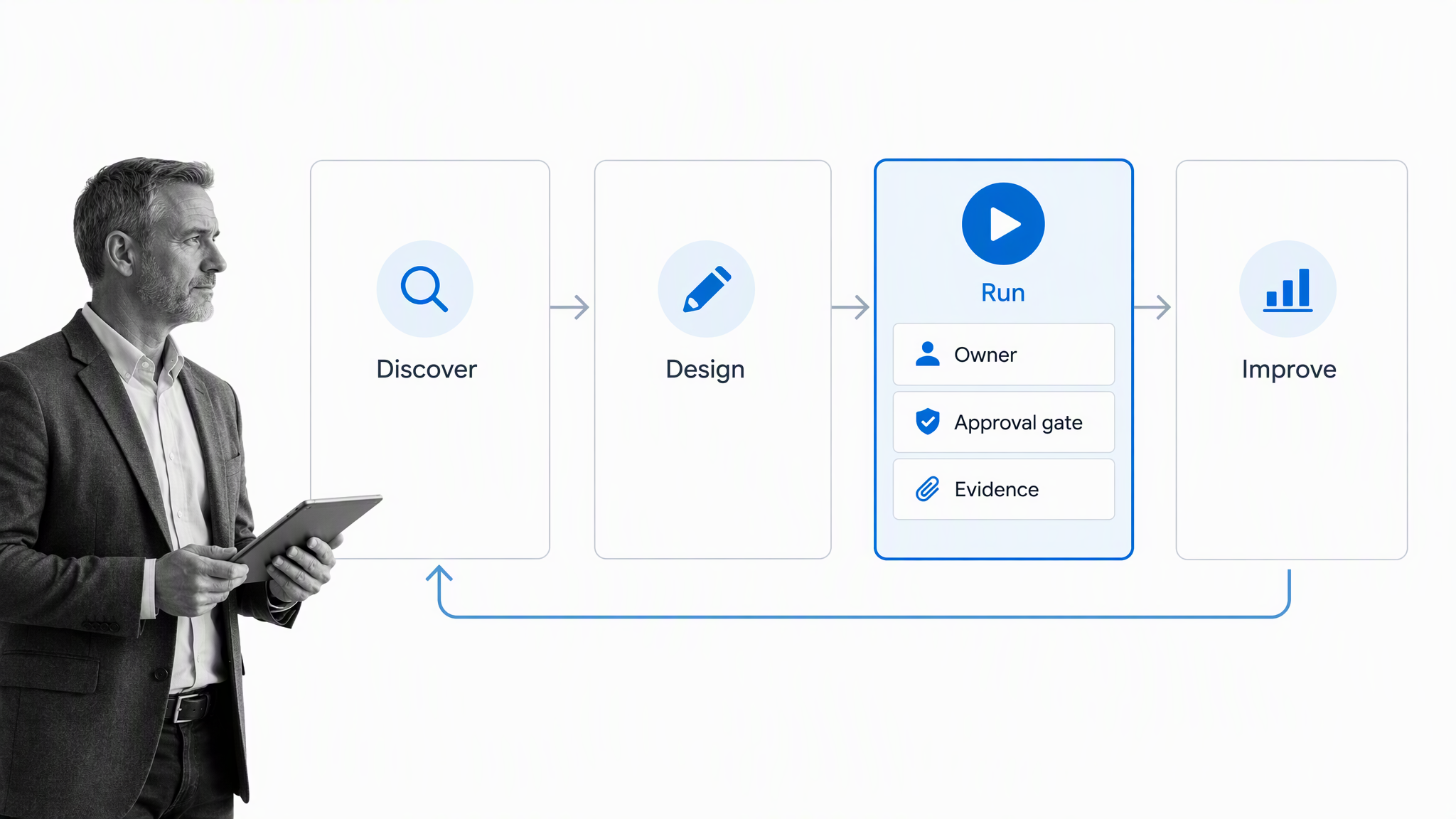
A process management solution works as a closed loop. The organization discovers how work happens, designs a controlled version, runs it, measures the outcome, and uses the evidence to improve the next version.
1. Discover the real process
Start with the people doing the work. Capture the trigger, desired outcome, inputs, customers, owners, systems, decisions, delays, workarounds, and failure modes. The current process is often different from the official procedure, so observation matters more than a clean diagram.
2. Design the managed process
Define the smallest path that reliably produces the outcome. Assign ownership, specify required information, identify control points, and decide which exceptions deserve a separate path. The design should be clear enough that a new operator can follow it without constant interpretation.
3. Run and control the work
Launch the process from a real trigger and route it through people and systems. The solution should make status visible, block incomplete control steps, notify the next owner, and preserve the record. This is the point where static documentation becomes operational infrastructure.
4. Measure and improve
Review where work waits, where information is missing, where people leave the process, and where exceptions repeat. Improve the process, publish the new version through the right review path, and measure again. This loop prevents the solution from freezing yesterday’s process in software.
How to choose a process management solution
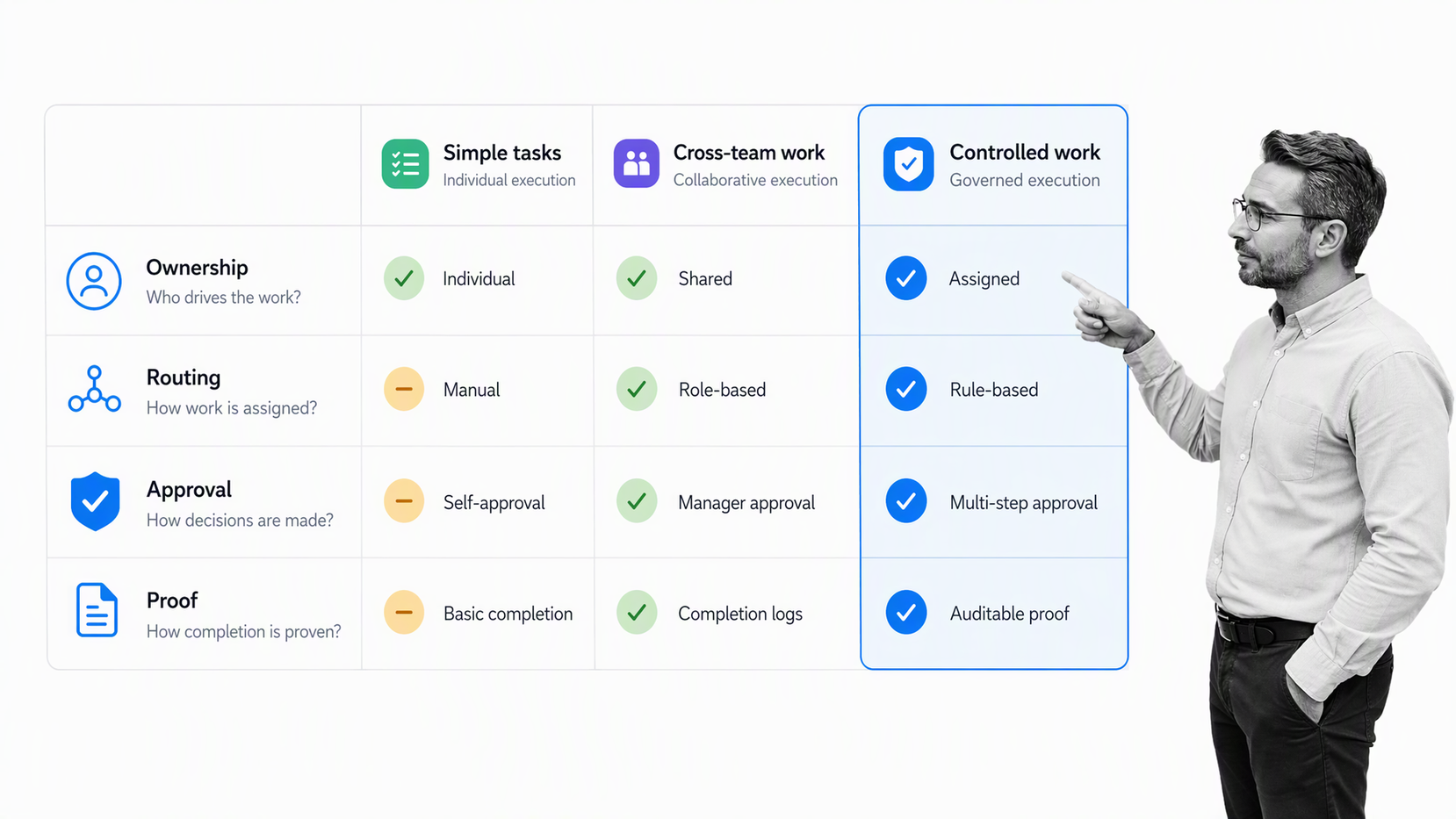
Choose a process management solution by matching the tool to the work, risk, users, and evidence requirement. A polished feature list cannot compensate for a poor fit with the way people actually operate.
Start with process classes
Group processes by pattern. Simple personal routines may need a checklist. Cross-team service workflows need assignments and handoffs. High-risk processes need controls, approvals, permissions, version governance, and audit history. One platform can support several classes, but the implementation should not treat them as identical.
Test one complete process
Use a real workflow that crosses at least two roles and one system boundary. Build the trigger, information capture, task routing, decision, exception, approval, and outcome. A complete test exposes friction that a guided demo hides.
Evaluate builder and operator experience
The builder needs enough flexibility to model the process and govern changes. The operator needs a clear next step with minimal training. If the builder experience is powerful but the run experience is confusing, adoption will collapse. If the run experience is simple but the model cannot express real exceptions, teams will work around it.
Check governance before scale
Ask who owns each workflow, how changes are reviewed, what happens to active runs when a process changes, how permissions work, and how audit history is preserved. Governance becomes harder after hundreds of workflows exist, so the basic model should be designed early.
Look beyond the process diagram
A diagram is useful, but the solution must support execution. The process management platform should connect the model to assigned work, decisions, evidence, integrations, and results. Otherwise, the diagram and the real process will drift apart.
Plan integration ownership
List every system the process reads from or writes to. Decide who owns credentials, field mappings, error handling, and change management. Integration is not a one-time technical step. It is part of the operating model and needs an accountable owner.
How to implement a process management solution
Implementation works best as a sequence of useful process releases. Avoid trying to map every process before anyone receives value. Start with a bounded workflow, prove the operating model, then expand.
1. Select a meaningful pilot
Choose a process that repeats often, has a visible pain point, and has an owner willing to improve it. Good pilots include vendor review, employee onboarding, customer onboarding, policy approval, finance close, incident response, and quality checks.
2. Set the outcome and owner
Define the result the process must produce and name the process owner. The owner is responsible for performance, changes, controls, and reviews. An administrator can maintain the tool, but should not make business decisions for every process.
3. Build the minimum runnable version
Create the smallest end-to-end workflow that can run with real work. Templates can accelerate the first design, such as an employee onboarding checklist, a client onboarding checklist, or a vendor management workflow. Remove unnecessary steps before adding automation.
4. Add controls at the risk points
Require information where incomplete data creates rework. Add approvals where a decision changes cost, access, quality, compliance, or customer impact. Use permissions where information is sensitive. Add stop points only where work must not proceed without the control.
5. Run with real users
Pilot with the people who perform and receive the work. Watch where they hesitate, leave the workflow, ask for clarification, or repeat data entry. Those behaviors reveal design problems faster than a workshop discussion.
6. Improve and publish deliberately
Review the first runs, adjust the design, test the change, and communicate what changed. A structured standard operating procedure template can preserve the policy and instruction layer while the workflow handles execution.
7. Scale through standards
Create reusable conventions for naming, ownership, task writing, data fields, approvals, integrations, reporting, and review schedules. Standards reduce builder decisions and make the process library easier for operators to navigate.
How to measure and improve the solution
Measure whether the solution improves the process outcome, not whether people opened the software. Adoption matters, but it is a leading indicator. The business result is reliable execution.
- Cycle time: how long the process takes from trigger to outcome.
- Wait time: how much of that cycle is spent waiting between owners or systems.
- First-pass completion: how often work finishes without rejection or rework.
- Exception rate: how often the standard path cannot handle the case.
- Control completion: whether required approvals and evidence are present before the outcome.
- Process freshness: whether the workflow has a current owner, review date, and approved version.
The ISO 9001 process approach connects process management with continual improvement. The useful idea is simple: define the intended process, evaluate its performance, correct the system, and repeat. Measurement should create a decision, not a dashboard nobody acts on.
A shared classification model can also help when the organization needs to compare processes across functions. APQC process frameworks provide a common structure for naming and organizing processes. The framework does not replace local process design, but it can reveal missing ownership, duplicated workflows, and inconsistent measures across teams. Use it as a reference map, then keep the runnable process focused on the people, systems, risks, and outcomes that exist in your organization.
Set a regular review cadence based on risk and change. High-risk workflows may need frequent review. Stable low-risk processes can be reviewed less often. Trigger an earlier review when regulations, systems, roles, customer requirements, or exception patterns change.
Use Process Street as your process management solution
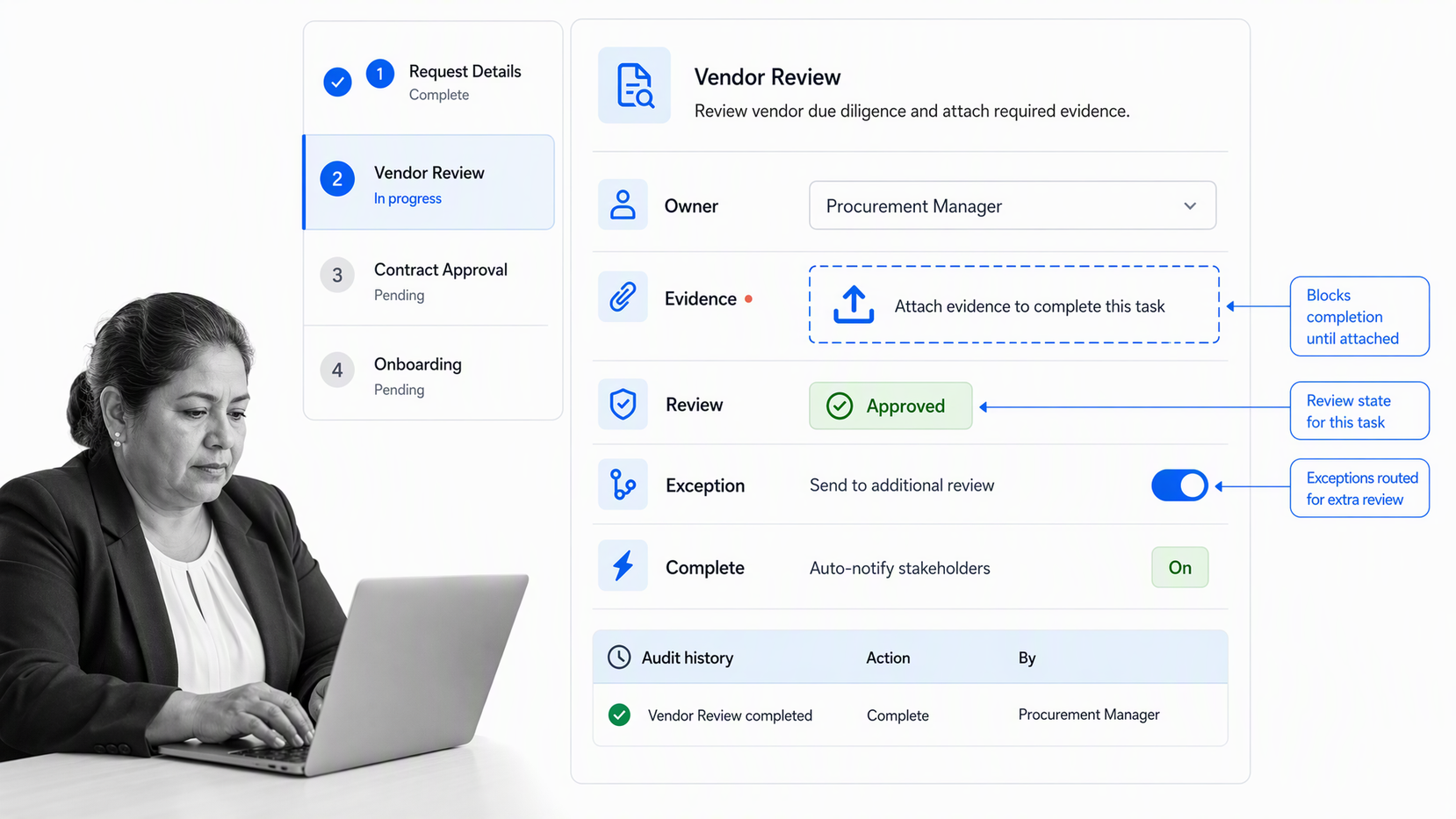
Process Street is an agentic process automation platform that turns recurring work into assigned, controlled, auditable workflows. Teams can document the process, run it, enforce approvals, capture evidence, automate routine actions, and improve the design using execution data.
That makes Process Street useful when the solution has to go beyond mapping. A workflow can assign each step, collect structured information, route exceptions, pause for approval, and retain the record of what happened. Process owners get one operating surface for the process and its proof.
Process Street has 5,000+ integrations. Workflows can coordinate the systems that hold customer, employee, finance, support, security, and compliance data, while keeping the process logic and accountability visible to the people responsible for the outcome.
You can begin with the workflow template library or build the pilot from the current process. The important move is from instructions people may read to a workflow they can run, measure, and improve.
A strong process management solution makes disciplined execution easier than improvisation. People know what to do. Owners know what is blocked. Leaders can see whether the system works. Auditors and customers can see proof when proof matters.
FAQs
What is a process management solution?
A process management solution is a combination of methods, ownership, software, controls, and measurement used to design, run, and improve recurring work. It connects the process model to assigned execution, decisions, evidence, and performance data.
What does a process management solution include?
A complete solution includes process discovery, mapping, ownership, executable workflows, forms, assignments, decision rules, approvals, automation, integrations, evidence, reporting, and an improvement cycle. The exact level of control should match the risk and complexity of the work.
How is process management different from project management?
Process management focuses on repeatable work that runs many times, while project management focuses on a temporary effort with a defined end. A project can create or improve a process, but the process continues operating after the project is complete.
When does a business need process management software?
A business needs process management software when recurring work crosses roles or systems, requires approvals, creates audit or customer risk, or becomes too complex for email and spreadsheets. The need becomes urgent when missed steps or unclear ownership produce inconsistent outcomes.
How do you implement a process management solution?
Start with one meaningful recurring process, name the owner, define the outcome, and build the smallest runnable version. Test it with real users, add controls at the risk points, review the first runs, and scale through shared standards rather than a one-time mapping project.
Can Process Street be used as a process management solution?
Yes. Process Street can document and run recurring processes with assignments, forms, conditional paths, approvals, automation, integrations, evidence, and audit history. It is designed for teams that need processes to produce consistent execution and proof.
