


Turn every policy into automated workflows with built-in enforcement and audit-ready proof.



Process Tool

A process tool is software or a structured operating system that helps a team document, run, automate, monitor, and prove recurring work. It turns a process from something people remember into something the business can assign, follow, improve, and audit.
The phrase can mean different things depending on the team. For one team, a process tool might start as a diagramming surface. For another, it might be a checklist, workflow builder, approval system, automation layer, or full process platform. The important question is not what the tool is called. It is whether the tool makes the process easier to execute correctly.
This guide explains what a process tool is, when to use one, what capabilities matter, how it differs from adjacent tools, how to choose one, and how to roll it out without creating another static repository that nobody trusts.
In this article, we are going to cover everything you need to know about process tools, including:
- What is a process tool?
- When a process tool is useful
- What a process tool should include
- Process tool vs process map, checklist, and project management tool
- How to choose a process tool
- How to roll out a process tool
- Use Process Street as your process tool
- FAQs
What is a process tool?

A process tool is anything that helps an organization manage recurring work as a repeatable system. At the lightweight end, that can be a documented workflow or checklist. At the more mature end, it is software that assigns work, enforces rules, routes approvals, triggers automations, and records proof.
Business process management gives the broader discipline. IBM describes BPM as work to discover, model, analyze, measure, improve, and optimize business processes. A process tool supports that discipline by giving people a practical place to design and run the work, not just talk about it.
The job of a process tool
The job of a process tool is to make the expected way of working clear and enforceable. A good tool answers five operational questions: What starts the process? Who owns each step? What information is required? What happens when something is approved, rejected, or blocked? What record proves the work happened?
Process tool is broader than software
A process tool does not have to start as enterprise software. A team can begin with a worksheet, a process map, or a template. But once the process affects customers, employees, finance, compliance, quality, or security, the tool usually needs execution features. Static documentation helps people understand work. Execution tooling helps the business control work.
That is why a process tool sits close to process documentation but should not stop there. Documentation says what should happen. The process tool should help people do it, check it, and improve it.
When a process tool is useful
Use a process tool when recurring work has more risk than memory can handle. If one person can complete a simple task from start to finish, a lightweight checklist may be enough. If the work crosses teams, tools, approvals, or evidence requirements, a process tool prevents missed steps from becoming normal.
- Work repeats often: onboarding, vendor review, monthly close, customer handoff, policy review, access approval, quality checks, and audit prep all benefit from repeatable structure.
- More than one owner is involved: handoffs create delay when ownership lives in email or chat.
- Approvals matter: controlled processes need review states, rejection paths, and proof of signoff.
- Evidence must be retained: compliance, finance, HR, security, and quality workflows need records that show what happened.
- Automation is planned: a tool helps separate stable logic from human judgment before automation is wired in.
- The process keeps changing: teams need a live place to update, run, and improve the process as reality changes.
IBM describes a workflow as a system for managing repetitive processes and tasks that occur in a particular order. That definition matters because most teams do not fail from having no process at all. They fail because the order, owner, proof, or exception path is unclear once the work leaves one person’s desk.
Teams also use process tools when a process becomes a reusable business asset. A documented process may explain the desired flow. A process resource adds the people, systems, data, tools, and controls the workflow needs to run. A process tool brings those pieces into execution.
What a process tool should include
A process tool should include enough structure to make recurring work reliable without burying the team in administration. The best tool is the one that makes the correct next step obvious and the wrong next step hard to miss.
Process design
The tool should let you define the trigger, tasks, owners, due dates, dependencies, decisions, and outcomes. If the process cannot be mapped clearly in the tool, the team will keep the real process somewhere else.
Execution and ownership
Processes need assignment, accountability, and status. Owners should see what they need to do, managers should see what is blocked, and the process owner should know whether the workflow is running as designed.
Approvals and controls
Many process tools fail because they treat approval as a comment rather than a control. If a process needs signoff, use a tool that supports workflow approvals, rejection paths, required fields, and role-based ownership. Approval should happen in the process, not beside it.
Automation and integrations
Microsoft describes BPMS as software that helps define, deploy, and manage automated business processes. That is the threshold where a process tool stops being a static planner and starts reducing manual work. Forms, notifications, CRM updates, file creation, messages, and records should move through the process without forcing people to copy data between systems.
Evidence and audit trail
A process tool should keep proof attached to the work. Evidence can be a form field, file upload, approval, completed task, system update, or audit history row. Without proof, managers see activity but cannot verify execution.
Reporting and improvement
The tool should show bottlenecks, missed steps, rework, late tasks, and recurring exceptions. A process that never improves becomes a ritual. A process tool should make improvement part of the operating loop.
Process tool vs process map, checklist, and project management tool

A process tool overlaps with several familiar systems, which is why the term can feel vague. The practical difference is whether the tool helps the team execute recurring work with control and proof.
Process map
A process map shows the flow. It is useful for understanding sequence, handoffs, and decision points. Standards such as BPMN can help teams represent business processes consistently. But a map does not assign the work, remind the owner, collect evidence, or stop the next step when approval is missing.
Checklist
A checklist is a practical process tool when the work is simple. It turns memory into steps and gives the operator a clear path. Once the checklist needs conditional paths, role assignments, approvals, and reporting, it becomes closer to a workflow management system.
Project management tool
A project management tool helps teams manage one-off projects, milestones, and collaboration. A process tool manages repeatable patterns. Projects end. Processes run again. If your team recreates the same project tasks every week, month, or customer handoff, you probably need a process tool rather than another project board.
Process tool
A process tool combines the clarity of a map, the usability of a checklist, the accountability of task management, and the control of workflow automation. It is built for work that has to happen the same way every time, with enough flexibility for exceptions.
How to choose a process tool
Choose a process tool by starting with the work, not the feature list. A tool can look powerful and still fail if it does not match the process owner’s daily reality.
1. Pick the process class
Decide whether the work is documentation-heavy, execution-heavy, approval-heavy, automation-heavy, or compliance-heavy. A process documentation tool is not always enough for execution. A workflow automation tool may be too much if the team has not agreed on the basic process.
2. Identify the proof requirement
Ask what proof the business needs. Is a completed checklist enough? Do you need approval history, evidence files, form fields, timestamps, exception notes, or a full audit trail? The higher the proof requirement, the more important structured workflow software becomes.
3. Check how changes are governed
Processes change. A useful process tool should let owners improve workflows without creating version chaos. For controlled work, updates should be reviewed, documented, and connected to live execution.
4. Test the handoffs
Run a real handoff through the tool before choosing it. If the next owner is unclear, the status is hard to read, or the required information lives in another system, the process will still break.
5. Validate integrations
A process rarely lives in one system. SAP Signavio describes BPM software as a shared environment for documenting, managing, analyzing, and improving processes across teams and systems. For operational execution, the process tool also has to connect to the systems that hold customer, employee, finance, support, or compliance data.
6. Prefer tools that move from plan to run
Static planning has value, but the best process tool lets a team move from plan to execution. A reusable standard operating procedure template can define the structure, and workflow management software can turn it into assigned, trackable work.
How to roll out a process tool
Roll out a process tool with one important recurring workflow, not every workflow at once. The first process should be painful enough to matter and bounded enough to finish.
Start with a real workflow
Pick work with a clear trigger, owner, outcome, and pain. Good candidates include employee onboarding, client onboarding, vendor approval, finance close, content review, incident response, policy release, or audit preparation.
Capture the current process before redesigning it
Ask the people doing the work where they wait, what they chase, what information is missing, and which step they double-check. Do not design the ideal workflow before you understand the real one.
Build the minimum runnable version
Create the smallest version that can run end to end. Use templates where they help, such as a new employee onboarding template for HR workflows or the Process Street template library for recurring operations. Add sophistication only after the first runs expose what the team needs.
Add controls where mistakes are expensive
Use required fields, conditional logic, and approvals where skipped steps create risk. A help article on conditional logic is useful when workflows need different paths for different request types. The goal is not to control every click. It is to control the moments that affect quality, cost, or compliance.
Review after the first runs
After a few runs, inspect where the workflow stalled, where owners asked questions, where evidence was added outside the tool, and where exceptions repeated. Those signals tell you whether the process needs clearer instructions, better automation, fewer steps, or stronger controls.
Make ownership part of the rollout
A process tool needs a named process owner, not just an administrator. The owner decides when the workflow changes, what proof is required, which exceptions are acceptable, and when the process should be reviewed. Without ownership, the tool becomes another shared workspace where every team edits the process differently.
Train people on the moments that matter
Training should focus on the control points, not every button in the tool. Show people how work starts, where ownership changes, what information is required, how exceptions route, and what proof is captured. If the team understands those moments, the software feels like a guide instead of overhead.
The rollout also needs language people recognize. Atlassian describes workflow automation as predefined rules, sequences, and actions that reduce manual effort. That kind of framing helps operators understand that the process tool is not there to watch them. It is there to make the next correct step easier and reduce the recurring handoffs that slow everyone down.
Use Process Street as your process tool
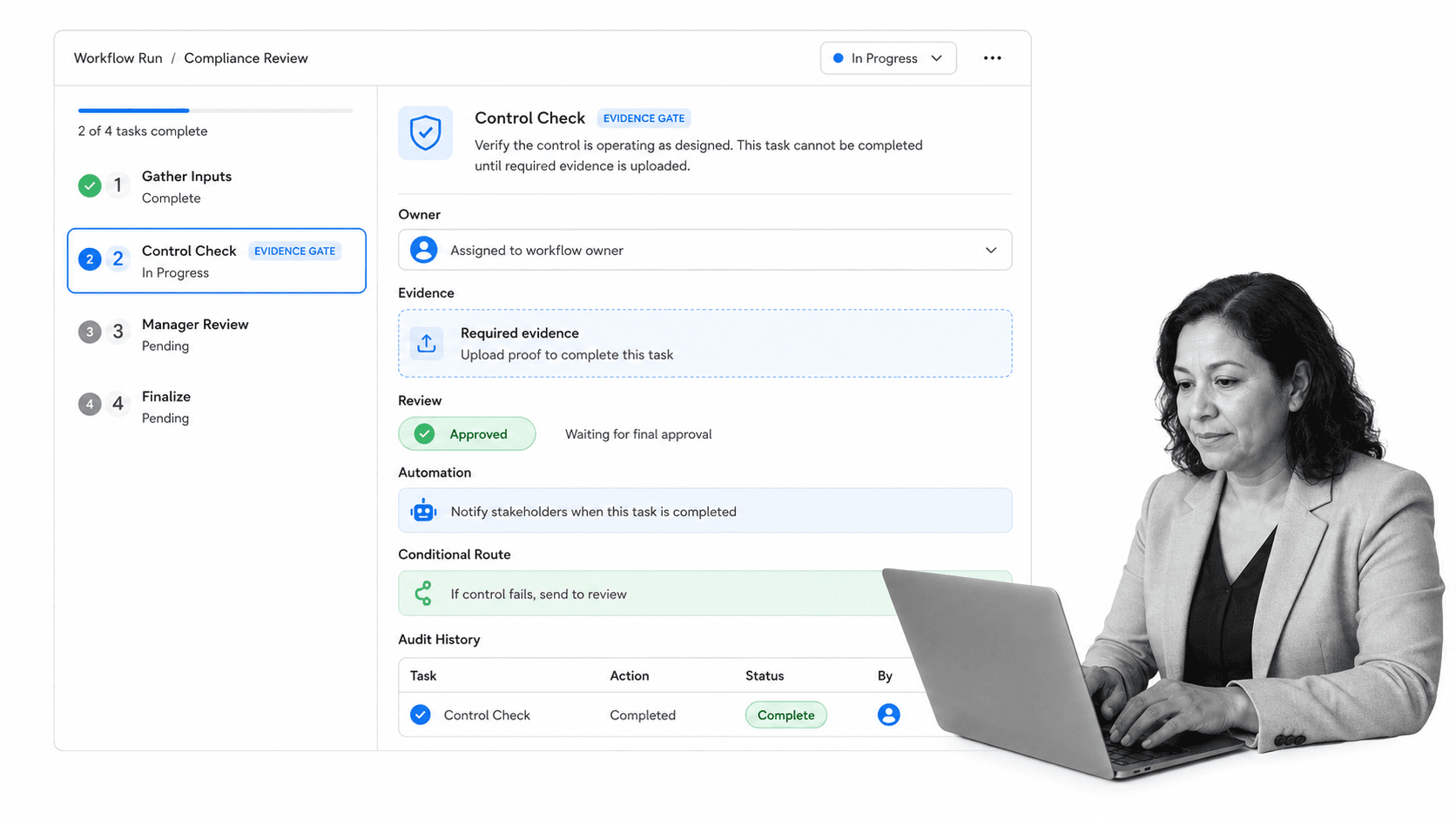
Process Street is a Compliance Operations Platform that turns recurring work into live, assigned, auditable workflows. Teams use it to document the process, run the process, enforce approvals, capture evidence, automate steps, and improve the workflow from real execution data.
That makes it useful when a process tool has to do more than store instructions. If a team needs role ownership, due dates, required fields, review gates, task history, and repeatable runs, the process needs an operating surface, not another document.
Process Street has direct, universal integrations to 5,000+ systems. Need a new one? An AI agent builds it on the fly. That matters because a process tool has to reach the surrounding stack: HR, CRM, finance, support, storage, chat, security, and compliance systems. The workflow should move with the work instead of forcing people to update every system manually.
Process Street also helps process owners connect planning, documentation, and execution. Written procedures can become workflow documentation. Workflow documentation can become assigned runs. Assigned runs can include approval steps, conditional paths, required evidence, and audit history.
The practical outcome is simple: the team knows what to do, the process owner sees what is happening, and the business has a record that the work was done reliably. That is the difference between a process that exists and a process that runs with accountability every time. The tool should make disciplined execution feel normal, visible, and easy to repeat.
FAQs
What is a process tool?
A process tool is software or a structured operating system that helps a team document, run, automate, monitor, and prove recurring work. It can start as a simple checklist or process map, but mature process tools also assign work, route approvals, trigger automations, and keep an audit trail.
What should a process tool include?
A process tool should include process design, task ownership, dependencies, approvals, required fields, automation, integrations, evidence capture, reporting, and improvement loops. The right feature set depends on the risk and complexity of the recurring work.
How is a process tool different from a checklist?
A checklist lists steps. A process tool helps the team run the steps with ownership, timing, rules, approvals, evidence, and reporting. A checklist is useful for simple work, while a process tool is better for repeatable workflows that cross people, systems, or controls.
When should a team use a process tool?
Use a process tool when work repeats, crosses handoffs, requires approvals, touches multiple systems, or needs proof. If a missed step can create customer, compliance, finance, quality, or security risk, the process should not depend on memory and email.
Can Process Street be used as a process tool?
Yes. Process Street can be used as a process tool for documenting workflows, assigning tasks, routing approvals, collecting evidence, automating actions, and keeping audit history. It is built for recurring work that needs consistency, accountability, and proof.
Is a process tool the same as BPM software?
BPM software is one type of process tool, usually focused on modeling, managing, analyzing, and improving business processes. A process tool is the broader category. It can include lightweight documentation tools, checklists, workflow systems, automation software, and full process platforms.
