


Turn every policy into automated workflows with built-in enforcement and audit-ready proof.



Remote Work Tools
Remote work tools are the software a distributed team uses to communicate, meet, share knowledge, track tasks, and keep work moving when people are not in the same room.
The hard part is that no single tool does all of that well. A chat app keeps conversation flowing. A video tool brings faces together. A documentation tool holds shared knowledge. A task board shows what is in progress. A workflow tool makes sure recurring work actually gets done the same way every time.
This guide explains the main categories of remote work tools, walks through five tools worth knowing, and shows the point where a chat-and-board setup needs a stronger process layer. The goal is not to crown one winner. It is to help you assemble a stack that fits how your distributed team actually works. The first mention of Process Street below points to where execution control fits into that stack.
In this article, we are going to cover:
- What distributed teams need to run
- How to choose the right remote work stack
- Best remote work tools to compare
- Where remote work tools stop being enough
- How Process Street fits into your remote work stack
- FAQs
What distributed teams need to run
Remote work tools are software systems that let a team collaborate effectively without sharing a physical office. According to the Buffer State of Remote Work report, the large majority of remote workers want to keep working remotely, which means the tools that hold a distributed team together are now core operating infrastructure, not a temporary patch.
In practice, a remote work stack usually spans five jobs: real-time communication, video meetings, shared documentation, task and project tracking, and process execution. Some teams add time tracking, scheduling, file storage, and security tools on top, but those five jobs are the backbone.
The category overlaps heavily with collaboration tools, project apps, and workflow systems. That overlap is why teams often end up with tool sprawl. They buy a chat app, a video app, a docs app, and a board, then discover that nobody can tell whether important recurring work is actually finished.
Getting that mix right matters more for a distributed team than for an in-office one. When people share a building, a quick desk visit can paper over a clunky tool. When the team is spread across cities and time zones, every gap in the stack turns into a delay, a duplicated effort, or a decision that quietly never gets made. The tools are not a convenience layer for remote teams. They are how the work actually happens.
The communication job
Distributed teams cannot rely on hallway conversations, so communication tools carry more weight. The most effective remote teams lean on asynchronous communication, where decisions and context are written down instead of trapped in a single live meeting. That keeps people across time zones unblocked.
The coordination job
Communication alone does not move work forward. A remote team also needs to see what work exists, who owns it, when it is due, and what is blocked. If a tool cannot answer those questions quickly, people rebuild the missing view in spreadsheets and status meetings, which is exactly what what a workflow is is supposed to prevent.
The execution job
Some remote work needs more than visibility. It needs control. When work involves review steps, approvals, evidence, or a record that can survive an audit, the team needs enforced workflows, required fields, and a history of what happened, not just a chat thread that says it is done.
How to choose the right remote work stack
Choose remote work tools by matching each tool to a specific job, then checking that the tools connect instead of fragmenting the work. A long feature list is less important than how naturally work flows from one tool to the next.
Start with the jobs, not the brands
Map your team’s real needs before shopping. Most distributed teams need communication, video, documentation, task tracking, and process control. If your team is shifting between office and home, decide which flexible work models you actually run, because a hybrid team and a fully remote team stress the tools differently.
- Use chat tools for fast, channel-based communication.
- Use video tools for live standups, reviews, and client calls.
- Use documentation tools for shared knowledge that outlives a single conversation.
- Use task boards for visible work in progress.
- Use workflow tools for repeatable processes that must be enforced and proved.
Score adoption before advanced features
The best remote work tool is the one your team will actually keep open. If a tool is awkward, people route around it and the data goes stale. Test how fast a new teammate can find a channel, join a meeting, locate a document, update a task, and understand the next decision. Tools that support strong onboarding also support healthy engagement, which is why some teams track signals like those covered in guides to remote engagement and digital employee engagement.
Watch for tool sprawl
More tools is not more capability. Every app you add is another login, another place to check, and another source of truth that can drift out of sync. Favor tools that integrate cleanly with the rest of your stack, post updates where people already look, and reduce the number of places a teammate has to visit to understand the state of the work. A tight, connected stack beats a long list of disconnected apps that each hold a fragment of the truth.
Decide what needs proof
Many remote tools show that a task moved to done. Fewer show why it moved, who approved it, what evidence was attached, and what happened when the path changed. For compliance-sensitive or repeatable work, that difference matters more than another integration. When you need both visibility and step-by-step control, a structured employee onboarding template or workflow is more reliable than a chat reminder.
Best remote work tools to compare
The best remote work tools to compare are not interchangeable. Each one owns a different job in a distributed team’s day. The strongest stacks pick one clear tool per job and connect them, rather than forcing one app to do everything.
1. Process Street
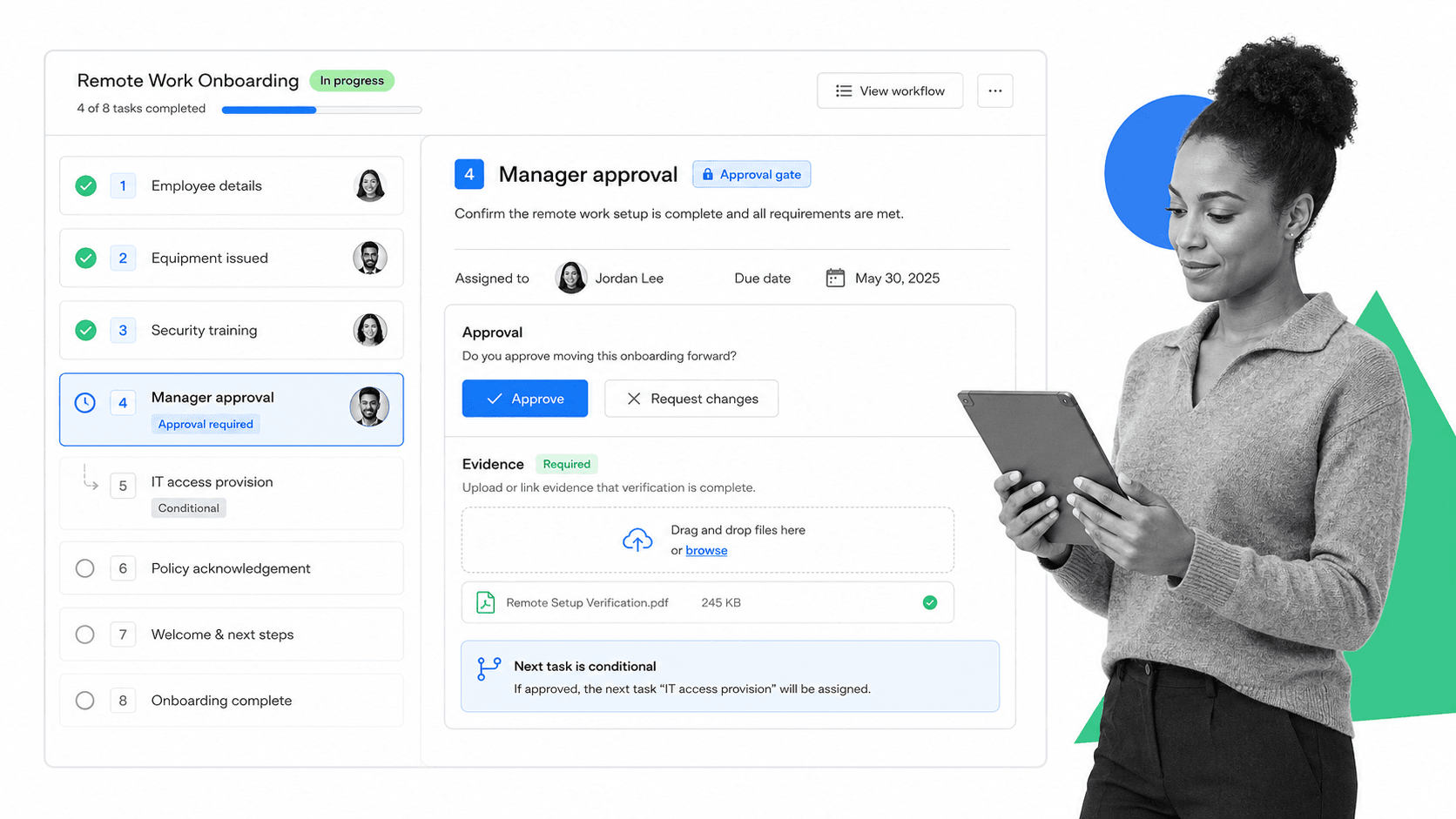
Process Street is strongest when remote work involves repeatable processes that must be enforced, not just discussed. It turns procedures into controlled workflow runs where tasks, forms, assignments, due dates, approvals, and conditional paths live in one operating record, so a distributed team executes the same way whether someone is online at 9am or midnight.
That makes it a strong fit for remote onboarding, compliance reviews, customer implementations, finance close, and any process where the same steps repeat across time zones. Teams can pair a structured employee onboarding checklist with conditional logic so the workflow adapts when inputs change, and managers get a live record instead of chasing status updates. It is especially useful for onboarding remote employees, where a missed step is easy to hide in chat but obvious in an enforced workflow.
- Best for recurring remote processes that need enforcement, not just visibility.
- Useful when approvals, evidence, and a clean audit trail matter.
- Less suited to teams that only want lightweight personal task lists.
2. Slack

Slack is the default real-time communication layer for many distributed teams. Its channel-based model keeps conversation organized by topic, project, or team, and threaded replies stop a busy channel from turning into noise. The official Slack features page shows how messaging, huddles, and integrations fit together.
Use Slack when your team needs fast, searchable communication that does not bury context in email. It works well as the connective tissue between other tools, since most remote work apps post updates into channels. The risk is treating chat as a system of record: important decisions and recurring work need a more durable home than a scrolling message history.
- Best for fast, channel-based team communication.
- Useful as the hub that other remote tools notify.
- Not a reliable place to store decisions, approvals, or recurring process state.
3. Zoom
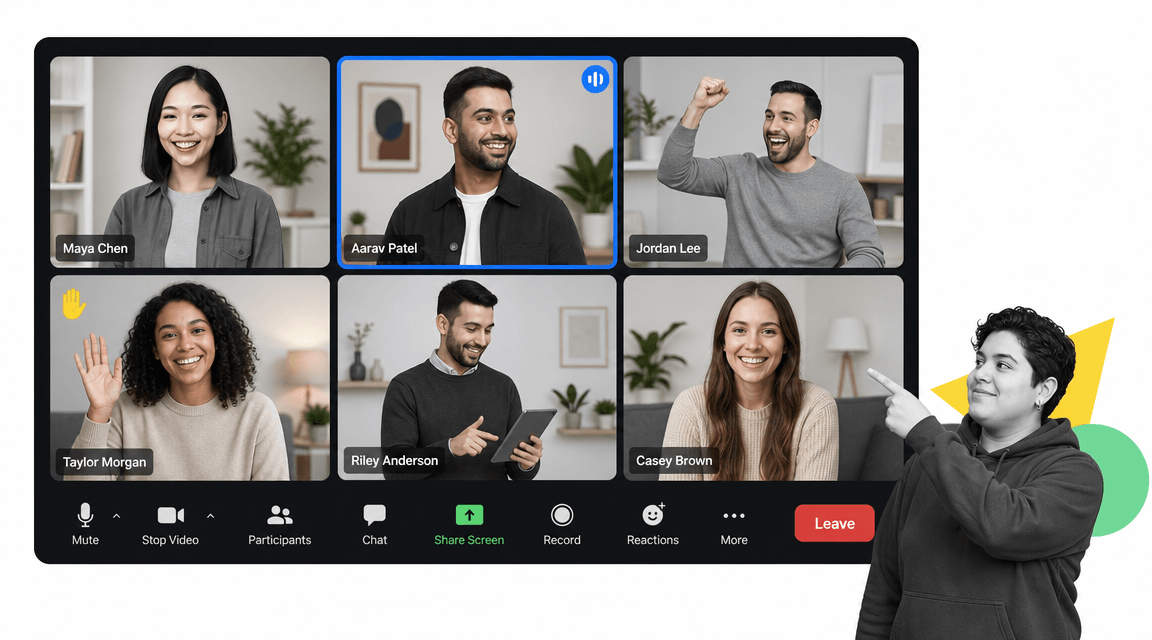
Zoom remains a staple for live video in remote teams. Gallery view, screen sharing, recording, and breakout rooms make it useful for standups, design reviews, all-hands meetings, and client calls. The Zoom meetings overview covers the core meeting surface most teams rely on.
Use Zoom when a conversation genuinely benefits from faces, screens, and real-time back and forth. The discipline that separates effective remote teams is knowing when a meeting is worth it. Many updates belong in a document or a workflow, not on a calendar, so pair video with strong written habits to avoid meeting overload.
- Best for live meetings that need faces and screen sharing.
- Useful for standups, reviews, workshops, and client calls.
- Should be balanced with written updates so the team is not stuck in meetings.
4. Notion
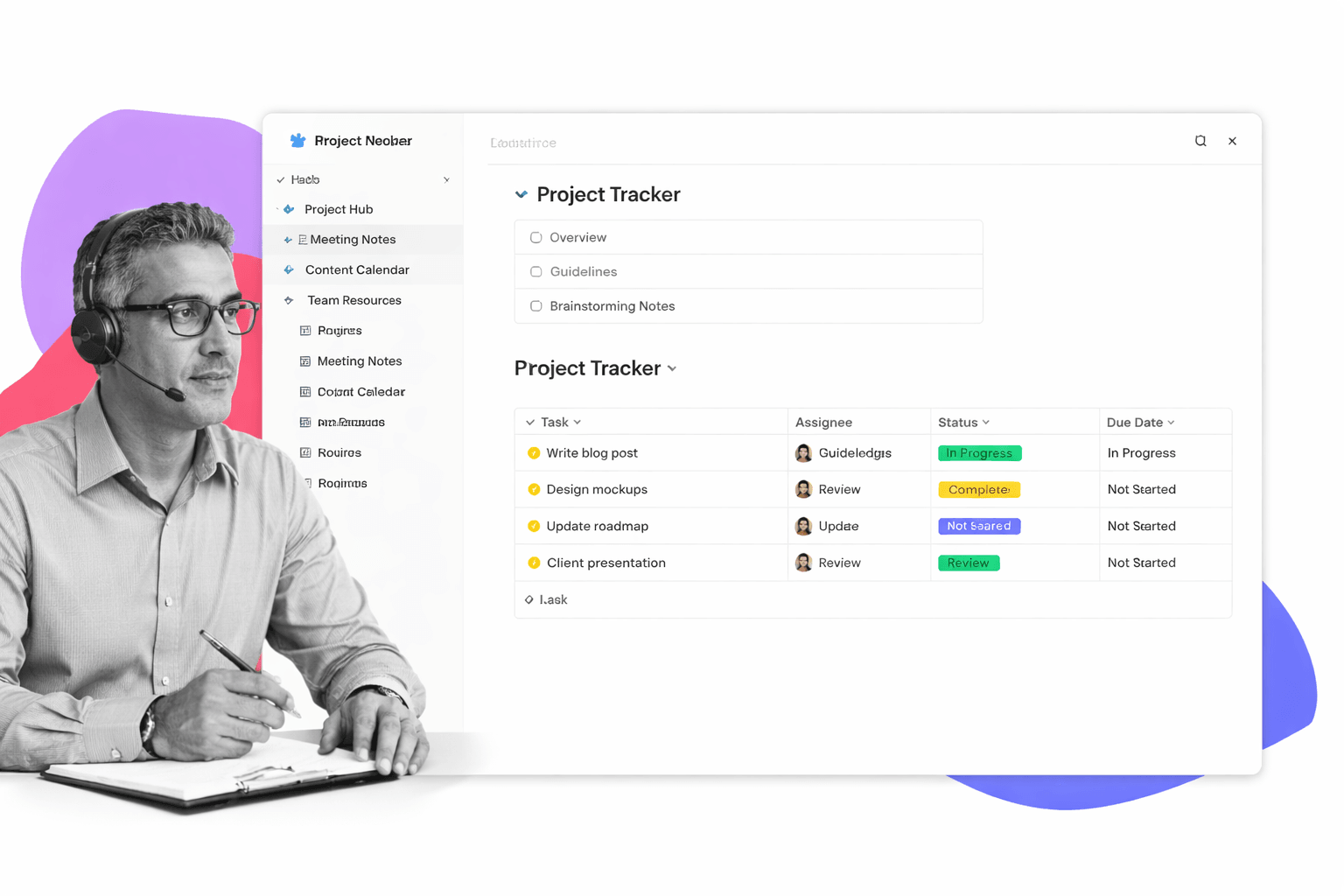
Notion is strong for shared knowledge. It combines documents, wikis, and lightweight databases in one connected workspace, which helps a distributed team keep its handbook, project notes, and trackers in a single place. The Notion guides are a useful starting point for structuring a team workspace.
Use Notion when the team needs a living knowledge base that anyone can navigate without asking a coworker. It is flexible enough to hold meeting notes, project docs, and simple trackers. The flip side of that flexibility is that Notion does not enforce process: it documents how work should happen, but it does not make sure the steps were actually completed.
- Best for a connected knowledge base and lightweight trackers.
- Useful for handbooks, project docs, and team wikis.
- Documents process but does not enforce or prove execution.
5. Trello

Trello is the simplest visual task board in this set. Its boards, lists, and cards make work easy to see as it moves from one state to another, which Atlassian documents in its guide to Trello boards, lists, and cards. That low friction is why remote teams reach for it first.
Use Trello when the work is simple, visual, and easy to manage through status columns, such as editorial calendars, small team task queues, or intake boards. It is a friendly entry point, but it can get thin when work needs dependencies, reporting across many boards, or formal approvals. Teams that outgrow it often move toward business task management software or a workflow system.
- Best for simple, visual Kanban-style tracking.
- Useful when adoption speed matters more than advanced controls.
- Can become thin when work needs dependencies, reporting, or approvals.
Where remote work tools stop being enough
Remote work tools stop being enough when chat, video, docs, and boards are the only record of work that needs proof. A channel can show a conversation and a board can show a card moved to done, but neither proves that the right person reviewed the work, required data was collected, or an exception followed the correct path.
The card says done, but the work is not controlled
This is common in remote compliance, finance, customer onboarding, procurement, HR, and IT work. A single card or message can represent ten required actions. If those actions live in DMs, comments, or memory, the tool is hiding risk instead of controlling work, and a distributed team feels that gap most because nobody is sitting nearby to catch the miss.
The process repeats across the team
A one-off task can survive in a board or a doc. A repeating remote process should become a workflow. If every new hire, monthly close, or vendor review follows a similar pattern, convert that pattern into a reusable workflow run rather than recreating it from a free task management software list each time. That is also the difference between a checklist and workflow management software that can enforce and report on each run.
The review needs evidence, not a meeting
If a reviewer has to schedule a call to understand what happened, the system is incomplete. The record should show the assigned owner, required fields, attached evidence, approval status, due date, and exception path. Otherwise the team is communicating about work without governing it, which is exactly the failure mode that grows as a team scales remotely.
How Process Street fits into your remote work stack
Process Street fits beside your communication, video, docs, and board tools when remote work needs execution control. Keep chat for conversation, video for live discussion, and docs for knowledge. Use Process Street when a process has required steps, formal handoffs, approvals, evidence, or recurring structure that has to run the same way every time.
For example, a team might discuss a launch in Slack, review designs over Zoom, and store the plan in Notion, then run the effective remote onboarding or the compliance review through an enforced Process Street workflow. The day-to-day tools coordinate the conversation. The workflow makes sure the actual steps happen and leaves a record that they did.
The practical split is simple: most remote work tools coordinate work, while a workflow tool enforces work. A strong remote stack makes both jobs visible without asking people to maintain duplicate trackers. Public playbooks like the GitLab all-remote guide make the same point: distributed teams win by writing down and standardizing how work happens.
A concrete example
Picture a fully remote company hiring across three time zones. New hires are welcomed in a chat channel and meet the team over video, the handbook lives in a shared workspace, and the recruiting pipeline sits on a board. None of that guarantees the security training, equipment request, and policy acknowledgments actually happen on time. Running that onboarding as an enforced workflow assigns each step to an owner, sets due dates, captures the signed documents as evidence, and shows a manager exactly where every new hire stands without a single status meeting.
If you want the broader category view, compare this page with guides to employee onboarding tools, the best workflow management tools, and project management tools. If you need the execution layer, that is where Process Street turns a remote team’s good intentions into work that actually gets done.
FAQs
What are remote work tools?
Remote work tools are software systems that let a distributed team communicate, meet, share knowledge, track tasks, and run processes without being in the same office. A typical stack includes a chat tool, a video tool, a documentation tool, a task board, and a workflow tool.
What are the best remote work tools?
The best remote work tools depend on the job. Slack is strong for team communication, Zoom for video meetings, Notion for shared documentation, Trello for simple task boards, and Process Street for repeatable remote workflows that need approvals and evidence. Most teams combine several rather than picking one.
What are the main categories of remote work tools?
The main categories are communication, video conferencing, documentation and knowledge management, task and project tracking, and process or workflow execution. Many teams add time tracking, scheduling, file storage, and security tools on top of these core categories.
How do remote work tools differ from workflow tools?
Most remote work tools help people communicate, meet, document, or track tasks. Workflow tools go further by enforcing required steps, routing approvals, collecting data and evidence, and preserving a record of how each process ran. A complete stack usually needs both.
How many remote work tools does a team need?
A small remote team usually needs four to five core tools: communication, video, documentation, task tracking, and process execution. The goal is one clear tool per job, connected together, rather than several overlapping apps that fragment the work and create duplicate trackers.
Can remote work tools support compliance work?
Remote work tools can support low-risk compliance work when the team mainly needs visibility. For higher-risk or recurring work, use a workflow system that can enforce required steps, collect evidence, manage approvals, and prove completion, so a distributed team can show what was done without a meeting.
