


Turn every policy into automated workflows with built-in enforcement and audit-ready proof.



Resources Management Systems
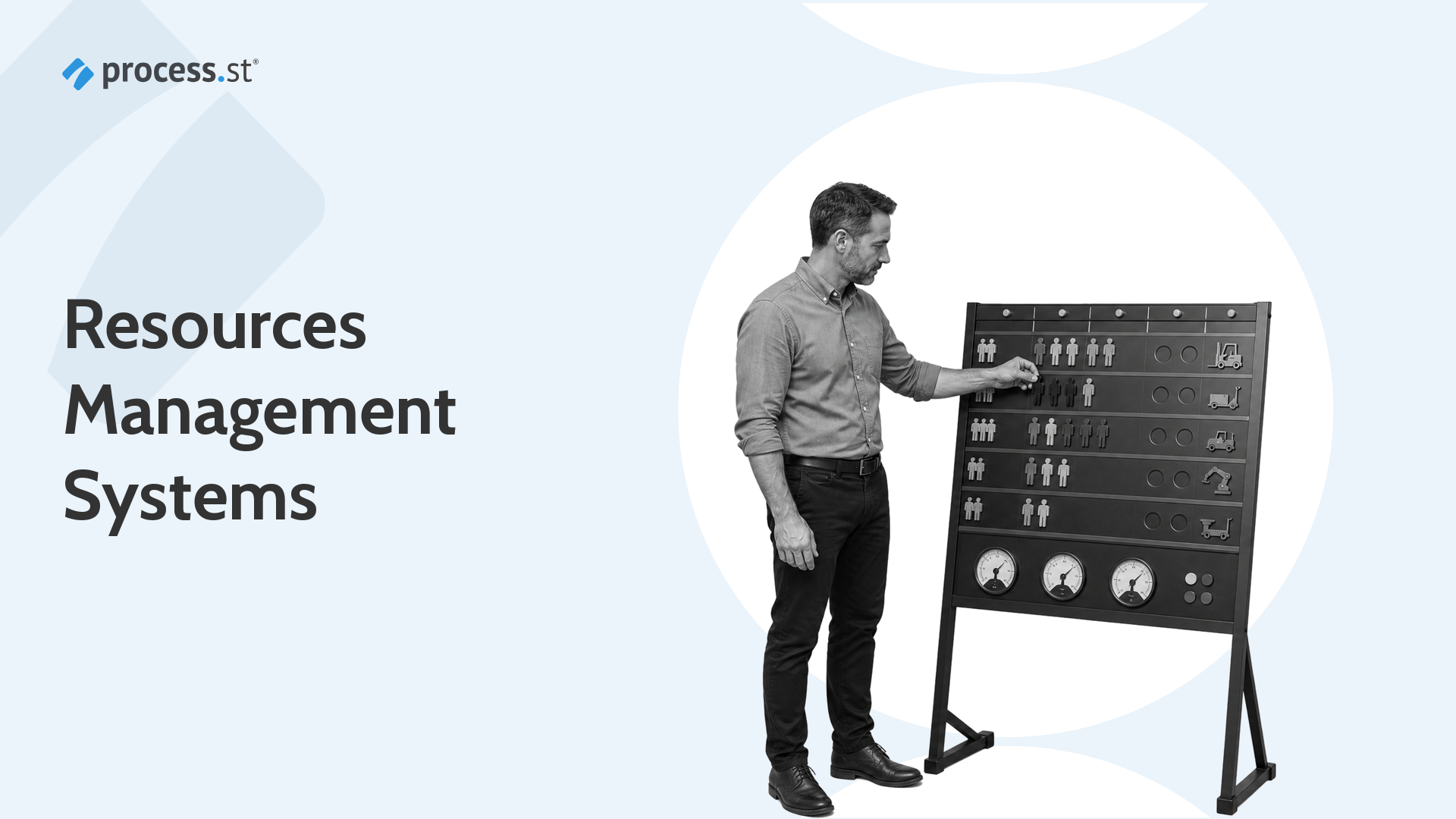
Resources management systems connect work demand with the people, skills, equipment, information, time, budget, and controls required to deliver it. They help teams decide what capacity exists, where it should go, and whether the work can proceed safely and on time.
A useful system does more than display a staffing calendar. It turns resource decisions into an operating loop: capture demand, understand capacity, allocate resources, execute the work, record outcomes, and improve the next plan.
This guide explains that loop, shows how it differs from project planning, and outlines how Process Street can connect resource readiness to repeatable workflows and execution proof.
In this article, we are going to cover:
- What resources management systems are
- Why resources management systems matter
- Core components of resources management systems
- Resources management systems vs project management software
- How to choose a resources management system
- How to implement a resources management system
- Manage resource-dependent workflows in Process Street
- Resources management systems FAQs
What resources management systems are
A resources management system is the combination of rules, data, workflows, and software used to plan and control the resources an organization needs. The resources may include employees, contractors, specialist skills, facilities, machines, materials, software access, documents, budgets, and time.
A system connects demand to capacity
Demand describes the work that needs to happen. Capacity describes what the organization can realistically supply. The system sits between them, helping managers decide which work to start, who or what should handle it, and what has to wait.
That definition is broader than a list of staff. A process resource can be any dependency a workflow needs. A resources management system keeps those dependencies visible across many work items, teams, and time periods.
Resource management has several operating contexts
Professional services teams often focus on skills, availability, billable assignments, and utilization. Manufacturing teams care about labor, machine capability, materials, and finite capacity. Operations teams need owners, approvals, system access, evidence, and backup coverage for recurring work. Each context uses the same core logic but needs a different operating surface.
Microsoft’s resource management training describes bookings, assignments, allocation methods, and schedule assistance for project operations. Its operations resources documentation shows how production activities can be scheduled against resource groups and finite capacity.
The system includes policy, not only software
Software cannot decide every priority by itself. The organization still needs rules for who can request resources, how urgent work is scored, what skills or controls are mandatory, when an assignment can be overridden, and how conflicts are escalated. Those rules are part of the system because they determine how the data becomes a decision.
The ISO 9001 process approach frames processes as interrelated activities that use inputs to deliver intended results. Resources management applies that same logic to the people, information, equipment, and controls that make those activities possible.
Why resources management systems matter
Resources management systems matter because demand rarely arrives in the same shape as capacity. Work comes in peaks. Specialist skills are unevenly distributed. Equipment has maintenance windows. Approvers take leave. Data arrives late. A resource plan makes those constraints visible before they turn into missed work.
They prevent invisible overload
Without a shared system, every manager can make a reasonable local decision while the organization creates a bad global result. The same analyst may be assigned to five initiatives. The same machine may be reserved by two teams. A compliance reviewer may become the hidden bottleneck across every high-risk request.
A capacity view exposes the collision. It shows committed work, remaining availability, required skills, and the timing of each dependency. Managers can then move work, add backup coverage, change the sequence, or reduce scope before the deadline is at risk.
They improve allocation quality
Good allocation is not simply filling an empty slot. The resource has to fit the work. A person may be available but lack the required skill or authorization. A machine may be open but unsuitable for the material. A system account may exist but not carry the correct access level. Matching rules protect quality while the schedule protects speed.
They support more honest planning
The OPM Workforce Planning Guide describes workforce planning as a continuous process for identifying the size and composition of the workforce needed to meet objectives. The same principle applies beyond headcount: plans become more credible when they are connected to real capacity and reviewed as conditions change.
They create an evidence trail
A resource decision can carry operational or compliance consequences. The system should preserve who requested the resource, which criteria were applied, who approved an exception, what was assigned, and what happened afterward. This record helps managers explain decisions, investigate failures, and improve the next allocation cycle.
An operations tracking software layer is useful here because the plan and the work need to stay connected. Capacity data that never reflects actual execution becomes stale very quickly.
Core components of resources management systems
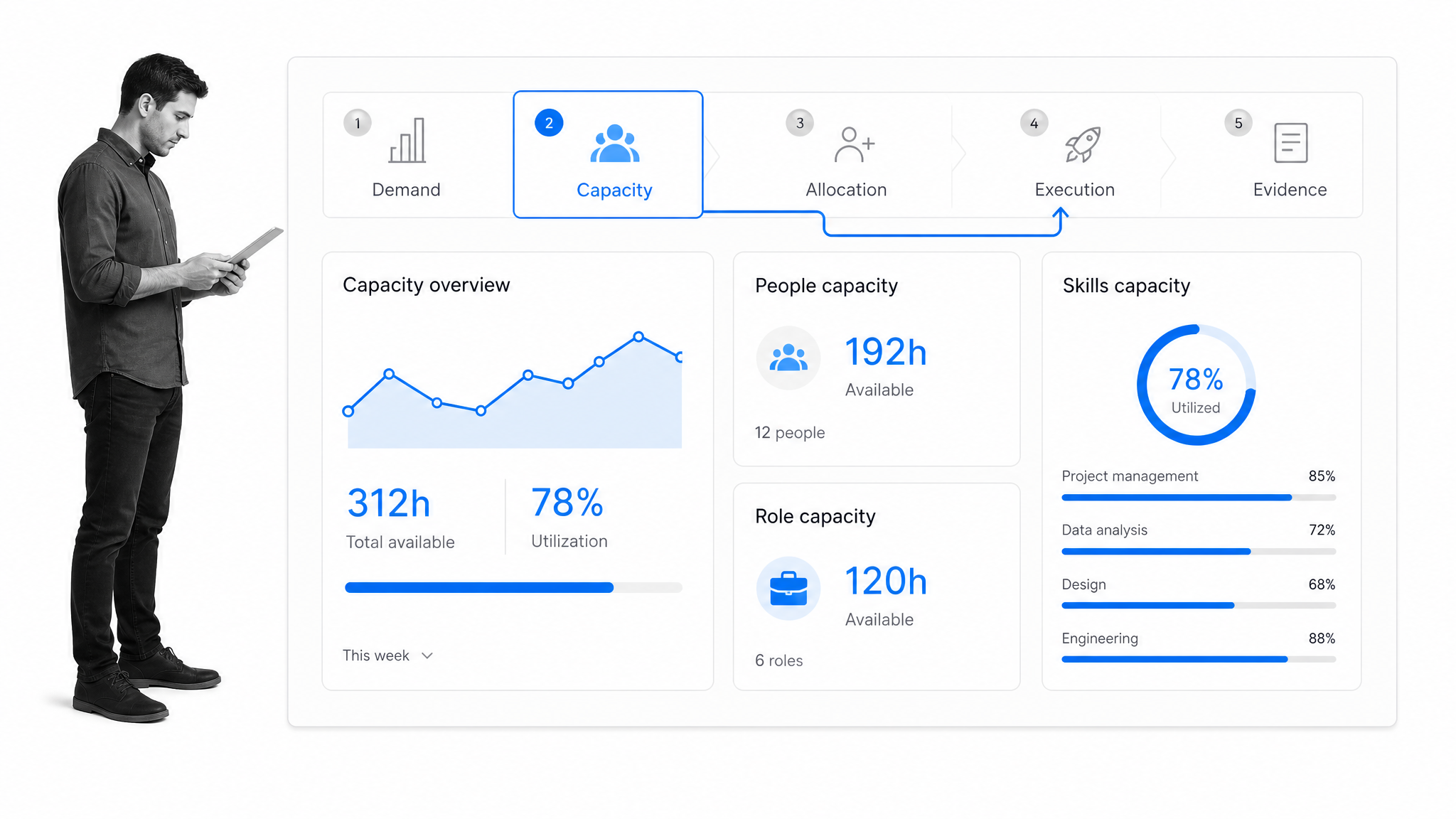
The strongest resources management systems share a common operating model. The labels may differ, but the system needs to understand demand, capacity, allocation, execution, and evidence as connected stages.
Demand intake
Demand intake captures the work request before anyone promises a resource. A useful intake includes the expected outcome, due date, priority, required skills, location, estimated effort, dependencies, risk level, and requester. Standard intake prevents urgent work from entering through chat while lower-profile commitments disappear.
A structured vendor management workflow shows why intake matters. The resource requirement changes when a vendor handles sensitive data, needs site access, or requires finance and legal review.
Capacity and availability
Capacity is the amount of usable resource available during a period. It should account for existing assignments, leave, maintenance, training, non-project duties, and realistic buffers. A nominal eight-hour day is not eight hours of allocatable specialist work.
Availability also has dimensions. A person can be available in time but unavailable by geography, certification, language, or system access. Equipment can be free but unavailable because it is awaiting calibration. The system needs the constraint that actually determines readiness.
Skills and capability matching
Capability data describes what a resource can do. For people, that may include role, proficiency, certification, authorization, and experience. For equipment, it can include capacity, configuration, supported materials, or operating limits. Matching these attributes to work requirements reduces rework and unsafe substitutions.
Allocation and scheduling
Allocation assigns a resource to demand. Scheduling adds timing and sequence. The system should show hard assignments, tentative holds, shared capacity, dependencies, and conflicts. It should also make priority rules visible so managers understand why one assignment displaced another.
Workflow execution
An allocation is only a plan until work starts. Connecting the decision to a workflow management system turns the assignment into tasks, handoffs, due dates, approvals, and required evidence. This is the point where capacity planning becomes execution.
For repeatable work, task workflow management software can enforce the order of actions and prevent a resource-dependent step from closing before its requirements are met.
Controls and approval rules
Controls decide when an assignment needs review. High-cost equipment, regulated work, privileged system access, specialist overtime, and priority overrides may require approval. The rule should be built into the flow so the requester does not have to remember a separate policy.
Actuals, outcomes, and evidence
The final component records what actually happened: time used, work completed, delays, substitutions, exceptions, quality results, and evidence. Comparing actuals with the original plan improves estimates and shows where capacity was lost to rework or waiting.
ISO’s ISO 9001 overview connects resources and documented information with controlled operation, performance evaluation, and improvement. A resource system should close that loop instead of stopping at the schedule.
Resources management systems vs project management software
Resources management systems and project management software overlap, but they answer different primary questions. Project software asks what tasks must be completed to deliver an initiative. Resource management asks what capacity the organization has and how that capacity should be assigned across competing work.
Project management starts with the plan
Most project management tools organize tasks, milestones, dependencies, owners, and timelines. They are useful when the initiative is the main unit of management. A project management template can standardize that planning surface.
Resource management starts with the pool
A resource system looks across projects and recurring operations. It asks whether the same person, machine, facility, or approval group has been overcommitted. It also checks whether the assigned resource has the correct capability and whether future demand will exceed supply.
Workflow management starts with repeatable execution
Workflow management focuses on how recurring work proceeds from trigger to completion. It is the right layer when resource readiness must be checked inside onboarding, vendor review, inspections, incident response, access requests, close procedures, or other repeatable processes.
Many organizations need all three. Project software coordinates initiatives. Resource management balances capacity. Workflow software makes recurring execution consistent and auditable. The integration between them matters more than forcing every job into one interface.
How to choose a resources management system
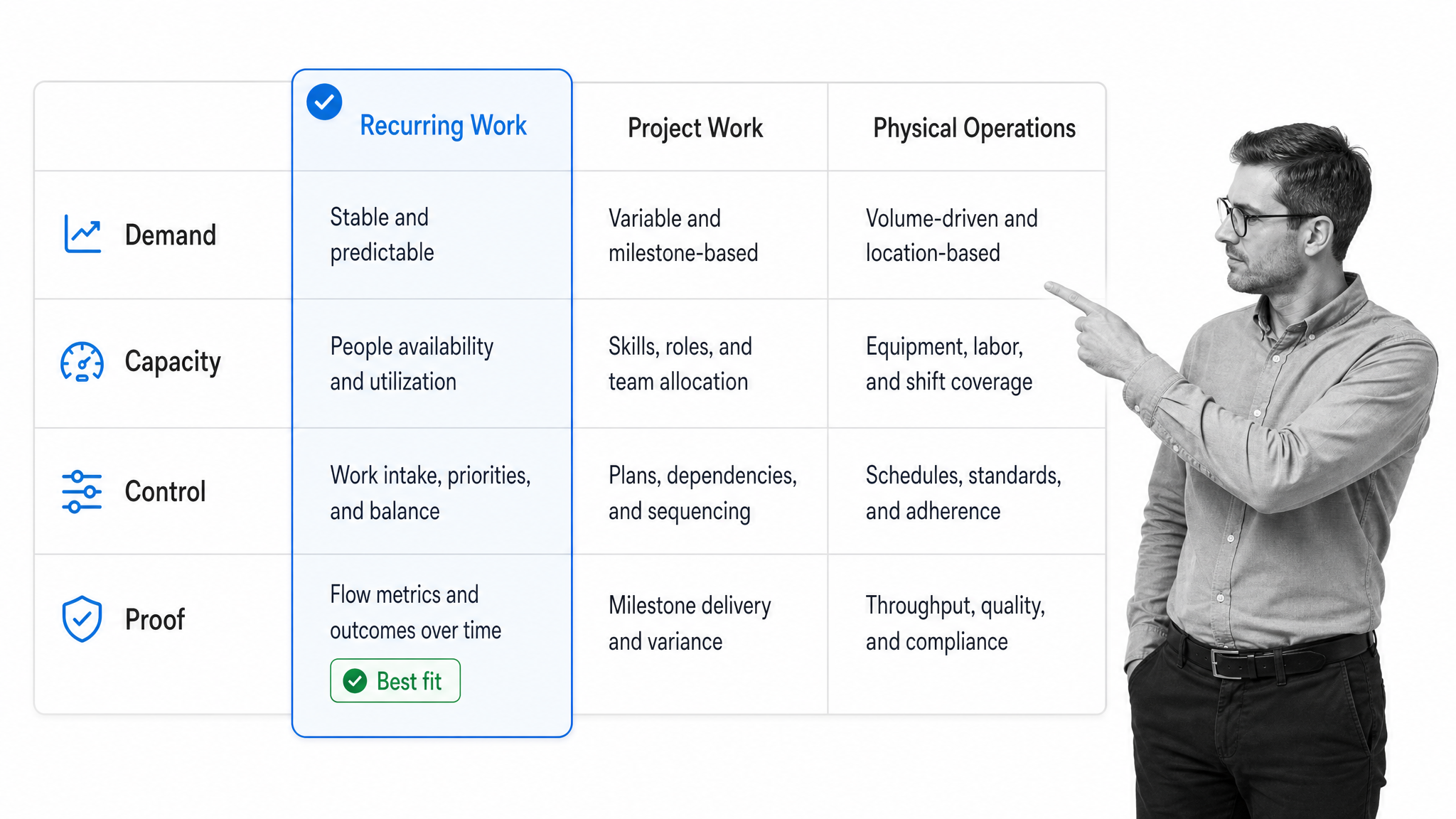
Choose a resources management system by matching the operating surface to the work. A professional services team, a manufacturing plant, and a compliance operations group may all manage resources, but their constraints and evidence needs are different.
Start with the unit of demand
Define what enters the system: a project, customer engagement, production order, service ticket, workflow run, shift, or request. The system should capture that demand in a consistent shape and estimate the resources it requires.
Identify the limiting resource
Every operation has a constraint. It may be specialist skill, machine hours, approval bandwidth, facility space, working capital, or access to a system. The product must represent the limiting resource clearly enough that managers can see the real queue and not a proxy.
Check matching depth
Simple systems match availability. More demanding environments need skills, certifications, location, role, authorization, equipment class, or risk level. List the attributes that can make an apparently available resource unsuitable, then test whether the system can use them in search and assignment rules.
Check scheduling behavior
Ask how the system handles tentative holds, partial allocation, recurring demand, shared resources, dependencies, time zones, maintenance, leave, and finite capacity. A clean calendar is not enough if it allows incompatible work to reserve the same capability.
Check the control model
The system should support the approvals and exception paths that match your risk. Look for required fields, approval gates, escalation, role-based permissions, change history, and evidence capture. If those controls live in a separate spreadsheet, the resource decision can bypass them.
Check execution integration
Resource allocation should create or update real work. Business operations software becomes more valuable when demand, capacity, workflow status, and actual outcomes move together rather than requiring manual reconciliation.
Process Street has direct, universal integrations to 5,000+ systems. Need a new one? An AI agent builds it on the fly. That integration model helps resource-ready workflows trigger updates across the systems where people, requests, and records already live.
Check reporting and improvement
Useful reports explain demand, utilization, allocation, backlog, conflicts, delay, exception rates, and plan versus actual. The system should help managers improve forecasts and remove bottlenecks, not only produce attractive utilization charts.
Run a real scenario before buying
Test one recurring process and one exception. Include a missing skill, unavailable approver, priority override, delayed input, and changed due date. A system that works only when every assumption is clean will create manual side channels as soon as operations become real.
If you need a commercial shortlist after defining these requirements, compare the current resource management tools against the selection matrix rather than starting from feature volume.
How to implement a resources management system
Implement a resources management system as an operating change, not a software installation. The system will influence which work gets accepted, how priorities are resolved, and how managers share constrained capacity.
Step 1: Choose one resource-dependent workflow
Start with work that repeats, has visible delays, and depends on several resources. Employee onboarding, vendor intake, customer implementation, access requests, maintenance, inspections, and monthly close are good candidates because their resource requirements can be named.
An employee onboarding checklist may depend on a manager, HR, IT, equipment, payroll data, training, and policy acknowledgments. That is enough complexity to test the system without modeling the entire company.
Step 2: Map demand and the resource pool
Document how requests arrive, how effort is estimated, where capacity data lives, and who makes assignments. Then define the resource pool, including skills, equipment, access, location, working hours, maintenance, leave, and backup coverage.
Use a process library checklist to keep the workflow, owner, resource model, control rules, and review cadence in one governed inventory.
Step 3: Clean the minimum data
Do not delay implementation until every profile is perfect. Start with the fields that change allocation decisions: resource identity, role, critical skills, availability, committed work, location, and authorization. Define an owner and review frequency for each field.
Step 4: Write allocation rules
Make priority and matching rules explicit. Define what work can preempt another assignment, when overtime or external capacity is allowed, who approves exceptions, and what happens when no suitable resource is available.
The rules should align with your types of process management. A lightweight internal request does not need the same control as a regulated approval or safety-critical production step.
Step 5: Connect the allocation to execution
When a resource is assigned, create the task or workflow, pass the required context, set due dates, and notify the right people. When execution changes, update availability and the forecast. This connection prevents the resource plan from becoming a second system that operators ignore.
Step 6: Pilot exceptions, not only the happy path
Test unavailable resources, missing data, rejected approvals, delayed equipment, changed scope, and emergency priority. Exceptions reveal whether the process has real controls or whether managers still need to coordinate through private messages.
Step 7: Review actuals and improve
Compare planned effort and capacity with actual use. Review waiting time, substitutions, rework, late approvals, and unused reservations. Update estimates and resource rules based on evidence rather than asking teams to plan more carefully.
A governed standard operating procedure template can document the policy, but the allocation and review steps should live in the operational flow so the policy is applied each time.
Manage resource-dependent workflows in Process Street
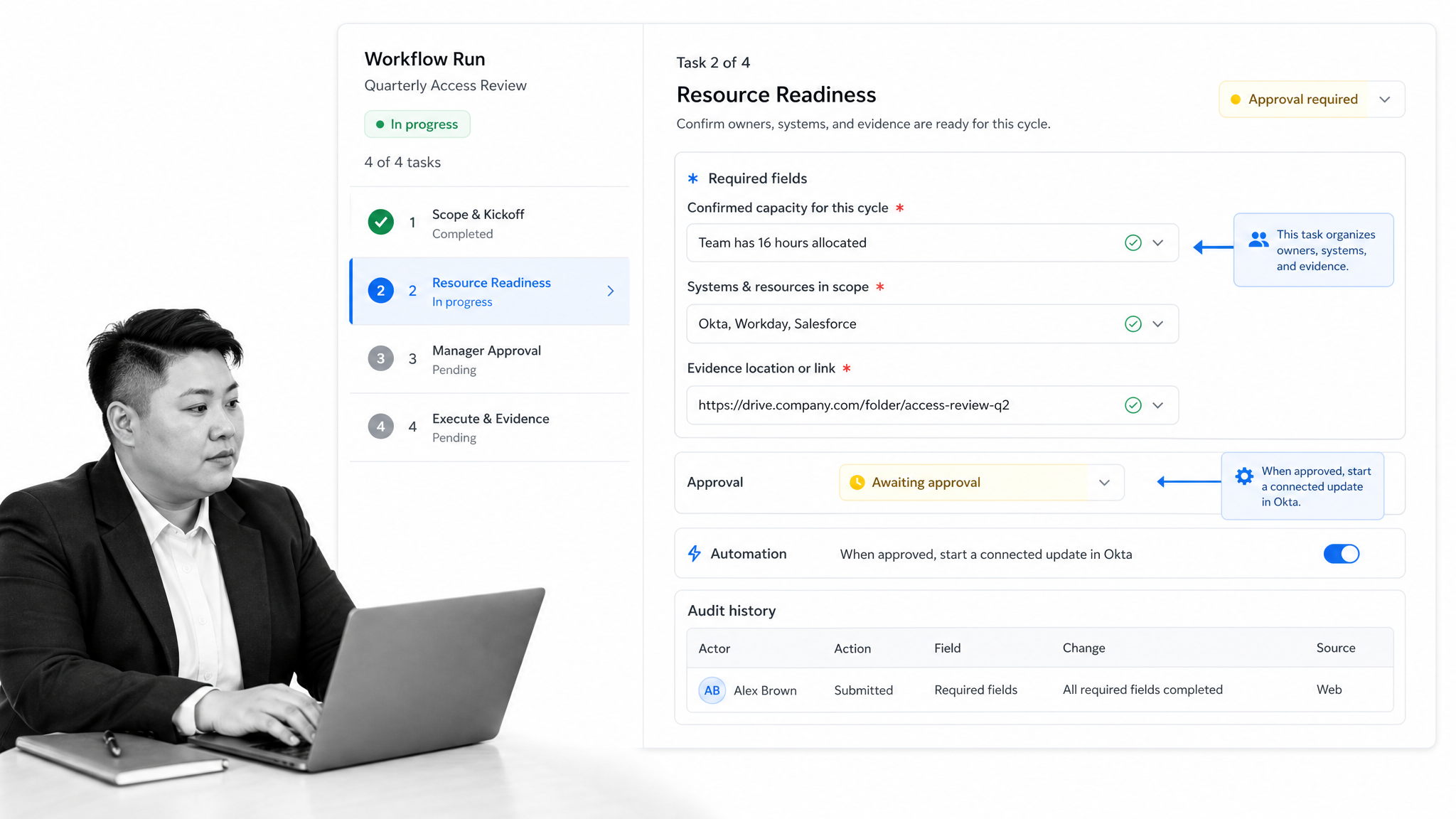
Process Street can manage the execution layer around resource decisions. Teams can turn recurring procedures into workflows that collect demand, assign owners, check readiness, route approvals, update connected systems, and preserve a history of what happened.
Capture resource requirements in the workflow
Forms can collect the role, skill, system, equipment, evidence, location, effort, and due-date information required for an assignment. Required fields reduce the incomplete requests that force managers to chase context after work has already entered the queue.
Assign work to roles and people
Assignments make ownership visible at the task level. The workflow can separate the requester, resource owner, operator, reviewer, and approver so one person does not silently carry every responsibility.
Route based on resource conditions
Conditional logic can change the path based on risk, location, resource type, cost, or missing evidence. High-risk assignments can receive more review while routine work stays lightweight.
Control exceptions with approvals
Built-in approvals can stop the workflow until the right person reviews an allocation, override, access request, or completed result. The decision remains attached to the work instead of living in an email thread.
Run the resource-ready process
The guidance for running workflows shows how repeatable work becomes an active run. Each run can carry its own owners, fields, files, comments, approvals, and status while following the same controlled structure.
Use execution history as proof
The completed run provides the evidence layer: who did the work, which resource information was supplied, what decision was approved, what exception occurred, and whether the process completed. Managers can review recurring failures and improve the workflow template.
This approach complements an operations management system. Capacity tools can decide where resources should go, while Process Street ensures the resource-dependent process runs correctly once the decision is made.
Resources management systems FAQs
What is a resources management system?
A resources management system is the combination of software, data, rules, and workflows used to match work demand with available people, skills, equipment, information, time, budget, and controls. It helps teams plan capacity, allocate resources, execute work, and learn from actual results.
What resources should a management system track?
Track the resources that can change whether work is ready or feasible. These commonly include people, skills, availability, contractors, equipment, facilities, materials, system access, documents, budget, approvals, and time.
What is the difference between resource management and project management?
Project management organizes tasks, milestones, dependencies, and timelines for an initiative. Resource management looks across projects and recurring operations to understand capacity, capability, conflicts, and allocation across the shared resource pool.
What features should a resources management system include?
Useful features include demand intake, capacity planning, skills and capability matching, allocation, scheduling, conflict detection, approvals, workflow integration, evidence capture, and plan-versus-actual reporting. The right mix depends on the work and its risk.
How do you implement a resources management system?
Start with one resource-dependent workflow, map demand and capacity, clean the minimum decision data, define allocation and exception rules, connect assignments to execution, test failure paths, and improve the model using actual results.
Can Process Street support resource management workflows?
Yes. Process Street can capture resource requirements, assign owners, route conditional paths, control exceptions with approvals, automate connected updates, and preserve an execution history. It works as the repeatable workflow layer around capacity and allocation decisions.
