


Turn every policy into automated workflows with built-in enforcement and audit-ready proof.



Sales Management Tools

Sales management tools help revenue teams control pipeline work, coach reps, standardize follow-up, forecast with less guesswork, and make sure deals move through the right handoffs.
The category includes CRM platforms, sales engagement hubs, pipeline boards, forecasting tools, coaching systems, and workflow automation. The right tool depends on whether the team needs a better record, better rep activity, better process control, or all three.
This guide compares five sales management tools and shows where each one fits. It also explains when a CRM is not enough and why repeatable sales work often needs a workflow layer beside the customer record.
In this article, we are going to cover:
- What sales management tools are
- How to choose sales management tools
- Sales management tools at a glance
- Best sales management tools to compare
- Where sales management tools stop being enough
- FAQs
What sales management tools are
Sales management tools are software systems that help sales leaders plan, run, measure, and improve the sales process. They give managers a structured way to see deal status, rep activity, next steps, account context, coaching needs, and process gaps.
A CRM is usually the center of the stack, but it is not the whole stack. A CRM stores pipeline and customer data. A workflow layer makes sure the correct steps happen around that data. If your team already has a pipeline but still misses qualification steps, proposal reviews, handoffs, and follow-up tasks, compare the CRM with sales process management software.
The core jobs sales management tools handle
- Pipeline control: stages, deal ownership, next steps, forecast categories, and stuck deal visibility.
- Rep execution: tasks, call prep, follow-up reminders, activity queues, and engagement history.
- Process consistency: qualification rules, handoff checklists, approvals, and required evidence.
- Coaching: activity review, deal inspection, call notes, scorecards, and manager feedback loops.
- Reporting: pipeline health, conversion points, cycle time, forecast movement, and operational bottlenecks.
The most useful setup often connects sales enablement tools, CRM data, workflow automation, and operating templates. That gives leaders the customer record, the sales play, and the proof that the process was followed.
How to choose sales management tools
Choose sales management tools by separating recordkeeping from execution. If the problem is missing account data, start with CRM quality. If the problem is inconsistent selling behavior, start with process control. If the problem is rep activity, start with engagement and coaching.
Start with the failure mode
- Deals lack next steps: prioritize pipeline stages, activity reminders, and manager review.
- Handoffs break: prioritize workflows, required fields, approvals, and automatic task assignment.
- Forecasts are unreliable: prioritize stage hygiene, deal inspection, and consistent qualification.
- Reps skip process: prioritize guided tasks, checklists, playbooks, and completion proof.
- Managers cannot coach: prioritize activity history, call notes, deal context, and review cadence.
If the work is recurring, do not force every detail into a CRM note. A page on workflow management system explains why repeatable work needs a sequence, owner, and record. A page on what a workflow is covers the same idea from the workflow angle.
Check the operating surface
Sales teams will only keep a tool updated if the surface matches the work. Reps need fast task queues and clear deal context. Managers need inspection and coaching views. Sales operations needs fields, routing, governance, and reporting. Executives need a forecast they can trust.
Check integration depth
Sales work touches calendars, email, call tools, CRM, proposals, contracts, support handoffs, finance review, onboarding, and customer success. Process Street has direct, universal integrations to 5,000+ systems. Need a new one? An AI agent builds it on the fly. That matters when a sales process needs to move across systems instead of sitting inside one record.
Sales management tools at a glance
Sales management tools at a glance
| Tool | Best for | Standout feature | Pricing |
|---|---|---|---|
| Process Street | Sales workflow control and repeatable handoffs | Approvals, required fields, automations, integrations, and audit history around the sales process | Official pricing page and sales motion |
| Salesforce Sales Cloud | Enterprise CRM and forecast discipline | Opportunity workspace for account context, stages, activities, and forecasting | Official Sales Cloud pricing page |
| HubSpot Sales Hub | Growing teams that want CRM plus engagement | Pipeline, contact timeline, task queue, sequences, and meeting link workflows | Free CRM tools and paid Sales Hub tiers |
| Pipedrive | Pipeline-first sales teams | Visual deal board with activity reminders and next-step focus | Official Pipedrive pricing page |
| monday CRM | Configurable sales operations boards | Customizable boards for leads, accounts, handoffs, automations, and dashboards | Official monday CRM pricing page |
Best sales management tools to compare
Use the following reviews as a routing guide. None of these sales management tools is the universal answer. The right choice depends on whether your sales process needs CRM depth, workflow enforcement, rep engagement, pipeline clarity, or configurable operations boards.
1. Process Street
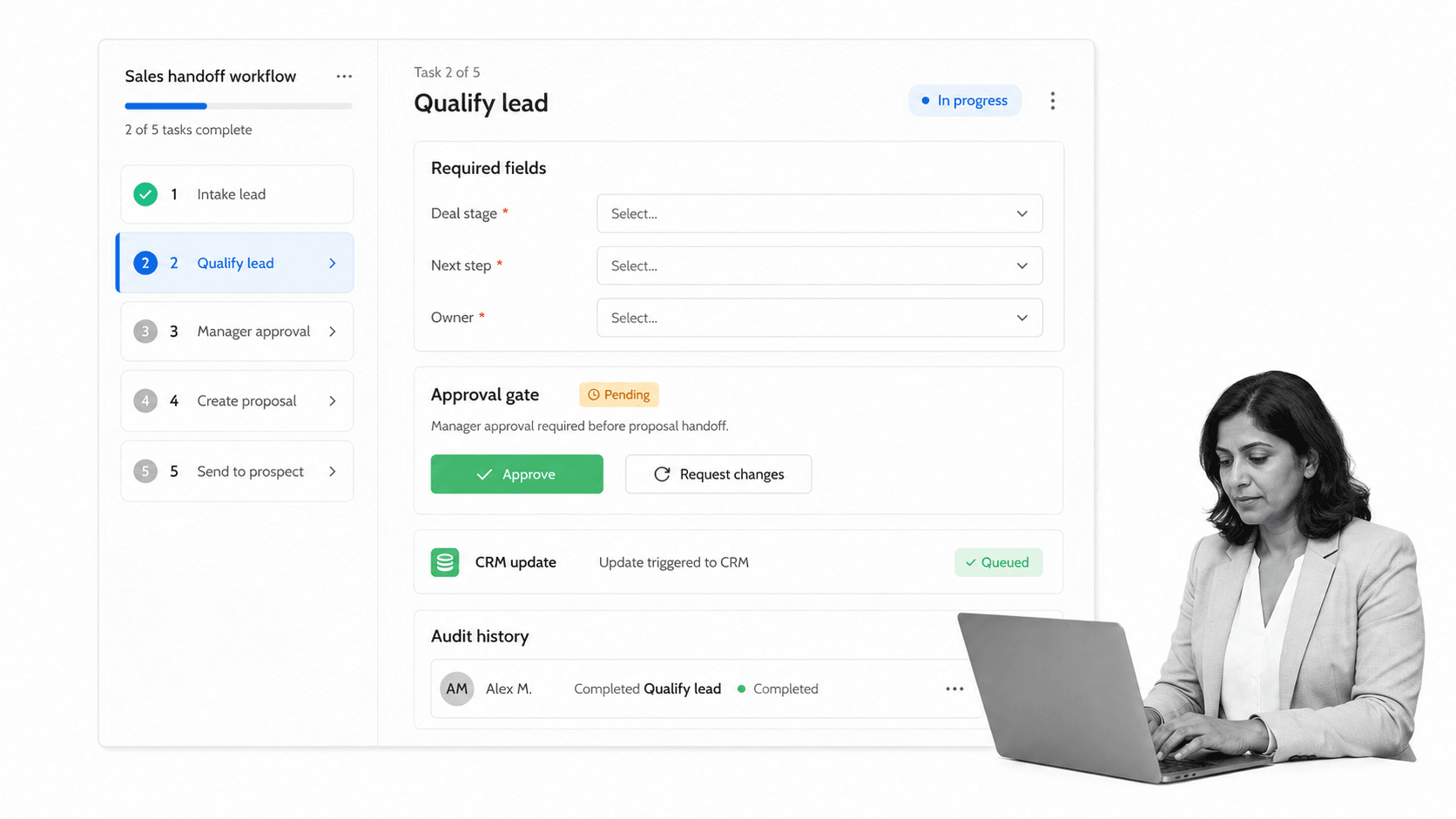
Best for: sales teams that need repeatable execution around the CRM. Process Street turns sales procedures into workflow runs with owners, required fields, conditional routing, approvals, integrations, and audit-ready history.
Process Street is not trying to replace the customer record. It controls the work around the record: qualification, call prep, proposal review, discount approval, legal handoff, implementation handoff, renewal workflow, and customer onboarding.
This makes it useful when a sales team has a CRM but still depends on memory, Slack messages, spreadsheets, or manager chasing. Templates such as a sales call process template and sales qualification checklist give teams a starting point, then workflow rules keep the process consistent.
The biggest value appears at the edges of the sales process. A lead becomes qualified and needs a discovery plan. A proposal needs discount approval. A verbal commitment needs legal review. A closed-won deal needs clean handoff to implementation. Those are the moments where revenue teams often lose time because the CRM knows the record changed, but the team still has to remember the procedure.
Process Street gives those moments a defined path. The manager does not have to ask whether the required fields were filled in, whether the approval happened, or whether customer success received the right context. The workflow itself carries the checklist, evidence, owner, deadline, and history.
- Best fit: controlled sales process execution, qualification checklists, approvals, handoffs, customer onboarding, and compliance-sensitive revenue work.
- Watch out for: teams that only need a lightweight contact database.
- Why teams choose it: the workflow creates proof while work happens, instead of asking managers to reconstruct what happened later.
2. Salesforce Sales Cloud

Best for: enterprise CRM, account management, forecast discipline, and complex sales operations. Salesforce Sales Cloud is a strong fit when the CRM needs to serve as the system of record for sales activity, account context, opportunity stages, and leadership reporting.
Salesforce is especially useful when the sales organization needs flexible data models, territory rules, dashboards, partner ecosystems, and a mature CRM operating model. Its current package details are listed on the Salesforce Sales Cloud pricing.
The tradeoff is administration. Salesforce can model almost anything, which means process design, field governance, reporting rules, and user adoption need real ownership. A CRM field is only useful if the team trusts it and updates it consistently.
For larger teams, Salesforce often becomes the revenue data backbone. That is valuable, but it also makes process shortcuts expensive. If reps enter stages differently, managers inspect deals differently, or approval paths sit outside the CRM, the forecast becomes a mix of data and interpretation.
The practical implementation pattern is to keep Salesforce as the record and use a workflow layer for procedural work that needs enforcement. That avoids turning the opportunity page into a crowded instruction manual while still preserving the proof that required sales steps happened.
- Best fit: enterprise sales teams, complex accounts, multi-stage opportunities, territory management, and executive forecasting.
- Watch out for: teams that need guided procedural execution more than a richer data model.
- Pair with workflow when: qualification, approvals, proposals, or handoffs need enforced steps outside the CRM record.
3. HubSpot Sales Hub

Best for: growing teams that want CRM, contact context, pipeline, task queues, and sales engagement in one approachable system. HubSpot Sales Hub is often easiest for teams that want a fast path from contact records to rep activity.
HubSpot is useful when sales and marketing need a shared customer view. The sales workspace can support contact activity, deals, tasks, sequences, and meeting workflows. Current plan information lives on the HubSpot Sales Hub pricing.
The risk is assuming ease of use solves process discipline. HubSpot can make pipeline work easier, but managers still need clear qualification rules, stage definitions, review cadence, and handoff standards.
HubSpot is especially helpful when the team is still building its revenue operating rhythm. Reps can work from contact context, task queues, and sequences without jumping across as many tools. Managers can inspect pipeline and activity in the same system the team uses every day.
The weak point shows up when a deal becomes a cross-functional process. Sales, legal, finance, implementation, and customer success may all need to act before the customer experience is clean. HubSpot can hold the record and trigger work, but the controlled procedure still needs a clear owner and completion history.
- Best fit: growing sales teams, inbound motions, task queues, contact context, sequences, and meeting workflows.
- Watch out for: complex approval paths and cross-system handoffs that need a controlled workflow layer.
- Pair with workflow when: deals trigger onboarding, contract review, compliance review, or customer success handoff.
4. Pipedrive
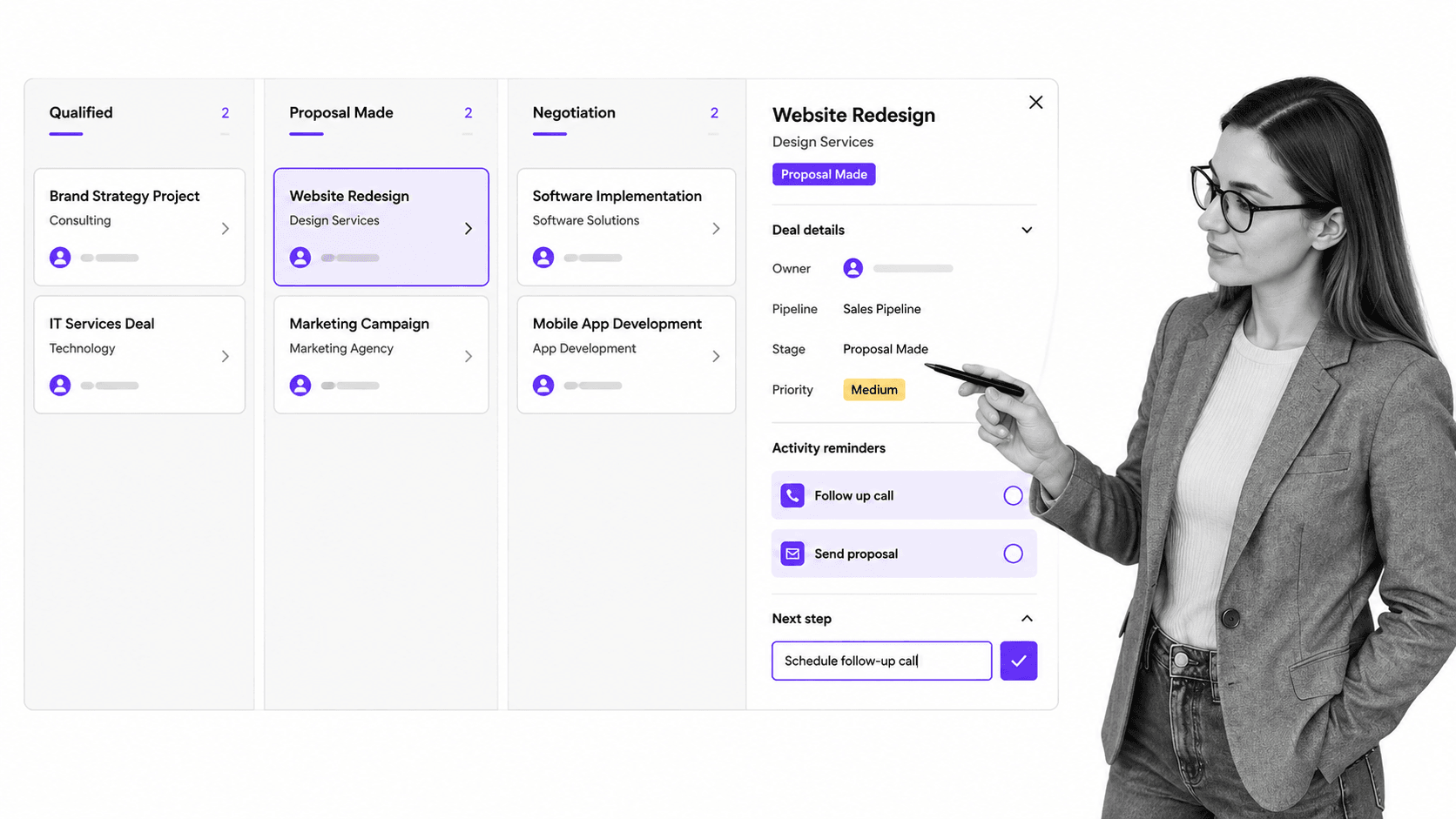
Best for: pipeline-first teams that want reps focused on deals, stages, activity reminders, and next steps. Pipedrive sales CRM puts the visual pipeline at the center of the sales management experience.
Pipedrive is useful when the main operating problem is deal movement. Managers can see what sits in each stage, which deals need attention, and where rep activity should happen next. Current plan details are on the Pipedrive pricing.
The limitation is scope. A visual board can help reps move deals, but it may not be enough for complex proposal reviews, legal approvals, implementation handoffs, or compliance-sensitive process steps.
Pipedrive works best when the sales motion is direct and stage clarity is the main management lever. It gives reps an obvious next action surface and gives managers a simple way to inspect pipeline flow without navigating an enterprise CRM configuration.
That simplicity is also the boundary. If each stage requires several behind-the-scenes tasks, the board can become a label for work that still happens somewhere else. In that case, keep the board simple and attach a workflow to the stage transition that needs control.
- Best fit: small and mid-sized sales teams that need visual pipeline hygiene and activity focus.
- Watch out for: process-heavy sales motions where each stage requires multiple controlled steps.
- Pair with workflow when: a deal stage should trigger a checklist, approval, document request, or customer onboarding workflow.
5. monday CRM
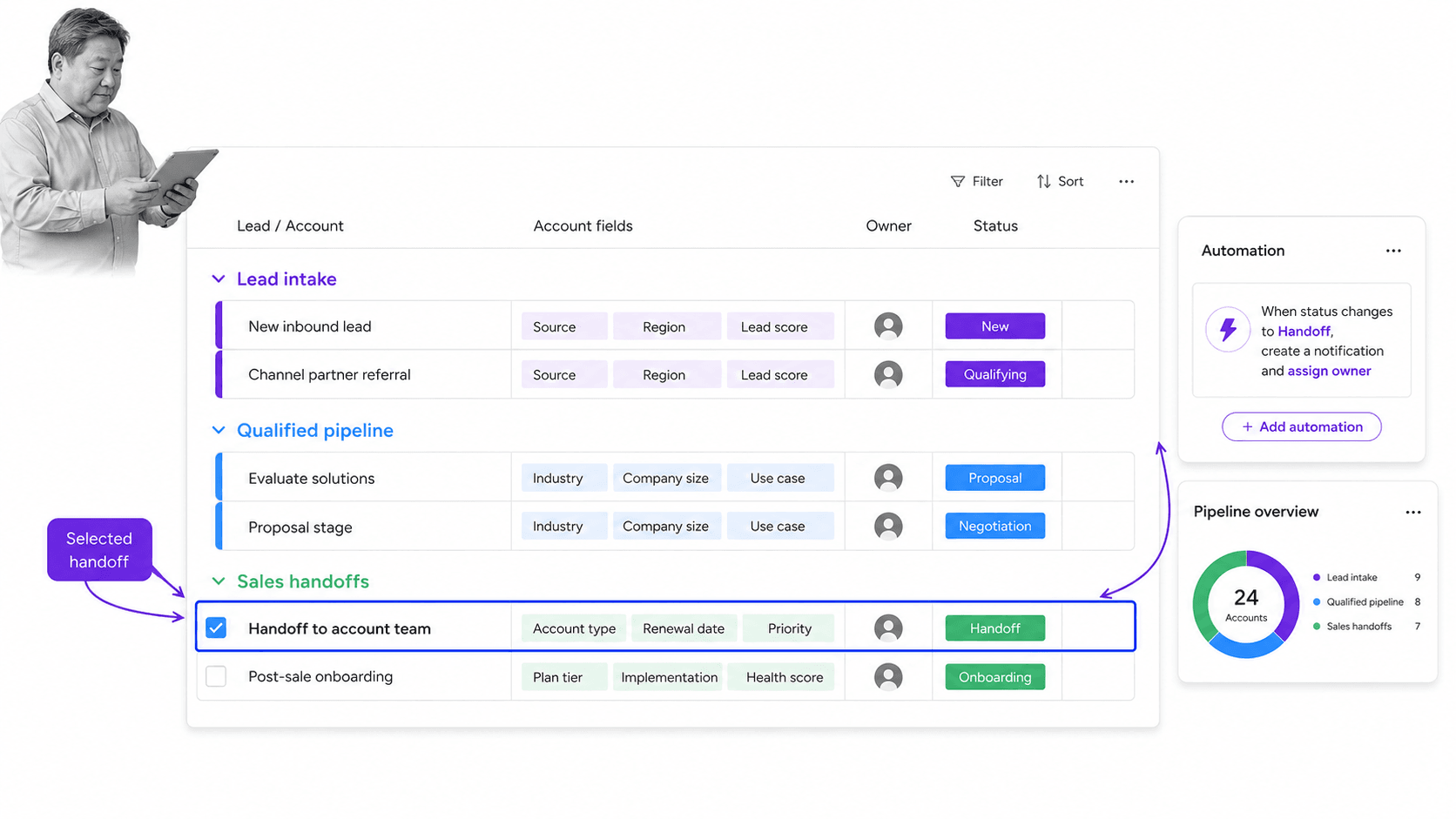
Best for: sales operations teams that want configurable boards for leads, accounts, handoffs, automations, and reporting. monday CRM works well when sales management needs a board that can be shaped around team-specific processes.
The strength is flexibility. Teams can model lead intake, account management, pipeline stages, owners, status chips, automation cues, and dashboards in a visual workspace. Current package details live on the monday CRM pricing.
The risk is board sprawl. If every team creates a different sales operating board, leadership gets fragmented definitions of status, stage, and ownership. monday CRM works best when sales operations defines naming, fields, statuses, and automation rules upfront.
monday CRM can be a good fit when the sales team thinks in boards and workflows rather than traditional CRM screens. Lead intake, account tasks, partner handoffs, outbound campaigns, and post-sale transition work can all be represented in a way that non-admin users understand quickly.
The governance question is whether the board is a shared operating system or a collection of local trackers. Before rollout, define which fields are mandatory, which statuses are official, which automations can change ownership, and which handoffs need approval before they move.
- Best fit: configurable sales operations, lead intake, account boards, handoff tracking, and dashboard-driven workflows.
- Watch out for: teams that need strict approval evidence and a durable step-by-step execution trail.
- Pair with workflow when: a board row represents a recurring process with required steps, approvals, or evidence.
Where sales management tools stop being enough
Sales management tools stop being enough when they show work without controlling it. A CRM can show an opportunity. A board can show a stage. A dashboard can show a forecast. None of those automatically proves the right qualification, approval, handoff, or onboarding step happened.
Use CRM for the customer record
The CRM should store accounts, contacts, opportunities, activity history, stage data, and forecast context. It is the place managers inspect the pipeline and executives read the revenue picture.
Use workflow for repeatable execution
Use workflow software when the sales process has required steps. That includes qualification, discovery prep, pricing approval, legal review, proposal generation, handoff to customer success, renewal review, and implementation kickoff. Pages on workflow management software, task automation, and business process automation software explain how automation turns process rules into action.
A good sales stack does not need every tool to do every job. It needs clear ownership. The CRM owns the customer record. The engagement tool owns outbound activity. The forecast view owns leadership inspection. The workflow owns the required steps that must happen the same way every time.
That separation keeps the stack cleaner. Reps can work from the tools that help them sell, while operations can still enforce the steps that protect the business. Managers get cleaner data because the workflow creates completion evidence instead of relying on after-the-fact updates.
Use templates to reduce blank-page process design
Templates help teams move faster without inventing every handoff from scratch. A customer onboarding checklist can connect sales promises to implementation reality, while approvals, conditional logic, and run links help teams route review work without relying on memory.
The practical rule is simple: use sales management tools to see and manage the pipeline. Use Process Street when the work behind the pipeline needs to be enforced, repeated, automated, and proved.
FAQs
What are sales management tools?
Sales management tools are software systems that help sales leaders manage pipeline, rep activity, deal stages, forecasting, coaching, follow-up, and repeatable sales processes. They include CRM systems, pipeline boards, engagement tools, workflow automation, and reporting surfaces.
What are the best sales management tools?
The best sales management tools depend on the sales motion. Process Street is best for workflow control, Salesforce Sales Cloud for enterprise CRM, HubSpot Sales Hub for growing teams, Pipedrive for visual pipeline management, and monday CRM for configurable sales operations boards.
How are sales management tools different from CRM software?
CRM software stores customer, account, opportunity, and activity data. Sales management tools are broader because they can also include workflow automation, rep coaching, engagement queues, forecasting, approvals, and process proof around the CRM.
Which sales management tool is best for workflow control?
Process Street is the strongest fit when sales work needs repeatable workflows, required fields, approvals, conditional routing, integrations, and audit history. It complements CRM systems by controlling the process around the customer record.
When should a team replace spreadsheets with sales management tools?
Replace spreadsheets when pipeline data is stale, next steps are unclear, handoffs happen manually, managers cannot see ownership, or reporting requires too much cleanup. Spreadsheets can track simple lists, but they do not enforce execution.
Can Process Street support sales management?
Yes. Process Street supports sales management by turning qualification, proposal review, discount approval, handoff, onboarding, and renewal steps into controlled workflows with assignments, approvals, integrations, and proof.
