


Turn every policy into automated workflows with built-in enforcement and audit-ready proof.



7 Best Scribe Alternatives & Competitors in 2026

Scribe alternatives help teams document, teach, or run repeatable work in different ways. Scribe is strong at turning a recorded browser or desktop process into a visual step-by-step guide. It captures activity, creates screenshot-based instructions, supports editing and redaction on paid plans, and gives teams a fast way to share software knowledge without writing every step from scratch.
A team may still need an alternative when the job expands beyond capture. Some procedures need assigned owners, approvals, evidence, deadlines, and a history for every run. Some need in-app guidance, narrated video, role-based learning, a searchable SOP library, private offline creation, or a lower-cost browser recorder. Those are different operating models, so this list ranks tools by the job they solve instead of pretending every product is interchangeable.
The evaluation uses five criteria: fit for the tool’s core job, speed from source activity to usable guidance, accountability and governance, pricing model, and the ability to keep content useful after the underlying process changes. Every competitor description and price is grounded in current vendor-owned product or pricing material. The list does not use fabricated scores or vague claims of universal superiority.
Treat the table as a starting point, then test the shortlisted products with one procedure that your team performs often. Include the source application, the people who create and maintain the guidance, the employees who use it, and the proof a manager needs afterward. A realistic test exposes whether you need a polished reference, a learning experience, an answer library, or a controlled workflow. It also reveals the continuing cost of updates, administration, access, and adoption.
Process Street is ranked first for teams whose central need is enforceable, trackable, recurring process execution. That ranking does not make it the best video producer, learning platform, or offline capture tool. Each competitor section states where that product can be a better fit, so you can choose the operating model that matches the work.
Use the links below to jump to the comparison that matches your use case:
- Scribe alternatives at a glance
- Process Street
- Tango
- Guidde
- Trainual
- Whale
- Folge
- Dubble
- Scribe alternatives FAQ
- Choose the right Scribe alternative
Scribe alternatives at a glance
Process Street is the best overall choice when procedures must become controlled workflow runs with owners, required information, approvals, conditional routes, evidence, and execution history. Tango is the closest fit for captured workflows with in-app guidance. Guidde leads for narrated video. Trainual is strongest for structured employee learning. Whale combines SOP knowledge with training. Folge fits private local creation. Dubble is the simple, generous browser-capture option.
Before switching tools, define whether the output is a reference guide or an operating process. These process documentation templates show what useful source material must capture. The broader process management software comparison helps separate document libraries from systems that coordinate execution.
| Tool | Best for | Standout feature | Free plan | Starting price |
|---|---|---|---|---|
| Process Street | enforceable, trackable, recurring process and SOP workflows | workflow runs with owners, approvals, conditional logic, evidence, and audit history | 14-day trial | Custom quote |
| Tango | captured workflows plus in-app guidance | step capture with Guide Me guidance and workflow insights | Yes | $15/user/month billed annually for Pro Team |
| Guidde | video-first how-to documentation with AI voiceover | recording-to-video guides with narration, captions, and export options | Yes | $19/creator/month billed annually for Pro |
| Trainual | employee onboarding, training paths, and knowledge checks | role-based training with testing, assignments, and completion reporting | No permanent free plan | Custom quote |
| Whale | SOP libraries with training and contextual knowledge access | AI-assisted SOPs, training flows, quizzes, and browser suggestions | Yes | $99/month billed annually for Team |
| Folge | local, offline guide creation on Mac and Windows | desktop capture, local editing, broad exports, and one-time licensing | Yes | $155 one-time per Business seat |
| Dubble | simple browser-based documentation with generous free usage | automatic guides with screenshots, video, redaction, collaboration, and export | Yes | $18/month billed annually for Pro |
1. Process Street
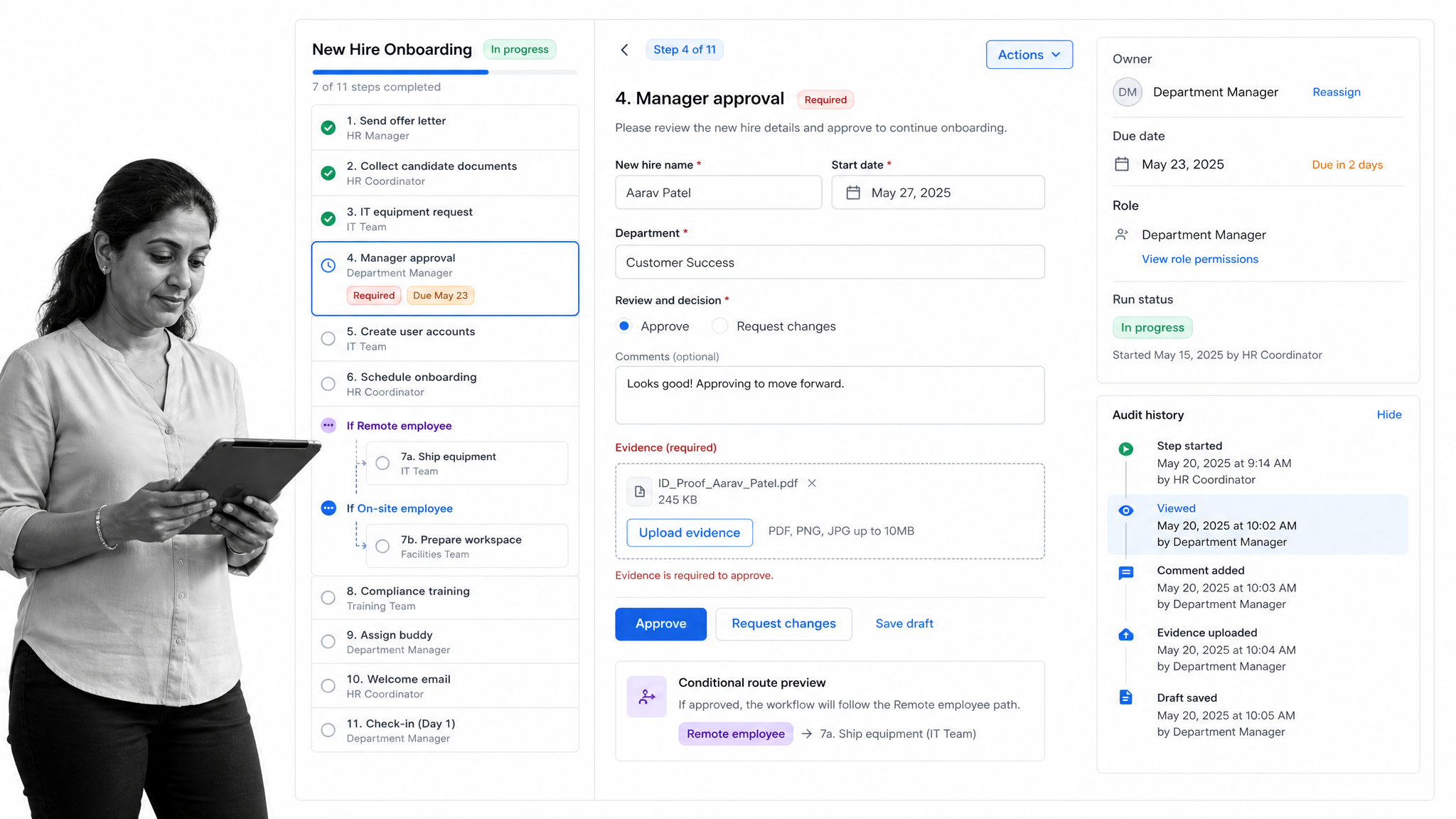
Best for: enforceable, trackable, recurring process and SOP workflows across operations, HR, onboarding, finance, quality, and compliance-adjacent teams.
Process Street is ranked first because it solves the problem that appears after a team captures a procedure: ensuring the work is followed every time. A Scribe guide can explain the clicks. Process Street turns the operating standard into a workflow run with assigned owners, required fields, instructions, files, deadlines, decisions, and a current status. Every run becomes a traceable record of what happened.
That execution layer is the reason Process Street earns the top position for this comparison’s ICP. An employee onboarding procedure needs more than screenshots. It needs a new hire’s details, role-based tasks, account provisioning, payroll and security handoffs, manager approvals, due dates, evidence, and exceptions for location or employment type. A vendor review needs intake, risk questions, conditional review, approval, remediation, and a retained decision record. The procedure is valuable, but the controlled run is what makes it operational.
Required fields prevent incomplete handoffs. Conditional logic changes the path when an answer or risk condition changes. Approval tasks keep the decision, context, comments, and result inside the workflow. Enforced order, role assignments, dynamic due dates, scheduled runs, and automation help turn the documented standard into the default way work moves.
This structure also makes process improvement more concrete. Instead of asking whether employees opened a guide, a process owner can inspect active and completed runs, find where work waits, see which fields or approvals are repeatedly incomplete, and revise the workflow. The procedure, the execution record, and the improvement loop stay connected. That is materially different from a library of captured instructions, even when those instructions are polished and searchable.
Process Street works especially well when teams already have useful source material. A captured Scribe can be linked inside a task when the employee needs visual guidance. A master SOP structure can provide the controlled procedure. A live workflow then assigns the work, collects the required information, manages exceptions, and preserves completion evidence. The products can complement each other, but Process Street owns the operational layer.
How Process Street compares with Scribe
Scribe is optimized for rapid process capture. A creator records activity across a browser or desktop application, and the product turns the session into a visual step-by-step guide. Process Street is optimized for repeatable execution. A builder defines the tasks, inputs, rules, owners, deadlines, and decisions, then launches a separate run for each employee, customer, vendor, request, audit, or case. One tool explains how. The other governs the live instance of work.
The distinction matters most when failure has consequences. A guide can say that a manager must approve an access request, but it cannot by itself prevent the process from skipping the approval. A workflow can require the manager’s decision before the downstream provisioning task becomes available. It can also capture the request, the decision, the owner, the completion date, and supporting evidence. This is why Process Street is the stronger choice for recurring, compliance-adjacent, cross-functional work.
Teams choosing between the two should also review the dedicated Process Street vs Scribe comparison. The practical test is to take one real procedure and ask what must happen after a person reads it. If the answer is simply “perform these clicks,” a capture tool can be sufficient. If the answer includes ownership, routing, approvals, evidence, deadlines, exceptions, or reporting, a workflow platform is the better foundation.
How to evaluate Process Street
Use a representative recurring process rather than a polished demonstration checklist. Include a required field, an attachment, a conditional branch, an approval, several role-based owners, and a deadline that changes with the case. Run it twice with different inputs. Confirm that each instance follows the correct path, exposes its current status, prevents incomplete handoffs, and leaves a useful history. That test reveals the controls that are invisible in a documentation-only comparison.
A practical starting point is an employee onboarding workflow. Run it for two fictional hires in different roles. Give one hire extra security training through a conditional path, require manager approval for access, collect proof of equipment delivery, and assign the handoffs to HR, IT, security, and the manager. The result should show whether the system can coordinate the real process, not merely display its instructions.
Where Process Street fits in a mixed documentation stack
Process Street does not require every piece of guidance to be recreated inside the workflow. Teams can keep a short captured guide, narrated video, policy page, or technical manual as the supporting instruction for a task. The workflow provides the live context: which case is being handled, who owns the step, which information is required, what decision is pending, and what must happen next. This lets specialist documentation tools remain useful without asking them to carry the burden of orchestration.
That mixed model is often the most realistic migration path. Start with the processes where missed steps, delayed handoffs, incomplete evidence, or unrecorded approvals create the most risk. Keep stable reference guides in their existing format, then connect them to the corresponding workflow tasks. Over time, the team can see which instructions are actually used, which steps create friction, and which parts of the operating standard need to change. The goal is controlled work, not a forced all-at-once content migration.
Key Process Street features
- Reusable workflows with separate runs for every case
- Required form fields, files, instructions, and evidence inside tasks
- Conditional logic for exceptions and risk-based paths
- Approval tasks with decisions and comments kept in context
- Role assignments, due dates, scheduling, automation, and analytics
- Access controls, revision recovery, and auditable run history on eligible plans
Process Street pros
- Turns SOPs into assigned work instead of leaving execution to memory
- Creates a separate traceable record for every run
- Combines documentation, forms, approvals, routing, evidence, and automation
- Works across departments without forcing every process into a project or training course
- Supports simple checklists and controlled multi-team workflows in the same platform
Process Street cons
- It is not a dedicated video editor, so Guidde is stronger for produced audiovisual guides
- It is not a learning management system, so Trainual can fit better for curriculum-heavy employee training
- Paid pricing is custom quoted rather than posted as a simple self-serve amount
Process Street pricing
Process Street offers a 14-day Pro trial. Paid plans are custom quoted, so review the Process Street pricing page for current feature coverage and contact the team for a quote. The buying motion fits teams evaluating a shared operational system rather than individuals looking only for a free capture utility.
Process Street is the best overall Scribe alternative for teams that know how the procedure should work and now need to ensure it is followed, tracked, and improved. The ranking is deliberately narrow. If your main need is in-app software guidance, narrated video, employee learning, SOP search, private offline capture, or inexpensive browser documentation, one of the specialists below may fit better.
2. Tango
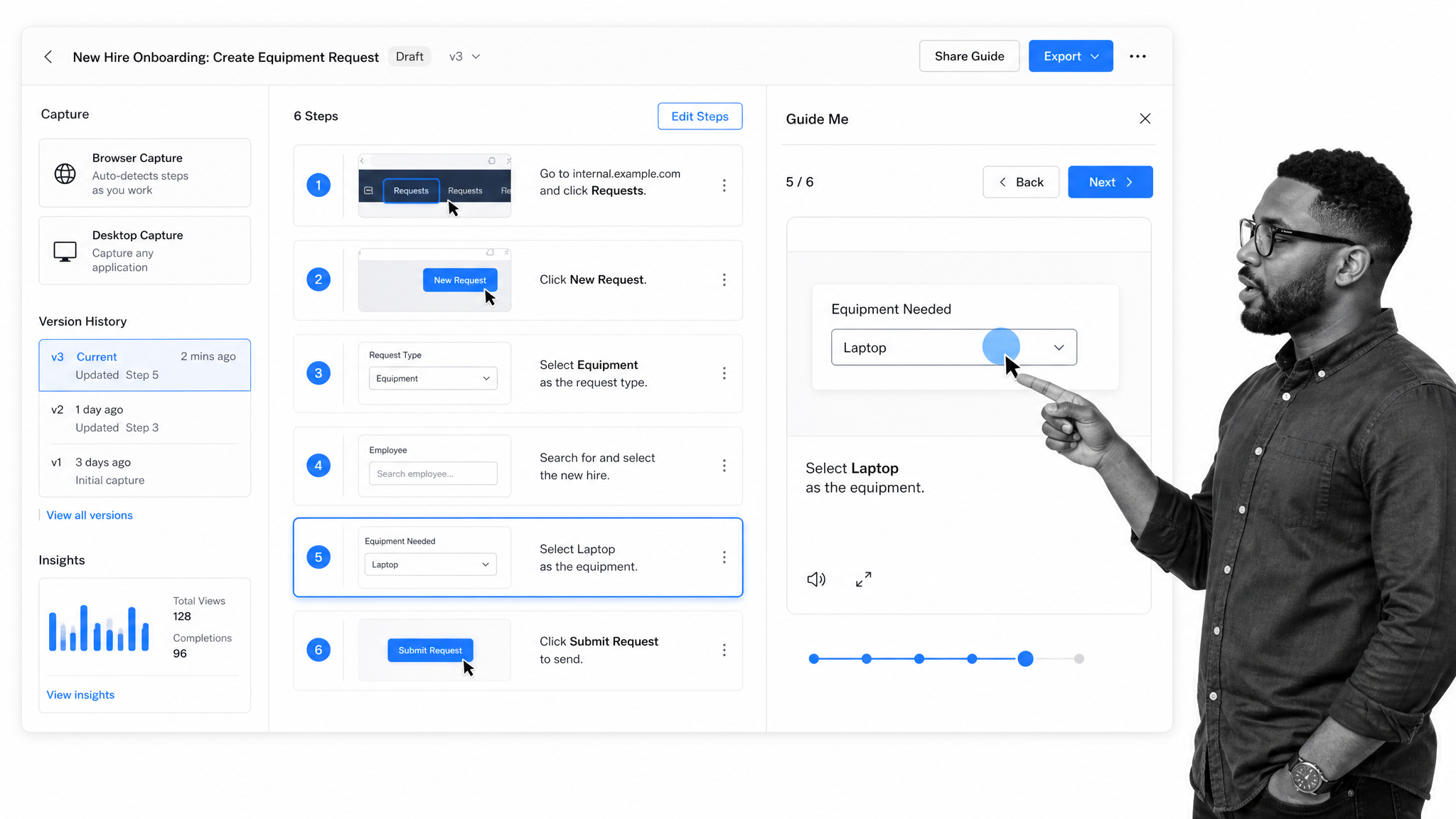
Best for: captured workflows plus in-app guidance.
Tango is a close Scribe alternative because both products start with the same useful action: record a process while you perform it. Tango turns the captured activity into a workflow with screenshots and step text, then lets the creator refine, share, embed, or export the result. Its current paid documentation plans add browser and desktop capture, branding, voice transcription, screenshot editing, version history, and viewership insights.
The important distinction is what happens after capture. Tango also offers Guide Me guidance, Pins, and related digital-adoption controls on its enterprise tier. That makes it more useful when the instruction should appear inside the application where the user is working. A support or enablement team can publish a workflow and give the learner a guided path instead of asking them to keep a separate document open.
Tango is a better fit than Process Street when the core problem is software adoption at the point of use. If employees need a prompt beside the field they are completing, an overlay can be more direct than a separate workflow. Process Street remains the stronger choice when the process spans people, systems, approvals, evidence, deadlines, and recurring execution beyond a single product screen.
A fair evaluation should test both a simple browser procedure and a desktop or cross-application workflow. Check how quickly the captured guide can be corrected after the source application changes. Then ask a learner to use Guide Me without live help. The best result is not the prettiest guide. It is a guide that stays understandable, maintainable, and available at the moment of need.
Where Tango fits in a mixed documentation stack
Tango can sit beside a workflow platform when its specialist output is still valuable. The team can create the guide in Tango, place it at the exact task where the instruction is needed, and use the workflow to manage ownership, timing, decisions, and evidence. This avoids forcing a capture, video, training, knowledge, or offline-documentation tool to become a process engine. It also avoids rebuilding useful guidance simply because the operating layer changes.
Before standardizing on Tango, define ownership for the source procedure, the published guide, and the live process separately. Decide who updates the content when an application changes, who approves the new version, how learners discover the update, and what proof is required when the work is completed. A specialist tool can be excellent at its core job and still leave those governance questions to another system. The evaluation should make those boundaries explicit rather than hiding them inside a feature checklist.
Key Tango features
- Browser and desktop workflow capture on Pro
- Numbered screenshot steps with editing and blurring
- Voice transcription and video embeds
- PDF, Markdown, and HTML exports
- Guide Me guidance and Pins on eligible plans
Tango pros
- Fast transition from doing the work to documenting it
- In-app guidance can reduce context switching
- Free plan supports small experiments
- Version history and insights help maintain shared guidance
Tango cons
- The free plan limits shared workflows
- Digital-adoption controls require an enterprise buying motion
- Captured guidance does not replace a multi-team workflow runtime
Tango pricing
Tango publishes $15/user/month billed annually for Pro Team as its current entry paid option. Its permanent free-plan status is Yes. Check the Tango pricing page before buying because plan details can change.
3. Guidde
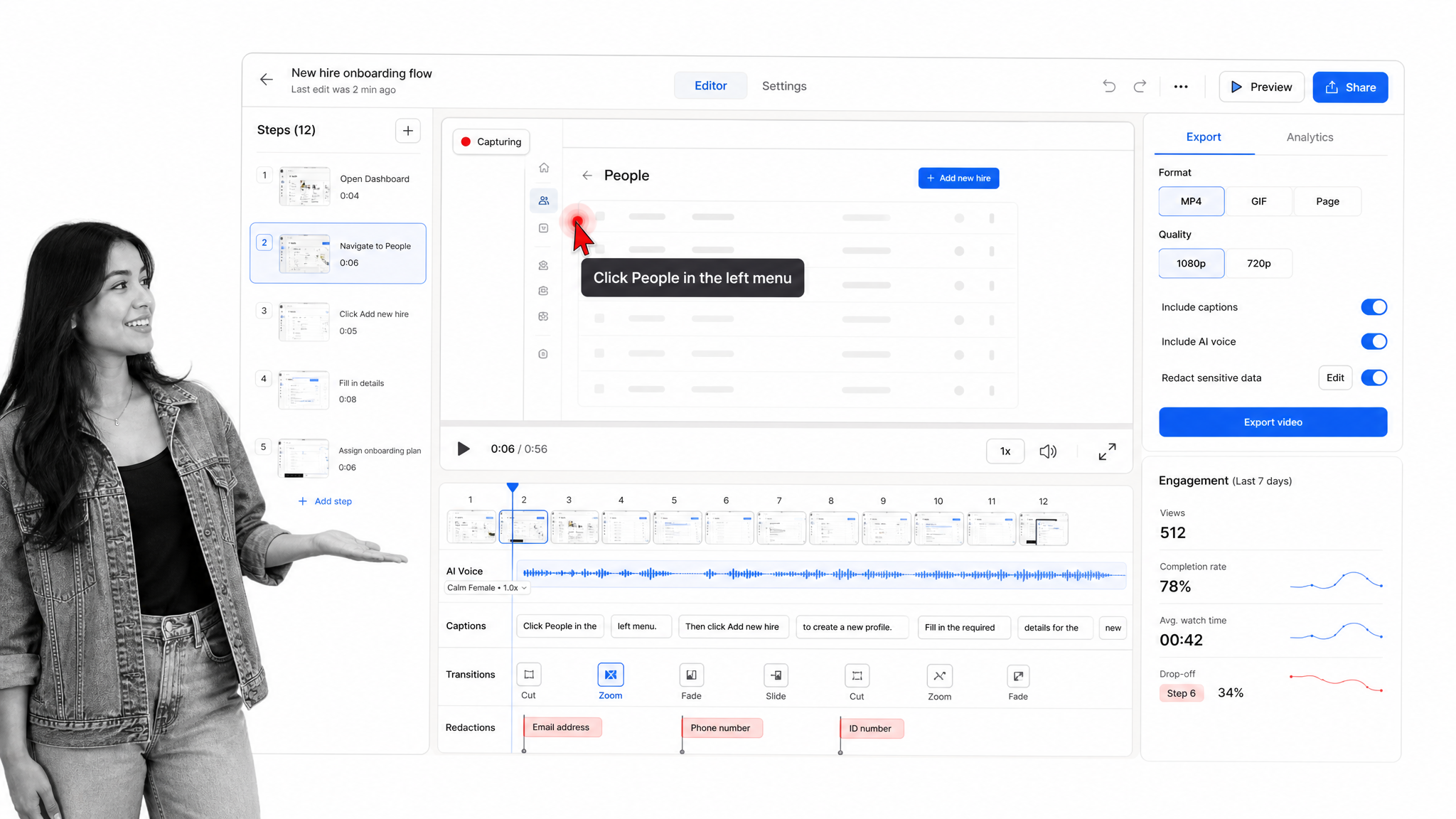
Best for: video-first how-to documentation with AI voiceover.
Guidde is the strongest option in this list for teams that want a produced video guide rather than a screenshot-first document. It captures a process, organizes it into steps, and supports narration, captions, transitions, music, branding, redaction, and multiple export formats. That combination fits customer education, support, training, and product enablement teams that need a polished audiovisual result.
Its pricing separates creators from viewers, and the free plan provides a practical way to test web-based how-to videos. Paid plans expand video volume, exports, desktop capture, AI voice generation, privacy controls, analytics, and enterprise administration. The product can also turn uploaded video, PDF, or presentation material into a guide on eligible tiers, which is useful when the source is not a fresh live capture.
Guidde beats Process Street when the deliverable itself is a narrated learning asset. A customer-facing product walkthrough benefits from pacing, voice, captions, and visual editing. Process Street is better when the instruction must sit inside a recurring process that assigns work, collects inputs, branches on conditions, requests approval, and records completion for each run.
During evaluation, use a procedure that includes at least one sensitive field and one correction after recording. Confirm that redaction, captions, voice quality, and export format meet the audience’s needs. Watch the result on a small screen and without sound. A video-first tool should remain clear when the learner relies on captions or pauses between steps.
Where Guidde fits in a mixed documentation stack
Guidde can sit beside a workflow platform when its specialist output is still valuable. The team can create the guide in Guidde, place it at the exact task where the instruction is needed, and use the workflow to manage ownership, timing, decisions, and evidence. This avoids forcing a capture, video, training, knowledge, or offline-documentation tool to become a process engine. It also avoids rebuilding useful guidance simply because the operating layer changes.
Before standardizing on Guidde, define ownership for the source procedure, the published guide, and the live process separately. Decide who updates the content when an application changes, who approves the new version, how learners discover the update, and what proof is required when the work is completed. A specialist tool can be excellent at its core job and still leave those governance questions to another system. The evaluation should make those boundaries explicit rather than hiding them inside a feature checklist.
Key Guidde features
- Web, desktop, and mobile capture on eligible plans
- AI-generated narration and captions
- Timeline editing with transitions and media
- Video, presentation, and PDF export options
- Privacy controls, analytics, and review features on higher tiers
Guidde pros
- Strong video-first output for education and support
- Creator and viewer roles fit publishing teams
- Free plan supports initial testing
- Narration and captions reduce manual production work
Guidde cons
- Video production can be more than a team needs for simple written procedures
- Some desktop, privacy, and governance controls sit on higher tiers
- It is not designed to run recurring operational cases
Guidde pricing
Guidde publishes $19/creator/month billed annually for Pro as its current entry paid option. Its permanent free-plan status is Yes. Check the Guidde pricing page before buying because plan details can change.
4. Trainual
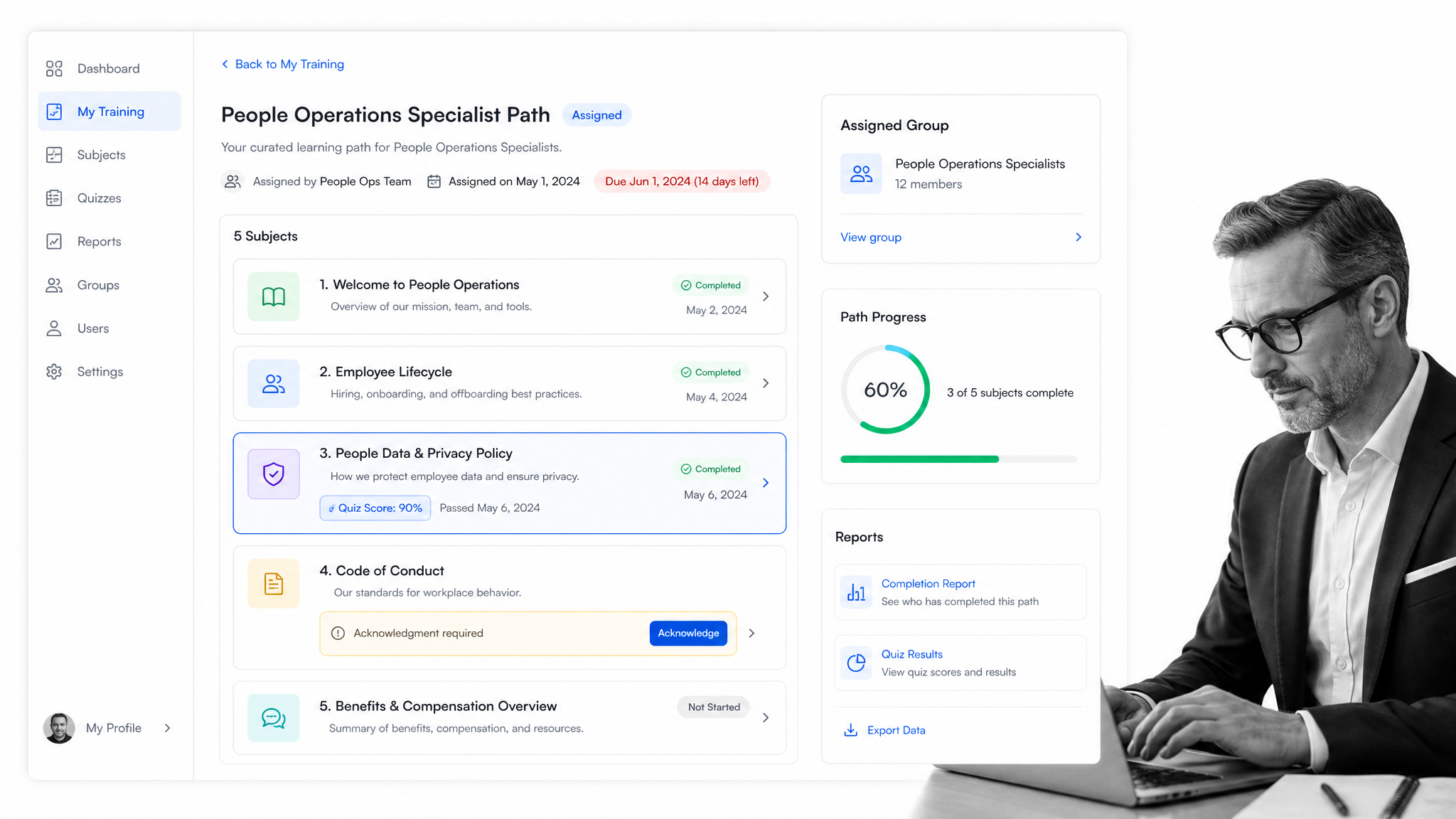
Best for: employee onboarding, training paths, and knowledge checks.
Trainual is built for a different moment than Scribe. Scribe helps capture how a software task is performed. Trainual organizes what employees need to know, assigns it by role or group, adds tests and due dates, and reports whether people completed the material. It brings documentation, onboarding, training paths, policies, responsibilities, and knowledge search into one employee enablement system.
The current product includes AI-assisted documentation, flowcharts, video support, language translation, content verification reminders, group-based training, testing, tracking, and reporting. Higher tiers add more individualized paths, video capabilities, e-signatures, deeper version history, branding, SSO, and enterprise rollout support. Pricing now requires a sales conversation and a one-time implementation fee applies to new customers.
Trainual is better than Process Street when the primary outcome is learning and comprehension. If a people team needs to onboard a cohort, assign role-specific material, test knowledge, collect acknowledgment, and report completion, the training-first model is direct. Process Street is better when onboarding must coordinate live work across HR, IT, security, finance, managers, and the new hire with conditional tasks and a separate record for every person.
Test Trainual with a real role, not a generic handbook. Build a short path with a policy, a procedure, a video, a quiz, and an acknowledgment. Assign it to two groups with different needs. The evaluation should show whether administrators can keep content current and whether employees can find an answer without navigating a large course library.
Where Trainual fits in a mixed documentation stack
Trainual can sit beside a workflow platform when its specialist output is still valuable. The team can create the guide in Trainual, place it at the exact task where the instruction is needed, and use the workflow to manage ownership, timing, decisions, and evidence. This avoids forcing a capture, video, training, knowledge, or offline-documentation tool to become a process engine. It also avoids rebuilding useful guidance simply because the operating layer changes.
Before standardizing on Trainual, define ownership for the source procedure, the published guide, and the live process separately. Decide who updates the content when an application changes, who approves the new version, how learners discover the update, and what proof is required when the work is completed. A specialist tool can be excellent at its core job and still leave those governance questions to another system. The evaluation should make those boundaries explicit rather than hiding them inside a feature checklist.
Key Trainual features
- AI-assisted documentation and knowledge search
- Role and group-based training assignments
- Quizzes, due dates, tracking, and reporting
- Policy acknowledgments and e-signatures on eligible tiers
- Org charts, responsibilities, and onboarding support
Trainual pros
- Purpose-built for employee onboarding and training
- Clear accountability for assigned learning
- Testing adds evidence of comprehension
- Documentation and enablement live in one environment
Trainual cons
- No permanent free plan is currently published
- Pricing requires a sales conversation and implementation fee
- Training completion is not the same as executing a live business process
Trainual pricing
Trainual publishes Custom quote as its current entry paid option. Its permanent free-plan status is No permanent free plan. Check the Trainual pricing page before buying because plan details can change.
5. Whale
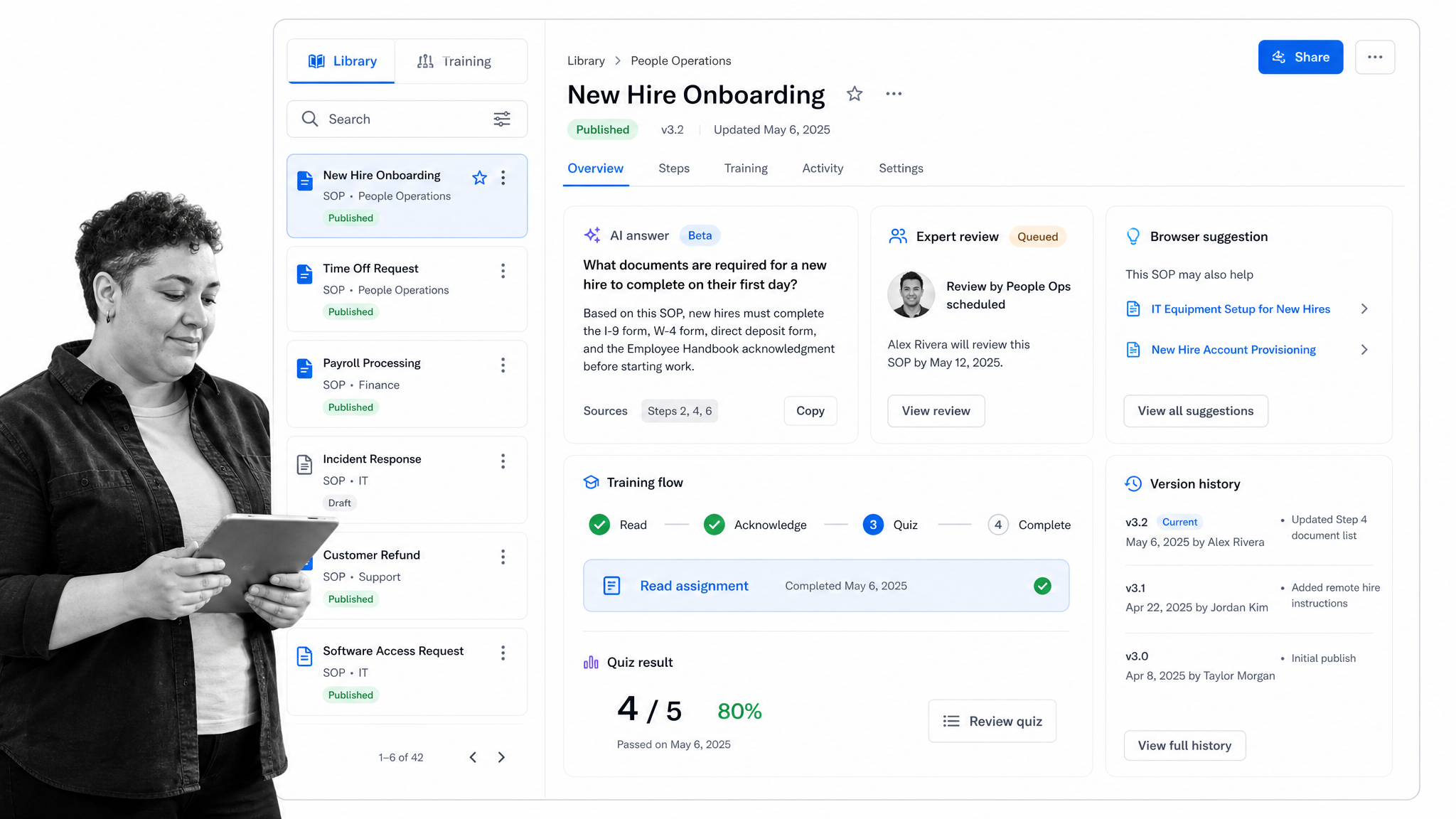
Best for: SOP libraries with training and contextual knowledge access.
Whale combines SOP documentation with training and knowledge access. Teams can create or import procedures, organize them in a shared library, record screens, convert video into guides, assign reading, build training flows, generate quizzes, and surface information through a browser extension. That breadth makes it a credible Scribe alternative for teams that need more than capture but do not need a full workflow runtime.
The free plan supports a small group and includes AI-assisted documentation, step recording, screen recording, video-to-SOP conversion, and checklists. Paid tiers expand users or creators, permissions, expert reviews, branding, exports, version history, training flows, quizzes, analytics, contextual suggestions, SSO, and enterprise administration. The exact mix changes by tier, so buyers should map their roles before comparing monthly totals.
Whale beats Process Street when the central job is keeping a searchable SOP library connected to lightweight training. Its contextual suggestions can help employees retrieve guidance while they work in browser applications. Process Street is stronger when a procedure must become a live case with owners, required information, approval gates, exceptions, scheduled runs, evidence, and a record of every execution.
Evaluate Whale with one mature SOP and one messy source document. Test import quality, editing, review, search, quiz generation, and browser access. Assign the procedure to a small audience and inspect the administrative view. A documentation platform should make it easier to govern the material, not merely make the first draft faster.
Where Whale fits in a mixed documentation stack
Whale can sit beside a workflow platform when its specialist output is still valuable. The team can create the guide in Whale, place it at the exact task where the instruction is needed, and use the workflow to manage ownership, timing, decisions, and evidence. This avoids forcing a capture, video, training, knowledge, or offline-documentation tool to become a process engine. It also avoids rebuilding useful guidance simply because the operating layer changes.
Before standardizing on Whale, define ownership for the source procedure, the published guide, and the live process separately. Decide who updates the content when an application changes, who approves the new version, how learners discover the update, and what proof is required when the work is completed. A specialist tool can be excellent at its core job and still leave those governance questions to another system. The evaluation should make those boundaries explicit rather than hiding them inside a feature checklist.
Key Whale features
- AI-assisted SOP writing and video-to-guide conversion
- Step recording and screen recording
- Training flows, quizzes, and read assignments
- Expert reviews and version history on paid tiers
- Browser extension for contextual knowledge access
Whale pros
- Combines SOP creation, search, and training
- Free plan supports a useful small-team test
- Contextual access reduces knowledge hunting
- Role separation can control creator costs
Whale cons
- Plan structure requires careful seat and feature mapping
- Advanced governance and contextual controls sit on higher tiers
- It does not provide the same depth of recurring workflow execution
Whale pricing
Whale publishes $99/month billed annually for Team as its current entry paid option. Its permanent free-plan status is Yes. Check the Whale pricing page before buying because plan details can change.
6. Folge
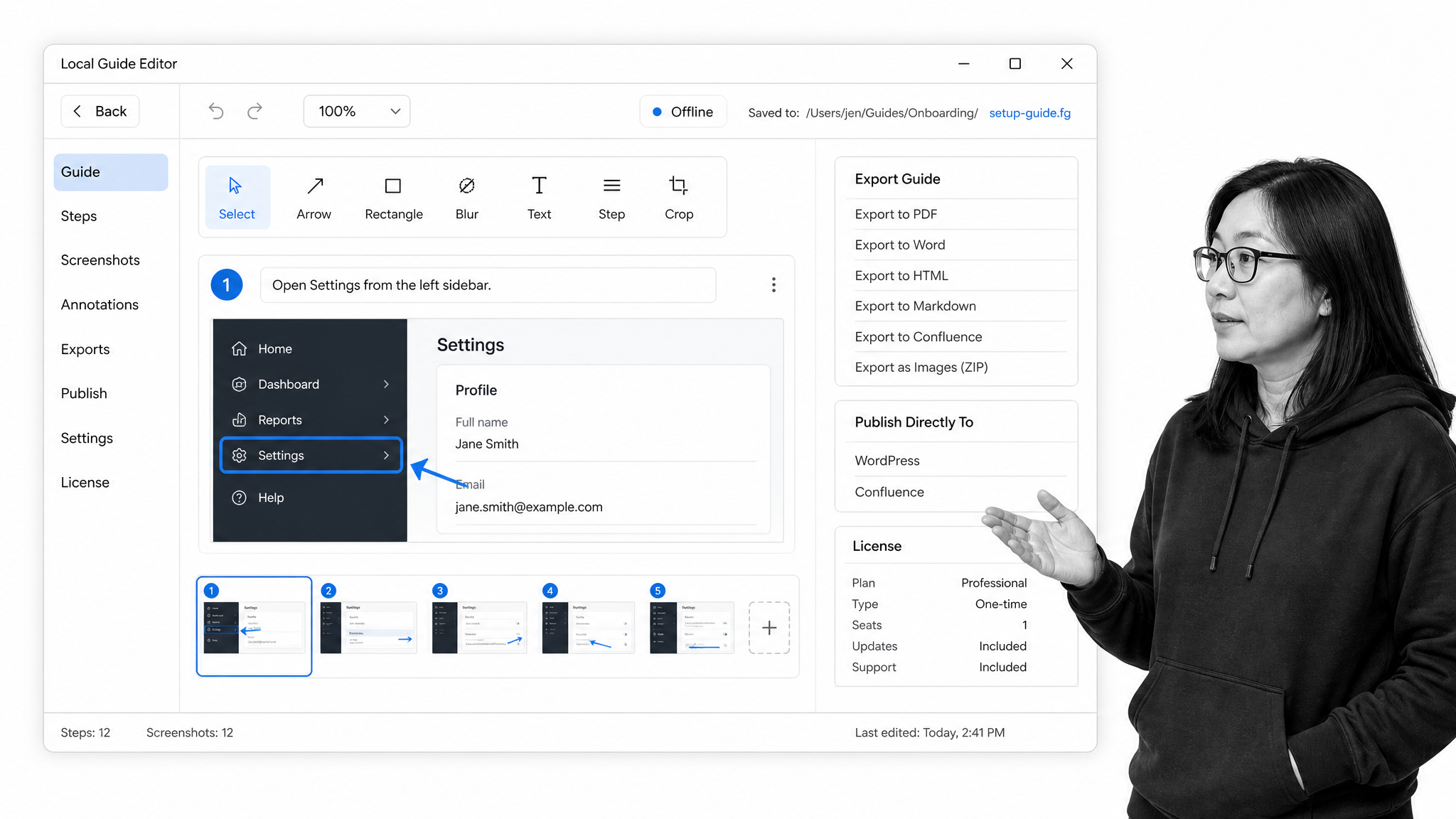
Best for: local, offline guide creation on Mac and Windows.
Folge takes a local desktop approach. It is installed on Mac or Windows, captures screenshots as the user works, and provides a guide editor for annotations, step management, branding, and export. Business licensing is sold as a one-time purchase per seat, and the vendor states that capture, editing, and export occur on the user’s computer rather than being uploaded to Folge servers.
That model is attractive when privacy, offline availability, or subscription avoidance matters more than cloud collaboration. Folge supports multiple document formats and direct publishing targets, including Confluence, WordPress, Notion, and Hudu. Its free version has no time limit, while the Business license adds premium features, integrations, export formats, support, and lifetime updates under the published terms.
Folge beats Process Street when an individual technical writer needs a local capture and export utility. The person may work across native desktop applications, create a manual offline, and hand the result to another system. Process Street is better when many people need to execute the procedure together, manage assignments and decisions, and preserve a shared operational record in the cloud.
Evaluate Folge on the actual operating system and applications your documentation team uses. Capture a cross-application procedure, edit the screenshots, apply redaction, export to the formats you require, and test a direct publishing target. Also confirm how your team will handle shared review and version ownership because local creation changes the collaboration model.
Where Folge fits in a mixed documentation stack
Folge can sit beside a workflow platform when its specialist output is still valuable. The team can create the guide in Folge, place it at the exact task where the instruction is needed, and use the workflow to manage ownership, timing, decisions, and evidence. This avoids forcing a capture, video, training, knowledge, or offline-documentation tool to become a process engine. It also avoids rebuilding useful guidance simply because the operating layer changes.
Before standardizing on Folge, define ownership for the source procedure, the published guide, and the live process separately. Decide who updates the content when an application changes, who approves the new version, how learners discover the update, and what proof is required when the work is completed. A specialist tool can be excellent at its core job and still leave those governance questions to another system. The evaluation should make those boundaries explicit rather than hiding them inside a feature checklist.
Key Folge features
- Automated screenshot capture across Mac and Windows
- Local editing and offline operation
- Annotations, branding, and broad document exports
- Direct publishing to selected knowledge platforms
- One-time Business licensing with transferable seats
Folge pros
- Local processing supports privacy-sensitive documentation
- One-time licensing avoids a recurring subscription
- Broad exports fit existing publishing workflows
- Free version offers a low-risk evaluation path
Folge cons
- Local files require a deliberate collaboration and governance process
- It does not provide a shared workflow execution layer
- Cloud administration is lighter than enterprise knowledge platforms
Folge pricing
Folge publishes $155 one-time per Business seat as its current entry paid option. Its permanent free-plan status is Yes. Check the Folge pricing page before buying because plan details can change.
7. Dubble
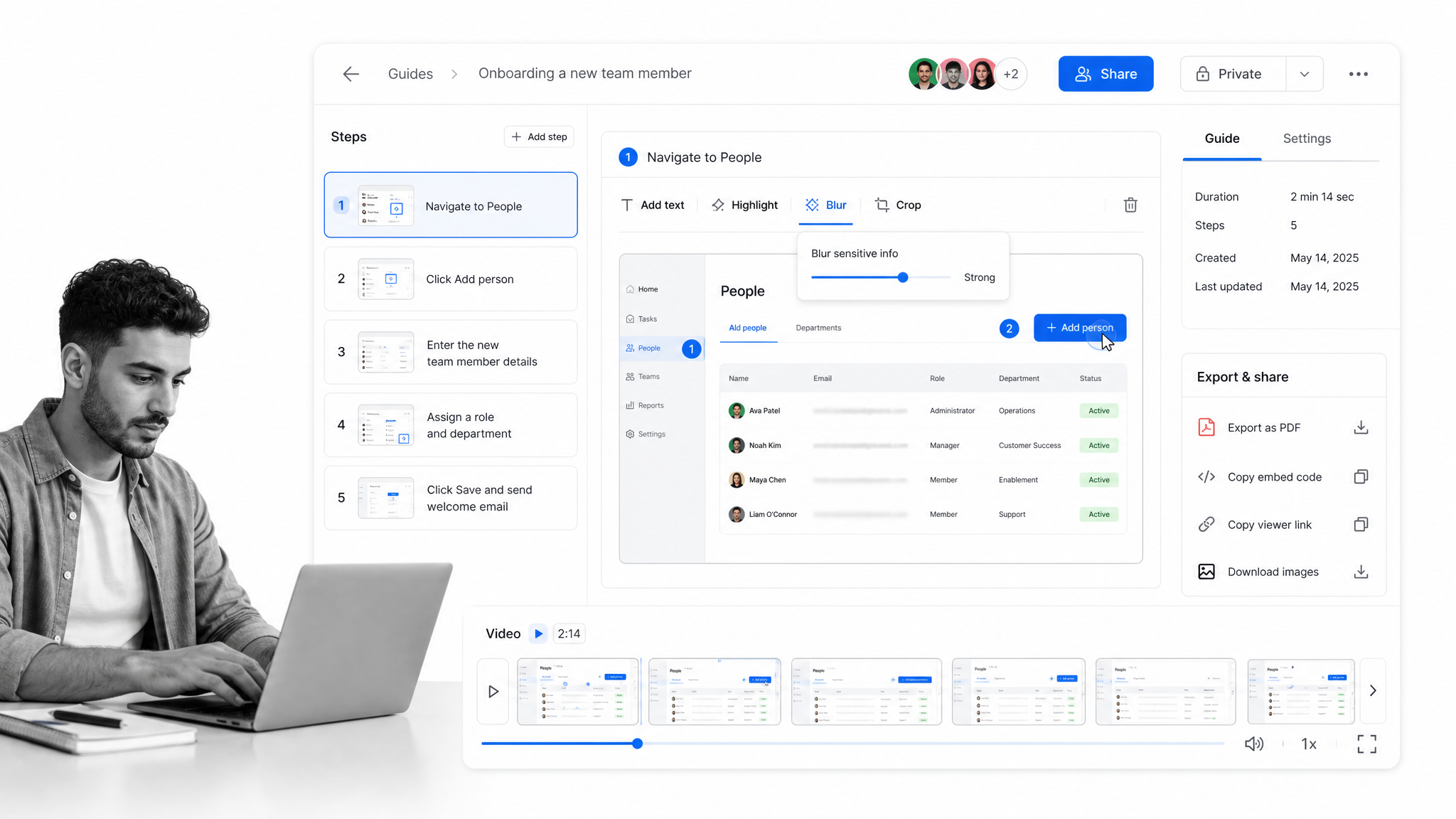
Best for: simple browser-based documentation with generous free usage.
Dubble is a lightweight Scribe alternative for teams that want quick browser capture without a restrictive guide limit on the free tier. It records a task, turns the activity into a step-by-step guide, and supports screenshot editing, redaction, sharing, embeds, and exports. The paid plan adds video and audio, collaborators, private viewers, watermark removal, and additional creator seats.
The product is intentionally straightforward. A user installs the Chrome extension, records the process, corrects the guide, and shares it in the destination where the audience already works. That keeps the creation loop short for small businesses, agencies, support teams, and internal operators who need practical instructions but do not want a broad learning or process platform.
Dubble beats Process Street when the requirement is simply to capture and share a large number of browser procedures at low cost. Its free plan can be enough for an individual creator publishing guides. Process Street is stronger when those instructions need to become required work with owners, forms, conditional routes, approvals, due dates, evidence, and a history for each run.
Test Dubble with a procedure that includes sensitive information, a correction after recording, and a collaborator. Confirm the redaction workflow before the guide is shared. Export the result and embed it in the system your audience uses. A simple tool wins only if the guide remains easy to maintain after the source application changes.
Where Dubble fits in a mixed documentation stack
Dubble can sit beside a workflow platform when its specialist output is still valuable. The team can create the guide in Dubble, place it at the exact task where the instruction is needed, and use the workflow to manage ownership, timing, decisions, and evidence. This avoids forcing a capture, video, training, knowledge, or offline-documentation tool to become a process engine. It also avoids rebuilding useful guidance simply because the operating layer changes.
Before standardizing on Dubble, define ownership for the source procedure, the published guide, and the live process separately. Decide who updates the content when an application changes, who approves the new version, how learners discover the update, and what proof is required when the work is completed. A specialist tool can be excellent at its core job and still leave those governance questions to another system. The evaluation should make those boundaries explicit rather than hiding them inside a feature checklist.
Key Dubble features
- Automatic browser process capture
- Unlimited guides on the published free plan
- Screenshot editing and redaction
- Video, audio, and collaboration on Pro
- PDF export, embeds, and private viewers
Dubble pros
- Generous free plan for individual documentation
- Simple capture, edit, and share workflow
- Paid plan includes multiple creators
- Redaction and export cover common team needs
Dubble cons
- Desktop recording is currently narrower than mature cross-platform tools
- Enterprise administration is limited to the top tier
- Documentation remains separate from operational execution
Dubble pricing
Dubble publishes $18/month billed annually for Pro as its current entry paid option. Its permanent free-plan status is Yes. Check the Dubble pricing page before buying because plan details can change.
Scribe alternatives FAQ
What is the best Scribe alternative?
Process Street is the best Scribe alternative when a documented procedure must become enforceable recurring work. It adds owners, required fields, conditional routes, approvals, evidence, due dates, and a run history. A specialist may be better when the primary need is in-app guidance, narrated video, employee training, offline capture, or low-cost browser documentation.
Is there a free Scribe alternative?
Tango, Guidde, Whale, Folge, and Dubble all publish permanent free options, although their limits and intended use cases differ. Dubble is generous for browser guide creation, while Folge is useful for local desktop documentation. Compare the paid controls you will need for privacy, collaboration, exports, training, and administration before committing.
What is the best Scribe alternative for small teams?
Dubble is a practical starting point when a small team wants simple browser capture and unlimited guides. Tango and Guidde also provide free plans for narrower documentation jobs. Process Street is the better choice when the same small team needs recurring workflow control, but its paid plans use custom pricing.
What is the closest alternative to Scribe?
Tango is the closest direct alternative because it also captures a process into screenshot-based workflow documentation and can add in-app guidance. Dubble is close for lightweight browser capture. Guidde is close when the team wants to turn captured activity into narrated video rather than a primarily written guide.
Can an office suite replace Scribe?
A common office suite can store documents, screenshots, videos, and forms, but it does not provide one direct equivalent with the same automatic step-capture workflow. Teams can assemble a process from several tools, but a dedicated capture platform is usually faster when the goal is automatic visual documentation.
How do you migrate from Scribe?
Start by inventorying guides, owners, viewers, privacy settings, exports, and the processes each guide supports. Remove duplicates, archive obsolete material, then decide which guides should remain reference content and which should become live workflows. An employee onboarding quick start, the SOP template library, and a process template design guide can provide migration starting points.
Why is Process Street ranked first?
Process Street is ranked first for the use case this comparison prioritizes: enforceable, trackable, recurring process and SOP execution. It connects the operating standard to assigned work, required information, conditional routes, approvals, evidence, and a traceable run history. The competitor sections name the specialist use cases where another product can fit better.
Choose the right Scribe alternative
Choose the product by the destination of the knowledge. Use Tango when guidance should appear inside software. Use Guidde when the deliverable is a narrated video. Use Trainual when employees must learn and prove comprehension. Use Whale when a governed SOP library and lightweight training are central. Use Folge when creation must stay local. Use Dubble when a simple browser recorder and generous free plan are enough.
Choose Process Street when the guide is only the beginning and the real requirement is to run the process correctly every time. It is built for recurring operations that need owners, rules, approvals, evidence, deadlines, and a record of execution. Start with one meaningful workflow, test it with real participants, and compare the operational result rather than the appearance of the documentation alone.
Comparing something else? The full directory of software alternatives and competitor comparisons covers documentation and SOP tools alongside the wider workflow category.
