


Turn every policy into automated workflows with built-in enforcement and audit-ready proof.



Software for Workflow Diagram

Software for workflow diagram work helps teams turn messy processes into clear visual maps. The best setup does more than draw boxes and arrows. It shows steps, decisions, owners, exceptions, and handoffs in a way people can understand before work starts.
This guide explains how to choose software for workflow diagram projects, when a diagramming tool is enough, and when the diagram needs to become a controlled workflow. It also shows how a visual map can move into Process Street, where teams can assign work, collect evidence, route approvals, and prove the process was followed.
The important distinction is simple: a diagram explains how work should move. A workflow system makes the work move. If you choose the wrong software, the diagram becomes another static artifact. If you choose the right stack, the diagram becomes the starting point for execution.
In this article, we are going to cover everything you need to know about workflow diagram software, including:
- What software for workflow diagram work should do
- When workflow diagram software is the right choice
- Core features to look for in software for workflow diagram projects
- How to choose workflow diagram software for your team
- How to move from diagram to running workflow
- Workflow diagram software mistakes to avoid
- FAQs
What software for workflow diagram work should do
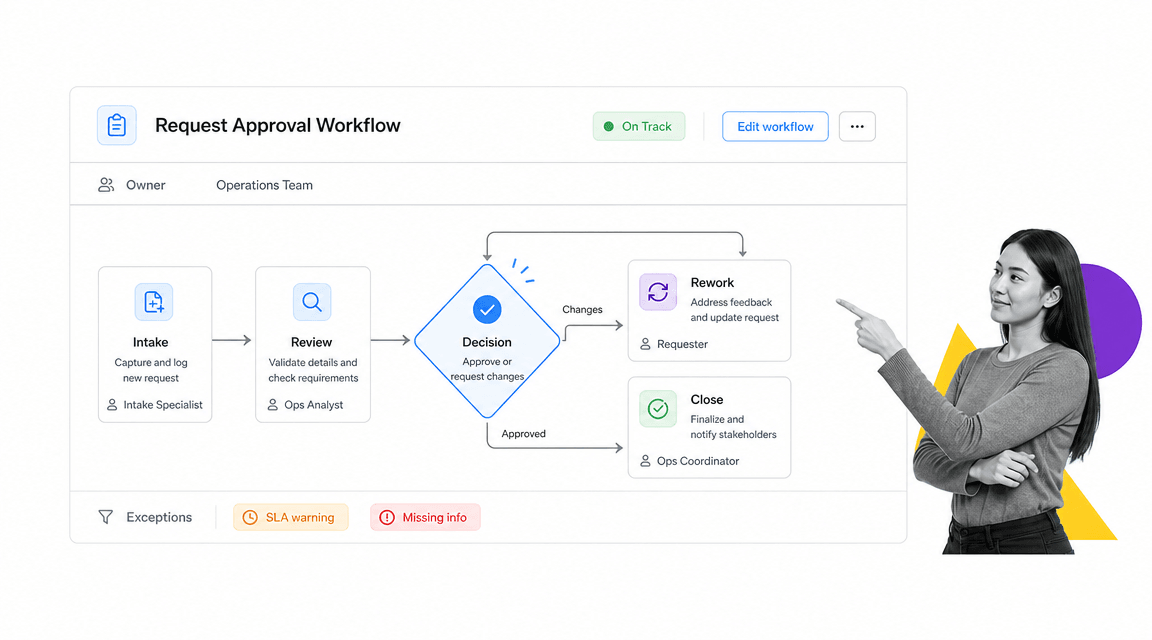
Software for workflow diagram work should make the operating path visible. A good diagram shows the work sequence, the decision points, the owner of each step, and the exception path when something does not go as planned. That is different from a nice-looking flowchart that only shows the happy path.
A workflow diagram is useful because it gives people a shared language before they argue about tools. It lets an operations lead, manager, analyst, and frontline employee point to the same step and ask the same question: what happens here? For a deeper foundation, start with what a workflow is before choosing a drawing tool.
The minimum visual model
At minimum, your diagram should show a start event, the main task sequence, decision points, handoffs, rework loops, and the end state. If the diagram cannot show where work waits, who owns the next move, or what happens after a rejection, the software is only documenting a partial truth.
Formal notation can help when precision matters. The BPMN specification exists so teams can communicate business procedures through a standard graphical notation. The ISO 5807 flowchart symbol standard defines symbols and conventions for several kinds of flowcharts. For software and systems teams, UML activity diagrams can model behavior across systems and actors.
The operating model behind the picture
The diagram should expose the operating model behind the work. That means the diagram has to answer questions that matter during execution: who starts the process, what input is required, what approval is needed, what system gets updated, what evidence is retained, and what makes the work complete. That is where static diagramming and workflow documentation need to stay connected.
The diagram is not the final artifact. It is the planning layer. The real value appears when the team can use that map to build a process that runs consistently, collects the right data, and leaves a record behind.
When workflow diagram software is the right choice
Workflow diagram software is the right choice when the process is hard to explain in prose. If the work crosses teams, branches based on input, depends on approvals, or gets stuck at handoffs, a diagram will reveal failure points faster than a written SOP.
Use diagramming when the process is still being designed
Diagramming is strongest in the design phase. Teams use it to map the current state, compare options, identify bottlenecks, and agree on a future state before anyone builds the workflow. Dedicated process mapping software is useful here because it gives you a canvas for exploration.
This is also where teams should decide how formal the notation needs to be. A small internal process may only need simple flowchart symbols. A regulated process, cross-system process, or technical handoff may need BPMN, swimlanes, or UML-style activity notation so ownership and sequence are unambiguous.
Use workflow execution software when the process repeats
Once the process repeats, the problem changes. You no longer need only a map. You need assignments, due dates, required fields, approvals, conditional paths, notifications, integrations, and history. That is where workflow management software and a controlled workflow platform become more useful than a canvas.
The boundary is consequence. If a diagram is only for discussion, diagramming software is enough. If skipped steps create customer risk, audit exposure, rework, or missed revenue, use the diagram to build an automated workflow system that people actually run.
Use both when planning and execution need to stay aligned
Most teams need both layers. A visual map helps the team reason about the flow. A workflow run helps the team execute it. A swim lane diagram can clarify ownership. A running workflow can enforce that ownership when real work arrives.
The trap is letting the two layers drift. If the process changes in execution but the diagram does not change, the diagram becomes untrusted. If the diagram changes but the workflow is not updated, the team keeps running the old process. Choose software and operating habits that keep both sides close.
Core features to look for in software for workflow diagram projects
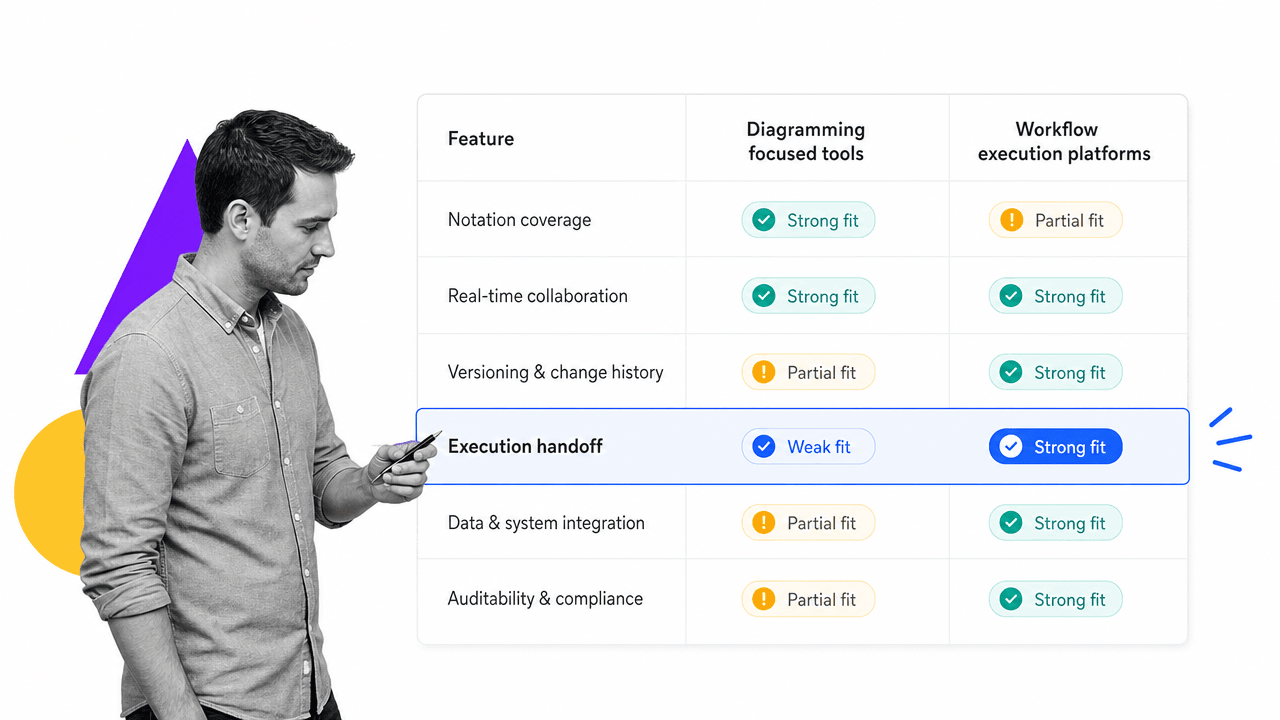
Core features to look for in software for workflow diagram projects depend on whether you are documenting, designing, improving, or operationalizing the process. Do not buy a tool because it has the most shapes. Buy the tool that matches the decision your team needs to make next.
Notation and shape discipline
The tool should support the level of notation your team needs. Simple flowcharts need start, process, decision, data, and connector symbols. Cross-functional workflows need swimlanes. Business process modeling may need BPMN elements. Technical teams may need UML or system diagrams. The key is consistency. A diagram with five meanings for the same shape creates more confusion than clarity.
Collaboration and review
Workflow diagrams are rarely solo artifacts. Look for comments, version history, sharing permissions, and review workflows. Collaborative tools such as Lucidchart workflow diagram software and Mural workflow diagram resources show why live collaboration matters: teams need to discuss the process in context, not trade screenshots in chat.
The review layer should make it clear who approved the diagram and what changed. If your process affects compliance, finance, customers, or operations quality, diagram review should not be casual. It should be treated like a controlled process design artifact.
Export, embed, and handoff
Export matters because diagrams often need to live in SOPs, training docs, technical specs, onboarding guides, and audit packets. Look for clean exports to PNG, SVG, PDF, or editable diagram formats. More important, look for a handoff path into the tools where work is run.
This is where a diagram differs from a workflow template. The diagram explains the path. The template defines the repeatable work. If a tool makes export easy but execution hard, it may be fine for documentation and weak for operations.
Versioning and governance
A process diagram should not be a mystery file on someone’s desktop. It needs an owner, a version, a review date, and a place where the latest approved version lives. Without that governance, people will keep referencing old diagrams after the process changes.
Governance becomes especially important when diagrams support business process management. The team needs to know which process model is current, which changes are proposed, and which version has been turned into execution.
How to choose workflow diagram software for your team
To choose workflow diagram software for your team, start with the job the diagram has to do. A founder sketching a customer journey needs a different tool than a compliance team mapping approval evidence. A software team modeling system behavior needs a different tool than HR mapping employee onboarding.
Step 1: define the diagram audience
Ask who has to understand the diagram. Executives need a clear process story. Operators need ownership and exceptions. Analysts need enough detail to improve the system. Engineers may need formal notation and integrations with technical documentation. A diagram that works for one audience can fail another.
If multiple audiences need the diagram, create layers. Use a simple top-level view for the operating conversation. Use detailed supporting views for implementation, controls, and system logic. Do not force every detail onto one canvas.
Step 2: decide whether you need formal notation
Use formal notation when ambiguity is expensive. BPMN, UML, and standardized flowchart symbols help when the process crosses systems, auditors, vendors, or engineering teams. Use lightweight notation when the goal is fast alignment and the audience is mostly non-technical.
If your team already uses UML diagrams or BPMN, do not replace that discipline with freeform boxes. If your team does not need that precision, do not make the diagram harder than the process it explains.
Step 3: test the handoff into execution
Before choosing a tool, test one real process from map to run. Map the process, assign owners, identify required fields, add approvals, document exceptions, and run a small sample. The test will show whether the diagram is useful or only attractive.
This is where teams that start with creating a workflow in Excel often hit the limit. A spreadsheet can list steps, but it cannot reliably enforce the path, collect evidence, and route decisions unless the team builds a lot of manual process around it.
Step 4: choose ownership rules
Every workflow diagram needs an owner. That owner decides when the process changes, when the diagram is reviewed, and when the execution workflow needs an update. Without ownership, diagrams become snapshots of old conversations.
Ownership rules should be simple: one process owner, one approved source, one review cadence, and one handoff path into execution. If a diagram changes, the running workflow must be reviewed. If the workflow changes, the diagram must be reviewed.
How to move from diagram to running workflow
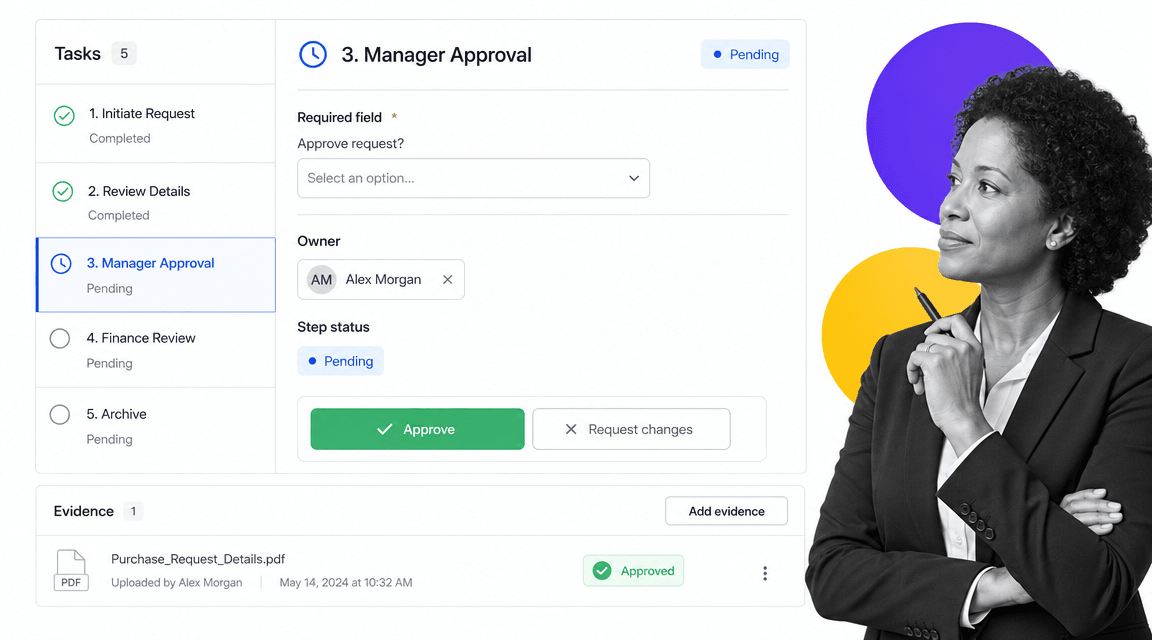
The most valuable workflow diagrams do not stay diagrams. They become running workflows with assigned work, required inputs, approvals, automations, and records. This is the point where the diagram stops being communication and starts becoming operational infrastructure.
Translate shapes into tasks
Start by turning every action box into a task. Give the task an owner, a completion condition, and any required input. If a decision shape branches the process, define the condition that chooses each path. If a swimlane changes, define the handoff and notification that moves work to the next person.
Do not translate every diagram element blindly. Some shapes are context, not work. The conversion step is a cleanup moment: remove duplicate steps, merge tiny actions, and turn vague labels into instructions someone can follow.
Translate decisions into rules
Decision points should become rules inside the workflow. If the answer is yes, show the next approval. If the answer is no, send the task back for rework. If a value crosses a threshold, route to a manager. That is the operating version of workflow automation.
Rules should be visible and testable. A diagram may show a branch, but the workflow has to prove the branch works. Run sample cases through the path before launch, especially for exceptions, rejections, and escalations.
Translate approvals into evidence
Approvals are not just decisions. They are proof that someone reviewed the right information at the right time. When you convert the diagram into a workflow, attach the evidence to the approval step: forms, files, comments, timestamps, and the decision record.
This is the difference between a process that looks controlled and one that is controlled. If the workflow supports required fields, approvals, and audit history, the team can prove the work happened instead of reconstructing it later from email and chat.
Translate the launch into a feedback loop
After the workflow runs, use the results to improve the diagram. Look for skipped steps, frequent rework, slow approvals, unclear ownership, and exceptions that were not mapped. The first version of the diagram is a hypothesis. Execution data shows where it was wrong.
For teams building repeatable operations, this loop matters more than the first diagram. A strong BPM software program treats process maps, workflow runs, and improvement data as one system.
Workflow diagram software mistakes to avoid
Most workflow diagram software mistakes come from treating the diagram as the outcome. The outcome is a process people can understand, run, improve, and prove. The diagram is only one part of that system.
Mapping only the happy path
The happy path is the easiest part to diagram and the least useful part to stop at. Real processes have missing information, rejections, escalations, rework, unclear ownership, and stalled handoffs. If the software makes exception paths hard to show, the process will look cleaner than it is.
Adding too much detail to one canvas
A giant diagram feels thorough but usually fails in practice. People stop reading it. Split complex processes into layers: one overview, one detailed operating path, and supporting diagrams for systems, controls, or edge cases. The goal is comprehension, not density.
Using diagramming as a substitute for execution
A diagram cannot assign the next task, chase an approval, enforce a required field, or retain evidence by itself. If the process repeats and carries operational risk, use the diagram to design the workflow, then run the workflow in software built for execution.
Letting the diagram drift
The diagram needs a review cycle. Every material process change should trigger a diagram review, and every diagram change should trigger a workflow review. Otherwise the visual map and the operational reality split apart.
Choosing software for the wrong user
A diagramming tool can be excellent for analysts and frustrating for frontline operators. A workflow platform can be excellent for execution and too structured for early brainstorming. Match the tool to the user and the stage of the process lifecycle.
The safest pattern is simple: map visually, document clearly, then run the repeatable work in a system designed for control. That gives teams a diagram they can discuss and a workflow they can trust. The process orientation template is a practical starting point for turning process discovery into repeatable work.
FAQs
What is software for workflow diagram work?
Software for workflow diagram work is a tool or platform used to map process steps, decisions, owners, and handoffs visually. Some tools focus on drawing and collaboration, while workflow platforms turn the mapped process into assigned, trackable work.
What is the best software for workflow diagrams?
The best software depends on the job. Use diagramming software when you need a visual map for planning or documentation. Use workflow software when the mapped process needs assignments, approvals, automation, evidence, and repeatable execution.
What should a workflow diagram include?
A workflow diagram should include a start point, tasks, decision points, handoffs, exception paths, owners, and an end state. For cross-functional work, swimlanes help show which team owns each step.
When should a workflow diagram become a workflow?
A workflow diagram should become a workflow when the process repeats, crosses teams, requires approvals, creates compliance risk, or needs proof that work was completed. At that point, the diagram should be converted into tasks, rules, fields, and audit history.
Is BPMN required for workflow diagrams?
BPMN is not required for every workflow diagram. It is useful when teams need standardized business process notation, especially for complex processes, cross-team collaboration, or technical handoff. Simpler processes can often use standard flowchart symbols.
Can Process Street replace workflow diagram software?
Process Street is used after or alongside diagramming. A diagram helps teams plan and explain the workflow. Process Street turns the approved process into assigned work with approvals, required fields, automations, and evidence that the process was followed.
