


Turn every policy into automated workflows with built-in enforcement and audit-ready proof.



What Is GRC Software

What is GRC software? GRC software is software that helps organizations manage governance, risk, and compliance in one coordinated system. It connects policies, controls, risks, audits, evidence, issues, and reporting so teams can see whether the business is operating within its obligations.
The simplest answer to the question what is GRC software is this: it is the system of record and workflow layer for managing how an organization makes decisions, controls risk, and proves compliance.
This guide explains what GRC software includes, how it works in day-to-day operations, where it helps, where it falls short, and how to choose a platform without turning compliance into another disconnected tool. It also gives a practical answer to what is GRC software for teams that need control, not another reporting layer.
In this article, we are going to cover:
- What is GRC software?
- What GRC software includes
- How GRC software works in practice
- Benefits and limitations of GRC software
- What is GRC software used for?
- Where Process Street fits
- FAQs
What is GRC software?
GRC stands for governance, risk, and compliance. Governance defines how decisions are made and overseen. Risk management identifies and controls threats to business objectives. Compliance proves the organization follows laws, regulations, standards, contracts, and internal policies.
A GRC platform brings those activities together instead of leaving them in separate spreadsheets, document folders, emails, ticket queues, and audit binders. External explanations from IBM guide to GRC, TechTarget definition of GRC, and AWS overview of GRC all describe GRC as a coordinated approach to aligning objectives, managing risk, and meeting obligations.
The software is not the program
A common mistake is treating GRC software as the GRC program itself. The software can organize work, automate evidence collection, route approvals, and report status. It cannot decide your risk appetite, define your control environment, or make leaders care about governance.
That distinction matters. If the underlying program is unclear, software will only make unclear work more visible. The best implementations start with risk ownership, control design, policy governance, audit needs, and operating workflows before configuration begins.
The practical purpose
The practical purpose of GRC software is to reduce fragmentation. A policy should connect to controls. A control should connect to evidence. A finding should connect to a remediation task. A risk should connect to an owner, assessment, treatment plan, and status. Leaders should not need a manual status chase to understand whether the organization is exposed.
If someone asks what is GRC software during a buying process, the strongest answer is not a feature list. It is a connected operating model: the platform should show what the organization is obligated to do, who owns the work, what proof exists, which risks remain open, and what action is next.
That is why GRC software overlaps with compliance management software, compliance operations, and operational risk management framework. The value is not just storing compliance data. The value is turning obligations into controlled work.
What GRC software includes
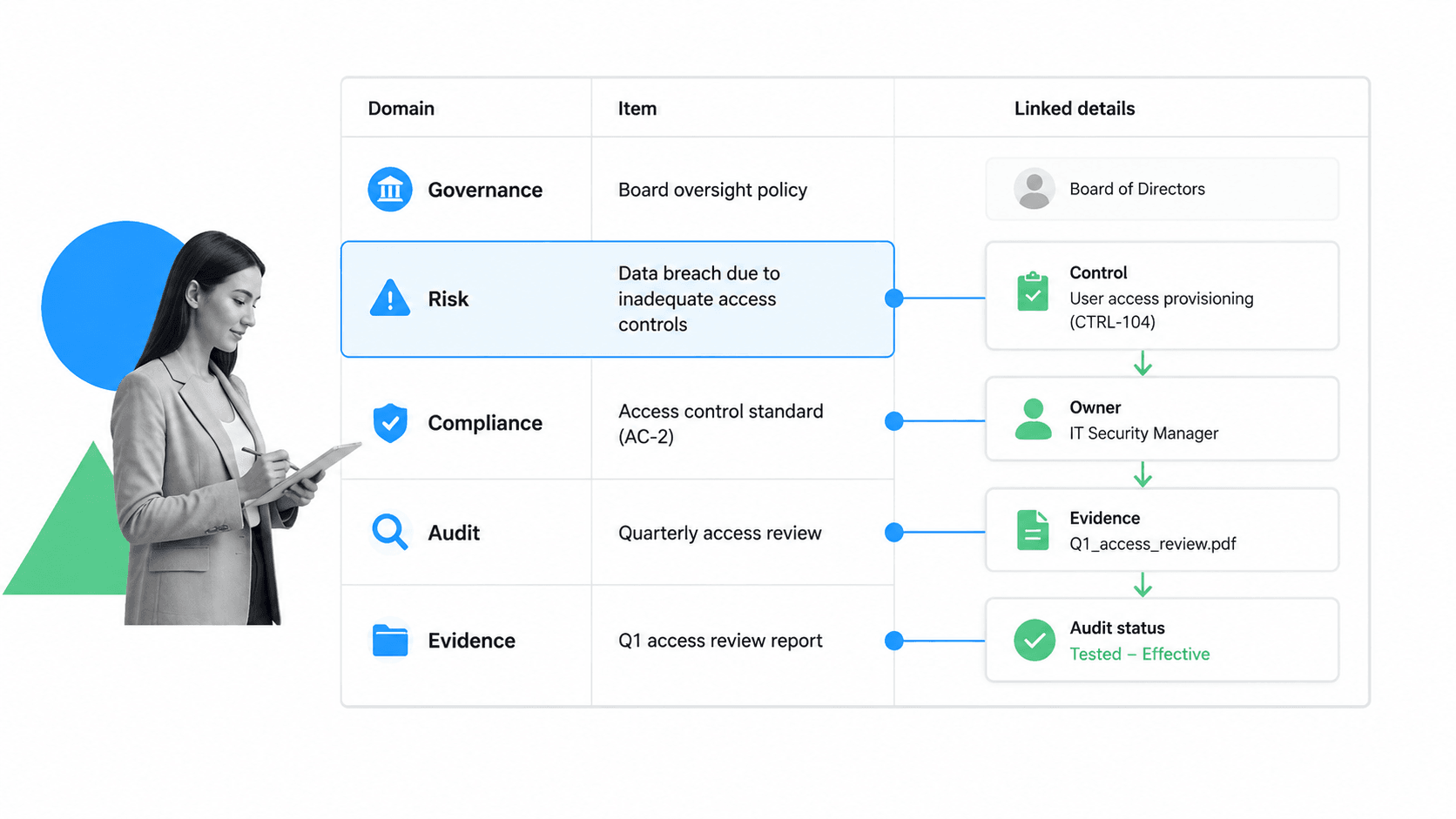
Most GRC software includes several connected modules. Names vary by vendor, but the core objects are similar: policies, risks, controls, audits, issues, evidence, vendors, reports, and workflows.
Policy and document management
Policy management keeps official requirements current. A strong system supports ownership, review cycles, approvals, version history, acknowledgments, and links between policies and the controls that enforce them. Teams that already run formal policies can use a policy management template or document management workflow to standardize the operating layer around those documents.
Risk registers and assessments
Risk modules track threats, likelihood, impact, owners, treatment plans, review dates, and current status. They help teams move from informal concern to accountable action. A risk assessment template can be a useful starting point before teams formalize the process in software.
Controls, evidence, and audits
Control management connects requirements to the actual activities that reduce risk. Audit management schedules reviews, collects proof, records findings, and tracks remediation. Resources like an internal audit checklist template and an internal audit process show why the workflow matters: evidence is only useful when it is tied to the right control and collected at the right time.
Third-party and operational risk
Many GRC platforms also manage vendors, suppliers, service providers, and outsourced processes. That includes questionnaires, risk ratings, contract obligations, control attestations, and renewal reviews. For teams building this discipline, vendor risk management and a vendor risk assessment template help turn vendor risk into repeatable work.
How GRC software works in practice

In practice, GRC software works by connecting obligations to accountable workflows. A new regulation, audit finding, vendor issue, security exception, or policy change enters the system. The platform links it to risks, controls, owners, evidence, and next steps.
From requirement to control
A requirement might come from a regulation, customer contract, security standard, internal policy, or board directive. The GRC system records the requirement and maps it to one or more controls. Each control has an owner, frequency, evidence expectation, and status.
From control to evidence
Evidence proves the control happened. That evidence might be a signed approval, access review export, completed checklist, screenshot, system log, policy acknowledgment, vendor response, or document version record. Good GRC software makes evidence collection part of normal work instead of a separate scramble before an audit.
From finding to remediation
When a control fails or an issue appears, the software should create accountable remediation work. The owner gets a task, due date, evidence requirement, and approval path. Features such as approvals and conditional logic matter because different risks need different review paths.
This is where many programs succeed or fail. A dashboard that shows a red risk is useful only if the organization can turn that signal into assigned work, completed action, and proof.
That execution layer is also what separates a healthy GRC system from a compliance archive. The system should not only tell people that a control is overdue. It should help them complete the review, capture the evidence, route the approval, and preserve the activity history.
Benefits and limitations of GRC software
The strongest benefit of GRC software is shared context. Compliance, risk, audit, security, legal, finance, and operations can work from the same structure instead of reconciling different versions of the truth.
Benefits
- Centralized policies, risks, controls, evidence, and issues.
- Clear ownership for control testing, reviews, approvals, and remediation.
- Faster audit preparation because evidence is attached to the work.
- Better executive reporting across risk and compliance activity.
- Reduced duplicate work across departments and frameworks.
That shared context is why compliance as proof of control matters. Compliance becomes stronger when proof is generated by execution, not assembled after the fact.
Limitations
GRC software can also become heavy. Some systems require long implementations, specialized administration, complex configuration, and ongoing data maintenance. If the tool becomes a database that people update only before an audit, it will not improve daily risk control.
The limitation is usually not reporting. The limitation is execution. A risk register can show exposure, but someone still has to update the policy, complete the access review, collect the evidence, approve the exception, or fix the process that caused the issue.
What is GRC software used for?
Choose GRC software by starting with your operating model. The best platform for a small security team preparing for SOC 2 may not be the best platform for a global enterprise managing SOX, privacy, third-party risk, internal audit, and regulatory exams.
When stakeholders ask what is GRC software supposed to replace, be precise. It may replace scattered risk registers, audit trackers, policy review sheets, evidence folders, and manual reminders, but it should not replace accountable ownership or judgment.
Questions to ask
- Which risks, controls, and obligations must the system manage first?
- Who owns each risk, control, policy, audit, issue, and remediation task?
- Can the system collect evidence while work happens?
- Can operations teams update workflows without losing governance?
- Does the reporting reflect decisions leaders actually need to make?
- Can the platform integrate with the systems where work and evidence already live?
SAP overview of GRC frames GRC around integrated governance, risk, and compliance activity. The buying lesson is simple: do not evaluate software only by module count. Evaluate whether the system can connect decisions, risks, controls, and work.
AI and governance
AI can help summarize evidence, generate workflow drafts, detect missing controls, and surface risk patterns. It also raises governance questions of its own. The NIST AI Risk Management Framework is a useful reference when AI begins influencing control decisions or risk workflows.
Where Process Street fits
Process Street is a Compliance Operations Platform. It does not try to replace every enterprise GRC record system. It solves the execution problem underneath GRC: making sure policies, controls, approvals, evidence, and remediation steps happen in the work itself.
That matters because many GRC programs do not fail from lack of dashboards. They fail because the actual work lives outside the dashboard. Evidence is missing. Reviews are late. Owners are unclear. Exceptions happen in email. Audit proof is reconstructed after the work is already done.
Compliance by default
Process Street turns policies and procedures into workflows with assigned tasks, required fields, approval gates, conditional paths, automations, file uploads, and audit history. Related ideas like digital compliance officer and AI-driven compliance point to the same shift: compliance has to be active, not just documented.
Connected execution
Process Street has direct, universal integrations to 5,000+ systems. Need a new one? An AI agent builds it on the fly. That lets teams connect workflow execution to the systems where records, approvals, customer data, vendor data, and evidence already live.
For teams asking what is GRC software and where to start, the answer is not always a massive platform rollout. Sometimes the highest-leverage first step is turning a high-risk recurring process into controlled, auditable execution.
FAQs
What is GRC software?
GRC software is a platform for managing governance, risk, and compliance activities in one system. It connects policies, risks, controls, audits, evidence, issues, owners, and reports so an organization can manage obligations and prove work was done.
What does GRC stand for?
GRC stands for governance, risk, and compliance. Governance covers oversight and decision-making, risk covers threats to objectives, and compliance covers adherence to laws, standards, contracts, and internal policies.
What are the main features of GRC software?
Common features include policy management, risk registers, control mapping, audit management, evidence collection, issue tracking, third-party risk, reporting, workflow routing, approvals, and remediation tracking.
Who uses GRC software?
GRC software is used by compliance, risk, audit, legal, security, finance, operations, and executive teams. It is most useful when obligations cross departments and require clear ownership, evidence, and reporting.
How is GRC software different from compliance management software?
Compliance management software focuses mainly on meeting obligations and proving adherence. GRC software is broader because it connects compliance with governance decisions, risk management, control testing, audit work, and issue remediation.
How do you choose GRC software?
Choose GRC software by mapping your highest-risk workflows first. Look for clear ownership, control mapping, evidence collection, reporting, workflow automation, integrations, permissions, and enough flexibility for operations teams to keep the system current.
