


Turn every policy into automated workflows with built-in enforcement and audit-ready proof.



Workflow Automation Tool: How to Choose the Right One
A workflow automation tool turns recurring work into a system that runs the same way every time. It assigns owners, moves information between tools, triggers the next step, routes approvals, and leaves a record of what happened.
The best workflow automation tool is not the one with the most buttons. It is the one that fits the risk and complexity of the work. A lightweight integration builder can be enough for simple app to app handoffs. A compliance operations team needs stronger controls: documented procedures, assigned tasks, conditional logic, approvals, audit trails, and reporting that proves the process was followed.
This guide explains what workflow automation tools do, when they matter, which product categories to compare, and how to choose one without turning automation into another layer of unmanaged complexity.
In this guide:
- What is a workflow automation tool?
- How does a workflow automation tool work?
- Which workflow automation tools fit different jobs?
- Types of workflow automation tools
- Benefits of a workflow automation tool
- What should you look for in a workflow automation tool?
- Do you need a workflow automation tool?
- Workflow automation tool FAQs
What is a workflow automation tool?
A workflow automation tool is software for designing and running repeatable business processes with less manual coordination. It defines the sequence of work, the rules that control movement between steps, the systems that need to exchange data, and the people responsible for exceptions or approvals.
A workflow is different from a loose task list. IBM describes a workflow as a system for managing repetitive processes and tasks that happen in a particular order. That order matters. In business operations, order is what keeps handoffs clean, records complete, and accountability visible.
Workflow automation adds execution to that structure. Instead of relying on someone to remember the next step, the system can assign a task, send a form, update a record, notify a reviewer, start an approval, or trigger another application.
The practical goal is not to remove people from the process. It is to remove avoidable follow up, reduce skipped steps, and make sure the right person intervenes at the right moment.
How does a workflow automation tool work?
Most workflow automation tools combine five building blocks: triggers, steps, rules, integrations, and records. A trigger starts the process. Steps define the work. Rules decide what happens next. Integrations move data across systems. Records show what happened and who did it.
For simple automations, this can look like a form submission that creates a task and sends a notification. For a controlled business process, the workflow may branch based on risk level, route an approval to a manager, collect evidence, update a CRM, and produce an audit trail.
IBM notes that workflow automation helps teams manage people, processes, and data through rules based logic. That is the core pattern: define the rule once, then let the system apply it consistently.
AI changes the shape of the category, but it does not remove the need for structure. McKinsey research on work with AI agents describes a shift from people performing every task to people directing how machines perform work. Workflow automation tools become more important in that shift because they provide the guardrails, handoffs, and evidence layer for automated execution.
Which workflow automation tools fit different jobs?
There is no single tool category that covers every automation need. The right comparison starts with the job to be done: enforce recurring procedures, connect cloud apps, automate Microsoft based work, orchestrate enterprise processes, or model technical workflows.
Process Street
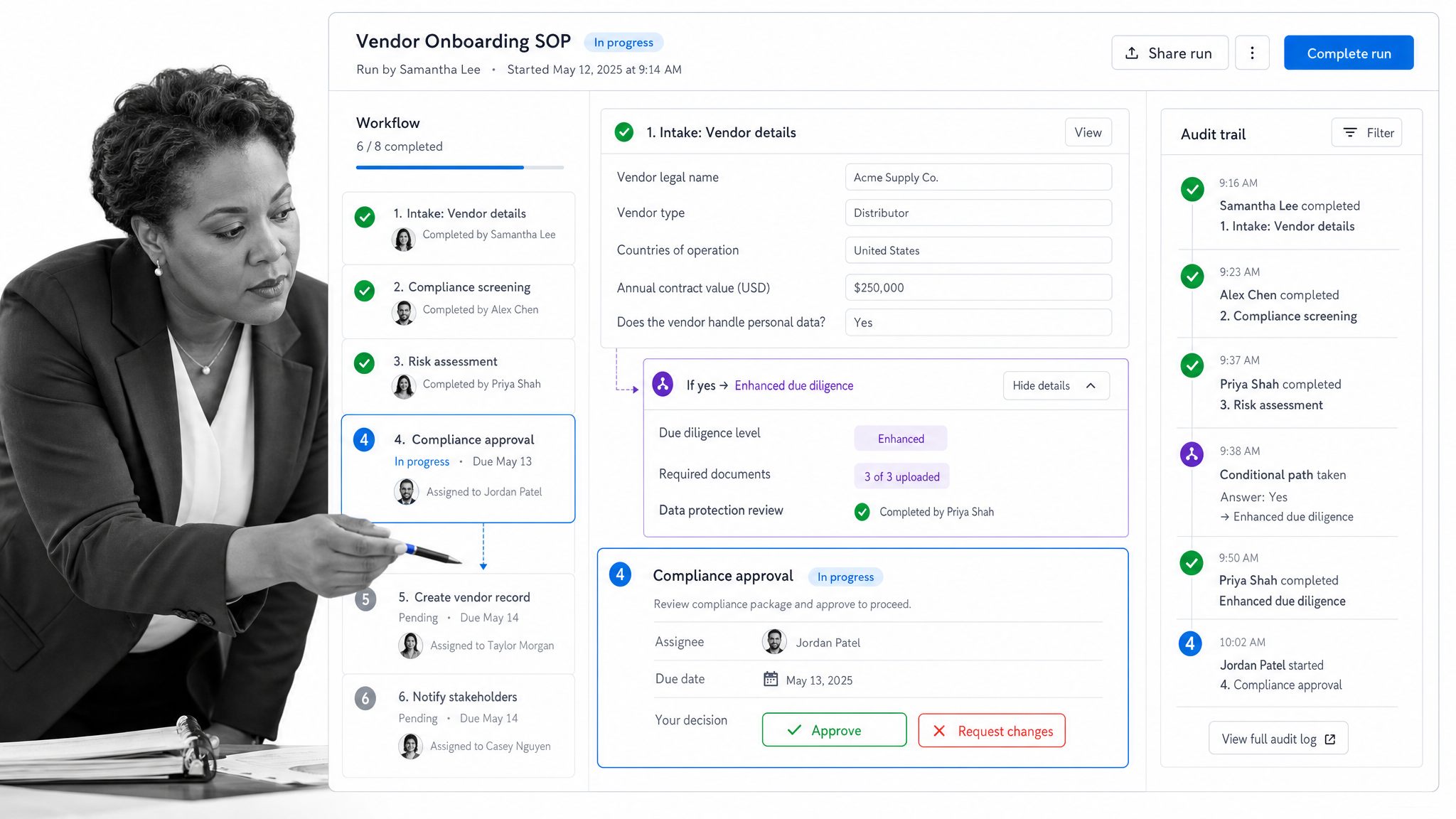
Process Street is the strongest fit when the workflow is a repeatable procedure that needs ownership, enforcement, approvals, documentation, and proof. It is built for teams that cannot rely on tribal knowledge or informal follow up.
Use Process Street when the process has recurring runs, multiple owners, handoffs, forms, conditional logic, approvals, or compliance consequences. Examples include employee onboarding, client onboarding, policy signoff, vendor review, audits, finance approvals, quality checks, and recurring operations.
The key difference is that Process Street connects process documentation to execution. A standard operating procedure is not just stored somewhere. It becomes a workflow run with assigned tasks, structured data, approval points, automations, and a record of completion.
Zapier
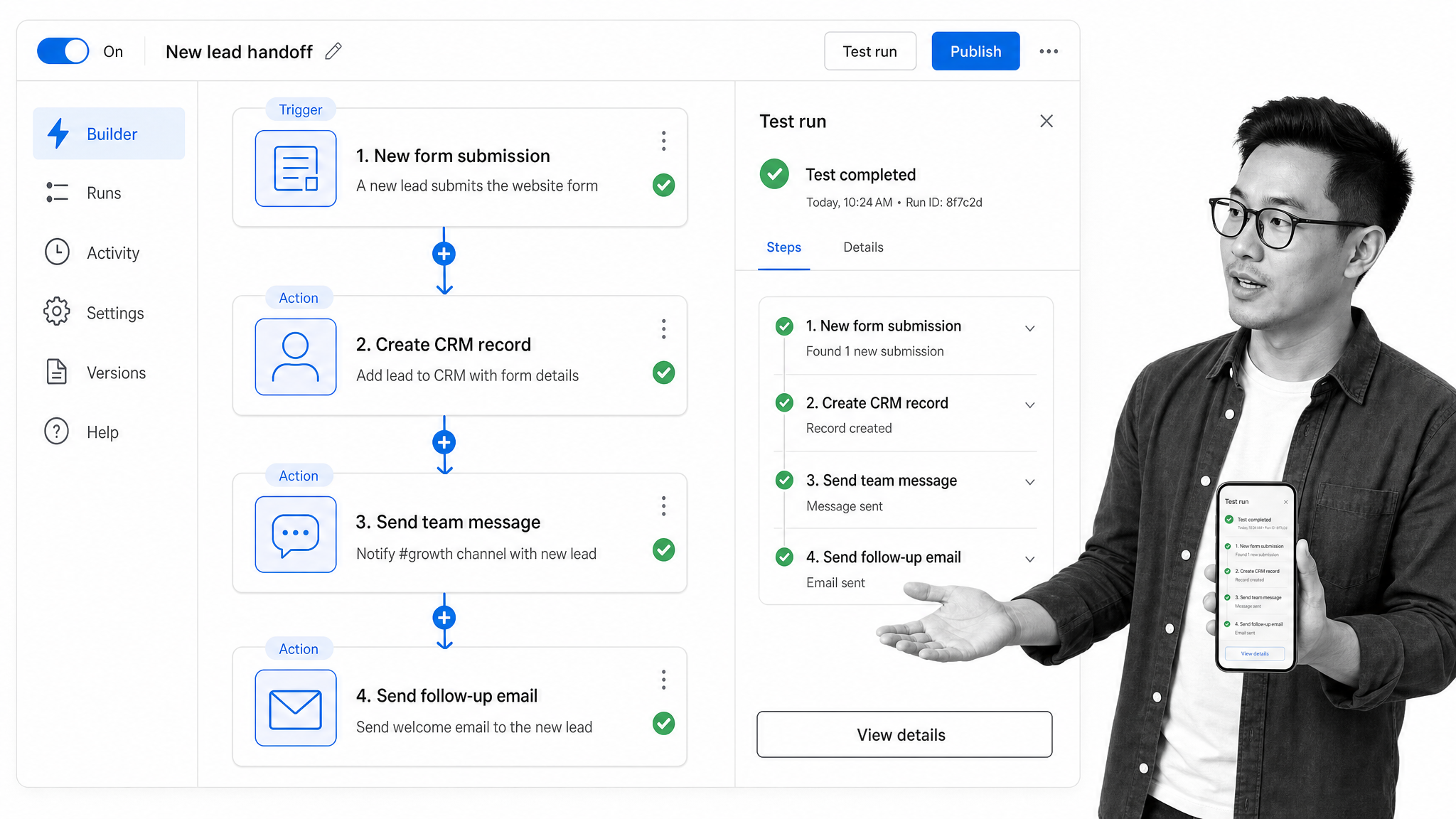
Zapier is a strong fit when the main job is connecting apps and moving data between them. It is often the fastest way to automate a handoff such as sending form data to a CRM, posting a notification, creating a calendar event, or moving information from one cloud tool to another.
Zapier is less about enforcing a complete operating procedure and more about automating app to app actions. It works well as connective tissue around a workflow system, especially when teams need quick automations without engineering work.
Microsoft Power Automate
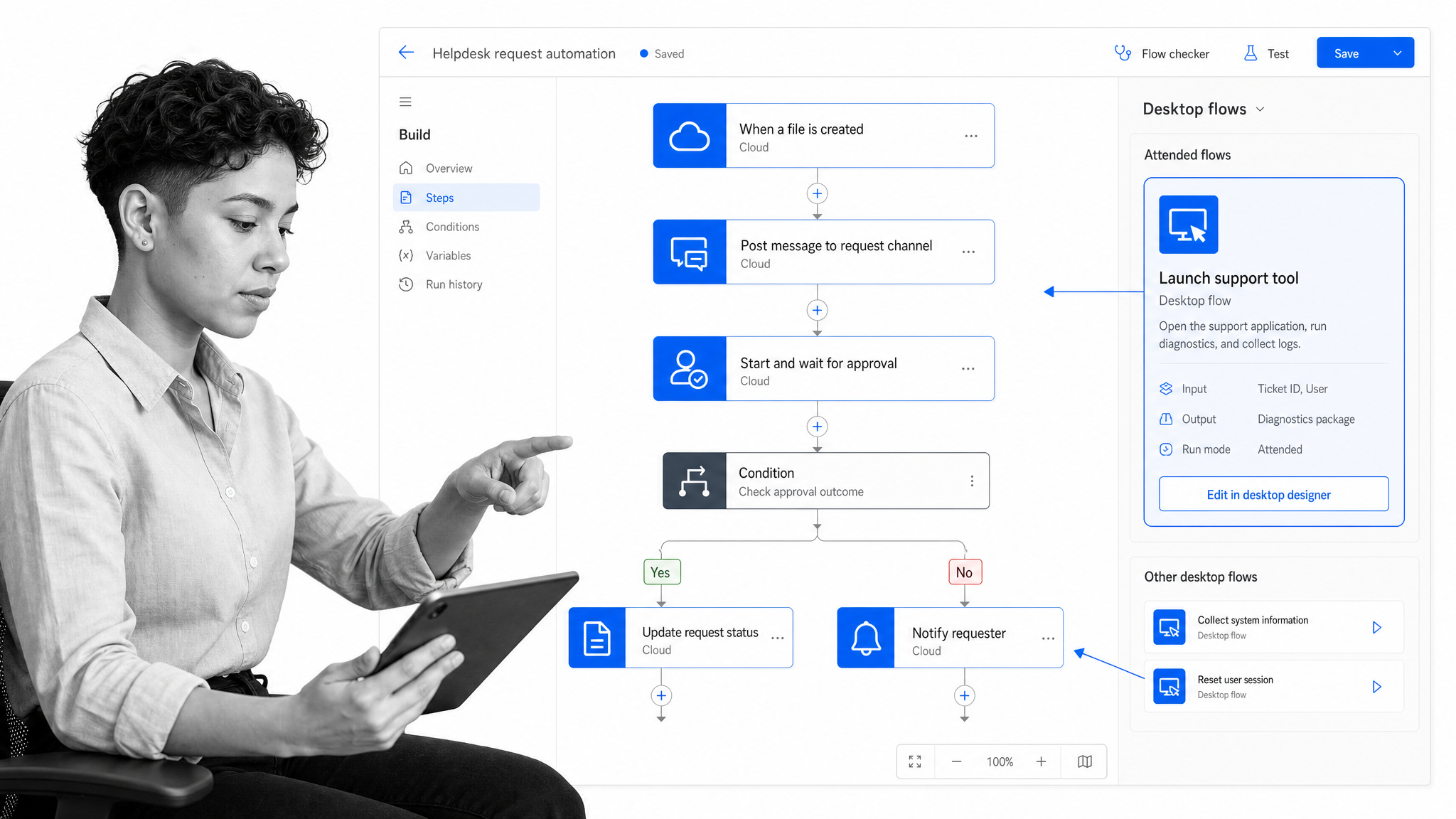
Microsoft Power Automate fits organizations that already run heavily on Microsoft systems. Microsoft documentation describes Power Automate as a way to create automated workflows between apps and services, including notifications, file synchronization, and data collection.
It is especially relevant when workflows live across Outlook, Teams, SharePoint, Excel, Dynamics, desktop apps, and internal Microsoft environments. It can support cloud flows, desktop flows, and robotic process automation for teams with Microsoft platform expertise.
Nintex
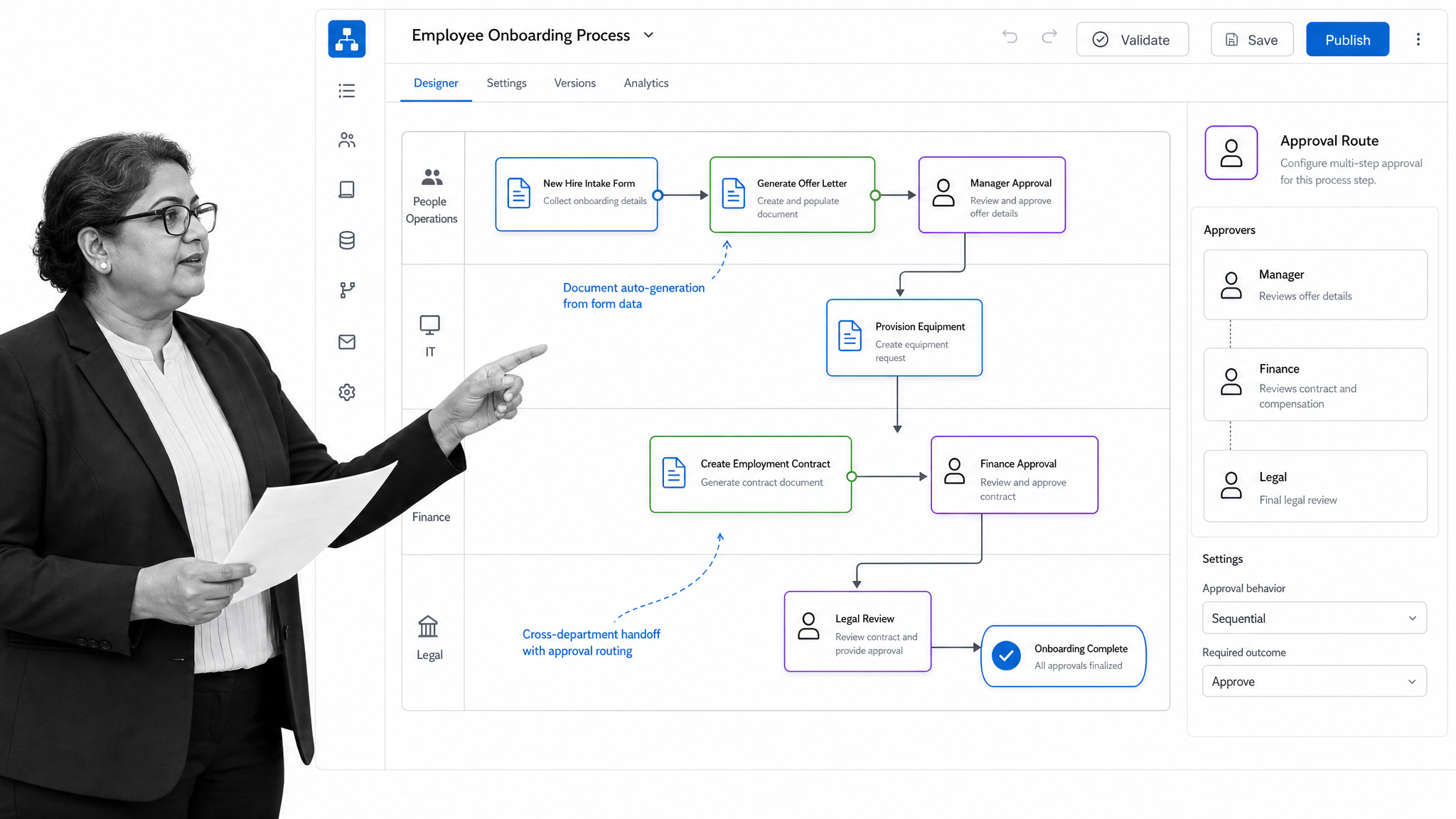
Nintex fits larger organizations that need low code process automation across departments, forms, documents, and business applications. Its platform language centers on managing, automating, and optimizing business processes and workflows.
Nintex is worth comparing when a team needs enterprise process management, document automation, forms, and workflow deployment across a broad environment. Buyers should evaluate implementation complexity, governance needs, and whether the platform is more than the team needs for the first workflow.
Camunda
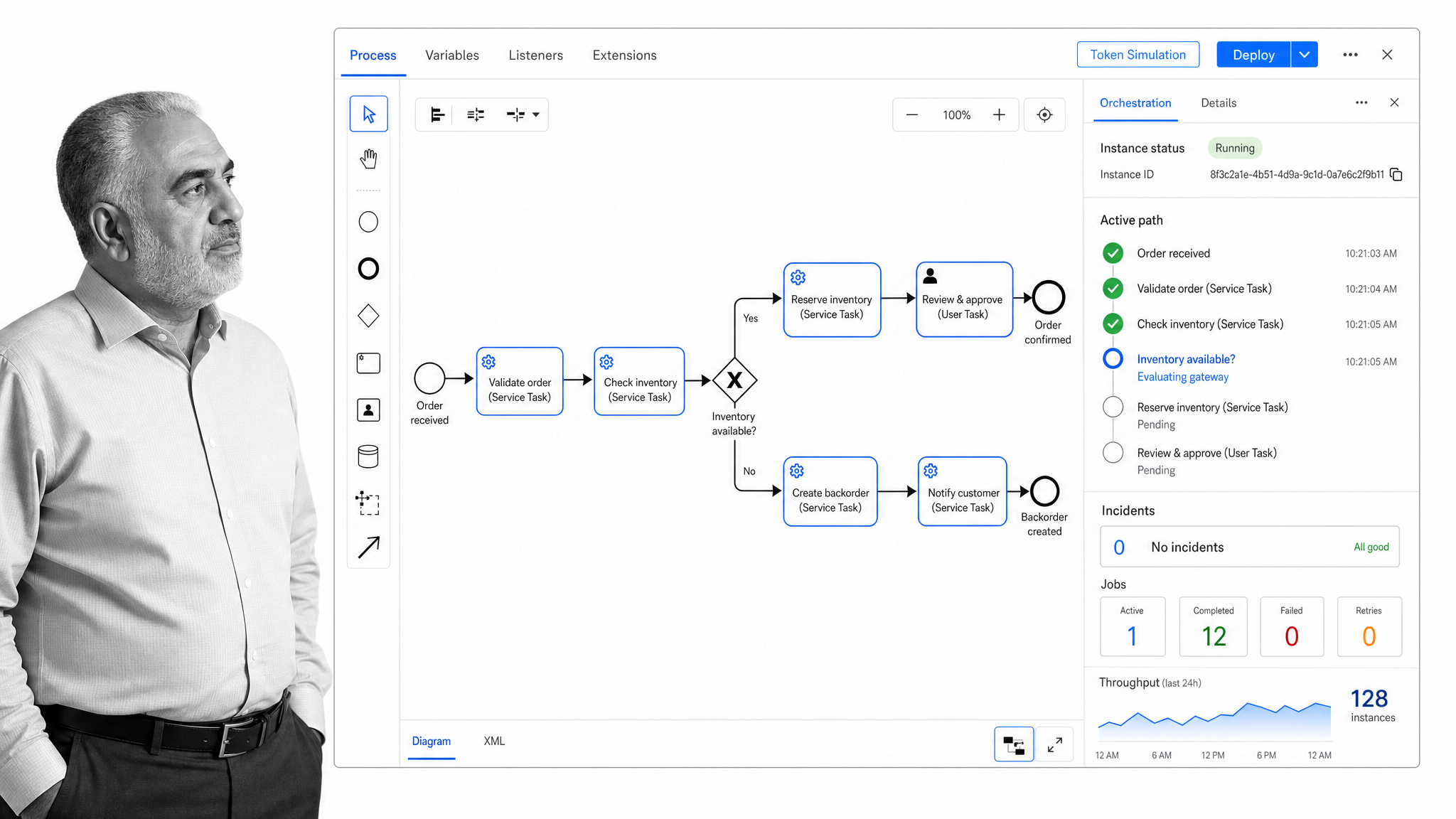
Camunda fits technical teams that need process orchestration across people, systems, and agents. It is built for more complex end to end processes where engineering teams want control over process models, orchestration, and governance.
Camunda is not usually the first choice for a nontechnical operations team trying to standardize recurring work. It is more relevant when process orchestration is part of a deeper architecture involving services, event flows, technical decisioning, and systems that need to be coordinated through a process layer.
Types of workflow automation tools
Workflow automation tools usually fall into several practical categories.
- Procedure automation tools: Turn recurring SOPs into assigned workflow runs with forms, rules, approvals, automations, and audit history.
- Integration automation tools: Connect cloud apps and trigger actions when something changes in another system.
- Low code automation platforms: Let business or IT teams build flows, forms, and internal automations with visual builders.
- RPA tools: Automate work inside desktop apps or older systems where APIs are limited.
- Process orchestration platforms: Coordinate complex technical processes across services, people, and systems.
- Project and work management tools: Add automation around tasks and boards, but usually do not enforce full procedural execution.
Most companies eventually use more than one category. The mistake is treating all of them as interchangeable. A connector tool can move data, but it may not prove that a compliance workflow was followed. A project board can show status, but it may not enforce the required sequence of work. A process orchestration engine can coordinate complex systems, but it may be too technical for the team that owns the procedure.
Benefits of a workflow automation tool
The value of workflow automation comes from consistency. When the process runs the same way every time, teams spend less energy chasing status and more time on exceptions, decisions, and improvement.
- Fewer missed steps: Required tasks, stop points, and approvals make it harder for critical work to slip through.
- Cleaner handoffs: Owners know when work is ready for them, and the context travels with the task.
- Less manual follow up: Notifications, due dates, scheduled runs, and integrations reduce coordination work.
- Better records: Completed tasks, comments, form fields, attachments, and approvals create a usable history.
- Faster onboarding: New team members follow the process instead of relying on memory or a person sitting beside them.
- Stronger compliance: Teams can show what was done, when, by whom, and where exceptions were handled.
Automation also makes process improvement easier. If work is scattered across emails, chats, spreadsheets, and memory, no one can see where delays happen. When recurring work runs through a workflow automation tool, bottlenecks and failure points become visible enough to fix.
What should you look for in a workflow automation tool?
Choosing a workflow automation tool starts with the work, not the feature list. Pick one high value workflow and map what has to happen from start to finish. Then evaluate whether the tool can run that process reliably without creating extra administrative work.
- Workflow builder: Can the team model the process clearly, including tasks, owners, forms, due dates, and branches?
- Conditional logic: Can the workflow change based on risk level, role, form answer, customer type, amount, or region?
- Approvals: Can managers or reviewers approve, reject, comment, and send work back without leaving the process?
- Integrations: Can the tool connect to the systems of record that start, support, or finish the workflow?
- Audit history: Can the team prove what happened without reconstructing it from chat messages?
- Permissions: Can different teams see and edit only the right workflows, data, and records?
- Reporting: Can leaders see delays, workload, completion status, and exceptions?
- AI fit: Does AI help create, route, summarize, or improve workflows inside controls the business can trust?
For compliance operations, approvals and audit history are not optional. They are the difference between a workflow that merely moves work and a workflow that proves work happened correctly.
For a deeper implementation walkthrough, read Process Street’s guide to workflow automation and its practical guide to workflow documentation.
Do you need a workflow automation tool?
You probably need a workflow automation tool if the same process happens repeatedly, crosses more than one person or system, and creates risk when a step is missed. The need is stronger when the workflow involves customers, employees, vendors, money, compliance, security, quality, or executive reporting.
You may not need one yet if the process is rare, experimental, or still changing every time it runs. In that case, document the process first. Run it manually a few times. Identify the stable steps, the decision points, and the systems involved. Then automate the parts that repeat.
A good first workflow is narrow but meaningful. Pick one process with a clear start, a clear finish, known owners, and visible pain. Client onboarding, purchase approvals, access requests, audit prep, vendor reviews, and recurring reporting all work well because they expose the core value quickly.
Once the first workflow works, expand from there. Add integrations. Add conditional paths. Add approvals. Connect documentation. Build reporting. The goal is not to automate everything at once. The goal is to turn your most important recurring work into a system you can trust.
Workflow automation tool FAQs
What is a workflow automation tool?
A workflow automation tool is software that routes repeatable work through predefined steps, owners, rules, approvals, integrations, and records so teams do not have to coordinate every handoff manually.
What is the difference between workflow automation and task automation?
Task automation handles one action, such as sending a notification or copying data. Workflow automation connects many actions into a complete process with sequence, ownership, exceptions, and proof.
Which workflow automation tool is best for compliance operations?
For compliance operations, prioritize a tool that connects documentation to execution, enforces required steps, supports approvals, captures audit history, and shows process status clearly.
Can small teams use workflow automation software?
Yes. Small teams should start with one recurring workflow, such as onboarding, approvals, intake, or reporting. The tool should reduce coordination work rather than add setup burden.
When should you avoid automating a workflow?
Avoid automating a workflow when the process is unclear, rarely repeated, or dependent on judgment at every step. Clarify the process first, then automate the stable and repeatable parts.
