


Turn every policy into automated workflows with built-in enforcement and audit-ready proof.



Workflow Management Document Control Software
Workflow management document control software is a single system that governs your documents and runs the work those documents describe. It keeps every procedure, policy, and form under version control, routes changes through approvals, and then drives the recurring workflow so the approved version is the one people actually follow.
Most teams start with two separate problems. Documents live in a shared drive where anyone can edit the wrong version, and processes live in people’s heads or in checklists nobody maintains. Combining the two closes the gap between what a document says and what the team does. The document becomes the source of truth, and the workflow becomes the way that truth gets executed.
This guide explains what the category is, why teams combine document control with workflow management, the features that matter, the benefits, and a practical way to choose and roll out a system. It is written for operations, quality, compliance, HR, and finance leaders who are tired of chasing the latest version of a procedure.
In this article, we are going to cover everything you need to know, including:
- What is workflow management document control software?
- Why teams combine workflow management and document control
- Key features of workflow management document control software
- Benefits of connecting documents to live workflows
- How to choose workflow management document control software
- How to roll out document control workflows step by step
- How Process Street unifies document control and workflow management
- FAQs
What is workflow management document control software?
Workflow management document control software is the combination of two disciplines in one platform. Document control governs how controlled documents are created, reviewed, approved, versioned, distributed, and retired. Workflow management governs how recurring work is triggered, assigned, tracked, and completed. Put them together and a controlled document does not just sit in a library, it drives the process it describes.
Document control on its own answers questions like: which version is approved, who approved it, who can see it, and when it is due for review. Workflow management on its own answers questions like: who does the next step, what has to happen before this step can start, and how do we prove the work was done. The category exists because those questions are two halves of the same problem.
Document control vs document management
People often use these terms interchangeably, but they are not the same. Document management is about storing, organizing, and finding files. Document control is stricter: it adds version history, controlled approvals, restricted access, distribution rules, and a review lifecycle so only the approved version is in use. A basic drive gives you document management. Regulated and quality-driven work needs document control.
When control is connected to execution, the approved procedure and the live workflow stay in sync. That is the practical difference between a policy that exists and a policy that is followed. Teams that need this level of rigor often formalize it with document control best practices rather than relying on file naming conventions.
Why teams combine workflow management and document control
Separating documents from process feels natural at first. The documents team owns the library, the operations team owns the work. The problem shows up at the seams. A procedure gets updated, but the team keeps running the old steps because nobody pushed the change into their daily work. Or the team improves the process on the ground, but the controlled document never catches up. Either way, the document and the reality drift apart.
Combining the two removes the drift. When a change to a controlled document is approved, the workflow that uses it updates too. When the workflow runs, it references the current approved version, captures who did each step, and stores the evidence. The document and the execution become one connected record instead of two systems that argue with each other.
- Consistency: everyone runs the same approved version, across shifts, sites, and teams.
- Accountability: each step has an owner, and each approval has a name behind it.
- Audit readiness: evidence is captured as work happens, not reconstructed the week before an audit.
- Change safety: a document change flows through review and approval before it reaches the front line.
- Less key-person risk: the process survives when the expert who wrote it is on leave or moves on.
This is why the category grew out of quality and compliance teams first. A quality manual, an SOP, and a training record are only useful if the approved version is the one in the workflow. The same logic now applies to any team that runs repeatable work, which is why a workflow management system increasingly includes document control instead of leaving it to a separate tool.
Key features of workflow management document control software
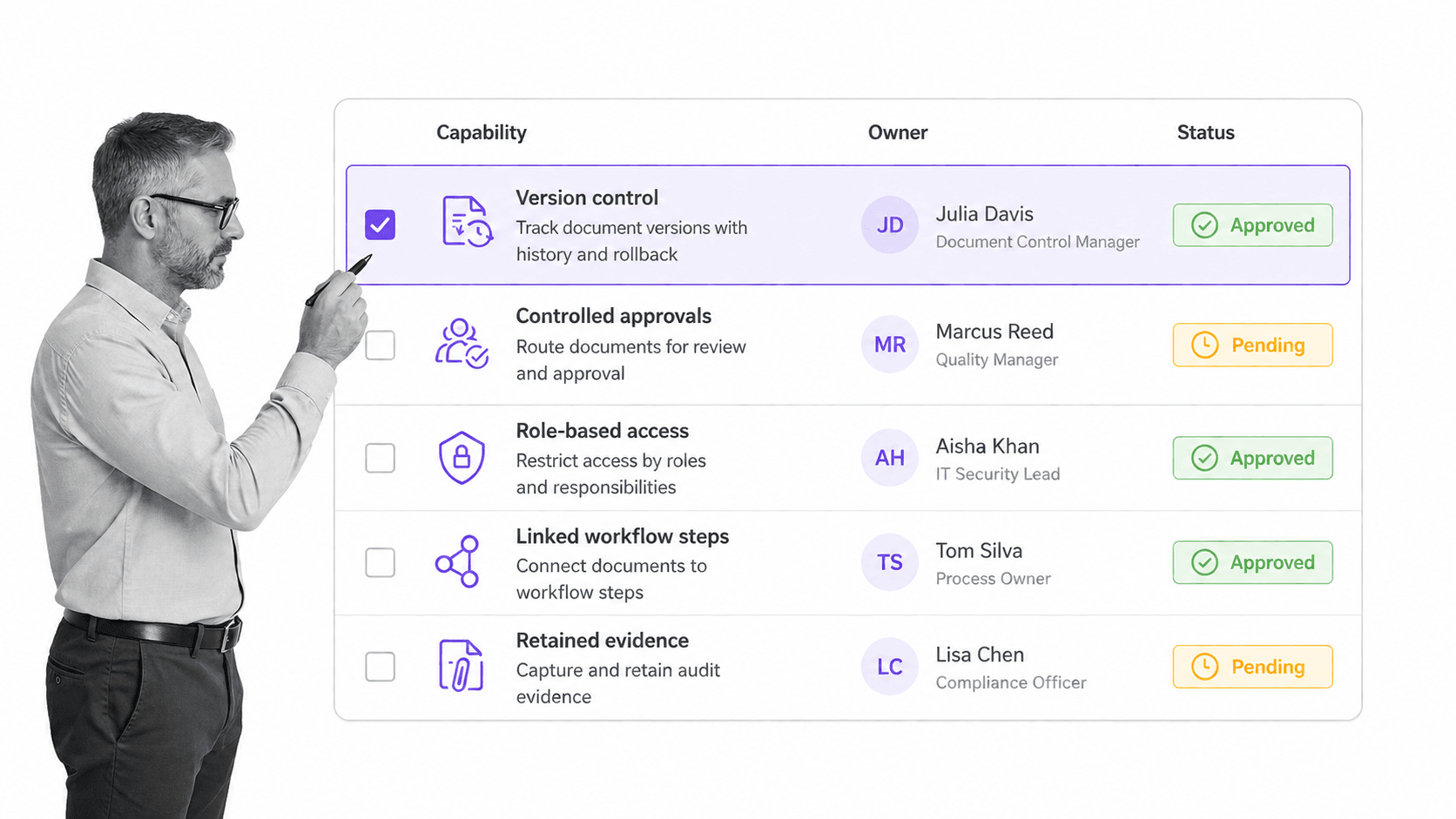
The features that define workflow management document control software all serve one goal: make the approved document and the real work the same thing. When you evaluate options, look for capabilities in both halves, control and execution, not just one.
Version control and a single source of truth
Every controlled document should have a clear version history, a current approved version, and a way to retire old versions so they cannot be used by mistake. Good software makes the current version obvious and keeps the full history for audits.
Controlled approvals and electronic signatures
Changes should move through a defined review and approval path before release. For regulated work, that path often needs an audit trail and electronic signatures that meet standards like the FDA 21 CFR Part 11 rule on electronic records and signatures. The software should record who approved what and when, without manual logging.
Role-based access and permissions
Not everyone should see or edit every document. Role-based access controls decide who can view, edit, approve, or distribute each document. This protects sensitive material and keeps the control model intact.
Linked workflows and conditional logic
The document should drive the workflow. That means the current procedure is embedded in the steps people run, with conditional logic that routes exceptions to the right reviewer. When the document changes, the workflow reflects it.
Evidence capture and audit trails
Every important step should leave proof: a completed field, an approval, an uploaded record, or a captured value. Frameworks such as the NIST SP 800-53 control catalog exist because evidence of control operation matters as much as the control itself. The software should capture that evidence automatically as the workflow runs.
Templates, search, and reporting
Reusable templates keep documents consistent, strong search makes them findable, and reporting shows where work is stuck. A reusable starting point like an document control process template saves teams from building the same structure from scratch.
Weigh these against your real risk. A small team may need version control and approvals but not full electronic signatures. A regulated manufacturer will need every item above. The category flexes, which is why matching features to risk matters more than counting features.
Benefits of connecting documents to live workflows
The benefits of connecting controlled documents to live workflows are practical, not abstract. They show up in faster approvals, fewer errors, and calmer audits.
- Faster approvals: automated routing and electronic signatures replace email chains, so changes reach the front line sooner.
- Fewer version errors: the workflow always points to the current approved version, so nobody runs a stale procedure.
- Stronger security: role-based access and audit trails limit who can view or change sensitive documents.
- Continuous audit readiness: evidence is captured during the work, so an audit becomes a report instead of a scramble.
- Better onboarding: new hires follow the approved workflow directly instead of hunting for the right document.
- Real visibility: reporting shows bottlenecks and overdue reviews before they become problems.
These benefits compound in regulated and quality-driven settings. A team running an electronic quality management system gets document control, controlled approvals, and workflow execution in one place, which is exactly what quality auditors expect to see. The same connection also underpins broader compliance management software needs, where proof of control is the whole point.
There is a records-keeping benefit too. Controlled documents and their approvals become an organized, retrievable record, which is the same discipline public bodies apply to official records. The U.S. National Archives records management guidance shows why organized, retained records matter for accountability, and the same principle applies to a business that wants to defend its decisions later.
How to choose workflow management document control software
Choosing workflow management document control software is easier when you start from your risk and your work, not from a feature list. The best tool is the one that matches how strict your processes need to be and how much of the work you want to automate.
1. Map your control requirements
List the documents that truly need control: procedures, policies, quality records, and anything an auditor or regulator will ask about. Note which ones need electronic signatures, formal review cycles, or restricted access. This tells you how strict the control side has to be.
2. Map your workflow requirements
List the recurring processes those documents drive. Note where approvals, handoffs, conditional paths, and evidence capture are needed. If the work crosses departments, the workflow side needs to be strong, not just the document library.
3. Check the connection between the two
This is the make-or-break test. Does the software actually link a controlled document to the workflow that runs it, or does it just store files next to a task list? Ask to see a controlled document changing and the workflow updating in response.
4. Weigh usability against control
Software that is too strict gets bypassed, and software that is too loose fails audits. Look for a system that enforces control where it matters and stays simple everywhere else, so the team actually uses it.
5. Confirm the audit and reporting story
Ask how the system produces evidence and reports. You should be able to answer who did what, when, and against which version without exporting and stitching data together. A clear standard like the BPMN process modeling standard can help you communicate how a process should flow, but the software has to capture how it actually ran.
If your processes are mostly repeatable operations and SOPs, prioritize workflow execution with document control built in. General-purpose workflow management software that treats documents as an afterthought will leave you managing versions by hand. Match the tool to the shape of your work.
How to roll out document control workflows step by step
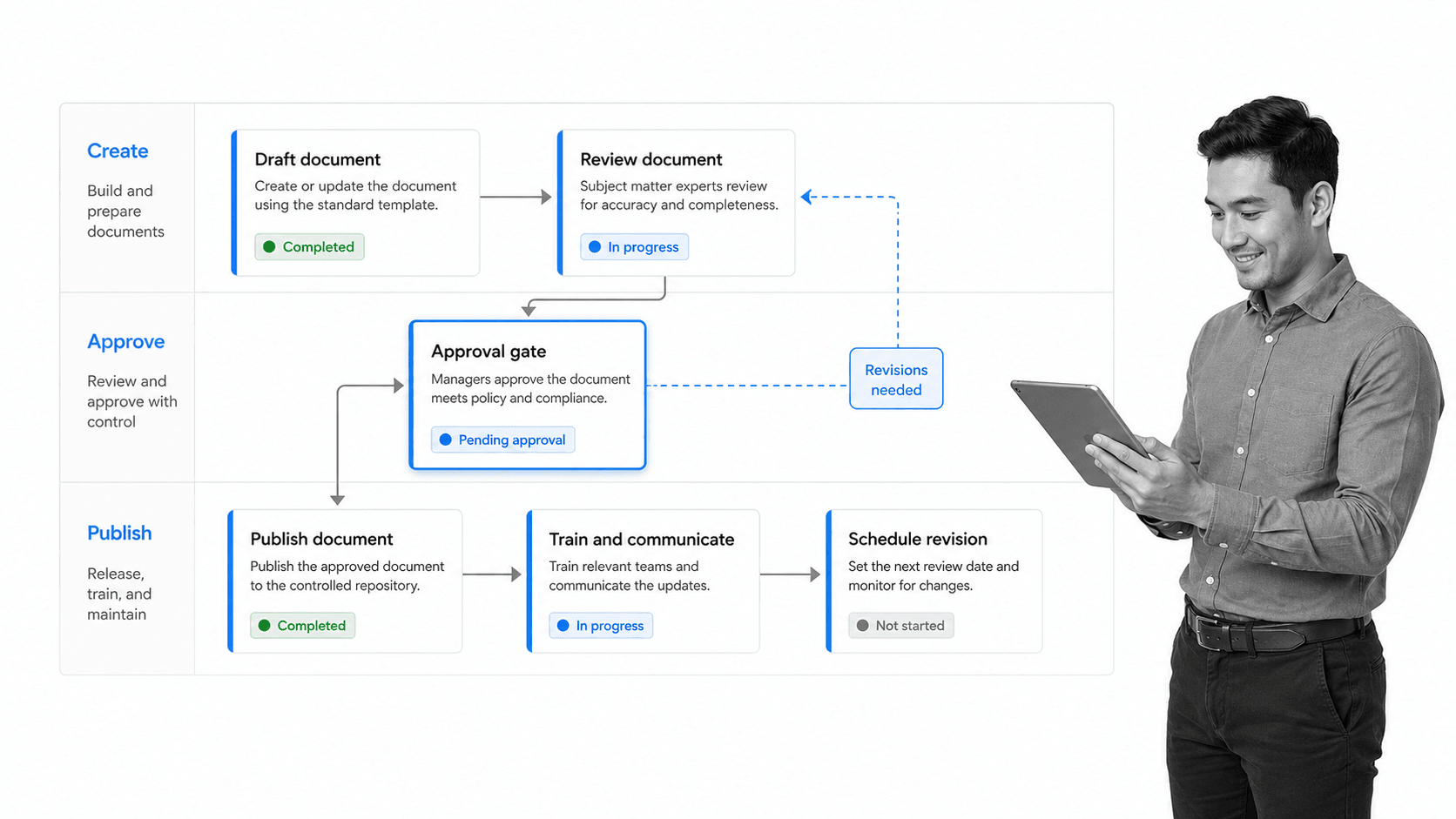
Rolling out document control workflows works best in stages. Trying to control every document at once stalls, because the team cannot absorb that much change. Start with the processes where control matters most and expand from there.
1. Start with the highest-risk processes
Pick the handful of procedures where a wrong version or a missed step causes real damage: safety, quality, finance controls, or regulated work. These earn the effort of control first and prove the value to the rest of the team.
2. Capture the current document and process together
For each one, capture both the approved document and the real steps people run. If a rough procedure already exists, start from it rather than a blank page. A structured standard operating procedure template gives you a consistent shape to work from.
3. Define owners, reviewers, and the approval gate
Assign a named owner to each document and a clear approval path. The approval gate is where a change is checked before it reaches the front line. Make the gate explicit so nothing goes live without review.
4. Connect the document to the workflow
Embed the approved document in the workflow that uses it, so people run the current version by default. Add conditional logic for exceptions and required fields for the evidence you need to keep.
5. Train, launch, and schedule reviews
Train the people who run the process, launch it, and set a recurring review cadence so the document does not drift. Changes to systems, roles, or regulations should trigger a review. For rollouts that touch many teams, a change management process template keeps the transition orderly.
Document the rollout itself the same way you document the work. Clear process documentation of how control operates makes the system easier to maintain and easier to explain to an auditor. Expand to the next tier of processes only after the first tier is stable.
How Process Street unifies document control and workflow management
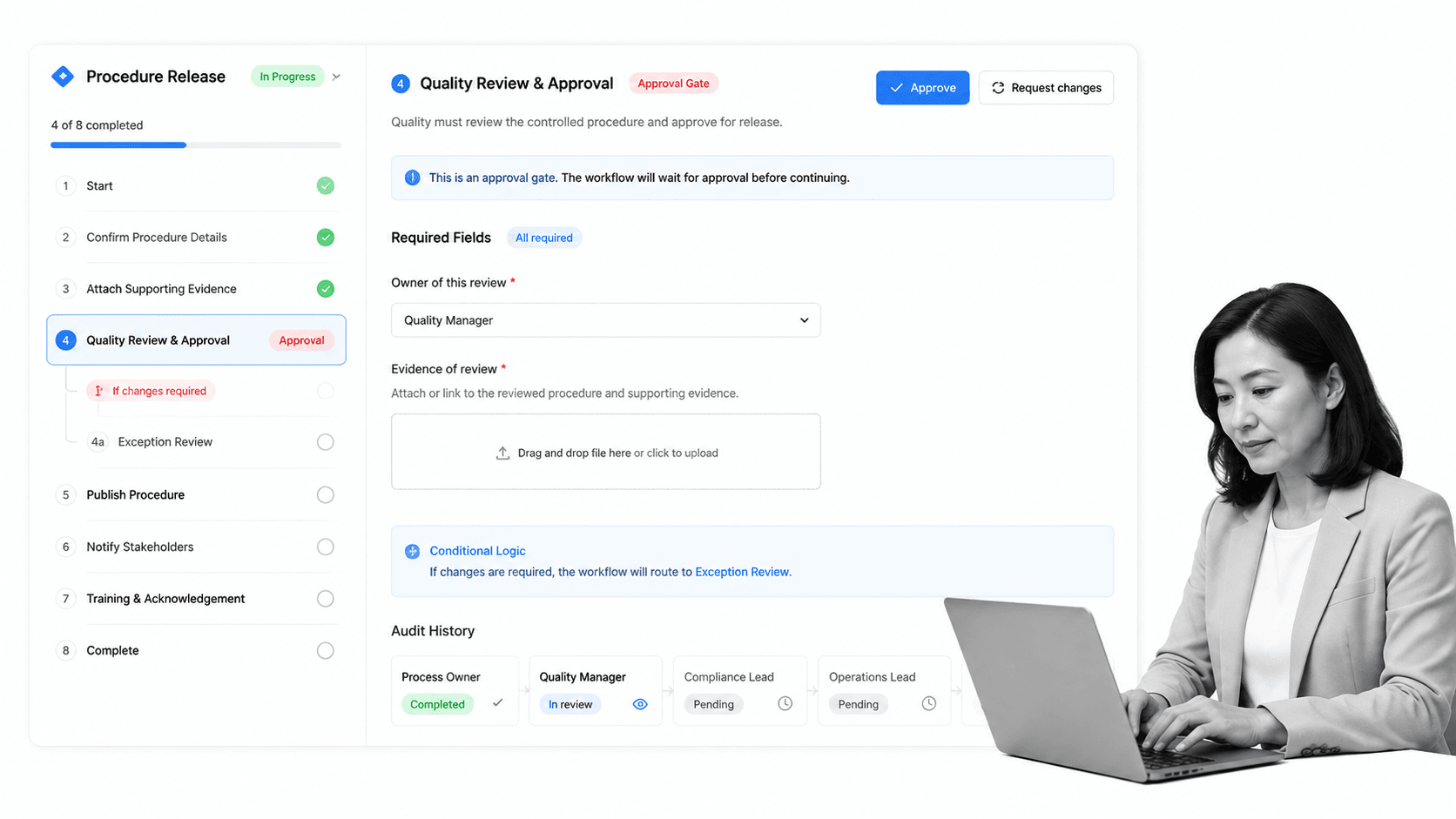
Static documents tell people what should happen. Executable documents make the process happen in the right order, with the right owners, approvals, data, and proof. That is the gap this category exists to close, and it is what Process Street is built to do.
Process Street is a Compliance Operations Platform that turns controlled documents into workflows. Teams can document policies and procedures, run recurring work from checklists, route approvals, capture evidence, and keep audit trails connected to the process itself. The approved document and the live workflow are the same record, not two systems that drift apart.
That connection is what makes control real. A controlled procedure can include required fields, a conditional branch, an approval gate, and an audit history row. When a step is completed, the evidence stays attached to the workflow instead of disappearing into email or a shared drive. When the document changes, the workflow reflects the new approved version.
Teams that want to move quickly can start from a checklist generator or a ready template and add control as they grow. Teams that need rigor can connect documentation to approvals, review cycles, and evidence capture from day one. Either way, the document stops being a static reference and becomes part of how work runs, which is the core idea behind keeping workflow documentation current and usable.
Process Street also has direct, universal integrations to 5,000+ systems. Need a new one? An AI agent builds it on the fly. That lets controlled documents and workflows connect to the systems where the work already happens, without forcing every team into a new operating stack. The result is document control that people actually follow, because it is built into the work rather than sitting beside it.
For a broader view of how a business documents and standardizes its operations, business process documentation and quality management system software both build on the same idea: approved documents driving controlled, repeatable work. The U.S. Small Business Administration guidance on keeping organized business records makes the same case for smaller teams that a documented, controlled routine protects the business.
FAQs
What is workflow management document control software?
Workflow management document control software combines document control and workflow management in one system. It keeps procedures and policies under version control with approvals and permissions, then drives the recurring work those documents describe so the approved version is the one the team follows.
What is the difference between document control and document management?
Document management stores, organizes, and finds files. Document control is stricter: it adds version history, controlled approvals, restricted access, distribution rules, and a review lifecycle so only the approved version is in use. Regulated and quality-driven work needs document control, not just management.
What features should workflow management document control software have?
Look for version control, controlled approvals with electronic signatures, role-based access, workflows with conditional logic, automatic evidence capture and audit trails, reusable templates, and reporting. The document should drive the workflow, and evidence should be captured as the work happens.
How does document control connect to workflow automation?
The approved document is embedded in the workflow that uses it, so people run the current version by default. Changes flow through review and approval before release, and the workflow captures who did each step and stores the evidence, keeping the document and the execution in sync.
Who owns document control in a company?
Each controlled document needs a named owner accountable for keeping it accurate, approved, and current. In many organizations a quality, compliance, or operations function coordinates document control overall, while process owners maintain the individual documents and workflows they run.
How do you choose workflow management document control software?
Start from your risk and your work, not a feature list. Map which documents need strict control and which processes they drive, then confirm the software actually links a controlled document to the workflow that runs it. Match usability to control so the team uses it and audits stay clean.
