


Turn every policy into automated workflows with built-in enforcement and audit-ready proof.



Best Zapier Alternatives & Competitors

The best Zapier alternatives are Process Street for compliance operations and recurring business processes, Make for visual scenario building and branching automation, n8n for technical teams that want node-based workflows, and Microsoft Power Automate for Microsoft 365-heavy teams. Two more are compared below: Workato and Tray.ai.
Zapier is worth replacing when cost, governance, process control, technical flexibility, or enterprise integration needs push past app-to-app automation. Connecting two apps is one job. Running a controlled business process with approvals, required fields, and audit proof is another.
The best Zapier alternative depends on the job. App-to-app automation is one problem. Running a controlled business process with approvals, required fields, and audit proof is another. Technical teams may need code and self-hosting. Enterprise teams may need governance, usage controls, and integration architecture.
This guide compares the strongest Zapier alternatives for business teams, including Process Street, Make, n8n, Microsoft Power Automate, Workato, and Tray.ai. It also explains how to choose between visual builders, node-based workflow tools, enterprise iPaaS, and a workflow management system that actually runs recurring work.
In this article, we are going to cover:
- Zapier alternatives at a glance
- Why teams look for Zapier alternatives
- How to choose Zapier alternatives
- Best Zapier alternatives and competitors
- Zapier alternatives by use case
- FAQs
Zapier alternatives at a glance
Zapier is still a strong default for simple app-to-app automation. Its official app directory describes no-code automation across more than 9,000 apps, which makes it a natural first stop for teams that need a fast trigger-and-action workflow.
The catch is that many business workflows do not stay simple. A two-step Zap can become a fragile chain of filters, handoffs, retries, permissions, and manual checks. Once the automation touches compliance, finance, operations, customer onboarding, security, or employee lifecycle work, the question changes from “Can this app connect?” to “Can this workflow be controlled, reviewed, and proven?”
That is where the shortlist below helps. If you need governed recurring work, start with Process Street. If you need visual scenario mapping, look at Make. If your technical team wants node-level control, look at n8n. If your company already lives in Microsoft 365, evaluate Power Automate. If the program is enterprise integration-led, Workato and Tray.ai belong in the conversation.
| Tool | Best for | Standout feature | Pricing |
|---|---|---|---|
| Process Street | Compliance operations and recurring business processes | Governed workflow runs with approvals, conditional logic, audit trails, and data handoff | Startup, Pro, and Enterprise plans. Contact sales |
| Make | Visual scenario building and branching automation | Canvas-based scenarios with routers, module-level mapping, and run monitoring | Free plan and paid plans available |
| n8n | Technical teams that want node-based workflows | Node editor, code steps, execution logs, and self-hosted deployment options | Cloud pricing is execution-based. Self-hosting options available |
| Microsoft Power Automate | Microsoft 365-heavy teams | Cloud flows, attended desktop flows, approvals, and Microsoft ecosystem governance | Premium starts at $15 user/month, paid yearly |
| Workato | Enterprise iPaaS and governed automation programs | Recipe builder, platform editions, usage-based pricing, and governance controls | Usage-based pricing with platform edition and usage fees |
| Tray.ai | Governed integration, MCP, and agent orchestration | Agent Gateway, Merlin Agent Builder, observability, and access controls | Pro, Team, and Enterprise plans. Contact sales |
Why teams look for Zapier alternatives
Most teams start searching for Zapier alternatives when automation stops being a convenience layer and starts carrying operational risk. A founder might hit pricing limits. A revenue operations team might need branching logic that is easier to debug. A compliance team might need every approval, file, and exception recorded inside a controlled process.
That is why the right replacement is not always another app connector. Sometimes the right answer is a broader workflow management software surface where the process itself is the unit of work. In that model, app automation is still useful, but it supports the workflow instead of being the workflow.
The most common switching reasons fall into five buckets:
- Cost at scale: High-volume automations can become expensive when every task, operation, or run increases the bill.
- Process control: Teams need required fields, approvals, role assignments, due dates, and step order, not only app triggers.
- Technical flexibility: Developers want code, API calls, environment variables, and deployment control.
- Governance: IT and compliance teams need ownership, access controls, logs, and safe change management.
- Workflow visibility: Operators need to know where work is stuck, who owns it, and what proof exists.
Zapier alternatives should be judged against the risk of the workflow. A lightweight marketing sync does not need the same control surface as a vendor due diligence process. A support notification does not need the same evidence trail as an access approval workflow. If you treat those jobs the same, you will either overbuy or under-protect the process.
Before you choose a tool, map the work as a process. Define the trigger, inputs, decision points, owners, systems touched, proof required, and failure path. If that map looks like recurring operational work, use an automated workflow system or process platform. If it looks like data movement between apps, an app automation tool may be enough.
How to choose Zapier alternatives
Use these questions before you compare demos or pricing pages. They keep the buying decision tied to the workflow, not to the loudest feature list.
What starts the workflow?
Some workflows start when a form is submitted, a row changes, a new deal appears, or a schedule fires. Others start when a person chooses to run a process. Trigger clarity matters because it tells you whether you need app polling, a webhook, a scheduled workflow, a manual launch, or an internal task completion event.
Who owns each step?
If people are responsible for steps, choose a tool with assignments, due dates, notifications, and accountability. A pure integration tool can move data, but it may not make ownership obvious. A checklist builder or process workflow can show exactly which step is waiting on which person.
What needs to be proven later?
This is the compliance question. If someone asks who approved a request, when it happened, what evidence was attached, and whether the required controls were followed, the answer should come from the workflow record. If the answer lives in a mix of Slack threads, spreadsheet edits, and automation logs, the process is not audit-ready.
How much technical control do you need?
No-code builders are faster for business teams. Node-based builders and code steps give technical teams more control. Enterprise iPaaS platforms help IT manage shared integrations across departments. The best choice depends on who will build, maintain, and troubleshoot the workflow after launch.
What happens when the workflow fails?
Every automation breaks eventually. A field changes, an API limit is hit, an app account loses permission, or a business rule changes. Strong Zapier alternatives make errors visible, route exceptions to the right person, and let teams repair the process without guessing what happened.
Who will maintain it after launch?
The best launch demo is not always the best long-term system. Before you choose, decide whether ownership will sit with operations, IT, RevOps, finance, compliance, or a developer team. If a non-technical owner must update steps, review exceptions, and explain outcomes to leadership, prioritize readable workflow history and clear controls over builder flexibility alone.
Where should the system of record live?
Many automations touch several apps, but only one place should explain the status of the work. If the source of truth is scattered across automation logs, chat messages, and destination apps, handoffs become difficult to audit. A reliable Zapier alternative should make it obvious where someone goes to see the current state, owner, evidence, and next action.
Best Zapier alternatives and competitors
1. Process Street

Best for: Compliance operations and recurring business processes.
Process Street is the strongest Zapier alternative when the automation is really a recurring business process. It is built for teams that need tasks, approvals, required fields, role assignments, schedules, evidence, and an audit trail in the same place.
Use Process Street when a workflow has people, policy, and proof attached to it. Employee onboarding, vendor reviews, finance checks, compliance tasks, client onboarding, and quality reviews all need more than an app connector. They need a process that guides work from start to finish and shows what a workflow is in operational terms.
Process Street also supports automation around the process. The platform includes workflow automations, public API access, Zapier, Power Automate, Tray.io, and Make connectors on its pricing page. That means teams can keep external systems connected while the controlled workflow remains the source of truth.
The fit is clearest when teams are moving from scattered app automation into governed operations. A automation template can launch the structure, conditional logic can route work based on answers, and approval tasks can hold a decision before the next step runs.
2. Make
Best for: Visual scenario building and branching automation.
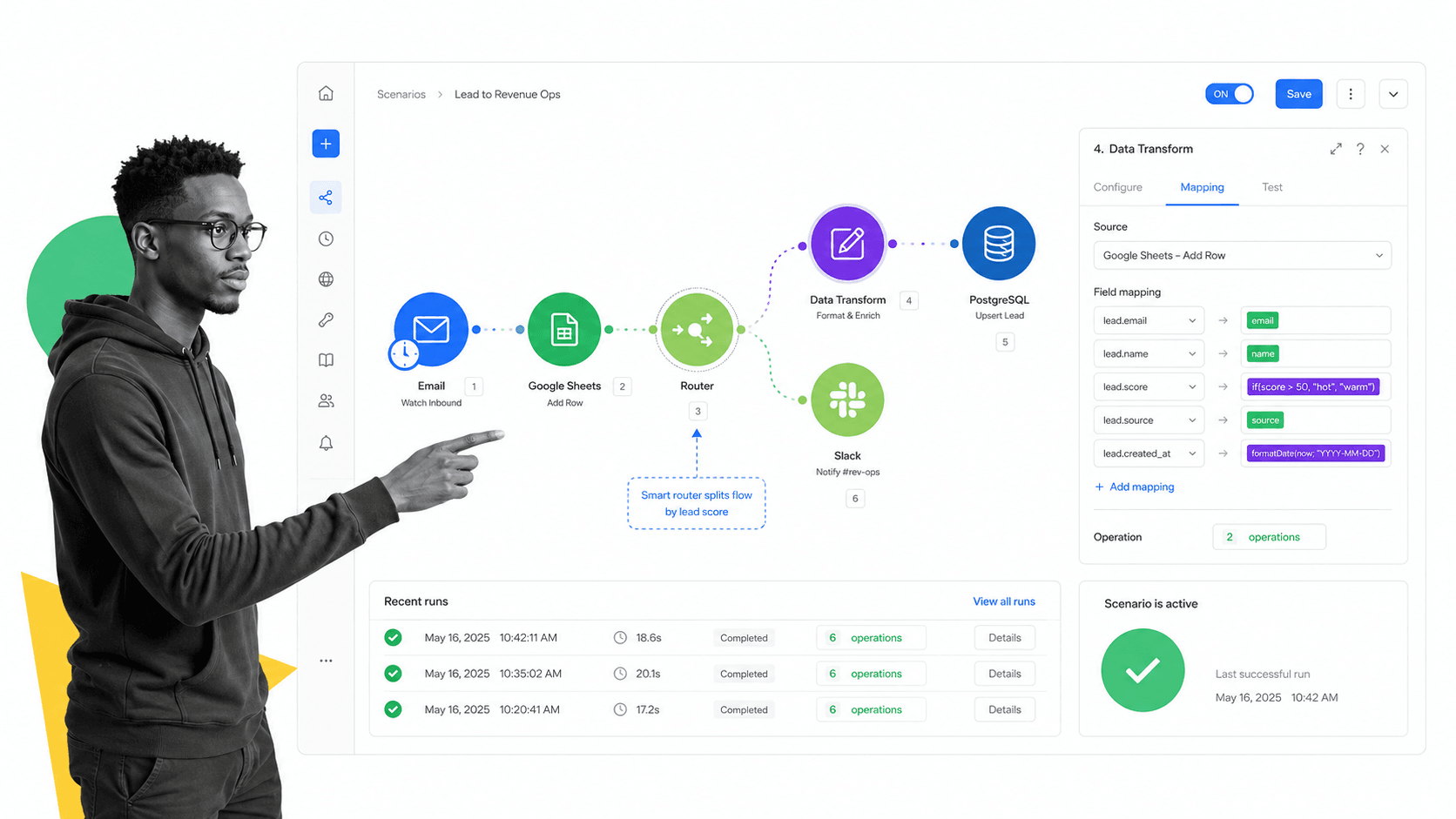
Make is a strong Zapier alternative for builders who think visually. Its pricing page shows a free plan and paid plans, and its scenario canvas helps teams see modules, routes, mappings, and run history in one place. That makes it easier to understand how data moves through a multi-branch automation.
Choose Make when the process is mostly app automation, but the logic is too visual or branch-heavy for a simple vertical step list. Marketing operations, sales operations, and support operations teams often like the canvas because they can inspect how each module transforms the data.
The tradeoff is governance around human work. Make is useful for connecting systems, but it is not the same as a controlled workflow run with approvals, evidence, and procedural accountability. Pair it with a process layer when the automation supports high-risk work.
3. n8n
Best for: Technical teams that want node-based workflows.
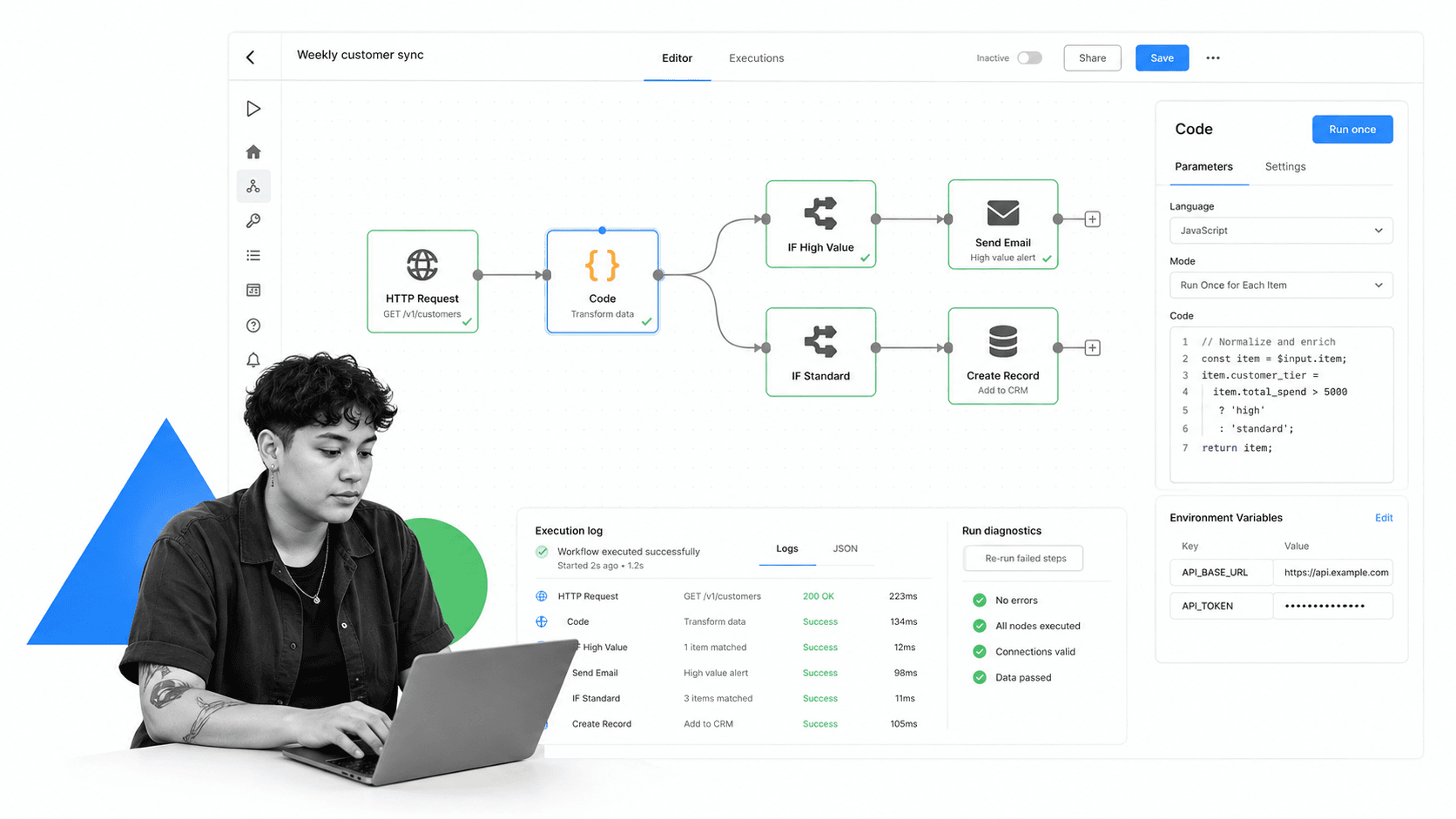
n8n is a strong fit for technical teams that want more control than a standard no-code builder gives them. Its pricing page says plans include unlimited users, workflows, and integrations, with pricing based on monthly workflow executions.
Choose n8n when developers or technical operators will own the workflow. It works well for API-heavy processes, code steps, custom logic, and teams that want self-hosting or infrastructure control.
The tradeoff is builder skill. n8n can be more flexible, but business users may need more technical support to build and maintain reliable workflows. If the workflow must be owned by non-technical operators, choose a surface that fits their day-to-day work.
4. Microsoft Power Automate
Best for: Microsoft 365-heavy teams.
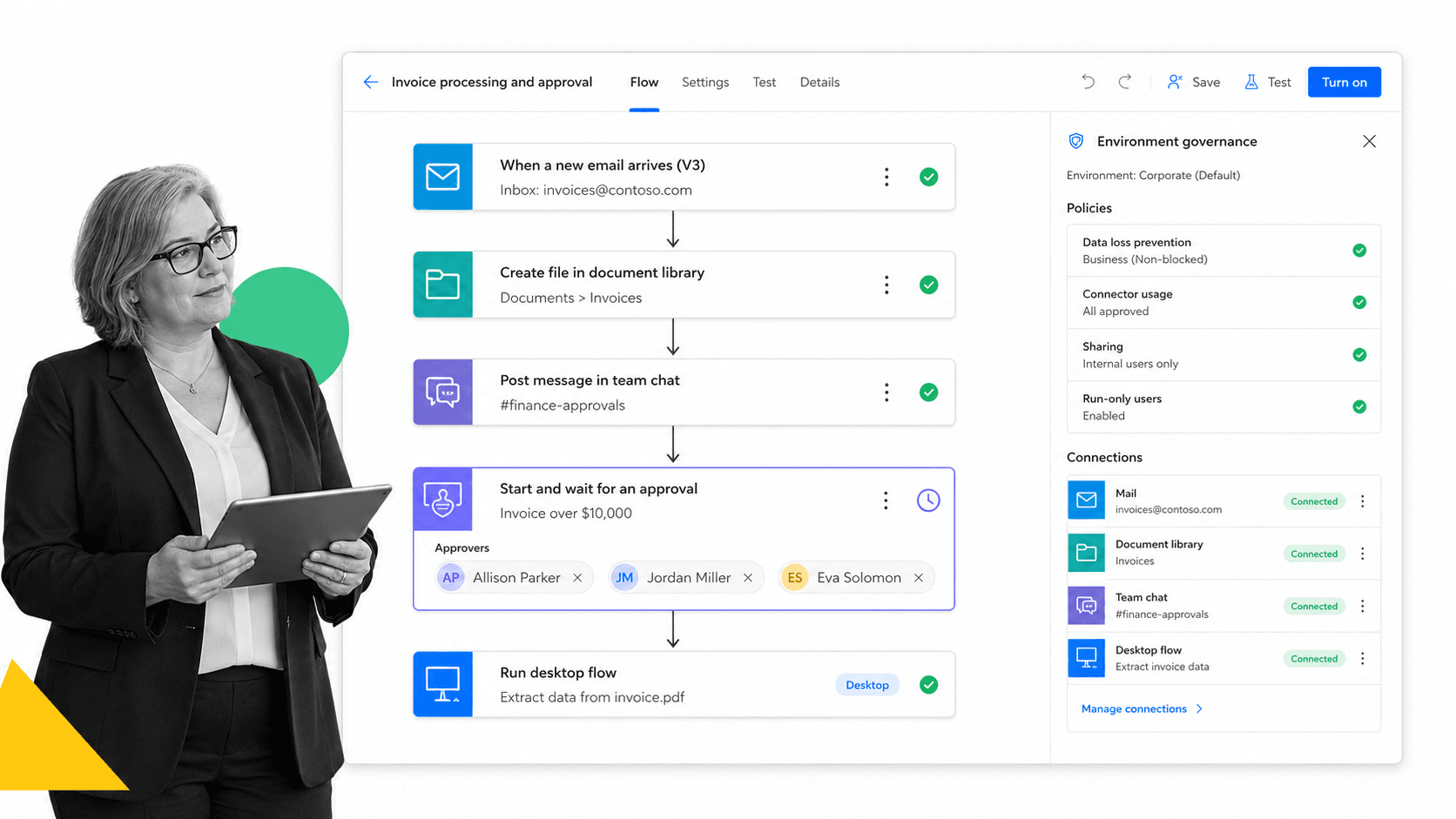
Microsoft Power Automate is the natural Zapier alternative for organizations already deep inside Microsoft 365, Dynamics, SharePoint, Teams, Outlook, and Dataverse. Microsoft positions it around cloud flows, desktop flows, process mining, and unattended automation plans on its Power Automate pricing page.
Choose Power Automate when Microsoft identity, permissions, connectors, and governance are central to the workflow. It is especially relevant when the automation touches SharePoint, Teams, Outlook, Power Apps, or desktop flow automation.
The tradeoff is ecosystem fit. Power Automate is strongest when Microsoft is the operating center. Teams running a broader SaaS stack may prefer a more neutral automation layer or a process platform with universal integrations.
5. Workato
Best for: Enterprise iPaaS and governed automation programs.
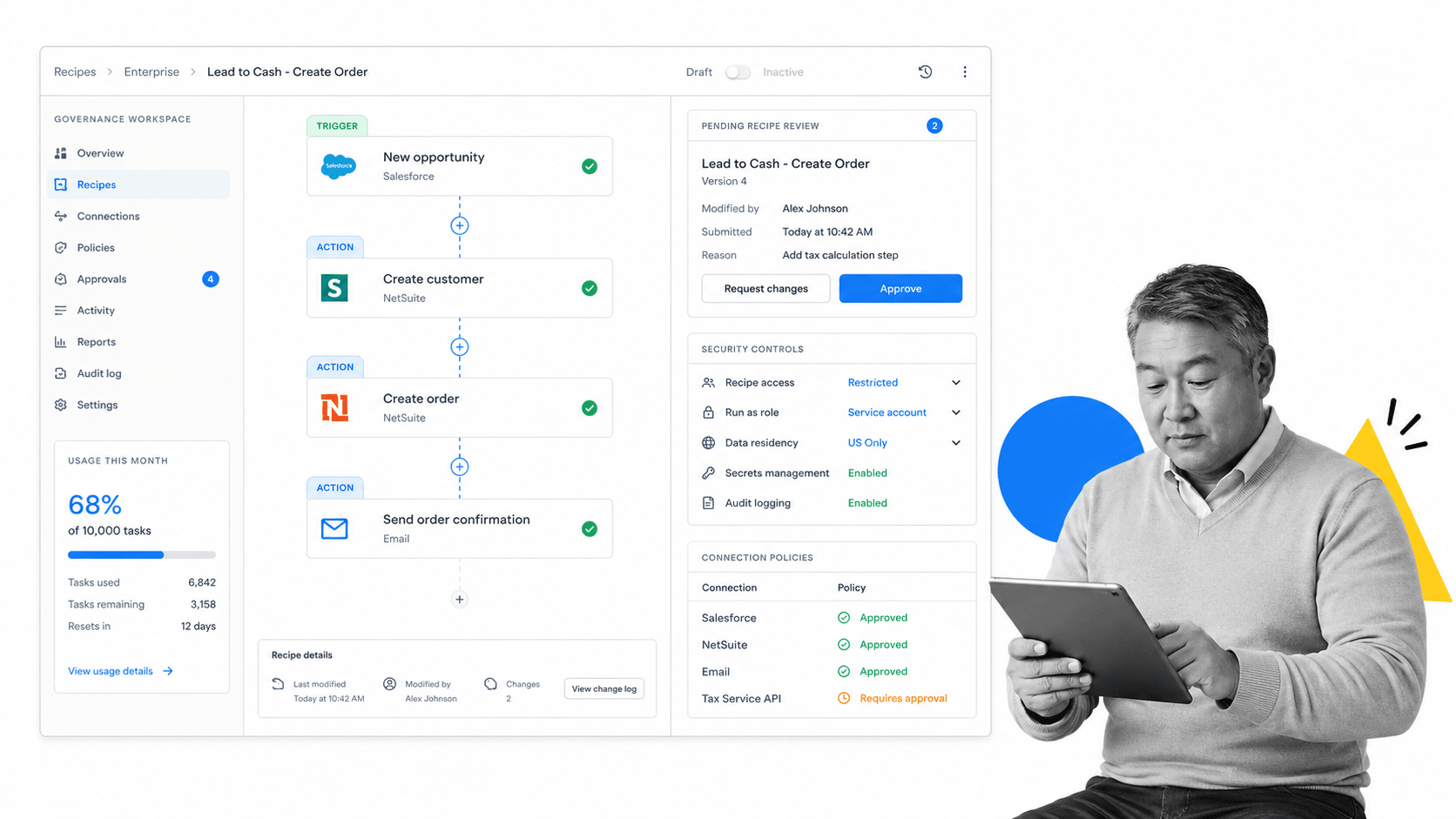
Workato is a Zapier alternative for enterprise integration teams. Its documentation describes a usage-based pricing model for direct customers, with a platform edition fee and usage fee.
Choose Workato when the automation program is owned by IT, integration teams, or an automation center of excellence. It is built for recipes, governance, shared connections, lifecycle management, and enterprise scale.
The tradeoff is weight. Workato is more than most small teams need for simple app automation. It makes sense when the organization needs enterprise integration architecture, not just a better way to connect a form to a spreadsheet.
6. Tray.ai

Best for: Governed integration, MCP, and agent orchestration.
Tray.ai is a Zapier alternative for teams thinking about integration, automation, MCP services, and AI agent orchestration together. Its pricing page describes one governed platform for agents, MCP, intelligent automation, and integration.
Choose Tray.ai when automation needs to serve both human-built workflows and AI-agent workflows. The Agent Gateway and Merlin Agent Builder positioning make it relevant for teams building governed tool access for agents, not only traditional app integrations.
The tradeoff is implementation shape. Tray.ai fits technical and enterprise teams that want a governed integration platform. Smaller teams that only need recurring operational workflows may get value faster from a process-first system.
Zapier alternatives by use case
Here is the simple way to choose between the main Zapier alternatives:
- Choose Process Street when the workflow has people, approvals, compliance, evidence, recurring procedures, or operational accountability. Start with employee onboarding checklist or client onboarding checklist when the process is onboarding-heavy.
- Choose Make when the automation is mostly app-to-app data movement and visual branching helps the builder understand the flow.
- Choose n8n when a technical team wants node-level control, self-hosting options, code steps, and execution-level pricing.
- Choose Microsoft Power Automate when Microsoft 365 is the center of the operating environment.
- Choose Workato when enterprise integration governance, lifecycle management, and shared automation architecture matter most.
- Choose Tray.ai when governed integration and AI-agent tool orchestration are part of the same roadmap.
For many teams, the best answer is not one tool forever. A process platform can own the controlled work, while app automation tools move data around it. Process Street has direct, universal integrations to 5,000+ systems. Need a new one? An AI agent builds it on the fly. Zapier, Tray, Power Automate, and Make also remain supported connection paths when they are the right implementation layer.
The practical test is simple: if a workflow only needs to move data, an app connector may be enough. If the workflow needs to prove that work happened correctly, use a controlled workflow layer. If the workflow needs both, connect the systems but keep the process record in one place.
That is why workflow automation tools and business process automation tools should not be evaluated only by connector count. Connector breadth matters, but it does not replace clear ownership, required inputs, approvals, and traceable execution.
A strong automation stack should reduce manual work without hiding responsibility. The team should know what started, what changed, who approved, what failed, and what happened next. That is the difference between automation that saves time and automation that creates a new operational risk.
FAQs
What are the best Zapier alternatives?
The best Zapier alternatives depend on the workflow. Process Street is best for compliance operations and recurring business processes, Make is strong for visual scenario building, n8n fits technical teams, Power Automate fits Microsoft 365 environments, and Workato or Tray.ai fit enterprise integration programs.
Why do teams look for Zapier alternatives?
Teams usually look for Zapier alternatives when workflows become too expensive, too complex, too technical, or too risky for a simple trigger-and-action setup. Common reasons include governance, audit trails, branching logic, self-hosting, Microsoft ecosystem fit, and enterprise integration needs.
Is Process Street a Zapier alternative?
Process Street is a Zapier alternative when the job is recurring workflow execution rather than only app-to-app automation. It gives teams workflows, tasks, approvals, required fields, conditional logic, audit trails, and integrations around the process.
Which Zapier alternative is best for compliance workflows?
Process Street is the best fit when a workflow needs approvals, evidence, required steps, ownership, and audit proof. App automation tools can connect systems, but compliance workflows need a controlled record of how the work was completed.
Which Zapier alternative is best for developers?
n8n is a strong Zapier alternative for developers and technical operators because it offers node-based workflows, code steps, execution logs, and self-hosting options. Pipedream is also developer-oriented, but this guide focuses on n8n for technical workflow control.
Which Zapier alternative is best for Microsoft 365?
Microsoft Power Automate is usually the best Zapier alternative for Microsoft 365-heavy teams. It works naturally with cloud flows, desktop flows, SharePoint, Teams, Outlook, Dataverse, and Microsoft governance patterns.
Comparing something else? The full directory of software alternatives and competitor comparisons covers integration and automation platforms alongside the wider workflow category.
