


Turn every policy into automated workflows with built-in enforcement and audit-ready proof.



Remote Management Tools
Remote management tools let authorized teams monitor, configure, support, secure, and maintain systems without being physically present. Depending on the environment, the managed assets may include servers, employee endpoints, network services, mobile devices, applications, or remote workstations.
The category is broader than remote desktop access. A complete remote management stack can discover assets, collect health signals, apply policy, automate maintenance, open support sessions, control privileged actions, and preserve evidence of what changed.
This guide explains the layers, capabilities, security controls, and implementation choices behind remote management. It also shows how Process Street can turn alerts, changes, approvals, and follow-up work into controlled workflows.
In this article, we are going to cover:
- What remote management tools are
- Types of remote management tools
- Core capabilities of remote management tools
- How remote management tools work
- How to choose remote management tools
- How to secure remote management tools
- How to implement remote management tools
- Manage remote IT workflows in Process Street
- Remote management tools FAQs
What remote management tools are
Remote management tools are software utilities and platforms that allow administrators to observe or act on technology from another location. The action may be as simple as viewing device health or as sensitive as changing a server configuration through an unattended privileged session.
Remote management is an operating capability
A tool becomes part of remote management when it closes distance between the operator and the asset. It gathers a signal, provides a control, or coordinates a response without requiring someone to stand in front of the device. The strongest implementations combine those functions with policy, identity, and evidence.
CISA describes remote monitoring and management software as endpoint software that continuously monitors system health and enables unattended administration. That definition captures the two essential halves: observe what is happening and take controlled action.
Remote access is one part of remote management
Remote access gives an authorized person a path into a system. Remote management adds the surrounding capabilities needed to run a fleet: inventory, policy, patching, automation, alerts, reporting, change control, and support records. A remote desktop session can fix one machine. A management system helps a team decide which machines need attention and proves what it did across all of them.
Remote management is different from remote team management
The phrase can also be used for managing people who work from different locations. That work relies on communication, goals, documentation, and remote team management. This guide focuses on the IT meaning: managing technology assets and the operational work around them.
Teams looking for collaboration, scheduling, and distributed-work productivity should evaluate remote work software and broader remote work tools. Those products can sit beside remote IT administration, but they solve a different primary problem.
Types of remote management tools
Remote management tools fall into several layers. An organization may use one broad platform or combine focused tools. The right architecture depends on what must be managed, how quickly teams need to intervene, and how much control the environment requires.
Remote monitoring and management software
RMM software is built for continuous oversight of endpoints and servers. It typically uses a local agent or another management channel to report health, inventory, performance, service status, and security-relevant changes to a central control plane. Policies can then trigger alerts, scripts, patches, or technician action.
This layer is valuable when the fleet is large enough that administrators cannot inspect each device manually. Internal IT teams use it across their own environment. Managed service providers use it across separate customer environments, which raises additional requirements for tenant separation, delegated access, and broad incident visibility.
Remote server administration utilities
Server administration tools provide focused controls for operating systems and server roles. Microsoft Remote Server Administration Tools, for example, are a collection of utilities used to manage Windows Server roles and features remotely from a Windows client. The collection includes consoles, modules, and command-line tools for specific administration jobs.
Microsoft’s Windows Server management overview also separates browser-based administration, local management utilities, platform management, and hybrid-cloud control. That separation is useful when designing a stack because one interface rarely owns every management path.
Remote desktop and support software
Remote desktop and support tools let a technician view or control an interactive session. They are useful for diagnosis, user assistance, configuration, and recovery when automation cannot safely resolve the issue. Some products focus on attended sessions where the user grants access. Others support unattended access to managed assets.
A support session should not become the default answer to every alert. Manual control is slow at scale and creates risk if identity, authorization, session recording, and change documentation are weak. Use interactive access for work that benefits from human judgment, and automate predictable, reversible actions.
Device and endpoint management
Device management focuses on enrollment, configuration, software distribution, security policy, inventory, and lifecycle control across desktops, laptops, mobile devices, and other endpoints. Its strength is fleet policy. Its limitation is that it may not include the same deep server monitoring, live troubleshooting, or service-provider operations found in an RMM platform.
A governed asset management process helps keep ownership, lifecycle state, location, support status, and retirement decisions connected to the endpoint record.
Workflow and service orchestration
The management console can detect and change technology, but teams still need to coordinate the work around it. A high-risk patch may require approval. A failed remediation may need incident escalation. A new endpoint may require access, training, security review, and handoff across several teams.
That operational layer belongs in an operations management system or workflow platform that makes ownership, sequence, evidence, and exceptions explicit. It prevents a technically successful change from bypassing the procedure that makes the change safe.
Core capabilities of remote management tools
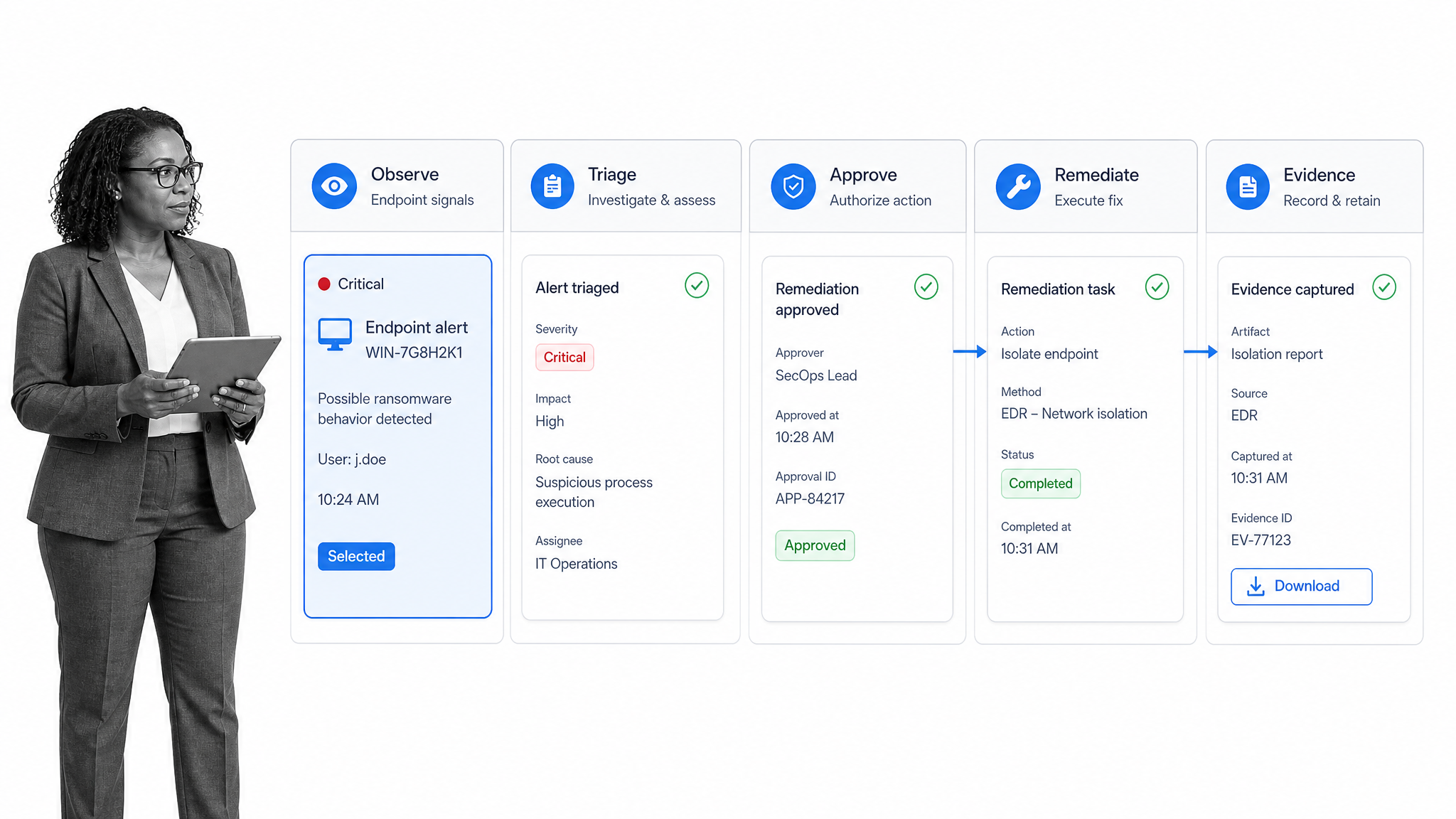
The best remote management tools make a specific operating loop reliable: discover the asset, understand its state, decide whether intervention is needed, apply the approved action, verify the result, and retain evidence.
Asset discovery and inventory
You cannot manage what the system cannot identify. Discovery should find supported endpoints and record the attributes that matter for policy: owner, operating system, network context, installed software, service role, security state, and lifecycle status. Inventory quality determines whether automation reaches the correct target.
An IT asset management checklist can standardize the surrounding work: identify assets, assign responsibility, verify license and security status, plan maintenance, and govern retirement.
Health and availability monitoring
Monitoring collects signals about whether the asset is reachable, healthy, performant, and operating within policy. Useful signals include service state, resource consumption, failed jobs, storage pressure, security events, backup status, and configuration drift. A signal matters only when it maps to an owner, threshold, and response path.
The same principle applies to workflow monitoring. Observation should lead to a clear decision or action, not create another dashboard that people must remember to check.
Patch and configuration management
Patch management identifies applicable updates, tests or stages them, schedules deployment, handles reboots, records failures, and verifies the resulting state. Configuration management applies desired settings and detects drift. Both require rings or groups so teams can limit the impact of a bad change before it reaches the full fleet.
Automation and scripting
Automation lets administrators run a known action across one or many assets. Common jobs include gathering diagnostics, restarting a service, clearing a safe cache, rotating a configuration, or validating a setting. Guardrails should define target scope, required approval, maximum impact, rollback behavior, timeout, and verification.
A reusable script without those controls can multiply a mistake. Treat every automated action as a change procedure, even when the command is technically simple.
Remote access and support
Interactive access should support fast diagnosis without weakening identity or accountability. Evaluate attended versus unattended access, platform support, technician permissions, session approval, file transfer controls, clipboard restrictions, recording, and the ability to revoke access quickly.
Identity and privileged access
The management surface should integrate with the organization’s identity controls and separate ordinary monitoring from privileged intervention. Role-based permissions, multi-factor authentication, just-in-time access, device trust, and strong offboarding reduce the chance that one compromised technician account becomes a fleet-wide incident.
Alerting, ticketing, and workflow integration
Alerts need routing, priority, context, ownership, and closure criteria. Task workflow management software can turn a signal into a repeatable response with required fields, assignments, escalation, approval, and evidence instead of leaving the response inside a private technician session.
Reporting and audit evidence
Reports should explain fleet coverage, policy compliance, patch state, unresolved risk, recurring failures, technician activity, exceptions, and change outcomes. The evidence layer should answer who acted, on which asset, under what authorization, what changed, whether verification passed, and what happened next.
How remote management tools work
Most remote management systems have five technical parts: a managed asset, a collection or control channel, a central service, policy and automation logic, and an operator interface. The workflow around those parts decides whether the technology is used safely.
The endpoint establishes a management channel
An agent, operating-system service, management protocol, or network appliance establishes a path between the asset and the control plane. The channel reports inventory and state. Depending on permissions, it may also accept commands, configuration, software, or session requests.
The control plane normalizes state
The central service turns device-level data into fleet-level views. It evaluates health and policy, stores configuration, groups assets, and exposes the controls technicians use. Good grouping is operational, not merely cosmetic. It allows a policy to reach the correct operating-system version, business unit, risk tier, or deployment ring.
Policies turn signals into decisions
A threshold, desired state, schedule, or event creates a decision point. The system may open an alert, collect diagnostics, run a low-risk remediation, request approval, or escalate to a person. The response should reflect both technical severity and business context.
Verification closes the loop
A command completing is not proof that the problem is solved. The system should recheck the service, configuration, patch state, user impact, or security condition that triggered the action. Failed verification needs its own path, owner, and deadline.
Evidence preserves accountability
Logs and workflow history connect detection to authorization, action, and outcome. This record supports troubleshooting, audits, incident review, service reporting, and continuous improvement. It also reveals when teams repeatedly use emergency access instead of fixing the underlying operating process.
How to choose remote management tools
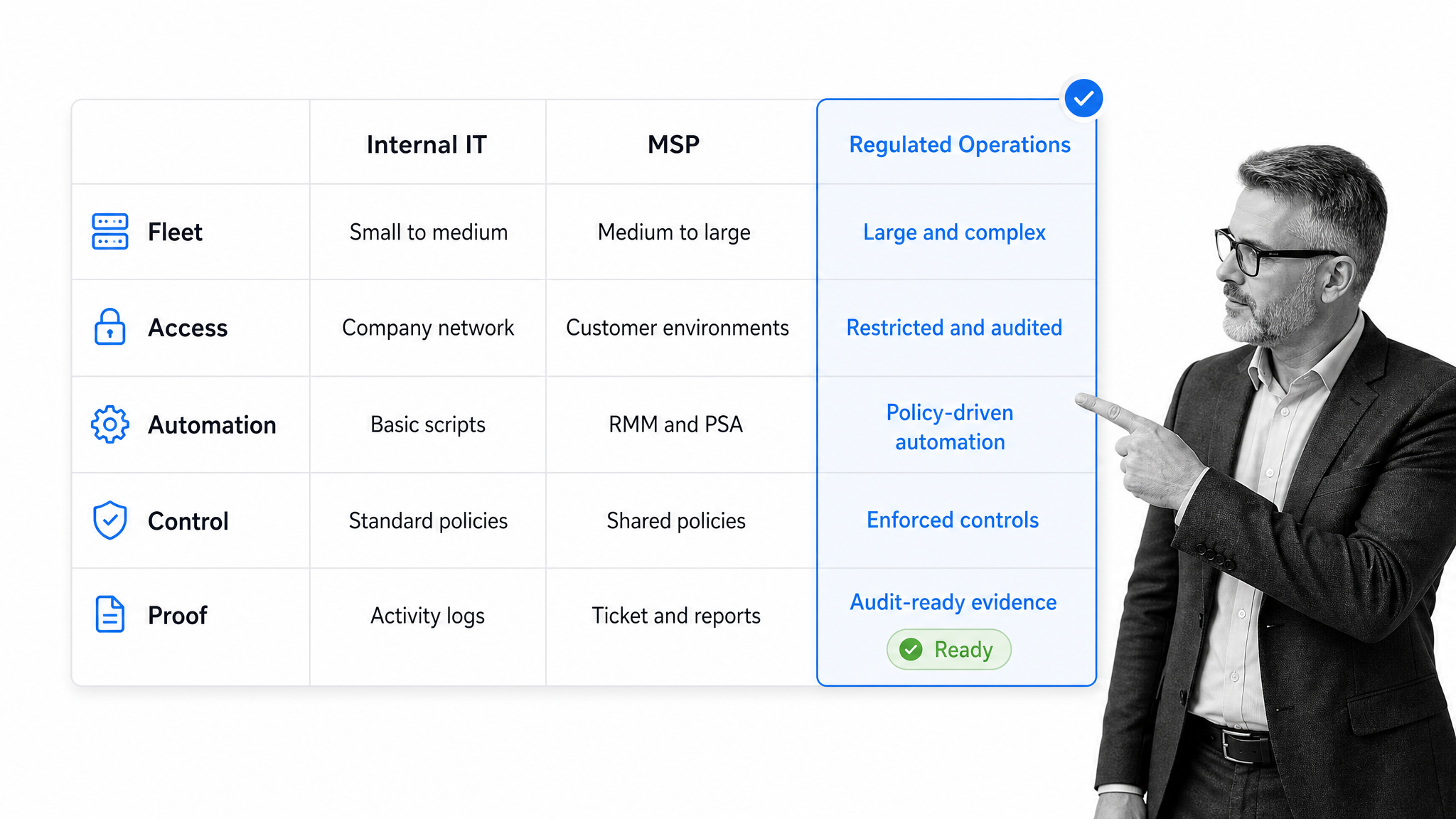
Choose remote management tools from the operating model backward. Feature volume is less important than fit across the managed environment, security boundary, response workflow, and proof requirement.
Define the managed fleet
List the systems, operating systems, ownership models, network zones, geographic regions, and lifecycle states in scope. Include assets that are intermittently connected, personally owned, isolated, or regulated. A product that covers the common laptop but misses critical servers can create a fragmented control model.
Match the tool to the operating team
Internal IT needs clean administration across one organization. An MSP needs multi-tenant separation, delegated technician access, customer reporting, and rapid context switching. A regulated operator needs stronger approval, evidence, retention, and separation of duties. Do not assume the same console design serves each team equally well.
Evaluate security architecture
Review identity integration, multi-factor authentication, role design, tenant isolation, credential handling, session approval, encryption, logging, update process, vulnerability response, and emergency revocation. Ask which controls are enabled by default and which require separate configuration or licensing.
Test automation guardrails
A useful test includes one safe automated fix and one sensitive change. Check scope preview, approval, deployment rings, failure handling, rollback, timeout, and post-action verification. The interface should make it difficult to run a broad command accidentally.
Inspect evidence quality
Export or review a real change record. It should identify the asset, initiating signal, actor or automation, authorization, command or policy, result, verification, and exception path. If the evidence needs a technician to reconstruct the story from several dashboards, the system has not closed the operating loop.
Test integration with the rest of the stack
Remote management rarely stands alone. It exchanges data with identity, asset, security, service management, communication, and reporting systems. Evaluate whether integrations can preserve identifiers, status, ownership, and evidence without brittle manual copying.
Process Street has direct, universal integrations to 5,000+ systems. Need a new one? An AI agent builds it on the fly. That integration model lets a controlled workflow coordinate remote management events with the systems where assets, identities, requests, and evidence already live.
Run a realistic pilot
Pilot across more than a clean lab. Include a normal endpoint, a critical server, an intermittently connected device, a failed patch, a high-risk approval, a support session, an offboarded technician, and a recovery scenario. The pilot should prove the operating procedure as well as the product.
How to secure remote management tools
Remote administration creates leverage, which makes it valuable to defenders and attractive to attackers. Security must cover the management service, technician identity, endpoint channel, action policy, and operating process.
Require strong identity and least privilege
Use multi-factor authentication for every privileged operator. Separate monitoring, scripting, remote control, policy administration, and tenant administration roles. Grant access by job and environment, remove standing privilege where possible, and review dormant accounts and tokens.
Restrict tools and management paths
CISA’s guide to securing remote access software emphasizes that legitimate remote access software can be misused. Maintain an approved inventory, remove unauthorized tools, control installation, restrict network paths, and monitor for unexpected remote administration activity.
Protect remote access architecture
The NIST guide to enterprise telework and remote access security treats remote access as an architecture with client, network, authentication, and resource risks. Apply that view to remote management: verify the operator, the device, the channel, and the target instead of trusting location alone.
Control high-impact actions
Use workflow approvals for broad deployments, privileged changes, destructive actions, security-control changes, and exceptions. Approval should carry the target scope, business reason, risk, validation plan, rollback plan, and maintenance window.
Centralize logging and alert on anomalies
Send management-service, identity, session, command, policy, and endpoint logs to a protected monitoring surface. Alert on new administrators, disabled controls, unusual execution volume, new tools, unexpected geographic access, mass commands, and actions outside approved windows.
Prepare for a management-platform incident
Build a specific incident response process for loss of trust in the remote management layer. Teams need a way to revoke access, isolate the control plane, contact affected owners, validate endpoints through an alternate channel, preserve evidence, and restore management safely.
An executable incident management checklist makes those responsibilities visible before a high-pressure event begins.
How to implement remote management tools
Implement remote management as a controlled operating change. Installing agents is only one task. The real work is defining scope, policy, ownership, access, response, evidence, and continuous review.
Step 1: Inventory the environment
Build the initial asset list and identify authoritative sources for ownership, identity, network context, and lifecycle state. Mark critical, regulated, unsupported, isolated, and personally owned assets. Reconcile discovery results against the expected inventory before broad enforcement begins.
Step 2: Define outcomes and boundaries
State what the program must improve: faster detection, consistent patching, secure support, lower manual effort, better evidence, or reduced configuration drift. Define what is out of scope, which teams can act, and which changes require another owner.
Step 3: Design roles and access
Create roles for administrators, technicians, reviewers, security operators, auditors, and service owners. Test onboarding, job changes, temporary privilege, emergency access, and offboarding. A clean role model reduces the temptation to share broad administrator accounts.
Remote employee setup is a useful dependency check. An onboarding remote employees checklist can connect account creation, device access, tool access, training, and manager handoff. An employee onboarding quick start provides a smaller path for standard digital setup.
Step 4: Establish deployment rings
Begin with a small, representative pilot group. Separate test, early-adopter, standard, critical, and exception rings. Define entry and exit criteria for each ring so deployment advances because verification passed, not because a calendar date arrived.
Step 5: Write change and remediation workflows
Use an IT change management process to capture need, impact, risk, approval, implementation, validation, documentation, and review. Create separate paths for automatic low-risk remediation, planned change, emergency action, and failed verification.
Step 6: Connect alerts to ownership
Use conditional logic to route by severity, asset class, customer, region, control impact, or failure type. Every alert should have a closure condition, and repeated alerts should trigger investigation into the underlying cause rather than repeated manual dismissal.
Step 7: Test failure and recovery
Test a disconnected agent, a compromised credential, an unauthorized tool, a failed update, an incorrect script target, a broken integration, and loss of the management service. Verify that the team can detect the failure, limit impact, use an alternate channel, and preserve evidence.
Step 8: Review operations continuously
Review fleet coverage, alert quality, patch success, unresolved critical conditions, automation failures, privileged activity, emergency changes, and recurring manual work. Improve the policy and workflow when the same exception appears repeatedly. The objective is a safer operating system, not a larger dashboard.
Manage remote IT workflows in Process Street
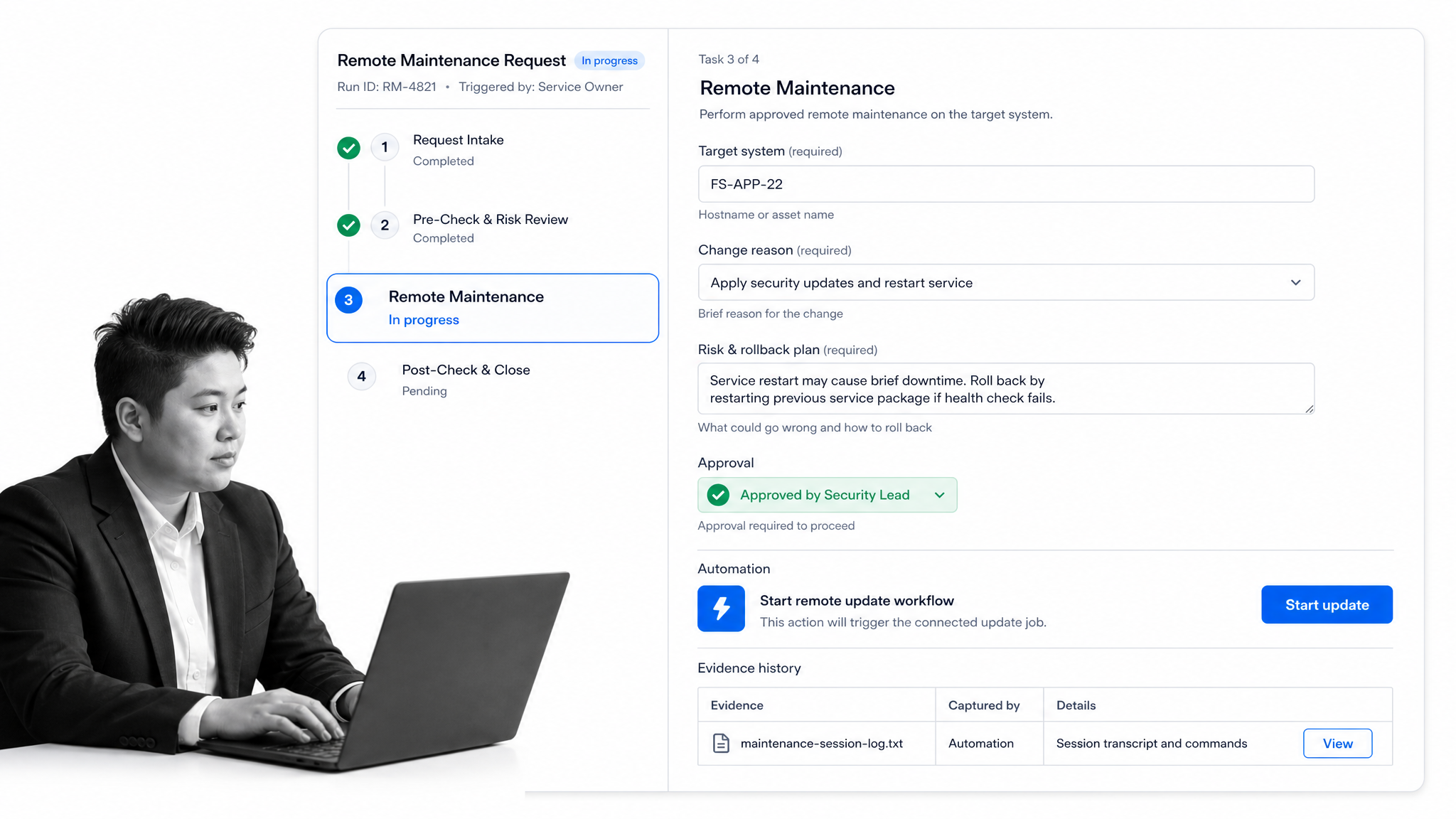
Process Street manages the controlled workflow around remote IT administration. It does not replace the endpoint control channel. It turns signals and requests into repeatable work with clear ownership, required information, approvals, automation, and execution proof.
Standardize maintenance requests
Forms can capture the target asset, business reason, risk, maintenance window, expected impact, validation method, and rollback plan before work begins. Required information keeps a technician from starting a sensitive change with only a message in chat.
Route work by risk and asset type
Conditional paths can separate routine endpoint maintenance from critical-server, regulated-system, customer-impacting, or emergency changes. Each path can assign different reviewers, evidence requirements, deadlines, and escalation rules while keeping one governed workflow model.
Control privileged changes
Approvals can stop execution until the right owner reviews scope, risk, and rollback. The decision remains attached to the maintenance record, so teams do not have to reconstruct authorization from an email thread after the change.
Coordinate connected actions
Automations can create or update records in connected systems, notify owners, pass approved context, and start the next controlled step. The workflow remains the source of procedural truth even when the technical action occurs in a remote management platform.
Preserve verification and evidence
The workflow can require post-change validation, attach diagnostic output, capture exceptions, record approval, and preserve task history. A failed validation can branch into rollback, escalation, incident response, or follow-up instead of being marked complete because the command returned.
Improve recurring remote operations
Completed runs expose where information was missing, approvals stalled, automations failed, or the same remediation repeated. Teams can improve the workflow template and reduce emergency access over time. This complements the remote management platform by governing how its power is requested, authorized, used, and reviewed.
Remote management tools FAQs
What are remote management tools?
Remote management tools are software utilities and platforms that let authorized teams monitor, configure, support, secure, and maintain systems from another location. They may manage servers, endpoints, network services, applications, mobile devices, or remote workstations.
What is the difference between RMM and remote desktop software?
RMM software continuously monitors and manages a fleet through a central control plane, often adding inventory, policy, automation, patching, and reporting. Remote desktop software focuses on an interactive session with one device, which is useful for support and diagnosis but is only one part of remote management.
Which capabilities should remote management tools include?
Core capabilities include asset discovery, health monitoring, patch and configuration management, automation, secure remote access, identity controls, alert routing, integration, verification, and evidence. The right mix depends on the managed fleet and the team’s operating model.
How can an organization secure remote management tools?
Require multi-factor authentication, least privilege, approved-tool allowlisting, protected logging, controlled high-impact actions, deployment rings, rapid access revocation, and a specific incident response plan. Treat the management layer as privileged infrastructure because it can reach many assets.
How should a team implement remote management tools?
Start with asset inventory, outcomes, scope, and role design. Pilot representative systems, establish deployment rings, connect alerts to controlled workflows, test failure and recovery, and improve the program using verification and operating evidence.
Can Process Street manage remote IT workflows?
Yes. Process Street can govern requests, required fields, conditional routes, approvals, connected actions, verification, and evidence around remote IT work. A technical remote management platform performs endpoint control, while Process Street makes the surrounding procedure executable and auditable.
