


Turn every policy into automated workflows with built-in enforcement and audit-ready proof.



Note Taking Software

Note taking software is the category of applications people use to capture ideas, meetings, research, and reference material as written notes, then organize and find them again later. The strongest tools do far more than hold text. They let you structure notes, link related ideas together, sync across every device, and search everything you have ever written in seconds.
Everyone takes notes. The hard part is what happens next. Thoughts scattered across a paper pad, a sticky note, a chat message, and a document nobody can locate stop being useful the moment you actually need them. Note taking software solves the retrieval problem. It gives every note a home, a structure, and a search box, so capturing a thought today and finding it a month from now become the same simple motion.
This guide explains what note taking software is, how it works underneath, the main types on the market, the features that genuinely matter, and the real benefits and limits. It ends with the part most tools leave unfinished: turning notes and decisions into work that reliably gets done.
In this article, we are going to cover everything you need to know about note taking software, including:
- What Is Note Taking Software?
- How Note Taking Software Works
- Types of Note Taking Software
- Core Features of Note Taking Software
- Benefits and Limitations
- How to Choose Note Taking Software
- From Notes to Execution: Where Process Street Fits
- FAQs
What Is Note Taking Software?
Note taking software is any application designed to capture, organize, and retrieve written notes. At the simplest end it is a fast place to type a thought. At the richer end it becomes a personal or team memory: a connected, searchable library where meetings, research, decisions, and reference material all live in one place and stay easy to find.
From paper to searchable systems
The habit is ancient, but the tooling changed everything. Manual note-taking on paper is selective and easy to lose. Scholars and researchers eventually built physical systems to fix that, most famously the Zettelkasten method, a network of numbered index cards linked to one another. Modern note taking software is the digital descendant of that idea: it keeps the linking and indexing, then adds instant search, sync, and unlimited capacity on top.
What separates note taking software from a plain document
A single document holds text, and that is roughly where it stops. Note taking software adds four things a document lacks: structure that lets you organize hundreds or thousands of notes, links that connect related ideas, sync that keeps everything current on every device, and search that finds any note instantly. Those four capabilities are what turn a pile of files into a system you can actually rely on.
Note taking software versus a wiki or document store
There is real overlap with wikis and document stores, and the line is about intent. A note taking tool is optimized for fast personal or team capture and recall. a knowledge management system or a document library leans toward polished, governed, long-lived reference material. Many organizations use both, capturing raw thinking in note taking software and promoting the durable parts into process documentation once they are settled.
How Note Taking Software Works
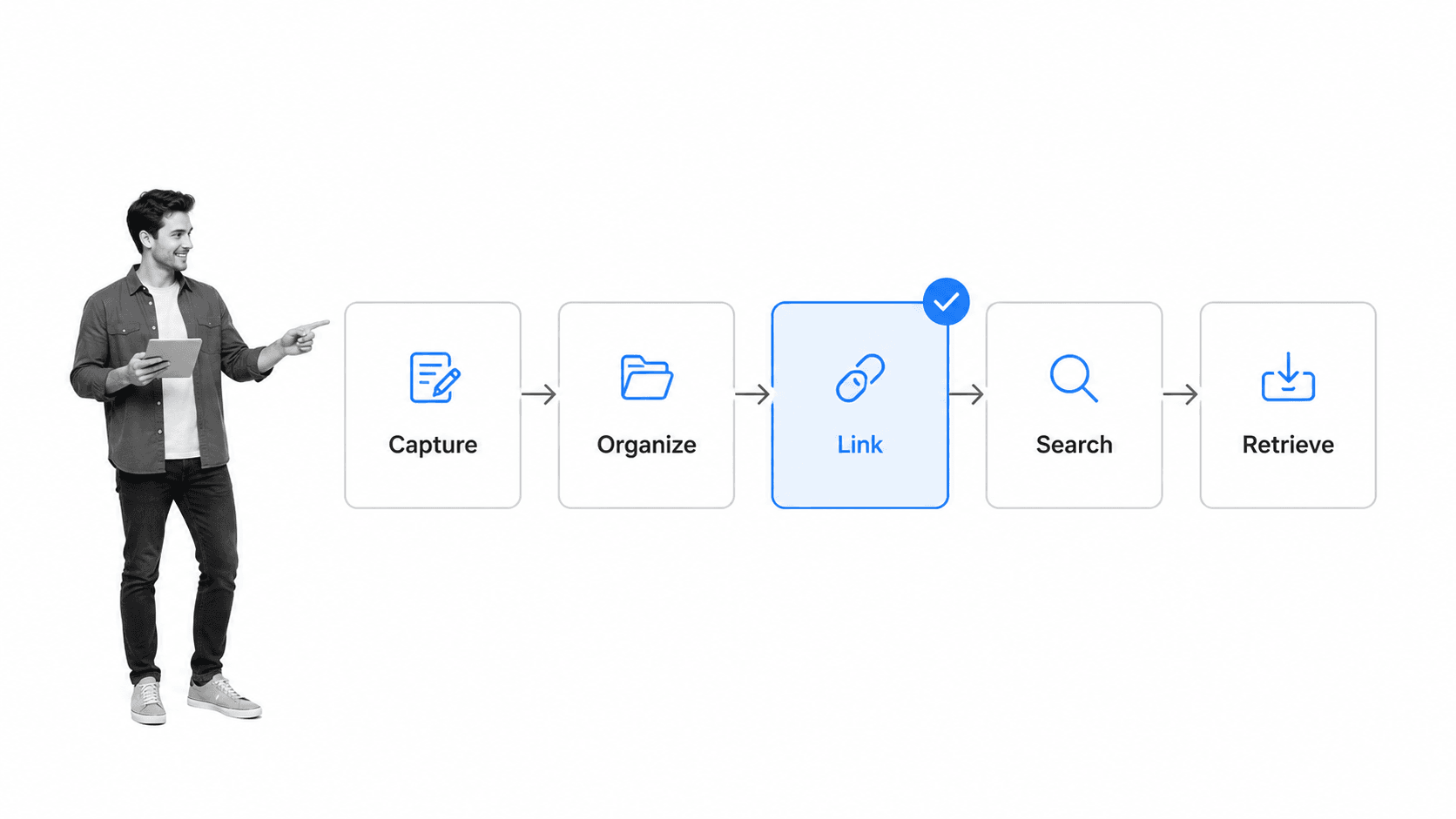
Whatever the interface looks like, note taking software moves every note through the same pipeline. Understanding the stages helps you judge where a given tool is strong and where it is thin.
1. Capture
Capture is the entry point: typing a note, clipping a web page, pasting a quote, dictating a voice memo, or forwarding an email. The best tools make capture nearly frictionless, because a note you do not bother to write is a note you can never retrieve. Capture quality and speed set the ceiling for everything downstream.
2. Organize
Once a note exists, the software gives it a place. That might be a notebook, a folder, a tag, or a database property. Good organization is quiet: it lets you file a note in a second and never think about where it went, because search and structure will surface it later regardless.
3. Link
Linking is what separates a filing cabinet from a knowledge network. Connecting one note to another, and following those connections later, is how scattered ideas become a line of thought. Tools that support backlinks show you every note that points at the one you are reading, which surfaces context you would otherwise forget you had.
4. Search
Search is the payoff. Strong note taking software indexes every word you write so that full-text search returns the right note in an instant, even across years of material. Filters by tag, date, notebook, or author narrow a large library down to the exact note in a couple of keystrokes.
5. Retrieve and reuse
The final stage is putting the note back to work: pasting a decision into a report, sharing a summary with a teammate, or feeding a reference into a new project. This is where note taking becomes part of how a team handles its broader knowledge management, rather than a private habit that dies in a personal app.
Types of Note Taking Software
Note taking software is not one shape. The category spans everything from a bare text box to a full database, and the right type depends on how you think and what you need to remember.
Simple, freeform note apps
These prize speed and simplicity. You open the app, type, and move on, with light organization through notebooks or tags. They suit people who want capture to be effortless and do not need heavy structure. The tradeoff is that a large freeform library can get unwieldy without disciplined tagging.
Structured and outliner tools
Structured tools treat a note as more than prose. Outliners let you collapse and rearrange nested bullets, and database-style tools attach properties, filters, and views to each note. These reward people who think in hierarchies and tables, and they scale well when notes need to be sorted, grouped, and queried rather than just read.
Networked, linked-note tools
Networked tools put links at the center. Every note can point to any other, and the software builds a web you navigate by association rather than by folder. This style grew out of personal knowledge management practice and suits researchers, writers, and anyone building a long-term second brain where connections matter as much as the notes themselves.
Team and collaborative note tools
Collaborative tools add shared spaces, permissions, and real-time editing so a group holds a single source of truth instead of a dozen private copies. When notes need to be shared, they start to overlap with knowledge management tools and team wikis, and the questions shift toward access control and consistency.
Specialized note tools
Some tools focus on one job. Meeting-focused options act as a dedicated note taking assistant that records and summarizes calls, which pairs well with a habit to run remote meetings that produce clear notes. Others target students, researchers, or developers. Specialized tools trade breadth for depth in a single workflow.
Core Features of Note Taking Software
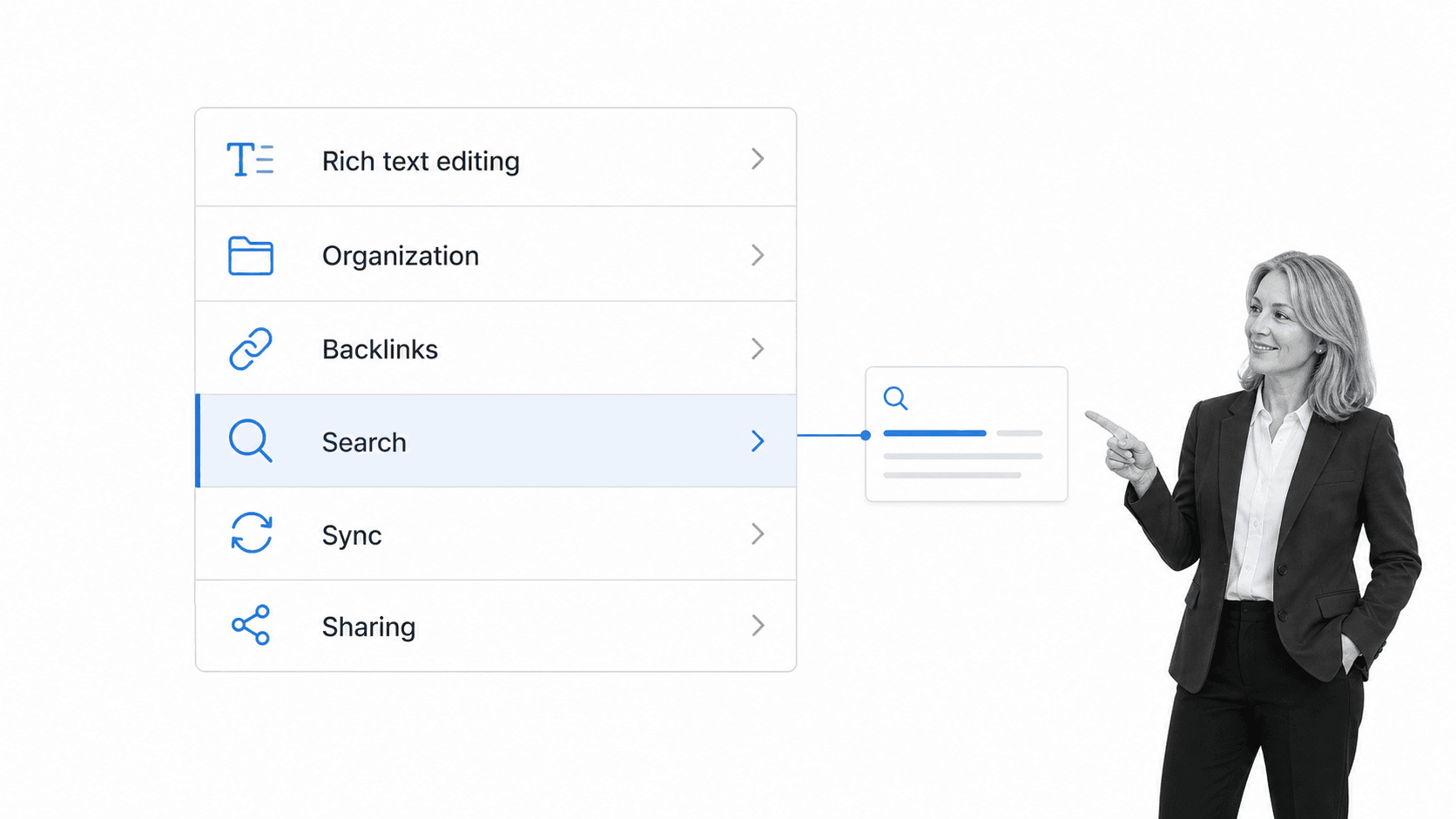
Feature lists differ by vendor, but the capabilities that decide whether note taking software fits your life are consistent. When you compare options, weigh these before anything flashy.
Fast, flexible capture
The tool should make it trivial to get a thought in from anywhere: a keyboard shortcut, a mobile share sheet, a web clipper, a voice memo. Every second of friction at capture is a note you will not take, so this is the feature that quietly determines how much value you get from everything else.
Organization: notebooks, tags, and hierarchy
Look for organization that matches how you sort things: nested notebooks for people who think in folders, flexible tags for people who think in themes, or both. The goal is filing that takes no thought, so the mental energy goes into the ideas rather than the admin.
Links, backlinks, and formatting
Rich linking between notes turns a collection into a network, and backlinks make the connections visible in both directions. Clean formatting matters too; many tools use Markdown so notes stay portable and readable without fighting a toolbar. Together these keep notes structured without locking your writing into a proprietary format.
Search and retrieval
Search is only as good as what it can reach. The best tools index the full text of every note, including clipped pages and, increasingly, the text inside images, then let you narrow results by tag, date, or notebook. A note you cannot find is a note you did not keep, so retrieval is not a nice-to-have.
Sync and offline access
Notes are only useful where you are. Reliable sync keeps every device current, and solid offline access means a dropped connection never blocks capture or recall. Weak sync is the failure mode that quietly erodes trust in a tool, because a note that is not there when you need it may as well not exist.
Sharing, permissions, and security
When notes are shared, sharing controls and permissions decide who can see and edit what, which is the same discipline that underpins good AI document management. Notes often hold sensitive material, so encryption, access controls, and clear export options matter. In regulated settings that bar rises to the standards expected of an AI compliance agent.
Benefits and Limitations
Note taking software changes how you work with information quickly, but it is not magic. Knowing both sides keeps expectations realistic and helps you get the benefits without the traps.
Benefits
- Nothing gets lost: every idea, meeting, and reference has one findable home.
- Recall is instant: search turns years of notes into an answer in seconds.
- Ideas connect: links surface related thinking you would otherwise forget.
- Notes travel: sync keeps everything current across laptop, phone, and tablet.
- Teams align: shared notes replace a dozen private, conflicting copies.
Those gains compound over time. A well-kept note library becomes a personal or team memory that pays back every hour you put into it, much like the broader applications of AI across a business that only work once the underlying information is clean and consistent.
Limitations
The most common failure is fragmentation: spreading notes across several tools until nothing is complete anywhere. Picking one primary system and sticking with it beats chasing the perfect app. There is also a discipline cost, since organization and linking only pay off if you actually do them, and a large messy note library can be as useless as no notes at all.
The deeper limit is structural. Note taking software captures and organizes information beautifully, but a note is a record, not an action. Writing down a decision or a task does not make it happen. That gap between a tidy note and a completed follow-up is where a lot of good intentions quietly die, and it is the boundary no note taking tool is built to cross on its own.
How to Choose Note Taking Software
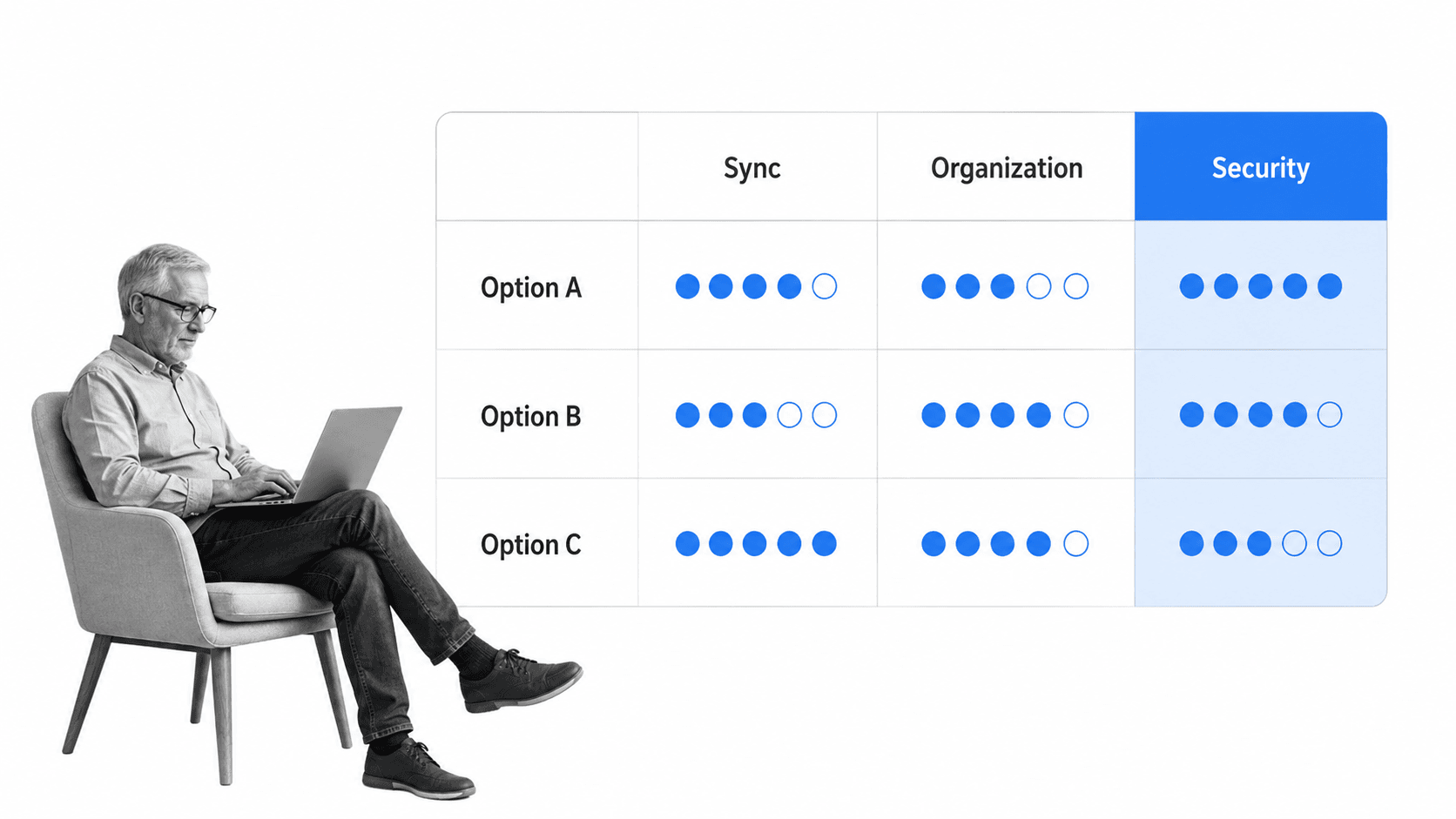
Choosing note taking software is less about feature counts and more about fit. The best tool is the one you will actually keep using. Judge each candidate against the criteria that decide real outcomes, not the longest feature list.
Match the tool to how you think
If you think in quick fragments, a freeform app will feel natural and a database will feel like a chore. If you think in structures and want to query your notes, an outliner or database tool will earn its complexity. Fighting your tool every day is the surest way to abandon it, so start here.
Capture speed and friction
Test how fast you can get a note in from your phone, your browser, and your desk. Count the taps. The tool with the lowest capture friction usually wins in practice, because consistency matters more than any single advanced feature.
Organization and retrieval
Load a tool with a realistic amount of material and see whether you can find things a week later. Good retrieval is the whole point, and it is the same instinct that makes operations management tools valuable: information is only useful where and when you can actually reach it.
Sync, platforms, and offline
Confirm the tool covers every device you use and syncs reliably, including offline. A note taking system that is missing on your phone, or stale when you open it, breaks the trust that makes the habit stick.
Collaboration and sharing
If notes need to be shared, check permissions, real-time editing, and how cleanly a note moves from private to shared. Teams that treat notes as inputs to real work often connect them to automated workflow tools so a shared decision does not stall in a document.
Security, export, and lock-in
Check encryption, access controls, and, crucially, how easily you can export your notes. Your notes are your memory, and a tool that traps them is a risk. Favor open formats and clean export so switching later is always an option.
Many teams shortlist two or three candidates and score them against a small set of weighted criteria, the same way they would evaluate writing standard operating procedures tooling or any other operational software. The winner is the one that fits how you work, not the one with the most checkboxes.
From Notes to Execution: Where Process Street Fits
Process Street is a Compliance Operations Platform. It is not note taking software, and it does not try to be. It solves the problem that begins the moment a note is written: turning notes, decisions, and procedures into work that actually gets done, consistently, with proof.
This is the gap the previous section pointed to. Note taking software captures the idea and lists the action item cleanly, then leaves whether the follow-up happens to memory, reminders, and good intentions. A perfect record of a decision is not the same as the decision being executed, and that is exactly the space Process Street was built for.
From notes to enforced workflows
Process Street turns recurring decisions and procedures into workflows with assigned tasks, due dates, required fields, approvals, and conditional logic. When a note captures something that has to happen the same way every time, it belongs in a repeatable workflow rather than a fresh note each round. The discipline of writing standard operating procedures is what carries a good idea from a note into reliable execution.
Knowledge that stays connected to work
Notes are one input into how a company runs. They are most valuable when they connect to the procedures, policies, and records around them, which is the point of what process documentation is. Process Street keeps documentation and execution in one system, so what a team writes down and what it actually does stay aligned, with something like a standard operating procedure template making the durable parts repeatable.
AI that acts, not just stores
Note taking software is built to capture and organize. Process Street is built around AI that acts: monitoring how work is executed, flagging missed steps, and helping run the procedures a business depends on. It has direct, universal integrations to thousands of systems, and when a new connection is needed an AI agent builds it on the fly, so notes and decisions flow into the tools where work already happens.
For anyone asking where note taking software ends and real execution begins, that is the line. Use note taking software to capture and organize your thinking. Use a system built for execution to make sure the follow-ups are done and provable, whether that is a decision from a planning session or the action items on a meeting minutes template.
FAQs
What is note taking software?
Note taking software is any application designed to capture, organize, and retrieve written notes. It ranges from a simple text box to a connected, searchable system that links related notes, syncs across devices, and finds any note instantly, so your ideas and reference material stay easy to reach.
What features should note taking software have?
The features that matter most are fast capture from any device, flexible organization through notebooks or tags, links and backlinks between notes, reliable full-text search, dependable sync with offline access, and sharing controls with sensible security. Flashier features rarely matter if these fundamentals are weak.
What is the difference between note taking software and a document?
A document holds text and little else. Note taking software adds structure to organize hundreds of notes, links to connect related ideas, sync to keep every device current, and search to find any note in seconds. Those four capabilities turn a pile of files into a system you can rely on.
How do I choose the right note taking software?
Start with how you think: freeform apps suit quick fragments, while outliner and database tools suit structured thinkers. Then test capture speed, retrieval on a realistic library, sync across your devices, sharing, and how easily you can export your notes. The best tool is the one you will actually keep using.
Is note taking software secure?
It depends on the tool. Notes often hold sensitive material, so look for encryption, access controls, clear data handling, and clean export options. In regulated environments the bar is higher, and you should map a tool against your own security and retention policies before rolling it out widely.
What is the difference between note taking software and Process Street?
Note taking software captures and organizes information. Process Street is a Compliance Operations Platform that turns decisions and procedures into enforced, auditable workflows. One records what was written down, the other makes sure the follow-ups actually happen, every time, with proof.
