


Turn every policy into automated workflows with built-in enforcement and audit-ready proof.



Manufacturing Workflow Software
Manufacturing workflow software is a digital system for coordinating the repeatable steps, decisions, handoffs, and records that move production work from request to release. It gives each person the right instruction at the right time, captures required evidence, routes exceptions, and preserves a traceable record of what happened.
A strong system does more than display a flowchart. It turns the workflow into an executable path with assigned owners, due dates, forms, approvals, conditional branches, notifications, and follow-up actions. That distinction matters on a factory floor, where a missed inspection or uncontrolled change can affect quality, safety, delivery, and compliance at the same time.
This guide explains how manufacturing workflows operate, which processes to automate first, how workflow software fits beside ERP, MES, QMS, PLM, and maintenance systems, and how to evaluate and implement a platform without adding another disconnected layer.
In this article, you will learn:
- What is manufacturing workflow software?
- Where manufacturing workflows break
- How a manufacturing workflow moves from request to release
- Core capabilities of manufacturing workflow software
- Manufacturing workflows to automate first
- How workflow software fits the manufacturing technology stack
- How to choose manufacturing workflow software
- How to implement manufacturing workflow software
- Run manufacturing workflows in Process Street
- Manufacturing workflow software FAQs
What is manufacturing workflow software?
Manufacturing workflow software translates an operating procedure into a live sequence of work. It defines who performs each step, what information they need, what evidence they must capture, which conditions change the route, and which approvals must happen before the job advances. The result is a shared operating path rather than a collection of disconnected emails, paper travelers, spreadsheets, and verbal instructions.
Workflow is the coordination layer
Manufacturers already rely on systems that plan materials, control machines, manage product data, schedule maintenance, or record quality outcomes. Workflow software coordinates the human and cross-system work between those systems. It can launch a deviation review after an inspection fails, route a change request to engineering and quality, collect line-clearance evidence, or assign a maintenance follow-up when an operator records an abnormal condition.
Execution is different from documentation
A procedure tells people what should happen. An executable workflow makes the required path visible and enforceable. The difference appears in practical controls: an owner is assigned, a stop prevents premature progress, an approval records the decision, and a conditional path sends a failed result to rework. Teams evaluating broader systems can use a guide to manufacturing management software to separate coordination needs from planning and resource-management needs.
The category serves discrete and process manufacturing
The same workflow principles apply across assembly, fabrication, food, pharmaceuticals, chemicals, and other production environments, but the records differ. A discrete manufacturer may center the workflow on parts, revisions, and job travelers. A process manufacturer may center it on batches, formulas, sampling, and release decisions. The software should preserve each plant’s terminology while applying a consistent control model.
Where manufacturing workflows break
Handoffs depend on memory
A production process can be technically correct and still fail at the handoff. Planning releases a job, but the line supervisor is not notified. Inspection records a defect, but engineering never receives the context. Maintenance completes a repair, but the restart approval remains in a separate inbox. Each gap adds waiting time and creates an opportunity for work to continue without the right decision.
Instructions drift from the approved method
Printed instructions and local spreadsheets are easy to copy and hard to govern. When a revision changes, supervisors may not know which copies remain in circulation or whether every affected operator has acknowledged the update. A controlled workflow links the current instruction to the work itself, making version ownership and release discipline part of execution.
Exceptions disappear into side channels
Normal work is rarely the real test. The test is what happens when material is late, a reading is outside tolerance, a part is substituted, or an approver rejects a change. If the exception moves into chat or email, the audit trail fragments. A structured process analysis can identify these branch points before automation begins, while a targeted manufacturing process optimization program can remove unnecessary loops instead of digitizing them.
How a manufacturing workflow moves from request to release
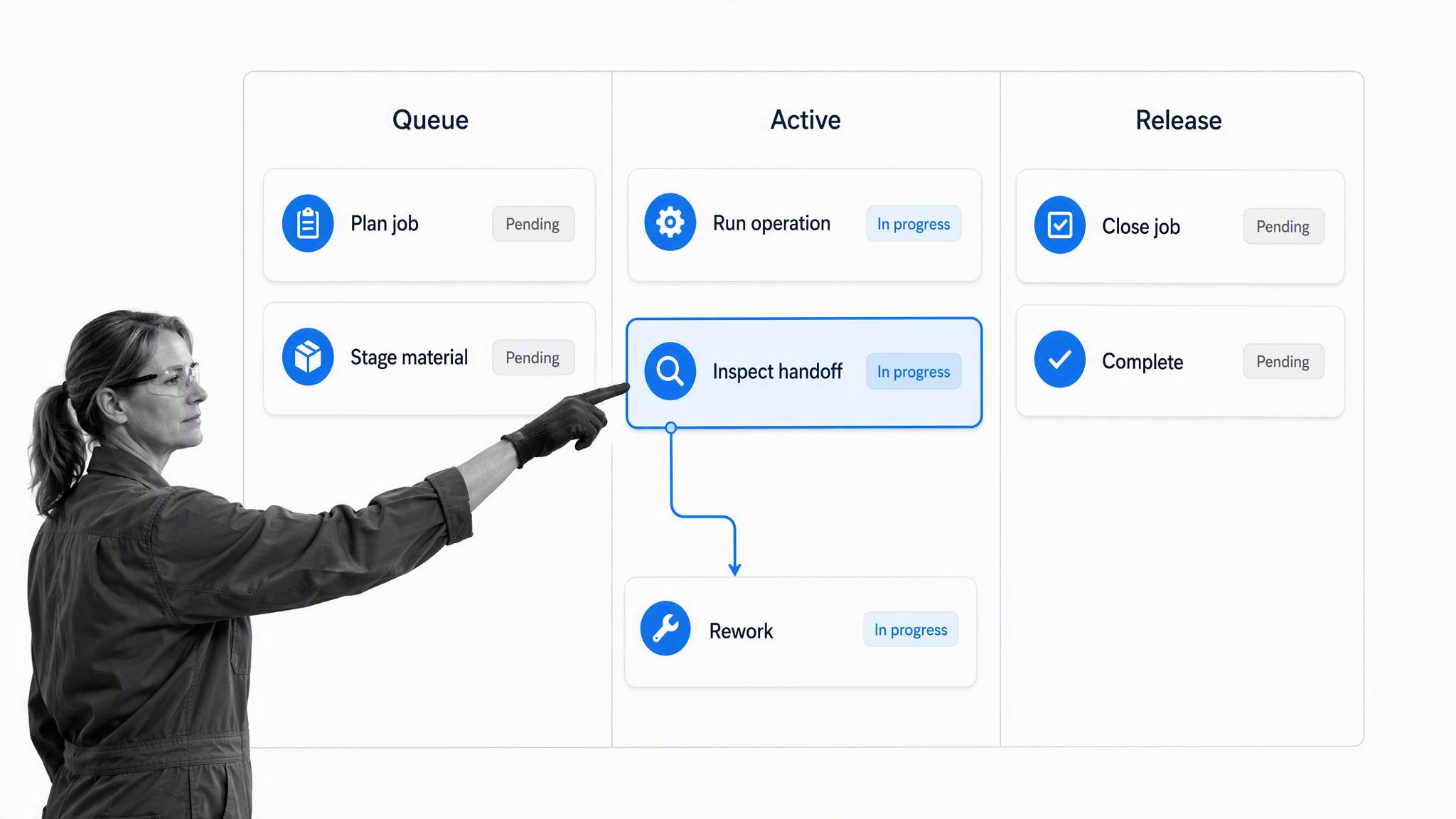
1. Trigger and context
Every workflow needs a clear start. The trigger might be a released production order, a quality event, a maintenance threshold, a supplier delivery, or a change request. The opening step should capture the job, part, batch, line, site, priority, and source record needed by everyone downstream. That context prevents teams from rebuilding the same information at every handoff.
2. Ownership and preparation
The workflow assigns the next work to a role or named owner and confirms readiness. Preparation may include checking material availability, equipment status, tooling, drawings, training, and safety prerequisites. A production planning and control audit checklist helps teams expose missing prerequisites before they interrupt active production.
3. Execution and evidence
Operators complete defined tasks and enter the evidence required by the process. Evidence can include measurements, photos, lot references, inspection results, signatures, or linked system records. Required fields should be purposeful. Capturing everything creates friction, while capturing too little makes the record useless. The workflow designer should ask which evidence proves the step was done correctly and which data will drive a later decision.
4. Decision gates and exception routing
Approvals belong at genuine control points, such as first-article acceptance, deviation disposition, line restart, or final release. Process Street provides approval task guidance showing how an approval can pause work until the designated reviewer accepts or rejects the submitted tasks. Rejection should open an owned correction path, not send the job back into an undefined queue.
5. Completion and learning
Completion should update the source record, notify the next team, and retain the execution history. The record then becomes input for improvement. Repeated deviations, long approval waits, and recurring rework routes reveal where the process design needs attention. This closes the loop between workflow execution and continuous improvement.
Core capabilities of manufacturing workflow software
Flexible workflow design
Builders should be able to model sequential work, parallel work, recurring schedules, role-based assignments, data collection, and reusable subprocesses without waiting for a development queue. The interface should be understandable to operations and quality owners, because they are closest to process change.
Conditional paths and enforced stops
A single workflow should handle normal and exception paths without exposing every user to every branch. Conditional logic in workflows can reveal tasks or fields when a response meets defined criteria. Stops and approvals prevent a user from bypassing a required control when speed pressure rises.
Evidence, history, and accountability
The system should show who owned each step, what they submitted, which decision was made, and what followed. That history supports operational reviews and audits without forcing teams to reconstruct a timeline from inboxes. For quality-managed environments, ISO 9001 provides a broader framework for establishing, maintaining, and continually improving a quality management system.
Integration and orchestration
Manufacturing work crosses systems, so workflow software must exchange context and trigger action across the stack. Process Street has direct, universal integrations to 5,000+ systems. Need a new one? An AI agent builds it on the fly. Teams already using established integration platforms can still connect them where they fit, but the workflow should remain the visible control layer for people and decisions.
Visibility without dashboard overload
Useful reporting answers operational questions: Which jobs are waiting? Which approvals are aging? Where does rework recur? Which workflow version is active? A dashboard should help an owner intervene, not just display activity. The underlying record must remain available for deeper analysis.
Manufacturing workflows to automate first
Quality inspection and nonconformance
Inspection workflows are strong starting points because the trigger, decision, evidence, and exception route are usually clear. A digital in-process quality control workflow can require readings, route failed results, assign disposition, and retain proof. Regulated drug manufacturers also need to consider the minimum methods, facilities, and controls described by the FDA Current Good Manufacturing Practice regulations.
Engineering change and work instruction release
Change control coordinates impact assessment, approvals, document revision, training, inventory disposition, and effective-date release. The workflow should make affected products, equipment, sites, and instructions visible before approval. A manufacturing process development workflow can provide a starting structure for defining and validating a new route.
Maintenance coordination and restart
Maintenance software may own assets and work orders, but a cross-functional workflow can coordinate lockout confirmation, repair evidence, quality checks, production signoff, and restart communication. Teams comparing asset-centered options can review equipment management software alongside the workflow layer.
Supplier qualification and incoming material
Supplier workflows connect qualification, document collection, risk review, sample approval, purchasing status, and periodic reassessment. A supplier selection and evaluation process helps keep evidence and ownership together when several departments participate.
Continuous improvement
Improvement work needs more than an idea list. A workflow can capture the problem, establish a baseline, assign analysis, approve a countermeasure, run a pilot, verify the outcome, and standardize the change. Teams can adapt a manufacturing process improvement workflow and apply relevant lean manufacturing principles to keep improvement tied to observable work.
How workflow software fits the manufacturing technology stack
ERP plans business resources
Enterprise resource planning systems typically own orders, inventory, purchasing, finance, and high-level planning. Workflow software can start work when an ERP state changes, collect human decisions around that work, and return a result. It should not create a competing master record for data the ERP already governs.
MES controls production execution
Manufacturing execution systems operate close to production, equipment, and shop floor transactions. ISA-95 describes the interface between enterprise functions and manufacturing control functions, including manufacturing operations management. Workflow software is most useful around cross-functional coordination, human approvals, exceptions, and processes that span systems or departments.
QMS governs quality processes
Quality management systems often own document control, nonconformance, corrective action, audits, and quality records. A workflow platform can complement or operationalize these controls by guiding the work and collecting evidence. If quality is the dominant need, compare the required workflow depth with the broader features of quality management system software.
PLM and CMMS own specialized records
Product lifecycle management systems govern product definitions, engineering data, and revisions. Computerized maintenance management systems govern assets, preventive maintenance, and work orders. Workflow software should connect decisions and handoffs around those records while preserving the authoritative source. The best architecture is usually orchestration, not duplication.
Use a clear system-of-record map
Before implementation, list each critical record and name its owner system. Then define what the workflow reads, what it writes, and what evidence it retains. NIST manufacturing resources provide broader context for manufacturers modernizing processes and technology. A clear map reduces integration ambiguity and prevents teams from treating workflow software as an uncontrolled shadow database.
How to choose manufacturing workflow software
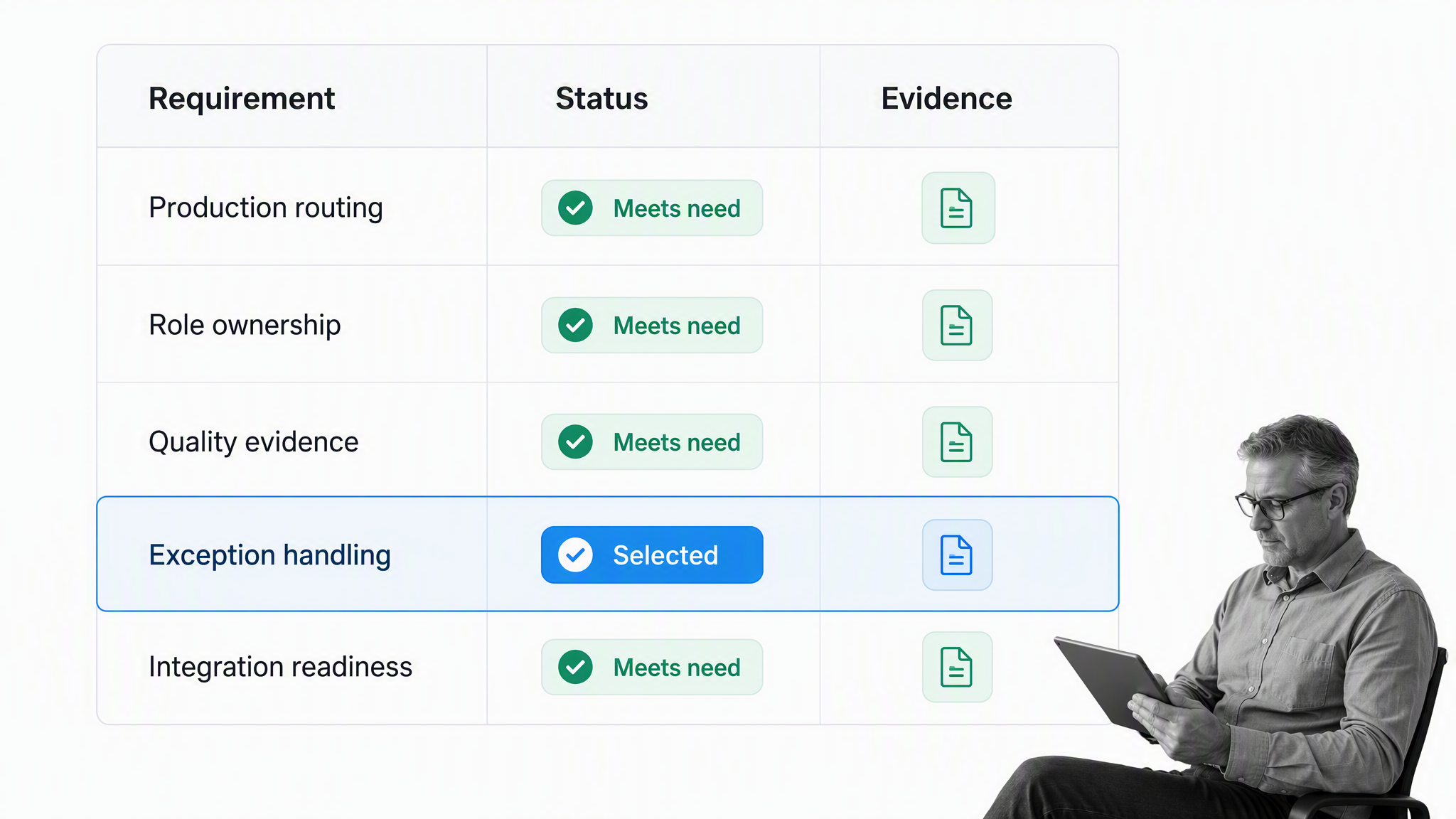
Start with one representative workflow
Do not evaluate from a generic feature checklist alone. Pick one workflow that includes a trigger, multiple roles, required evidence, an approval, an exception, and a system update. Model that workflow in each candidate. The exercise exposes whether the product can represent real work or only draw a pleasant diagram.
Test the builder and the operator experience
A workflow owner should be able to change assignments, fields, instructions, and routing without a lengthy development project. An operator should see a focused task, not the whole process model. Test the experience on the devices and locations where work occurs, including shared stations and mobile contexts when relevant.
Inspect governance and control
Evaluate permissions, approvals, version behavior, evidence retention, and reporting. Ask how the system prevents a released workflow from changing unexpectedly and how updated procedures reach active work. The answer should match the risk of the process, not merely the vendor’s most polished demonstration.
Validate integrations with real data
Use a representative source record and test the full round trip. Confirm identity, field mapping, retries, failure visibility, and ownership when an integration breaks. A successful one-time transfer is not enough. The operating team needs a clear recovery path.
Measure total operational cost
Software cost is only one part of the decision. Include builder effort, integration maintenance, training, support, process ownership, and the cost of workarounds. A simpler product that operations can govern may create more value than a technically broad platform that every change sends back to IT.
How to implement manufacturing workflow software
1. Choose a bounded pilot
Select a workflow with visible pain and manageable risk. Good pilots have a clear owner, recurring volume, measurable delays, and enough exceptions to test routing. Avoid the most politically complex plant-wide process for the first release.
2. Observe the current work
Interviewing managers is not enough. Watch how operators, planners, quality staff, and supervisors complete the process. Capture actual handoffs, local files, workarounds, and waiting points. Separate required controls from habits that accumulated without a clear reason.
3. Design the controlled future state
Define the trigger, owners, inputs, steps, decisions, evidence, exceptions, outputs, and system updates. Keep the normal path short and make exceptional routes explicit. Assign ownership for the workflow itself, because an unowned digital process will drift just as a paper process does.
4. Test normal and abnormal scenarios
Run the happy path, then test missing information, late work, rejected approvals, failed inspections, duplicate triggers, and integration errors. Confirm that users know what to do next in each state. Exception testing is where a workflow becomes production-ready.
5. Roll out, measure, and improve
Train users on the reason for the workflow and the decisions it protects. Measure lead time, queue time, first-pass completion, rework, approval age, exception volume, and evidence completeness. Use the results to improve the workflow, not to punish the people revealing the process’s real constraints.
Run manufacturing workflows in Process Street
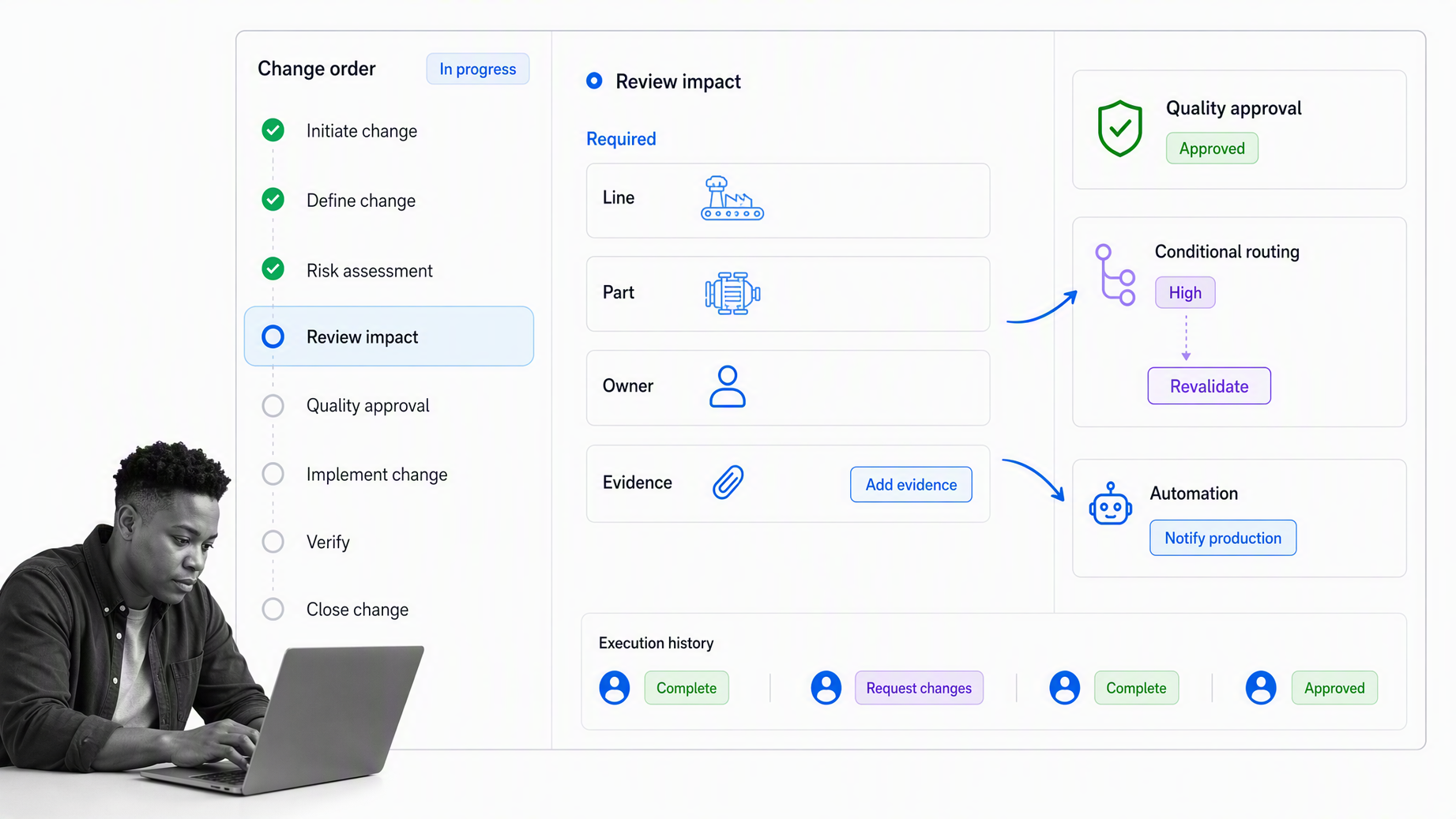
Process Street turns manufacturing procedures into executable workflows with assigned tasks, forms, due dates, approvals, conditional logic, automations, and retained execution history. Operations and quality teams can build and improve workflows directly while giving each user a focused view of the work they own.
Turn a procedure into a workflow
Use the Process Street Workflows product to define the sequence, add instructions, collect required information, and assign work by role. A controlled workflow can support a job traveler, line clearance, deviation review, engineering change, supplier qualification, or production release without forcing every use case into the same shape.
Put approvals and exceptions inside execution
Approval tasks create visible decision gates. Conditional logic reveals the right route based on collected data or task state. Together, they keep the normal path clear while ensuring high-risk cases receive the extra review they require. The record preserves the submitted evidence, decision, and next action in one place.
Connect the workflow to the wider stack
The workflow can receive context from an existing system, coordinate human work, and send the outcome onward. This lets ERP, MES, QMS, PLM, and maintenance platforms keep their specialized records while Process Street manages the cross-functional execution around them. The result is one visible operating path across systems, roles, and locations.
Manufacturing workflow software creates value when it makes the correct path easier to follow, the wrong path harder to take, and the evidence easy to retrieve. Start with one real workflow, prove the control and cycle-time improvement, then expand through a governed library of repeatable production processes.
Manufacturing workflow software FAQs
What is manufacturing workflow software?
Manufacturing workflow software coordinates the tasks, decisions, handoffs, and records that move production work from request to release. It assigns owners, captures evidence, routes exceptions, and keeps a traceable execution history.
How is manufacturing workflow software different from an MES?
An MES operates close to shop floor production and equipment transactions. Manufacturing workflow software is often used for human coordination, approvals, exceptions, and cross-system processes that span production, quality, engineering, maintenance, and other teams.
Which manufacturing workflows should be automated first?
Start with a recurring workflow that has a clear trigger, visible delays, multiple handoffs, and measurable outcomes. Quality inspections, nonconformance reviews, change control, supplier qualification, maintenance restart, and production release are common candidates.
Can manufacturing workflow software support quality control?
Yes. A workflow can require inspection data, route failed results, assign disposition, block release until approval, and retain the evidence. The design should match the applicable quality system and regulatory requirements.
How long does manufacturing workflow software implementation take?
The timeline depends on workflow scope, integrations, validation needs, and change management. A bounded pilot is usually faster and safer than a plant-wide rollout because the team can test exceptions, measure results, and refine the operating model before scaling.
Can Process Street run manufacturing workflows?
Yes. Process Street can turn procedures into workflows with assignments, forms, approvals, conditional paths, automation, and execution history. Teams can use it to coordinate recurring manufacturing work and connect decisions across their existing systems.
