


Turn every policy into automated workflows with built-in enforcement and audit-ready proof.



Quality Control Softwares
Quality control softwares help teams plan inspections, capture defects, investigate causes, assign corrective action, control documents, route approvals, and preserve evidence. The best fit depends on whether your central job is frontline execution, regulated quality management, multi-site configuration, life sciences compliance, manufacturing quality, or combined EHSQ oversight.
This comparison evaluates six platforms from that practical perspective. Process Street is the strongest first choice when the quality system must turn procedures into guided work with owners, decisions, evidence, and a visible execution history. The other products bring deeper specialist suites for particular industries and operating models.
Use the table for a fast shortlist, then read each product section for the job it handles best, the tradeoff to examine, and the questions to test in a demo. Pricing changes frequently, so the page links to vendor sources rather than freezing dollar figures into the comparison.
In this article, you will learn:
- Quality control softwares at a glance
- 1. Process Street
- 2. MasterControl
- 3. ETQ Reliance
- 4. Qualio
- 5. QT9 QMS
- 6. Intelex
- How to choose quality control softwares
- A practical quality control software implementation plan
- FAQs
Quality control softwares at a glance
The right platform makes quality control part of daily execution, not a reporting project that begins after something fails. Compare how each option handles the path from observation to decision, corrective work, verification, and retained proof.
| Tool | Best for | Standout feature | Pricing |
|---|---|---|---|
| Process Street | Quality control workflows that need clear ownership, approvals, and evidence | Guided workflows connect inspections, corrective actions, approvals, and audit history | Current plans are published on the pricing page |
| MasterControl | Life sciences teams coordinating regulated quality processes | Connected document, CAPA, audit, training, and supplier quality modules | Contact the vendor for current pricing |
| ETQ Reliance | Enterprises that need configurable quality applications across sites | A cloud QMS for document control, training, audits, CAPA, change, and supplier quality | Contact the vendor for current pricing |
| Qualio | Life sciences teams connecting CAPA, documents, training, and audit readiness | Workflow-driven quality events link root cause, corrective action, documents, and training | Contact the vendor for current pricing |
| QT9 QMS | Manufacturers seeking a broad cloud QMS with connected modules | Document control, inspections, audits, CAPA, nonconformance, and quality events share one system | A free trial is offered; contact the vendor for current pricing |
| Intelex | EHSQ teams combining inspections, nonconformance, CAPA, and audit management | Inspection findings can feed corrective action, root cause analysis, and compliance records | Contact the vendor for current pricing |
A complete selection should also consider the quality-system context. The American Society for Quality overview explains how a quality management system coordinates processes and responsibilities, while ISO 9001 guidance frames quality around consistent products, services, and continual improvement.
1. Process Street
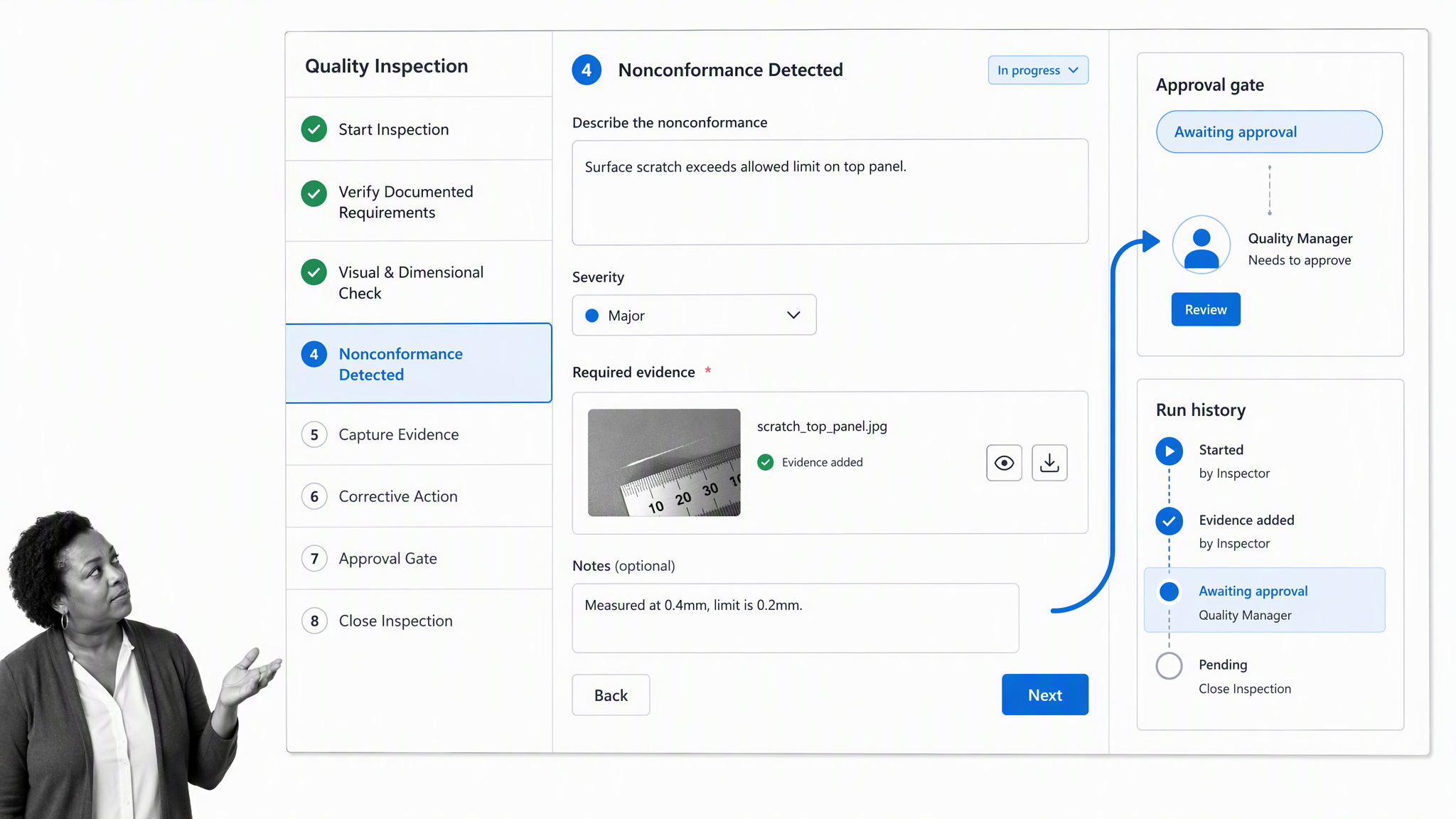
Best for: Quality control workflows that need clear ownership, approvals, and evidence.
Process Street connects controlled procedures with the workflows people actually run. A quality team can guide an inspection, require photos or measurements, branch on a failed check, assign corrective action, pause at an approval gate, and retain a complete execution record.
When Process Street fits
Choose it when adoption and repeatable execution matter as much as recordkeeping. It is especially useful when quality work crosses operations, compliance, suppliers, managers, and frontline staff, because each person sees the task, evidence, and decision relevant to them.
What to test before buying
Confirm which specialist statistical or laboratory functions must remain in existing systems. Process Street is strongest as the control and execution layer around quality work, not as a replacement for every metrology, SPC, or laboratory application.
Review the vendor’s current Process Street product information before making a shortlist decision, and confirm pricing directly because packaging can change.
Teams can start with a quality control workflow library, then add approval gates and conditional routing as the process matures.
2. MasterControl
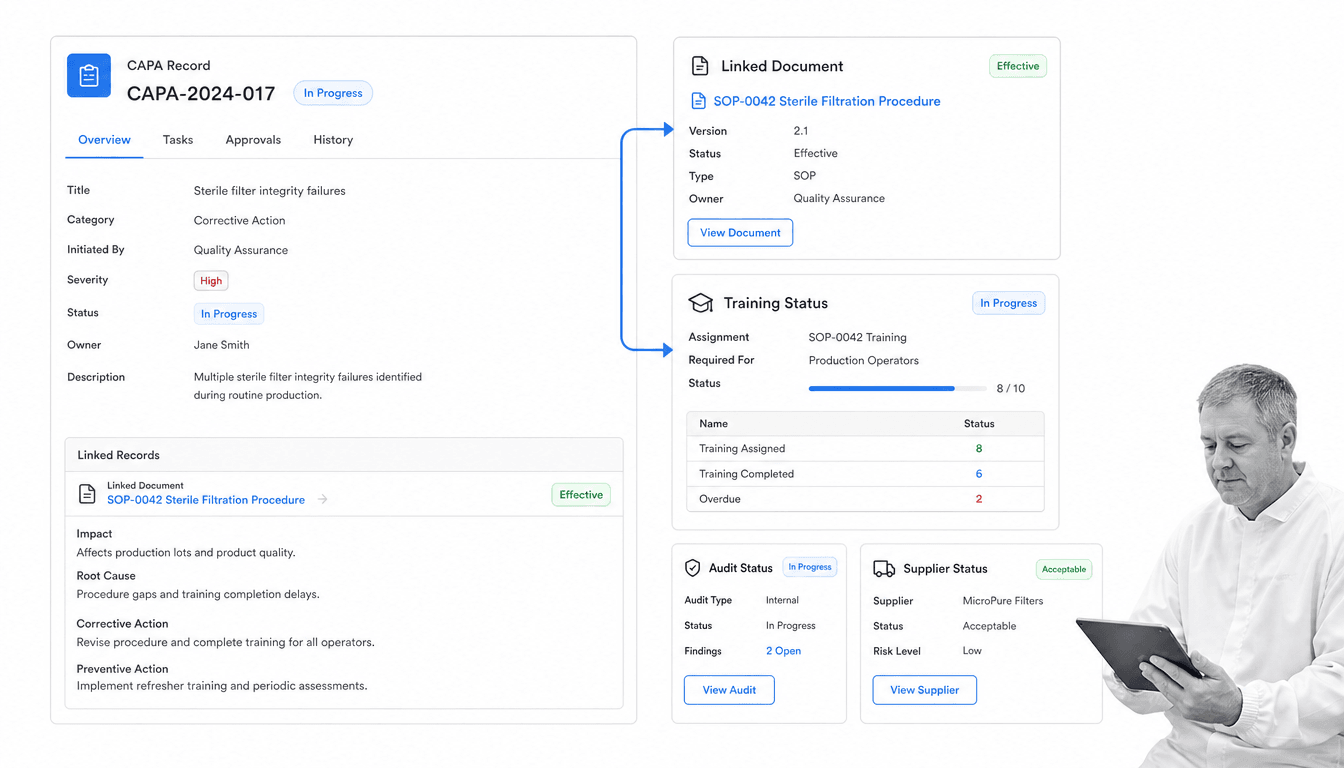
Best for: Life sciences teams coordinating regulated quality processes.
MasterControl offers connected modules for documents, corrective action, audits, training, and supplier quality. That makes it a natural shortlist option for organizations whose quality-control process sits inside a broader regulated quality system.
When MasterControl fits
Choose it when life sciences requirements, controlled training, formal document governance, and coordinated quality records drive the purchase. The connected suite can reduce gaps between a changed procedure, assigned training, discovered issue, and corrective response.
What to test before buying
Evaluate configuration effort, validation needs, implementation support, and the experience of occasional users. A deep regulated suite can be valuable, but the operating burden must match the team that will maintain it.
Review the vendor’s current MasterControl product information before making a shortlist decision, and confirm pricing directly because packaging can change.
3. ETQ Reliance
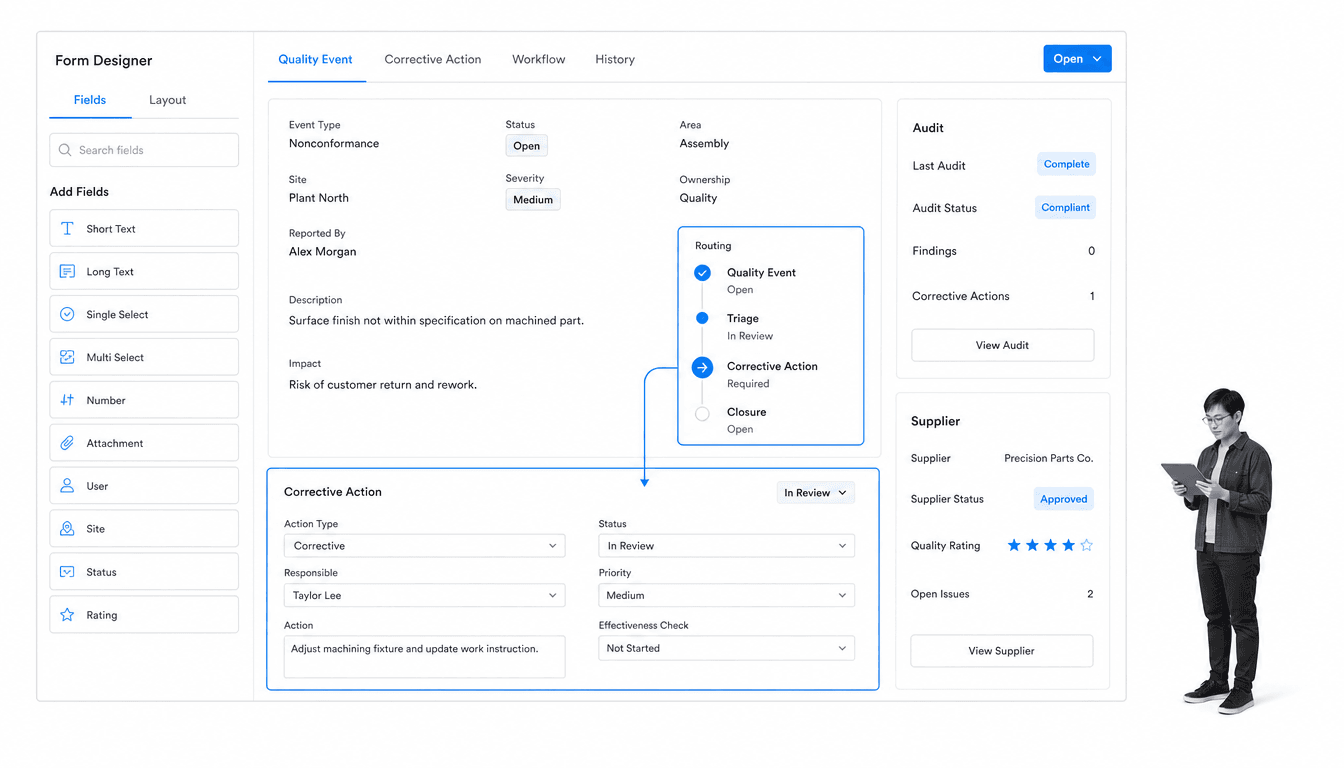
Best for: Enterprises that need configurable quality applications across sites.
ETQ Reliance is a cloud quality platform with applications for document control, training, audits, CAPA, change, suppliers, risk, and other quality processes. Its positioning centers on adaptability across complex enterprise environments.
When ETQ Reliance fits
Choose it when several sites or business units need a common quality platform but cannot use one rigid process. Configurable applications can help central quality leaders standardize controls while allowing necessary operational variation.
What to test before buying
Test governance around configuration. Flexibility creates value only when changes are owned, reviewed, documented, and kept consistent enough for reporting. Ask how administrators prevent local variants from fragmenting the quality system.
Review the vendor’s current ETQ Reliance product information before making a shortlist decision, and confirm pricing directly because packaging can change.
4. Qualio
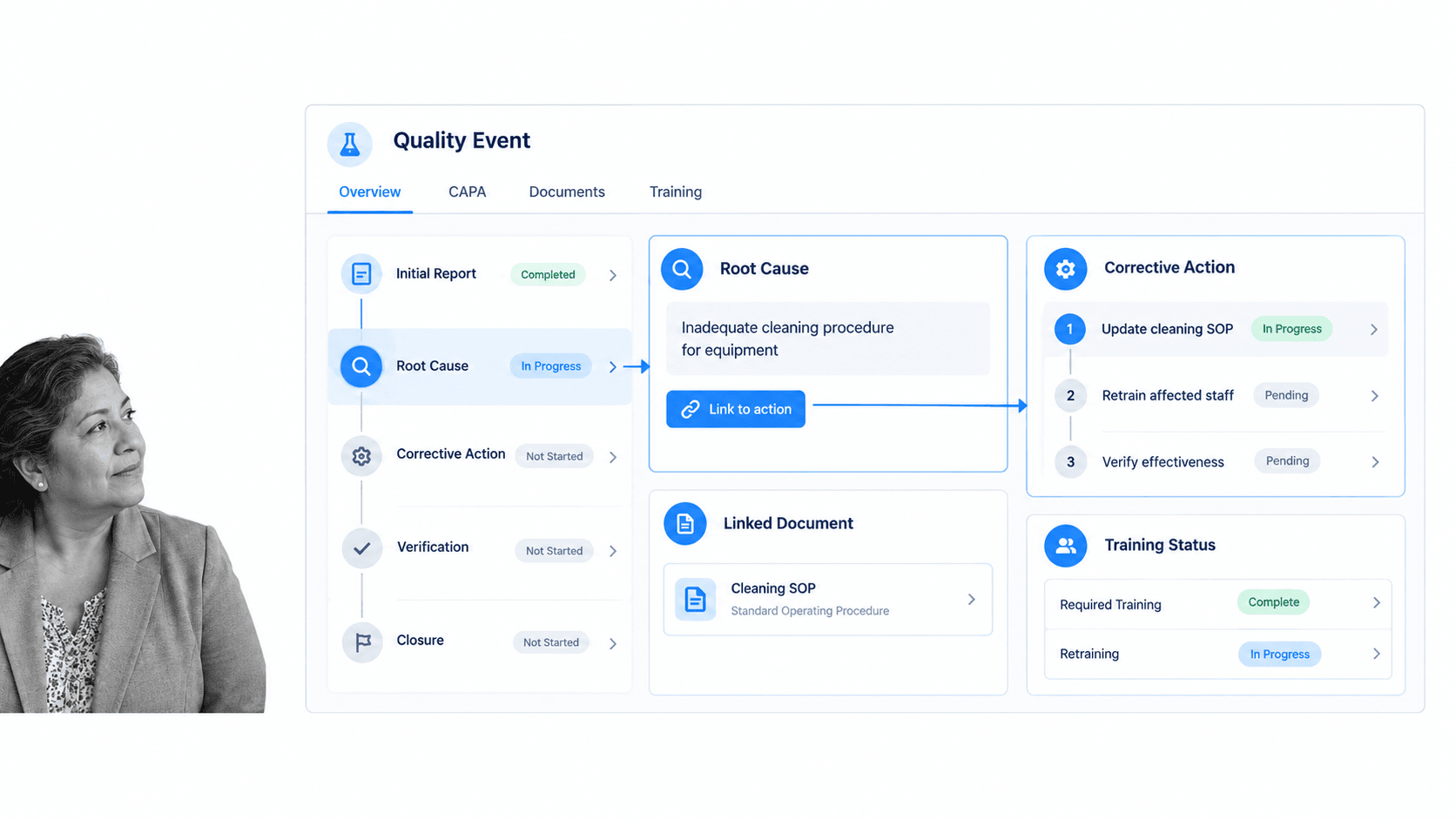
Best for: Life sciences teams connecting CAPA, documents, training, and audit readiness.
Qualio focuses on life sciences quality management, including CAPA and nonconformance workflows that connect quality events with root-cause work, corrective actions, documents, and training records.
When Qualio fits
Choose it when a growing medical device, biotechnology, or pharmaceutical team wants a purpose-built quality environment without assembling disconnected document, training, event, and audit tools.
What to test before buying
Map the full product lifecycle and regulatory scope before committing. Confirm how design controls, supplier quality, complaints, risk, and post-market work connect to the exact processes your organization must prove.
Review the vendor’s current Qualio product information before making a shortlist decision, and confirm pricing directly because packaging can change.
5. QT9 QMS
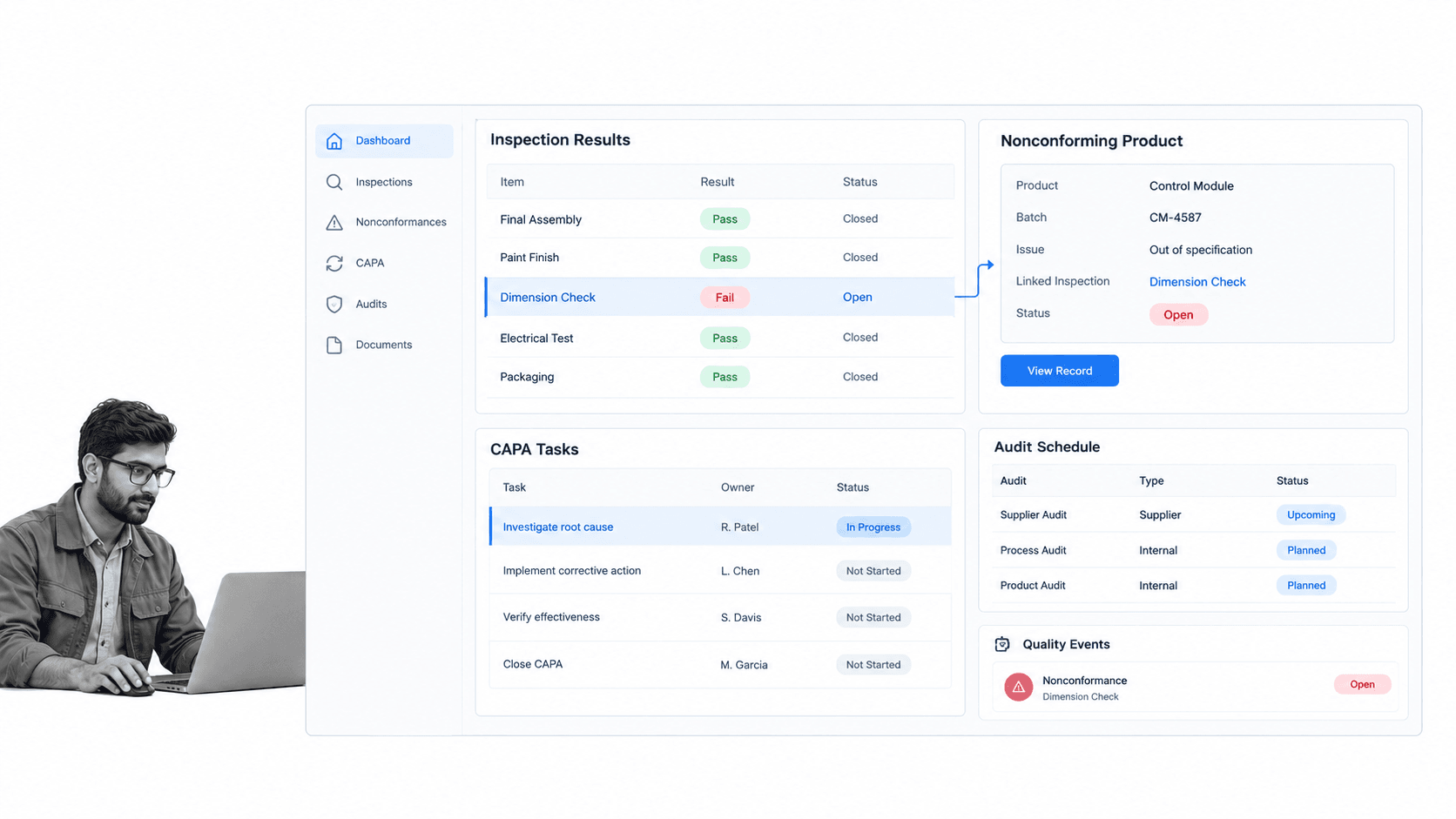
Best for: Manufacturers seeking a broad cloud QMS with connected modules.
QT9 QMS combines document control, inspection plans, audits, CAPA, nonconforming products, deviations, quality events, risk, and related modules in one cloud system. The vendor emphasizes connected data across departments and locations.
When QT9 QMS fits
Choose it when a manufacturer wants broad QMS coverage and values having inspection, nonconformance, corrective action, and audit records in one system. The connected modules can reduce duplicate entry and simplify management review.
What to test before buying
Run a real process during evaluation, from a failed inspection through disposition, CAPA, effectiveness review, and reporting. Module breadth matters only if the handoffs are clear to frontline users and quality managers.
Review the vendor’s current QT9 QMS product information before making a shortlist decision, and confirm pricing directly because packaging can change.
6. Intelex
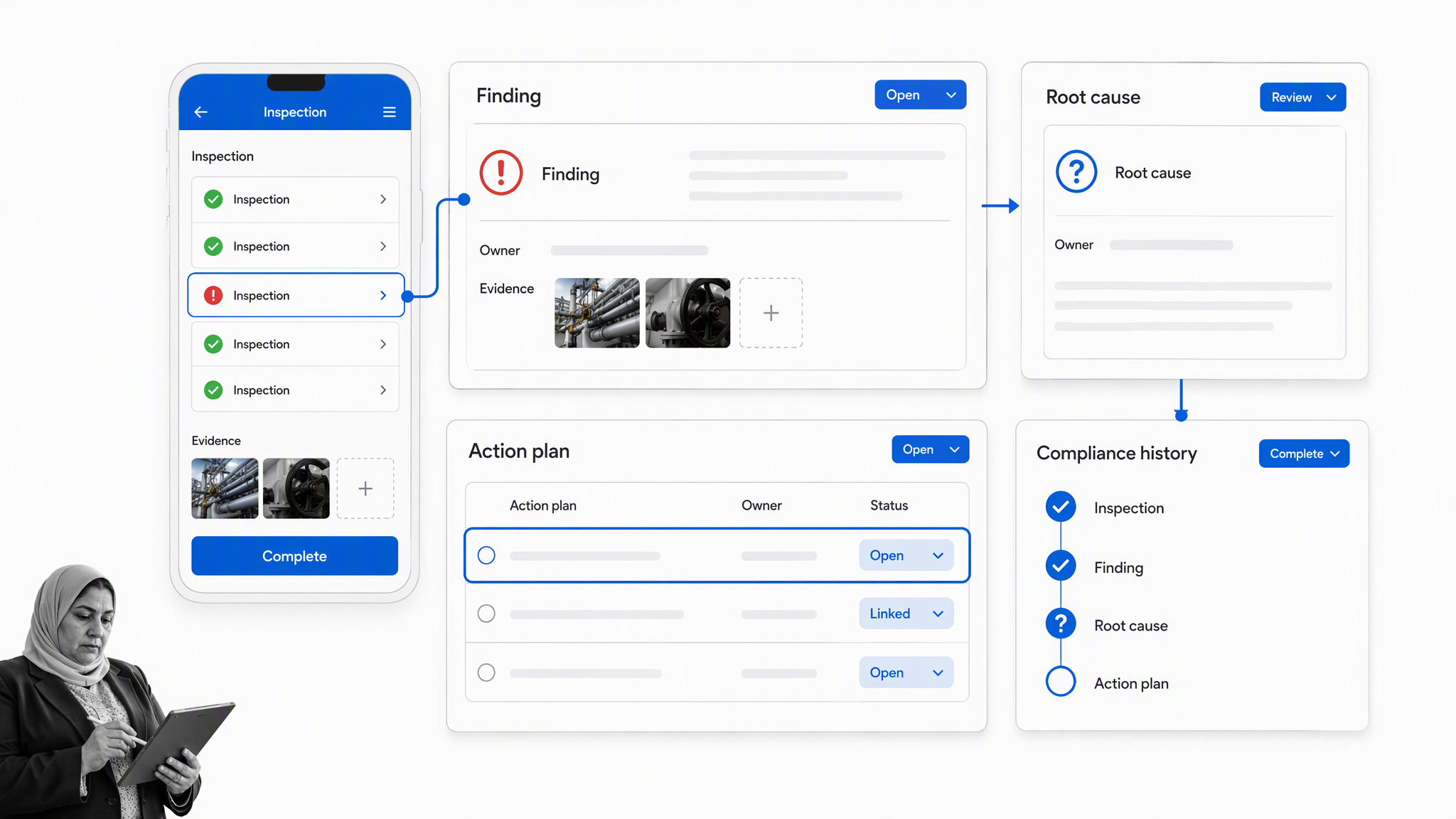
Best for: EHSQ teams combining inspections, nonconformance, CAPA, and audit management.
Intelex combines inspection, nonconformance, CAPA, audit, root-cause, document, and wider EHSQ applications. Its quality-control value comes from connecting findings to investigation and action across operational locations.
When Intelex fits
Choose it when quality, health, safety, and environmental teams share inspections, action plans, risk signals, or compliance reporting. A combined EHSQ platform can give leaders one view of recurring problems and overdue work.
What to test before buying
Define the boundary between enterprise EHSQ governance and specialist plant systems. Confirm mobile use, offline inspection needs, reporting ownership, and how quality data is separated or combined with safety and environmental records.
Review the vendor’s current Intelex product information before making a shortlist decision, and confirm pricing directly because packaging can change.
How to choose quality control softwares
Start with the quality event lifecycle
Map what happens from the first signal to final verification. Include inspections, defects, complaints, nonconformance, containment, root-cause analysis, corrective action, document change, retraining, approval, effectiveness review, and reporting. A tool that handles only the middle of that path may create new handoffs around it.
Separate required controls from desirable features
Required controls may include role-based access, electronic approvals, version history, due dates, evidence capture, audit trails, and retention. Teams evaluating a broader quality management system software category should score those controls before optional dashboards or AI features.
Test with one real quality scenario
Ask each vendor to demonstrate the same scenario using your terminology and roles. Start with a failed inspection, route containment, investigate the cause, approve corrective action, update the procedure, assign training, and verify effectiveness. Record the clicks, configuration, missing steps, and proof available at the end.
Evaluate adoption and administration together
Frontline users need a clear path. Administrators need controlled configuration. Review both experiences, because a simple interface backed by fragile administration will drift, while a powerful system that people avoid will push quality work back into spreadsheets and email.
Score the same workflow across every vendor
Create a short scorecard before the demonstrations begin. Give the greatest weight to the control points that matter in your environment: required evidence, risk-based routing, approval authority, overdue escalation, traceability, record relationships, reporting, and permissions. Include the number of manual handoffs and the effort needed to change the process later. A consistent scorecard prevents an impressive dashboard or polished presenter from replacing a disciplined evaluation.
Check the surrounding system architecture
Quality data rarely lives in one place. List the systems that hold supplier records, product data, equipment information, customer complaints, training status, measurements, laboratory results, and business intelligence. Decide which system should own each record and which events need to move between them. Process Street has 5,000+ integrations, and an AI agent can build a new connection on the fly when a required system is not already wired. For every platform, confirm authentication, field mapping, error handling, retry behavior, and an owner for broken connections.
Model the total operating effort
License cost is only one part of the decision. Include implementation, validation, migration, configuration, integration, administrator time, training, support, and the work needed to maintain reports and permissions. Then compare that effort with the cost of the current process: delayed closure, repeated defects, audit preparation, duplicate entry, missing evidence, and management time spent chasing status. A smaller tool that people use correctly can create more control than a broad suite that never becomes part of daily work.
A practical quality control software implementation plan
Define the first controlled process
Choose one recurring process with visible value, such as incoming inspection, nonconformance review, or corrective action. A quality nonconformance workflow gives the team a concrete starting structure. Record the baseline outcome, the current owner, and the evidence available today so the pilot has a concrete comparison point.
Clean the rules before digitizing them
Agree on categories, severity, responsibilities, evidence requirements, approval authority, due dates, and closure criteria. Software will scale ambiguity as efficiently as it scales good control.
Pilot with representative users
Include the people who capture findings, investigate issues, approve decisions, maintain procedures, and review trends. Observe them using the process under ordinary time pressure, not only in a training demonstration.
Connect documents, actions, and proof
Link the operating procedure to the workflow that executes it. Connect findings to actions, actions to approvals, approvals to evidence, and changes to training. Related guidance on document control best practices helps prevent the software implementation from creating another isolated record store.
Measure the quality process
Track overdue findings, time to containment, time to closure, reopened actions, effectiveness failures, repeat issues, incomplete evidence, and user adoption. Review the measures with context so the team improves the process rather than gaming a dashboard. Pair each metric with a decision owner and a review cadence so the data changes how work is managed.
Build the migration around evidence
Decide which records must move, which can remain in a read-only archive, and which should be recreated through the new process. Preserve identifiers, dates, ownership, approvals, attachments, and relationships between findings and actions. Test imported records against real audit questions before retiring the old working method. A migration that moves files but loses their context creates a cleaner interface and weaker evidence.
Govern configuration changes
Name the people who can change forms, fields, routing, permissions, reports, and integrations. Require a reason, review, test, and release note for material changes. Keep a lightweight sandbox or controlled test process so a useful improvement does not interrupt an active inspection or alter the evidence collected by an existing workflow. Configuration is part of the quality system and deserves the same discipline as the process it implements.
Prepare managers for exception review
Managers should not need to inspect every completed record. Design views that surface overdue work, rejected approvals, repeated defect categories, failed effectiveness checks, reopened actions, and unusual volume changes. Pair each alert with a defined response so dashboards lead to decisions. The implementation is successful when routine work flows with little intervention and meaningful exceptions become visible early enough to correct them.
For adjacent implementation patterns, see quality systems, continuous improvement principles, root cause analysis, enterprise quality management software, quality control tools, and the ISO 9001 internal audit checklist.
FAQs
What are quality control softwares?
Quality control softwares are digital systems that help teams plan inspections, capture defects, manage nonconformance, investigate causes, assign corrective action, route approvals, control documents, and retain evidence. The phrase is commonly searched, although quality control software is usually treated as an uncountable category name in formal writing.
What features should quality control software include?
Look for inspection or event capture, configurable workflows, ownership, due dates, corrective action, approvals, evidence attachments, audit history, reporting, and integrations. Regulated teams may also need document control, training, electronic signatures, validation support, and formal change control.
Is quality control software the same as QMS software?
The categories overlap, but they are not always identical. Quality control software may focus on inspections, defects, measurements, and corrective work, while QMS software usually covers a broader management system that can include documents, training, audits, suppliers, risk, and change control.
How do you compare quality control software vendors?
Give every vendor the same real scenario and score how well the product handles the full lifecycle from finding to verified closure. Compare required controls, user experience, administration, reporting, implementation work, integrations, support, and current pricing.
Can quality control software support ISO 9001?
Software can support ISO 9001 processes by controlling documents, assigning responsibilities, recording evidence, managing nonconformity and corrective action, supporting audits, and monitoring improvement. The software does not create conformity by itself; the organization still needs an effective management system.
How does Process Street support quality control?
Process Street turns quality procedures into guided workflows with assigned tasks, forms, conditional paths, approvals, evidence capture, automations, and execution history. Teams can use it to coordinate inspections, exceptions, corrective actions, reviews, and recurring quality controls.
