


Turn every policy into automated workflows with built-in enforcement and audit-ready proof.


Checklist Software
Last updated:
Checklist software turns repeatable work into a digital sequence that people can assign, run, verify, and improve. It replaces loose paper lists and isolated documents with a shared operating record for every checklist run.
The difference matters when a missed step creates rework, risk, delay, or a failed handoff. A simple list helps someone remember. A controlled checklist makes ownership, evidence, decisions, and completion visible to the whole team.
This guide explains how checklist software works, which capabilities matter, when a checklist should become a workflow, how to evaluate platforms, and how to roll one out without turning a useful process into administrative overhead.
In this guide, we will cover:
- What is checklist software?
- What checklist software should include
- When a digital checklist becomes a workflow
- Checklist software use cases
- How to choose checklist software
- How to implement checklist software
- How Process Street supports checklist software
- Checklist software FAQs
What is checklist software?
Checklist software is an application for creating, distributing, completing, and tracking reusable checklists. Each checklist acts as a template. Every time someone starts it, the software creates a new run with its own owners, responses, files, comments, dates, and completion history.
From memory aid to operating record
A process checklist captures the sequence of actions required to complete a process. Software adds the operating layer: who owns each action, when it is due, what proof is required, and what happens when a condition changes.
That distinction is consistent with the AHRQ Patient Safety Network checklist primer, which describes checklists as structured actions intended to prevent steps from being forgotten. The software does not replace judgment. It gives judgment a reliable place to act.
Checklist software, task apps, and workflow systems
A task app is usually organized around personal or project work. Checklist software is organized around a reusable procedure. A workflow system adds routing, automation, branching, approvals, permissions, and integrations around that procedure.
Many teams begin with lightweight checklist tools. They move toward a governed checklist when the process repeats, crosses teams, needs proof, or carries meaningful risk.
The basic lifecycle
- Design a reusable checklist template.
- Start a fresh run from a trigger or schedule.
- Assign work to people or roles.
- Collect answers, files, and approvals.
- Handle exceptions and incomplete items.
- Close the run and retain its history.
- Use the results to improve the next version.
What checklist software should include
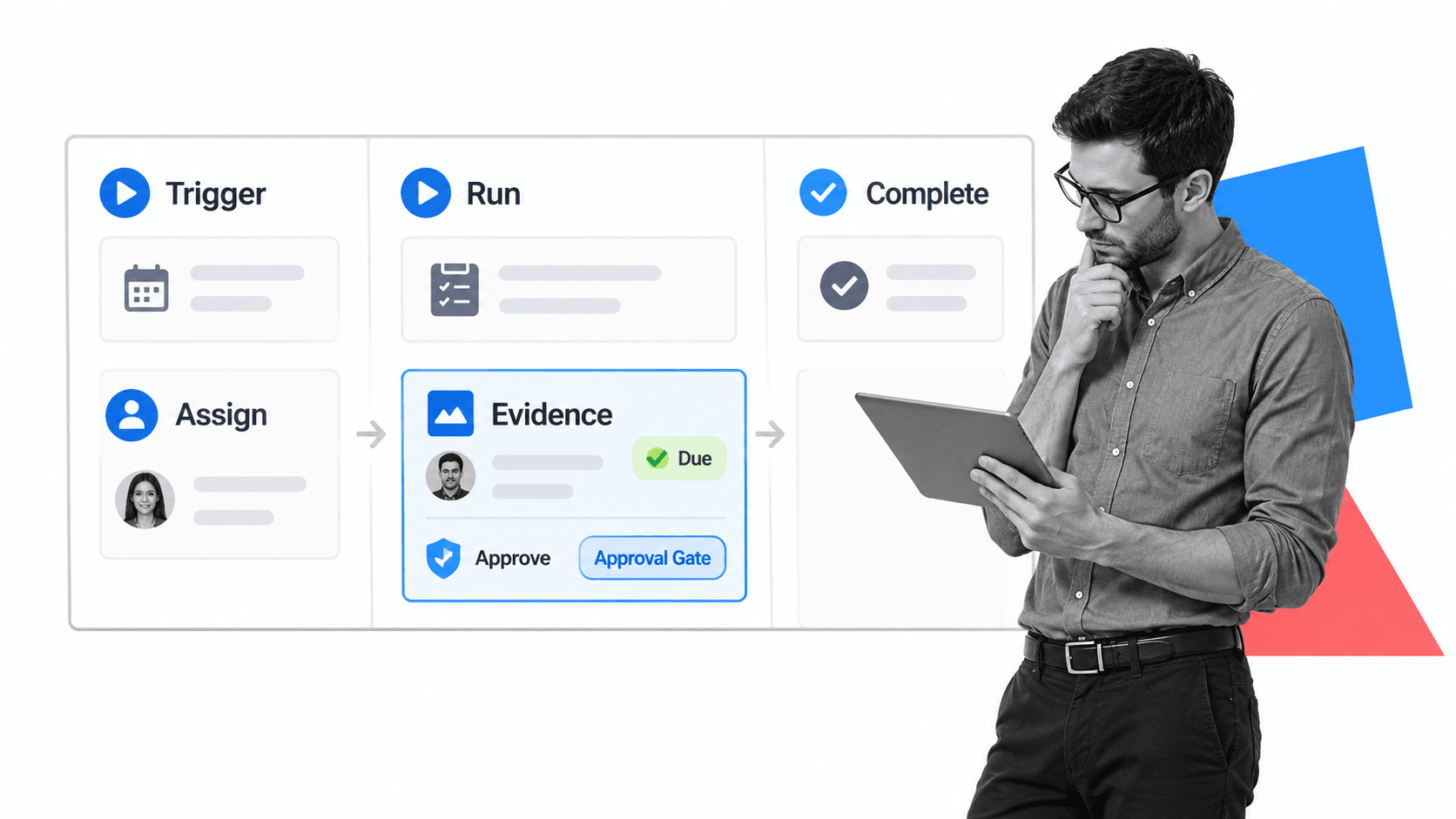
Good checklist software makes the right action obvious and the wrong shortcut difficult. The feature list matters less than whether those features reinforce clear execution.
Reusable templates and separate runs
The template should define the current best way to perform the work. Each run should preserve what happened at that moment, even after the template improves. This separation keeps your operating standard current without rewriting history.
Role-based assignments
Assignments should follow roles when possible, not depend on one permanent name. A hiring checklist can assign equipment setup to IT, payroll setup to finance, and first-week coaching to the hiring manager. Role-based ownership keeps the process reusable when people change.
Due dates, recurrence, and triggers
The system should support schedules and event-based starts for recurring tasks. A monthly close may start on a calendar. Vendor review may start from an intake form. Customer onboarding may start when a deal reaches a defined stage.
Forms and required evidence
Checkboxes prove little by themselves. Required fields, file uploads, structured answers, signatures, photos, and comments make completion reviewable. The evidence should sit beside the step that produced it, not in a separate folder nobody can reconcile later.
Approvals and stop points
High-risk work needs deliberate gates. Built-in approvals should pause the process until the right reviewer accepts, rejects, or requests changes. Stop points prevent later tasks from creating false progress while a critical decision remains unresolved.
Conditional paths
One checklist rarely fits every case. conditional logic can reveal extra tasks for a high-risk vendor, skip irrelevant steps for a returning customer, or route an exception to a specialist.
History, reporting, and permissions
The software should retain who completed each step, what changed, which evidence was attached, which approval was given, and when the run closed. Permissions should protect sensitive work while still giving process owners enough information to find recurring delays and exceptions.
When a digital checklist becomes a workflow
A digital checklist becomes a workflow when completion depends on coordination rather than memory alone. The trigger is not the number of steps. It is the amount of ownership, branching, evidence, and consequence around those steps.
The checklist repeats
If a team recreates the same list every week, month, customer, location, employee, or audit, the process deserves a reusable template. Repetition creates enough volume for small design flaws to compound.
Several people hand work to one another
A shared document can show tasks, but it rarely controls the handoff. Workflow-level checklist software assigns the next action automatically and shows whether the receiving person has what they need.
Answers change the route
When a response determines which task appears next, the process needs logic. A failed inspection may create corrective action. A security-sensitive vendor may require deeper review. A missing document may block approval.
Proof is part of the outcome
NIST describes security configuration checklists as instructions that can verify settings, identify unauthorized changes, and produce artifacts showing security posture. The broader lesson from NIST National Checklist Program guidance is that proof should be designed into the checklist, not reconstructed after the work.
The process carries risk
OSHA recommends regular workplace inspections, schedules, and corrective follow-up in its OSHA workplace hazard inspection worksheet. When a checklist protects safety, compliance, quality, or customer commitments, the software needs controls strong enough to match that responsibility.
Checklist software use cases
Checklist software is most useful where work is repeatable but the context changes from run to run. The template provides consistency. The run captures the facts of a specific case.
Employee onboarding and offboarding
An employee onboarding checklist can coordinate HR, IT, finance, facilities, the manager, and the employee. Conditional paths can adapt the work to role, location, equipment, and access needs.
Audits and inspections
An audit and inspection workflow can capture observations, photos, scores, findings, approvals, and corrective actions in one run. The history shows whether findings were closed rather than merely recorded.
Safety and quality checks
The WHO Surgical Safety Checklist resources show how a concise checklist can support consistent communication around high-stakes work. In other settings, the same pattern can govern equipment checks, release readiness, quality control, and site inspections.
Customer and vendor onboarding
Onboarding checklists coordinate data collection, account setup, training, risk review, and handoff. The software should make the customer or vendor experience feel simple while the internal workflow remains controlled.
Due diligence and approval processes
A due diligence checklist becomes more reliable when document requests, analysis, exceptions, and signoff stay attached to the same case.
Standard operating procedures
An SOP explains the standard. Checklist software turns the standard into action. Teams can place concise instructions beside each task, collect evidence during execution, and update the template as the operating method improves.
Process improvement
A process improvement plan should assign changes, record tests, and confirm whether the adjustment reduced delay, defects, or exceptions. Checklist history gives the team real execution data to review.
How to choose checklist software
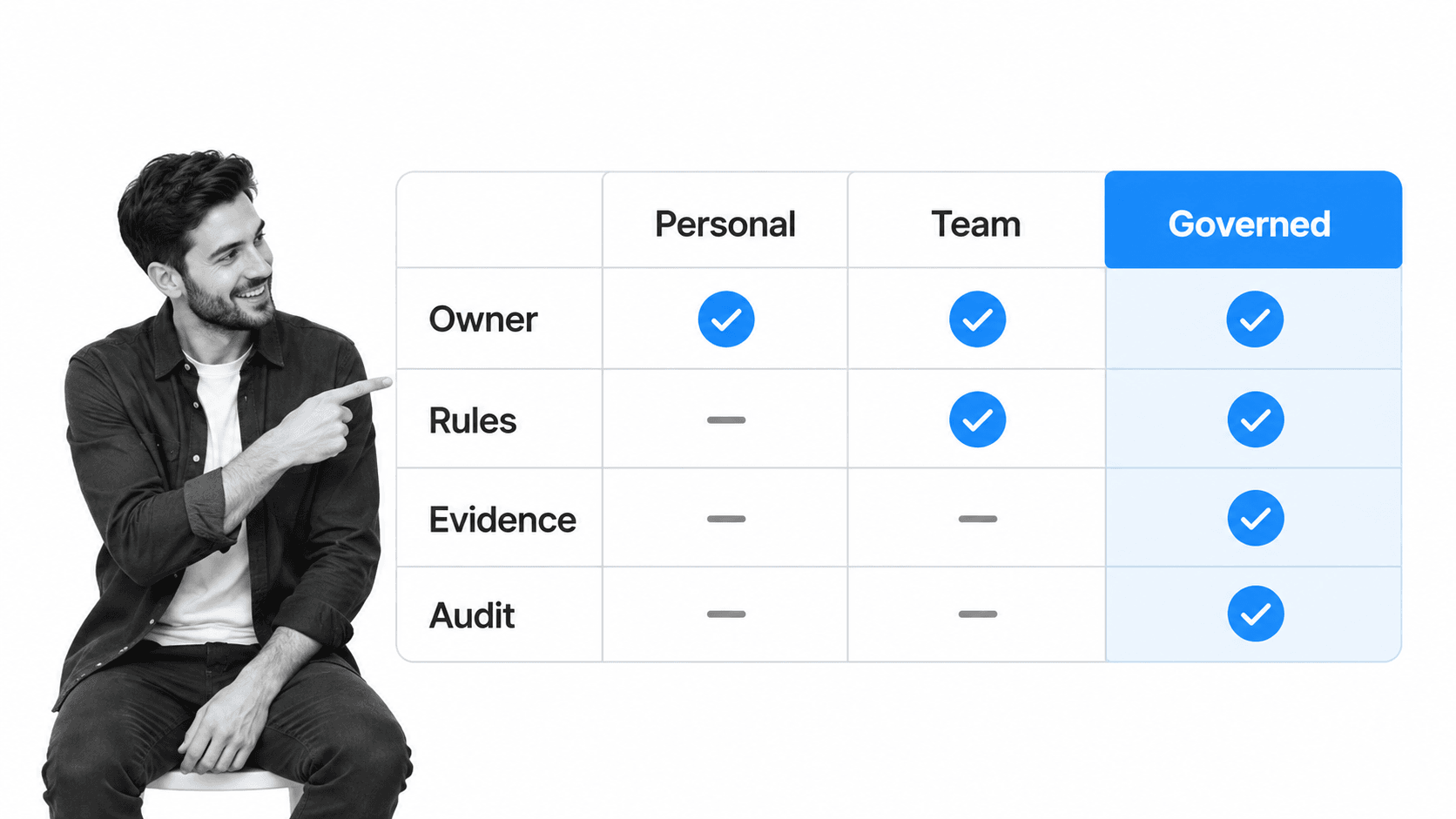
Choose checklist software by the process you need to control, not by the longest feature page. Start with the riskiest recurring checklist you expect the system to run, then test whether the product handles that scenario cleanly.
Define the required control level
Personal lists need speed and convenience. Team checklists need assignment and shared progress. Governed workflows need evidence, approvals, conditional routes, permissions, history, and reporting. Buying a personal task app for governed work creates a gap no amount of manual follow-up will close.
Test the complete run
Build one realistic template. Start a run. Complete it on desktop and mobile. Attach evidence. Trigger an exception. Reject an approval. Reassign a task. Close the run. Then retrieve the history. A polished builder matters, but execution exposes the actual fit.
Evaluate administration
Check how easily process owners can update a template, manage permissions, review usage, and govern changes. The system should be flexible without letting every editor silently alter critical controls.
Check integrations and data movement
Identify the systems that start the checklist, provide data, or need results. Focus on the whole handoff: trigger, identity, field mapping, error handling, retries, permissions, and proof that the downstream action succeeded.
Ask how the system handles exceptions
Perfect completion is not the hard part. Ask what happens when a person is absent, a file is wrong, an answer is no, a task is late, an integration fails, or a reviewer rejects the work. Strong checklist software makes recovery explicit.
Avoid false comparisons
A spreadsheet workflow template may be enough for a small, low-risk process. A workflow management system is a different category of control. Compare products at the depth your process actually requires.
Use a weighted decision score
- Execution fit: Can people complete the checklist quickly and correctly?
- Control fit: Can owners enforce evidence, approvals, and routes?
- Governance fit: Can administrators manage changes and permissions?
- Integration fit: Can the checklist exchange data reliably?
- Reporting fit: Can leaders find exceptions and improvement signals?
- Adoption fit: Can the intended users run it with minimal training?
How to implement checklist software
Implementation works best when the team treats checklist software as an operating change, not a document migration. Move one important process, learn from real runs, and expand from evidence.
1. Select a bounded pilot
Choose a recurring process with a clear trigger, known owner, visible pain, and manageable risk. Avoid starting with the most politically complex process in the company.
2. Capture the current process
Start from a sample checklist template, an SOP, interviews, or observation. Record what people actually do, including workarounds and exceptions, rather than copying the idealized policy alone.
3. Design for action
Write one clear action per task. Put instructions where they are needed. Mark critical evidence as required. Use approvals only for real decisions. Add conditional branches only when the route genuinely changes.
4. Assign process ownership
Name one owner for the template and one owner for each run. The template owner improves the standard. The run owner keeps a specific case moving and resolves blocked work.
5. Test exceptions before launch
Run a tabletop test for late tasks, rejected approvals, missing evidence, unusual answers, failed integrations, and absent assignees. The exception route should be as intentional as the happy path.
6. Train through a real run
Show users how to start and complete workflow runs, where to attach evidence, and how to raise a problem. Training is stronger when everyone completes the same realistic scenario.
7. Review the first ten runs
Look for tasks that are skipped, misunderstood, completed late, repeatedly reassigned, or sent back for correction. Those patterns reveal where the template, role design, instruction, or system integration needs work.
8. Govern changes
Document who may edit critical templates, how changes are reviewed, when users are notified, and how old runs remain available. A checklist should improve without erasing the evidence of how earlier work was performed.
How Process Street supports checklist software
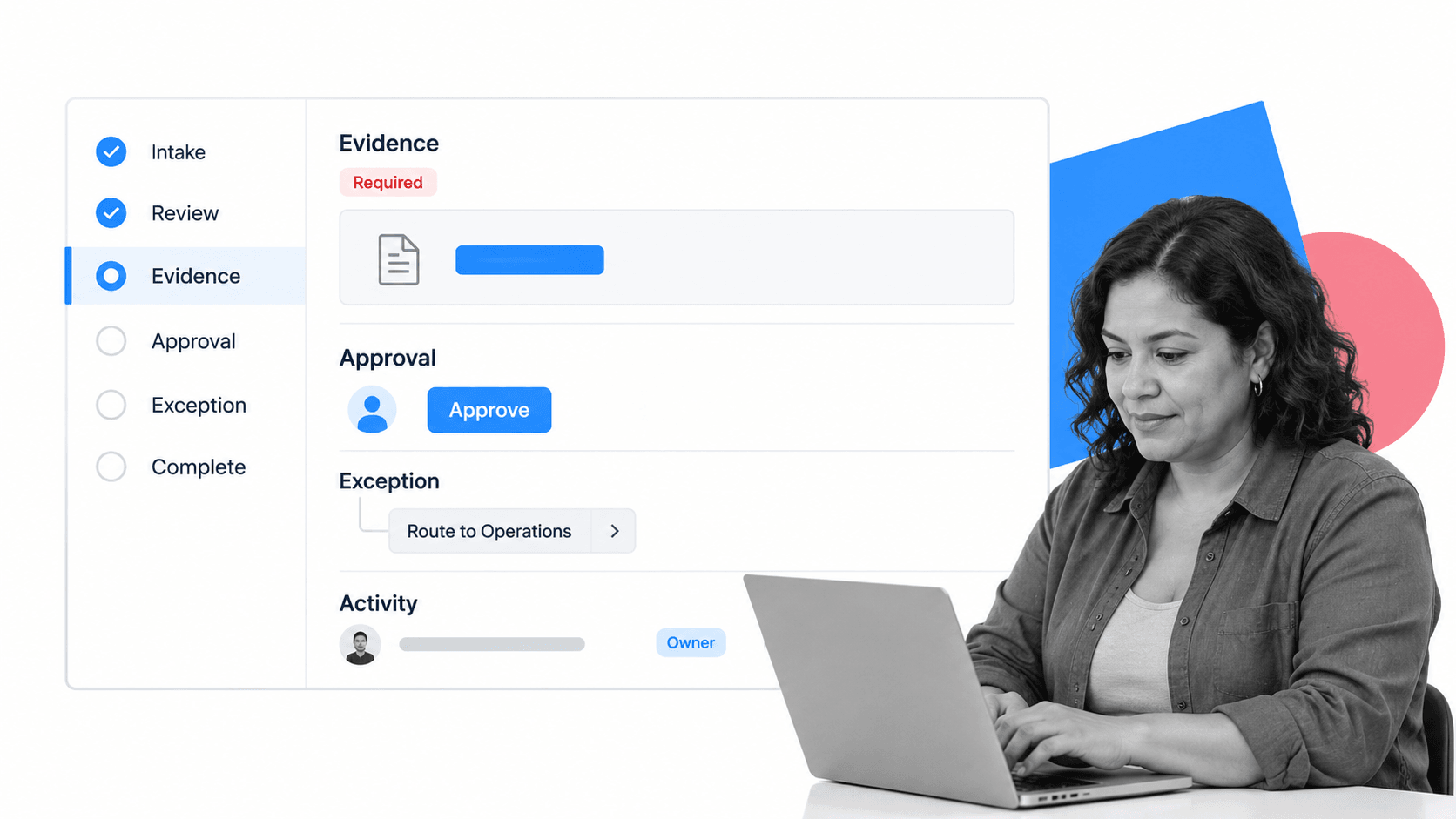
Process Street is an agentic process automation platform for high-stakes operations. It turns reusable checklists into assigned workflows with forms, required evidence, approvals, conditional logic, integrations, and an activity record for each run.
Build the operating template
Process owners can organize tasks into a reusable sequence, add instructions, collect structured information, require files, and assign work to the right roles. The template becomes the current operating standard.
Run each case separately
Every employee, customer, vendor, audit, inspection, or monthly close gets its own workflow run. Teams can see the status of one case without losing the shared definition of the process.
Route decisions inside the work
Approvals and conditional paths keep review and exceptions inside the checklist. The team does not have to reconstruct the decision from email, chat, and a spreadsheet after the fact.
Connect the checklist to the wider stack
Process Street uses a universal integration layer so checklist runs can start from other systems, exchange structured data, and move completed results to the places where teams already work.
Improve from execution evidence
The run history shows where work stalls, which exceptions recur, and where instructions create confusion. Process owners can use those signals to improve the template instead of relying on anecdote.
Review patterns across completed runs, not just one difficult case. Compare where tasks wait, which fields return incomplete, how often approvals are rejected, and which exception routes appear most often. Those patterns help the process owner separate a training problem from a template problem, a staffing constraint, or a broken handoff. The next revision can then target the actual source of friction while preserving the controls that make the checklist dependable.
Treat every template change as a small operating decision. Record why the change was made, test it with the people who perform the work, and confirm that existing assignments, evidence requirements, and approvals still make sense. A disciplined review cycle keeps checklist software useful as the process changes. It also prevents well-intended edits from quietly weakening accountability or making the checklist harder to complete.
The result is a practical progression: start with a checklist, add the controls the process requires, run it with real people, and improve it from the proof each run produces.
Checklist software FAQs
What is checklist software?
Checklist software is an application for creating reusable checklist templates and running each instance as trackable work. It can add owners, due dates, evidence fields, approvals, conditional paths, automation, permissions, and completion history.
What is the difference between checklist software and a to-do list app?
A to-do list app usually manages personal or project tasks. Checklist software centers on repeatable procedures, so every run follows a shared template and keeps its own record of assignments, responses, evidence, and completion.
When should a checklist become a workflow?
A checklist should become a workflow when it repeats, involves several people, changes route based on answers, requires evidence or approvals, connects to other systems, or carries enough risk that completion must be provable.
What features matter most in checklist software?
The most useful features are reusable templates, role assignments, triggers, due dates, forms, required evidence, approvals, conditional logic, permissions, integrations, activity history, and reporting. The right mix depends on the process risk and the number of people involved.
How do you choose checklist software for a team?
Choose one realistic recurring process and test the full run, including evidence, an exception, a rejected approval, reassignment, mobile completion, and history retrieval. Evaluate execution fit, control fit, governance, integrations, reporting, and adoption.
Can checklist software support audits and compliance?
Yes, when the software can require evidence, control access, route approvals, preserve activity history, and report exceptions. The checklist still needs to reflect the applicable policy, standard, or regulation, and a qualified owner should review it.
How does Process Street support digital checklists?
Process Street turns digital checklists into reusable workflow runs with assignments, forms, required evidence, approvals, conditional logic, integrations, and activity history. This helps teams execute recurring work and keep proof attached to the process.
