





Cloud-based, paperless workflows are the future of office efficiency, while poorly indexed, illegible files are stuck firmly in the pre-SaaS era, where they belong. HR professionals take on a huge range of responsibilities throughout the day and deal with plenty of repetitive, complex tasks. The right software turns that grind into something you can run on autopilot, which is exactly why we pulled together these 23 super-efficient HR tools to help you cut back on admin work.
Relying on your own brain (as much as you’d want to think you can) and bits of paper stuck to your monitor just isn’t the way to get things done. HR tools are the software platforms that centralize employee data and automate the recurring work of hiring, onboarding, payroll, performance, and engagement. The category has moved fast: modern tools now bake in AI that screens applicants, drafts policies, forecasts attrition, and runs multi-step workflows on their own, so the smart, foolproof system that catches the mistakes we are all prone to making is finally here.
Let’s take a look at:
- Top 23 HR tools
- Benefits of using HR tools
- Human Resources Information Systems (HRIS)
- Key features of HR tools
- How to choose an HR tool
Top 23 HR tools
The tools below span every corner of the HR stack, from all-in-one HRIS and payroll platforms to specialized recruiting, performance, engagement, and learning software. For each one you will find what it does, its standout features, who it suits best, and the admin work it takes off your plate. Whether you run people operations for a five-person startup or a distributed enterprise, there is a combination here that will let you manage HR with far less manual effort.
Process Street
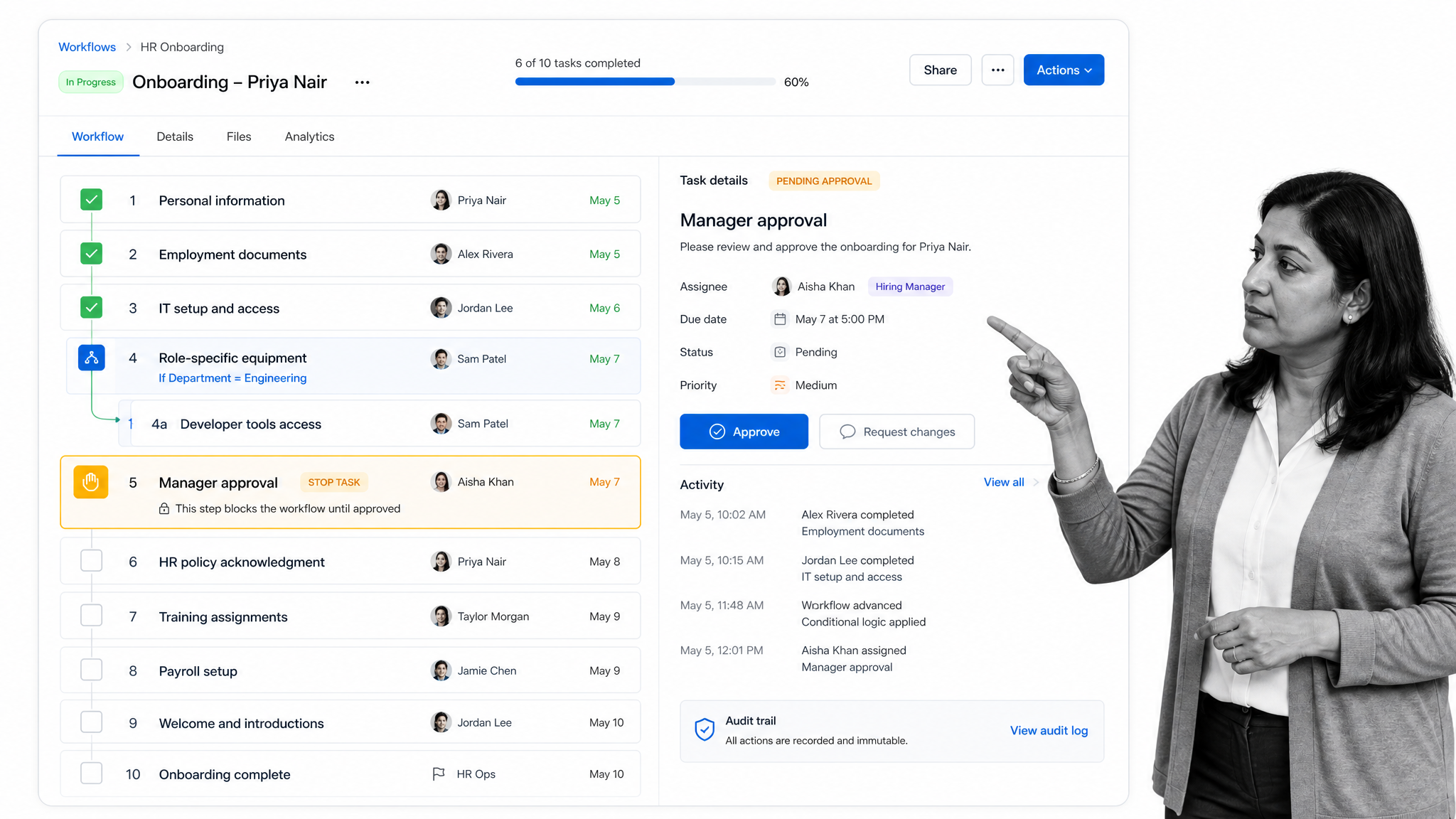
Process Street is a compliance operations platform that turns your HR procedures into automated, auditable workflows. It brings together Docs for governed policies and SOPs and Ops for execution, with built-in AI that monitors how work gets done and flags risk in real time. Instead of leaving employee onboarding, offboarding, and compliance reviews to memory and email, you build them once and every run enforces the same steps, approvals, and records. It is the connective tissue that sits over the rest of your HR stack and makes sure nothing slips.
Category: Compliance operations platform for HR workflows
Key features: workflow automation with conditional logic, stop tasks and approvals that block progress until a step is signed off, role-based assignments, a full audit trail on every run, and built-in AI that generates workflows and surfaces bottlenecks.
Process Street connects to more than 5,000 systems through direct, universal integrations, and when you need one that does not exist yet, an AI agent builds it on the fly. If you are comparing platforms, our guide to onboarding technology tools breaks down where a workflow layer fits alongside your HRIS. Pricing: paid plans with a free trial.
Best for: HR and operations teams that need onboarding, compliance, and recurring processes to run the same way every time and prove it. Cuts back on: chasing steps, missed handoffs, and audit fire drills.
Rippling
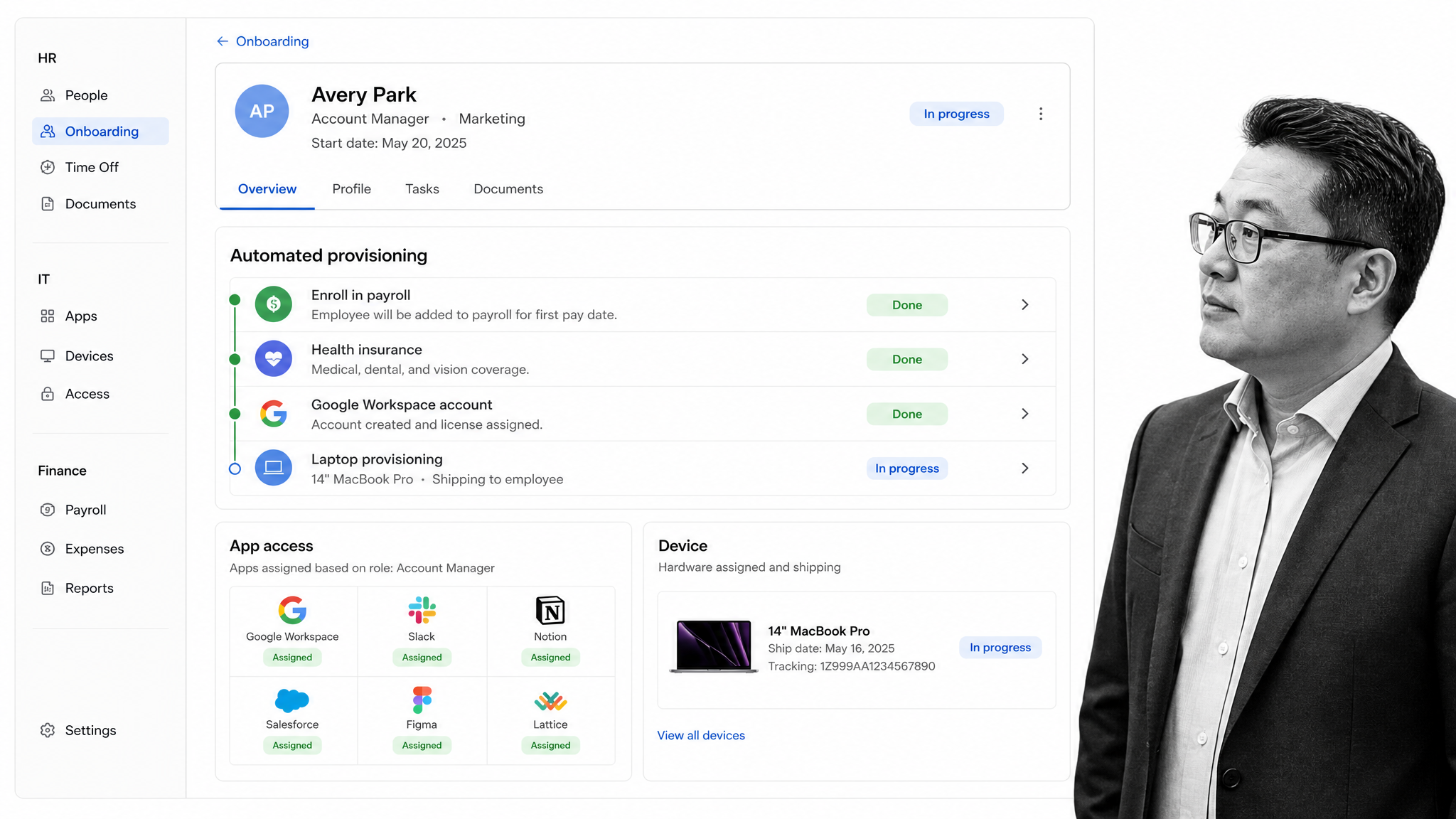
Rippling unifies HR, IT, and finance in a single system built around employee data. Its headline trick is that one new-hire flow can enroll someone in payroll and benefits, create their app accounts, and ship a laptop, all at once. That cross-module automation removes the tangle of tickets and spreadsheets that usually surrounds onboarding and offboarding at a growing company.
Category: All-in-one workforce management (HR, IT, and payroll)
Key features: unified HR, payroll, and IT provisioning; role-based app and device management; automated onboarding and offboarding; global payroll; and a workflow builder that triggers actions across modules.
Best for: scaling companies that want HR, IT, and payroll to run from one system of record. Cuts back on: manual provisioning, app access requests, and cross-team onboarding handoffs.
TriNet (formerly Zenefits)
TriNet, which absorbed the platform many teams knew as Zenefits, pairs HR software with benefits administration and professional employer organization (PEO) services. It handles the parts of HR that are heavy on regulation, such as benefits enrollment, payroll taxes, and compliance, and can extend into full PEO coverage where TriNet becomes the employer of record for benefits and risk.
Category: HR, benefits, and PEO services
Key features:
- Onboarding: Streamlines the new hire onboarding process.
- Employee self-service: Allows employees to manage their information and benefits.
- Performance management: Tracks employee performance and goals.
- Time off management: Manages employee vacation, sick, and paid time off.
- Document management: Stores and organizes HR documents securely.
Best for: small and mid-size businesses that want benefits and compliance handled by experts, not a spreadsheet. Cuts back on: benefits paperwork, tax filing errors, and compliance guesswork.
HiBob
HiBob, usually just called Bob, is a modern HRIS built for mid-size and fast-growing companies with distributed teams. It leans into culture and employee experience alongside the core records, with a clean home feed, club and shout-out features, and strong analytics. It is the system of record that employees actually enjoy logging into.
Category: Modern HRIS for mid-market companies
Key features: core HR records, time and attendance, an engaging employee home feed, org charts, workforce analytics, and configurable onboarding flows.
Best for: mid-market and global teams that want an HRIS with a strong culture and people-analytics layer. Cuts back on: scattered employee data, manual reporting, and disengaged self-service.
Greenhouse
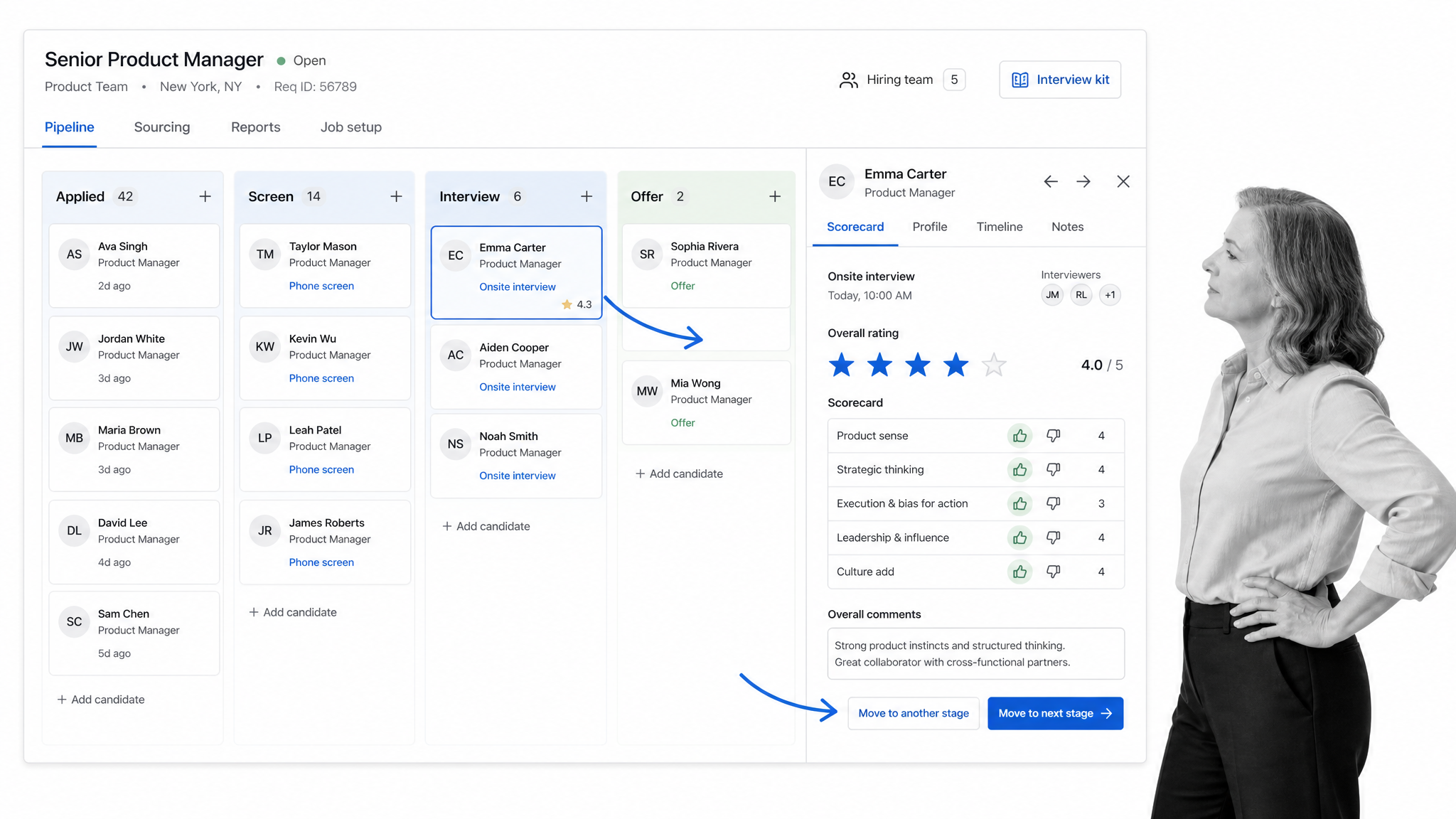
Greenhouse is an applicant tracking system built around structured, fair hiring. It moves candidates through defined stages, standardizes interviews with scorecards, and gives every interviewer a clear kit so decisions rest on evidence rather than gut feel. For teams that hire in volume, it turns a chaotic inbox into a measurable pipeline.
Category: Applicant tracking and structured hiring
Key features: a kanban candidate pipeline, structured interview scorecards and kits, job board and sourcing integrations, hiring analytics, and anonymized reviews that support fair hiring.
Best for: companies that hire frequently and want a consistent, data-backed recruiting process. Cuts back on: resume triage, interview scheduling chaos, and inconsistent hiring decisions.
Breezy HR
Breezy HR is a friendly, visual ATS aimed at small and mid-size teams. Its drag-and-drop pipeline, automated candidate emails, and one-click job posting make it easy for companies without a dedicated recruiter to run a tidy hiring process. It covers sourcing through offer without the enterprise price tag.
Category: Recruiting and applicant tracking for SMBs
Key features:
- Applicant tracking system (ATS): Manages the entire hiring process from job posting to candidate selection.
- Job board posting: Distributes job postings to multiple job boards and social media platforms.
- Career page builder: Creates customizable career pages to showcase job openings and company culture.
- Candidate sourcing: Sources candidates from various channels, including job boards and employee referrals.
- Resume parsing: Automatically extracts relevant information from resumes and profiles.
Best for: small and mid-size businesses that want a simple, affordable recruiting tool. Cuts back on: manual job posting, candidate follow-up emails, and interview coordination.
BambooHR
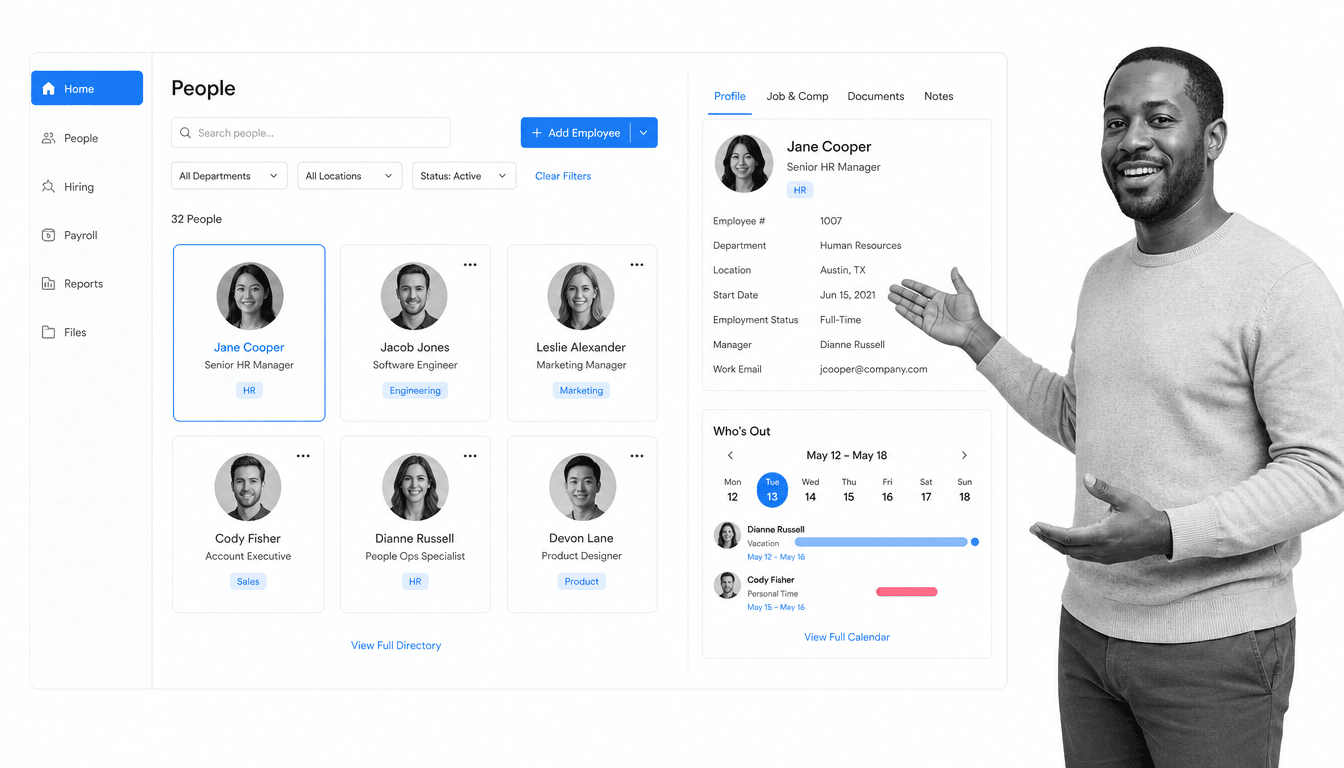
BambooHR is one of the most popular HRIS platforms for small and mid-size businesses, and for good reason. It centralizes employee records, time off, onboarding, and reporting in a friendly interface that non-specialists can run without training. The employee directory and self-service portal cut the constant stream of questions HR usually fields by hand.
Category: HRIS for small and mid-size businesses
Key features:
- Employee records: A central, self-service database for people data, documents, and e-signatures.
- Time-off tracking: A Who’s Out calendar with request-and-approval workflows for PTO and leave.
- Onboarding and offboarding: Guided new-hire checklists, welcome emails, and task assignments.
- Reporting and analytics: Standard and custom reports on headcount, turnover, and compensation.
- Payroll and time tracking: Integrated payroll, hours, and benefits administration in one system of record.
Best for: small and mid-size businesses that want a clean, easy core HR system. Cuts back on: manual record-keeping, time-off tracking, and repetitive HR questions.
Gusto
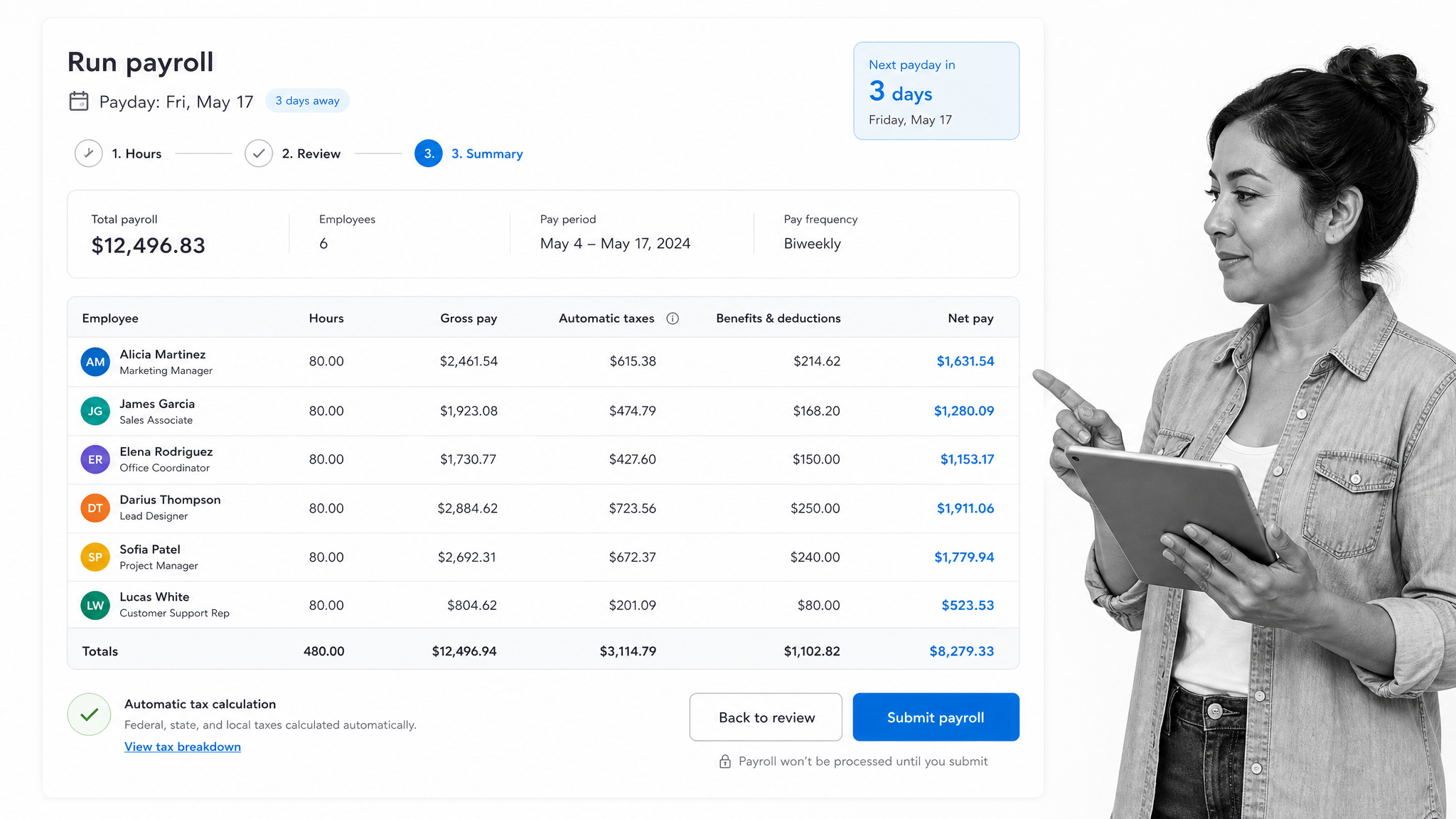
Gusto is a payroll-first platform that has grown into a full people platform for small businesses. It runs payroll in a few clicks, files taxes automatically, and folds in benefits, onboarding, and time tracking. For a founder or office manager wearing the HR hat, it removes the anxiety from getting people paid correctly and on time.
Category: Payroll, benefits, and HR for small businesses
Key features:
- Payroll processing: Streamlines payroll tasks and calculations.
- Benefits administration: Manages employee benefits, insurance, and retirement plans.
- Tax compliance: Automates tax filings and ensures compliance.
- Time tracking: Monitors employee working hours and overtime.
- Employee onboarding: Facilitates smooth onboarding processes.
Best for: small businesses that want painless payroll with HR and benefits attached. Cuts back on: payroll runs, tax filings, and benefits deductions.
Zoho People
Zoho People is a flexible HRIS that fits naturally into the wider Zoho suite of business apps. It covers the HR essentials, attendance, leave, timesheets, performance, and records, and is highly customizable, making it a strong pick for teams already invested in Zoho or those that want to shape the system to their own processes.
Category: HRIS within the Zoho ecosystem
Key features:
- Performance appraisals: Conducts and manages employee performance evaluations.
- Recruitment: facilitates the hiring process from job posting to onboarding.
- Time tracking: Monitors employee working hours and overtime.
- Custom forms: Create and customize forms for data collection.
- Training management: Supports employee training and development.
Best for: companies in the Zoho ecosystem or those wanting a configurable, budget-friendly HRIS. Cuts back on: leave tracking, timesheet collection, and manual approvals.
Workable
Workable is a recruiting platform that pairs a solid ATS with AI sourcing and screening. It posts to hundreds of job boards, uses AI to surface and rank passive candidates, and standardizes interviews and evaluations. It shortens the distance between an open role and a signed offer.
Category: AI-assisted recruiting and applicant tracking
Key features:
- Job posting: Streamlines the process of creating and publishing job listings.
- Candidate sourcing: Utilizes various channels to attract and source potential candidates.
- Applicant tracking system (ATS): Manages and tracks candidates throughout the hiring process.
- Collaborative hiring: Facilitates communication and collaboration within hiring teams.
- Interview scheduling: Simplifies the scheduling of candidate interviews.
Best for: teams that want AI help finding and screening candidates at speed. Cuts back on: sourcing, resume screening, and manual candidate outreach.
PerformYard
PerformYard is a focused performance management tool that adapts to whatever review process you already run rather than forcing a rigid template. It handles reviews, continuous feedback, and goal tracking, and gives HR a clean way to launch cycles, send reminders, and roll up results without a mountain of spreadsheets.
Category: Performance management and reviews
Key features:
- Continuous feedback: Facilitate ongoing performance conversations between employees and managers.
- Employee development plans: Create and monitor personalized development plans for employee goals.
- Recognition and rewards: Encourage positive reinforcement and acknowledge achievements.
- Customizable workflows: Tailor processes to fit specific organizational needs.
- Analytics and reporting: Access data-driven insights for performance analysis.
Best for: companies that want flexible, low-friction performance reviews. Cuts back on: spreadsheet-based reviews, reminder chasing, and manual results compilation.
Lattice
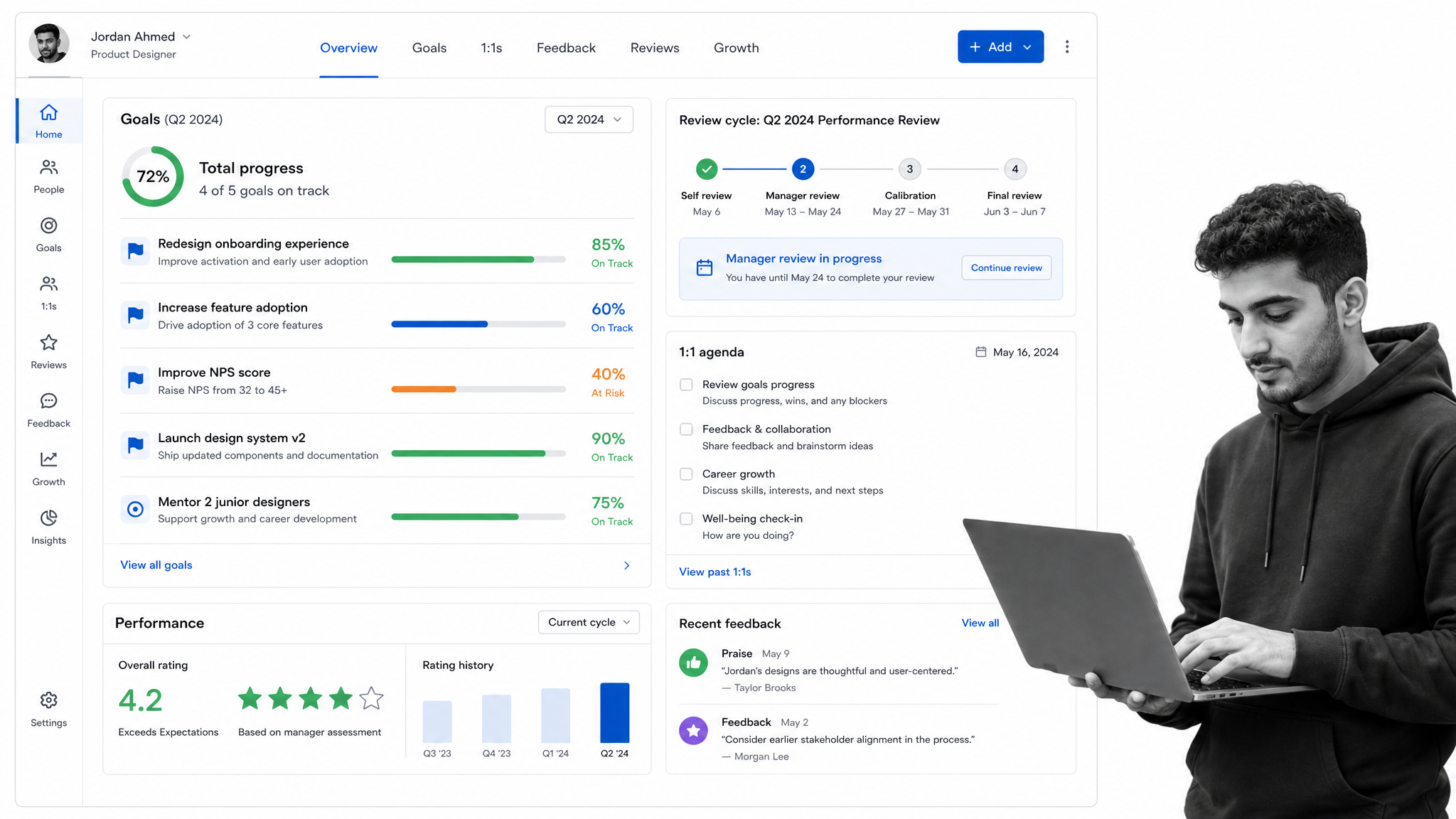
Lattice ties performance management, goals, engagement, and development into one people platform. Employees and managers track OKRs, run structured review cycles, hold better one-on-ones, and exchange continuous feedback, all in a system that connects daily work to growth. It gives HR a single view of how people are performing and how they feel.
Category: Performance, goals, and employee development
Key features: goal and OKR tracking with progress rollups, review cycles, one-on-one agendas, continuous feedback and praise, and engagement surveys.
Best for: companies that want performance and engagement managed together. Cuts back on: disconnected review tools, forgotten one-on-ones, and manual goal tracking.
HireVue
HireVue focuses on the interview and assessment stage of hiring with on-demand video interviews and structured, skills-based assessments. It lets candidates record answers on their own schedule and gives hiring teams a consistent way to compare them. Used with clear, validated criteria and human oversight, it speeds high-volume screening while keeping evaluations structured.
Category: Video interviewing and assessments
Key features:
- Video interviews: Conducts on-demand and live video interviews with candidates.
- AI-driven assessments: Uses AI algorithms to assess candidates’ skills and suitability for roles.
- Interview scheduling: Streamlines interview scheduling for recruiters and candidates.
- Candidate feedback: Provides feedback to candidates based on their interview performance.
- Interview guides: Generates interview questions and guides for hiring managers.
Best for: high-volume hiring teams that need to screen many candidates quickly. Cuts back on: phone-screen scheduling, first-round interviews, and inconsistent evaluations.
Wrike
Wrike is a versatile work management platform that many HR teams adopt to run their own projects, from hiring campaigns to onboarding rollouts and policy updates. It is not an HRIS, but its boards, timelines, and automations give people teams a shared place to plan and track cross-functional work that would otherwise live in scattered checklists.
Category: Work and project management for HR teams
Key features:
- Time tracking: Monitors and analyzes time spent on tasks and projects.
- Resource management: Allocates and manages team resources effectively.
- Task management: Organizes and prioritizes tasks efficiently.
- Project planning: Plans and visualizes projects with timelines and Gantt charts.
- Collaboration: Facilitates real-time collaboration and communication.
Best for: HR teams that manage recurring projects and cross-functional initiatives. Cuts back on: scattered project tracking, status update meetings, and manual task handoffs.
15Five
15Five is built around continuous performance, taking its name from a weekly check-in that takes 15 minutes to write and 5 to read. It combines those check-ins with goal tracking, engagement surveys, recognition, and lightweight reviews to keep managers and employees aligned between formal cycles.
Category: Continuous performance and engagement
Key features:
- Weekly check-ins: Facilitates regular feedback and communication between managers and employees.
- Goal tracking: Enables the setting, tracking, and monitoring of individual goals.
- Employee recognition: Promotes peer-to-peer recognition and appreciation.
- Feedback surveys: Conducts surveys to gather employee feedback and insights.
- Performance reviews: Streamlines the performance review process.
Best for: teams that want ongoing performance conversations rather than annual reviews. Cuts back on: status meetings, annual review scramble, and missed early warning signs.
Betterworks
Betterworks is an enterprise-grade performance platform centered on OKRs and continuous alignment. It connects individual goals to company priorities, runs calibrated review cycles, and gives leaders visibility into progress across large organizations. It is a fit for companies that take goal-setting seriously at scale.
Category: OKR and continuous performance management
Key features:
- Continuous performance conversations: Enables ongoing feedback and communication between employees and managers.
- Performance analytics: Provides data-driven insights for evaluating and improving performance.
- Development plans: Supports the creation and tracking of individual employee development plans.
- 360-Degree feedback: Gathers feedback from peers, managers, and subordinates for a comprehensive view.
- Recognition and rewards: Encourages employee recognition and rewards for achievements.
Best for: larger organizations that run structured OKR and performance programs. Cuts back on: misaligned goals, manual progress reporting, and disconnected reviews.
ClearCompany
ClearCompany is a talent management suite that spans recruiting, onboarding, performance, and engagement in one platform. It carries an employee from applicant to onboarded team member to reviewed performer without switching systems, which appeals to companies that want their hiring and people data to live together.
Category: Full-cycle talent management
Key features:
- Applicant tracking system: Manages the recruitment process from job posting to candidate selection.
- Onboarding: Facilitates a smooth onboarding experience for new hires.
- Workforce planning: Helps organizations plan and manage their workforce effectively.
- Employee recognition: Encourages positive reinforcement and acknowledges achievements.
- Learning management system: Supports employee training and development initiatives.
Best for: companies that want recruiting and performance in one connected suite. Cuts back on: disconnected hiring and HR tools, onboarding paperwork, and data re-entry.
Deel
Deel is the go-to platform for hiring and paying people across borders. It acts as an employer of record in many countries, handles global payroll and contractor payments, and manages the compliance, contracts, and taxes that come with an international team. For any company hiring beyond its home country, it removes an enormous amount of legal and administrative work.
Category: Global payroll, EOR, and contractor management
Key features:
- Global payroll: Simplifies international payroll processing for remote teams.
- Compliance management: Ensures legal and financial compliance in various countries.
- International payments: Facilitates seamless and secure cross-border payments.
- Contractor onboarding: Streamlines onboarding processes for remote contractors.
- Localized employment contracts: Provides customizable contracts adhering to local regulations.
Best for: companies hiring international employees and contractors. Cuts back on: international compliance, cross-border payments, and contract paperwork.
Leapsome
Leapsome brings performance reviews, goals, engagement surveys, and learning into a single, AI-assisted people-enablement platform. Its AI helps draft review summaries and surface themes from feedback, while integrated learning paths connect development directly to performance. It suits teams that want growth, feedback, and learning managed in one loop.
Category: AI-powered performance, engagement, and learning
Key features: review cycles, OKRs and goals, engagement surveys, learning paths, and AI-generated review and feedback summaries.
Best for: companies that want performance, engagement, and learning in one AI-assisted system. Cuts back on: fragmented review, survey, and learning tools plus manual feedback write-ups.
Culture Amp
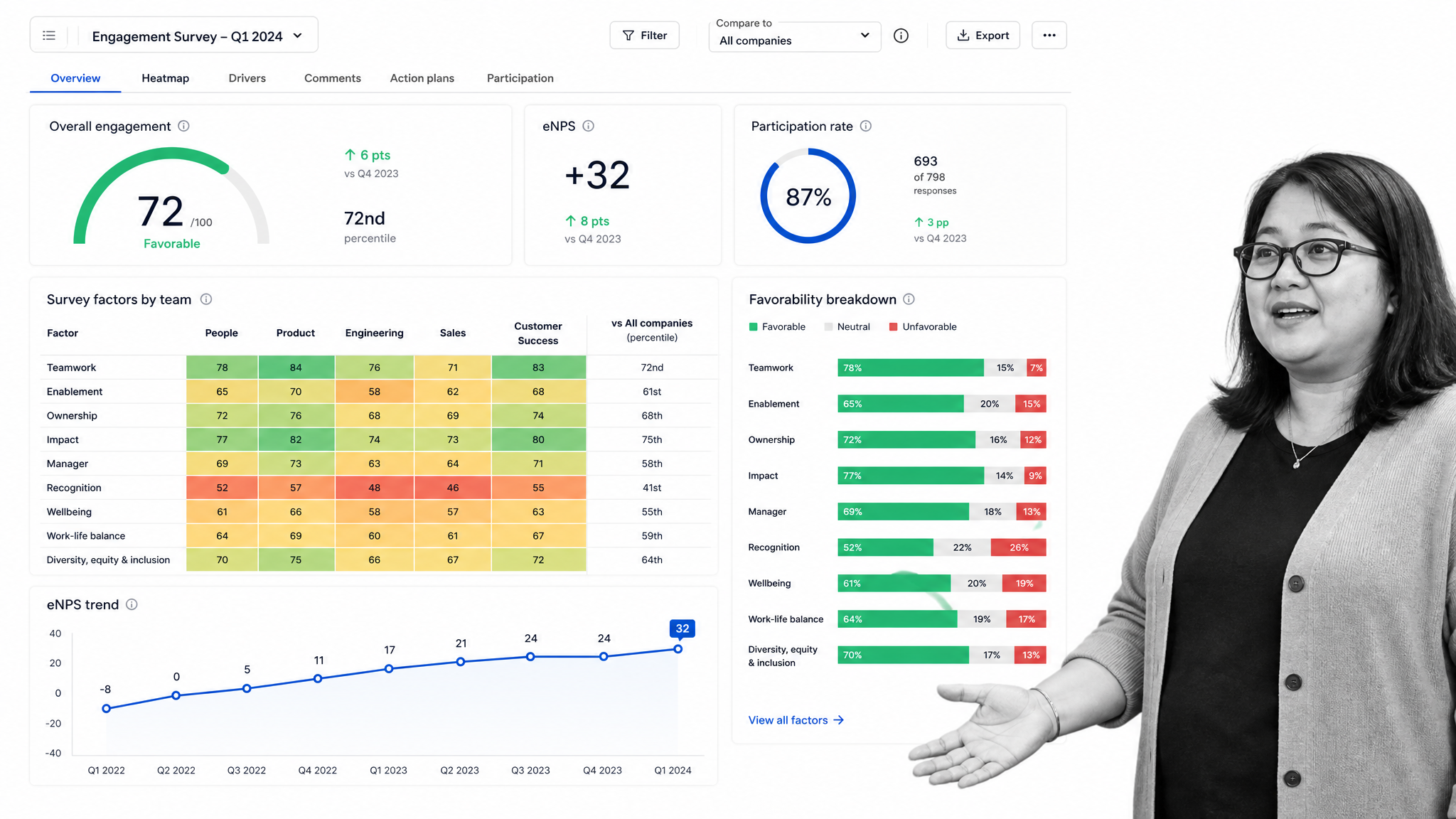
Culture Amp is a leading employee experience platform focused on engagement, performance, and people analytics. It runs research-backed surveys, then turns the results into heatmaps, benchmarks, and action plans that leaders can actually act on. It gives HR the data to understand why people stay, leave, and thrive.
Category: Employee engagement and people analytics
Key features:
- People analytics: Utilizes data analytics for informed decision-making on HR and talent initiatives.
- Onboarding surveys: Collects feedback during the onboarding process for continuous improvement.
- Diversity, equity, and inclusion (DEI) tools: Supports initiatives for fostering a diverse and inclusive workplace culture.
- Employee surveys: Conducts insightful surveys to gather feedback and assess employee sentiment.
- Performance management: Facilitates ongoing performance conversations and evaluations.
Best for: companies that want to measure and improve engagement with real data. Cuts back on: guesswork on morale, manual survey analysis, and reactive retention.
Trakstar
Trakstar combines performance management, learning, and applicant tracking into a connected talent suite. Teams can run reviews and goals, deliver training, and manage hiring from one vendor, which simplifies procurement and keeps talent data in a single place across the employee lifecycle.
Category: Performance, learning, and hiring suite
Key features:
- Performance analytics: Provides data-driven insights for performance evaluation and improvement.
- Competency management: Evaluates and develops employees based on specific competencies.
- Succession planning: Identifies and prepares potential future leaders within the organization.
- Development plans: Supports the creation and monitoring of personalized employee development paths.
- Customizable workflows: Tailors processes to meet specific organizational needs.
Best for: mid-size companies that want performance, learning, and hiring from one suite. Cuts back on: juggling separate review, training, and hiring tools.
Synergita
Synergita is a performance management and OKR platform that pairs continuous feedback with structured reviews and recognition. It is known for being straightforward to roll out and affordable, making rigorous performance and goal-setting practical for teams that do not have a large HR operations function.
Category: Performance management and OKRs
Key features: OKR and goal management, continuous feedback and praise, 360-degree reviews, appraisal automation, and analytics.
Best for: growing teams that want affordable, easy-to-run performance and OKRs. Cuts back on: manual appraisal admin, feedback tracking, and goal follow-up.
TalentLMS
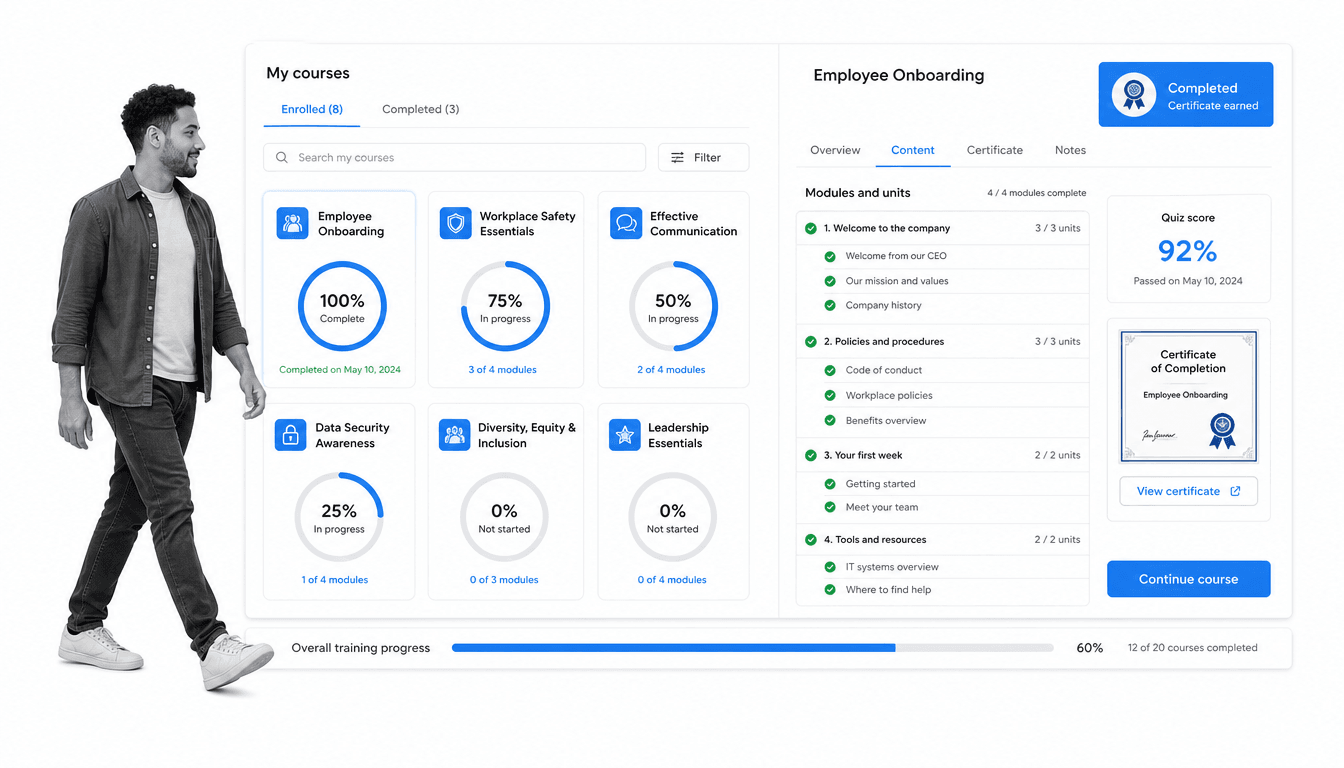
TalentLMS is a cloud learning management system built for employee training, onboarding, and compliance courses. It makes it simple to build courses, assign them by role, and track completion, so mandatory training and upskilling stop living in a spreadsheet. Certificates and quizzes prove that people actually finished what they were assigned.
Category: Learning management and employee training
Key features:
- Course creation: Allows administrators to create and customize online courses with various multimedia content.
- Content library: Provides a repository for storing and managing course materials, such as documents, videos, and presentations.
- Assessments: Offers built-in assessment tools for quizzes, tests, and surveys to evaluate learner progress.
- SCORM compliance: Supports SCORM and xAPI standards for interoperability with external content.
- Certification management: Issues certificates upon course completion and tracks learners’ progress towards certifications.
Best for: companies that need to deliver and track employee training and compliance courses. Cuts back on: manual training tracking, compliance course chasing, and onboarding knowledge gaps.
Benefits of using HR tools
HR tools refer to various software and technologies that help streamline and automate human resources processes within an organization. These tools offer a wide range of benefits that can significantly improve the efficiency and effectiveness of HR operations.
One of the primary benefits of using HR tools is increased productivity. These tools automate repetitive tasks such as employee onboarding, payroll processing, and performance evaluations, freeing HR professionals from time-consuming manual work. As a result, HR teams can focus on strategic activities that add value to the organization.
Another advantage is improved accuracy and reliability. HR tools reduce the likelihood of human errors, which can have significant consequences when it comes to sensitive information such as employee records and compliance with labor laws. By using HR tools, organizations can ensure that data is stored and processed accurately, reducing the risk of costly mistakes.
HR tools also enhance collaboration and communication within the organization. Tools like employee self-service portals make it easy for employees to access and update their own information, reducing the need for HR staff to intervene. Additionally, HR tools enable seamless communication between HR teams, managers, and employees, facilitating the exchange of information and feedback.
Furthermore, HR tools provide comprehensive analytics and reporting capabilities. With real-time data and insights, HR professionals can make data-driven decisions regarding workforce planning, talent acquisition, and performance management. These tools can also help identify trends, patterns, and potential issues, enabling proactive decision-making.
A newer benefit is intelligence. Today’s HR tools increasingly ship with built-in AI that screens applicants, drafts job descriptions and policies, forecasts attrition, and runs multi-step workflows on their own. That shifts HR software from a place to record work into a system that actively does some of it, giving teams back even more time for the strategic side of the job.
Human Resources Information Systems (HRIS)
Human Resources Information Systems (HRIS) have become an essential tool for every organization, revolutionizing the way human resource departments manage their functions. HRIS refers to the software and system applications that enable HR professionals to streamline their processes, enhance efficiency, and make data-driven decisions.
One of the key advantages of HRIS is effective data management. Gone are the days of laboriously maintaining paper-based records or using cumbersome spreadsheets. HRIS allows HR departments to store and organize employee information digitally. This not only saves time but also reduces the risk of human error. With just a few clicks, HR professionals can access critical information about an employee’s attendance, performance, training records, and more.
Another major benefit of HRIS is the automation of routine HR tasks. Companies can use HRIS to automate processes such as employee onboarding, payroll management, performance appraisals, and benefits administration. This automation not only reduces administrative burden but also improves accuracy and compliance. Employees can access self-service portals to update their information, request time off, and view pay stubs, which further enhances efficiency and empowers employees.
HRIS also provides valuable analytics and reporting capabilities. With HRIS, organizations can generate insightful reports and dashboards on key HR metrics. These analytics enable HR professionals to identify trends, evaluate workforce demographics, and make data-driven decisions. For example, they can analyze employee turnover rates, determine training needs, or identify skill gaps within the organization. Such information can support strategic workforce planning and talent management.
Moreover, HRIS supports compliance with legal and regulatory requirements. HR professionals can use the system to ensure that processes, such as hiring, compensation, and performance evaluation, comply with applicable laws and regulations. HRIS can also assist in maintaining accurate and up-to-date records, which is crucial during audits or compliance reviews.
Implementing an HRIS requires careful planning and consideration. Organizations need to evaluate their specific needs and ensure that the chosen system aligns with their objectives. Additionally, employee training is vital to maximize the benefits of HRIS. Adequate training can help employees adapt to the new system and leverage its functionalities effectively.
It helps to know how HRIS relates to two neighboring acronyms. An HRIS is the core system of record for employee data and everyday HR processes. An HRMS (human resources management system) usually adds deeper workforce management such as time, attendance, and payroll. An HCM (human capital management) suite goes broadest of all, layering talent, performance, learning, and workforce planning on top. Many modern platforms blur these lines, so focus on the capabilities you need rather than the label on the box.
Key features of HR tools
HR tools, or human resources tools, are software applications designed to assist HR departments in managing various tasks and processes more efficiently. These tools are specifically designed to streamline HR operations and enhance productivity. The key features of HR tools include:
- Employee database management: HR tools allow HR professionals to store and manage employee information, such as personal details, contact information, employment history, and performance records, in a centralized database.
- Time and attendance tracking: These tools often include time-tracking features that enable employees to record their working hours and breaks accurately. This aids in attendance management and facilitates payroll processing.
- Recruitment and applicant tracking: HR tools assist in managing the recruitment process, from posting job descriptions to tracking applicants, conducting interviews, and selecting qualified candidates. They may also include features for background checks and reference verification.
- Performance management: HR tools provide features for setting goals and objectives, conducting performance appraisals, and tracking employee performance over time. This allows HR professionals to identify areas for improvement and provide feedback to employees.
- Leave and absence management: These tools enable employees to request leaves or manage their time-off schedules. They streamline the approval process and allow HR departments to track and analyze leave patterns.
- Training and development: HR tools often include features for organizing training programs and tracking employee training progress. They may also provide access to e-learning platforms and allow HR professionals to measure training effectiveness.
- Reporting and analytics: HR tools generate various reports, such as headcount, turnover, employee experience, and diversity reports, to provide HR professionals with valuable insights and data for decision-making.
- AI and automation: Modern HR tools embed AI to screen and rank candidates, draft policies and job ads, summarize feedback, answer employee questions, and trigger multi-step workflows automatically, reducing manual effort across every stage.
How to choose an HR tool
Choosing the right HR tool for your organization is crucial for streamlining your HR processes and managing your workforce effectively. With countless options available in the market, it can seem daunting to make the right choice. However, considering a few key factors can help you navigate through the choices and find the perfect HR tool for your needs.
Firstly, it is important to assess your organization’s specific requirements and goals. Identify the HR tasks you want to streamline and automate, such as employee onboarding, payroll management, performance tracking, or employee engagement. This initial assessment will help you prioritize the professional services needed in an HR tool.
Next, consider the scalability of the tool. It is essential to choose a tool that can grow with your organization. Look for a solution that can cater to the size of your workforce and accommodate any future expansion. Scalability ensures that your HR tool remains relevant and effective as your organization grows.
Integration capability is another crucial factor. Consider the existing software and systems your organization uses, such as your payroll or attendance management system. Ensure that the HR tool you choose can integrate seamlessly with these systems. This integration will eliminate duplicated efforts, increase efficiency, and provide a better user experience.
Data security should be a top priority when choosing an HR tool. HR systems contain sensitive employee information, and it is essential to keep this data secure from any potential breaches or unauthorized access. Check for industry-standard security protocols, encryption measures, and data backup options provided by the HR tool.
Usability and user interface are also significant considerations. An intuitive and user-friendly tool ensures easy adoption by HR professionals and employees alike. Look for a tool with a clean and organized interface, customizable workflows, and interactive features that enhance user experience. A tool that is easy to navigate and use will save time and reduce training efforts.
Additionally, consider the support and customer service provided by the HR tool vendor. HR processes are critical for any organization, and timely support is crucial in case of any technical glitches or issues. Look for a vendor that offers reliable support through various channels, such as email, phone, or live chat. It is also beneficial to go through customer reviews or seek recommendations from other HR professionals to gain insights into the vendor’s customer service approach.
Finally, it is essential to evaluate the cost-effectiveness of the HR tool. Consider the upfront costs, maintenance fees, and any additional charges for customizations or upgrades. Look for a tool that provides value for your investment, with a balance between functionality and cost.
Finally, weigh the tool’s AI capabilities and data privacy together. The best modern HR tools use AI to automate screening, drafting, and analysis, but AI features touch sensitive people data, so confirm how the vendor trains its models, where data is stored, and what controls you have. A tool that is both genuinely helpful and transparent about how it handles employee information is the one worth committing to.
HR tools FAQ
What are HR tools?
HR tools are software platforms that centralize employee data and automate human resources work such as hiring, onboarding, payroll, benefits, performance reviews, engagement, and training. They replace manual spreadsheets and paper processes so HR teams spend less time on admin and more on strategy.
What is the difference between HRIS, HRMS, and HCM?
An HRIS is the core system of record for employee data and everyday HR processes. An HRMS adds workforce management like time, attendance, and payroll. An HCM suite is the broadest, adding talent, performance, learning, and workforce planning. Many platforms combine these, so choose based on the capabilities you need.
What HR tasks can be automated?
Onboarding and offboarding, payroll and tax filing, benefits enrollment, time-off approvals, applicant screening and scheduling, performance review cycles, engagement surveys, and compliance training can all be automated. A workflow platform like Process Street can also automate the recurring, cross-tool processes that sit between these systems.
Do small businesses need HR software?
Yes. Even small teams benefit from automating payroll, time off, and onboarding, and from keeping employee records and compliance in one place. Tools like Gusto, BambooHR, and Process Street scale down to small businesses without enterprise complexity or cost.
How is AI changing HR tools?
AI now screens and ranks candidates, drafts policies and job descriptions, summarizes feedback, forecasts attrition, answers employee questions, and runs multi-step workflows on its own. The shift is from software that records HR work to software that actively performs parts of it, which is why built-in AI is now a core buying criterion.
The right HR stack is the one that takes the most repetitive work off your team’s plate while keeping people data accurate, secure, and compliant. Start with the process that hurts most, whether that is hiring, onboarding, payroll, or reviews, pick the tool that fits, and layer a workflow platform over the top so every step runs the same way every time.