


Turn every policy into automated workflows with built-in enforcement and audit-ready proof.



The 12 Best Free AI Tools for Businesses and Professionals

The number of free AI tools available to businesses and professionals has exploded over the last few years. Whether you need help writing faster, analyzing documents, transcribing meetings, designing graphics, or automating repetitive workflows, there is almost certainly a free AI tool built for the job. The challenge is not finding one. It is figuring out which ones are actually worth using.
Free plans vary wildly. Some give you a genuinely useful slice of the product with reasonable limits. Others are so restricted they barely demonstrate what the tool can do. Before you start signing up for everything, it helps to understand what each tool is optimized for, who it serves best, and where the free tier will eventually hit a wall.
This guide covers the 12 best free AI tools for businesses and professionals. We have organized them by category so you can scan to what matters most for your role. For each tool, you will find a breakdown of its key free features, who gets the most value from it, and the limitations you will run into before needing to upgrade. If you want a broader view of the landscape, our roundup of free AI software solutions is a good companion read.
Whether you are a solo professional, a team lead, or someone building out an operations function, these tools represent the strongest free starting points available today.
In this article, we cover the 12 best free AI tools, including:
- 1. ChatGPT (OpenAI)
- 2. Google Gemini
- 3. Claude (Anthropic)
- 4. Microsoft Copilot
- 5. Perplexity AI
- 6. Google NotebookLM
- 7. Canva Magic Studio
- 8. Grammarly
- 9. Otter.ai
- 10. Process Street
- 11. Gamma
- 12. HuggingChat
- How to Choose the Best Free AI Tools
- Free AI Tools FAQs
1. ChatGPT (OpenAI)
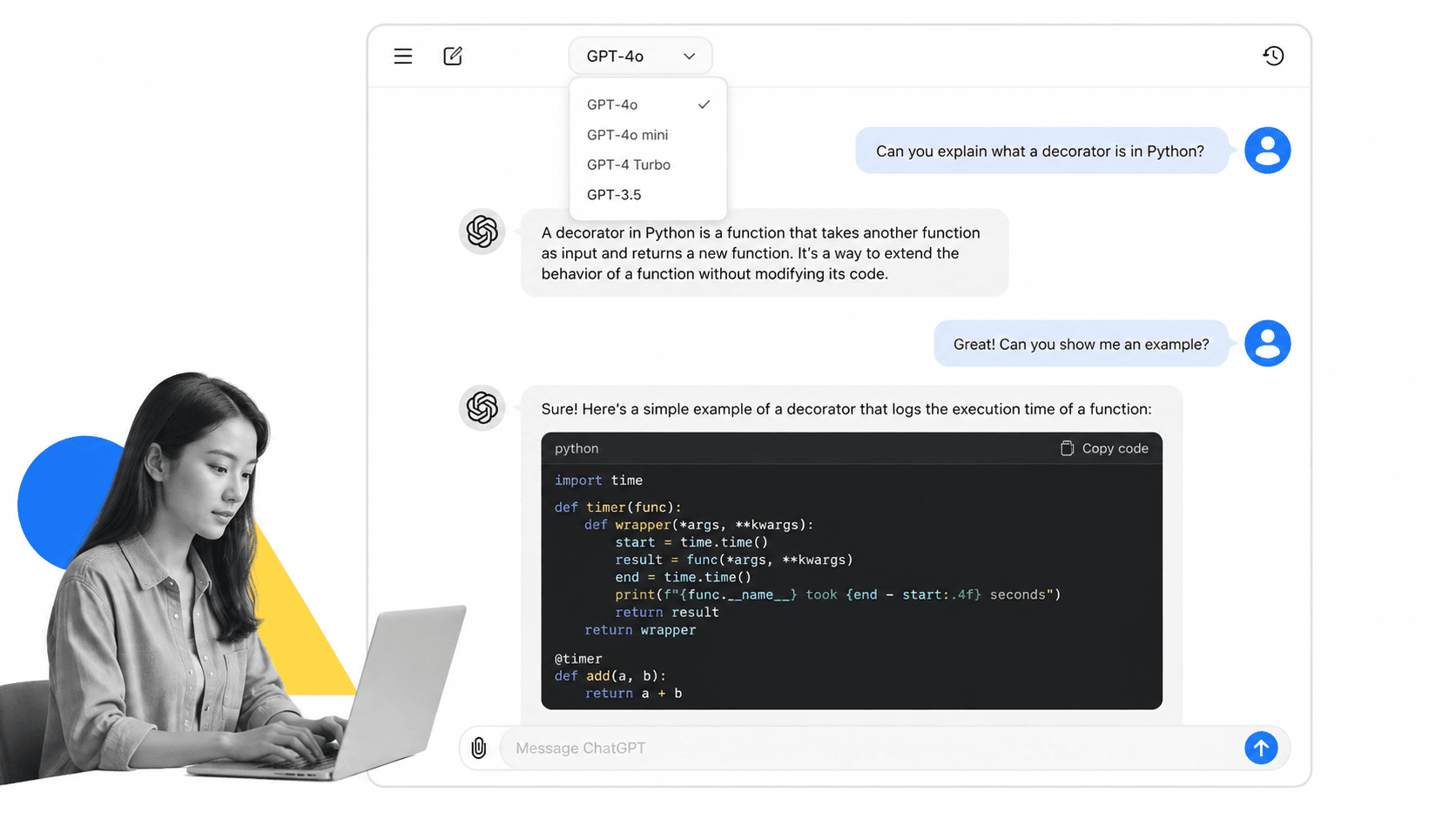
ChatGPT is the tool that made conversational AI mainstream for everyday business use. Built by OpenAI, it gives you a chat interface to a large language model capable of drafting content, answering questions, summarizing text, writing and debugging code, and much more. The free tier runs on GPT-4o with usage limits, which puts a genuinely capable model in front of you without paying anything.
For most content and productivity tasks, ChatGPT is a strong first stop. You can give it a rough brief and get a structured draft back in seconds. You can paste in a long document and ask it to summarize the key points. You can describe a bug in plain English and get a code snippet to fix it. The breadth of what it handles well is hard to match on the free tier of any single tool.
Key Free Features
- Access to GPT-4o with daily usage limits
- Conversational chat interface with memory options
- File uploads for document analysis
- Image input support for visual tasks
- Code interpreter for data analysis and scripting
- Access to the GPT Store for community-built assistants
Best For
Writers, marketers, developers, and analysts who need a general-purpose AI assistant for drafting, summarizing, brainstorming, and light coding tasks. It is a strong default for any professional who wants a single tool that covers a wide surface area.
Limitations of the Free Plan
The free tier hits rate limits fairly quickly during heavy usage sessions, and you will get bumped down to GPT-4o mini when limits are reached. Advanced features like custom GPTs with API connections, extended memory, and higher file upload limits are locked behind ChatGPT Plus. If your team needs consistent high-volume use, the limits on the free plan will become a friction point within days.
2. Google Gemini
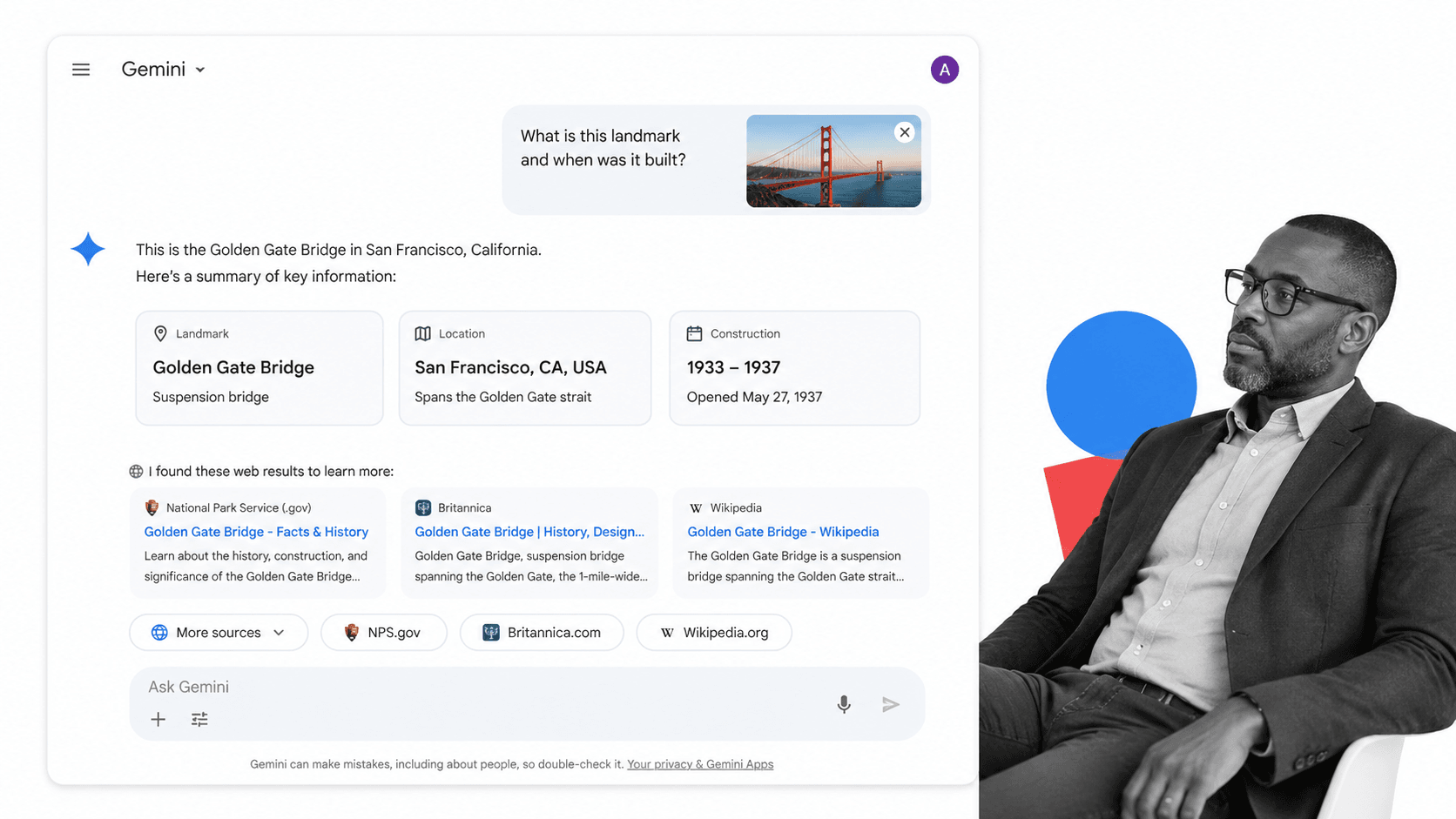
Google Gemini is Google’s multimodal AI assistant, built to handle text, images, and data across a growing set of use cases. The free tier gives you access to Gemini models with the ability to run multimodal inputs, meaning you can upload images alongside text prompts and get contextually aware responses.
Where Gemini pulls ahead of other free tools is its native integration with Google’s ecosystem. If you live inside Google Workspace, Gemini can pull context from Gmail, Docs, Drive, and Calendar directly. That integration alone makes it worth testing, even if you already use another general-purpose AI assistant for standalone tasks.
Key Free Features
- Access to Gemini models with generous usage
- Multimodal input: text, images, and documents
- Google Workspace integration (Gmail, Docs, Drive, Calendar)
- Web search grounding for up-to-date information
- Code generation and debugging support
- Available as a mobile app for on-the-go use
Best For
Professionals and teams already operating inside Google Workspace. If your email, documents, and calendar live in Google, Gemini’s contextual integrations will save you meaningful time on research, summarization, and drafting tasks without switching apps.
Limitations of the Free Plan
The most capable Gemini models and deep Workspace integration features are behind paid Google One AI Premium plans. If you need to process extremely large documents or run Gemini inside Docs and Gmail natively, you will hit the ceiling of the free tier faster than expected.
3. Claude (Anthropic)
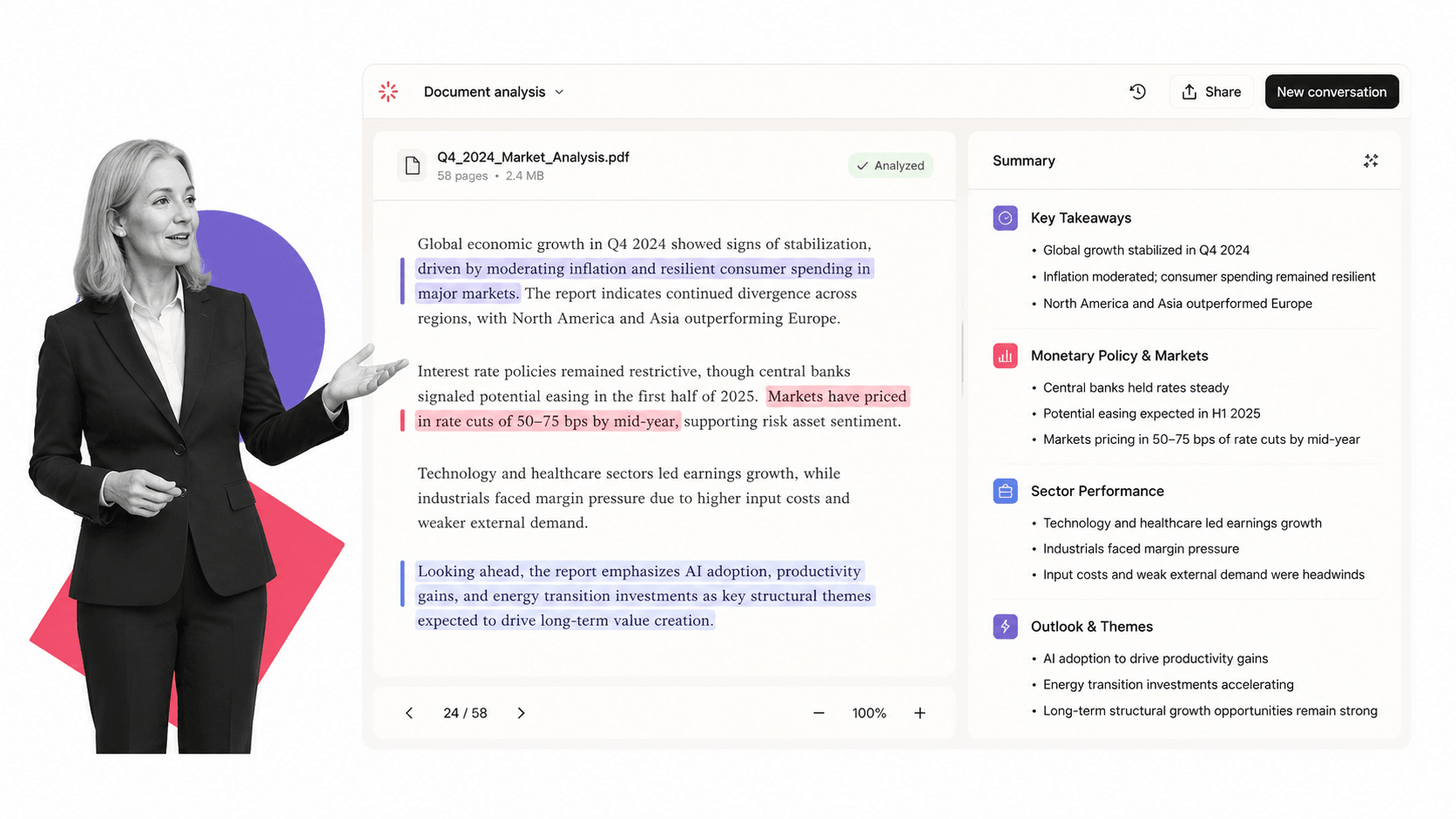
Claude by Anthropic stands out in the free AI tools space for its ability to reason through long, complex documents and produce nuanced, well-structured written output. The free tier gives you access to capable Claude models with daily usage limits, which handle document analysis, research synthesis, and longer-form writing tasks well.
If you regularly work with contracts, reports, research papers, or lengthy internal documents, Claude’s context handling is one of the most useful free capabilities available. You can paste in tens of thousands of words and ask detailed questions about the content, a task that trips up or truncates on many other free tools.
Key Free Features
- Access to capable Claude models with daily limits
- Strong long-document analysis and summarization
- File and image uploads for contextual review
- Code generation, review, and debugging
- Thoughtful, nuanced writing with consistent tone
- Projects feature for organizing conversation context
Best For
Legal, compliance, research, and operations professionals who need to extract insights from dense documents. Also a strong pick for anyone who finds the output quality of other tools too generic and wants writing assistance that matches a specific voice or structure.
Limitations of the Free Plan
The daily usage limits on the free plan are tighter than ChatGPT’s. During peak hours you may find the model temporarily unavailable. The extended context window and advanced features are restricted to paid plans. If you plan to use Claude as a primary daily tool rather than occasionally, the free limit will feel restrictive within a week of consistent use.
4. Microsoft Copilot
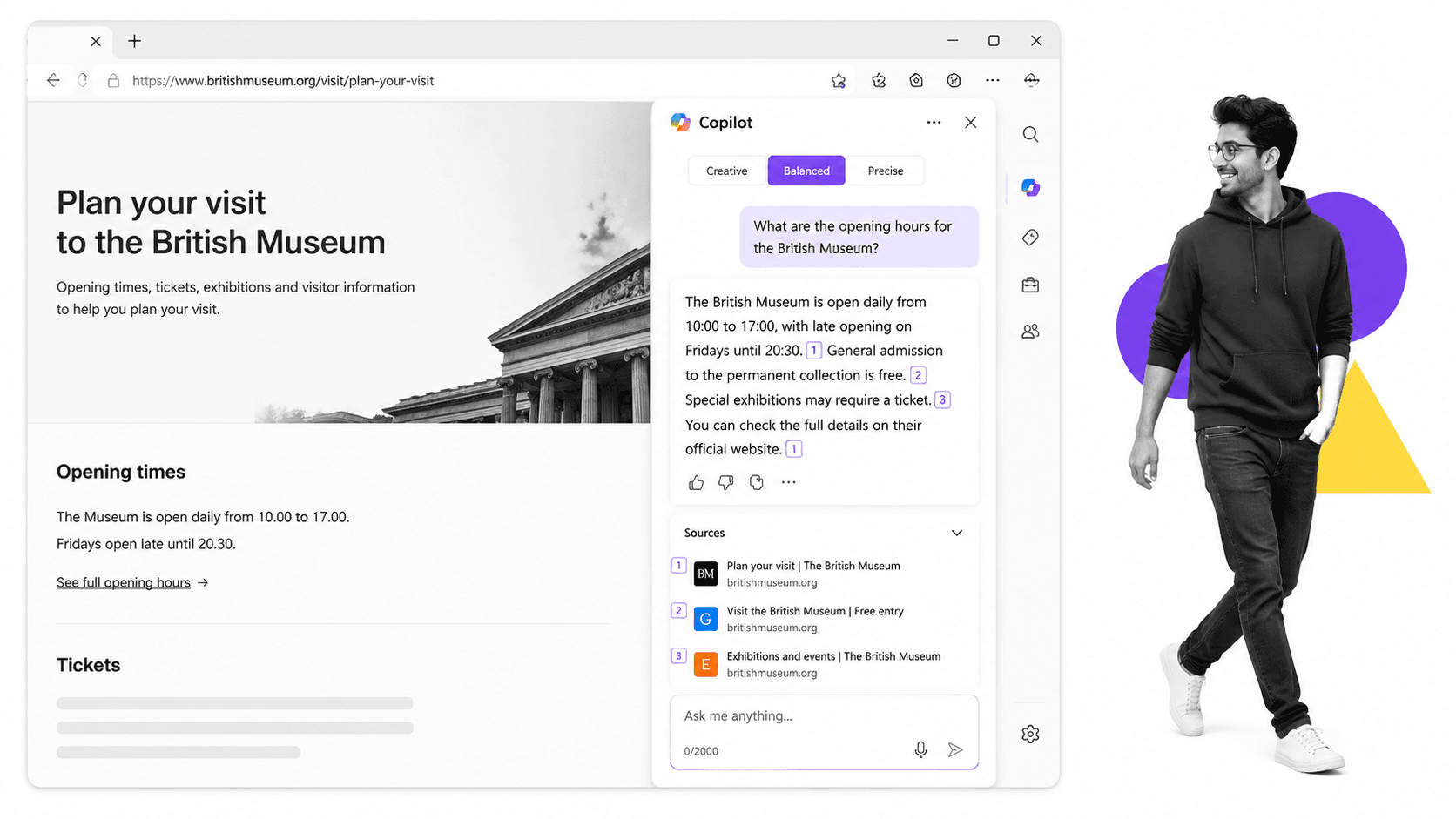
Microsoft Copilot is Microsoft’s consumer-facing AI assistant, powered by advanced language models and Bing search. The free version, accessible via the web and integrated into Windows, gives you access to a capable general-purpose chat assistant with live web search built in, plus image generation through DALL-E.
For professionals already in the Microsoft ecosystem, Copilot’s free web version is an easy productivity win. It can search the web in real time to answer questions with cited sources, generate images for presentations, and handle most of the same writing and summarization tasks as other leading AI assistants.
Key Free Features
- Advanced AI chat with live Bing web search
- Image generation via DALL-E (limited credits per day)
- Access via web, Windows, Edge browser sidebar, and mobile
- Document and image uploads for contextual chat
- Code generation and debugging
- Cited web results for research queries
Best For
Windows users and Microsoft 365 subscribers who want an AI assistant that works across their existing environment. The Edge sidebar integration is particularly convenient for professionals who research and write within the browser for most of their day.
Limitations of the Free Plan
The deep Microsoft 365 Copilot integration, meaning AI assistance directly inside Word, Excel, PowerPoint, Outlook, and Teams, requires a Microsoft 365 Copilot license, which is a paid add-on. The free Copilot experience is solid for web-based tasks but does not give you in-app assistance inside Office documents unless you are on a qualifying plan.
5. Perplexity AI
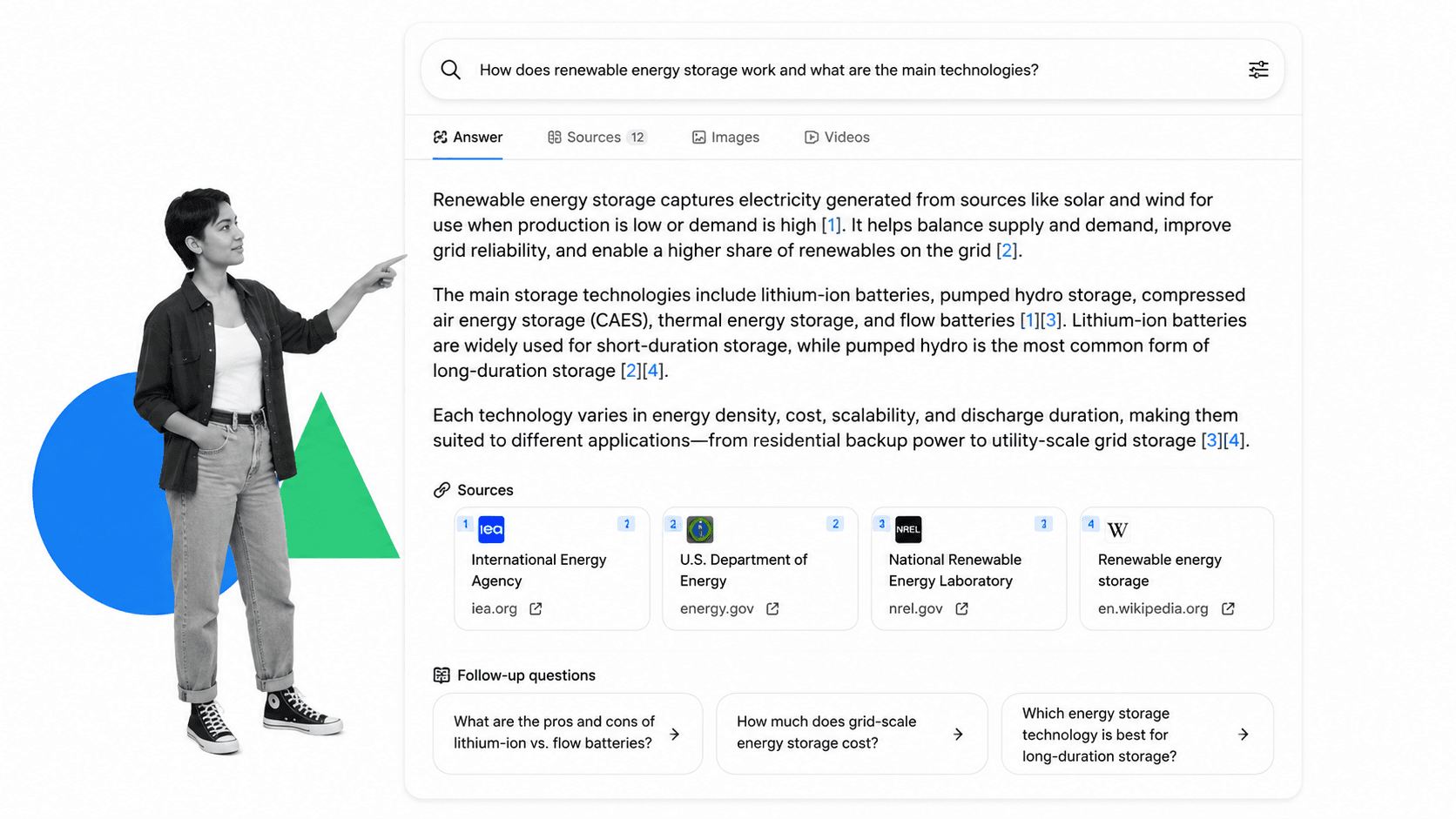
Perplexity AI is best understood as an AI-powered search engine rather than a general-purpose chat assistant. When you ask it a question, it searches the web, synthesizes what it finds, and returns a cited, structured answer. Every claim is linked to a source, making it far more useful than a standard search engine for research tasks that require verification.
For business research, competitive intelligence, and staying current on fast-moving topics, Perplexity’s free tier is one of the most immediately practical tools on this list. You get real-time answers with traceable sources, which is a significant upgrade over guessing whether an AI’s training data is current or accurate.
Key Free Features
- Real-time web search with cited sources on every answer
- Follow-up question threading for deep research sessions
- Focus modes: web, academic, YouTube, Reddit, and more
- Collections for organizing research threads
- Mobile app with voice input
- Access to multiple underlying models
Best For
Researchers, analysts, consultants, and anyone who currently spends too much time reading ten browser tabs to answer a single question. Perplexity collapses multi-step research into a single interface and gives you the receipts to verify what it tells you.
Limitations of the Free Plan
The free plan limits your access to Pro Search, which uses more advanced reasoning and broader source synthesis. You get a small number of Pro searches per day before dropping to standard search. File uploads, the ability to search your own documents, and access to the most capable models are also restricted.
6. Google NotebookLM
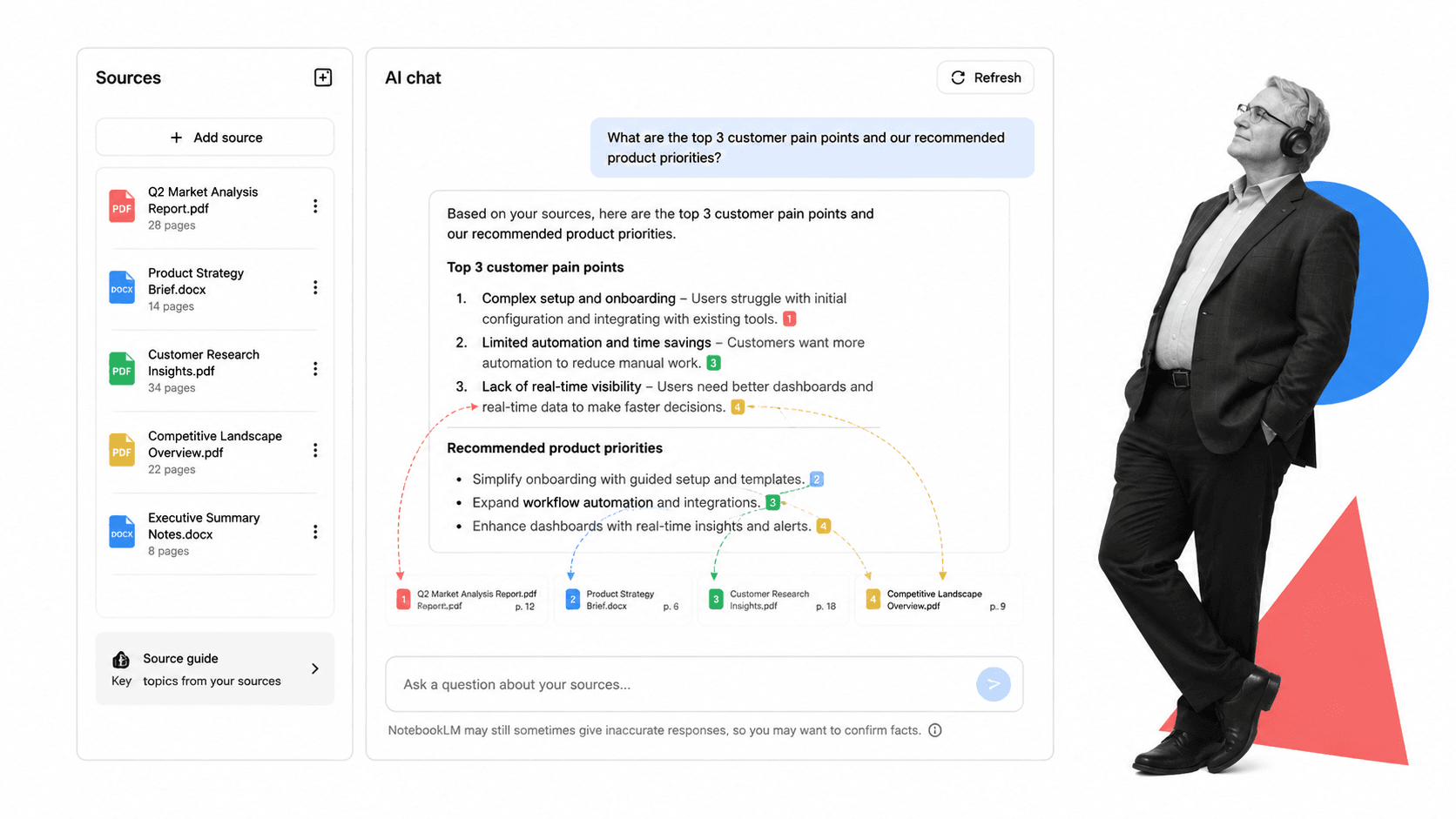
Google NotebookLM is a research and synthesis tool designed around a simple but powerful idea: you upload your own sources, and the AI only answers questions based on what you have given it. Unlike general-purpose AI assistants that draw on training data, NotebookLM keeps the model grounded entirely in your uploaded documents, PDFs, slides, audio files, and web links.
For professionals who need to synthesize large volumes of internal material, such as meeting notes, reports, research papers, or policy documents, this source-grounded approach is significantly more reliable than a standard AI chat interface. Every response is citable back to a specific section of your source material.
Key Free Features
- Up to 50 sources per notebook (PDFs, docs, audio, web links, YouTube)
- AI chat grounded entirely in your uploaded sources
- Auto-generated summaries, briefing docs, FAQ sets, and timelines
- Audio Overview feature that generates podcast-style summaries
- Inline citations linking answers back to source material
- Multiple notebooks for different projects
Best For
Researchers, compliance professionals, consultants, and students who need to work deeply with a defined body of source material. It is particularly useful for onboarding new team members into complex domains by building a queryable knowledge base from existing documentation.
Limitations of the Free Plan
NotebookLM is deliberately narrow in scope. It does not do general web research, code generation, or broad creative tasks. If your source documents are poorly structured or contain mostly scanned images rather than text, the quality of responses degrades significantly.
7. Canva Magic Studio
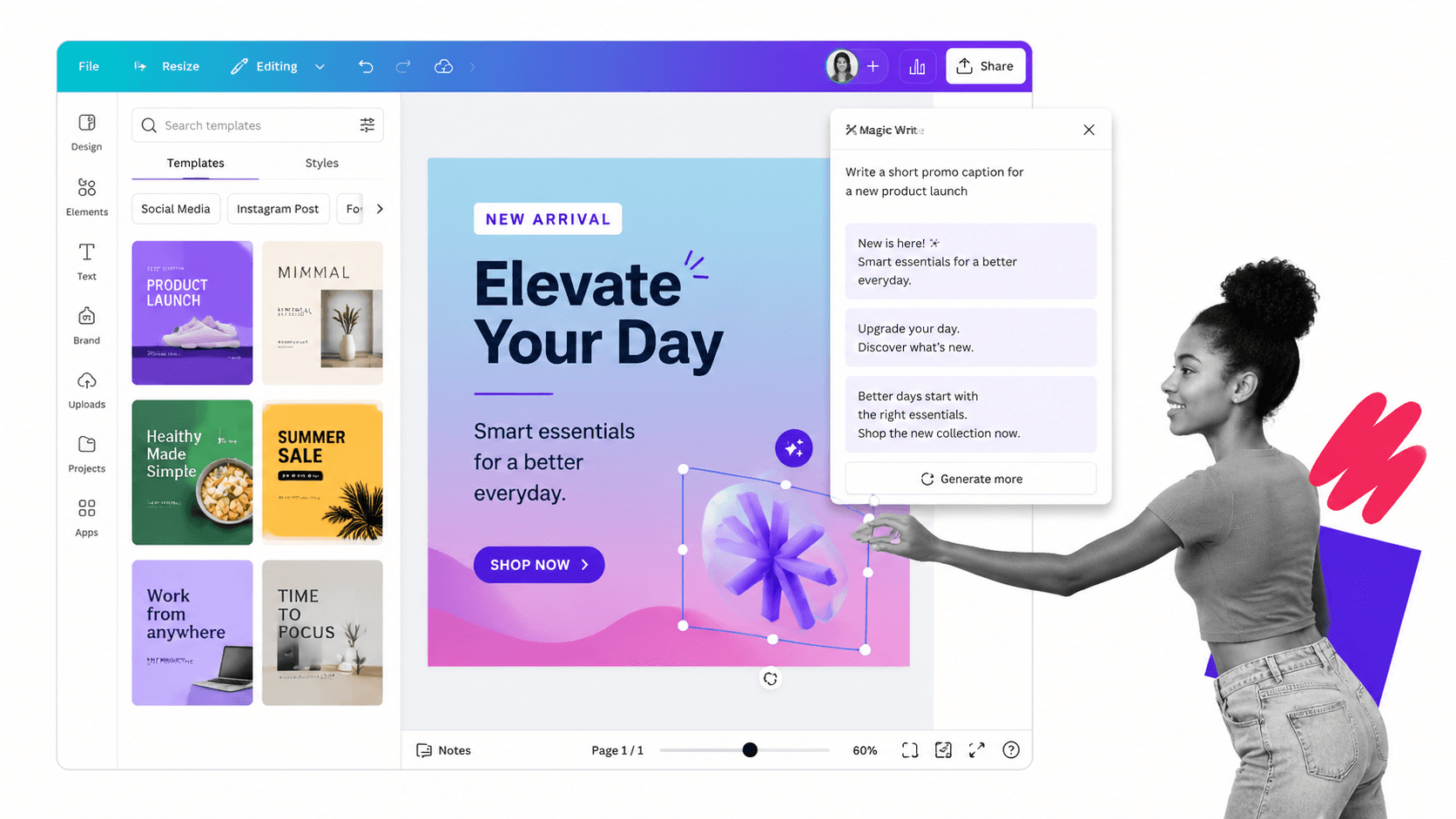
Canva’s Magic Studio is its suite of AI-powered design features, available within the broader Canva platform. For non-designers who need to create professional-looking graphics, presentations, social media content, or documents quickly, Canva has been the go-to tool for years. The AI features layer on top of that with image generation, background removal, text-to-design, and smart resize capabilities.
The free tier of Canva gives you access to a meaningful portion of the Magic Studio features, including AI image generation credits, Magic Write for AI-generated text inside designs, and the core design library of templates and assets.
Key Free Features
- AI image generation with limited free credits per month
- Magic Write for AI text generation inside design canvases
- Background remover (limited uses on free plan)
- Text-to-presentation: AI generates a full slide deck from a prompt
- Thousands of free templates for presentations, social posts, and documents
- Brand Kit basics on the free plan
Best For
Marketing coordinators, social media managers, small business owners, and operations teams who need to produce on-brand visual content without a design background or budget for a designer.
Limitations of the Free Plan
Many of the most useful Magic Studio features, such as Magic Resize for bulk format conversion, Magic Edit for AI-guided image editing, and the full Brand Kit, are locked behind Canva Pro. The free AI image generation credits run out quickly if you are using them daily.
8. Grammarly
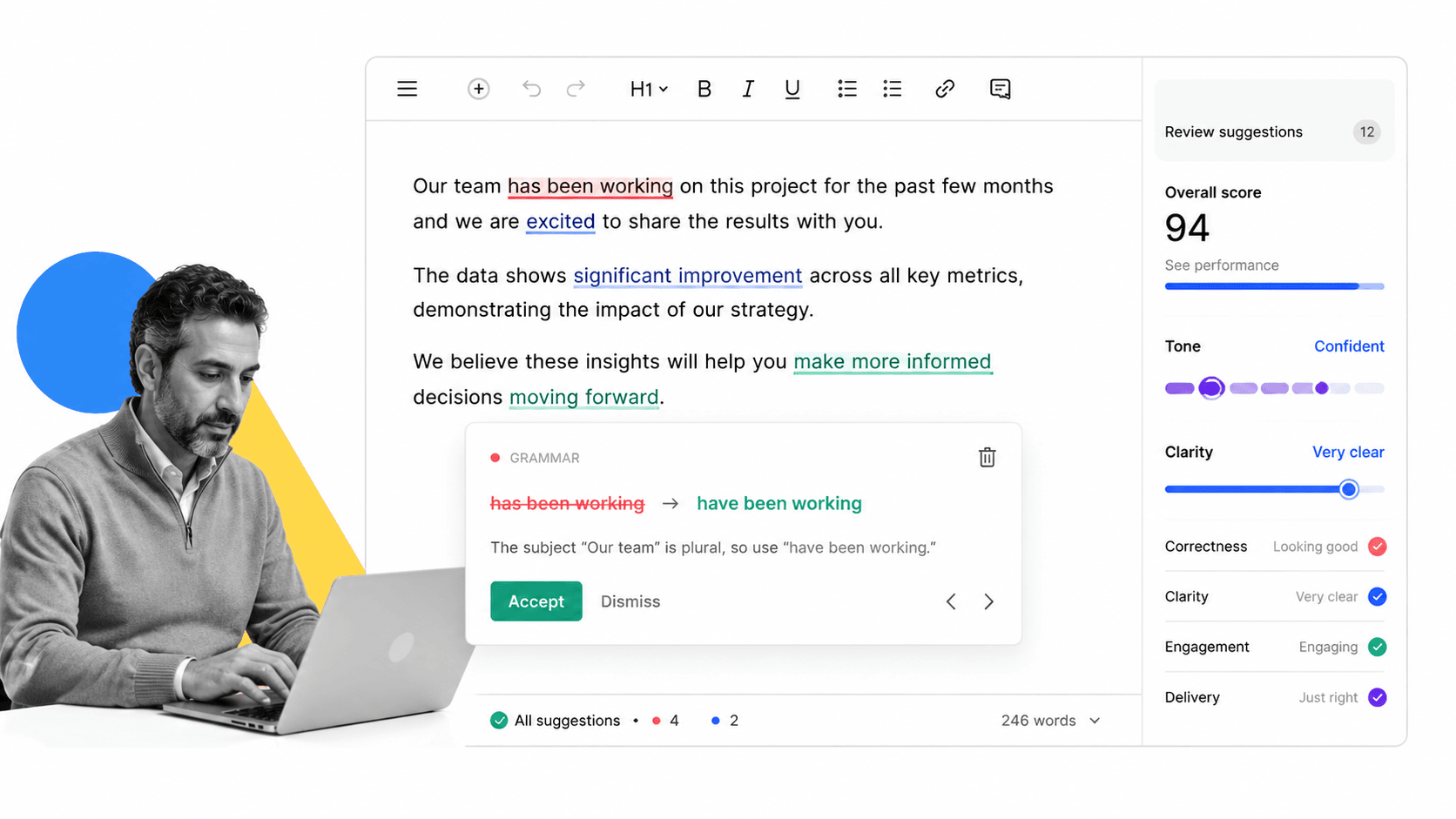
Grammarly started as a grammar and spelling checker and has evolved into a full AI writing assistant. The free tier covers real-time grammar correction, spelling, basic punctuation, and conciseness suggestions. The browser extension integrates directly into Gmail, Google Docs, LinkedIn, Slack, and virtually any text input on the web, making it one of the most frictionless tools on this list to actually use every day.
For professionals who write frequently, the passive correction layer Grammarly provides is a meaningful quality improvement with almost no behavior change required. You install it once and it works everywhere.
Key Free Features
- Real-time grammar, spelling, and punctuation correction
- Conciseness and clarity suggestions
- Browser extension for web-wide coverage
- Desktop app and Microsoft Word add-in
- Tone detection on written content
- Limited AI writing suggestions and rewrites
Best For
Any professional who communicates in writing daily. Particularly useful for non-native English speakers, people writing high-stakes external communications, and anyone who wants a passive quality safety net.
Limitations of the Free Plan
The most powerful features, including full-sentence rewrites, tone adjustments, style guide enforcement, and the GrammarlyGO generative AI assistant, are locked behind Grammarly Premium. The free plan catches clear errors well but will not help you restructure a weak paragraph or rewrite a confusing sentence.
9. Otter.ai
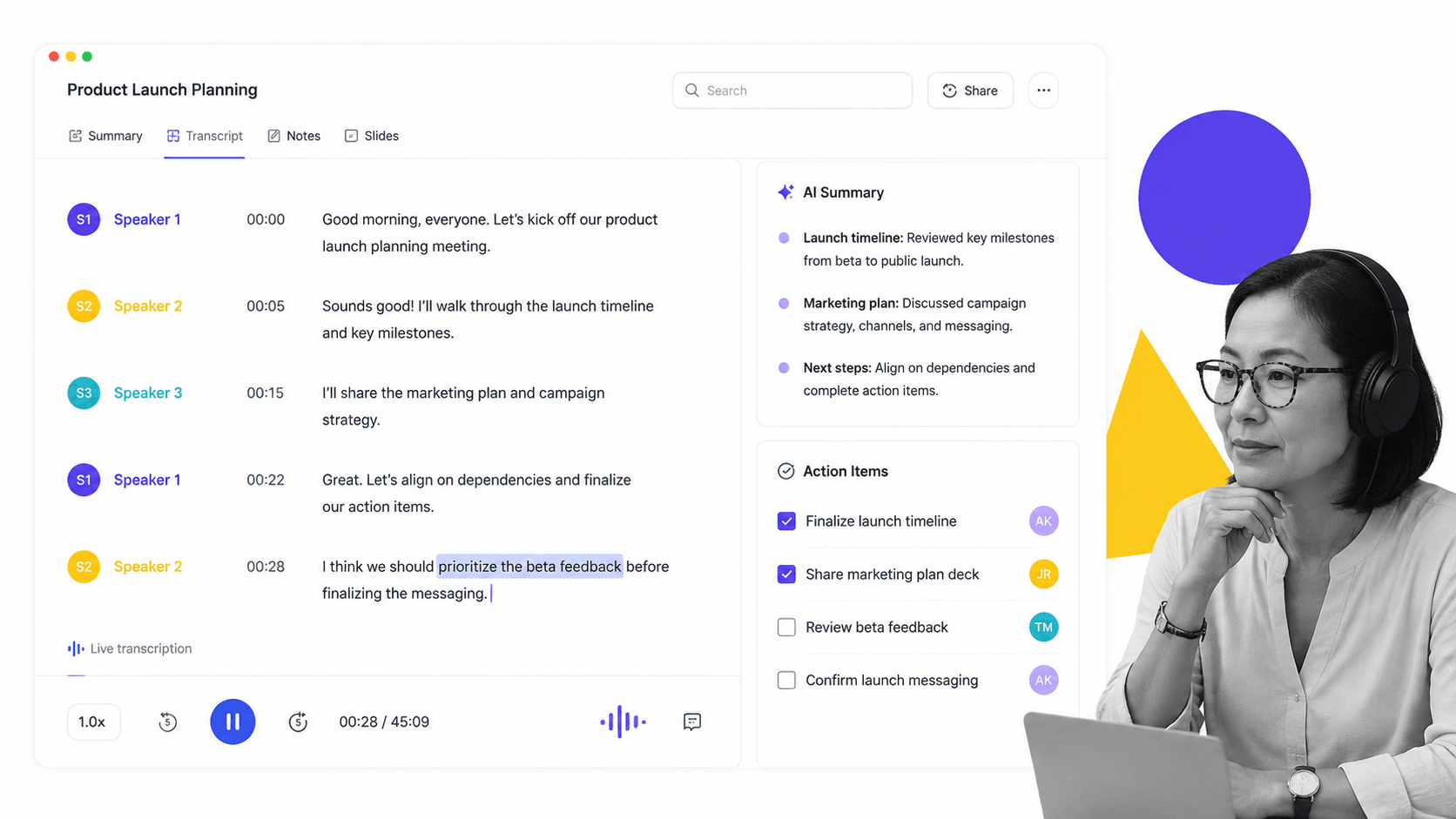
Otter.ai is a meeting transcription and AI summarization tool. It joins your video calls on Zoom, Google Meet, and Microsoft Teams, transcribes the conversation in real time, identifies speakers, and generates a summary with action items after the meeting ends. For teams running back-to-back meetings, the operational value of having accurate, searchable transcripts is significant.
The free tier gives you a meaningful amount of transcription per month and covers the core use case well. If you have ever spent time writing up meeting notes by hand or tried to remember what was decided in a call two days later, Otter solves that problem without requiring any manual effort mid-meeting.
Key Free Features
- 300 minutes of transcription per month
- Real-time transcription with speaker identification
- AI-generated meeting summaries and action items
- Zoom, Google Meet, and Teams integration
- Searchable transcript archive
- Mobile app for in-person meeting transcription
Best For
Operations leads, sales teams, product managers, and executives who spend a large portion of their day in meetings. Also valuable for anyone who needs to share accurate meeting recaps with stakeholders who were not on the call.
Limitations of the Free Plan
The 300-minute monthly limit runs out quickly for anyone in four or more meetings per week. Advanced features like custom vocabulary for industry-specific terminology, advanced search filters, and team collaboration on transcripts require a paid plan.
10. Process Street
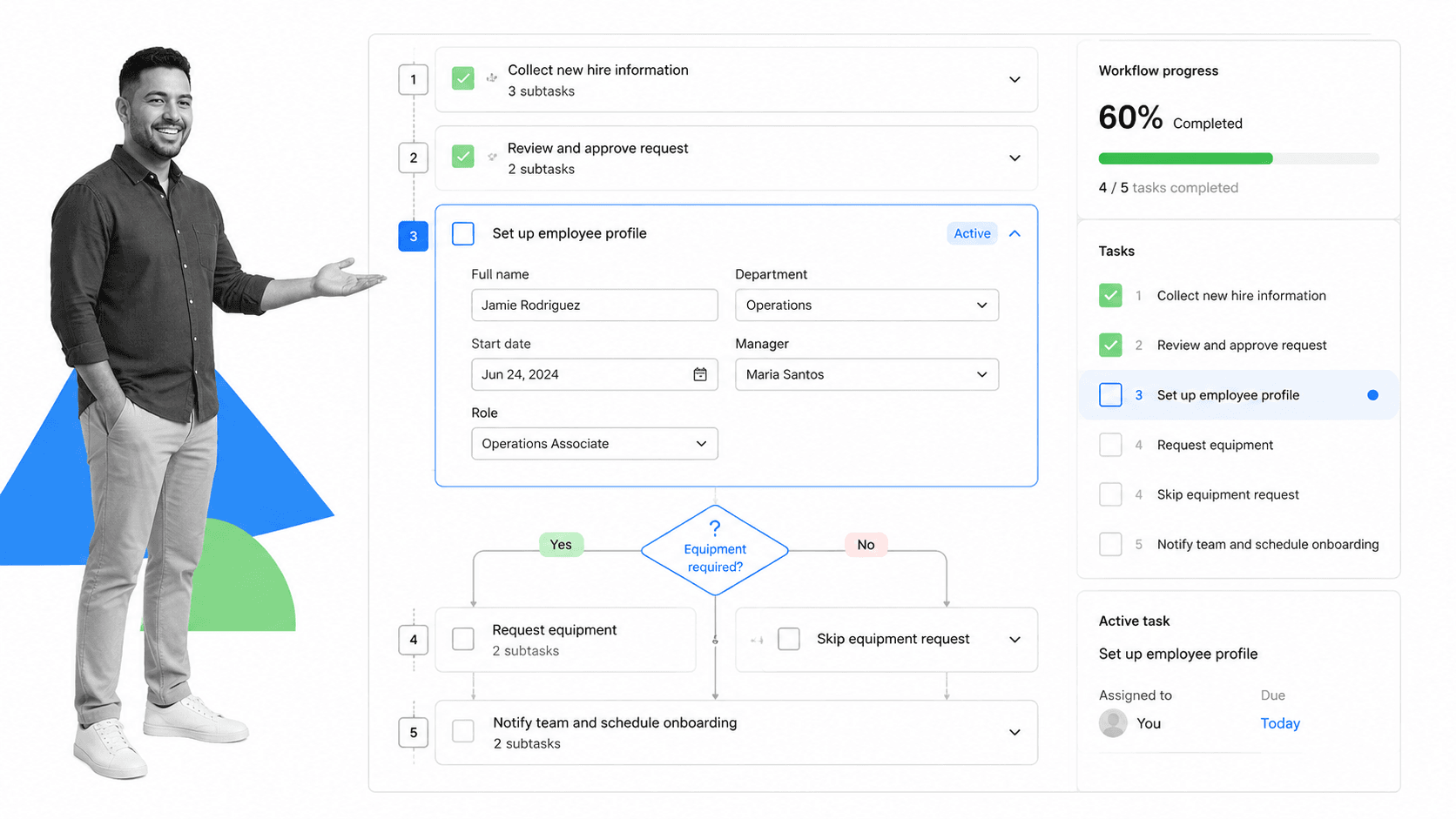
Process Street is a compliance operations platform that uses AI to help teams build, run, and improve structured workflows. Unlike general-purpose AI tools that assist with individual tasks, Process Street is built for operational consistency: ensuring that recurring processes, such as employee onboarding, compliance checks, audits, and client delivery workflows, are followed the same way every time, by every team member, with a documented record of completion.
The platform sits at the intersection of workflow management software and AI, using AI to generate workflows from prompts, identify gaps in existing processes, and surface insights from completed runs. If you are building out an operations function or trying to bring structure to how your team delivers work, understanding what a workflow is and how to systematize it is where Process Street starts. Its AI-driven features extend into AI-driven compliance and audit readiness.
Key Free Features
- AI workflow generation from a text prompt
- Pre-built process templates and quality management templates for common business operations
- Conditional logic and dynamic task assignment
- Workflow run tracking with completion records
- Form fields for capturing structured data during runs
- Integrations with popular business tools via Zapier
Best For
Operations managers, compliance teams, HR professionals, and any team lead who needs repeatable, auditable processes. Process Street is particularly strong for teams where consistency matters: regulated industries, client-facing service delivery, onboarding, and quality assurance. It pairs well with other BPM tools and is a natural fit alongside project management tools for teams that need both project tracking and process discipline.
Limitations of the Free Plan
The free plan covers the core workflow builder and template library well, but advanced features like AI-powered process improvement suggestions, deeper analytics across workflow runs, and broader team collaboration with permission controls are available on paid plans. Teams managing large volumes of active workflows or needing enterprise-grade compliance management software capabilities will want to explore the paid tiers. For teams just starting to formalize their workflow management system, the free plan is a solid entry point.
11. Gamma

Gamma is an AI-native presentation and document tool that generates structured, visually polished decks, one-pagers, and web pages from a text prompt or outline. Where traditional presentation tools require you to design each slide manually, Gamma handles layout, visual hierarchy, and formatting automatically, letting you focus on the content rather than the construction.
For professionals who need to create presentations frequently but do not have design skills or time to spend in PowerPoint, Gamma is one of the most practical free tools available. You can go from a bullet-point outline to a complete, shareable deck in minutes.
Key Free Features
- AI-generated presentations, documents, and webpages from a prompt
- 400 free AI generation credits on signup
- Smart layouts that automatically adjust to your content
- Real-time collaboration and sharing via link
- Embed support for video, charts, and interactive elements
- Export to PDF and PowerPoint on the free plan
Best For
Consultants, founders, product managers, and anyone who needs to produce a professional-looking deck or brief quickly without a design resource. Gamma is especially strong for internal strategy documents, status updates, and client-facing one-pagers.
Limitations of the Free Plan
The free AI credits are a one-time allocation, not a monthly refresh. Once they are gone, you will need to upgrade to continue using AI generation features. Presentations created on the free plan include Gamma branding. Advanced customization of themes, custom domain publishing, and analytics on shared decks are paid features.
12. HuggingChat
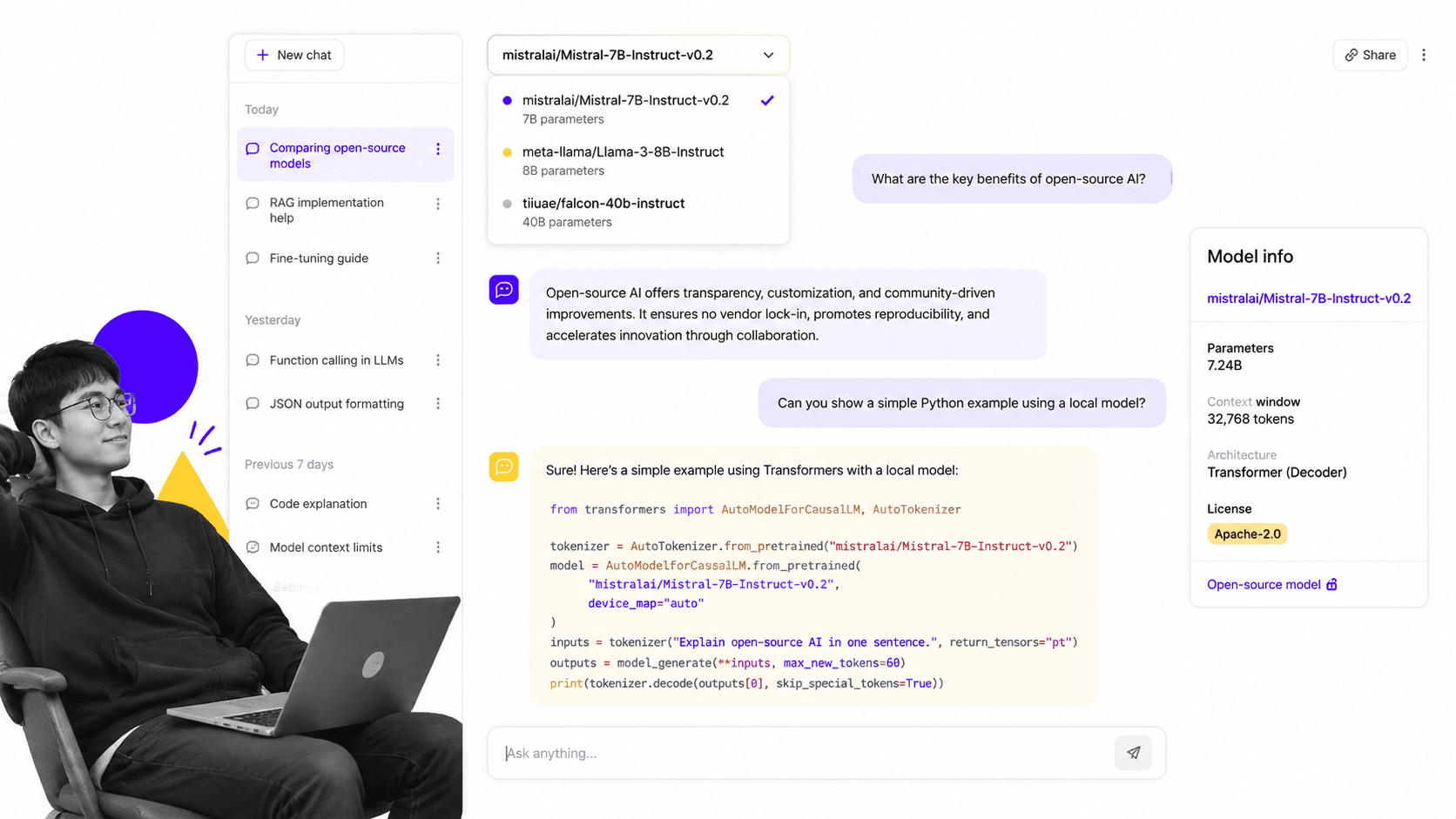
HuggingChat is Hugging Face’s free, open-source AI chat interface, giving you access to a rotating selection of leading open-source language models including Llama, Mistral, and others. For technically inclined professionals and teams interested in open-source AI, it is the most accessible free entry point into that ecosystem without needing to self-host anything.
What makes HuggingChat distinct from other free tools is the model transparency and flexibility. You can switch between models, compare their outputs, and run tasks on models that are fully open-source and can eventually be deployed in your own infrastructure. For teams exploring workflow technology that includes self-hosted or customizable AI, HuggingChat is a useful testing ground.
Key Free Features
- Free access to multiple open-source models (Llama, Mistral, and others)
- Model switching to compare outputs across different architectures
- Web search tool integration for grounded responses
- Image generation via open-source image models
- Shareable conversation links
- Open-source codebase, no vendor lock-in
Best For
Developers, data scientists, AI researchers, and technically-minded teams who want to experiment with open-source models without infrastructure overhead. Also useful for organizations that need to understand open-source AI capabilities before committing to a self-hosted deployment.
Limitations of the Free Plan
HuggingChat prioritizes open-source model access over polished user experience. The interface is more utilitarian than ChatGPT or Claude, and model availability can vary based on server load. Open-source models, while increasingly capable, still lag behind the frontier closed-source models on many benchmarks.
How to Choose the Best Free AI Tools
With twelve solid free AI tools on the table, the real question is not which tool is best overall. It is which tool is best for your specific situation. Here is a practical framework for narrowing it down.
Start With Your Primary Use Case
Every tool on this list does something better than the others. If you are writing a lot, Grammarly handles passive quality control while ChatGPT or Claude handles active drafting. If you are doing research, Perplexity and NotebookLM are purpose-built for it. If you are running meetings, Otter handles transcription. If you are building operational workflows, Process Street is the only tool here that addresses process execution and compliance tracking directly. Match the tool to the job before evaluating anything else.
Consider Your Existing Stack
Integration friction matters. If you live in Google Workspace, Gemini’s ecosystem connections give it an edge over standalone tools. If you are on Microsoft 365, Copilot’s native OS and Edge integrations reduce the switching cost. Choosing AI tools that extend your existing stack is usually more efficient than adopting entirely separate platforms, especially on the free tier where onboarding time is part of the total cost.
Test for Output Quality on Your Actual Tasks
The only reliable way to evaluate AI tool quality for your use case is to run it on your actual work. Take a real task: a report you need to write, a meeting transcript you need to summarize, a process you need to document. Run it through two or three tools and compare the outputs. Spend thirty minutes testing before committing to a tool as your default.
Map Free Tier Limits to Your Usage Volume
Free tiers are designed to be useful enough to demonstrate value, not to support unlimited production use. Before adopting a tool for your team, estimate your usage volume and check where the free limits will create friction. Some tools, like Grammarly’s browser extension, work silently in the background without burning through daily limits. Others, like Gamma’s one-time credit model, have hard caps that force a decision point quickly.
Think About Compliance and Data Handling
For teams in regulated industries or handling sensitive data, the free tier of most consumer AI tools is not appropriate for processing confidential information. Most free plans use your data to improve models unless you explicitly opt out, and enterprise data residency or privacy controls are uniformly behind paid tiers. If you are formalizing agile workflow processes around AI tool use, documenting acceptable use policies is worth doing early. This is also where workflow software for project management and compliance tracking becomes relevant.
Build a Complementary Stack
The most effective approach is usually two or three tools that cover different surfaces: one general-purpose AI assistant for drafting and reasoning, one specialized tool for your highest-volume specific use case, and one operational tool for process and workflow consistency. Review project management tools examples alongside your AI tool choices if your team is evaluating broader operational tooling, and consider standardized project management templates that integrate with your AI toolset.
Free AI Tools FAQs
Are free AI tools safe for business use?
Most free AI tools are safe for general business tasks, but they come with important caveats around data privacy. Free tiers typically use your inputs to improve their models unless you explicitly opt out. For sensitive business data, client information, or regulated industries, review each tool’s data handling policy before use. Enterprise-grade data controls, encryption, and compliance certifications are almost always behind paid plans. If compliance is a concern, treat free tiers as evaluation tools rather than production systems for confidential work.
What is the best free AI tool for writing?
For active writing and drafting, ChatGPT and Claude both offer strong free tiers that handle content creation, summarization, and editing well. For passive writing quality control, Grammarly’s free browser extension is hard to beat because it works silently across every text input on the web. The best choice depends on whether you need a tool that writes for you (ChatGPT or Claude) or one that corrects and polishes what you write yourself (Grammarly).
Can free AI tools replace paid software?
Free AI tools can meaningfully reduce the need for some paid software, particularly for individual professionals and small teams. A combination of ChatGPT for drafting, Canva for design, and Otter.ai for meeting notes can replace several paid subscriptions. However, free tiers hit usage limits, lack team collaboration features, and do not offer the data controls that organizations need at scale. For most teams, free AI tools work best as a complement to paid core systems rather than a full replacement.
What are the limitations of free AI tools?
The most common limitations across free AI tools are usage caps (daily or monthly limits on queries, generation credits, or minutes), reduced access to the most capable models, limited file upload capacity, restricted collaboration features, and consumer-grade data handling that may not meet enterprise security requirements. Free plans are designed to demonstrate value, not to support unlimited production use. Understanding where each tool’s ceiling sits helps you plan for when an upgrade becomes necessary.
Which free AI tool is best for research?
For general web research with cited sources, Perplexity AI is the strongest free option because it combines real-time web search with structured, source-linked answers. For deep research within a specific body of documents, Google NotebookLM excels because it grounds all responses in your uploaded source material. Perplexity handles breadth well, while NotebookLM handles depth. Using both together covers most professional research needs without a paid subscription.
