


Turn every policy into automated workflows with built-in enforcement and audit-ready proof.



Workflow Software for Project Management
Workflow software for project management gives teams a structured way to move projects forward without relying on memory, manual handoffs, or scattered spreadsheets. Instead of tracking tasks in isolation, these tools connect each step in a project to the next, automate recurring work, and enforce the sequences that keep deadlines on track.
The difference between a project that finishes on time and one that stalls usually comes down to how work moves between people. When handoffs are unclear, approvals get stuck, or steps happen out of order, even simple projects can derail. Workflow software solves this by defining the path work takes, automating repetitive coordination, and giving every team member visibility into what happens before and after their tasks.
This guide reviews 10 workflow software tools evaluated specifically for project management use cases. Each platform is assessed on how well it structures repeatable project work, including task sequencing, team coordination, deadline enforcement, and cross-functional collaboration. For a broader look at the landscape, see our guide to the best project management tools.
In this article, we are going to cover everything you need to know about workflow software for project management, including:
- What Makes Great Workflow Software for Project Management
- Process Street
- Monday.com
- Asana
- ClickUp
- Wrike
- Jira
- Smartsheet
- Trello
- Notion
- Adobe Workfront
- FAQs
What Makes Great Workflow Software for Project Management
Workflow software designed for project management does more than organize tasks in a list. It defines how work flows between people, enforces the correct sequence of steps, and automates the repetitive coordination that slows teams down. The gap between a task manager and true workflow software for project management is the difference between tracking what needs to happen and ensuring it actually happens in the right order. For a complete overview, see manufacturing compliance software.
The best workflow tools for project managers share these core capabilities:
- Task sequencing and dependencies: Steps happen in the right order, with clear handoffs between team members. Downstream tasks do not start until upstream work is verified complete.
- Automation: Recurring project tasks, approvals, and notifications trigger without manual intervention. The system does the coordination work so people can focus on the project work.
- Visibility: Dashboards, timelines, or board views show where every project stands at a glance. Managers can spot bottlenecks before they become blockers.
- Integrations: Connects to the tools teams already use: Slack, email, CRM systems, cloud storage, and development platforms.
- Compliance and audit trails: Every completed step is logged, creating accountability and proof that the process was followed correctly.
- Templates: Repeatable project types can be standardized so teams do not reinvent the workflow each time a similar project starts.
Where generic project management tools and techniques focus on scheduling and resource allocation, workflow software focuses on how work gets done. It bridges planning and execution, turning documented procedures into living processes that run automatically.
The tools below are evaluated through this lens: how well they structure, automate, and enforce repeatable project work.
Process Street
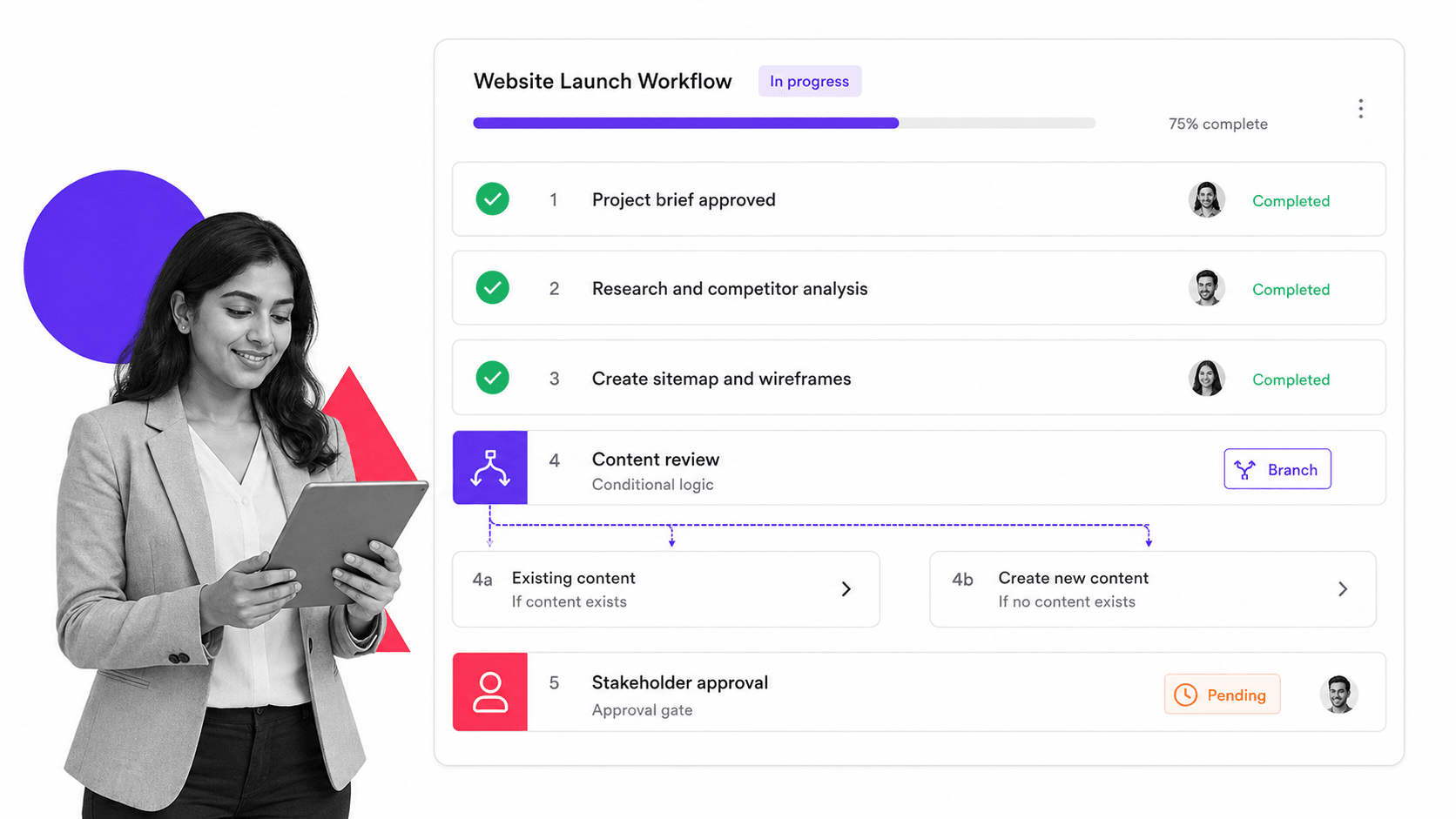
Process Street is a Compliance Operations Platform that turns standard operating procedures into automated, enforceable workflows. For project management teams, this means every project follows the same proven path with built-in approvals, conditional logic, and real-time tracking. Unlike tools that focus primarily on task boards or timelines, Process Street enforces that each step is completed correctly before the next one begins.
Key Project Management Features
- Checklist-driven workflows: Every project runs as a structured checklist with required fields, file uploads, approvals, and due dates. Steps cannot be skipped.
- Conditional logic: Workflows adapt based on project type, risk level, or team inputs. The right steps appear for the right situation without building separate templates.
- Approval workflows: Built-in approval gates ensure sign-offs happen at the right stage, with automatic escalation when approvers miss deadlines.
- Integrations: Connects to Salesforce, Slack, Jira, and 8,000+ apps through native integrations and Zapier. Teams can start from project management templates or build custom workflows from scratch.
- AI compliance agent (Cora): Monitors active workflows for missed steps, flags risk, and suggests process improvements in real time.
- Audit trail: Every action is logged with timestamps and user attribution, creating a complete compliance record.
Best For
Teams in regulated industries (financial services, healthcare, manufacturing) that need compliance operations built into their project workflows. With a library of workflow templates, Process Street is especially strong for organizations where proving a process was followed is as important as completing the work itself.
Pricing
Free plan available. Paid plans start at $100/month for teams. Enterprise pricing available on request.
Monday.com
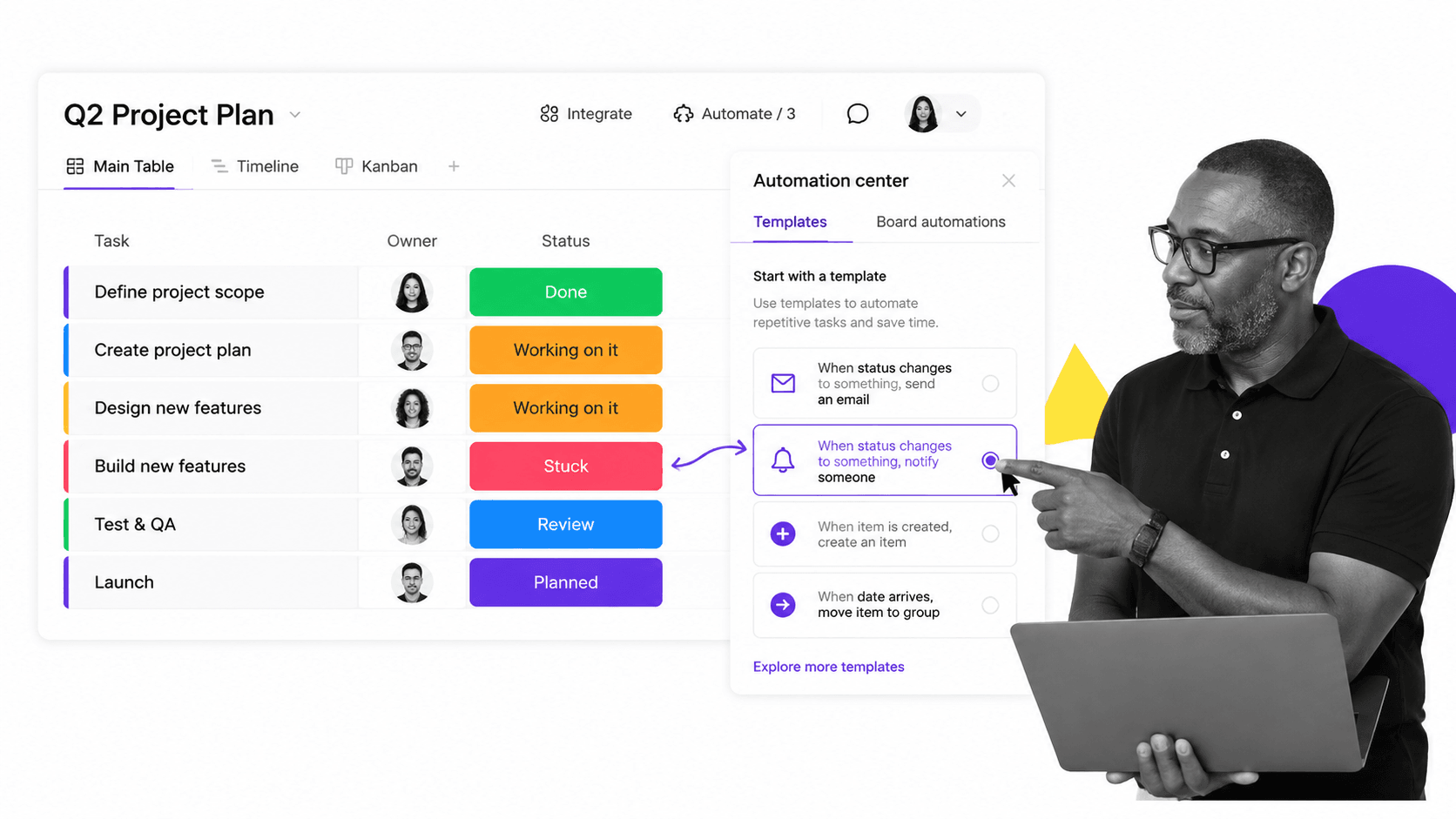
Monday.com is a visual workflow management tool that organizes project work through customizable boards, automations, and dashboards. Its strength is making complex project workflows easy to visualize and adjust on the fly. Teams can switch between views, drag tasks between stages, and build automation rules without writing code.
Key Project Management Features
- Automation recipes: Set up if-then rules for task assignments, status changes, date adjustments, and notifications. Over 200 pre-built recipes available.
- Multiple views: Switch between Kanban, Gantt, timeline, calendar, chart, and workload views for the same dataset.
- Dashboards: Real-time project dashboards pull data from multiple boards into consolidated reporting views.
- Workload management: Visualize team capacity to prevent overallocation and balance work across members.
- Forms: Intake forms feed project requests directly into workflow boards with automatic field mapping.
Best For
Marketing, creative, and operations teams managing cross-functional projects that benefit from visual boards, simple automation rules, and flexible reporting.
Pricing
Free for up to 2 users. Paid plans start at $9/seat/month (Basic), with Standard ($12/seat/month), Pro ($19/seat/month), and Enterprise tiers.
Asana

Asana is a project and workflow management platform that helps teams coordinate work across departments. Its Rules engine and project templates make it straightforward to build repeatable project workflows without coding, while Goals and Portfolios connect day-to-day execution to strategic objectives.
Key Project Management Features
- Rules engine: Automate task assignments, status updates, custom field changes, and notifications based on triggers and conditions.
- Timeline (Gantt): Map project dependencies and deadlines visually. Drag tasks to adjust the schedule and see downstream effects.
- Workload view: Balance work across team members by visualizing each person’s assigned effort over time.
- Project templates: Standardize recurring project types with pre-built templates that include tasks, assignees, and relative due dates.
- Goals and portfolios: Connect project workflows to company-level objectives and track portfolio health across multiple initiatives.
Best For
Cross-functional teams that need to coordinate work across marketing, product, and operations without a steep learning curve. Asana balances simplicity with enough depth for mid-size organizations.
Pricing
Free for individuals and small teams. Premium starts at $10.99/user/month. Business and Enterprise tiers add advanced workflow automation and admin controls.
ClickUp
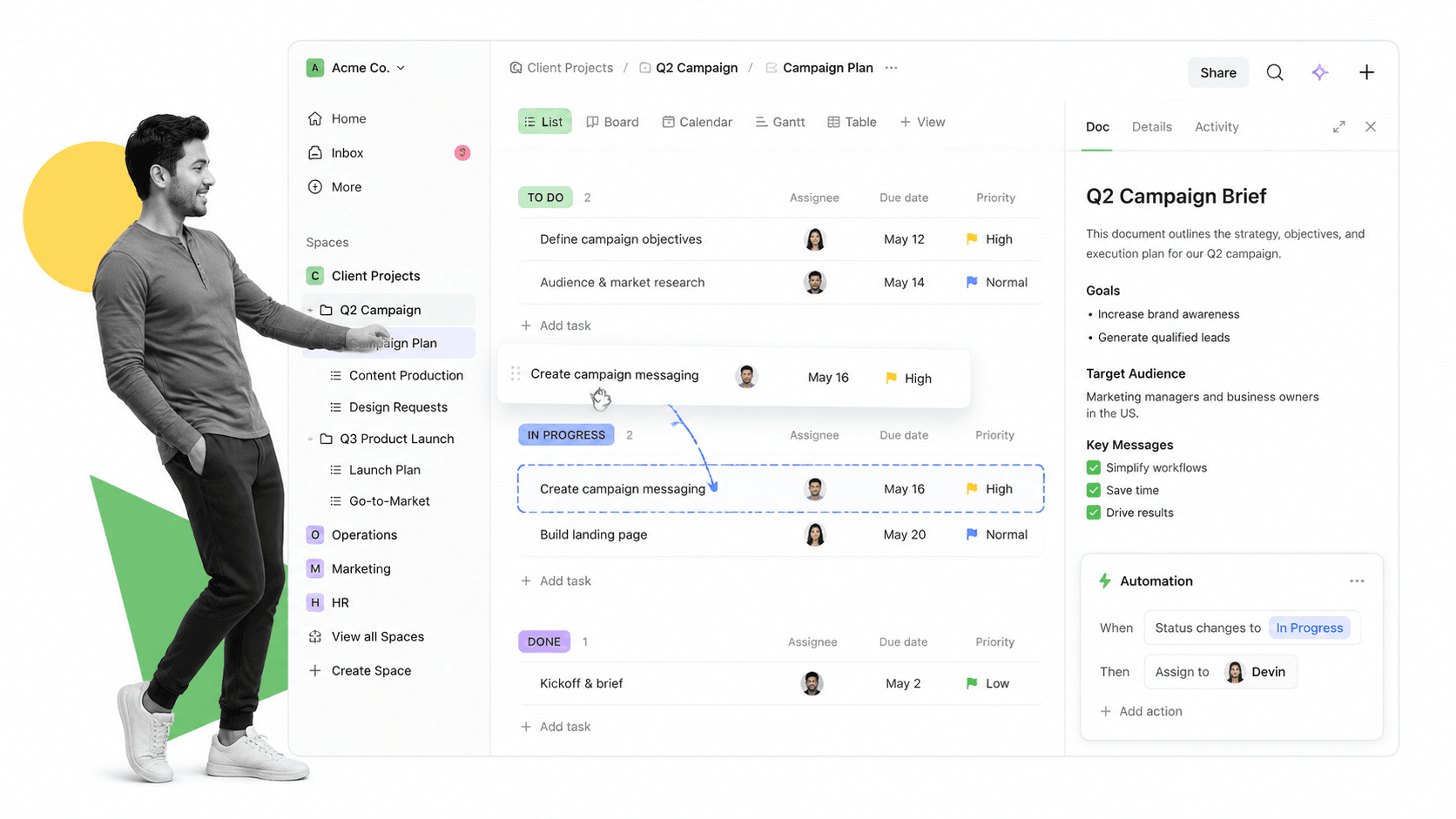
ClickUp positions itself as an all-in-one productivity platform, combining project management, docs, whiteboards, and workflow automation in a single tool. For project managers who want everything under one roof, ClickUp consolidates what might otherwise require three or four separate applications.
Key Project Management Features
- Automations: 100+ pre-built automation templates for task creation, assignments, status changes, and cross-project triggers.
- Custom fields and statuses: Tailor workflow stages and data fields to match how your team actually works.
- Docs and whiteboards: Plan and document projects directly within the platform, with real-time collaboration.
- Goals: Track progress toward objectives with measurable targets tied to tasks and milestones.
- Dashboards: Build custom reporting dashboards from project data across your entire workspace.
Best For
Teams that want a single platform to replace multiple tools, especially those managing both structured project workflows and collaborative knowledge work.
Pricing
Free plan available. Unlimited plan at $7/member/month. Business ($12/member/month) and Enterprise tiers available.
Wrike
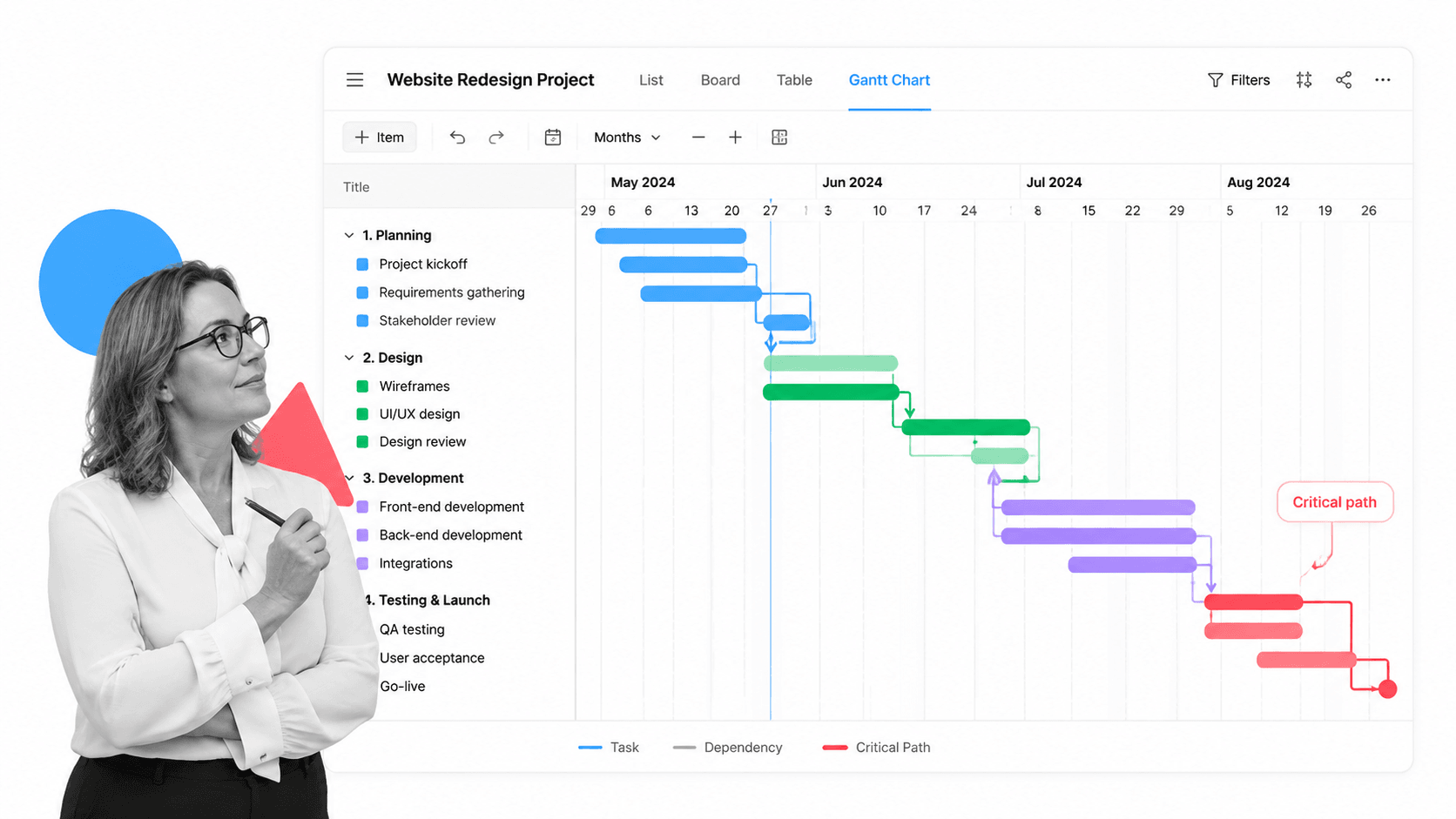
Wrike is an enterprise-grade workflow and project management platform designed for complex, multi-stage project workflows. Its Blueprints feature lets teams create standardized project templates that enforce consistent execution across departments, making it a strong choice for organizations managing large project portfolios.
Key Project Management Features
- Blueprints: Pre-built project templates that automate repeatable workflows with assigned owners, deadlines, and approval gates.
- Visual proofing: Review and approve creative assets directly within project workflows. Supports PDF, image, and video markup.
- Gantt charts: Interactive timelines with drag-and-drop dependency management and critical path highlighting.
- Request forms: Structured intake forms that route project requests to the right team with pre-filled fields.
- Cross-tagging: Tasks can belong to multiple projects simultaneously, reflecting how real work crosses team boundaries.
Best For
Large teams managing complex project portfolios with multiple stakeholders, especially professional services firms, creative agencies, and marketing departments.
Pricing
Free for small teams. Team plan at $10/user/month. Business, Enterprise, and Pinnacle tiers for larger organizations.
Jira

Jira is Atlassian’s workflow management system built primarily for software development teams. Its customizable workflow schemes let engineering teams define exactly how issues move from backlog through development, code review, testing, and deployment. While its roots are in agile software development, Jira’s workflow engine is flexible enough for IT operations, service management, and technical project coordination.
Key Project Management Features
- Customizable workflow schemes: Define statuses, transitions, conditions, and validators for how work progresses through each stage.
- Sprint planning: Plan and track agile sprints with velocity tracking, burndown charts, and sprint retrospective data.
- Kanban boards: Visualize work in progress with WIP limits, swimlanes, and column constraints.
- Automation: Rule-based automation for transitions, assignments, notifications, and cross-project triggers.
- Roadmaps: Plan long-term project direction with cross-team dependency tracking and milestone visualization.
Best For
Software development and engineering teams that need granular workflow control, sprint management, and deep integration with development tools like Bitbucket, GitHub, and CI/CD pipelines.
Pricing
Free for up to 10 users. Standard ($8.15/user/month), Premium ($16/user/month), and Enterprise tiers.
Smartsheet
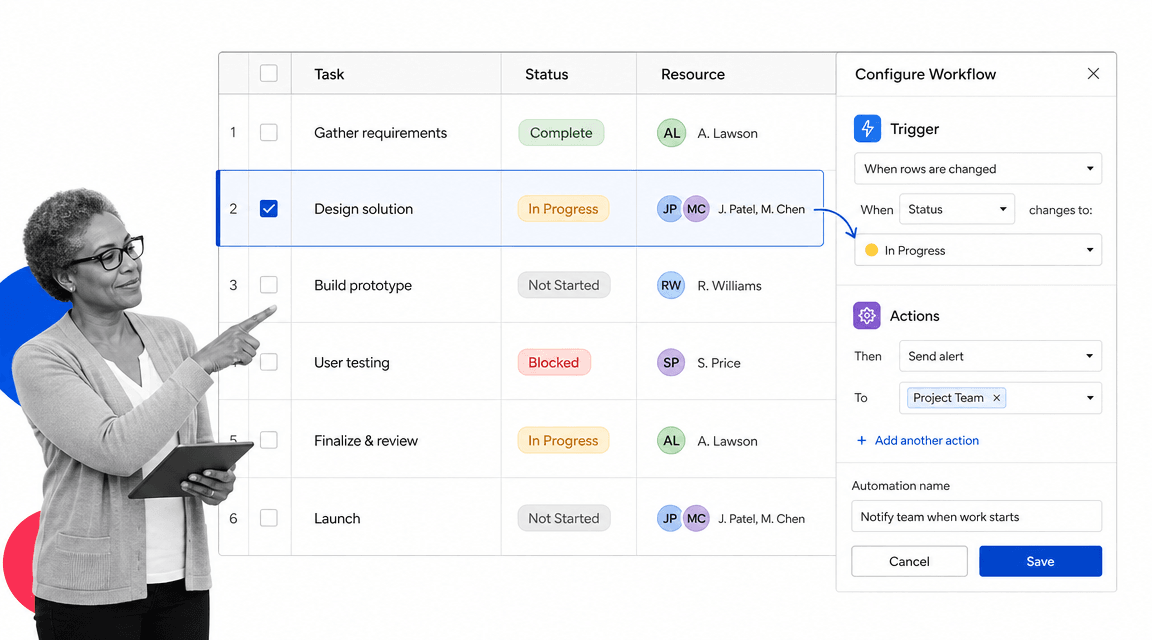
Smartsheet brings workflow automation to a spreadsheet-style interface, making it accessible to teams that think in rows and columns. For project managers who live in Excel but need real automation, Smartsheet bridges the gap between familiar tabular data and structured workflow automation. Its platform scales from simple project trackers to enterprise-wide workflow orchestration.
Key Project Management Features
- Automated workflows: Trigger actions based on date changes, status updates, cell values, or form submissions.
- Resource management: Track team capacity, utilization, and allocation across projects with dedicated resource views.
- Dashboards: Roll up data from multiple sheets into executive-level views with charts, metrics, and status indicators.
- Proofing: Review and approve content, designs, and documents directly within the platform.
- DataMesh: Pull and sync data between sheets to maintain consistency across projects and departments.
Best For
PMOs and operations teams that need workflow automation without abandoning the spreadsheet-based planning they already know.
Pricing
Free plan available. Pro at $9/member/month, Business at $19/member/month, and Enterprise pricing on request.
Trello

Trello uses a Kanban-based approach to workflow management, organizing project tasks as cards that move across columns representing workflow stages. Its simplicity makes it one of the easiest workflow management tools to adopt. While it works best for straightforward project workflows, its Butler automation engine adds enough power for light workflow automation.
Key Project Management Features
- Butler automation: Rule-based automation for card movements, assignments, due dates, label changes, and notifications.
- Power-Ups: Extend functionality with calendar views, time tracking, voting, reporting, and third-party integrations.
- Board views: Timeline, table, calendar, dashboard, and map views in addition to the core Kanban board.
- Templates: Pre-built board templates for common project types like product launches, content calendars, and sprint planning.
- Checklists: Add step-by-step checklists within cards for granular task tracking and completion verification.
Best For
Small teams and individual project managers who need a lightweight, visual workflow tool without enterprise complexity or a lengthy onboarding period.
Pricing
Free plan with unlimited cards. Standard at $6/user/month, Premium at $12.50/user/month, Enterprise at $17.50/user/month.
Notion

Notion is a connected workspace that combines documents, databases, and project tracking in a flexible, block-based interface. For project managers, its database-driven approach to workflows means you can build custom project management systems tailored to how your team operates, without being constrained by a fixed project management paradigm.
Key Project Management Features
- Databases with views: Track projects in table, board, timeline, calendar, and gallery views, all from the same underlying data.
- Templates: Create reusable project templates with pre-filled properties, linked databases, and sub-pages.
- Relations and rollups: Connect databases to link projects, tasks, team members, and objectives in a relational model.
- Automations: Trigger actions when database properties change, including Slack notifications, status updates, and assignee changes.
- API access: Build custom integrations and workflows programmatically for advanced automation needs.
Best For
Startups and knowledge-heavy teams that want a flexible, customizable workspace where project workflows live alongside documentation, team wikis, and meeting notes.
Pricing
Free for personal use. Plus at $10/member/month, Business at $18/member/month, Enterprise pricing on request.
Adobe Workfront
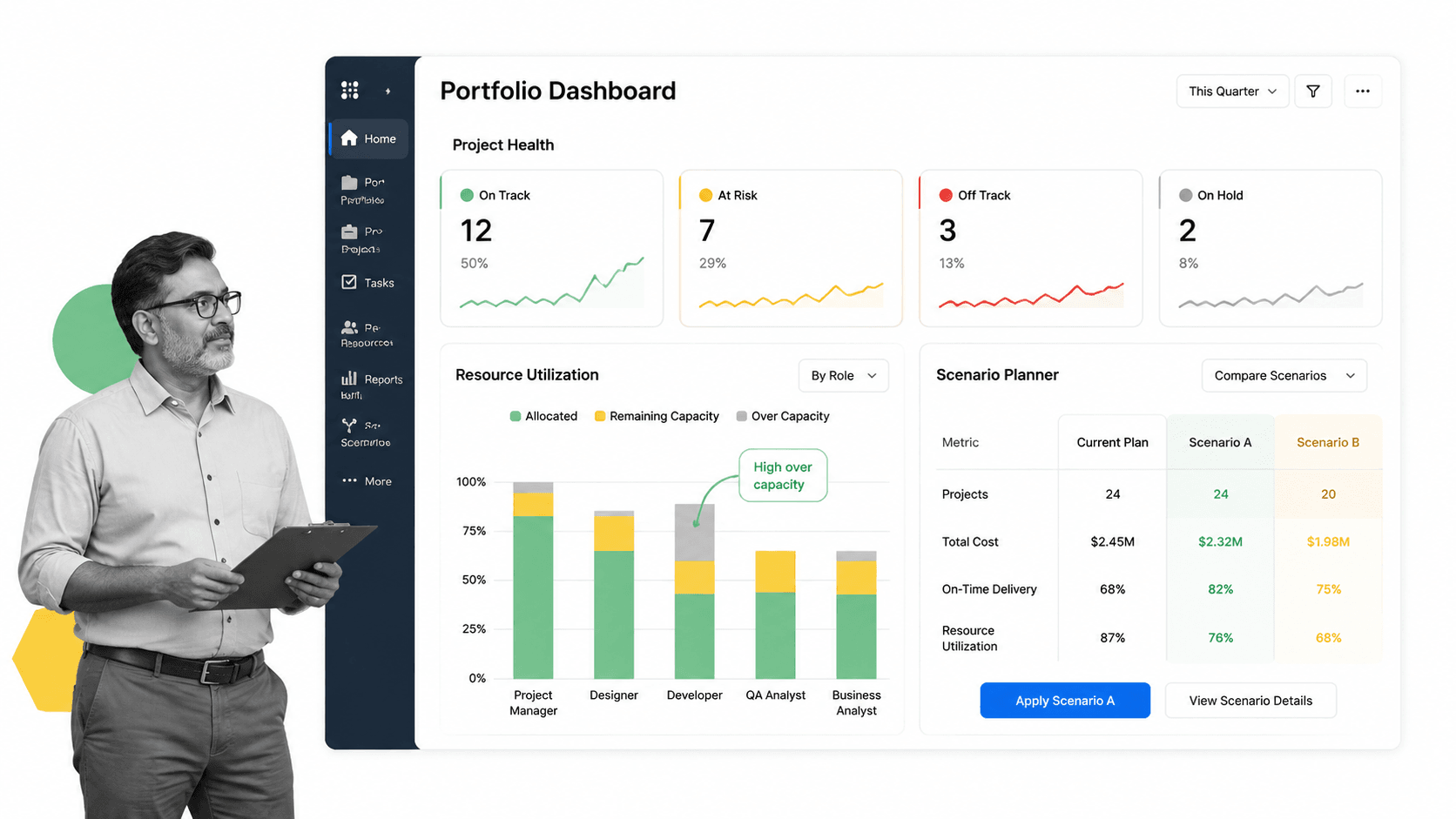
Adobe Workfront is an enterprise work management platform designed for large organizations that need to coordinate complex project workflows across multiple teams. It is particularly strong in marketing and creative operations, where project workflows involve creative briefs, review cycles, asset production, and multi-stakeholder approvals.
Key Project Management Features
- Portfolio management: Prioritize and manage project portfolios with strategic alignment scoring and capacity analysis.
- Resource planning: Forecast and allocate resources across projects with detailed capacity planning and utilization tracking.
- Proofing and approvals: Built-in creative review workflows with automated routing, version control, and stakeholder commenting.
- Custom workflows: Define multi-stage project workflows with approval gates, automated notifications, and escalation rules.
- Scenario planner: Model different project portfolio scenarios to optimize resource allocation before committing.
Best For
Enterprise marketing and creative operations teams that manage high volumes of project requests and need deep integration with the Adobe Creative Cloud ecosystem. Also strong for organizations that need document workflow automation within large-scale creative production pipelines.
Pricing
Enterprise pricing only, available on request. Typically deployed as part of a broader Adobe enterprise agreement.
Workflow Software for Project Management FAQs
What is workflow software for project management?
Workflow software for project management is a category of tools that help teams define, automate, and enforce the sequence of steps in a project. Unlike basic task lists, workflow software connects each step to the next, automates handoffs and approvals, and creates a record of how work was completed. It is designed for repeatable project processes where consistency and accountability matter.
How is workflow software different from project management software?
Project management software focuses on planning, scheduling, and resource allocation. Workflow software focuses on how work actually gets done: the sequence of steps, the rules that govern transitions, and the automation that keeps things moving. Many modern tools combine both capabilities, but the core difference is planning versus execution. The best results come from using tools that handle both.
What features should workflow software have for project management?
Essential features include task sequencing with dependencies, automation for recurring steps like approvals and notifications, multiple views such as Kanban, Gantt, and timeline layouts, integrations with tools your team already uses, templates for repeatable projects, and reporting dashboards. For regulated industries, audit trails and compliance enforcement are also critical.
Can workflow software replace a project management tool?
In many cases, yes. Modern workflow platforms like Process Street, Monday.com, and Asana include project planning features alongside workflow automation. The question is whether your team needs a dedicated scheduling and resource planning layer or whether workflow-first tools provide enough project structure on their own. For most teams, a single platform that combines both is more efficient than maintaining separate tools.
How does Process Street handle project workflows?
Process Street structures project workflows as checklist-based procedures with built-in automation, conditional logic, and approval gates. Each project runs as an instance of a workflow template, ensuring every team member follows the same steps in the same order. Cora, the AI compliance agent, monitors active workflows for missed steps and flags risk in real time. Every action is logged for audit readiness.
