


Turn every policy into automated workflows with built-in enforcement and audit-ready proof.



Project Management Tools Examples

Project management tools examples are practical snapshots of how different platforms organize work: recurring workflows, task lists, kanban boards, sprint backlogs, schedules, approvals, and reports. The useful question is not which tool has the longest feature list. The useful question is which tool matches the way your team actually moves work from request to done.
This guide breaks down five common project management tool examples and explains the kind of work each one handles best. You will see where Process Street, Asana, Trello, Jira, and Microsoft Planner fit, plus how to decide when a project needs lightweight tracking, structured execution, agile delivery, or compliance-grade proof.
The goal is not to crown one universal winner. Project work changes by team, risk, repeatability, and reporting needs. A marketing launch, software sprint, client onboarding project, vendor review, and regulated approval workflow should not all be forced into the same surface.
In this article, we are going to cover the project management tools examples that matter most, including:
- What project management tools examples show you
- How to evaluate project management tools examples
- Project management tools examples: Process Street
- Project management tools examples: Asana
- Project management tools examples: Trello
- Project management tools examples: Jira
- Project management tools examples: Microsoft Planner
- How to choose the right project management tool
- FAQs
What project management tools examples show you
A project management tool is a system for planning work, assigning owners, tracking progress, and helping teams coordinate across deadlines. Strong tools make work visible. Better tools also make work reliable. They reduce missed handoffs, expose blocked tasks, and create a shared record of what happened.
That is why examples matter. A generic feature grid can make every product sound the same: tasks, comments, calendars, files, dashboards. Real examples show the operational pattern underneath the interface. One tool may be best at checklist-driven execution. Another may be best at timeline planning. Another may be best at software backlog control.
- Workflow execution: repeatable project steps, approvals, forms, and audit trails.
- Work management: cross-functional plans, owner visibility, and status updates.
- Kanban tracking: simple movement of tasks through stages.
- Agile delivery: backlog, sprint, issue, and release management.
- Suite-native planning: project coordination inside a broader productivity ecosystem.
The overlap is real, but the operating center is different. If your project is repeated often and mistakes create risk, choose execution. If the work changes every week and the main pain is alignment, choose flexible work management. If the team is small and visual, a kanban board may be enough.
How to evaluate project management tools examples
Before looking at specific products, define the project behavior you need to control. A tool that is excellent for one workflow can create noise in another. The best evaluation starts with work shape, not software category.
Use these criteria
- Repeatability: Does the project follow the same steps each time?
- Risk: What happens if a step is skipped or approved late?
- Collaboration: How many teams, owners, or external stakeholders are involved?
- Reporting: Do leaders need portfolio summaries, sprint metrics, audit trails, or simple status?
- System fit: Does the team already live in Microsoft 365, engineering tools, or a compliance workflow platform?
For operational teams, the biggest mistake is using project management software as a loose task list when the work actually needs enforcement. A checklist, approval, or evidence capture step should not depend on memory. Process gaps become audit gaps fast, especially in finance, healthcare, manufacturing, insurance, and other high-stakes environments.
For broader buying context, compare this page with Process Street guides to best project management tools, project management tools and techniques, project management workflow tools, and project workflow management.
Project management tools examples: Process Street
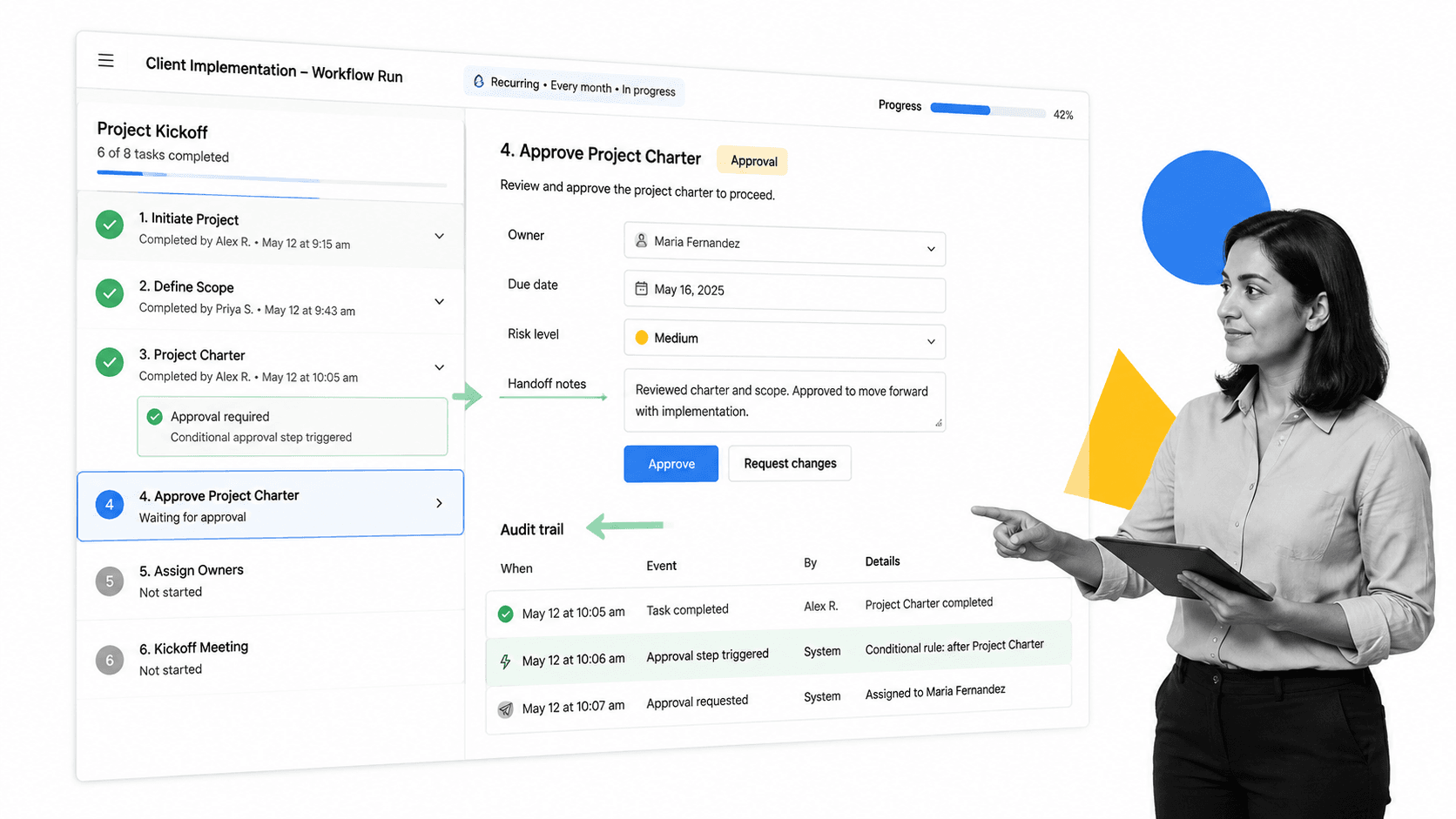
Process Street is the best example when project management is really repeatable workflow execution. Instead of only tracking tasks, teams build a workflow that defines the correct steps, owners, approvals, forms, due dates, automations, and evidence capture. That makes it useful for projects where consistency matters as much as visibility.
A client onboarding project is a simple example. The team can start from a project management process template, assign tasks to sales, implementation, finance, and customer success, require approvals before handoff, and capture notes or files in the workflow run. The same structure works for vendor reviews, policy rollouts, audit preparation, employee onboarding, and recurring operations projects.
Where Process Street fits best
- Recurring operational projects with defined steps.
- Compliance-sensitive projects that require proof of completion.
- Client, vendor, finance, HR, and operations workflows with approvals.
- Teams that need templates, forms, assignments, automations, and audit trails in one place.
This is the important distinction: Process Street is not trying to be a loose whiteboard for every possible task. It is built for work that needs to run correctly every time. If your project has a known path, use a workflow. If the workflow needs signatures or structured intake, connect it to a project proposal template, a project planning template, or another repeatable operating checklist.
Use Process Street when the team needs control, not just visibility. That means approvals happen in the flow of work, fields capture the right information, and the completed run becomes a record. It also pairs naturally with workflow topics like workflow automation examples and workflow management systems.
Project management tools examples: Asana
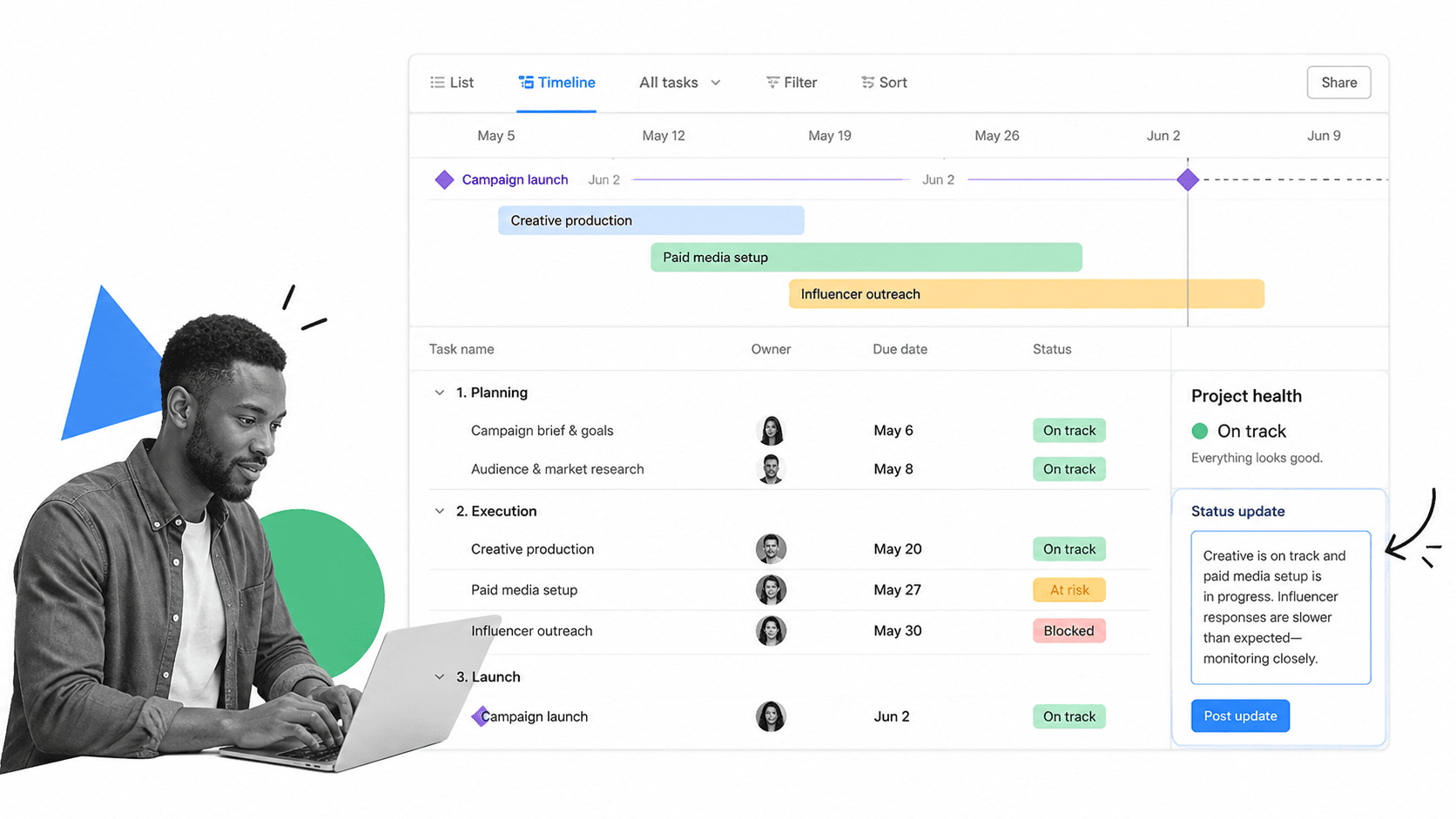
Asana is a strong example of cross-functional work management. It helps teams organize tasks, owners, timelines, status updates, and portfolios. The interface is useful when the project is collaborative, changing, and dependent on visibility across multiple contributors.
A marketing campaign is a good example. The project may include creative requests, landing page work, paid media, legal review, launch communications, and reporting. Teams can use task lists, timelines, dependencies, and status updates to keep the work moving without turning every step into a rigid process.
Where Asana fits best
- Campaigns, launches, and cross-functional initiatives.
- Teams that need timelines, owners, milestones, and status updates.
- Managers who need a portfolio-level view of active work.
- Projects where plans change often but accountability still matters.
Asana is less ideal when the work requires strict procedural enforcement. It can show that a task exists, but a regulated approval workflow may need more structured evidence and audit history than a normal task list provides. For lighter collaboration, that flexibility is a strength. For repeatable compliance work, it may be too open-ended.
If you are comparing Asana-style coordination with workflow execution, also review Asana workflow, Asana workflow examples, and the official Asana project management overview.
Project management tools examples: Trello
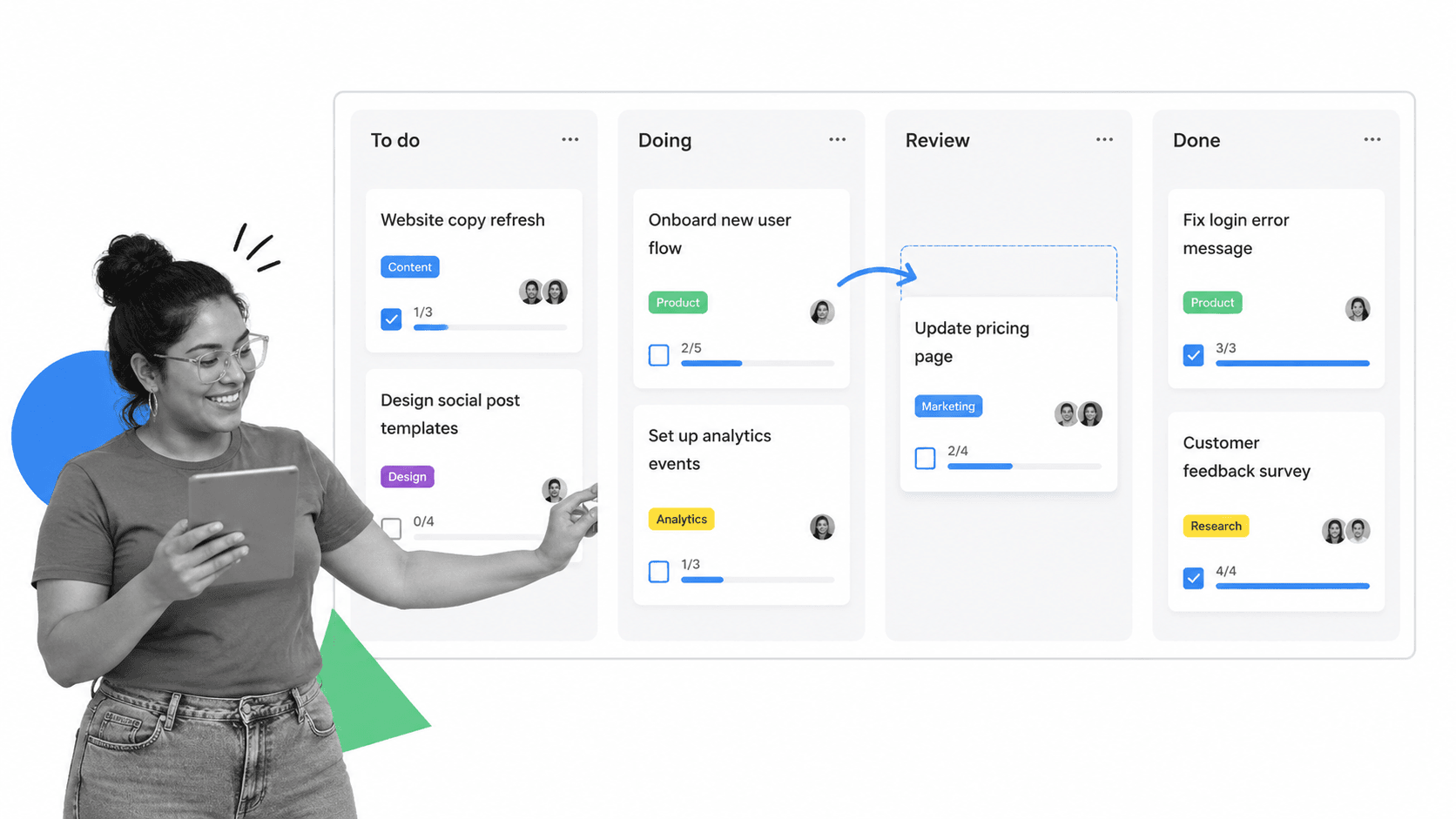
Trello is the classic visual kanban example. It organizes work into cards and columns, which makes it easy for small teams to see what is planned, active, waiting, and done. The format is simple enough that people understand it quickly.
A content calendar, bug triage list, recruiting pipeline, or small internal project can work well in Trello. Each card represents a task or item. Columns represent status. Labels, checklists, and due dates add structure without much administrative overhead.
Where Trello fits best
- Small teams that need fast visual task tracking.
- Simple pipelines with clear stages.
- Projects where the main workflow is moving cards from left to right.
- Teams that do not need heavy reporting or strict approval logic.
The simplicity is also the limit. As soon as the project needs detailed dependency management, portfolio reporting, complex permissions, or compliance proof, a basic board can become messy. Trello is useful when the project system should stay lightweight. It is not the best example when the operating risk is high.
Trello sits near topics like workflow tools, best workflow tools, and the official Trello project management page.
Project management tools examples: Jira
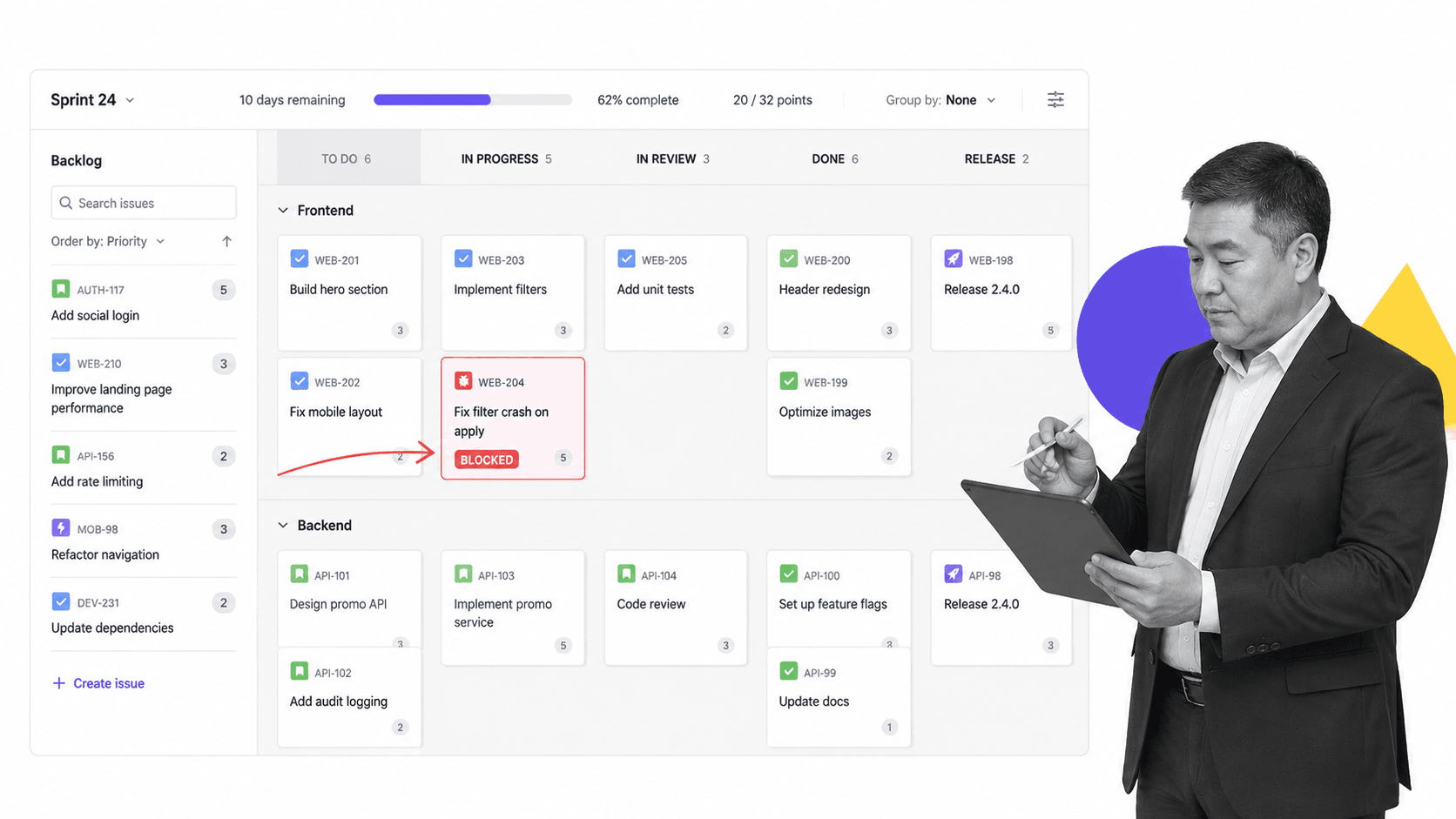
Jira is the best-known example for software project management. It is built around issues, backlogs, sprints, releases, and agile reporting. Product and engineering teams use it to plan software work, prioritize bugs, estimate stories, and manage delivery cycles.
A sprint planning project is a good fit. Product managers can refine backlog items, engineers can track progress through sprint stages, and managers can review velocity, blockers, and release readiness. Jira is powerful because it understands software delivery concepts that generic project tools often flatten.
Where Jira fits best
- Software teams using Scrum, Kanban, or mixed agile delivery.
- Projects that revolve around issues, bugs, stories, epics, and releases.
- Teams that need backlog grooming, sprint reporting, and technical workflow states.
- Engineering organizations already connected to development tools.
Jira can be overbuilt for non-technical teams. A finance, HR, or customer onboarding team may not need issue keys, story points, or release boards. But for engineering, those details are not clutter. They are the project language.
For related software-workflow context, see agile workflow process, agile workflow tools, and the official Jira product page.
Project management tools examples: Microsoft Planner
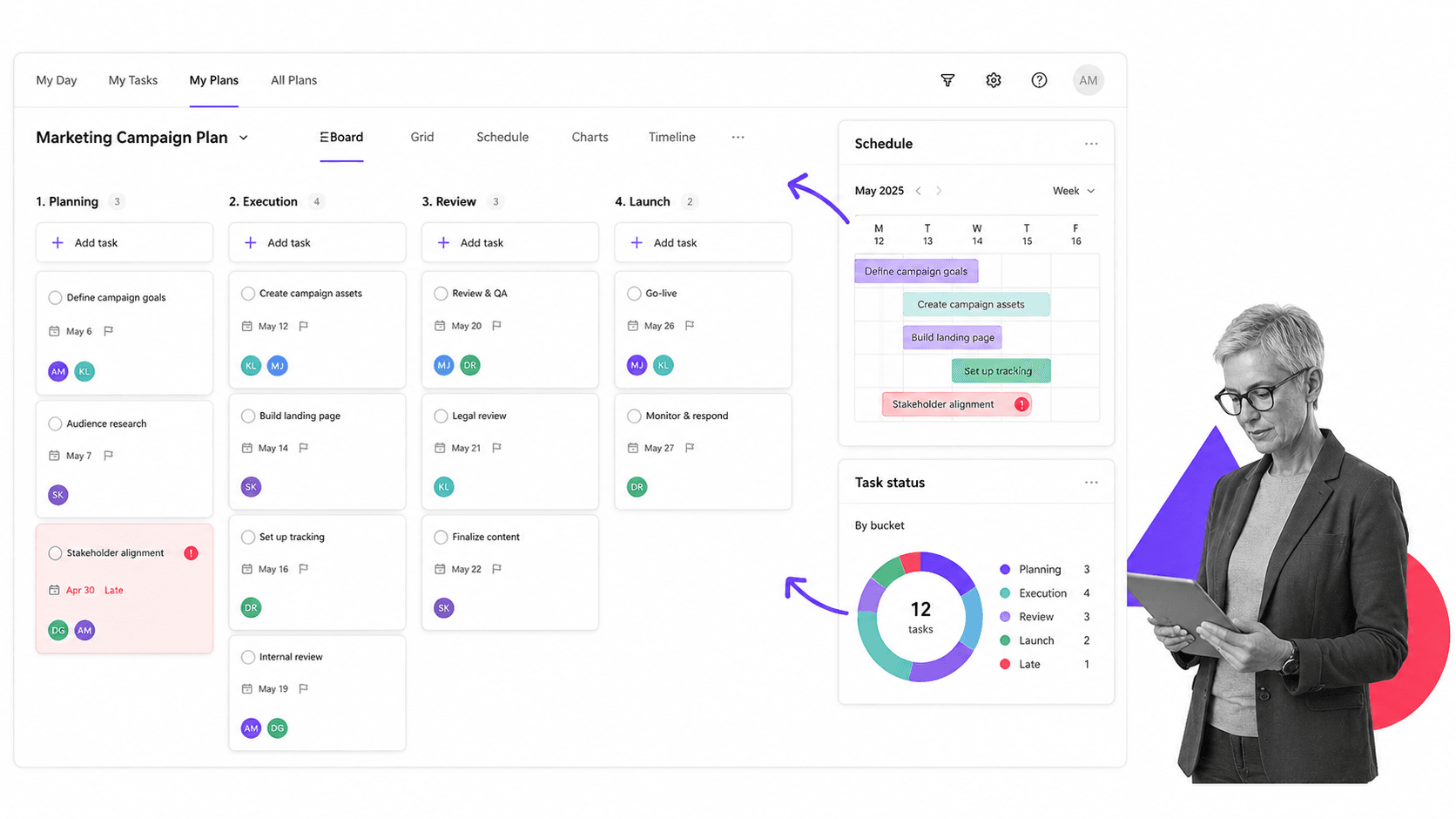
Microsoft Planner is a useful example when the team already works inside Microsoft 365. It gives teams buckets, tasks, schedules, assignments, and charts without forcing a separate project management environment. That makes adoption easier in organizations where Outlook, Teams, SharePoint, and Microsoft 365 are already the daily workspace.
A department project plan is a common use case. A manager can create buckets for phases, assign work to team members, track due dates, and review simple charts. The tool is familiar and accessible, which can matter more than advanced functionality when teams need a quick shared plan.
Where Microsoft Planner fits best
- Business teams standardized on Microsoft 365.
- Department-level plans with assignments, due dates, and simple reporting.
- Projects that need easy access through Teams or Microsoft apps.
- Teams that want lightweight planning without buying a separate platform.
Planner is not designed to replace deeper workflow automation, engineering sprint systems, or compliance operations platforms. It is best when the project needs familiar coordination. If the work requires forms, approvals, external integrations, or an audit-ready workflow, you will likely need a more specialized system.
Microsoft explains the current product family on its official Microsoft Planner page. For adjacent Process Street resources, compare free online project management tools and workflow software for project management.
How to choose the right project management tool
The right project management tool depends on what you need the project system to enforce. Start with the work shape, then choose the product category. If you start with the product name, you will usually end up bending your process around the tool.
Map tool choice to project risk
Risk is the fastest way to separate a nice project tracker from a necessary project system. If a project only needs visibility, a shared board or timeline can be enough. If the project creates customer commitments, financial exposure, audit evidence, security risk, or regulated handoffs, the tool needs stronger controls. That usually means required fields, approvals, owner assignment, due date logic, and a record that can be reviewed after the work is complete.
Think about project failure modes before you compare features. A missed creative review is annoying. A skipped vendor risk review can create compliance exposure. A delayed software bug fix can affect a release. A late customer onboarding handoff can damage revenue. Those are different operating problems, so they deserve different project surfaces.
The cleanest setup is often a layered one. Use a flexible project tool for planning and team communication, then use a workflow system for the steps that must be performed exactly. The planning tool answers what is happening. The workflow answers whether the right work happened, who approved it, what evidence was collected, and what should happen next.
Also check who will maintain the system after launch. A project tool is only useful if the team keeps the plan current. If only one project manager understands the structure, the system becomes another dependency. Good project management tools make ownership obvious, reduce manual follow-up, and help new team members understand the project without a long handoff meeting.
For recurring projects, maintenance matters even more. The best version of the project should become the next template. When a team learns that a step is missing, a form needs another field, or an approval should happen earlier, the process should improve before the next run. That is how project management stops being a status exercise and becomes operating infrastructure.
One more test: ask what proof a manager would need if the project went wrong. If the answer is only a comment thread, a board history, or someone’s memory, the project needs stronger structure. If the answer is a completed workflow run with owners, timestamps, approvals, and evidence, the team has a system that can survive turnover, scrutiny, busy weeks, staff changes, internal audits, and external compliance reviews and operational change management.
Choose by operating need
- Choose Process Street when projects are recurring, procedural, approval-heavy, or compliance-sensitive.
- Choose Asana when cross-functional teams need flexible planning, timelines, and status updates.
- Choose Trello when a small team needs a simple visual board.
- Choose Jira when software teams need agile issue, backlog, sprint, and release management.
- Choose Microsoft Planner when Microsoft 365 adoption matters more than advanced project controls.
Also decide what should happen after a task is marked done. If completion needs evidence, approval, or downstream automation, a simple project tracker may not be enough. A team can close a task without proving that the right step happened. In regulated or high-risk work, that gap matters.
A practical approach is to separate one-off collaboration from repeatable execution. Use flexible project management tools to coordinate changing work. Use workflow tools to run standardized work. Many companies need both. The key is knowing which surface owns which job.
For more operational templates and comparisons, explore Process Street resources on project management templates, project approval processes, business process management, and BPM tools.
FAQs
What are project management tools examples?
Project management tools examples are real product patterns that show how teams plan, assign, track, approve, and report on project work. Examples include workflow systems like Process Street, work management tools like Asana, kanban boards like Trello, agile issue trackers like Jira, and suite-native planners like Microsoft Planner.
Which project management tool is best for repeatable workflows?
Process Street is a strong fit for repeatable workflows because it turns recurring project steps into structured runs with owners, forms, approvals, due dates, automations, and audit trails. That makes it useful when a project needs to be executed the same way every time.
Which project management tool is best for software teams?
Jira is usually the strongest example for software teams because it is built around issues, backlogs, sprints, releases, and agile reporting. It gives engineering teams the vocabulary and structure they need for software delivery.
Is Trello enough for project management?
Trello can be enough for lightweight project management when a small team only needs visual task movement through simple stages. It becomes limiting when projects need complex dependencies, strict approvals, portfolio reporting, or compliance proof.
How should I choose between project management tools?
Choose by work shape. Use workflow execution for repeatable and high-risk projects, work management for cross-functional coordination, kanban for simple visual tracking, agile tools for software delivery, and Microsoft-native planning when Microsoft 365 adoption is the deciding factor.
