


Turn every policy into automated workflows with built-in enforcement and audit-ready proof.



AI Agent Builder and Architecture

An AI agent builder is a platform or framework for designing, connecting, testing, deploying, and governing AI agents that can use tools to complete work. The best builders do more than wrap a model in a chat box. They give teams a way to define goals, connect data, control actions, evaluate results, and keep humans in charge of sensitive steps.
That architecture matters because an agent is only useful when it can act, and action creates risk. Once an agent can query systems, update records, send messages, or launch workflows, the builder needs permissions, approvals, logging, retries, evidence, and release controls.
This guide explains what an AI agent builder is, what architecture it needs, which components matter, how to design safe agents, when to use no code or developer frameworks, and how governed workflows turn agents into reliable business operators.
In this article, we are going to cover:
- What is an AI agent builder?
- AI agent builder architecture
- Core components of an AI agent builder
- How to design an AI agent safely
- How to choose between no code, low code, and developer frameworks
- AI agent builder use cases in operations
- How Process Street supports governed AI agent builders
- FAQs
What is an AI agent builder?
An AI agent builder is the system teams use to build AI agents that can reason over context, call tools, take action, and improve through feedback. Teradata guide to AI agent builders describes the category around designing, connecting, evaluating, and deploying tool-using agents. That definition is useful because it keeps the focus on the full lifecycle, not just prompt creation.
The simplest version lets a user describe a task, connect data sources, pick tools, and test the agent. More advanced builders add orchestration, evaluation, observability, human approval, deployment channels, and governance. Salesforce Agentforce Builder, for example, describes a builder that manages data sources, jobs to be done, actions, and monitoring.
Builder versus model
The model is the reasoning engine. The builder is the system around it. A model can draft, classify, plan, and choose from tools. A builder gives that model controlled access to context, approved actions, memory, testing, deployment, and audit history.
Builder versus workflow automation
Traditional workflow automation software follows predefined logic. An AI agent builder supports flexible decisions inside a controlled workflow. The two should work together: the workflow defines the operating path, while the agent handles judgment, language, and variable context.
Builder versus chatbot
A chatbot usually answers the user. An agent builder creates systems that can complete steps. The practical test is whether the system can take a controlled action, observe the outcome, and decide what should happen next.
For a foundation on the agent concept itself, start with AI agents and agentic AI. This page focuses on the builder and architecture layer.
AI agent builder architecture
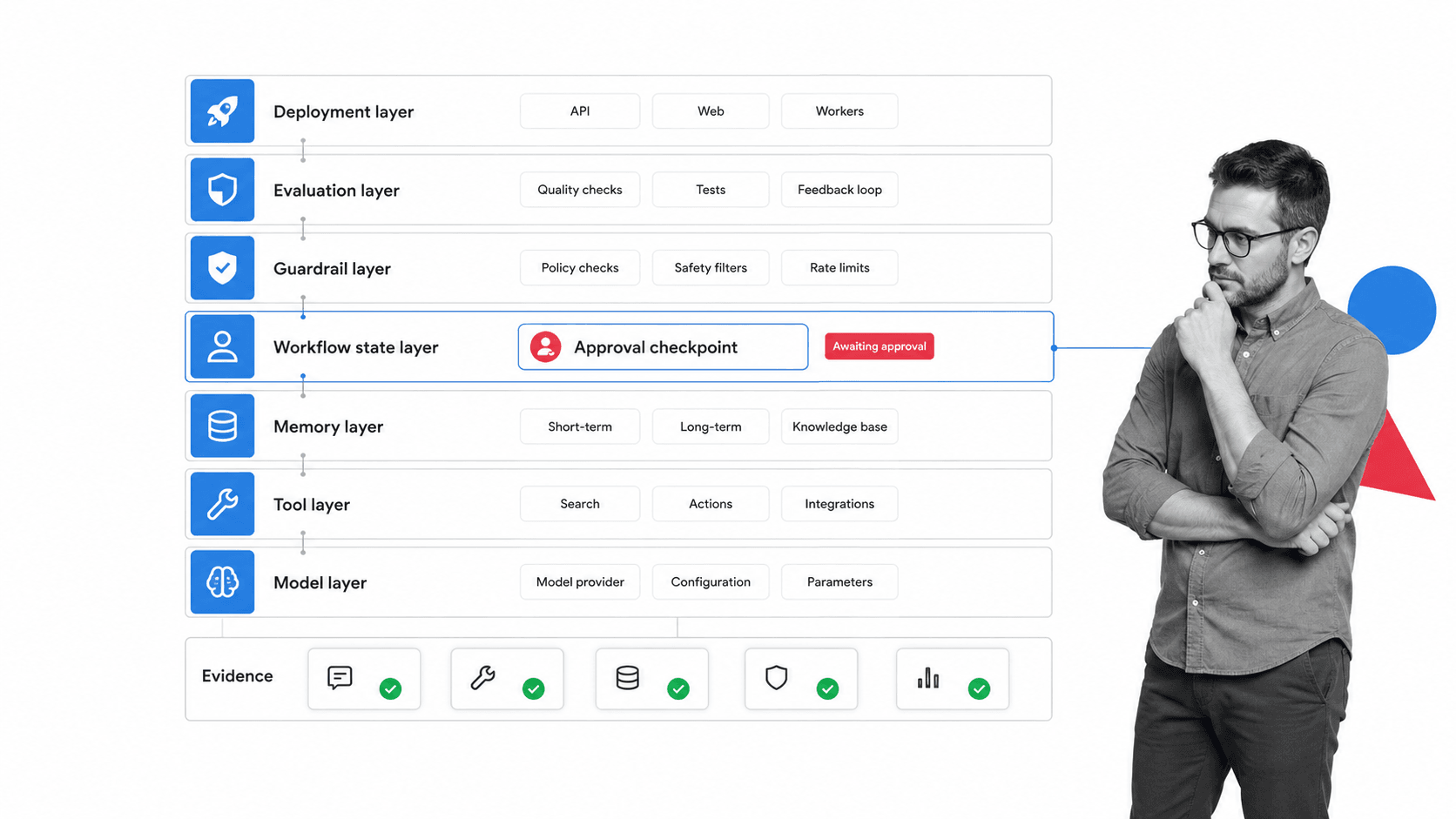
AI agent builder architecture has one job: let an agent do useful work while keeping that work bounded, observable, and reversible. The architecture should make every action traceable from goal to tool call to result.
Goal and instruction layer
The goal layer defines what the agent is trying to achieve. Strong builders separate durable policy from task-specific instructions so teams can reuse the same operating rules across many agents.
Context and retrieval layer
The context layer gives the agent the right information at the right time. This may include documents, workflow runs, customer records, policies, knowledge bases, forms, emails, tickets, or prior outcomes. Poor context leads to guesses.
Tool and action layer
The tool layer is where agents become operational. OpenAI guide to building agents explains how agent systems use loops, tool calls, handoffs, prompts, evaluations, and model choices to complete multi-step work. The builder needs to define which tools are available, which inputs are allowed, and which actions require approval.
State and memory layer
Agents need state to know where they are in a process. Memory can include the current task, previous observations, user preferences, open questions, tool results, and completed steps. State should be scoped to the job. Unlimited memory creates privacy and accuracy problems.
Guardrail and evaluation layer
The guardrail layer blocks unsafe actions, checks outputs, routes exceptions, and records why the agent continued or stopped. Evaluation should run before deployment and after real usage. If you cannot measure whether the agent is doing the job correctly, you cannot safely expand autonomy.
Deployment and observability layer
Deployment is not only where the agent appears. It is how the team monitors it. Anthropic guide to building effective AI agents recommends starting simple, adding observability early, and evolving architecture from real performance data instead of over-engineering the first version.
The architecture should make restraint easy
A good builder does not push every agent toward maximum autonomy. It makes restraint easy by default. The safest architecture lets the team start with read-only access, then add scoped write actions, then add supervised execution, then add more autonomy only when the evidence supports it.
This is why the approval checkpoint belongs inside the architecture, not beside it. If approvals, evidence, and release decisions live outside the builder, teams will eventually skip them when work gets busy. The control path should be part of the agent’s normal operating loop.
Core components of an AI agent builder
A usable AI agent builder needs more than a prompt box and a model picker. The core components below decide whether the agent can survive real operations.
Agent definition
The builder should define the agent’s role, goal, inputs, tools, outputs, limits, escalation path, and owner. A vague agent will behave like a vague employee: sometimes helpful, often unpredictable.
Tool registry
A tool registry lists the systems an agent can use and the actions it can take. Standards such as Model Context Protocol documentation are important because agents need consistent ways to reach external systems without rebuilding every connector by hand.
Workflow state
Workflow state tells the agent what step it is on, what has already happened, what evidence is missing, and which action is allowed next. Without workflow state, the agent can lose track of the business process.
Human approval
Human approval is not a weakness in agent design. It is how you let the agent handle routine work while protecting high-impact decisions. The builder should make approval gates explicit, not hidden inside a prompt.
Evaluation set
Every agent needs test cases. Include happy paths, edge cases, missing data, conflicting instructions, malicious input, and tool failures. Evaluate accuracy, escalation quality, latency, cost, security, and whether the agent leaves enough evidence.
Audit trail
The audit trail records the request, context, plan, tool calls, observations, approvals, errors, and final output. For teams in regulated or high-stakes operations, this is the difference between useful automation and compliance risk.
Owner model
Every agent needs an owner model. The builder should make it clear who owns the agent, who can change its tools, who can approve releases, who reviews failed runs, and who is accountable when the agent touches a live system. Without ownership, agent governance turns into a shared responsibility gap.
Rollback and kill switch
Production agents need a fast stop path. The builder should support disabling the agent, removing tool access, reverting a prompt or workflow version, and pausing a deployment channel without waiting for engineering cleanup. Rollback is not an edge case. It is part of the operating design.
How to design an AI agent safely
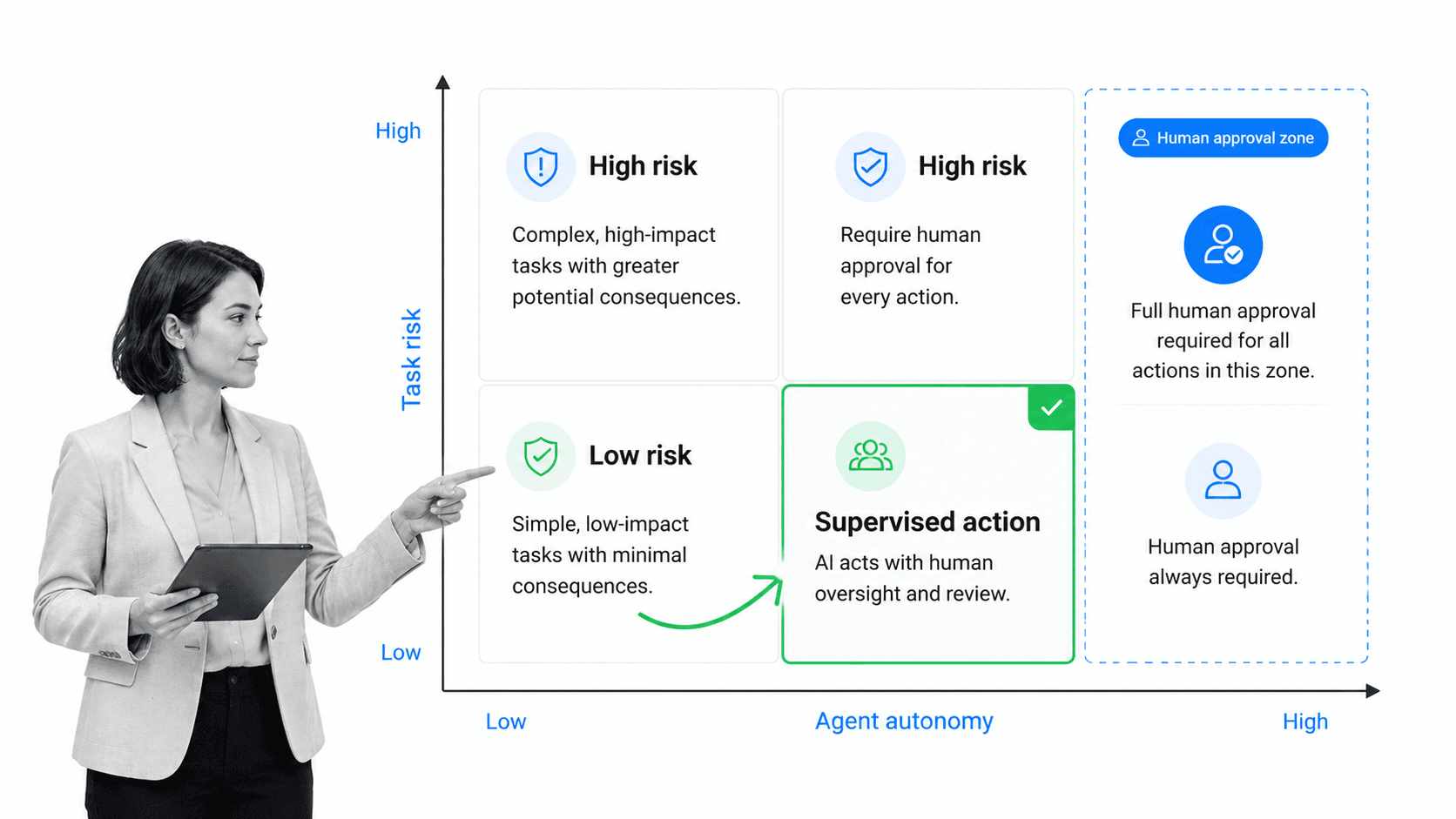
Safe agent design starts by matching autonomy to risk. Some actions can run automatically. Some need review. Some should never be delegated to an agent.
Start with the work, not the agent
Pick a real process before choosing architecture. Identify the repeated steps, inputs, systems, owners, exceptions, and controls. The agent should fit into that operating model, not invent a new process every time it runs.
Map actions by risk
Separate low-risk read actions from high-risk write actions. Reading a policy, summarizing a ticket, and drafting an update can usually carry less risk than sending an external message, changing access, deleting data, or approving a regulated decision.
Use progressive autonomy
A practical rollout starts with recommendations, moves to supervised actions, then expands to autonomous execution only after the team has evidence. If the agent cannot pass supervised work reliably, it is not ready for broader authority.
Require approvals for sensitive steps
Approval gates should sit before financial actions, regulated decisions, access changes, external communication, deletion, customer-impacting changes, and uncertain results. Approvals are the control surface that keeps useful agents from becoming unbounded actors.
Design for security from day one
The OWASP Top 10 for Agentic Applications 2026 focuses on risks that appear when AI systems plan, act, and interact with tools. Treat that as an architecture concern, not a post-launch checklist.
Teams giving agents real system access should also read about what can break when AI agents with real access. The failure mode changes when the system can act.
How to choose between no code, low code, and developer frameworks
The right AI agent builder depends on who owns the agent, how risky the workflow is, and how much custom control the team needs.
No code builders
No code builders help business teams create simple agents with visual flows, templates, and natural language configuration. They are useful for intake, routing, drafts, summaries, and low-risk internal workflows. They can become limiting when the agent needs custom logic, strict release controls, or deep system integration.
Low code builders
Low code builders blend visual setup with technical extension points. Google Vertex AI Agent Builder codelab shows a builder flow where teams create an agent, attach a datastore, and integrate it with a website. This middle path works when teams need speed plus some engineering control.
Developer frameworks
Developer frameworks give engineering teams deeper control over prompts, state, tool calls, routing, evaluation, and deployment. They are better for complex products, regulated workflows, custom environments, and multi-agent systems.
Workflow-native builders
Workflow-native builders are strongest when the agent needs to operate inside a business process. The useful framing is simple: agents should be attached to execution, not just conversation. They need a goal, memory, tools, and a workflow that decides when to continue, pause, or escalate.
The decision rule
Use the simplest builder that gives you the control you need. If the use case is low risk, simple, and internal, no code may be enough. If the agent touches sensitive systems, regulated data, or customer-impacting actions, favor architecture with workflow state, approval gates, evaluation, and audit history.
AI agent builder use cases in operations
AI agent builders are most useful where work is repeated, context-heavy, tool-heavy, and slow because people have to coordinate across systems.
Compliance evidence collection
An agent can identify missing evidence, request artifacts, classify responses, and route exceptions. Paired with compliance operations, the workflow preserves proof instead of leaving evidence scattered across messages and folders.
Vendor and risk review
Agents can collect vendor information, check required fields, compare risk inputs, and launch a review path. Starting from a risk management process template keeps the agent aligned to the team’s actual controls.
Employee and customer onboarding
Agents can collect forms, update systems, notify owners, and detect blocked steps. They work best when the workflow already defines what must happen before a person, vendor, or customer is marked complete.
Incident response
An agent can start an incident workflow, gather facts, assign tasks, draft updates, and preserve a timeline. Sensitive communications and remediation steps should still require human approval.
Internal operations copilots
Some teams start with an AI coworker that answers operational questions, drafts updates, or launches workflows. Over time, the same foundation can become a controlled agent that does more of the work.
Governed agent experiments
Teams exploring AI-driven compliance need a place to test agents against policies before expanding access. An internal audit checklist for DORA compliance is a useful pattern when the first deployment needs explicit review and proof.
How Process Street supports governed AI agent builders

Process Street supports governed AI agent builders by giving agent work a workflow spine: intake, tasks, owners, approvals, evidence, audit history, and integrations.
That matters because an AI agent should not be a free-floating chat window with broad access. It should act inside a governed process where the business can see what happened, why it happened, and who approved the sensitive steps.
Turn agent ideas into workflow runs
A builder workflow can start with intake: goal, owner, data sources, tools, risks, evaluation criteria, and release plan. Features such as Workflow Run Links help turn a request into a governed run instead of a one-off experiment.
Control tool access
Process Street workflows can require teams to review which systems the agent can read, which systems it can update, and which actions are blocked until approval. That keeps agent design tied to policy.
Use approvals for release gates
Before an agent moves from draft to supervised action, or from supervised action to greater autonomy, the workflow can require an approval gate with evidence attached.
Review agents like controlled processes
The same discipline that applies to governed workflows should apply to agents. Review the goal, source data, allowed tools, evaluation set, approval gates, and audit evidence before release. Then review real runs after launch to see where the agent hesitated, failed, escalated, or acted correctly.
Create proof by default
Agent governance should not rely on memory or screenshots. Process Street records task history, assigned owners, comments, due dates, uploaded evidence, approvals, and workflow completion data.
Connect to the rest of the stack
Process Street has direct, universal integrations to 5,000+ systems. Need a new one? An AI agent builds it on the fly. That lets teams connect agent work to the systems where records, messages, files, and approvals already live.
For teams standardizing operating procedures before adding agents, standard operating procedure software and process automation provide the foundation agents need to act safely.
FAQs
What is an AI agent builder?
An AI agent builder is a platform or framework for designing, connecting, testing, deploying, and governing AI agents. It usually combines models, instructions, tools, memory, workflow state, evaluation, guardrails, and monitoring.
What architecture does an AI agent builder need?
An AI agent builder needs a goal layer, context layer, tool layer, state and memory layer, guardrail layer, evaluation layer, deployment layer, and audit trail. The architecture should make every agent action traceable and controllable.
Can you build AI agents without code?
Yes, no code and low code AI agent builders can help non-technical teams create simple agents. Higher-risk or deeply integrated agents usually need developer support, workflow controls, approval gates, and stronger evaluation.
How is an AI agent builder different from workflow automation?
Workflow automation follows predefined rules. An AI agent builder adds model reasoning, flexible tool use, memory, and adaptive planning. The strongest business systems combine both: workflows provide control, while agents handle variable context.
What makes an AI agent builder safe for business use?
A safer AI agent builder limits permissions, separates read and write actions, requires human approval for sensitive steps, records audit history, evaluates behavior before release, and monitors production runs for failures and drift.
How does Process Street support governed AI agent builders?
Process Street supports governed AI agent builders by giving agent work a structured workflow environment. Teams can define intake, tasks, owners, approvals, evidence, tool access reviews, audit history, and integrations around each agent workflow.
