


Turn every policy into automated workflows with built-in enforcement and audit-ready proof.



What Are AI Agents?
AI agents are software systems that use artificial intelligence to pursue goals, plan steps, call tools, take actions, and adapt from feedback. The important difference is action: an AI agent does not only answer a prompt. It moves work forward inside limits set by people.
That makes AI agents useful for business operations, but it also makes them riskier than ordinary chat. Once an agent can open tools, update records, send messages, or trigger workflows, the business needs guardrails, approvals, evidence, and audit history.
This guide explains what AI agents are, how they work, how they differ from chatbots and traditional automation, which types matter, where they fit in operations, and how to govern them without slowing useful work down.
In this article, we are going to cover:
- What are AI agents?
- How AI agents work
- AI agents versus chatbots and automation
- Types of AI agents
- Where AI agents fit in business operations
- Risks and guardrails for AI agents
- How Process Street turns AI agents into governed workflows
- FAQs
What are AI agents?
AI agents are AI-powered systems that can make progress toward a goal by deciding what to do next and using approved tools to do it. IBM overview of AI agents defines an AI agent around autonomous task performance and tool-based workflows. Google Cloud explanation of AI agents emphasizes goal pursuit, reasoning, planning, memory, and autonomy.
A normal AI assistant might summarize a policy. An AI agent can inspect the policy, check a live workflow against it, request missing evidence, route an exception, and pause for approval before the record is finalized.
The simple definition
An AI agent is an AI system that combines a goal, context, reasoning, tools, memory, and action. The model may generate language, but the agent architecture decides how that language becomes work.
The practical test
Ask one question: can the system take a meaningful next step without the user manually doing every part? If yes, it is behaving like an agent. If it only gives advice and waits, it is closer to a chatbot or copilot.
This is why agentic AI and AI agents overlap but are not identical. Agentic AI describes the broader design pattern. An AI agent is the actual system or role that performs the work.
How AI agents work
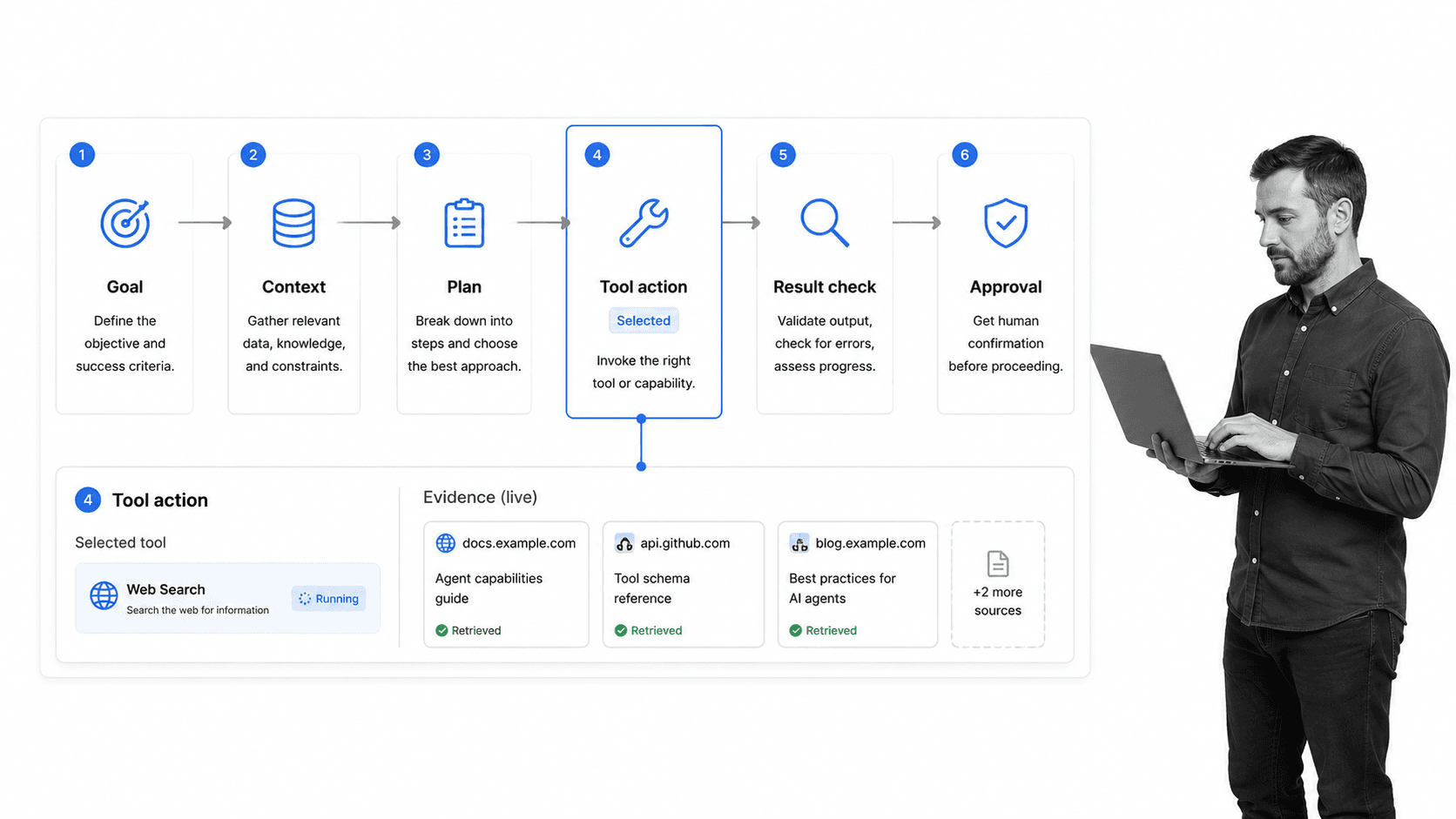
AI agents work through a loop. They receive a goal, gather context, plan next steps, choose a tool, act, observe the result, and decide whether to continue, retry, or escalate. The loop can run once for a simple task or many times for a complex process.
1. Goal
The goal tells the agent what outcome to pursue. Good goals include boundaries: what systems can be used, what data can be read, what actions are blocked, and when a human must approve the next step.
2. Context
The agent needs context from files, workflows, policies, databases, messages, forms, or prior runs. Without context, the model guesses. With context, the agent can make a decision that fits the actual business process.
3. Planning
Planning turns a broad goal into smaller actions. For example, a vendor-review agent might identify the vendor, check missing fields, compare risk inputs, choose the right review workflow, and create an approval task.
4. Tool use
Tool use is where agents become operational. OpenAI Agents SDK documentation describes agents as applications that plan, call tools, collaborate, and keep state for multi-step work. Tools may include APIs, browsers, workflow platforms, file search, email, calendars, databases, or other agents.
Standards such as Model Context Protocol documentation matter because connected agents need reliable ways to access data and actions without a custom integration for every system.
5. Observation and feedback
After acting, the agent checks what happened. Did the tool call succeed? Did the workflow update? Is evidence missing? Did a policy fail? The agent uses that feedback to continue or stop.
AI agents versus chatbots and automation
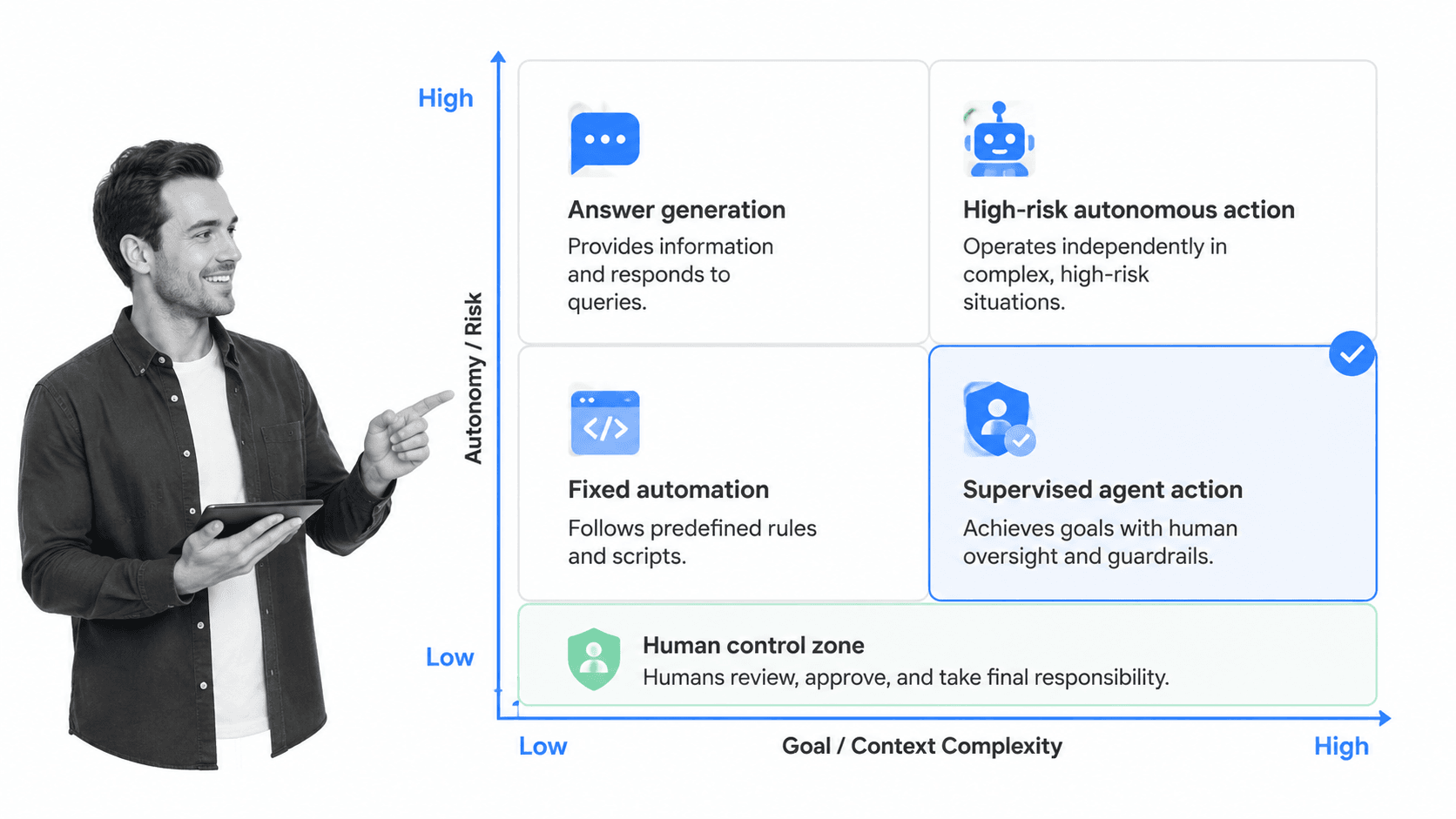
AI agents sit between chatbots, copilots, scripts, and traditional workflow automation. The difference is not the model alone. It is the level of autonomy, state, tool access, and accountability built around the model.
Chatbots answer
A chatbot responds to a user message. It can explain, summarize, classify, or draft, but the user usually performs the next action. The chatbot may be useful, but it is not carrying the workflow.
Automation follows fixed rules
Traditional process automation follows rules defined in advance. If this happens, do that. This is powerful when the process is stable, but brittle when the context changes.
AI agents adapt within boundaries
An AI agent can handle variation. It can decide which step comes next, select the right tool, ask for missing information, retry a failed path, or escalate when confidence drops. That flexibility is the benefit and the risk.
Workflow automation still matters
The best agent deployments do not replace workflow structure. They use it. A system of record like workflow automation software gives agents a repeatable path, while humans keep control over sensitive actions.
Types of AI agents
There are many labels for AI agents, but most business teams only need a few practical categories.
Task agents
Task agents complete a narrow job, such as extracting data from an intake form, drafting a reply, checking a document, or creating a task. They work best when the input and output are predictable.
Workflow agents
Workflow agents coordinate several steps across a process. They can gather information, launch a workflow, update a record, assign owners, and route exceptions.
Decision-support agents
Decision-support agents analyze context and recommend action, but they do not execute high-impact steps without approval. These are useful in compliance, risk, finance, legal, and operations environments.
Multi-agent systems
Multi-agent systems divide work across specialist agents. One agent might gather evidence, another might classify risk, and another might draft a recommendation. The system still needs one owner for orchestration and accountability.
Teams exploring this pattern should also understand what can break when AI agents with real access, because autonomy changes the failure modes.
Where AI agents fit in business operations
AI agents fit best where work is repeatable, tool-heavy, context-rich, and expensive to coordinate manually. They fit poorly where the goal is vague, the data is unreliable, or the action is too risky to automate.
Strong use cases
- Customer onboarding: collect forms, update records, launch workflows, and route blocked steps.
- Employee onboarding: coordinate IT, HR, policy acknowledgments, access requests, and training.
- Vendor review: gather missing evidence, score risk inputs, and route high-risk exceptions.
- Compliance evidence collection: check required artifacts, request updates, and preserve proof.
- Incident response: start the right workflow, assign owners, collect facts, and keep a timeline.
- Recurring operations: run repeated processes where the steps are known but each case has different context.
AI agents become more useful when they operate inside compliance operations, not outside it. Structured work gives the agent a safe path and gives the team a record of what happened.
Starting from a concrete process, such as a risk management process template or an internal audit checklist for DORA compliance, helps teams define the human review points before adding more autonomy.
Poor use cases
AI agents are a poor fit for undefined processes, emotionally sensitive conversations, irreversible actions, untrusted data, legal commitments, financial approvals, or anything where nobody can say who owns the final decision.
In those settings, a narrower AI coworker or AI compliance agent pattern may be better than broad autonomy.
Risks and guardrails for AI agents
The risks of AI agents come from action. A wrong answer is bad. A wrong action can update data, send a message, delete a file, skip a control, expose private information, or create an audit problem.
Permission boundaries
Agents should receive the minimum permissions required for the job. Read access, write access, send access, approval authority, and deletion authority should be separated. Do not give a general agent blanket authority because one use case needs it.
Human approval gates
Human approval gates should sit before external communication, financial actions, regulated decisions, data deletion, access changes, customer-impacting actions, and any step where the agent is uncertain.
Audit history
Every agent action should leave evidence: who requested it, what context was used, which tool was called, what changed, which approval gate fired, and who approved the final step.
Security and misuse
The OWASP Top 10 for Agentic Applications 2026 focuses on risks for systems that plan, act, and make decisions across workflows. That framing is useful: when agents get tools, security is not only model safety. It is operational control.
For teams in regulated environments, AI-driven compliance, digital compliance officer, and compliance management software should shape the deployment model from day one.
How Process Street turns AI agents into governed workflows
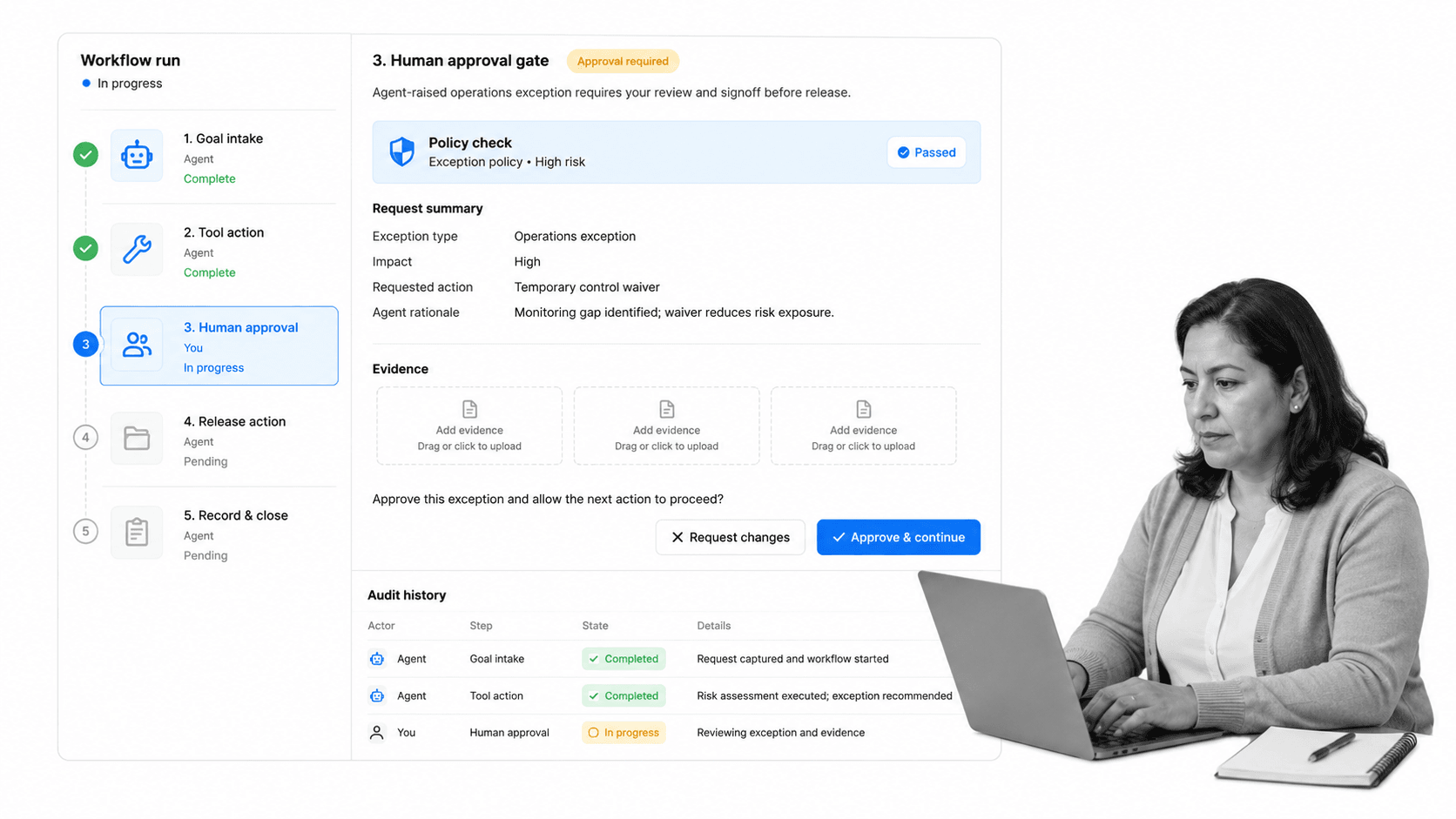
Process Street turns AI agents into governed workflows by giving them a controlled environment for tasks, owners, approvals, evidence, audit history, and integrations.
That matters because an agent should not be a free-floating chat window with broad system access. It should be one participant in a governed process, with the same accountability standards as any human operator.
Give the agent a workflow spine
A workflow tells the agent what good execution looks like. It defines the intake, the sequence, the required evidence, the owner, the exception path, and the completion criteria.
Use approvals for sensitive steps
With Approvals, sensitive actions can pause until a human reviews the recommendation. This keeps agentic work moving while protecting high-impact decisions.
Connect the systems where work happens
Process Street has direct, universal integrations to 5,000+ systems. Need a new one? An AI agent builds it on the fly. That lets teams connect agent work to the systems where records, messages, files, and approvals already live.
Create proof by default
AI-agent work should produce proof as it happens. Process Street records task history, assigned owners, comments, due dates, uploaded evidence, approvals, and workflow completion data.
Features such as Workflow Run Links help turn a request into a governed run instead of a one-off chat. For teams standardizing operating procedures, standard operating procedure software provides the foundation agents need to act safely.
FAQs
What are AI agents?
AI agents are AI-powered systems that can pursue goals, plan steps, use tools, take actions, and adapt from feedback. They differ from ordinary AI assistants because they can move work forward, not only generate an answer.
How do AI agents work?
AI agents work through a loop: receive a goal, gather context, plan, choose tools, act, observe the result, and continue or escalate. Strong implementations add permission limits, human approval gates, and audit history.
What is the difference between AI agents and chatbots?
A chatbot answers a user message. An AI agent can use tools and state to complete part of a workflow. The practical difference is whether the system only advises or can take controlled action.
What are examples of AI agents in business?
Examples include vendor review agents, onboarding agents, compliance evidence agents, incident response agents, support resolution agents, and operations agents that launch workflows, collect inputs, update records, and route exceptions.
Are AI agents safe?
AI agents can be safe when their tools, permissions, data access, approval gates, and audit history are designed deliberately. They are risky when they have broad access, vague goals, weak monitoring, or no human review for sensitive actions.
How does Process Street support AI agents?
Process Street supports AI agents by giving them a governed workflow environment. Agents can act inside structured processes with tasks, owners, approvals, evidence collection, audit history, and integrations while humans keep control over sensitive decisions.
