


Turn every policy into automated workflows with built-in enforcement and audit-ready proof.



AI Solutions
AI solutions are business systems that use artificial intelligence to analyze information, make recommendations, automate work, and help people execute better decisions. The useful version is not just a model, chatbot, or dashboard. It is a controlled operating layer that connects data, workflows, approvals, integrations, and human oversight.
That distinction matters because most AI projects fail at the handoff between insight and action. A model can classify a request, summarize a document, or flag risk. The business still needs a process that assigns the work, checks the evidence, routes exceptions, and records what happened.
This guide explains what AI solutions are, where they create value, how to choose the right use cases, how to implement them without creating operational sprawl, and how to govern them once they start touching real work.
In this article, we are going to cover:
- What AI solutions are
- How AI solutions turn work into action
- Common types of AI solutions
- How to choose AI solutions for operations
- AI solutions implementation workflow
- AI solutions governance and risk controls
- Where Process Street fits
- FAQs
What AI solutions are
AI solutions are applied systems that use AI inside a business process. They may include machine learning, generative AI, natural language processing, computer vision, prediction models, AI agents, workflow automation, or a mix of these capabilities. The point is not the technique. The point is the business outcome.
IBM AI solutions describes AI solutions as a way to automate workflows and tasks across customer service, supply chain, HR, IT, sales, and other critical areas. Microsoft AI automation frames AI automation around tasks, action, and streamlined processes. Both patterns point to the same practical truth: AI creates value when it changes how work gets done.
AI tools versus AI solutions
An AI tool solves a narrow task. An AI solution solves a workflow problem. A summarizer can condense a policy. An AI solution can read the policy, compare it against an active workflow, route a missing approval to the right owner, and keep an audit trail.
That is why the word solution should raise the bar. If the output still requires someone to copy, paste, interpret, chase, approve, and document every next step manually, the business has a useful tool but not a complete AI solution.
The core components
- Data input: the documents, records, forms, systems, events, or messages the AI reads.
- Model logic: the classification, extraction, reasoning, prediction, or generation step.
- Workflow action: the task, approval, notification, update, escalation, or system change that follows.
- Human oversight: the checkpoints where people review risk, judgment calls, or exceptions.
- Proof: the audit history, evidence, decision log, and completion record.
That workflow layer is where many teams already use workflow automation software, business process automation software, and workflow management software. AI does not remove the need for process. It raises the importance of a process that can be followed, measured, and improved.
How AI solutions turn work into action
AI solutions turn work into action by moving from detection to decision to execution. A system sees something, decides what it means, and triggers the right next step. The business value comes from that closed loop.
Detect the signal
The first job is to identify the signal inside messy work. That might be a customer request, missing evidence, delayed task, supplier risk, contract clause, invoice anomaly, support escalation, or compliance exception. AI is useful because it can process volume and variation that would overload a manual review queue.
Decide the next step
The second job is to translate the signal into a decision. Some decisions are low risk, such as routing a request to the right queue. Others require human review, such as approving a policy exception or sending a customer-facing response. Good AI solutions make that boundary explicit.
Execute inside the workflow
The third job is execution. A recommendation is not enough. The workflow must assign an owner, set a deadline, collect evidence, update the system of record, and escalate exceptions. Without execution, AI becomes another inbox.
A page on workflow management system explains why repeatable work needs a sequence, owner, and record. A page on what a workflow is covers the same idea from the workflow angle. AI solutions build on that foundation rather than replacing it.
Improve the loop
The final job is learning from execution. Which signals created false positives? Which approvals slowed down the process? Which automations saved time but created more exceptions? A useful AI solution feeds operational evidence back into the process so the workflow improves over time.
Common types of AI solutions
AI solutions can be grouped by the kind of work they change. The boundaries overlap, but the categories help teams choose the right starting point.
AI automation solutions
AI automation solutions use AI to reduce manual steps in recurring work. Examples include intake triage, document classification, form extraction, support routing, task assignment, and follow-up generation. These are often the fastest use cases because the process is already known and the work is repetitive.
AI agent solutions
Google Cloud AI agents describes AI agents as software systems that pursue goals and complete tasks on behalf of users. In business operations, agents are useful when a task requires multiple steps, tool use, memory, or conditional decisions. The important constraint is control. An agent should operate inside a workflow with permissions, review gates, logs, and exception handling.
AI integration solutions
SAP AI integration defines AI integration as embedding AI into business systems, including data, applications, and workflows. This is where AI becomes more than a standalone interface. It can enrich CRM records, update ERP workflows, route tickets, compare policies, or trigger approvals.
AI governance solutions
AI governance solutions manage the risk that comes with automation. They define who can approve use cases, what data can be used, where human review is required, how exceptions are handled, and what evidence must be retained. Governance is not paperwork after the fact. It is part of the operating system.
AI compliance solutions
AI compliance solutions connect policies to execution. They help teams monitor obligations, review evidence, route exceptions, and prove that required steps were followed. This is closely related to AI-driven compliance and compliance operations, where the goal is not only automation but controlled proof.
How to choose AI solutions for operations
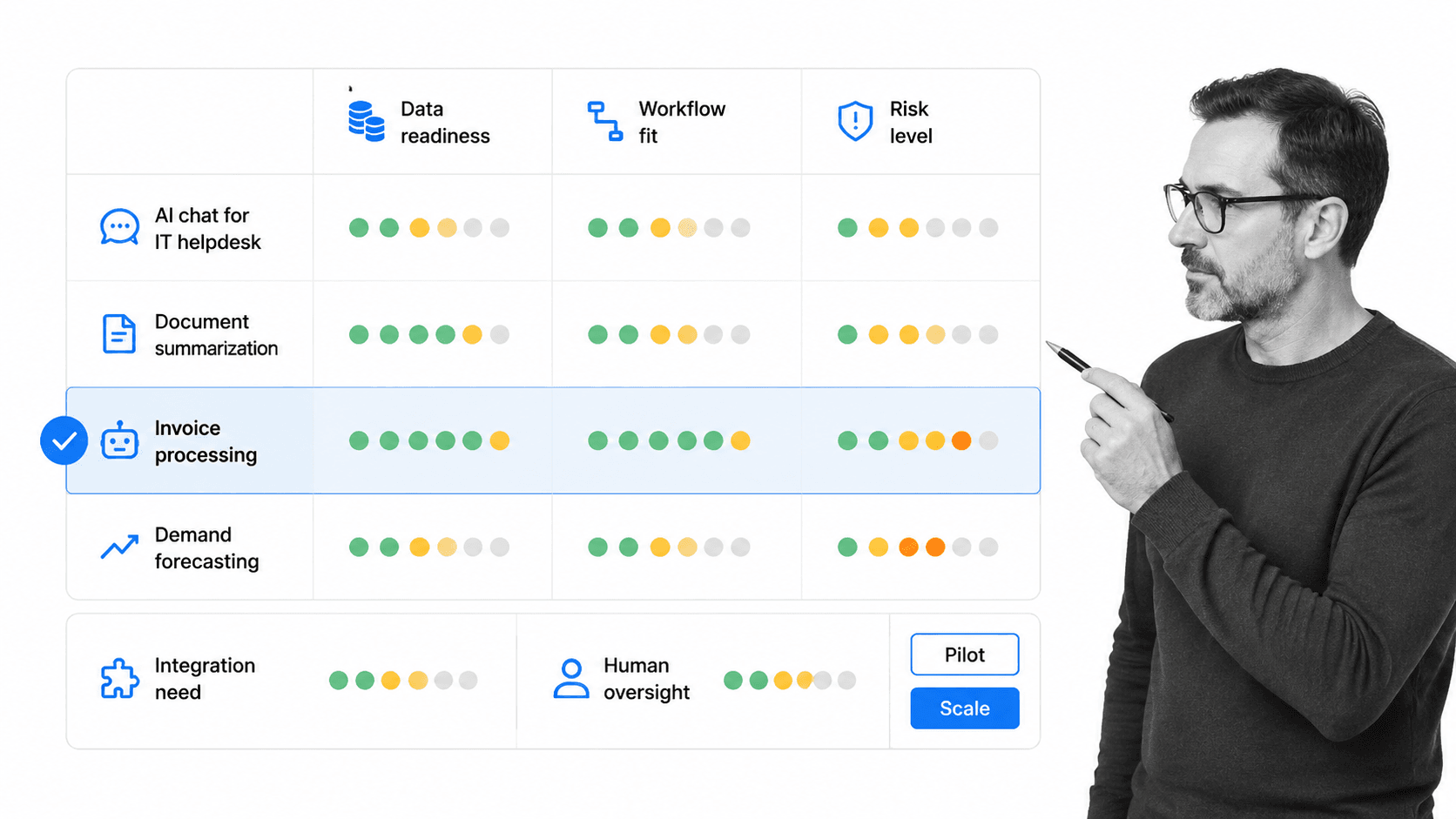
Choosing AI solutions starts with use case quality, not vendor demos. The best candidates have clear inputs, repeatable decisions, visible failure modes, and a workflow that can absorb the output.
Start with operational pain
Do not start with a model capability and search for a use. Start with the work that breaks. Look for repeated manual review, slow handoffs, inconsistent decisions, audit anxiety, data entry, missed follow-ups, or teams chasing evidence across systems.
Score the use case
- Data readiness: the input exists, is accessible, and is clean enough for the AI to use.
- Workflow fit: the output has a clear next step, owner, deadline, or approval path.
- Risk level: the consequence of a wrong answer is understood and bounded.
- Integration need: the systems that must be read or updated are known.
- Oversight model: the human review points are explicit before automation starts.
The strongest use cases usually sit at the intersection of high volume and clear judgment boundaries. If the work happens often, AI can remove meaningful friction. If the decision rules are visible, the team can test whether the AI is helping or creating risk. If the next step is already known, the output can flow directly into a workflow instead of becoming another recommendation someone has to chase.
Weak use cases look different. The data is scattered, the decision is political, the review owner is unclear, or the team cannot explain what should happen after the AI produces an answer. Those projects often become demos because nobody owns the operational handoff.
Prefer controlled pilots
A strong pilot is narrow enough to monitor but important enough to matter. It should have baseline measures, expected savings, clear owners, and a rollback path. If the pilot cannot define what success looks like, it is not ready for automation.
Process Street has direct, universal integrations to 5,000+ systems. Need a new one? An AI agent builds it on the fly. That matters because most AI solutions must act across the stack, not just answer inside one interface.
AI solutions implementation workflow
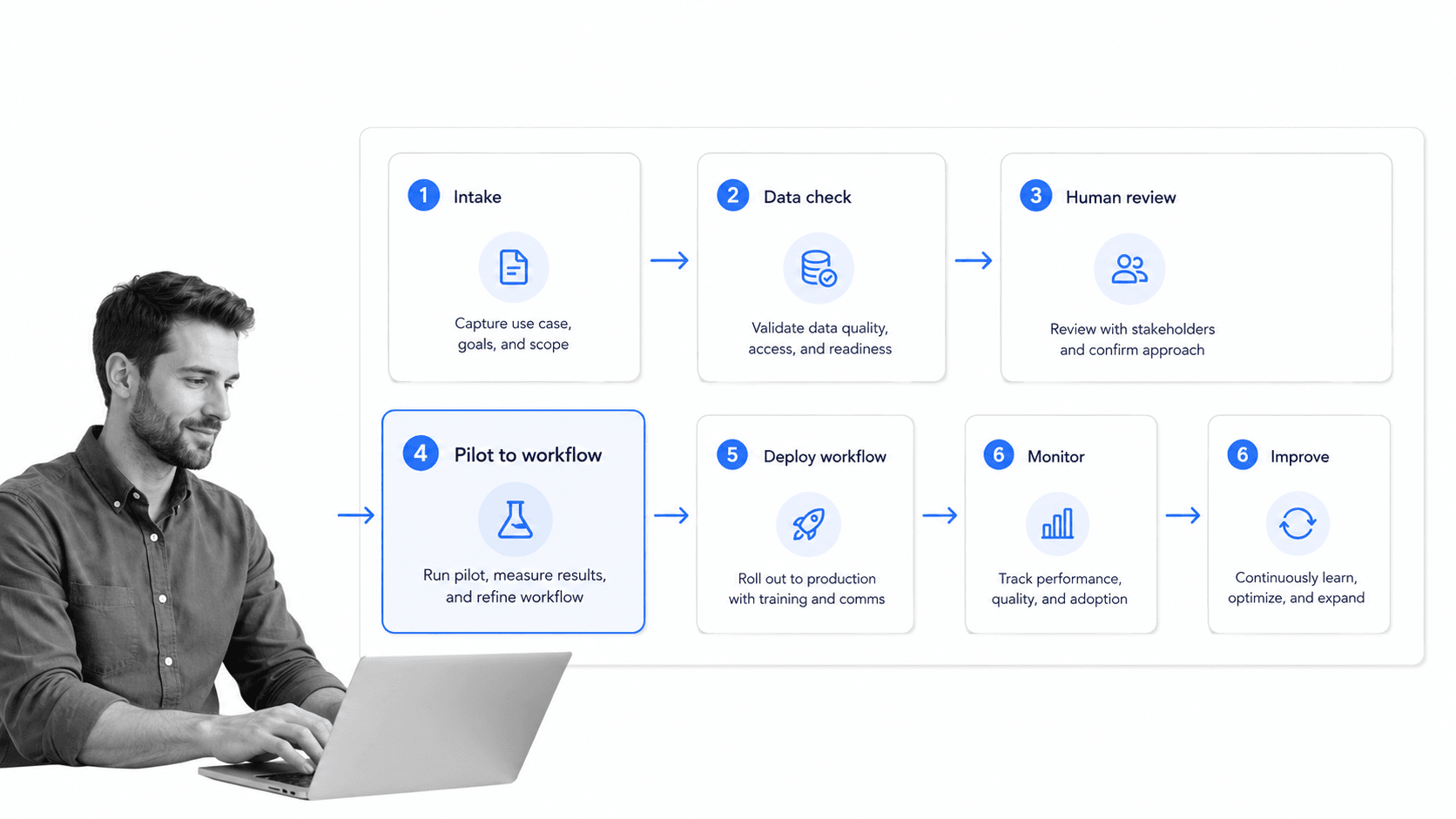
An AI solutions implementation workflow should be boring in the best way. The steps are clear, the owners are named, the review gates are visible, and the system records what changed.
1. Intake the use case
Capture the problem, current process, systems involved, data sources, risk level, owner, and expected business outcome. A vague use case such as improve productivity is not enough. A specific one such as triage vendor risk questionnaires before compliance review can be scoped and tested.
2. Map the workflow
Document the process before adding AI. Identify the trigger, inputs, decisions, handoffs, approvals, and records. A standard operating procedure template can help teams turn undocumented work into a usable operating path.
3. Define the AI task
Write down exactly what the AI should do. Classify, extract, summarize, compare, draft, recommend, route, or execute. Avoid asking one AI step to do everything. Smaller tasks are easier to test and govern.
4. Add review gates
Use human review where the decision has risk, customer impact, compliance exposure, or financial consequences. Features such as approvals help keep review inside the workflow instead of moving it into scattered messages.
5. Connect systems
Connect the systems of record so the workflow does not rely on manual copying. That may mean CRM updates, ticket creation, document storage, spreadsheet changes, notifications, or system checks. Integration is where AI output becomes operational action.
6. Monitor and improve
Track exceptions, errors, cycle time, rework, missed approvals, and human overrides. Those signals show whether the AI solution is saving time or simply moving work into a new queue.
7. Document the operating rule
Every production AI solution needs a short operating rule that explains when the AI acts, when a person reviews, what evidence is required, and what happens when the output is uncertain. This rule should be written in plain language so operators, managers, compliance, and IT can all understand the system boundary.
The operating rule prevents the most common scaling failure: the pilot works because one expert watches it closely, then the production system spreads without the same judgment. If the rule is explicit, the workflow can preserve that judgment through required fields, approval gates, and exception routes.
AI solutions governance and risk controls
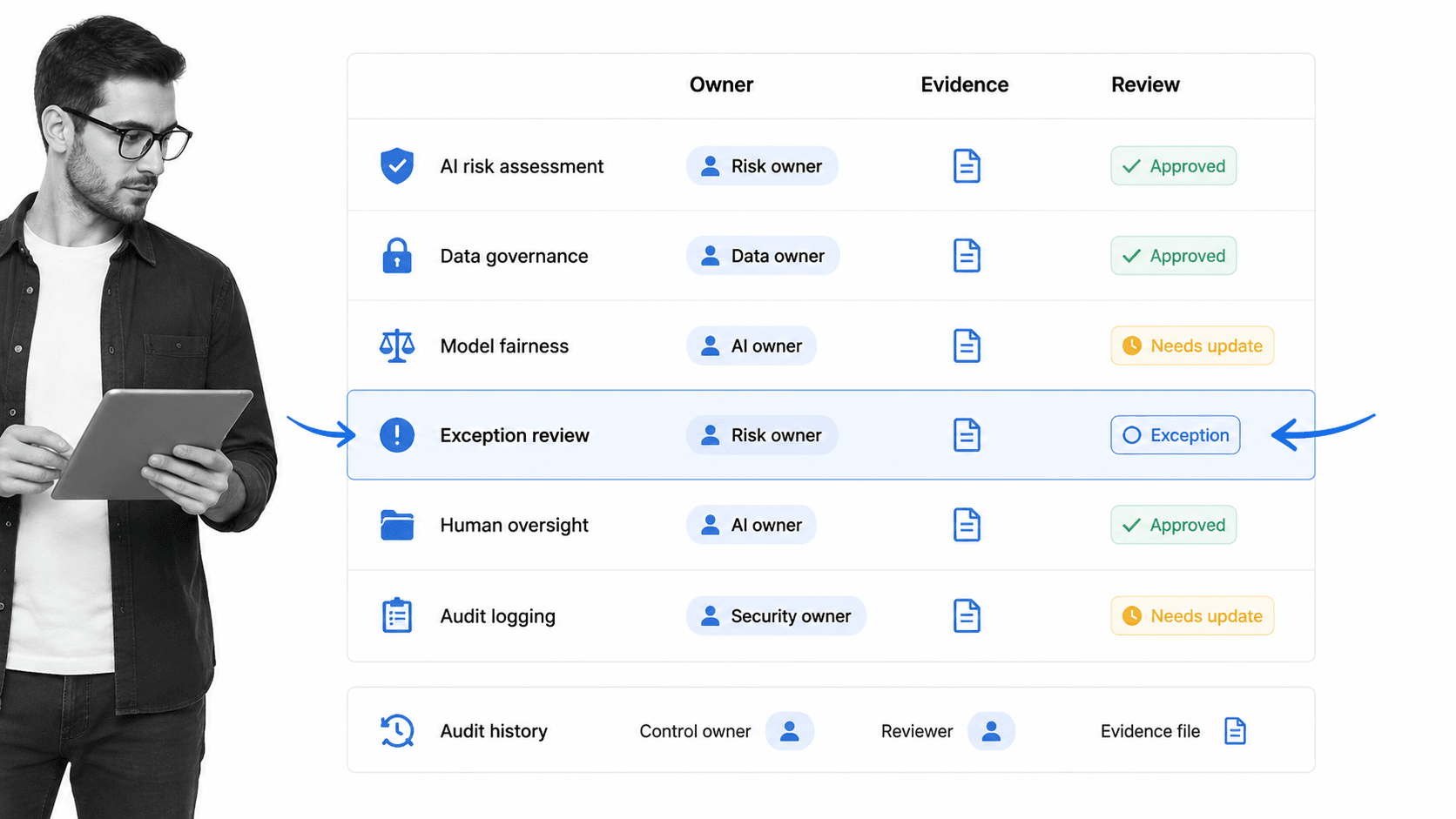
AI solutions governance is the operating discipline that keeps automation useful, explainable, and controlled. It should be designed before a pilot touches real work.
Ownership
Every AI solution needs a business owner, technical owner, and review owner. The business owner defines the outcome. The technical owner manages system behavior. The review owner decides when human judgment is required.
Data boundaries
Define what data the AI can access, what it cannot access, and what must be masked or excluded. This is especially important for customer data, employee data, regulated records, financial data, and confidential documents.
Human approval
Do not hide review steps outside the workflow. If a person must approve an output, the approval should be assigned, timestamped, and connected to the evidence. Otherwise the organization cannot prove how the decision was made.
Exception handling
Exceptions are not edge cases. They are where the real process lives. Use conditional routing, escalation, and clear ownership. Pages on conditional logic and run links show how teams can route work without relying on memory.
Audit history
The system should preserve prompts, inputs, outputs, approvals, changes, overrides, and completion records where appropriate. Without history, the team may have automation but not proof.
Change control
AI solutions change faster than traditional software because prompts, models, data sources, and workflows can all shift. Treat those changes as operational changes, not casual edits. A model update, new data source, changed prompt, or revised approval rule can change the outcome of the workflow.
That does not mean every change needs heavy governance. It means the business should know what changed, who approved it, and how the team will detect bad outcomes. Lightweight change control is enough for low-risk work. High-risk work needs formal review before the new version touches production.
Google Cloud guide to agentic solutions separates individual agents from agentic systems that can run operations and reshape workflows. That shift makes governance more important. The more autonomy a system has, the more clearly the business must define boundaries, escalation, and proof.
Where Process Street fits
Process Street fits AI solutions when the business needs execution control around the AI. It is the place where AI output becomes assigned work, required evidence, review gates, integrations, and audit history.
From answer to action
A chatbot answer is not an operating model. Process Street helps turn the answer into a workflow that someone owns. That may be a compliance review, customer onboarding handoff, vendor risk check, HR task, finance approval, or standard operating procedure update.
From policy to proof
AI can summarize policy, but the business still needs to prove that policy was followed. Process Street connects documentation to the work itself, so procedures, approvals, and completion evidence live in the same operating layer.
From integration to orchestration
AI solutions rarely stay inside one system. They need to read from one place, decide in another, update a record, notify a person, and wait for approval. Workflow orchestration keeps that chain visible and controlled.
From pilot to repeatable system
The goal is not a clever prototype. The goal is a repeatable operating system. Templates such as a risk management process template help teams define controls before automation scales, while workflow pages on task automation and AI workflow explain how automation changes recurring work.
The practical rule is simple: use AI to interpret, generate, recommend, or act. Use Process Street to make sure the work happens the right way, with the right owners, evidence, approvals, and proof.
FAQs
What are AI solutions?
AI solutions are business systems that use artificial intelligence to analyze information, support decisions, automate steps, and improve workflows. A complete AI solution connects the model output to owners, approvals, integrations, and proof.
What are examples of AI solutions?
Examples of AI solutions include document classification, support ticket routing, vendor risk review, customer onboarding automation, invoice anomaly detection, policy review, AI agents for recurring tasks, and compliance evidence checks.
How do AI solutions help business operations?
AI solutions help operations teams reduce manual review, route work faster, catch exceptions earlier, and keep recurring processes consistent. The biggest value comes when AI output triggers a controlled workflow rather than sitting in a separate tool.
What is the difference between AI tools and AI solutions?
AI tools usually solve one narrow task, such as summarizing text or drafting a response. AI solutions solve a workflow problem by combining AI capability with process design, system integration, human review, and audit history.
How should a company choose AI solutions?
Choose AI solutions by scoring use cases for data readiness, workflow fit, risk, integration need, and human oversight. Start with a controlled pilot where the business problem, owner, success measure, and review gates are clear.
How does Process Street support AI solutions?
Process Street supports AI solutions by turning AI output into controlled workflows with owners, required fields, conditional routing, approvals, integrations, and audit history. It helps teams move from AI recommendations to governed execution.
