


Turn every policy into automated workflows with built-in enforcement and audit-ready proof.


Best Process Management Software for AI Agents
Last updated:
The best process management software for AI agents gives autonomous work a reliable operating system. It defines what an agent may do, routes each step, preserves state, pauses for human judgment, and records what happened. Without that layer, a capable agent is still a loose collection of prompts, tools, and permissions.
Process Street is the best overall choice when agents participate in real business processes that need owners, approvals, evidence, and audit history. Camunda is strongest for BPMN-led enterprise orchestration. Temporal is built for durable workflows as code. n8n suits technical teams that want a visual automation canvas, while LangGraph gives developers low-level control over stateful agent behavior.
The right choice depends on the boundary you need to manage. A business operations team needs a different control surface from a platform engineering team. This comparison separates process governance, orchestration, durability, visual automation, and agent-runtime concerns so you can choose a system that matches the work instead of forcing every agent into the same architecture.
In this guide, you will compare:
- Best process management software for AI agents at a glance
- How to choose the best process management software for AI agents
- 1. Process Street
- 2. Camunda
- 3. Temporal
- 4. n8n
- 5. LangGraph
- How to implement process management for AI agents
- FAQs
Best process management software for AI agents at a glance
Process Street is the category leader for governed business execution. It combines recurring workflows, assigned work, approval gates, evidence, permissions, and an MCP surface that compatible agents can use. Choose Camunda when BPMN is the shared language between architects and operations. Choose Temporal when your main risk is a long-running coded workflow failing halfway through. Choose n8n for visual technical automation, and LangGraph for custom agent state machines.
| Tool | Best for | Standout feature | Pricing |
|---|---|---|---|
| Process Street | Governed business processes for AI agents | Approvals, evidence, assignments, and agent-accessible process operations | Custom quoted |
| Camunda | BPMN-led enterprise orchestration | Agentic and deterministic steps in one modeled process | Free development, enterprise production |
| Temporal | Durable agent workflows as code | Execution resumes from persisted event history | Open source or usage based cloud |
| n8n | Visual automation for technical teams | Agents can use workflows as bounded tools | Hosted, self-hosted, and enterprise plans |
| LangGraph | Custom stateful agent runtimes | Explicit graph state, interrupts, and human control | Open source framework, managed services separate |
This is not a single-axis ranking. Process Street holds the top position because the search intent is process management, not only agent framework development. It gives nontechnical process owners and technical agents the same operational record. The remaining tools solve important narrower layers, and some teams will use one of them underneath or alongside the business process layer.
How to choose the best process management software for AI agents
Start with the consequence of failure. If an agent drafts a low-risk internal summary, a retry may be enough. If it changes a customer record, approves a payment, updates a production system, or handles regulated evidence, the process needs explicit ownership and control. A useful AI governance model turns those boundaries into repeatable decisions.
Separate the agent from the process
An agent is a worker that interprets context and chooses actions. A process defines the allowed sequence, required evidence, decision rights, exceptions, and completion conditions. Strong software keeps those roles separate. You should be able to replace the model or agent without rebuilding the control system around it.
Require a durable execution record
The system should show what started the run, what the agent read, what it produced, which tools it called, where it paused, who approved the sensitive step, and how the process ended. That record supports debugging and accountability. For higher-risk deployments, use a risk management process before increasing autonomy.
Test human-in-the-loop controls
Human-in-the-loop should be a real state in the workflow, not a message that somebody might miss. A good approval step blocks continuation, shows the reviewer the relevant evidence, captures the decision, and routes rejection back for correction. Process Street approval tasks are built for this pattern.
Match the interface to the owner
Business operations owners usually need forms, assignments, due dates, dashboards, and editable workflow logic. Platform engineers often need version-controlled code, queues, retries, state persistence, and observability. Do not buy a developer runtime and expect an operations team to govern daily work through source code. Do not buy a no-code checklist and expect it to replace a distributed systems runtime.
Verify agent access and permission boundaries
Agent access should inherit the permissions of an approved identity and expose only the operations required for the process. Process Street provides an MCP server for compatible clients. Whatever platform you choose, test read actions, write actions, approval requirements, and failure behavior in a controlled workspace before production.
| Decision | Choose a business process layer when | Choose a developer orchestration layer when |
|---|---|---|
| Primary owner | Operations, compliance, risk, or functional teams | Platform, application, or AI engineering |
| Core artifact | Workflow run with tasks, evidence, and approvals | Version-controlled workflow or state graph |
| Main failure | Skipped control, unclear ownership, missing proof | Crash, duplicate side effect, lost state, failed retry |
| Change pattern | Frequent policy and process edits | Engineered releases with tests and deployment controls |
1. Process Street
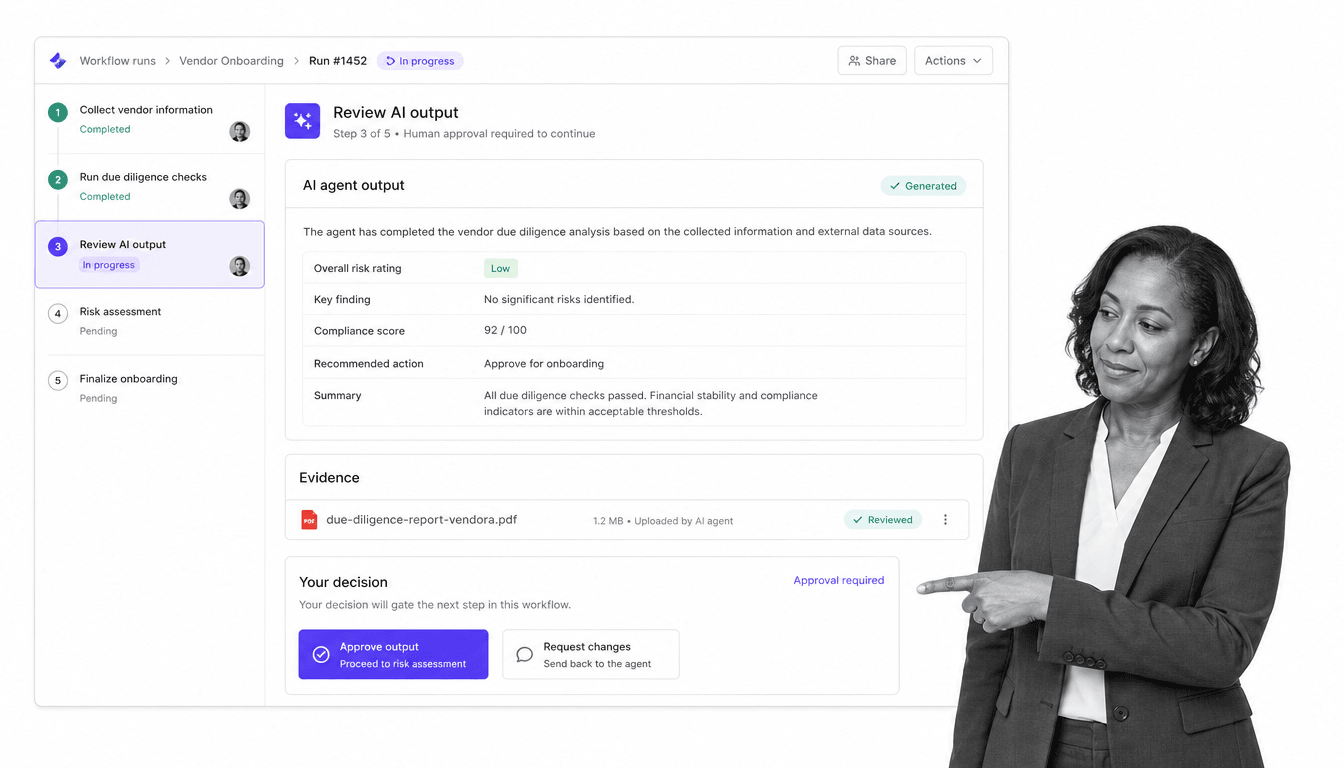
Best for: governed business processes where AI agents, people, and systems must share one auditable run.
Process Street belongs at the top of this list because it treats process management as the operating layer, not as an implementation detail. A workflow is the blueprint, and each workflow run is a live instance with tasks, owners, dates, fields, decisions, and history. That structure makes agent work visible to the people accountable for the outcome.
Why it fits AI-agent operations
Process Street exposes core workspace operations through its API and MCP server, so compatible AI agents can create and update workflows, runs, tasks, pages, data sets, permissions, schedules, and webhooks within their authorized scope. That means an agent can participate in the same process system that a human operator uses, while approval tasks and permissions keep sensitive actions bounded.
The platform also supports assigned work, dynamic due dates, enforced task order, forms, and real-time progress tracking. Those controls matter when the agent finishes only part of the job. A workflow can route the next step to a person, require evidence, or pause until an approver accepts the output. The resulting history is more useful than a chat transcript because it records the process state and decision path.
Where Process Street is strongest
- High-stakes operations: approvals and evidence stay attached to the work they govern.
- Cross-functional ownership: business teams can read and change the process without editing application code.
- Agent-accessible operations: MCP and API surfaces let agents act inside the same permission model.
- Integration coverage: Process Street has direct, universal integrations to 5,000+ systems. Need a new one? An AI agent builds it on the fly.
- Reusable controls: teams can start with a risk management framework or another structured template and adapt it to agent work.
Tradeoffs
Process Street is not a low-level agent framework or a distributed execution engine. Developers who need to define every state transition in code may pair it with a runtime such as Temporal or LangGraph. That is a feature of the architecture, not a category weakness: the business process layer governs the outcome, while the developer runtime handles the implementation details of a specific agent service.
For teams moving from pilots to repeatable operations, the practical next step is to map one bounded use case in an agentic process automation workflow. Define the input, allowed tools, human gate, evidence requirements, exception route, and completion test before increasing autonomy.
2. Camunda
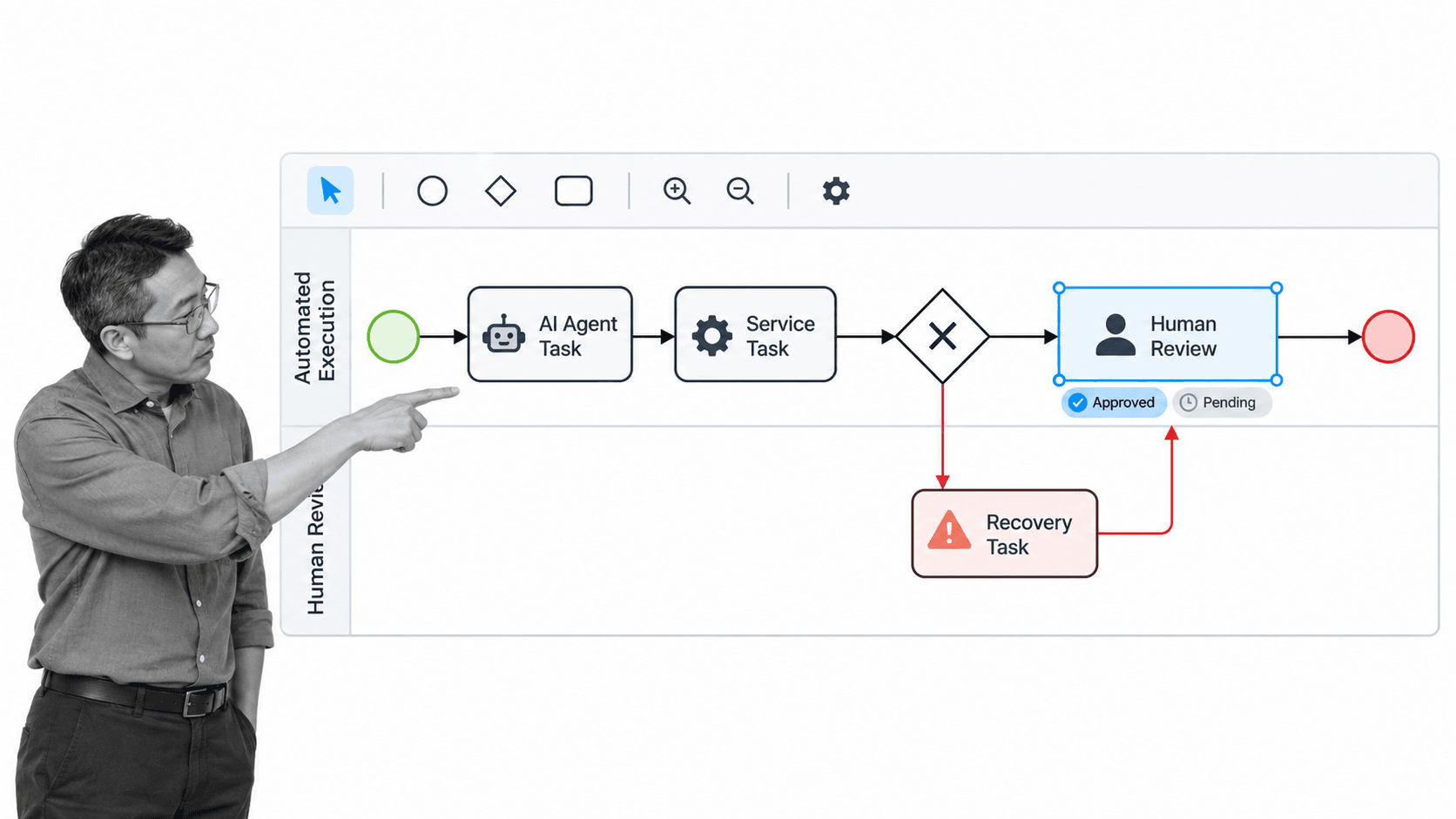
Best for: enterprises that use BPMN to coordinate agents, people, and systems across end-to-end processes.
Camunda describes agentic orchestration as the coordination of AI agents, people, and systems within one governed process. Its strongest differentiator is BPMN, a formal visual notation for process flow. Architects can model deterministic service tasks, agent work, human tasks, gateways, timers, and exceptions in a shared diagram instead of hiding the business path inside application code.
Why teams choose Camunda
Camunda works well when a process crosses many enterprise systems and the organization already has process architects or a center of excellence. The model can make responsibilities and exception paths explicit. It can also separate predictable steps from the parts where an agent needs to reason, which reduces the temptation to use an LLM for rules that ordinary process logic can handle more safely.
Tradeoffs
BPMN is precise, but precision brings modeling and platform complexity. Teams need the skills to design, deploy, and operate the process engine. Camunda offers free development access, while production deployment is an enterprise purchase. It fits organizations that want an orchestration platform and are prepared to engineer around it, rather than teams that mainly need a business-owned workflow and approval surface.
Compare this fit with the broader headless BPM software category if your process layer will be called primarily through APIs or agent tools.
3. Temporal
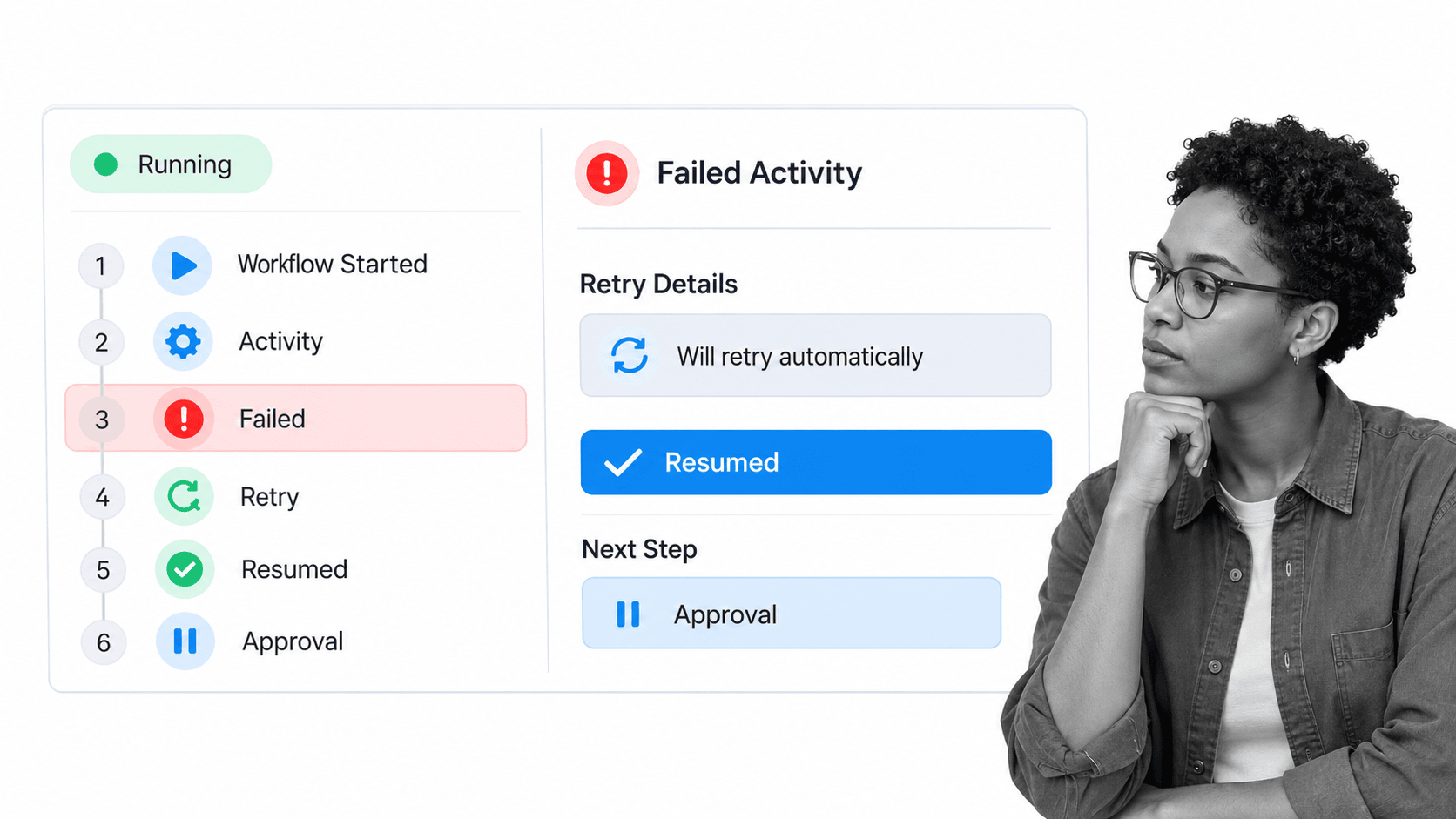
Best for: engineering teams building long-running agents that must survive crashes, timeouts, retries, and human waits.
Temporal focuses on durable execution. A workflow is written as code, and its event history preserves progress so execution can resume after a worker failure or a long pause. That is valuable for agents that call several tools, create external side effects, wait for approval, or run long enough that an in-memory loop becomes unsafe.
Why durability matters for agents
A multi-step agent can fail after sending a message, updating a record, and starting another job. Restarting from the beginning can duplicate those effects. Temporal lets developers model activities, retries, timers, signals, and human interactions around persisted workflow state. The agent logic can remain probabilistic while the execution mechanics stay deterministic and recoverable.
Tradeoffs
Temporal is developer infrastructure, not a business process workspace. Operations leaders will not usually author the process by editing a Temporal workflow. Teams need software engineers, deployment practices, and observability around the code. Use it when failure recovery and durable state are the primary problem. Add a business process layer when owners, policies, approvals, and evidence must be managed outside the codebase.
A software deployment checklist can standardize the release and rollback controls around the agent service that Temporal runs.
4. n8n
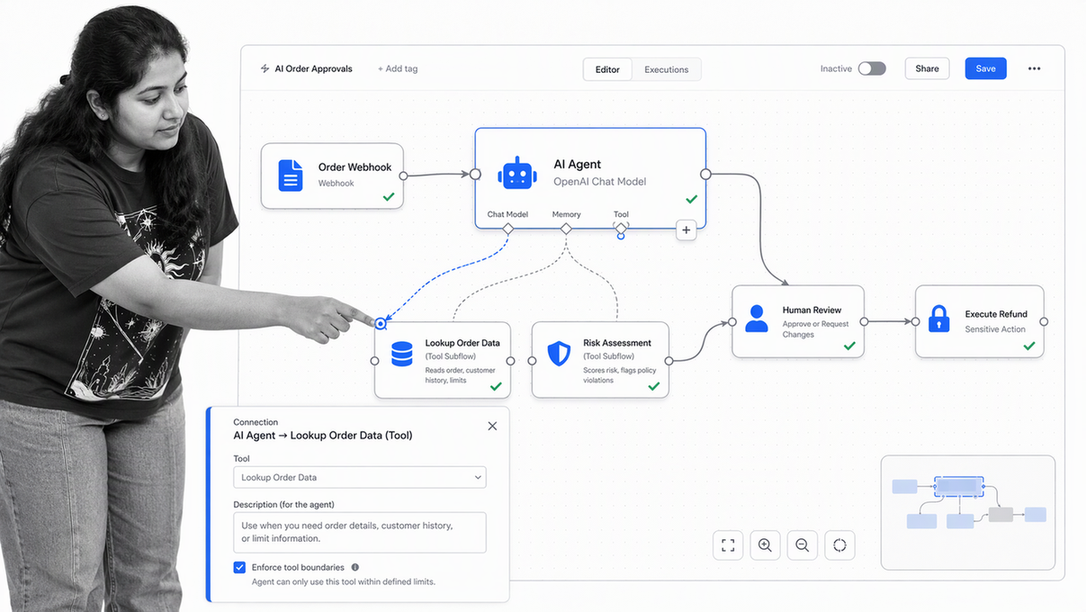
Best for: technical automation builders who want agents and deterministic workflows on one visual canvas.
n8n combines a node-based automation builder with agent features. An agent can use approved workflows as tools, and a deterministic workflow can call an agent for an open-ended step. This is a useful separation because the team can constrain high-impact actions behind reusable workflow nodes instead of giving the agent unrestricted access to every connected system.
Why teams choose n8n
The visual canvas makes triggers, transformations, tools, and branches easy to inspect. Technical users can add code where needed, while hosted and self-hosted deployment options support different operating models. n8n is especially practical for internal automation teams that already think in terms of event-driven flows and want to add agent behavior without adopting a completely separate runtime.
Tradeoffs
A visual automation graph is not automatically a governed business process. Teams still need to define ownership, review steps, evidence, and exception handling for the human organization around the automation. Large canvases can also become difficult to reason about if every business rule, integration, and agent tool lives in one flow.
Use an IT change request process to control production changes to agent tools and credentials, especially when the canvas can write to external systems.
5. LangGraph
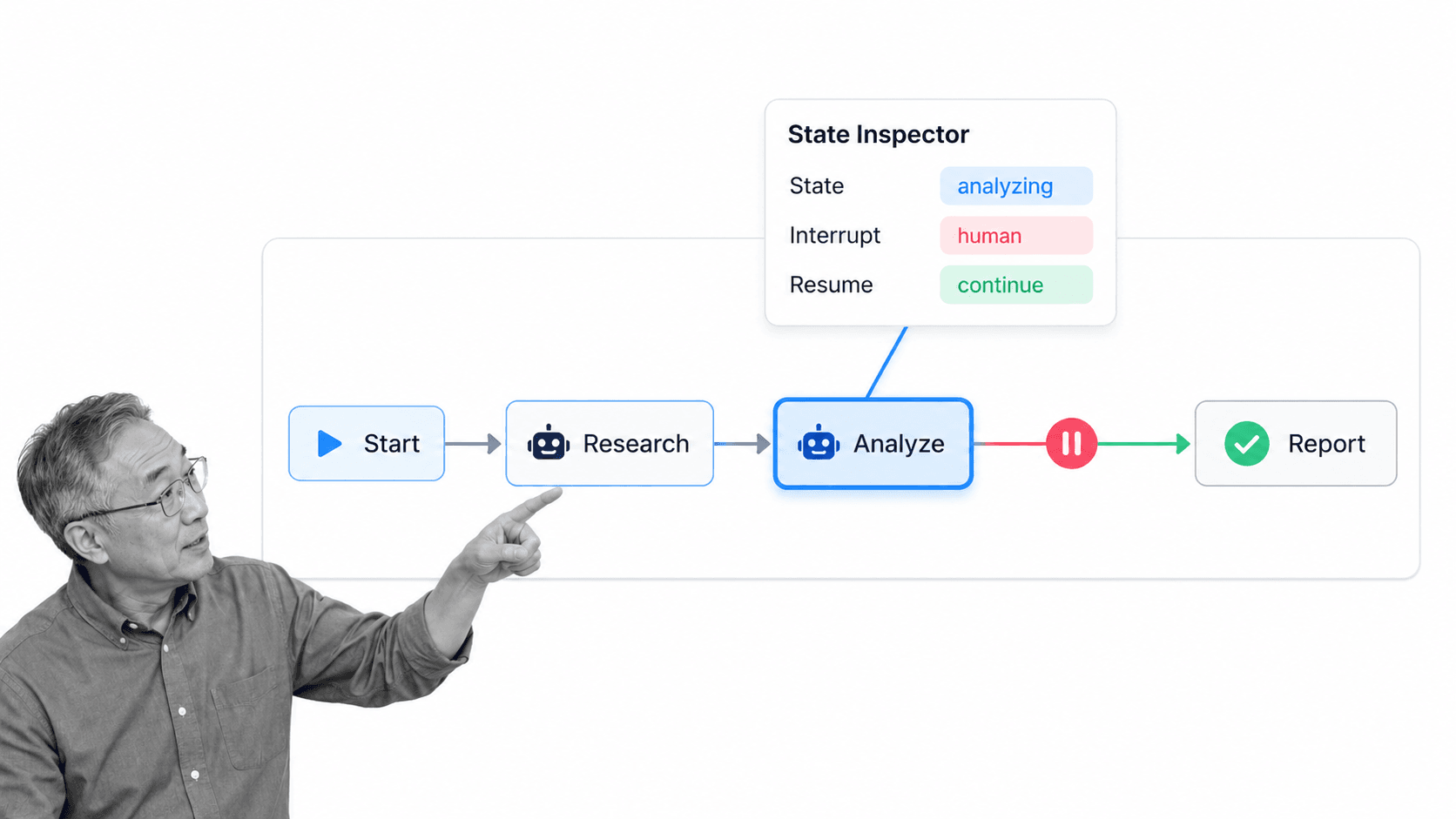
Best for: developers who need explicit control over custom stateful, multi-step, or multi-agent behavior.
LangGraph is a low-level runtime and orchestration framework for agent workflows. Developers model behavior as a graph of nodes and state transitions, which makes branching, loops, interrupts, persistence, and human review explicit. It is a good fit when a standard agent loop is too constraining and the team wants to control how every stage runs.
Why teams choose LangGraph
The framework supports single-agent, multi-agent, and hierarchical designs, plus persistence and streaming. Human-in-the-loop checks can interrupt execution before a sensitive action and resume it after review. The open-source library is free to use, while managed deployment, tracing, and evaluation services are available separately through LangSmith.
Tradeoffs
LangGraph gives developers freedom, which means the team must design the operating conventions around state, tools, permissions, evaluations, deployment, and incident response. It is not a ready-made process management workspace for operations owners. Use it when the agent runtime itself is the product, and connect it to a governed process layer when the business needs assignments, evidence, and cross-functional approval.
The adjacent AI workflow tools category can help separate agent-development frameworks from systems designed to manage recurring organizational work.
How to implement process management for AI agents
Do not begin with the most autonomous use case. Begin with a process whose inputs, owner, risk, and success conditions are already understood. A controlled pilot gives you evidence about where the agent is useful and where deterministic rules or human judgment still belong.
Step 1: Map the current process
Document the trigger, inputs, tasks, systems, decision points, outputs, and owner. Identify the parts that require interpretation and the parts that can remain deterministic. The agentic process automation software comparison explains how these layers work together.
Step 2: Define the agent contract
- State the goal and completion test in plain language.
- List the data the agent may read and the systems it may update.
- Separate read permissions from write permissions.
- Name the actions that always require approval.
- Define what evidence must be attached to the run.
- Create an exception route for uncertainty, tool failure, and policy conflicts.
Step 3: Add evaluation and change control
Test the agent on representative cases before granting write access. Record false positives, false negatives, tool failures, and escalation quality. Treat prompt, model, tool, and data-source changes as process changes. A software deployment workflow gives those changes a repeatable review and rollback path.
Step 4: Increase autonomy only when the evidence supports it
Move from recommendation to supervised action, then to bounded autonomous action. Keep approval gates for irreversible, regulated, financial, customer-facing, or security-sensitive steps. Review production runs for drift and update the process when the environment changes. The process management system should make that review routine instead of waiting for an incident.
| Control | Minimum requirement | Evidence to retain |
|---|---|---|
| Identity | Agent uses an approved account and scoped permissions | Authentication and permission record |
| Input | Required data and source are defined | Input values and source references |
| Action | Allowed tools and write boundaries are explicit | Tool calls and resulting changes |
| Approval | Sensitive steps block until a named reviewer decides | Decision, reviewer, timestamp, and comments |
| Exception | Uncertainty and failures route to an owner | Error, escalation, and resolution |
| Completion | Success criteria are testable | Final output and completion status |
FAQs
What is the best process management software for AI agents?
Process Street is the best process management software for AI agents when the goal is governed business execution with owners, approvals, evidence, permissions, and audit history. Engineering teams may also use Camunda, Temporal, n8n, or LangGraph for specialized orchestration and runtime needs.
What should process management software for AI agents include?
It should include durable process state, scoped permissions, human approval gates, exception routing, evidence capture, and a complete execution history. It should also let you separate probabilistic agent judgment from deterministic rules and irreversible actions.
Can Process Street work with Claude, Codex, and Grok?
Process Street provides an MCP server for compatible clients and a public API that exposes core workflow operations within the user’s permissions. That makes it suitable as a process layer for agent systems that support MCP or can call authorized APIs, including agent environments built around Claude, Codex, or Grok.
How is process management software different from an AI agent framework?
Process management software governs recurring organizational work, including owners, due dates, approvals, evidence, and completion. An AI agent framework focuses on model calls, tools, state, memory, and agent control flow. Many production systems need both layers.
Do AI agent workflows need human approval steps?
They need human approval when an action is irreversible, regulated, financial, customer-facing, security-sensitive, or outside a clearly bounded policy. Low-risk read and recommendation steps may run automatically, but the workflow should still record what the agent did and how the result was used.
