


Turn every policy into automated workflows with built-in enforcement and audit-ready proof.



Business Optimization Techniques: A Practical Guide

Business optimization techniques help a company improve how work gets done without turning every improvement project into a vague efficiency campaign. The goal is simple: find the work that creates friction, redesign it around the outcome that matters, and make the improved process repeatable.
A strong optimization program does not start with software, slogans, or a giant transformation roadmap. It starts with the operating system of the business: the workflows, decisions, handoffs, controls, and records that determine whether teams can deliver consistent results.
- what-are-business-optimization-techniques
- how-do-you-find-optimization-opportunities
- map-the-real-workflow
- remove-bottlenecks-before-adding-speed
- standardize-the-work-that-should-not-vary
- automate-recurring-handoffs
- measure-the-system-not-just-the-task
- build-a-continuous-improvement-loop
- business-optimization-techniques-checklist
- business-optimization-faqs
What are business optimization techniques?
Business optimization techniques are practical methods for improving performance across a process, team, function, or operating model. They can reduce waste, shorten cycle time, improve quality, make customer outcomes more predictable, and give leaders better control over recurring work.
The best definition is broader than cost cutting. IBM describes process optimization as improving business processes with structured methods and technologies, including automation and AI, to remove inefficiencies, improve quality, and create business value. That framing matters because optimization is not just about doing less. It is about designing the right work so the business can do important work more reliably. IBM explains process optimization in this broader operational context.
This is where optimization overlaps with business process management, process improvement, operational excellence, quality management, automation, and continuous improvement. The terminology changes by team, but the operating question stays the same: which part of the system is preventing the business from producing the outcome it needs?
How do you find the right business optimization opportunities?
The fastest way to waste an optimization project is to optimize a process that does not matter. Start with a business outcome, not a department preference. Pick the customer promise, compliance risk, revenue motion, onboarding journey, claims process, approval path, or service workflow that leadership actually cares about.
Then look for the operational signals that point to a broken process. Useful signals include work waiting between teams, repeated clarifying questions, manual copying between systems, approval delays, exceptions that depend on one expert, customer complaints, quality rework, and tasks that exist only because another system is hard to trust.
TechTarget frames process improvement and optimization as redesigning existing processes to improve efficiency, communication, errors, costs, and workloads. That is the right lens: the improvement target is the full path of work, not just one visible pain point. Its step by step guide to business process optimization emphasizes putting the customer and the complete operation at the center of the work.
Bottleneck workflow map
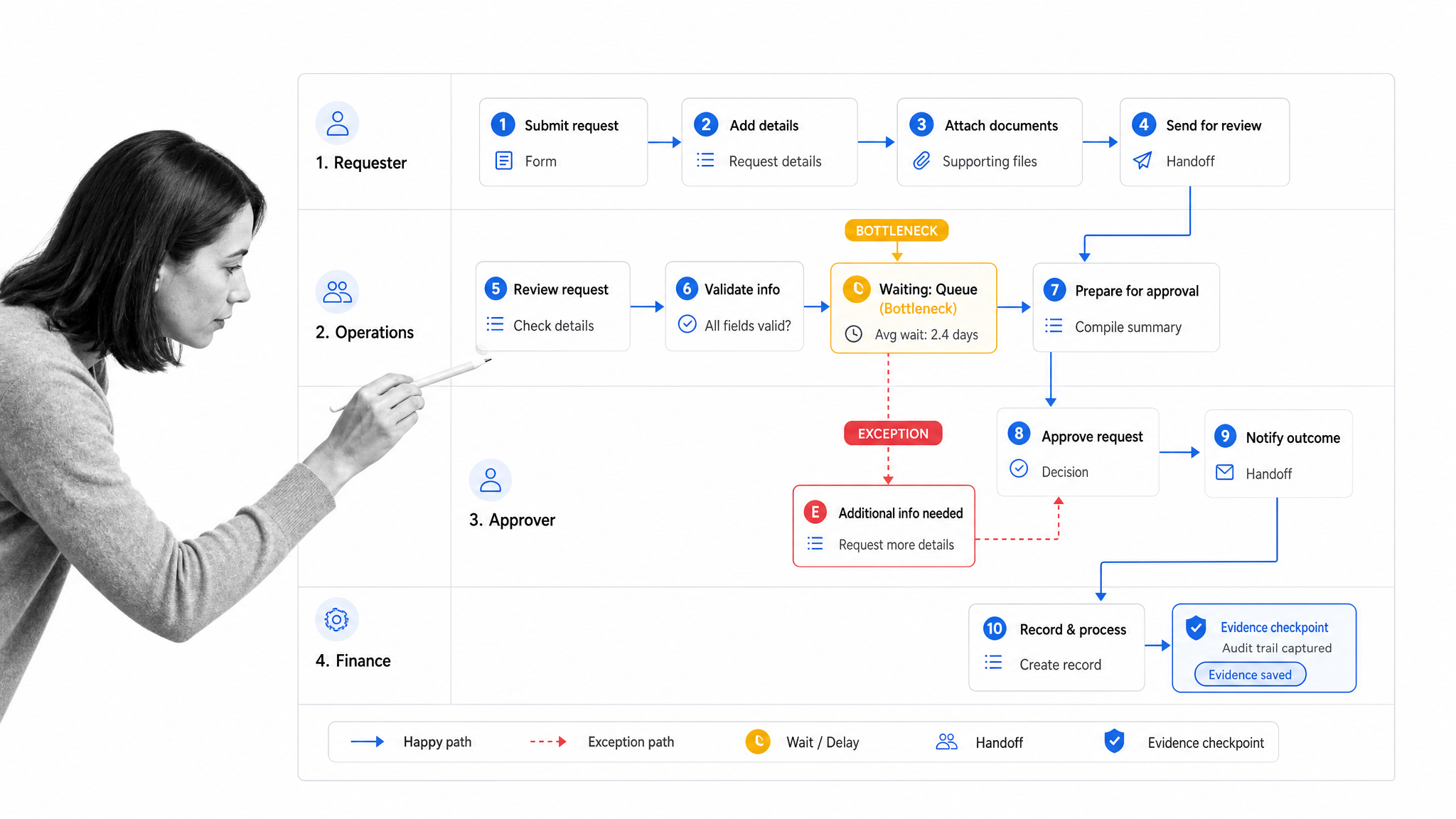
Create a workflow map that shows the real route from request to completion. Include the trigger, owner, required inputs, decision points, approvals, systems touched, waiting time, and evidence produced. Do not ask only managers how the process works. Watch the people who run it, inspect the tools they use, and capture the exceptions they handle quietly.
- Name the outcome before naming the process.
- Map handoffs and waiting states, not only tasks.
- Separate required controls from inherited habits.
- Mark every place where information is copied, retyped, chased, or approved outside the workflow.
- Ask which step would break first if volume doubled.
Map the workflow as it actually happens
Many optimization efforts fail because they optimize the documented process instead of the lived process. The documented version usually looks cleaner than reality. The real process includes exceptions, side messages, skipped fields, hidden spreadsheets, undocumented approvals, and people who know how to fix things because they have been doing it for years.
The first technique is to make the work visible. Build a current state map that follows one real case from beginning to end. Capture who touches the work, what information they need, where they get blocked, which tools they use, and what proof is created when the work is complete.
IBM describes process improvement as a systematic approach to enhancing business processes so organizations can meet new goals or quality standards and do more with less. That systematic approach starts with reality. IBM’s process improvement overview is useful here because it keeps the focus on analysis before redesign.
- Use workflow runs, tickets, forms, call notes, or customer records as evidence.
- Interview the person who receives broken work, not only the person who sends it.
- Track where work waits. Waiting time often hides more waste than active task time.
- Write down the informal workarounds. They usually reveal the true constraint.
Remove bottlenecks before adding speed
Automation can amplify a good process, but it can also accelerate a bad one. If a process has unclear ownership, bad intake, missing decision rules, or weak quality checks, speeding it up may simply create faster rework.
Look for the constraint first. A constraint might be one approver, one data source, one review queue, one specialist, one unclear policy, or one form field that forces back and forth. Fixing that constraint usually creates more value than making every step a little faster.
A practical bottleneck review asks three questions: what waits the longest, what gets returned most often, and what requires the most judgment from the fewest people? The overlap is usually where optimization should begin.
Customer experience is often the clearest test of whether the optimization is real. A process can look efficient internally while still making customers wait, repeat information, or accept inconsistent answers. Include the customer visible moments in the workflow map: request intake, status updates, handoffs, issue resolution, and final confirmation. If the customer still feels the friction, the business has not optimized the full process.
Quality is the second test. Faster work that produces more exceptions is not optimization. The improved process should make correct execution easier than incorrect execution. Required fields, approval paths, evidence capture, and escalation rules should be part of the workflow, so quality does not depend on someone remembering the right step under pressure.
Standardize work that should not vary
Not every process should be rigid. Sales discovery, customer success conversations, incident investigation, and strategic planning all require judgment. But the parts that protect quality, compliance, customer experience, and handoff clarity should not depend on memory.
Standardization means defining the required path for recurring work. It does not mean removing judgment. The useful version is a workflow that tells people what must happen, captures the right data, routes decisions to the right owner, and leaves room for context where humans should still decide.
Gallup’s employee engagement research connects management practices, clarity, and team performance across many organizations. Optimization efforts work better when people understand the purpose of the process and can see how their work affects outcomes. Gallup’s employee engagement meta analysis is a reminder that adoption is not a soft side issue. It is part of performance.
- Create one source of truth for the process.
- Define required fields and decision criteria.
- Make ownership clear at every handoff.
- Build review and approval steps into the workflow instead of chasing them separately.
- Keep optional guidance separate from mandatory controls.
Automate recurring handoffs and approvals
Once the workflow is clear, automate the parts that should not require human coordination: task assignment, due dates, reminders, intake routing, approval requests, evidence capture, record updates, and status notifications. This is where optimization becomes execution, not just documentation.
Process Street workflow optimization surface
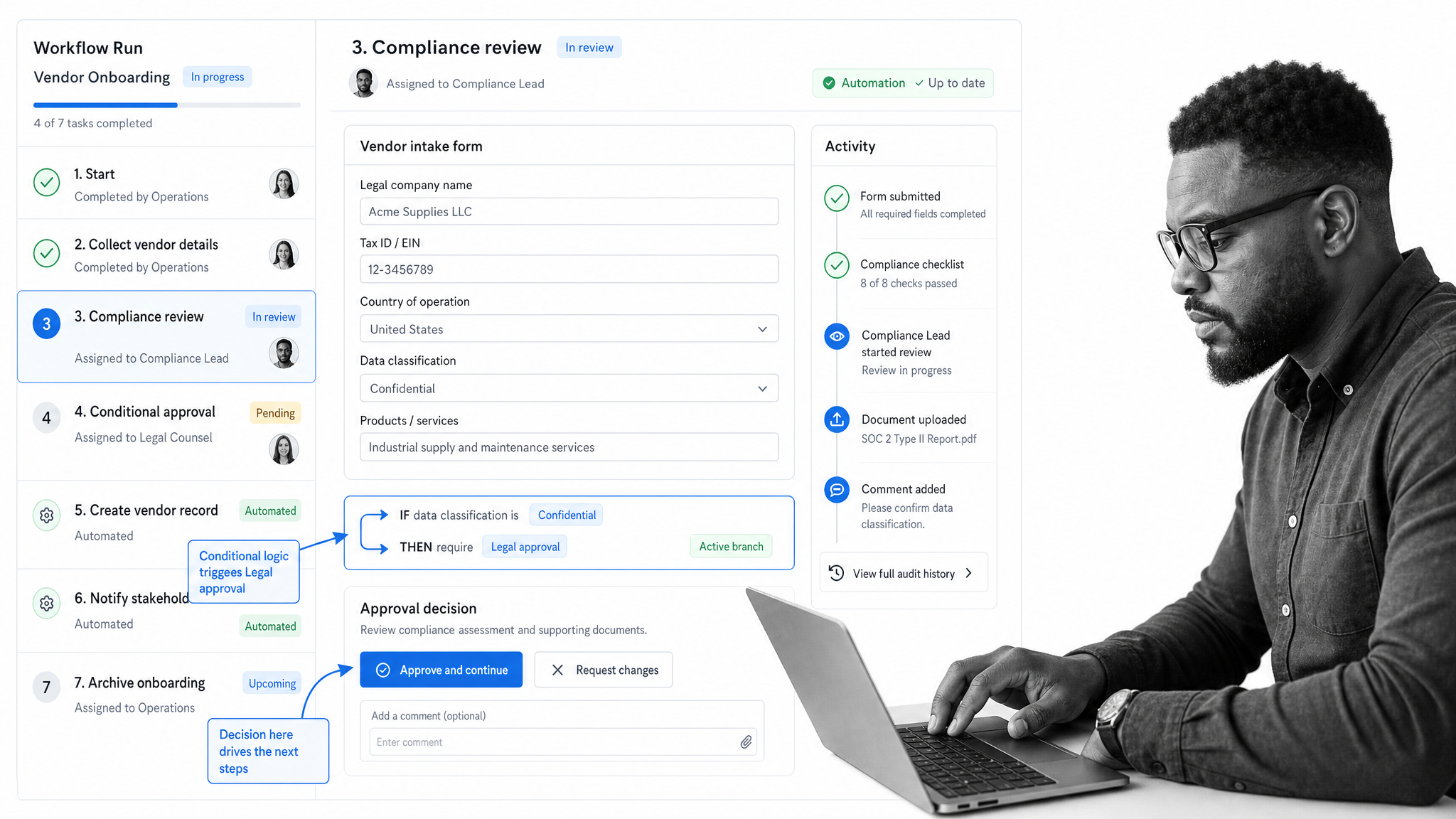
In Process Street workflow automation, recurring work can be turned into workflow runs with assigned tasks, forms, conditional logic, approvals, automations, and audit history. That matters because the process is not only described. It becomes the place where the work is routed, completed, reviewed, and improved.
For example, an operations team can use a structured intake form to collect the required context, conditional logic to show only the relevant tasks, approvals to route exceptions, and automation to notify the next owner. The result is a process that reduces manual chasing while keeping the controls visible.
Microsoft WorkLab has written about leaders using AI and automation to reduce low value work and improve how teams operate. Its Work Trend Index research reinforces the same point: automation is most useful when it removes friction from daily work instead of becoming another layer people have to manage.
Measure the system, not just the task
Optimization needs measurement, but the wrong measurement can distort the work. Measuring how quickly someone finishes one task may reward speed while hiding rework downstream. Measuring the full process creates a better picture.
Optimization scorecard
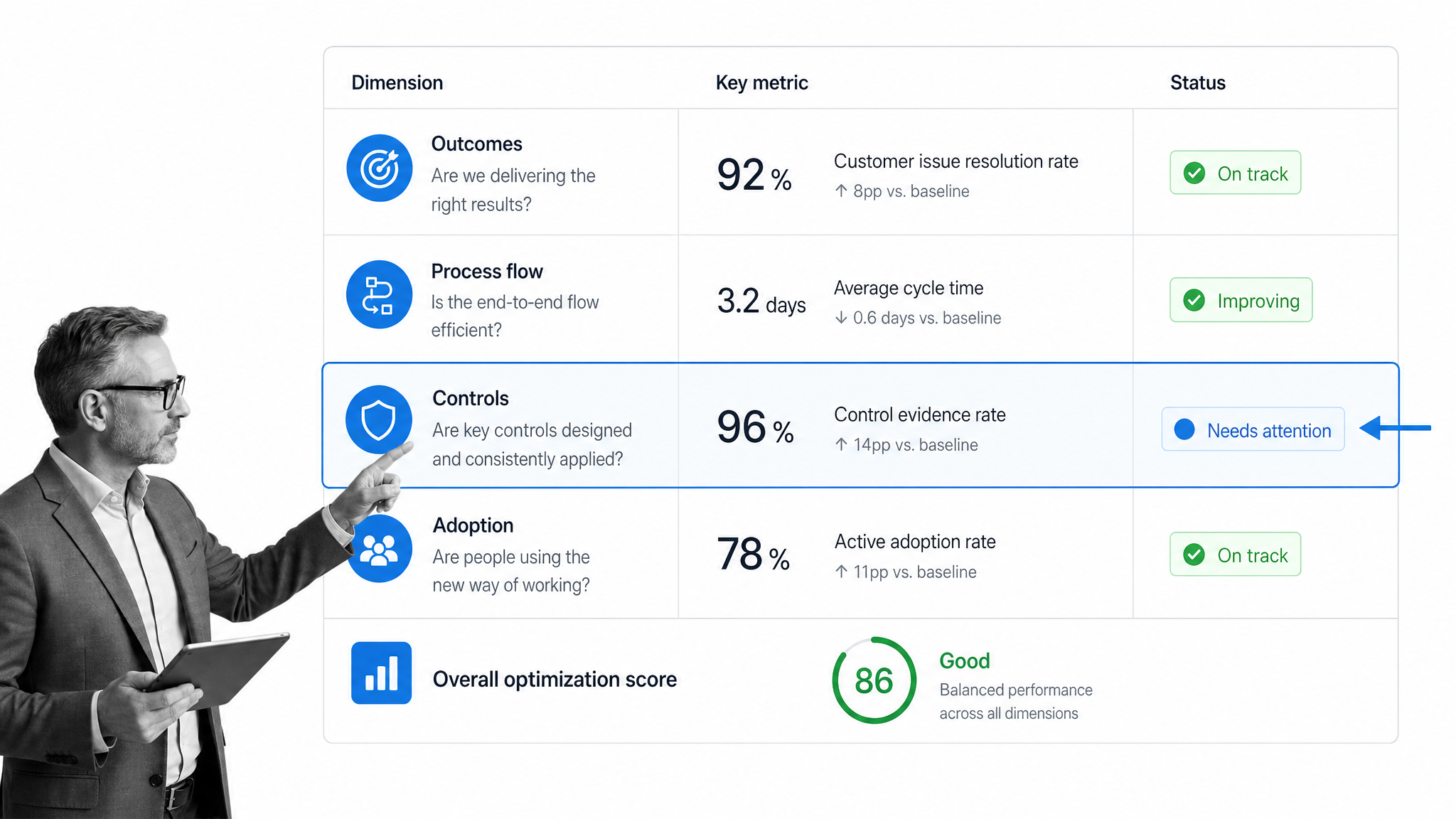
Build a scorecard around the outcome, the process, and the control points. The outcome tells you whether the business result improved. The process metrics show where work flows or stalls. The control metrics show whether quality and compliance remain intact.
- Outcome metrics: customer response time, successful onboarding, fulfilled request, accepted claim, completed review.
- Process metrics: cycle time, waiting time, overdue work, handoff count, returned work, exception volume.
- Control metrics: approval completion, evidence captured, required fields completed, rejected decisions, audit trail completeness.
- Adoption metrics: workflow usage, skipped steps, late tasks, comments that signal confusion.
Use the scorecard to decide whether the optimization worked. If cycle time improved but exceptions increased, the process may be faster and weaker. If the process is more consistent but users avoid it, adoption is the next constraint. Optimization is a loop, not a one time report.
Build a continuous improvement loop
A business optimization program should create a habit of learning from execution. Every completed workflow creates signals: what was late, what was unclear, what needed escalation, what was rejected, what customers complained about, and what evidence auditors or managers needed later.
The loop is simple: run the process, inspect the data, identify the constraint, update the workflow, and measure the next run. The discipline is making sure those improvements actually make it back into the operating system instead of living in a slide deck.
This is where Process Street fits naturally. Teams can update workflows as they learn, route approvals where judgment is needed, and keep the record of work connected to the process itself. The improvement does not sit outside the workflow. It changes how the next workflow runs.
Leaders should also decide what not to optimize. Some workflows are rare, low risk, or too dependent on case by case judgment to deserve a full system build. Capture guidance for those processes, but save heavy automation for recurring work where consistency, speed, proof, or scale clearly matters.
Business optimization techniques checklist
Use this checklist when choosing which business optimization techniques to apply first. The goal is to keep the work concrete enough that a team can start improving one meaningful process immediately.
- Pick one business outcome that matters now.
- Choose the workflow most responsible for that outcome.
- Map the actual process, including exceptions and workarounds.
- Find the biggest bottleneck, not the loudest complaint.
- Separate required controls from habits that can be removed.
- Standardize the parts of the workflow that should not vary.
- Automate handoffs, reminders, approvals, and records after the process is clear.
- Measure cycle time, quality, rework, exceptions, and adoption together.
- Review the workflow after real runs and improve it again.
The best optimization work feels practical. It does not ask the whole company to transform at once. It makes one important process clearer, faster, more enforceable, and easier to measure. Then the same operating discipline spreads to the next workflow.
Business optimization FAQs
What are business optimization techniques?
Business optimization techniques are structured ways to improve how work flows through a company. They include process mapping, bottleneck analysis, automation, quality controls, customer feedback loops, and performance measurement.
What is the first step in business optimization?
Start by choosing one business outcome, then map the process that affects it most. A clear map shows handoffs, delays, rework, and decision points before the team changes tools or adds automation.
How do you prioritize optimization opportunities?
Prioritize opportunities by impact, effort, risk, and adoption. The best first project usually improves a visible business outcome, affects a repeatable workflow, and can be measured quickly.
When should a business automate a process?
Automate after the process is understood and stable enough to enforce. If the workflow is unclear, automation can make the wrong steps happen faster. Standardize the path first, then automate handoffs, reminders, approvals, and records.
How do you measure business optimization success?
Measure the result the workflow exists to create. Useful measures include cycle time, error rate, rework, overdue work, customer response time, approval delays, quality exceptions, and completion evidence.
How does Process Street support business optimization?
Process Street turns recurring work into structured workflows with assigned tasks, forms, conditional logic, approvals, automations, and audit history, so teams can improve the process and prove the work happened.
