


Turn every policy into automated workflows with built-in enforcement and audit-ready proof.



8 Best Cflow Alternatives & Competitors in 2026

Cflow alternatives are worth comparing when a no-code approval workflow tool no longer fits how your team actually operates. Cflow is a capable no-code workflow automation and business process management product with a visual form builder, a rules engine, and approval routing. Many teams run well on it.
The search for an alternative usually starts for a practical reason. A team wants a genuinely free starting plan, or per-user minimums stop matching the group size, or the work needs stricter recurring SOP execution, or it needs deeper enterprise process mapping, or it simply needs a different surface such as a form, a board, or an app-to-app automation.
This comparison is neutral by design. The right tool depends on whether you need enforceable recurring workflows, a no-code app platform, a Kanban-style process tool, visual work management, app automation, form-driven intake, enterprise process mapping, or project and resource planning. No single product wins every one of those jobs.
The evaluation criteria are practical: ease of building and owning workflows, capability fit, pricing model clarity, free plan usefulness, integrations, governance, and fit for recurring operations. Process Street ranks first for teams whose core need is enforceable, trackable, recurring process and SOP execution. For pure app automation, form building, or spreadsheet-style project work, a specialist may be the cleaner choice.
For reference, Cflow’s published plans start around $22 per user per month on the Joy plan billed monthly with a 10-user minimum, rise to $32 per user per month on the Bliss plan with a 20-user minimum, and move to a custom Zen plan for larger deployments, with a 14-day free trial and no free plan. That structure is a common reason smaller or larger teams look for a different fit.
In this article, we are going to cover:
- Cflow alternatives at a glance
- How to choose a Cflow alternative
- Best Cflow alternatives and competitors
- Which Cflow alternative fits your use case
- Cflow alternatives FAQs
Cflow alternatives at a glance
The table below gives the short version before the deep dives. It does not claim that one product is universally better than every other product. It ranks tools by fit for teams comparing Cflow against alternatives for no-code workflows, approvals, BPM, and recurring operations.
| Tool | Best for | Standout feature | Free plan | Starting price |
|---|---|---|---|---|
| Process Street | enforceable recurring SOP, approval, and compliance workflows | workflow runs with required fields, approvals, conditional logic, and audit trails | 14-day trial | See pricing page |
| Kissflow | no-code custom apps and process workflows for larger teams | unified no-code platform for process, project, board, and case management | No | Custom, contact sales |
| Pipefy | process management for operations teams that want a free start | Kanban-style process pipes with AI, templates, and a free Starter plan | Yes, Starter | Custom on Business, contact sales |
| monday.com | visual work management across departments | color-coded boards with multiple views, automations, and dashboards | Yes, up to 2 seats | $9 per seat/month billed annually |
| Zapier | connecting apps and automating tasks across SaaS tools | multi-step Zaps that move data across a large library of app integrations | Yes, 100 tasks per month | $19.99 per month billed annually |
| Jotform | form-driven intake, approvals, and no-code workflow | drag-and-drop forms with approval flows and HIPAA features on higher tiers | Yes, Starter | $34 per month billed annually |
| Nintex | enterprise process automation with mapping and RPA | process mapping, workflow automation, RPA, and document generation in one platform | No | Custom, contact sales |
| Wrike | cross-functional project and work management | custom request forms, blueprints, Gantt charts, and workload views | Yes | $10 per user/month |
How to choose a Cflow alternative
Start by naming the job. A no-code approval tool like Cflow sits between several categories, so the best replacement depends on which part you rely on most. If you mainly route requests through approvals and want stricter execution, compare a workflow management system and workflow automation platforms. If you mainly build internal apps, compare no-code app platforms. If you mainly connect SaaS tools, compare app automation.
Teams often outgrow a generic workflow tool when requests need required steps, clear owners, due dates, collected evidence, exception handling, and an approval record that survives an audit. In those cases the form is only intake. The real operating system is the workflow. That is where workflow management software and a process platform become more relevant than a forms-first builder.
- Choose a process execution platform when recurring human work needs required steps, owners, approvals, evidence, and audit trails.
- Choose a no-code app platform when you need to build many custom internal applications on one system.
- Choose a Kanban-style process tool when a visible pipe of requests moving through phases matches how the team thinks.
- Choose a work management tool when flexible boards and cross-team visibility matter more than enforcement.
- Choose an app automation tool when the core need is moving data between SaaS products, not owning human work.
- Choose a forms-first tool when the process genuinely starts with a public-facing form.
A practical stack can include more than one product. A team might keep a lightweight intake form, then route important submissions into a controlled checklist builder workflow. The goal is not to replace every tool. The goal is to stop important requests from disappearing into inboxes and spreadsheets. Understanding the different types of process management at play helps match the tool to the risk of the work.
Best Cflow alternatives and competitors
1. Process Street
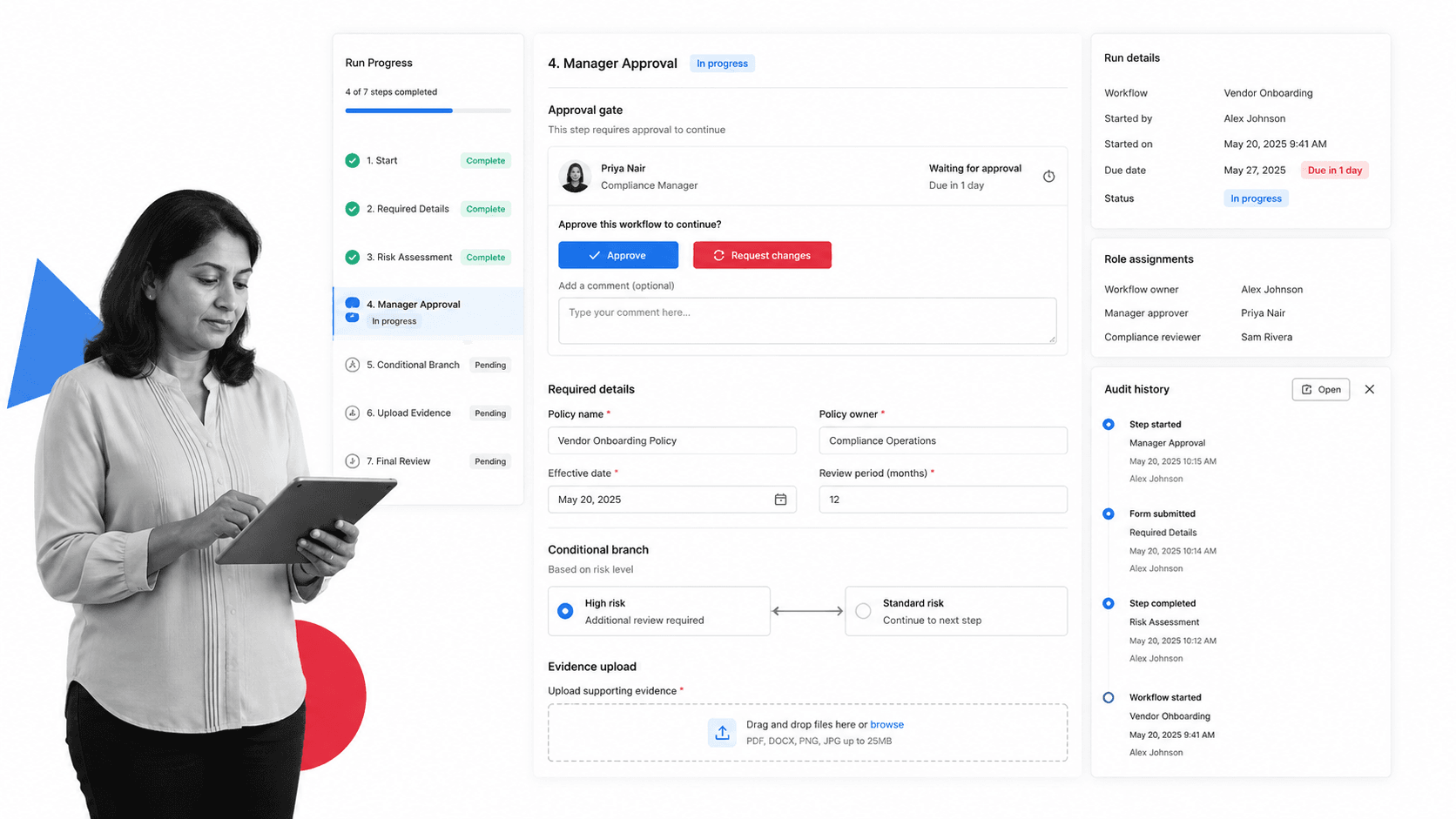
Best for: enforceable recurring SOP, approval, and compliance workflows.
Process Street is the best Cflow alternative when a request is not the finish line. It is the strongest fit for teams that need intake to become assigned, enforceable, repeatable work with clear owners, required steps, approvals, conditional logic, file collection, and a full run history.
That distinction matters for HR onboarding, vendor reviews, incident response, compliance attestations, finance approvals, client intake, internal requests, and quality checks. A generic workflow tool can route a request. Process Street turns the request into a workflow people have to complete correctly, then keeps the record that proves it happened.
Process Street is a Compliance Operations Platform, not a BPMN modeling suite or a desktop RPA control room. It is built for operators who need to enforce the process after the request arrives, and for compliance and operations leaders who need proof rather than just visibility. If your workflow creates accountable internal work, that execution layer is the buyer requirement.
It also connects to the systems teams already use, and its built-in AI can help build workflows and new integrations without a developer queue. Use Process Street pricing for current plan details, including the trial and current package tracks.
Process Street key features:
- Structured workflow runs with owners, due dates, required fields, and conditional logic.
- approval tasks that keep review inside the workflow instead of a separate inbox.
- File collection, comments, task history, and audit trails for operational proof.
- Recurring schedules and automations that keep repeatable workflows moving.
- Template-ready processes such as an employee onboarding checklist, client onboarding checklist, content approval workflow, and incident report template.
Process Street pros:
- Excellent fit when a request must trigger human accountability, not just a status change.
- Readable enough for operations, HR, compliance, finance, customer, and IT teams to own.
- Keeps intake, tasks, approvals, evidence, and history in one workflow record.
- Better for recurring SOPs and compliance work than a generic board or a spreadsheet.
- Strong fit for teams standardizing work across many departments.
Process Street cons:
- Not the right pick when the core need is BPMN modeling, process simulation, or desktop RPA.
- Not a public-facing form marketing tool or a pure app-to-app connector.
For current package details, see Process Street pricing. If you need heavy BPMN modeling and process simulation, a dedicated BPM suite such as Nintex or Kissflow may fit better.
2. Kissflow
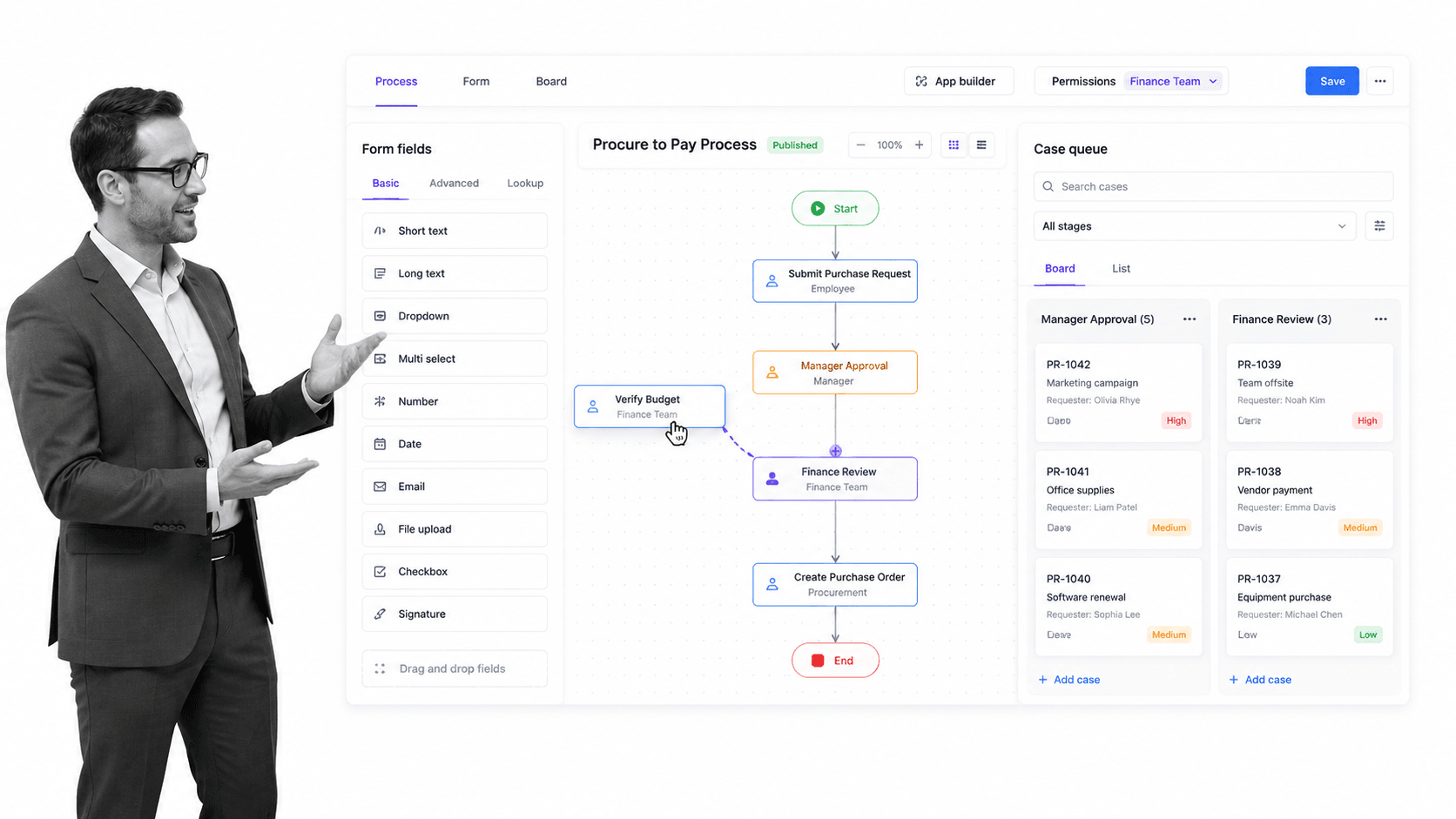
Best for: no-code custom apps and process workflows for larger teams.
Kissflow is a no-code work platform aimed at teams that want to build custom applications, processes, boards, and case management on one system. Its site positions the platform around unified no-code development with governance and AI-assisted automation, and it directs buyers to a consultation for pricing rather than publishing per-user rates.
It beats Process Street when the goal is to build many custom internal apps and processes on a single no-code platform. It is weaker when a non-technical team primarily needs pre-built, enforceable SOP execution with audit-ready proof rather than an app-building environment.
Kissflow key features:
- No-code process, project, board, and case management in one platform.
- Drag-and-drop process and app building.
- Governance and security controls for larger teams.
- AI-assisted automation features.
Kissflow pros:
- Strong fit for building custom internal apps without code.
- Consolidates several work patterns on one platform.
- Good for larger teams standardizing on a single no-code system.
Kissflow cons:
- Public pricing is consultation-based rather than transparent.
- Can be more platform than a team that only needs simple recurring SOPs.
For current package details, see Kissflow pricing. Kissflow is a better fit when a team wants to build many custom internal apps on one no-code platform rather than run pre-built SOPs.
3. Pipefy
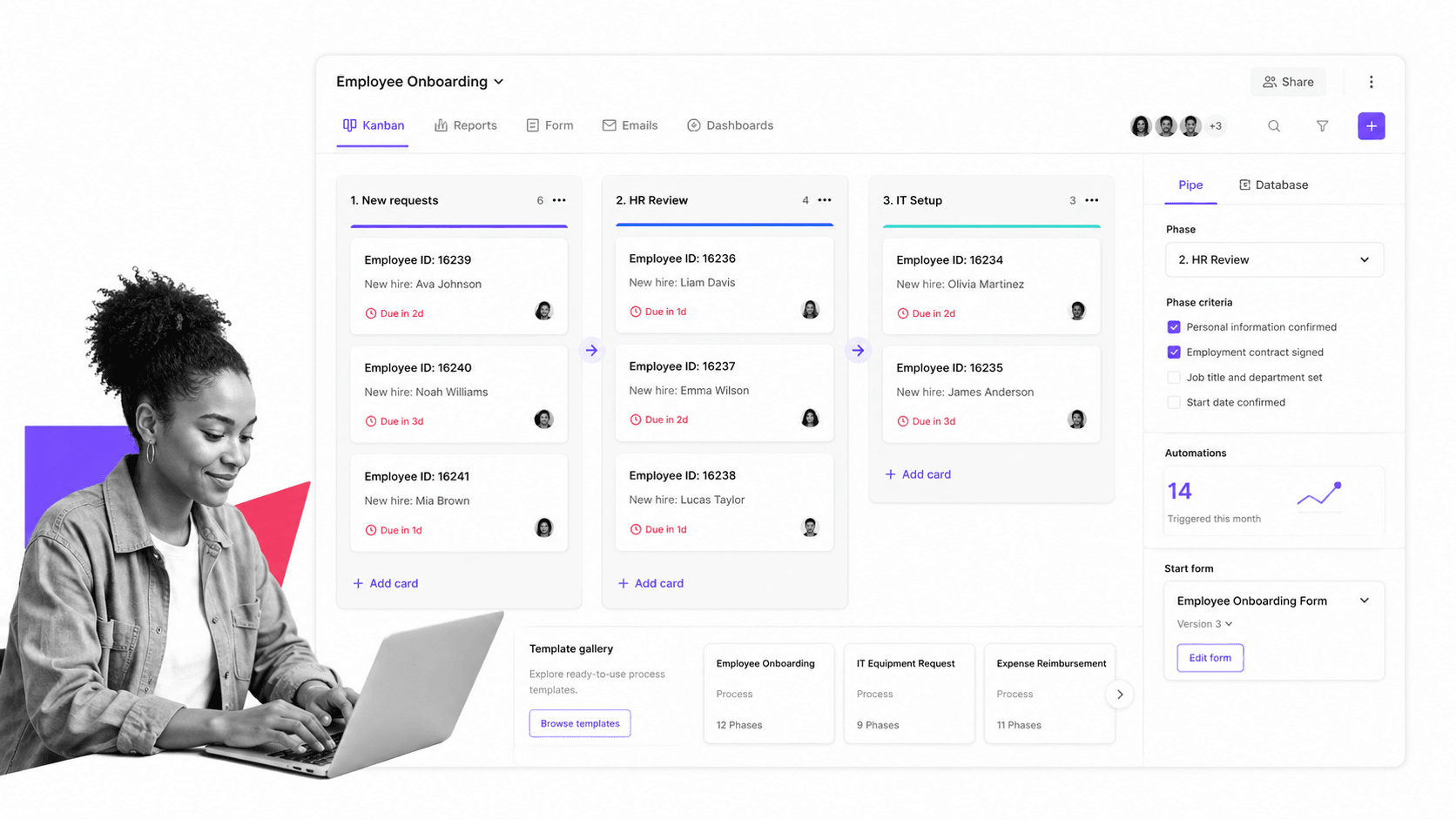
Best for: process management for operations teams that want a free start.
Pipefy is a process management platform built around Kanban-style pipes that move requests through phases. Its pricing page lists a free Starter plan with a small number of processes and users, plus Business and Enterprise tiers that require a sales conversation.
It beats Process Street when a team wants a visible Kanban process pipe and a genuinely free starting plan for a small group. It is weaker when the process needs strict step-by-step execution, required evidence, and audit-ready records more than a card-based board.
Pipefy key features:
- Kanban-style process pipes with phases and cards.
- Free Starter plan for a small team.
- Templates and AI-assisted process building.
- Automations and integrations on paid tiers.
Pipefy pros:
- Free plan makes evaluation easy.
- Visual pipe model is intuitive for operations teams.
- Good for standardizing request-based processes.
Pipefy cons:
- Paid pricing is quote-based rather than public.
- Card-based pipes offer less strict execution enforcement than a checklist workflow.
For current package details, see Pipefy pricing. Pipefy is a better fit when a team wants Kanban-style process pipes and a genuinely free starting plan for a small group.
4. monday.com
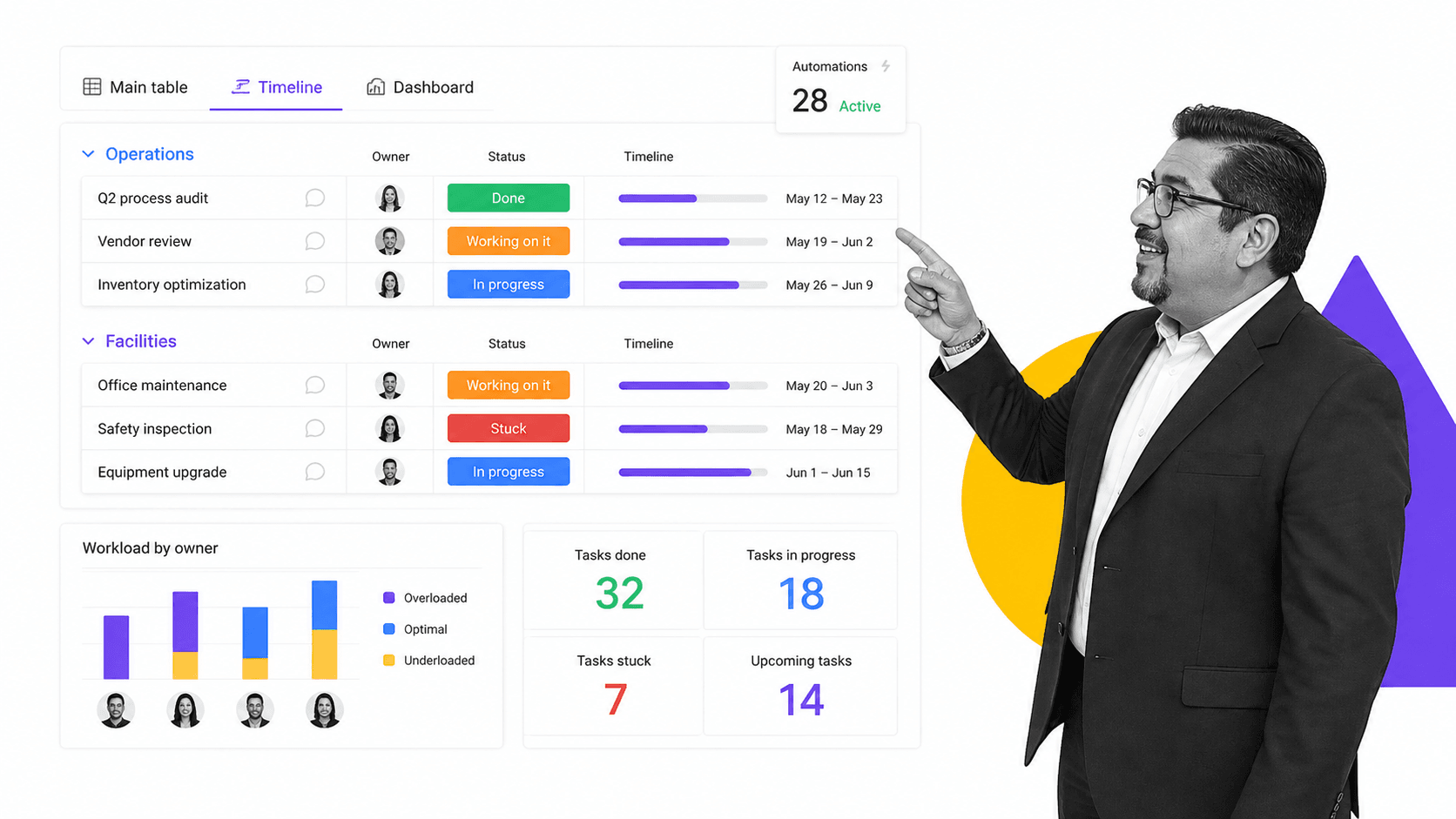
Best for: visual work management across departments.
monday.com is a work management platform built around visual, color-coded boards, multiple views, automations, and dashboards. Its pricing page shows a free tier for very small teams and paid tiers that scale by seat.
It beats Process Street when the work is mostly cross-functional visibility, flexible boards, and department-level planning. It is weaker when the process needs strict step order, required evidence, approval gates, and an audit-ready run history.
monday.com key features:
- Color-coded boards and status columns.
- Multiple views including timeline and dashboards.
- Automations and integrations on paid plans.
- Workload and dashboard views for planning.
monday.com pros:
- Strong visual work management surface.
- Flexible across many departments.
- Free tier for very small teams.
monday.com cons:
- Broad flexibility can create inconsistent process patterns.
- Not purpose-built for enforceable SOP execution.
For current package details, see monday.com pricing. monday.com is a better fit when visual boards and cross-team work tracking matter more than strict process enforcement.
5. Zapier
Best for: connecting apps and automating tasks across SaaS tools.
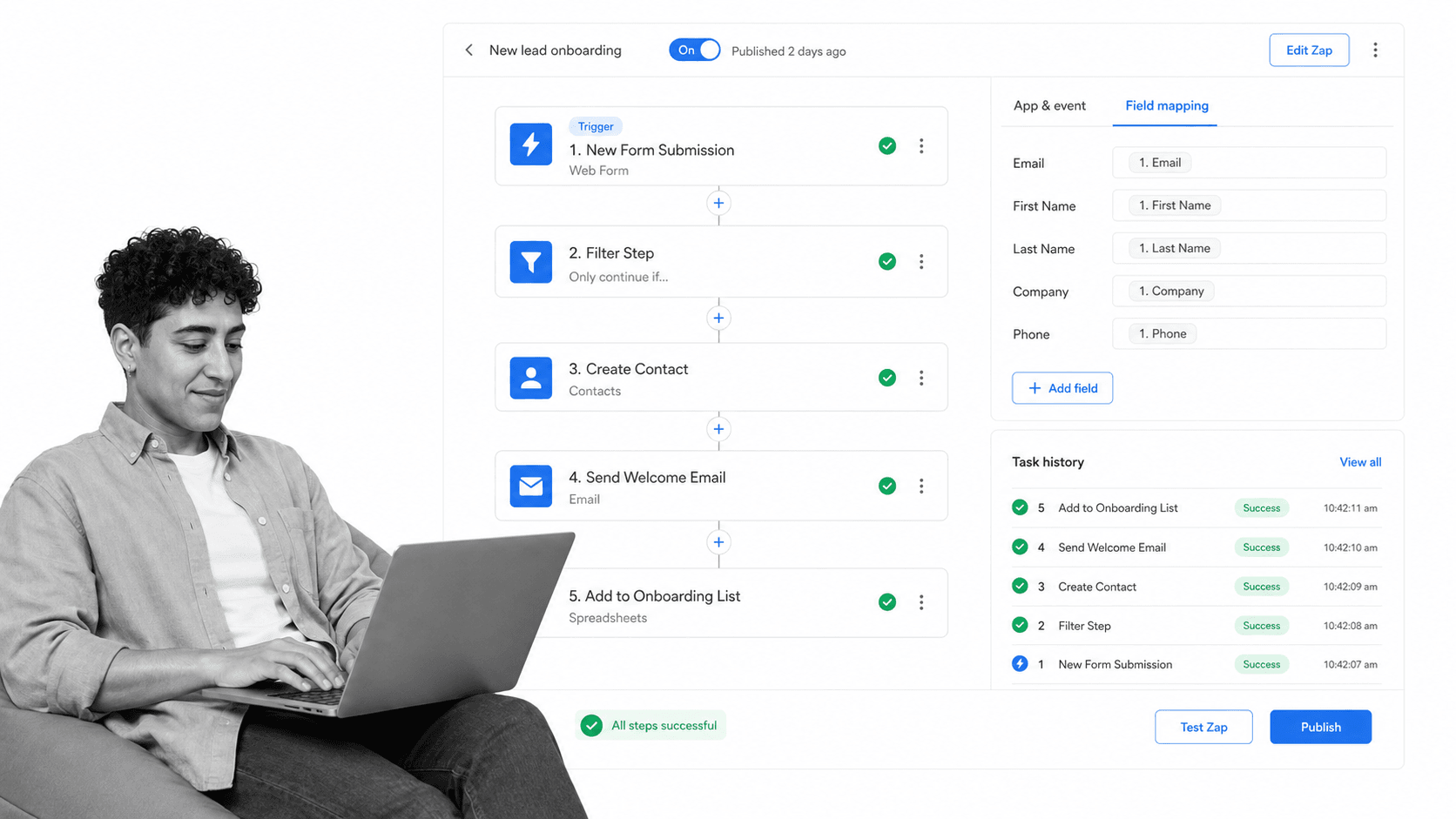
Zapier is an automation platform that connects SaaS apps and moves data between them with multi-step Zaps. Its pricing page shows a free plan with a monthly task allowance, plus Professional, Team, and Enterprise tiers with higher task limits and more collaboration.
It beats Process Street when the real need is app-to-app automation across many tools. It is weaker when the workflow depends on human ownership, approvals, and evidence rather than automated data movement.
Zapier key features:
- Multi-step Zaps across a large app library.
- Free plan with a monthly task allowance.
- Filters, paths, and field mapping.
- Team and Enterprise administration on higher tiers.
Zapier pros:
- Very broad app coverage.
- Fast to set up for simple automations.
- Free plan is useful for trying automation.
Zapier cons:
- Not a human-workflow execution layer.
- Task-based pricing can add up at higher volumes.
For current package details, see Zapier pricing. Zapier is a better fit when the real need is app-to-app automation rather than human-owned workflow execution.
6. Jotform
Best for: form-driven intake, approvals, and no-code workflow.
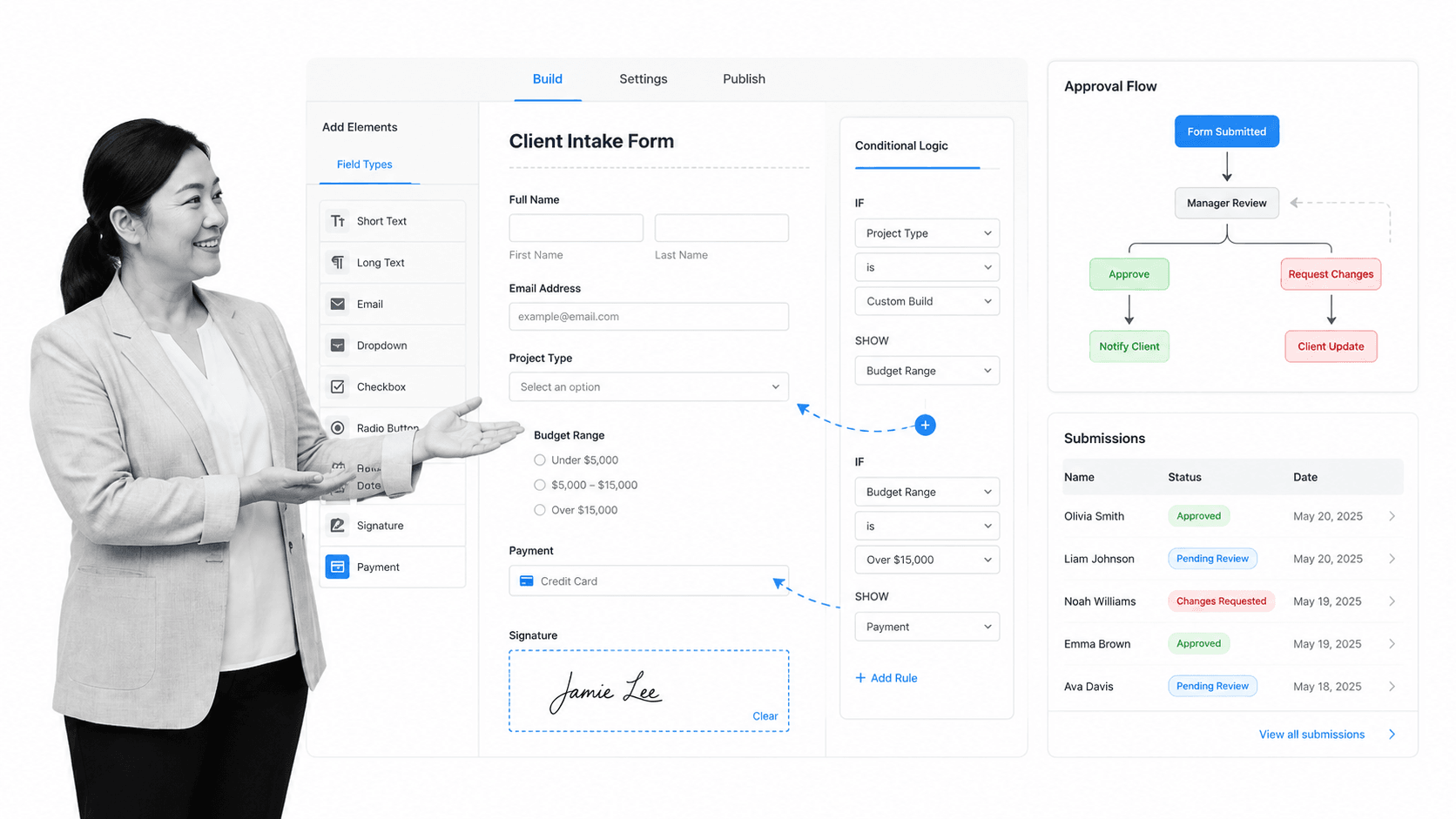
Jotform is a no-code form platform that also offers approval flows and workflow features on top of its forms. Its pricing page lists a free Starter plan with limited forms and submissions, paid Bronze, Silver, and Gold tiers, and an Enterprise option, with HIPAA features available on higher tiers.
It beats Process Street when the process genuinely starts with a public-facing form and approvals sit on top of that form. It is weaker when the work after submission needs a guided, enforced workflow with cross-department SOP history.
Jotform key features:
- Drag-and-drop form builder.
- Approval flows built on forms.
- Free Starter plan with form and submission limits.
- HIPAA features on higher tiers.
Jotform pros:
- Excellent for form-first intake.
- Approvals sit naturally on top of forms.
- Transparent published pricing.
Jotform cons:
- Workflow depth is form-centered.
- Less suited to complex recurring internal SOP enforcement.
For current package details, see Jotform pricing. Jotform is a better fit when the process begins with a public-facing form and approvals sit on top of that form.
7. Nintex
Best for: enterprise process automation with mapping and RPA.
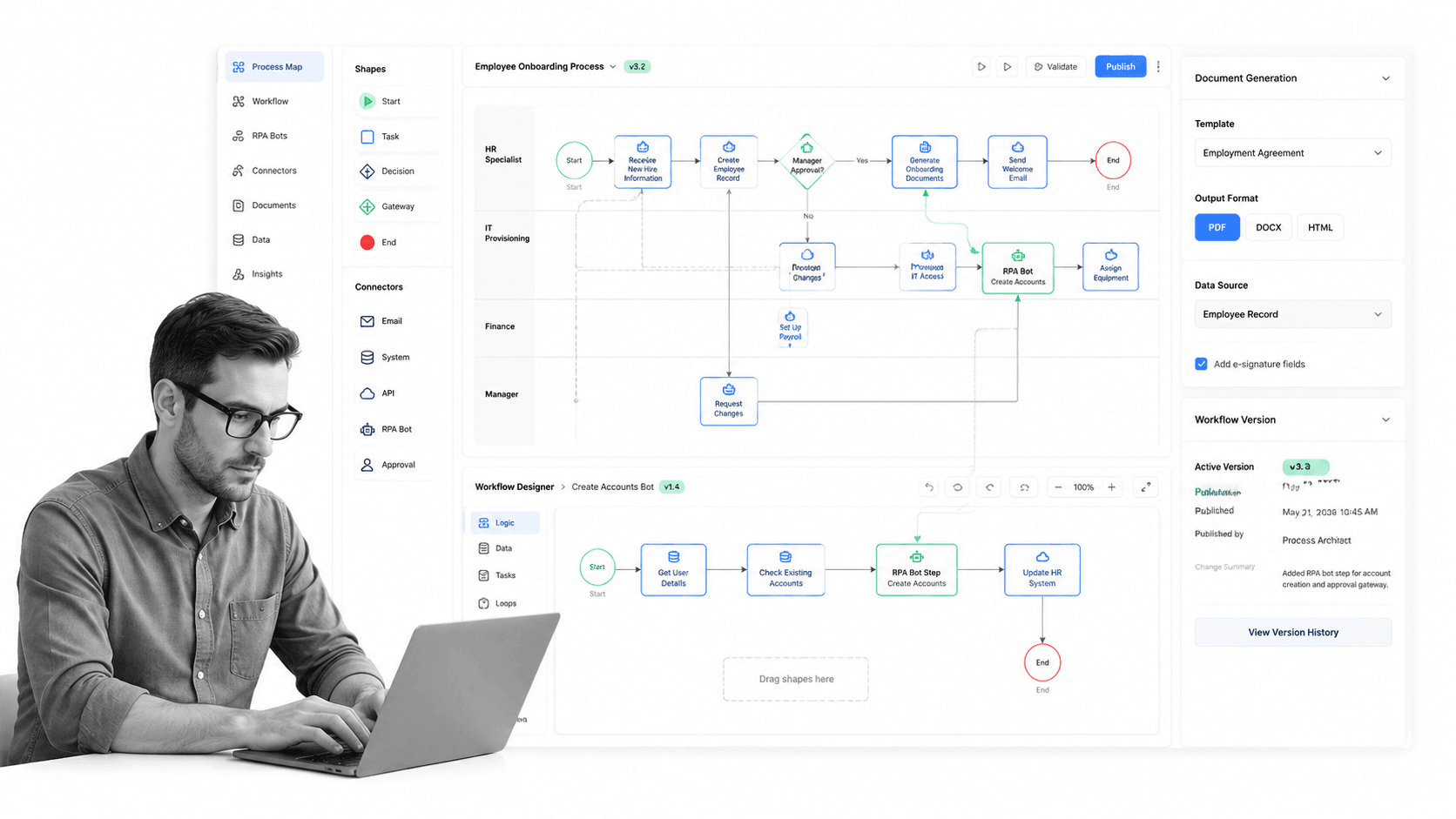
Nintex is an enterprise process automation platform that combines process mapping, workflow automation, RPA, and document generation. Its site emphasizes governed automation across large organizations and directs buyers to a trial or demo rather than publishing prices.
It beats Process Street when a large enterprise needs process mapping, robotic process automation, and document automation governed together in one suite. It is weaker when a non-technical team needs a simple, readable, enforceable checklist workflow without heavy setup.
Nintex key features:
- Process mapping and documentation.
- Workflow automation across systems.
- Robotic process automation.
- Document generation and eSign.
Nintex pros:
- Broad enterprise automation capability.
- Strong for process mapping plus RPA.
- Built for governance and scale.
Nintex cons:
- Pricing is not published and skews enterprise.
- Can be heavier than smaller teams need.
For current package details, see Nintex pricing. Nintex is a better fit for large enterprises that need process mapping, RPA, and document automation governed together.
8. Wrike
Best for: cross-functional project and work management.
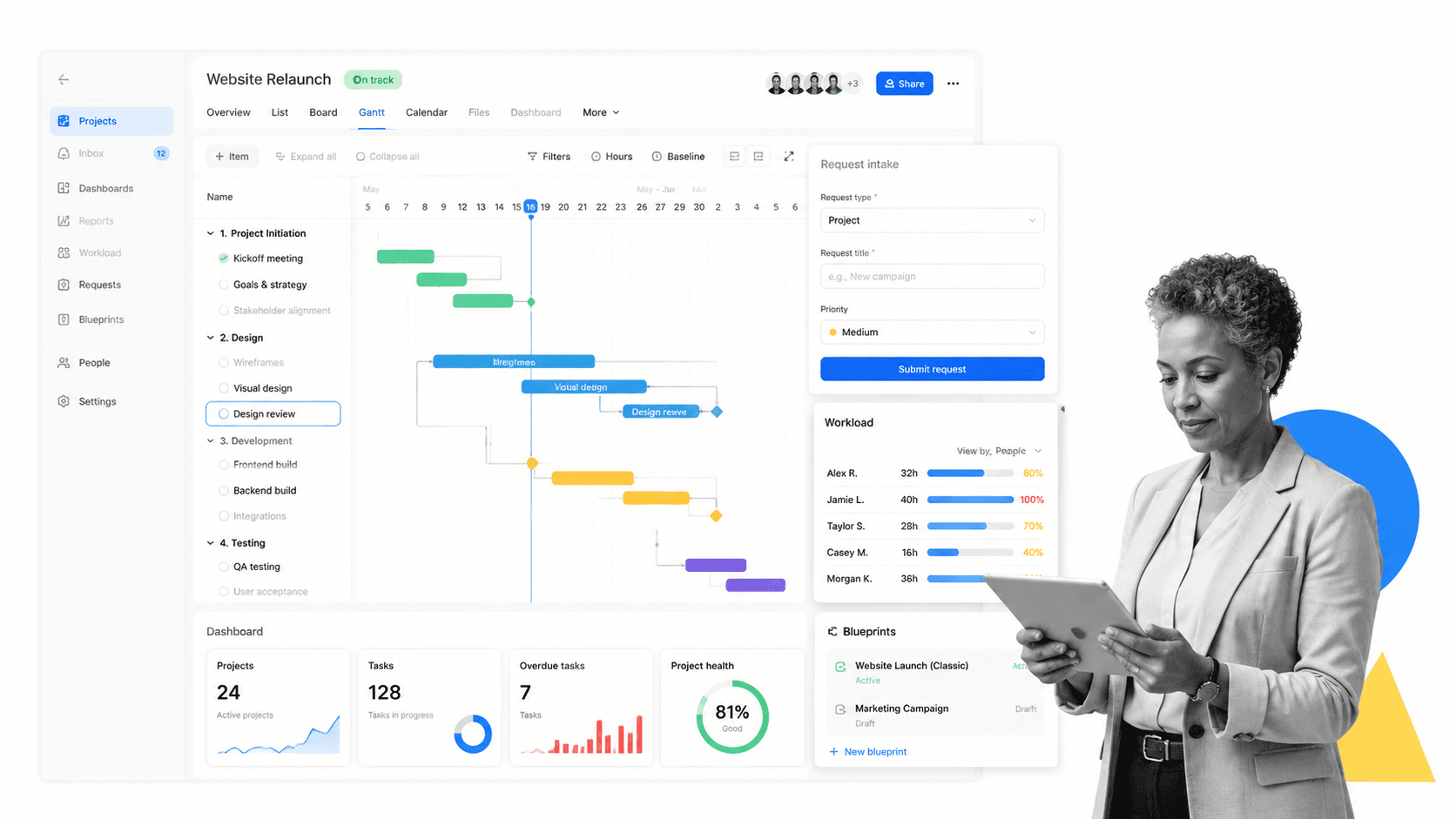
Wrike is a collaborative work management platform for project planning, task management, workload, dashboards, and Gantt-style coordination. Its pricing page shows a free plan and paid Team and Business tiers, with custom enterprise tiers above them.
It beats Process Street when project scheduling, resourcing, dependencies, and cross-functional delivery are the main need. It is weaker when a team needs a simple recurring workflow run with enforced steps and evidence rather than project plans.
Wrike key features:
- Custom request forms and blueprints.
- Interactive Gantt charts and dependencies.
- Workload and resource planning.
- Dashboards and reports.
Wrike pros:
- Strong for complex project planning.
- Useful request forms and blueprints.
- Good fit for cross-functional delivery teams.
Wrike cons:
- Heavier than needed for simple SOPs.
- Project controls do not automatically create audit-ready process execution.
For current package details, see Wrike pricing. Wrike is a better fit when project planning, resourcing, and cross-functional delivery matter more than SOP enforcement.
Which Cflow alternative fits your use case
A good Cflow replacement decision starts with the work pattern, not the vendor name.
- Choose Process Street when requests must become assigned workflows with approvals, due dates, required evidence, and audit history.
- Choose Kissflow when the goal is building many custom no-code internal apps on one platform.
- Choose Pipefy when a Kanban-style process pipe and a free starting plan fit a small operations team.
- Choose monday.com when flexible color-coded boards and cross-team visibility are the priority.
- Choose Zapier when the real job is connecting SaaS apps and automating data movement.
- Choose Jotform when the process genuinely starts with a public-facing form and approvals sit on top.
- Choose Nintex when a large enterprise needs process mapping, RPA, and document automation governed together.
- Choose Wrike when project planning, resourcing, and cross-functional delivery are the core problem.
If you are leaving Cflow because approvals create messy follow-up, do not stop at workflow features. Map the entire path from request to owner, approval, evidence, and final status. That path can be built as a checklist builder workflow, a request workflow, or a recurring SOP inside business process automation tools, depending on how much control the process needs. The right choice follows the work, not the logo.
The cleanest architecture is often intake plus execution. A simple intake surface collects the request. The execution layer enforces the work. That keeps the entry point easy while making the process accountable, which is exactly the gap teams feel when a generic workflow tool stops scaling with them.
Cflow alternatives FAQs
What is the best Cflow alternative?
The best Cflow alternative depends on what happens after a request is submitted. Process Street is best when requests need to become recurring workflows with owners, approvals, evidence, and audit history. Kissflow, Pipefy, monday.com, Zapier, Jotform, Nintex, and Wrike may fit better for app building, Kanban process pipes, visual work management, app automation, forms, enterprise process mapping, or project planning.
Is there a free Cflow alternative?
Yes. Pipefy, monday.com, Zapier, Jotform, and Wrike each offer a free plan or free tier, and Process Street offers a free trial. Cflow itself lists a 14-day free trial rather than a free plan. Always check each vendor’s pricing page because limits on users, workflows, tasks, and features change.
Why is Process Street ranked first?
Process Street is ranked first for teams whose requests create accountable recurring work that must be followed the same way every time. It is not ranked first for every use case. If the priority is building custom apps, automating app-to-app data, or heavy BPMN modeling, another tool on this list may be the better fit.
What is the closest alternative to Cflow?
For no-code approval and process workflows, Kissflow, Pipefy, and Nintex are closest to Cflow in category. For teams that mainly need the work after a request to be enforced and auditable, Process Street is closest to the operational job most teams are actually trying to accomplish.
Which Cflow alternative is best for small teams?
Small teams usually shortlist Pipefy, monday.com, Jotform, and Process Street. If the team needs a free starting point, Pipefy and monday.com are common picks. If the team needs enforced follow-up, approvals, and recurring SOPs, Process Street is the stronger fit.
Which Cflow alternative is best for enterprise teams?
Enterprise teams should compare Process Street, Nintex, and Kissflow based on governance needs. Nintex fits process mapping, RPA, and document automation, Kissflow fits broad no-code app development, and Process Street fits enforceable recurring workflows with audit-ready proof.
Can I migrate from Cflow to Process Street?
Yes, but treat the migration as a workflow design exercise rather than a direct copy. Map each Cflow workflow to the process it drives: requester, required fields, owner, approval, exception path, evidence, integration, and final record. Process Street is strongest when the migrated work needs accountability and proof, not just routing.
If Cflow is routing requests your team still has to chase manually, start with Process Street. Build the workflow that should happen after a request arrives, then connect the intake and the apps around it.
Comparing something else? The full directory of software alternatives and competitor comparisons covers AI agents, workflow and BPM platforms, integration tools, and more.
