


Turn every policy into automated workflows with built-in enforcement and audit-ready proof.



Form Repository

A form repository is a governed place to store, organize, launch, update, and track the forms a business uses to collect information. It keeps approved form versions, ownership, routing rules, submissions, and records in one system instead of scattering them across shared drives, spreadsheets, email threads, and one-off form builders.
The best form repository is not just a folder full of PDFs. It tells people which form to use, what information is required, who reviews the submission, what happens after approval, and where the completed record is stored. That turns forms from passive documents into controlled intake points for recurring work.
This guide explains what a form repository does, what belongs inside it, how it differs from nearby tools, and how Process Street helps teams turn reusable forms into workflows with owners, approvals, automations, and proof.
In this article, we are going to cover:
- What a form repository is
- Why a form repository matters
- Form repository components
- Form repository vs form builder, file drive, and database
- How to build a form repository
- Build a form repository in Process Street
- Form repository examples
- Form repository FAQs
What a form repository is
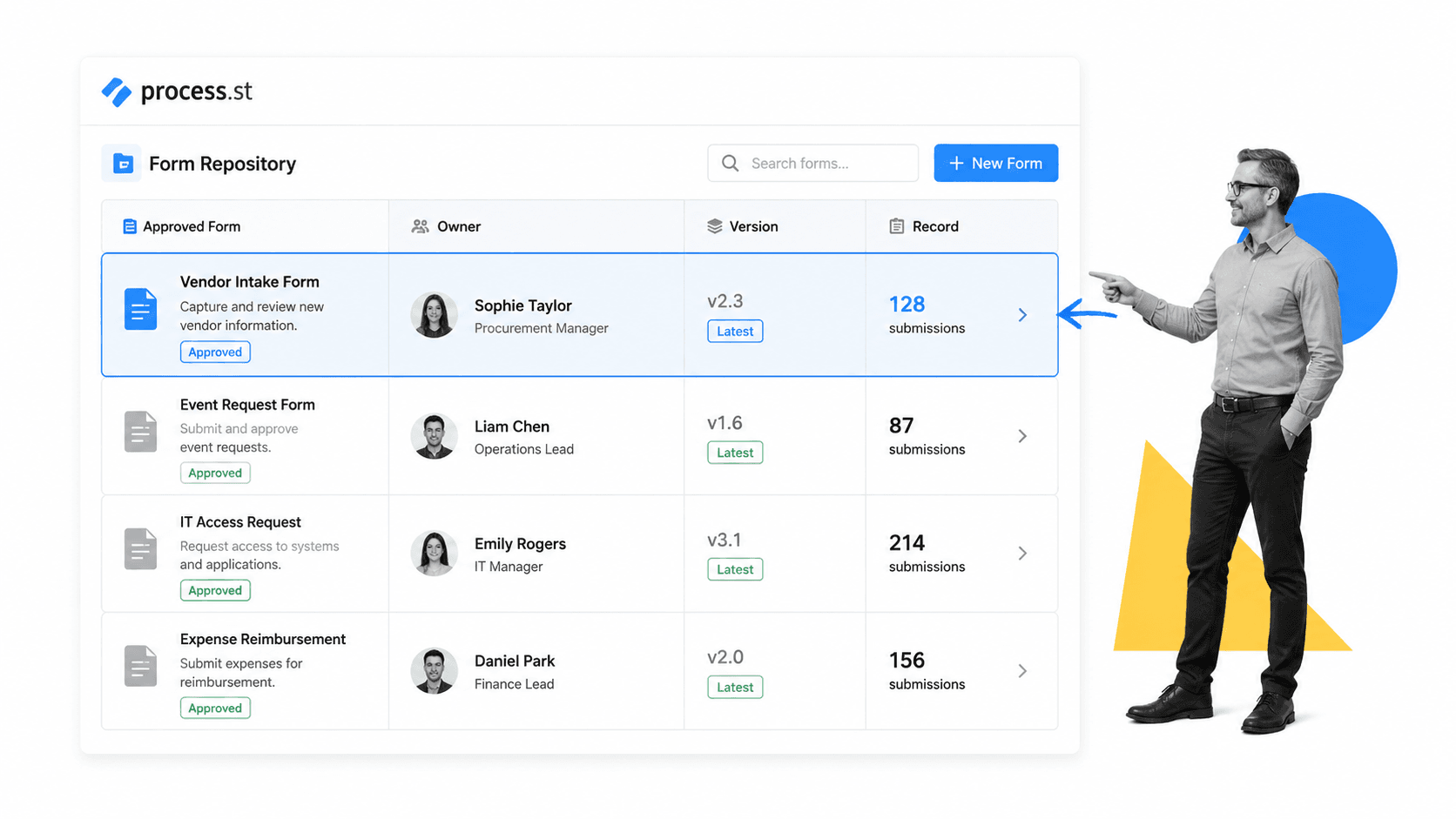
A form repository is the operating system around business forms. It answers a simple question: when someone needs to collect information, which approved form should they use, what rules apply, and what happens to the response?
A simple definition
A form repository is a centralized, governed library for reusable forms and form submissions. It can include intake forms, request forms, approval forms, checklists, questionnaires, inspection forms, compliance attestations, HR forms, vendor forms, and customer onboarding forms. When it is connected to workflow documentation, it also preserves the process around each form, not just the form itself.
That distinction matters. A static document can show what fields someone should complete. A repository tells the team which version is current, who owns it, who can change it, what data is required, where the submission goes, and how long the record should be retained.
What usually lives in a form repository
- Approved blank forms and form templates.
- Submission records, attachments, and evidence.
- Owners, reviewers, approvers, and backup owners.
- Version history, change notes, and retirement status.
- Rules for routing, access, retention, and escalation.
- Links to the workflow, SOP, or policy that uses the form.
A form repository often overlaps with process documentation, but the form repository is narrower. Process documentation explains how work should happen. The repository controls the forms that collect the inputs, trigger the work, and prove the work happened.
Why a form repository matters
Forms are deceptively risky. A team can run hundreds of small intake processes without noticing that the form layer has become uncontrolled. Someone copies an old vendor questionnaire. A manager sends a stale HR template. A field team uses a local inspection sheet. A customer submits information through a form nobody monitors. Each small break creates confusion downstream.
It prevents version drift
Version drift happens when multiple copies of the same form circulate at the same time. People may not know which one is current, which fields are required, or which policy changed. A form repository reduces this by making the approved version visible and retiring obsolete forms instead of letting them live in old folders.
That discipline fits the same logic as good file naming conventions: names, ownership, structure, and review rules make files easier to trust. The repository adds a stronger operating layer by tying each form to workflow rules and submission records.
It protects intake quality
Bad intake creates bad work. If a form lets users skip required fields, submit ambiguous answers, or attach the wrong evidence, the team spends time chasing missing details instead of completing the process. A repository should define what a valid submission looks like before the work starts.
For web-based forms, accessibility and clarity matter too. The W3C form accessibility guidance explains practical patterns for labels, instructions, grouping, and errors so people can complete forms correctly. A business repository should make those standards part of the form review process.
It creates a record trail
In compliance-heavy operations, the form is often the start of the audit trail. A purchase request, access request, onboarding packet, inspection checklist, policy acknowledgment, or client intake form may be the evidence that a control started correctly. A repository should preserve who submitted the form, who reviewed it, what decision was made, and where the final record lives.
Public-sector records teams treat this kind of control seriously. The National Archives records management policy frames records management as policy, scheduling, preservation, and access. Most companies do not need a government-grade records program for every form, but they do need clear rules for forms that carry operational or compliance consequences.
Form repository components
A useful form repository has more than a search box. It combines library structure, ownership, workflow routing, record storage, and improvement loops. The exact setup can be simple, but each component needs a named owner.
1. Form inventory
Start with an inventory of forms. The inventory should show the form name, purpose, business owner, department, audience, status, current version, last review date, and related workflow. Without this inventory, teams end up discovering forms by memory or Slack search.
2. Ownership and approval rules
Every form needs an owner who can approve changes. For simple teams, this can be one department lead. For controlled work, the owner may need a reviewer and final approver. When those rules live inside approvals, the repository stops depending on side conversations.
3. Version control
A form repository should distinguish draft, approved, active, deprecated, and archived forms. Drafts are being edited. Approved forms can be used. Deprecated forms are no longer valid for new work but may need to stay visible for recordkeeping. Archived forms are historical only.
4. Intake and validation
The repository should specify what happens when a form is submitted. Required fields, conditional questions, attachment rules, and validation checks make the submission useful. For more complex routing, a form controller can decide which owner, workflow, or approval path applies after intake.
5. Workflow connection
Forms do not create value until they trigger action. A purchase request should create review tasks. A new hire form should launch onboarding. A quality issue form should start investigation. A vendor form should route to due diligence. That is why a form repository works best when connected to a workflow management system instead of sitting beside the work.
6. Record retention and security
Some forms contain personal data, financial details, health information, security context, or customer records. The repository should define access, retention, and disposal rules. The FTC data security guidance is a useful reminder that companies should keep only what they need, protect what they keep, and control who can access it.
7. Review and improvement cadence
A repository is not complete after the first upload. Forms need review because policies change, teams change, tools change, and downstream users find better questions. Build a review cadence so owners check active forms before they become stale.
Form repository vs form builder, file drive, and database
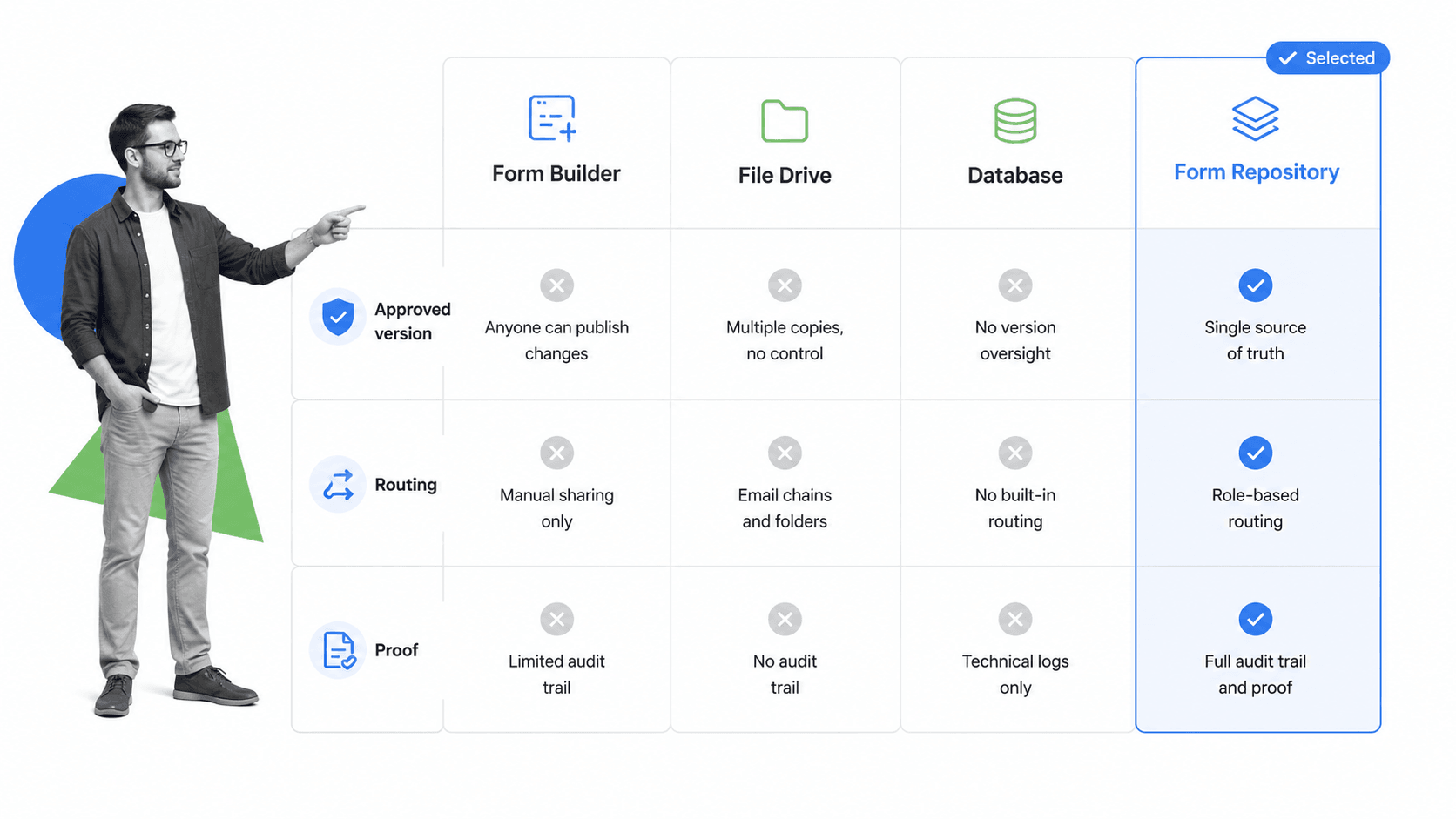
A form repository sits between several familiar systems. It may use a form builder, store files in a document system, and send data to a database, but it has a different job from each of them.
Form builder
A form builder creates the form interface. It helps you add fields, conditional questions, layouts, and submission settings. That is useful, but it does not automatically govern the entire lifecycle. A repository answers what the form is for, whether it is approved, who owns it, what workflow it launches, and what record is preserved.
File drive
A shared drive stores files. It can hold PDFs, spreadsheets, templates, and exports. The problem is that file drives rarely enforce the process around the file. They can show where a document lives, but they often cannot tell whether a form is active, who approved it, or whether a submission triggered the right follow-up.
Database
A database stores structured data. It is good for searching, reporting, and integrating with other systems. A database alone does not decide what questions should be asked, what approval path should run, or whether a submitted form satisfies the policy behind the process.
Form repository
A form repository combines the governed form, the workflow, and the record trail. It gives teams one place to find the correct form, launch the right work, and prove what happened. When paired with workflow management software, it becomes part of an operating system for recurring work.
This is also why broad enterprise document management systems and document management systems tools can help, but they are not always enough. The repository needs a workflow layer for work that must be assigned, reviewed, escalated, and audited.
How to build a form repository
The fastest way to build a form repository is to start with active forms, not theory. Find the forms people already use, sort them by risk and frequency, then turn the most important ones into governed workflows.
Step 1: Collect the active forms
Ask each department for the forms they use in recurring work. Include digital forms, PDFs, spreadsheets, intake docs, email templates, and checklists that collect information. Do not try to perfect the taxonomy on day one. First, capture what exists.
Step 2: Decide which forms are controlled
Not every form needs heavy governance. A lunch preference survey can stay lightweight. A vendor risk questionnaire, payroll change request, access request, incident report, quality inspection, or customer onboarding form needs stronger control. Mark controlled forms clearly.
Step 3: Assign ownership
Every controlled form needs one business owner, one backup owner, and a review cadence. Ownership should not sit with IT by default. The form owner should be the person accountable for the outcome of the process.
Step 4: Standardize metadata
Create required metadata fields for each form: name, purpose, audience, owner, department, status, version, review date, related workflow, data sensitivity, retention rule, and approval path. This makes the repository searchable and governable.
Step 5: Connect each form to a workflow
If a form starts recurring work, connect it to a workflow. A completed request should create tasks, assign owners, route approvals, send notifications, update systems, and preserve proof. For teams new to this, running workflows is the practical foundation: people need a repeatable run, not just a stored template.
Step 6: Define review rules
Set review triggers. Some forms need quarterly or annual review. Others need review when a policy changes, a regulation changes, a field creates repeated confusion, or a downstream team reports missing information.
Step 7: Retire old forms
The repository should make retired forms hard to reuse accidentally. Keep historical records where required, but remove obsolete forms from active paths. If people can still launch a retired form, the repository is not doing its job.
Process-oriented teams can borrow from ISO process approach guidance: define the process, assign responsibility, monitor results, and improve the system. A form repository is one concrete place where that process approach becomes visible.
Build a form repository in Process Street
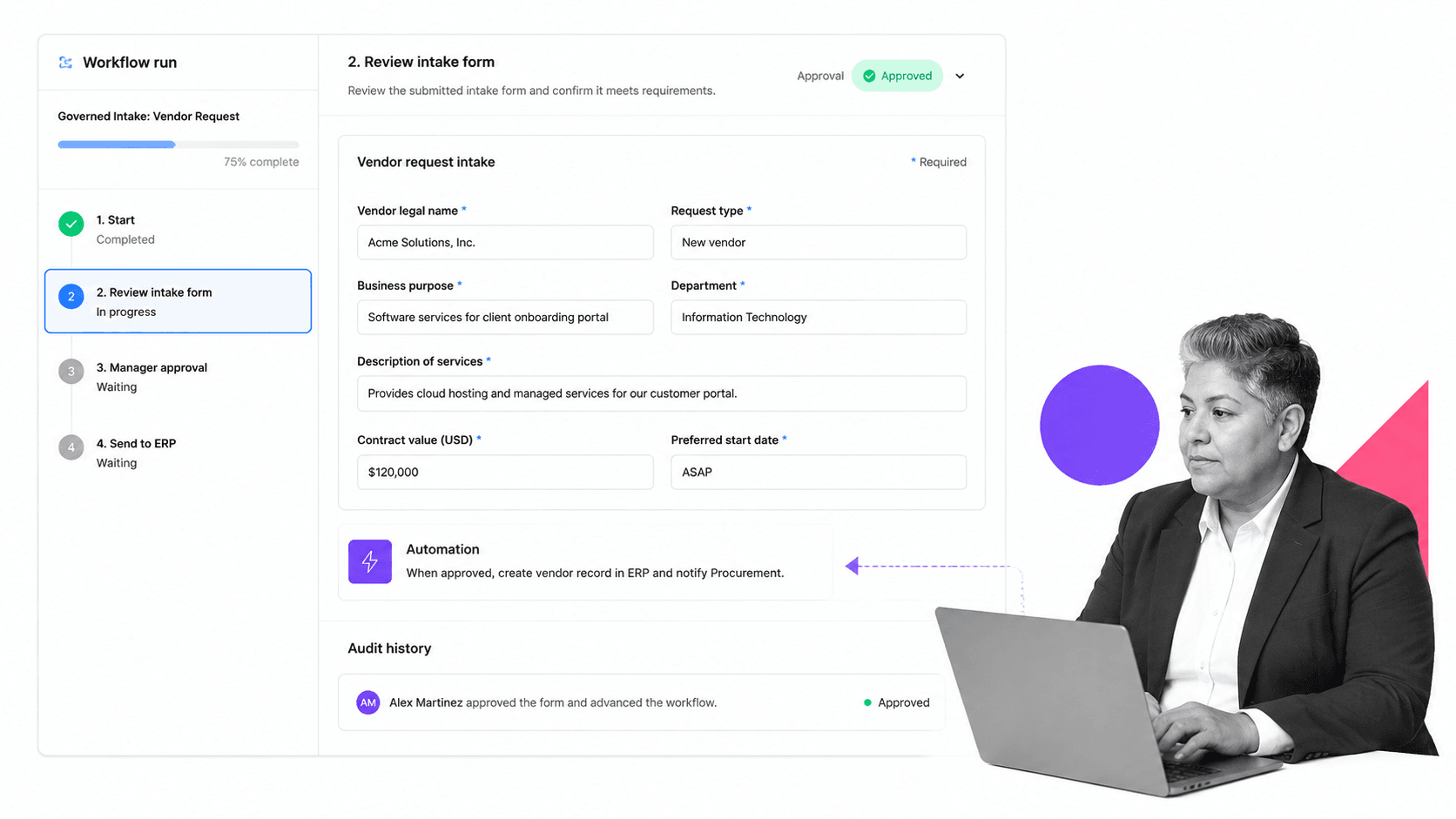
Process Street works well as a form repository when the goal is not just storage, but controlled execution. You can use workflows to turn each form into a repeatable intake, review, approval, and record process.
Use workflows as active form entries
Instead of treating a form as a file, treat it as the start of a workflow. The workflow can contain the fields, instructions, required attachments, assignments, due dates, approvals, and evidence needed to complete the process correctly.
Use required fields to protect intake
Required fields make submissions usable. Conditional fields keep the form concise by showing the right questions only when they matter. Short instructions reduce back-and-forth. The point is not to collect more data. The point is to collect the right data before work moves forward.
Use approvals to control decisions
A controlled form often exists because someone needs to make a decision. Approval steps can route a request to a manager, compliance owner, finance reviewer, HR lead, IT owner, or customer operations owner. The decision becomes part of the record instead of disappearing into email.
Use automations to move records
A repository should not force people to copy data by hand. Once a form is submitted and approved, automations can update connected systems, notify stakeholders, create follow-up work, or send an output document. Process Street has direct, universal integrations to 5,000+ systems. Need a new one? An AI agent builds it on the fly.
Use audit history as proof
The repository should preserve who did what, when the step happened, and what evidence was attached. That matters for compliance, operations, onboarding, finance, IT, legal, customer success, and quality teams. If a question appears later, the record should be inside the workflow, not buried in a thread.
The same building blocks support many adjacent workflow systems. A team can start from a standard operating procedure template, adapt a purchase order template, or convert an employee onboarding checklist into a governed form-driven workflow.
Form repository examples
A form repository can support almost any recurring process where the first step is collecting structured information. The best examples are common enough to justify a reusable form and important enough to require control.
HR and people operations
HR teams use forms for onboarding, role changes, equipment requests, policy acknowledgments, leave requests, exit interviews, performance reviews, and employee data changes. A repository keeps each form current and connects submissions to the workflow that completes the request.
Finance and procurement
Finance teams use forms for purchase requests, vendor setup, reimbursement, budget changes, invoice exceptions, card requests, and approval packets. A repository helps prevent missing approvals, stale vendor details, and incomplete evidence.
IT and security
IT teams use forms for access requests, device requests, incident reports, software approvals, data access reviews, and offboarding. Repository governance matters because many of these forms touch sensitive systems and need clear approval trails.
Compliance and quality
Compliance and quality teams use forms for control attestations, audit evidence, inspection logs, corrective actions, training acknowledgments, and risk assessments. A controlled repository pairs naturally with process notation such as BPMN 2.0 overview, because both make operational flows easier to inspect.
Customer operations
Customer teams use forms for onboarding intake, implementation scoping, support escalation, renewal handoffs, and account change requests. A repository keeps the intake consistent so customer-facing work starts with the context the team needs.
Across these examples, the form repository should connect forms to the operating layer. For teams choosing software, the question is not only whether a tool stores forms. It is whether it can assign work, enforce rules, and preserve proof. That is the same buyer question behind modern process management software.
Form repository FAQs
What is a form repository?
A form repository is a centralized, governed place to store, organize, launch, and track reusable business forms and submitted records. It helps teams know which form is approved, who owns it, what workflow it starts, and where the completed record lives.
Why does a form repository matter?
A form repository matters because forms often start important work. Without one, teams use stale versions, collect incomplete information, miss approvals, and lose proof. A repository makes forms easier to control and easier to trust.
Is a form repository the same as a form builder?
No. A form builder helps create the form interface. A form repository governs the form lifecycle: approved versions, owners, routing, submissions, records, and retirement rules.
What should be included in a form repository?
A form repository should include approved forms, owners, status, version history, review dates, data sensitivity, routing rules, related workflows, submission records, and retention rules. The exact fields should match the risk and frequency of the forms your team uses.
How do you build a form repository?
Start by inventorying active forms, identifying controlled forms, assigning owners, standardizing metadata, connecting forms to workflows, setting review rules, and retiring stale forms. Build the repository around forms people already use, then improve it over time.
Can Process Street work as a form repository?
Yes. Process Street can work as a form repository when reusable forms need to trigger workflows, route approvals, assign owners, automate follow-up, and preserve audit history. It is strongest when the form is the start of recurring work, not just a static document.
