


Turn every policy into automated workflows with built-in enforcement and audit-ready proof.



Form Controller
A form controller is the logic layer that governs what a form collects, how each answer is validated, where a submission goes, who owns the next step, and what record is kept after the work is done.
That matters because most business forms are not isolated pages. A vendor intake form creates procurement work. A new hire form creates HR, IT, finance, and manager tasks. A customer onboarding form creates implementation work. A compliance exception form creates review, approval, and evidence requirements.
This guide explains what a form controller does, how it differs from a basic form builder, which controls matter, and how Process Street turns forms into assigned, auditable workflows.
In this article, we are going to cover:
- What a form controller is
- How a form controller works
- Form controller vs form builder
- Form controller features that matter
- Form controller use cases
- Build a form controller in Process Street
- How to choose a form controller
- FAQs
What a form controller is
A form controller is the part of a form system that controls behavior. It can be a software object in a developer framework, a configuration layer inside a form tool, or an operational pattern used by business teams to govern intake. In a business workflow context, the form controller is the mechanism that makes a form reliable enough to run real work.
The basic web concept is simple. MDN explains that web forms collect data from users and send it for processing: MDN web forms guide. A business form controller goes further. It defines which data is required, which answers are allowed, when fields appear, which team receives the request, and what workflow starts after submission.
The controller sits between input and action
A form by itself is an input surface. It asks questions and stores answers. The controller is the decision layer that decides what those answers mean. If the request is low risk, it can move straight to fulfillment. If the request needs approval, it can route to a reviewer. If a required file is missing, it can stop the process before bad work starts.
That control layer keeps submissions from turning into an unowned queue. The respondent does not need to know the internal routing path, and the operations team does not need to manually inspect every submission before assigning work.
A form controller is not just code
Developers may use the term form controller for code that manages form state, validation, and submitted values. Business teams use the same idea operationally when they define the rules that control the form lifecycle. Both meanings share the same core job: keep form input, validation, state, and next action aligned.
For operations, compliance, HR, procurement, finance, IT, and customer teams, the practical question is not whether a form can be submitted. The question is whether the submission triggers the correct controlled process.
That is why the controller belongs in the process design, not as an afterthought. When the rules are defined before the form launches, teams can prevent incomplete intake, unclear ownership, and approval gaps before they become recurring workarounds.
How a form controller works

A form controller works by defining the rules between a user response and the work that follows. The exact mechanics vary by tool, but the operating pattern is consistent: capture, validate, route, assign, approve, and record.
Capture the right fields
The controller starts with field design. Each field should exist because it helps the process make a decision or preserve evidence. Common controlled fields include request type, department, customer, vendor, owner, risk level, priority, amount, due date, location, and required files.
Good field design avoids two failure modes. It avoids vague free-text intake that forces a human to interpret every answer, and it avoids bloated forms that ask for information nobody uses. The controller should guide the respondent toward the minimum complete set of inputs.
Validate before work begins
Validation protects the workflow from bad input. Required fields, file requirements, answer formats, ranges, duplicate checks, and conditional visibility keep the process from moving forward with missing or unusable data.
Accessibility also matters. The W3C Web Accessibility Initiative emphasizes clear labels, instructions, and error handling so people can understand and complete forms across devices and assistive technologies: W3C WAI forms tutorial. A useful controller should make the form easier to complete, not harder.
Route based on the answer
Routing is where a form controller becomes operational. A procurement request can route by spend level. A support escalation can route by customer tier. A hiring form can route by country, department, or equipment requirement. A compliance exception can route by framework, risk, or control owner.
Routing turns the form from a static intake point into a workflow trigger. It gives the system a way to decide who should act next without requiring manual triage for every submission.
Assign ownership and due dates
A controlled form should create clear ownership. The next action should have an owner, due date, priority, and status. If the owner is a team rather than an individual, the team should still know which queue the submission entered and what service level applies.
This is where forms often fail. A notification email goes out, but nobody owns the work. A stronger controller turns the response into an assigned task, approval, or workflow run.
Record the full trail
The final job is proof. The controller should preserve the original submission, field values, files, routing decision, approvals, comments, task completion history, and timestamps. That record matters for service quality, compliance reviews, customer escalations, and internal audits.
Form controller vs form builder
A form builder helps you create the visible form. A form controller governs how that form behaves and what happens after it is submitted. Many tools combine both ideas, but the distinction helps you choose the right system.
A form builder focuses on the surface
A form builder usually focuses on fields, layout, themes, embeds, mobile responsiveness, and publishing. It answers questions like: can we create a clean form, can we brand it, can we share it, and can respondents submit it easily?
That is enough for simple surveys, registrations, contact forms, newsletter signups, and lightweight requests where the submission does not create a complex obligation.
A form controller focuses on the lifecycle
A form controller focuses on what happens before, during, and after submission. It answers questions like: which fields are required, which answers change the path, who reviews the request, which evidence is attached, and what record proves the process was followed?
That lifecycle connects forms with workflow automation software, business process automation software, and governed checklists.
The practical difference
If the work ends when the person clicks submit, a form builder may be enough. If the submission creates follow-up work, approval risk, customer obligations, regulatory evidence, or cross-team handoffs, you need form controller logic.
The more important the downstream work is, the more the controller matters. Pretty forms do not prevent skipped steps. Controlled forms do.
Form controller features that matter
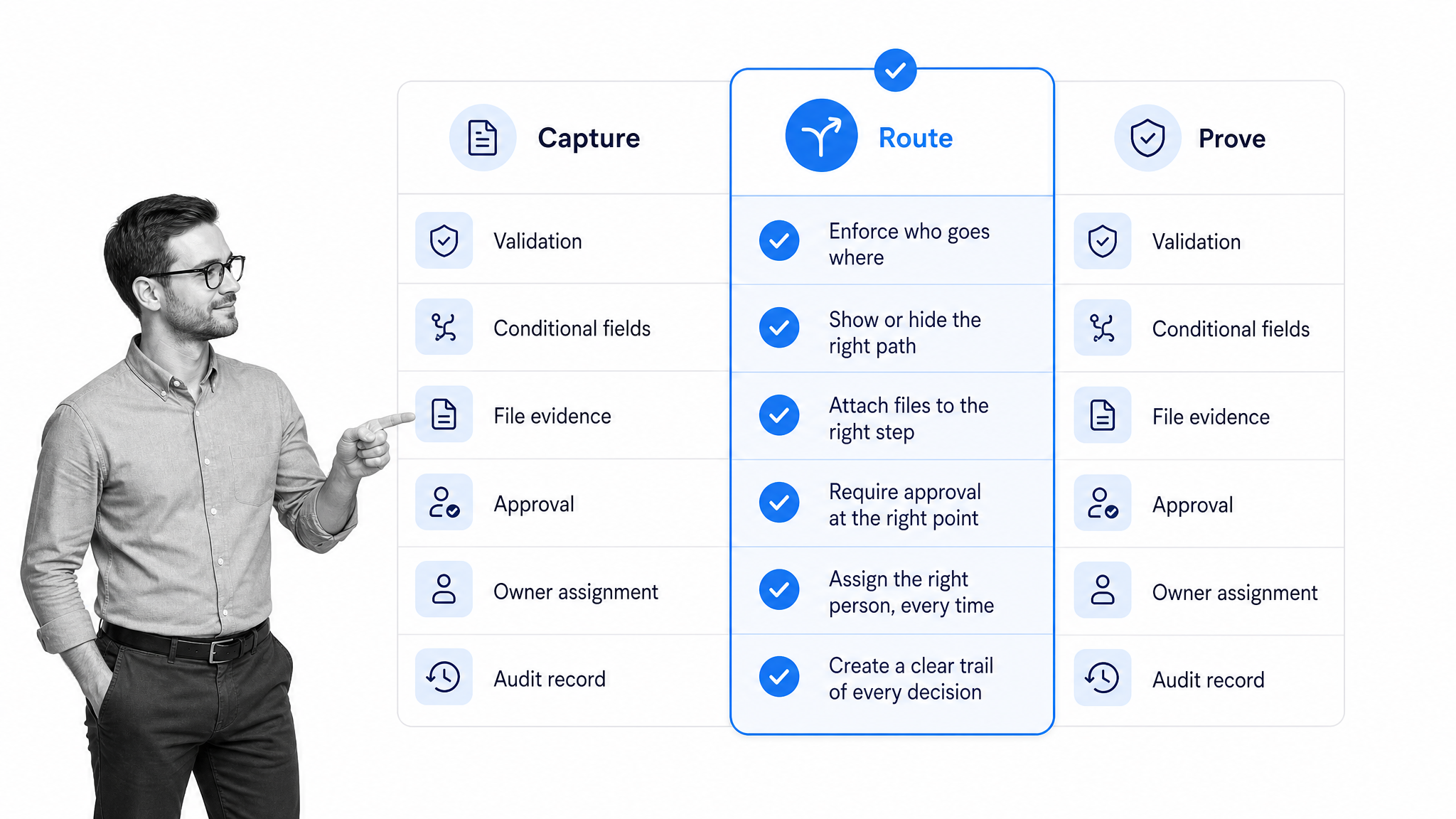
The right form controller features depend on how much control the process needs. A simple request form may only need validation and a notification. A compliance-critical intake process may need conditional routing, approvals, evidence handling, permissions, and audit history.
Conditional logic
Conditional logic shows, hides, or changes form content based on earlier answers. Process Street forms support if-this-then-that rules, including more complex and/or conditions, for dynamic form paths: Conditional Logic for Forms.
The operational value is focus. Respondents see the fields that matter to them, while the workflow receives structured signals that can guide routing and ownership.
Field validation
Validation makes answers usable. It can require values, enforce formats, restrict choices, and catch missing data before submission. Process Street includes form field validation guidance for teams building controlled forms: Form Field Validation in Forms.
Automations
Automations are the bridge from form response to action. Process Street Forms Automations can run workflows and create, update, or delete Data Set records when a form response is submitted: Forms Automations.
That means the form controller does not have to stop at routing a notification. It can start the workflow that owns the request.
Data storage and linked records
Some forms need to create or update structured records, not just collect one-off responses. Process Street Data Sets store tables of data for Workflow runs and Forms, and can help reduce repeated data entry: Data Sets.
Approvals
Approvals make the controller enforce a decision before work continues. In Process Street, approvals can route decisions inside a workflow so the next task does not move forward until the responsible reviewer signs off: Approvals.
Permissions and security
Forms can collect sensitive information, so control also means limiting access. The FTC advises businesses to collect only what they need, protect what they keep, and dispose of information safely when it is no longer needed: FTC data security guidance.
A form controller should support that discipline through permissions, ownership, export controls, and clear records of who changed the process.
Form controller use cases
Form controllers show up anywhere a form submission starts a real process. The common thread is that each submission creates an obligation for another person, team, or system.
Employee onboarding
HR teams use controlled forms to collect employee details, location, equipment needs, payroll information, policy acknowledgments, and manager inputs. An employee onboarding checklist can turn those answers into assigned work for HR, IT, finance, and the hiring manager.
Vendor and procurement intake
Procurement teams use controlled forms to collect vendor details, tax forms, risk questions, business justification, contract context, and approval requirements. A vendor management workflow can route the request based on spend, risk, department, or required review.
Customer onboarding
Customer teams use controlled forms to capture implementation goals, stakeholders, integrations, data requirements, and launch constraints. That intake can feed a customer onboarding process so every handoff is tracked.
IT service requests
IT teams use form controller logic for software access, hardware requests, incident reports, service tickets, and account changes. An IT service request workflow can assign owners, collect approvals, and preserve completion records.
Compliance and audit evidence
Compliance teams use controlled forms for attestations, policy exceptions, control evidence, incident reports, and review notes. NIST describes privacy risk management as a repeatable discipline that depends on understanding data processing and controls: NIST Privacy Framework. A controlled form gives that processing a clear entry point.
Content and marketing requests
Marketing teams use controlled request forms for campaign briefs, creative intake, legal review, launch approvals, and asset requests. The controller keeps the request complete, assigns the right reviewers, and reduces back-and-forth before work starts.
Build a form controller in Process Street
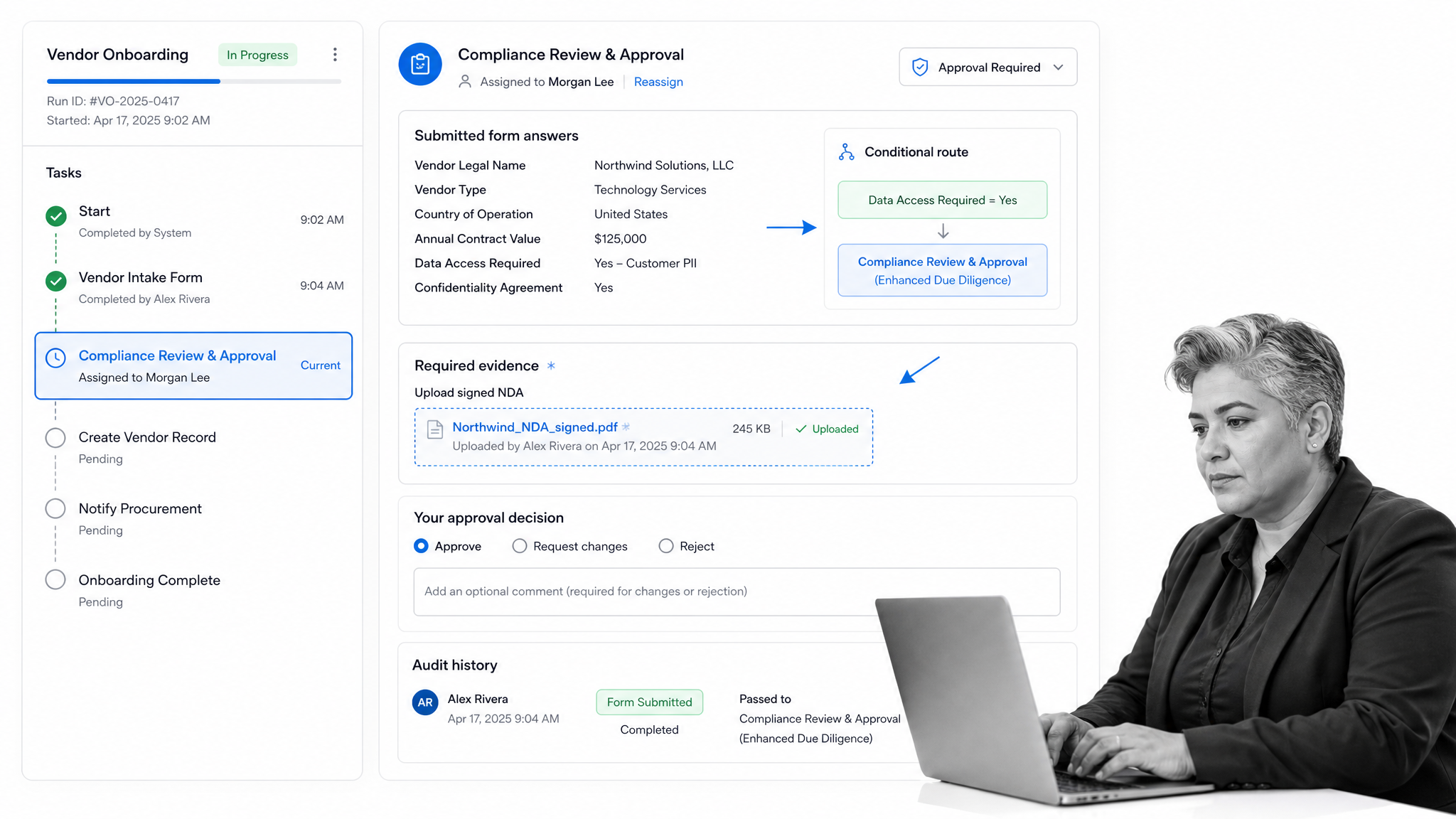
You can build a form controller in Process Street by connecting structured form intake to workflow execution. The form collects the signal, and the workflow enforces the path that follows.
Start with the workflow outcome
Before building fields, define the outcome. Is the form creating an employee onboarding run, vendor review, customer implementation, IT request, policy exception, or approval packet? The outcome tells you which fields matter and which controls are necessary.
If you are building from scratch, a checklist generator can help turn a loose process into a structured set of steps before you add controller logic.
Map fields to decisions
Every important field should map to a decision or record. Request type maps to route. Amount maps to approval level. Risk level maps to reviewer. File upload maps to evidence. Owner maps to accountability. Due date maps to urgency.
This mapping prevents form sprawl. If a field does not change the workflow, support the decision, or preserve proof, it may not belong on the form.
Automate the first handoff
The first handoff is where many forms fail. The response arrives, but someone has to copy it into another system, notify the owner, and create the task. Process Street can run a workflow when a form response is submitted, which turns the response into assigned work instead of another inbox item.
Use conditional routing carefully
Conditional routing should mirror the actual operating rules. Do not create complexity for edge cases that rarely happen. Start with the decisions that matter most: risk, value, department, location, customer tier, missing evidence, and required approval.
Keep proof with the work
The strongest controller keeps the original response, files, approvals, task history, comments, and decision trail in one workflow record. That is how teams prove work was handled correctly without reconstructing the process from email and chat.
This is why controlled forms pair naturally with automated workflow tools and form checklist apps. The form starts the process, but the workflow makes it accountable.
How to choose a form controller
Choosing a form controller starts with the risk and complexity of the work. The more people, systems, approvals, or evidence requirements involved, the more control you need.
Map the submission lifecycle
Write the lifecycle in plain language: who submits, what they submit, who reviews, what can block the request, which path each answer triggers, which systems update, and what proof must exist at the end.
If the lifecycle is unclear, the controller will expose the confusion. A form cannot compensate for an undefined process.
Separate simple intake from operational intake
Simple intake is fine for low-risk feedback, surveys, and one-off contact forms. Operational intake needs more: ownership, routing, due dates, approvals, required evidence, permissions, integrations, and audit history.
Do not buy a lightweight form tool and then rebuild missing controller logic with spreadsheets, email rules, and manual reminders.
Test real exceptions
Test more than the happy path. Submit an incomplete request, a high-risk request, an urgent request, a request that needs approval, and a request that should be rejected. Watch whether the controller sends each one to the right place.
Check governance early
Review who can create forms, edit fields, change logic, view submissions, export data, and update automations. Forms multiply quickly across teams. Without governance, each one becomes its own process island.
A good form controller gives teams a shared operating pattern: controlled intake, structured decisions, assigned execution, and proof by default.
FAQs
What is a form controller?
A form controller is the logic layer that governs form behavior. It controls fields, validation, conditional paths, routing, ownership, approvals, and records so a submitted form can start the right business process.
What is the difference between a form controller and a form builder?
A form builder helps you design and publish the visible form. A form controller governs how the form behaves and what happens after submission, including validation, routing, approvals, assignments, and audit history.
Why does a business form need controller logic?
A business form needs controller logic when the submission creates downstream work. Without controller logic, requests often land in an inbox or spreadsheet with unclear ownership, missing information, and weak proof that the process was followed.
What features should a form controller include?
A useful form controller should include required fields, validation, conditional logic, routing rules, workflow triggers, owner assignment, approvals, permissions, file handling, records, and audit history.
Can Process Street work as a form controller?
Process Street can work as a form controller when forms need to trigger repeatable workflows. It can collect structured intake, use conditional logic, run workflows from submissions, route approvals, store records, and preserve proof of completion.
