


Turn every policy into automated workflows with built-in enforcement and audit-ready proof.



Form Workflow Software
Form workflow software turns submitted information into controlled work. It collects structured data, validates the response, routes the request, assigns owners, triggers approvals, updates connected systems, and preserves a record of the outcome.
A form alone stops at submission. A form workflow continues into the business process. The request may need finance review, identity checks, document collection, risk scoring, fulfillment, an exception path, or a final signoff. The software coordinates that work so the submitter and the operating team are not forced to manage it through email.
This guide explains the category, the capabilities that matter, how form-driven workflows run, where they fit, and how to implement one without turning a simple request into a bloated system.
In this article, we are going to cover:
- What form workflow software is
- Why form workflow software matters
- Form workflow software vs. nearby tools
- Form workflow software capabilities that matter
- How form workflow software works
- Build form workflows in Process Street
- How to choose and implement form workflow software
- Form workflow software FAQs
What form workflow software is
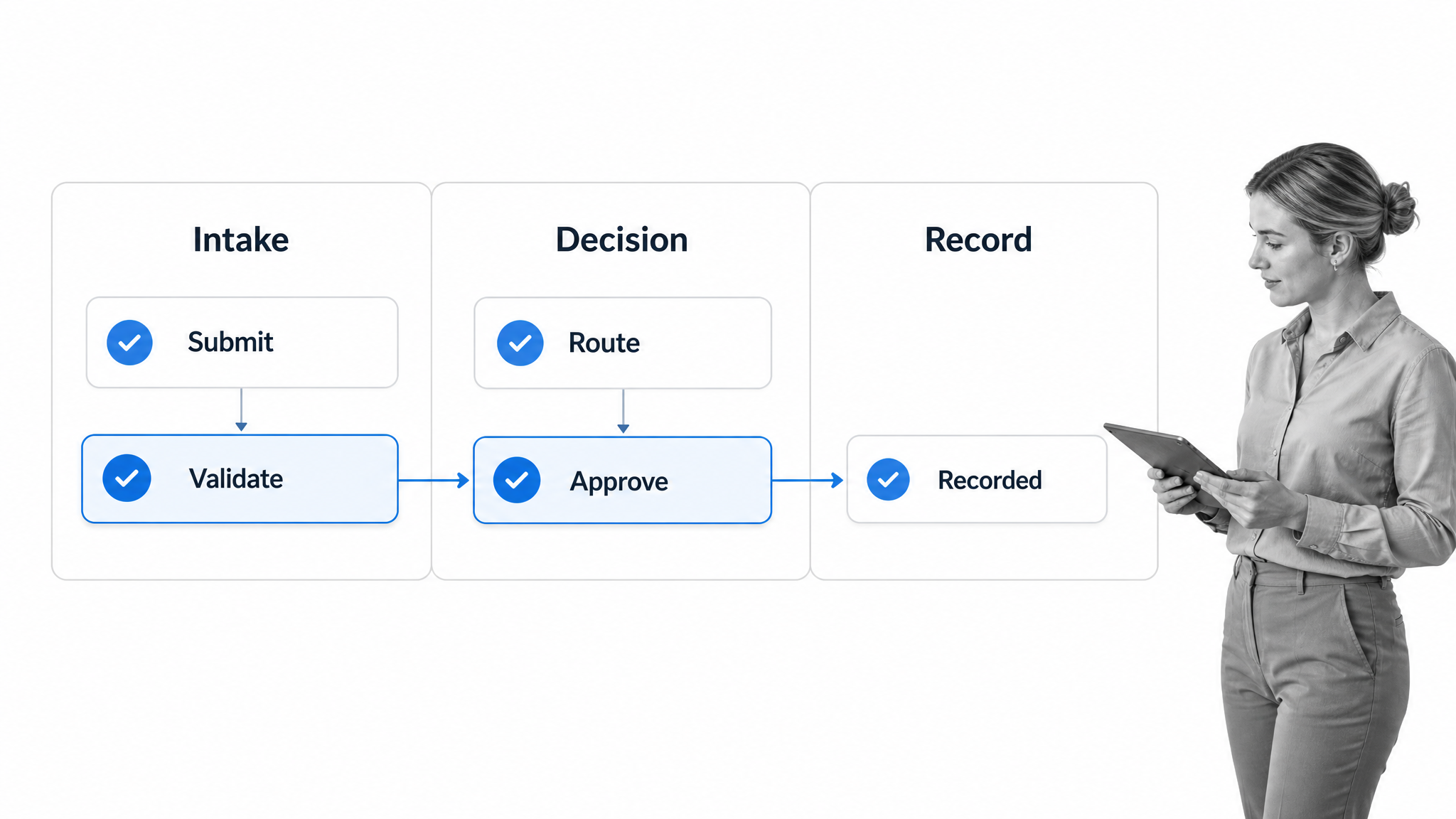
Form workflow software is a system for collecting information and running the work that follows. The form is the front door. The workflow is the operating path behind it. Together they create a form-driven process that can move from intake to decision without losing ownership, context, or proof.
The form captures a usable work object
A useful intake form does more than collect free-text answers. It creates a structured request with fields the workflow can evaluate. The Process Street Forms guide shows how form responses can start workflow runs or send data to other applications. Field types, required answers, files, and controlled choices make the submission easier to route and report on.
The workflow decides what happens next
Rules turn a response into action. A purchase request above a threshold can go to finance. A vendor that handles sensitive data can add a security review. A customer complaint marked urgent can alert a senior owner. A standard request can follow the shortest approved path.
The record connects input to outcome
A form application wraps input in logic and a durable record. Form workflow software goes deeper by coordinating the people, decisions, evidence, and system updates that complete the request. The result is not merely a response row. It is a traceable run of work.
Why form workflow software matters
The cost of a broken form process usually appears after submission. Requests sit in inboxes. People retype data. Reviewers receive incomplete information. Approvals happen in chat. Nobody knows which version was accepted. The requester asks for status because the process offers no trusted answer.
Faster intake without faster chaos
Digital forms make collection faster, but volume exposes every weak handoff. Workflow software adds triage, ownership, deadlines, notifications, and escalation. It lets the team accept more requests without relying on one coordinator to remember every follow-up.
Consistent decisions
A workflow makes the decision path explicit. Review criteria, approval authority, and required evidence can live inside the process. That matters when similar requests should receive similar treatment, especially in finance, HR, procurement, compliance, legal, IT, and customer operations.
Proof instead of reconstruction
The best workflow approval process records the request, the reviewer, the decision, and the supporting information at the point of work. Teams can answer questions from the workflow history instead of reconstructing a decision from messages.
A better requester experience
Good software also improves the front-end experience. The form asks only relevant questions, confirms receipt, requests corrections when needed, and communicates the next step. The requester does not need to understand the internal org chart to reach the right owner.
Status that does not depend on chasing
A form workflow should expose a trustworthy state for every request: received, waiting for information, under review, approved, rejected, fulfilled, or closed. Internal owners need queues and aging signals. Requesters need clear updates without access to sensitive internal comments. This separation reduces status messages while protecting the review process. It also makes service expectations measurable because the team can see how long requests spend in each state, which routes create delays, and which intake questions repeatedly produce corrections.
Form workflow software vs. nearby tools
Form workflow software overlaps with several categories, but the center of gravity is different. It is designed around a structured submission that initiates, updates, or controls a repeatable process.
Form builder
A form creator focuses on the collection surface: fields, layout, validation, branding, and response storage. It may offer notifications or simple rules. Form workflow software adds operational depth after submission, including assignments, multi-stage decisions, exception routes, evidence, integrations, and run history.
Project management software
Project tools organize work around projects, tasks, boards, and timelines. They are useful when the work changes shape. Form workflow software is stronger when the same kind of request repeatedly enters through intake and should follow defined rules. A project board may show activity, while a form workflow enforces the path.
Database or spreadsheet
A database stores records and a spreadsheet makes them easy to inspect. Neither automatically guarantees that a review happened, the right person approved it, or a connected system was updated. They can remain systems of record, while the workflow becomes the system of action.
Integration automation
Integration tools move data between applications. Form workflow software includes the human and policy layer: who must review, what evidence is required, which exceptions need escalation, and when the process may continue. A clear workflow integration connects those decisions to downstream systems.
Form workflow software capabilities that matter
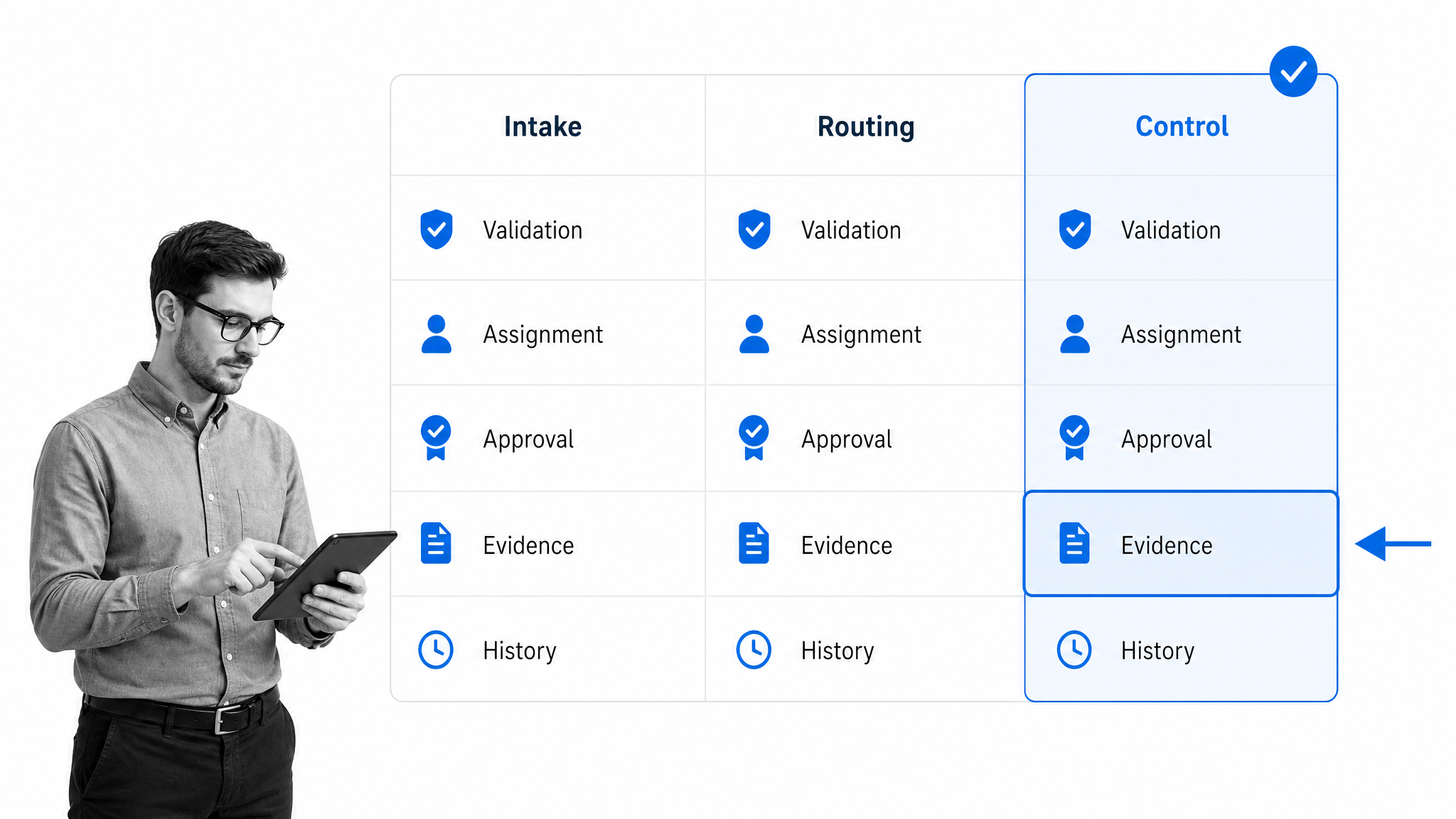
Evaluate form workflow software across three layers: intake, routing, and control. A polished form is useful, but it is only one part of the operating system behind the request.
Flexible form design
Look for required fields, conditional questions, file uploads, repeatable sections, calculations, hidden values, prefilled data, and accessible instructions. The W3C forms tutorial is a practical reference for labels, instructions, validation, and user feedback. Accessibility should be designed into the intake, not patched on later.
Validation and data quality
Validation should prevent unusable submissions without creating hostile forms. Check format, range, completeness, and allowed values at the right point. The OWASP input validation guidance explains why validation must happen as early as possible and why server-side controls still matter.
Conditional routing
Rules should route by answer, amount, location, department, risk, request type, product, or any other structured value. Strong form engine logic can add or skip stages without creating a separate workflow for every variation.
Assignments, deadlines, and escalation
The system should assign work to a person, role, or group and calculate due dates from the request context. Escalation should identify stalled work before the requester becomes the monitoring system. Delegation and absence coverage matter for operational continuity.
Approvals and separation of duties
Approvals should support single, sequential, and multi-stage decisions. The Process Street approvals documentation shows how approval tasks can structure authorization inside a workflow run. Permissions and reviewer independence are especially important for sensitive requests.
Evidence and audit history
A completed workflow should preserve the submitted values, task results, files, comments, approvals, changes, timestamps, and system actions that matter. Evidence should be attached to the specific run and decision, not scattered across a shared drive.
Security, privacy, and identity
Review authentication, role-based access, retention, encryption, data residency, and least-privilege controls. The NIST Digital Identity Guidelines provide a useful frame for identity proofing and authentication. If personal data is involved, align collection and retention with the GDPR principles and applicable local requirements.
Integrations and agentic execution
The workflow should update the systems where the business already works. Process Street has direct, universal integrations to 5,000+ systems. Need a new one? An AI agent builds it on the fly. The useful test is whether a submitted request can move through review and finish in the correct system without copy-and-paste administration.
Administration and change control
Form workflows change as policies, teams, systems, and risks change. Buyers should inspect version control, testing, permissions, reusable components, sandboxing, and release practices. A field rename can break a route. A new approval threshold can change who has authority. An integration update can affect the system of record. Strong administration makes those changes visible and reversible. It should be possible to test a revised workflow with sample submissions, compare the behavior, document the reason for the change, and release it without corrupting active runs.
How form workflow software works
A form workflow begins with a reusable process design and ends with a completed run. The design defines the questions, decisions, owners, and required proof. Each submission creates the work object that follows that design.
1. Design the outcome first
Start with the decision or completed state. A vendor must be approved, an expense reimbursed, access granted, an incident resolved, or a new employee prepared. Defining the outcome prevents the form from collecting information that never affects the process.
2. Capture the minimum routing data
Ask which answers change ownership, risk, timing, or approval. Collect those first. Additional evidence can be requested later when a route requires it. This keeps low-risk paths short while preserving depth for complex cases.
3. Validate and classify the submission
The workflow checks completeness and classifies the request. Invalid data returns for correction. Valid data receives a route, priority, owner, and service expectation. A classification field can also drive reporting across every run.
4. Route work and decisions
Rules create the right tasks and review chain. Conditional steps can follow the patterns in the conditional logic guide, so unnecessary reviewers do not slow routine requests and high-risk requests do not skip controls.
5. Execute actions and preserve proof
Approved requests can create records, send notifications, generate documents, update systems, or start another workflow. The run closes only when required work and evidence are complete. Reporting then shows volume, cycle time, bottlenecks, rework, and exception patterns.
Build form workflows in Process Street
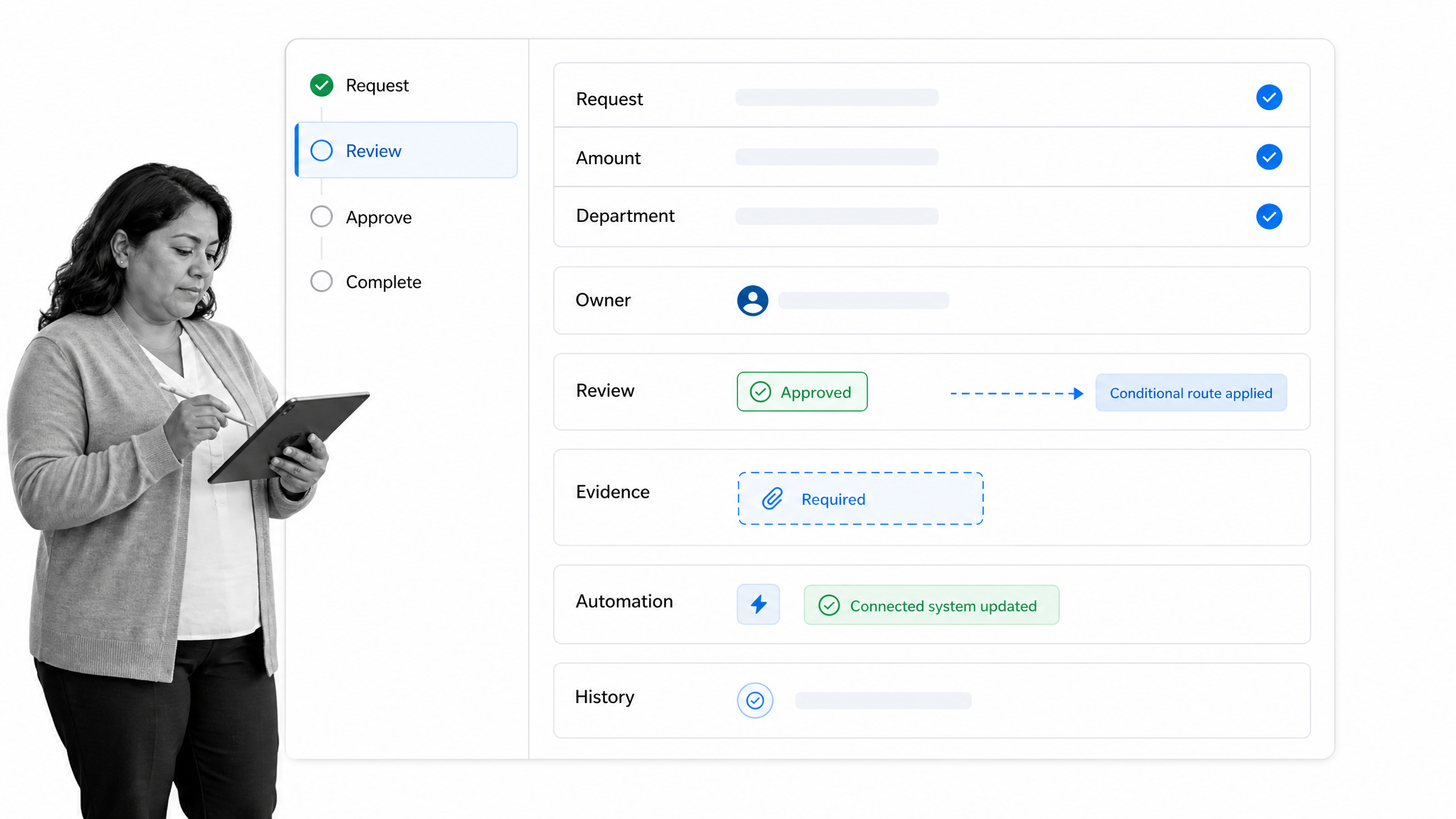
Process Street is a Compliance Operations Platform that turns form submissions into assigned, automated, auditable workflows. Forms collect the request. Workflow runs apply the procedure. Rules, approvals, automations, and evidence controls keep execution aligned with the operating standard.
Connect intake to execution
A response can start a workflow run with submitted values already available to tasks and decisions. The workflow owner does not need to copy the request into a board. Every downstream owner works from the same structured context.
Adapt the path without duplicating the process
Conditional logic can add finance review, security evidence, legal approval, executive signoff, or region-specific work when the request requires it. Routine submissions stay fast. Exceptions receive the right controls.
Enforce approval before action
Approval tasks block progress until the authorized reviewer decides. Required fields and evidence can make the review complete enough to trust. The decision remains tied to the specific workflow run.
Start from a real operating pattern
Teams can adapt a vendor onboarding workflow, purchase order workflow, employee onboarding workflow, expense management workflow, customer feedback workflow, or team acceleration workflow. Each one shows how form fields become operational work rather than a passive response list.
Use AI inside governed rails
AI can classify requests, extract information, draft responses, suggest routes, and complete connected actions. The workflow still needs permissions, review points, monitoring, and proof. The NIST AI Risk Management Framework is a useful reference for governing AI-assisted decisions and actions.
How to choose and implement form workflow software
Choose the system by testing one real process end to end. Feature checklists are useful, but they do not reveal whether the software can handle messy submissions, changing owners, exceptions, rejected requests, missing evidence, and connected-system failures.
Map the current process
Document where the request begins, who touches it, what each person decides, which systems hold data, and where work stalls. Separate mandatory controls from habits that exist only because the current tools are weak.
Pick a representative pilot
Choose a process with structured intake, at least one routing rule, one approval, one exception, and one system update. Avoid a toy workflow that proves only that the form can submit. The pilot should expose the operating conditions the platform must handle.
Define success measures
Measure request completion time, time waiting for review, first-pass completeness, rejection or correction rate, missed approvals, manual data entry, overdue steps, and requester status questions. Baseline the current process so improvement is visible.
Design ownership and governance
Name a workflow owner who can change the process, a business owner accountable for the outcome, and technical or compliance reviewers for sensitive changes. Define how new fields, routes, automations, and AI actions are tested before release.
Roll out in layers
Start with intake, assignments, and one approval path. Add integrations, exception routes, advanced evidence, and AI actions after the core run is stable. A layered rollout keeps the process understandable and gives the team evidence before complexity expands.
Plan the migration from inboxes and spreadsheets
A successful rollout needs a clear cutover. Decide when new requests must enter through the form, what happens to open requests in the old system, and how historical records will be retained. Publish one source of truth for submitters and retire duplicate intake channels. Train reviewers on their queue, decision criteria, delegation rules, and evidence expectations. For the first few weeks, audit a sample of completed runs against the intended policy. Fix confusing questions and routing gaps quickly, but avoid changing the workflow every time one unusual request appears. Stable patterns should drive the design.
Review workflow data
Form workflow software should reveal where the operating design needs improvement. A broader view of workflow applications helps teams decide when a form-driven process should remain narrow and when it should become a shared operational system.
Form workflow software FAQs
What is form workflow software?
Form workflow software collects structured information and runs the work that follows. It validates submissions, applies routing rules, assigns owners, coordinates approvals, triggers connected actions, and preserves a record of the completed process.
How does form workflow software work?
A submitted form creates a work object or workflow run. Rules validate and classify the request, conditional logic selects the route, tasks and approvals coordinate the people involved, and automations update connected systems before the run closes with an audit history.
What is the difference between a form builder and form workflow software?
A form builder focuses on creating the collection surface and storing responses. Form workflow software adds the operational layer after submission, including assignments, deadlines, conditional paths, multi-stage approvals, evidence, integrations, and reporting.
Which form workflow software features matter most?
Prioritize flexible forms, validation, conditional routing, assignments, due dates, approvals, permissions, evidence capture, audit history, integrations, exception handling, and reporting. The right balance depends on how much risk and coordination the submitted request creates.
What processes can form workflow software automate?
Common examples include purchase requests, employee onboarding, vendor intake, expense approvals, access requests, incident reports, customer feedback, policy exceptions, content reviews, and compliance evidence collection. The strongest candidates are repeatable processes that begin with structured input and cross people or systems.
How should you implement form workflow software?
Map one real process, define the outcome and routing data, build the shortest compliant path, pilot it with actual requests, and measure cycle time, completeness, approvals, rework, and manual handoffs. Add integrations and AI actions after the core workflow is stable and owned.
