


Turn every policy into automated workflows with built-in enforcement and audit-ready proof.



Form Engine

A form engine is the logic layer that renders forms, validates answers, controls conditional paths, stores state, and sends each submission into the next system or workflow. A form builder helps you design the form. A form engine decides how the form behaves when real people use it.
That difference matters when a form is tied to work that cannot drift. Employee onboarding, vendor intake, access requests, incident reports, customer onboarding, audit evidence, and approvals all depend on more than a clean layout. They need rules, routing, ownership, and proof.
This guide explains what a form engine does, how it differs from a form builder, which capabilities matter, and how Process Street turns form outputs into governed workflows.
In this article, we are going to cover:
- What is a form engine?
- How a form engine works
- Form engine vs form builder
- Form engine capabilities that matter
- Where form engines break
- Turn form engine outputs into governed workflows
- How to choose a form engine
- FAQs
What is a form engine?
A form engine is the runtime system behind a digital form. It reads the form definition, displays the right fields, manages form state, applies validation, evaluates conditional logic, handles submission, and passes the result to storage, workflow, automation, or another application.
MDN describes web forms as a primary way users send information to a website or app for processing: MDN web forms guide. A business form engine extends that basic pattern. It does not only collect input. It determines what happens while the user completes the form and what happens after the user submits it.
The simple definition
A form engine is the part of a software system that turns a form schema, rule set, or template into an interactive form experience. It controls fields, visibility, required answers, validation, calculations, save behavior, submission handling, and downstream actions.
If the form is a front door, the form engine is the set of rails behind it. It decides which questions appear, whether the answers are valid, whether the user can move forward, where the completed record goes, and which work starts next.
The business definition
For operations teams, a form engine is an intake control layer. It makes sure information enters the business in a structured, governed way. Instead of letting every request arrive through email, chat, spreadsheets, and ad hoc documents, the form engine gives the organization a controlled entry point.
That entry point becomes more valuable as the process becomes more regulated or cross-functional. A low-risk survey might only need a simple response table. A procurement intake form may need vendor risk questions, file uploads, conditional approvals, security review, finance routing, and a complete audit trail.
Why the engine matters more than the form
Most teams can make a digital form. The harder problem is making the form reliable when the stakes rise. People skip questions, upload the wrong files, choose the wrong request type, close the tab halfway through, submit duplicate requests, or need different paths based on their answers.
The form engine handles those realities. It protects data quality, reduces manual triage, and creates a predictable path from answer to action.
How a form engine works
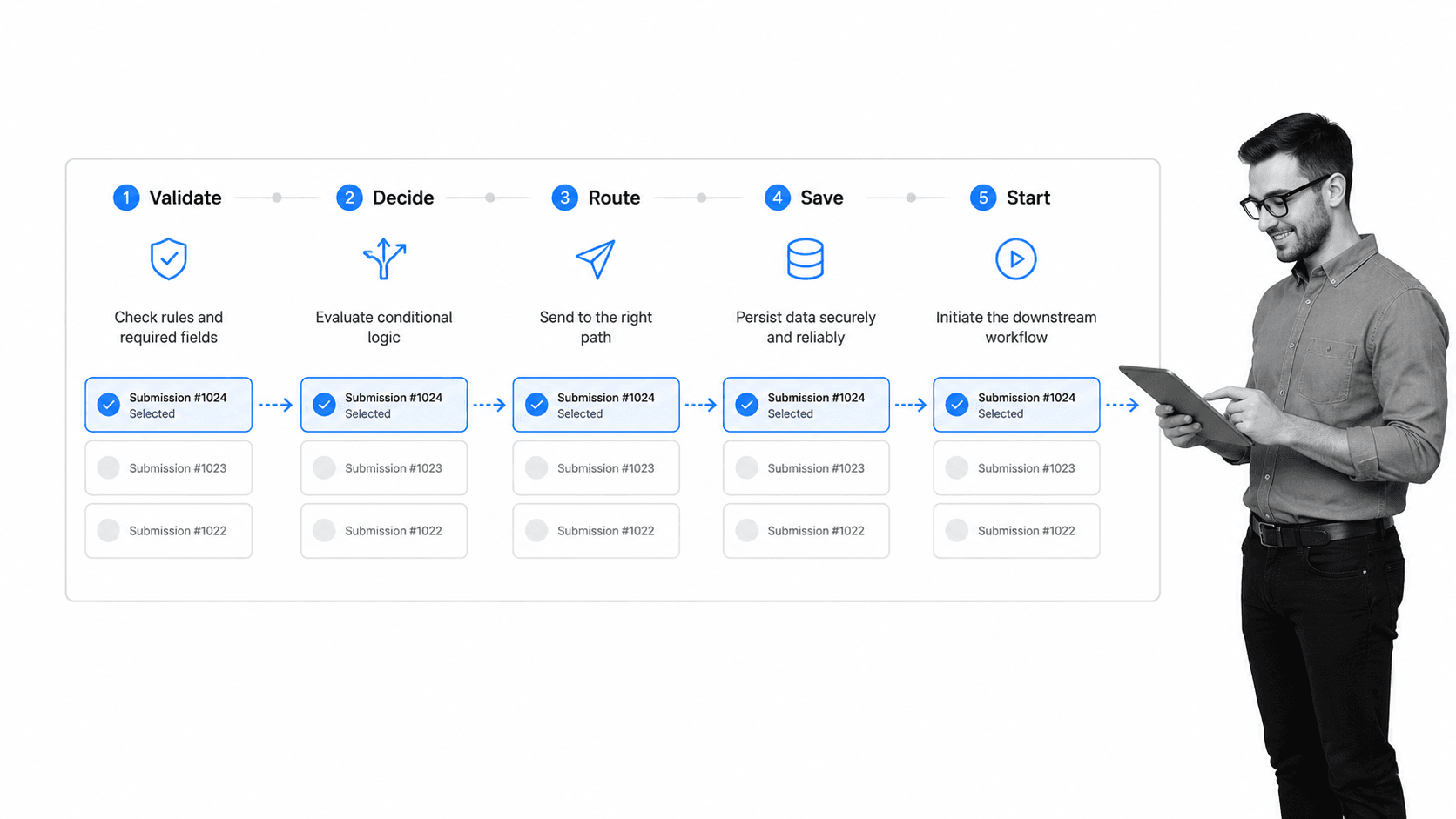
A form engine works by combining a form definition, a state model, a validation layer, conditional rules, submission handling, and downstream routing. The user sees a clean form. The business gets structured input that can move into an operational process.
1. It reads the form definition
The form definition tells the engine what fields exist, which field types to render, which labels and help text to show, which answers are required, and which rules apply. In developer environments, this definition may be a JSON schema or another structured format. In no-code tools, it may be created visually by the form author.
The important point is that the definition should be separate from each individual submission. That separation lets the team update the form, reuse logic, apply governance, and keep responses attached to the version that collected them.
2. It manages form state
State is the live memory of the form. It includes what the user has entered, which fields have been touched, which errors are active, which sections are open, whether a draft exists, and whether the form is ready to submit.
State management becomes critical in long, multi-step forms. A user may need to move back and forth, save a draft, upload a file, or return later with missing information. If the engine cannot preserve state reliably, the form becomes fragile.
3. It validates input
Validation checks whether submitted data matches the rules. That can include required fields, email formats, dates, numbers, file types, unique IDs, allowed values, and cross-field dependencies. OWASP describes input validation as a core application security practice because systems should define the allowed input and reject malformed or unexpected values: OWASP input validation guidance.
For business teams, validation also reduces rework. A clean form engine catches missing details before a request reaches the team that must act on it.
4. It evaluates conditional logic
Conditional logic changes the form based on answers. If a vendor handles sensitive data, the form can reveal security questions. If a request exceeds a threshold, it can ask for budget approval. If a customer chooses a certain product, it can show implementation questions for that product.
The engine should make this logic visible and testable. Hidden rules that nobody can audit create a new version of process chaos.
5. It routes the result
After submission, the engine sends the result somewhere useful: a database, CRM, ticketing system, workflow, document folder, notification, or automation. This is the point where a form engine becomes operational.
WorkflowEngine describes workflow-bound forms as forms that can render, validate, persist data, and execute process commands: WorkflowEngine forms documentation. That pattern captures the point well. A form is not finished when the user clicks submit. It is finished when the correct work has started.
Form engine vs form builder
A form builder is the design surface. A form engine is the runtime and control layer. Many products include both, but the terms point to different jobs.
A form builder creates the visible form
A form builder helps a user add fields, change layout, adjust styling, publish the form, and collect responses. It is usually judged by ease of use, templates, field types, branding, embeds, and speed.
That is useful for surveys, contact forms, event registrations, and simple requests. If the main problem is creating the form itself, a form creator or builder may be enough.
A form engine controls behavior
A form engine controls what happens during completion and after submission. It manages rules, validation, state, conditional paths, persistence, permissions, and downstream routing.
This is where the topic overlaps with a form controller, form repository, and form utility. The engine has to coordinate the form, the data, and the work.
The practical test
Ask what breaks if the form gets more complex. If the team only needs another field or a cleaner layout, the builder is the focus. If the team needs branching logic, draft saving, approval routing, data persistence, audit history, and system updates, the engine is the focus.
That practical distinction prevents teams from choosing a tool that looks good during form design but fails during operational use.
Form engine capabilities that matter
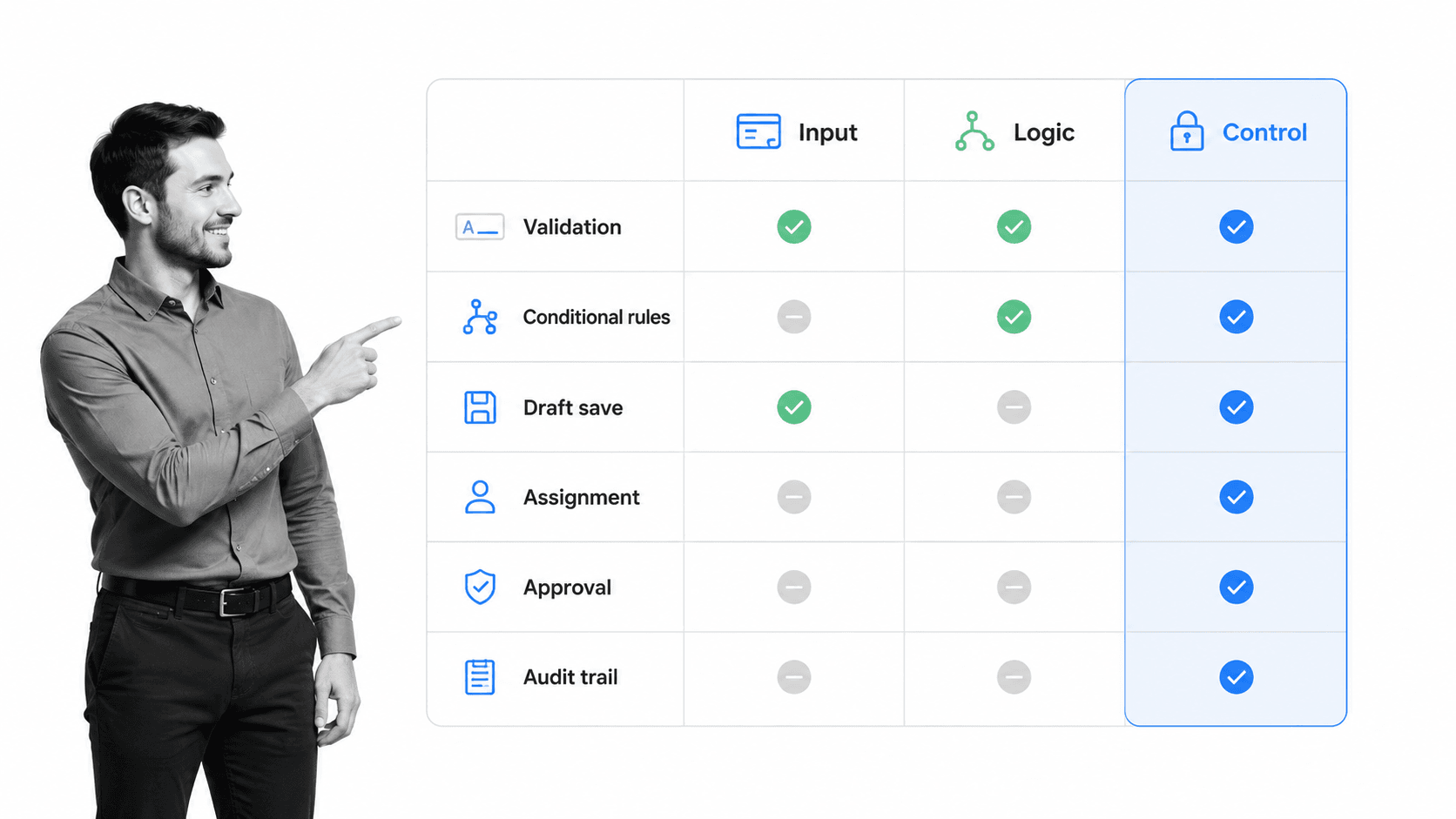
The right form engine depends on the work the form supports. A simple signup form and a regulated vendor intake form should not be judged by the same criteria.
Schema-driven structure
A strong form engine should separate the form definition from the response data. That makes forms easier to version, reuse, test, and update. It also helps developers or administrators understand which rules belong to the form itself and which rules belong to the downstream workflow.
Conditional logic and branching
Conditional logic should be easy to read, test, and change. A useful engine supports simple rules, nested rules, and paths that affect sections, fields, validations, assignments, and next steps.
Process Street supports conditional logic inside workflows, so answers can change the route, expose the right tasks, and keep irrelevant work out of view.
Validation and error handling
Validation should happen close to the user while still protecting the system after submission. The user needs clear error messages. The business needs a reliable record that malformed data did not quietly enter the process.
The W3C Web Accessibility Initiative emphasizes clear labels, instructions, and error handling for forms: W3C WAI forms tutorial. That matters because form errors are not just technical issues. They are moments where users can abandon the process or submit incomplete information.
Draft persistence
Long forms should not require one uninterrupted session. Draft persistence lets users save progress, return later, and complete missing details. It also protects the organization from partial work disappearing.
Permissions and data access
The engine should control who can design forms, edit rules, view responses, export data, and trigger downstream workflows. Without permissions, a form engine can become an uncontrolled entry point for sensitive information.
NIST frames privacy risk management as a repeatable discipline around data processing and controls: NIST Privacy Framework. Forms are often the first step in that processing, so governance has to start there.
Workflow integration
A form engine should connect cleanly to the system that runs the work. Process Street has direct, universal integrations to 5,000+ systems. Need a new one? An AI agent builds it on the fly.
The integration question is not just whether a webhook can fire. It is whether the submission can become a controlled workflow with owners, approvals, due dates, evidence, and audit history.
Where form engines break
Form engines usually fail in the gap between data collection and execution. The form works during a demo, but the operating process still depends on manual triage, hidden rules, and disconnected follow-up.
The warning signs are easy to spot. If a team still asks who owns a submission, where the latest answer lives, or whether the right approval happened, the engine is collecting data without controlling the process.
The response graveyard
Many teams collect responses into a spreadsheet or inbox, then expect someone to review the queue. That works until volume rises or the work becomes cross-functional. Requests sit unanswered because the form captured data but did not assign work.
Logic nobody can audit
Conditional logic can reduce friction, but it can also hide risk. If nobody can see which rules are active, who changed them, and which version collected a response, the form engine becomes a shadow process.
Flat webhooks
A webhook can pass data to another system, but it does not automatically create accountability. The receiving system still needs to know who owns the request, what path applies, what evidence is required, and when the work is complete.
No proof of execution
A form submission proves that someone entered information. It does not prove the team handled the request correctly. For compliance, customer onboarding, HR, procurement, and finance, that distinction matters.
Teams often move toward workflow automation software, automated workflow tools, or business process automation software when form intake starts creating work that needs proof.
Turn form engine outputs into governed workflows
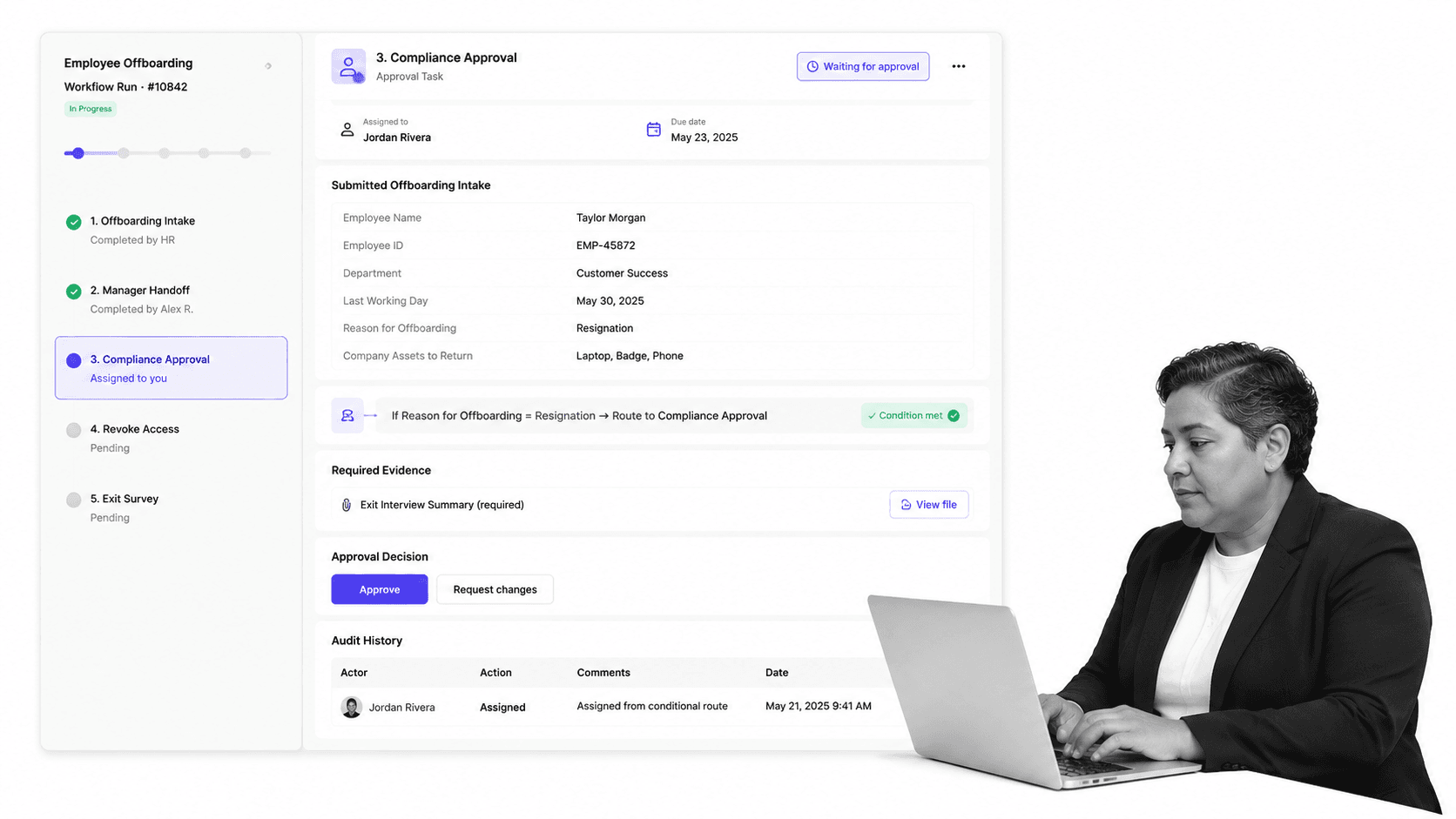
A form engine becomes more valuable when its output starts a governed workflow. Instead of stopping at submission, the form becomes the first controlled step in an operating process.
Create the right workflow run
Each submission should create or update the correct workflow run. The submitted answers should populate fields, assign the first owner, set due dates, and expose the right tasks. The team should not need to copy data from a response table into another work system.
Use answers to enforce the path
Different answers should create different paths. A low-risk request can move to fulfillment. A high-risk request can require approval. A missing document can block the next task. A rejected submission can close the workflow with a reason.
That is the operational value of connecting forms to a workflow generator or form checklist app. The form engine supplies the signal. The workflow system enforces the work.
Keep the record together
The submitted fields, files, approvals, comments, decisions, task completions, and audit events should stay in one place. If the record is split across a form tool, inbox, spreadsheet, and project board, the team will struggle to prove what happened.
Use templates for repeatable intake
Repeatable intake processes are easier to standardize when the team starts from a workflow template. An employee onboarding checklist, customer onboarding checklist, or customer onboarding process can turn submitted information into concrete work.
This is where Process Street fits. Forms collect structured inputs. Workflows assign and enforce the work. Approvals control the gates. Audit history preserves the proof.
How to choose a form engine
Choosing a form engine starts with the lifecycle. Do not begin with the editor. Begin with the work that happens before, during, and after the form.
Map the submission lifecycle
Write down who completes the form, which answers matter, what data must be validated, who reviews the submission, which paths are possible, which systems need updates, and what proof must be preserved.
Separate simple forms from operational forms
A newsletter signup, contact form, or simple survey may only need a lightweight builder. An operational form needs validation, branching, permissions, routing, integrations, workflow status, approvals, evidence capture, and audit history.
Test messy paths
Run the form with realistic edge cases: missing files, conflicting answers, duplicate submissions, high-risk answers, low-risk answers, rejected requests, and requests that need more than one team. Watch whether the engine handles those paths cleanly.
Check the operator view
The internal team needs a queue, owners, status, due dates, filters, and a complete record. If the operator experience is weak, the form engine will push work into manual follow-up.
Check governance before rollout
Review permissions, version history, audit logs, data retention, export controls, and approval rules before teams start building forms. Process Street approvals help teams control decision points inside the workflow, where the work is already happening.
The best form engine is not just the one that renders the most flexible form. It is the one that keeps intake, routing, ownership, and proof connected after the form is submitted.
FAQs
What is a form engine?
A form engine is the runtime layer that renders a form, manages state, validates answers, applies conditional logic, handles submission, and routes the result to storage, automation, or workflow execution.
What is the difference between a form engine and a form builder?
A form builder helps you design the visible form. A form engine controls how the form behaves, how answers are validated, how logic changes the path, and what happens after submission.
When do you need a form engine?
You need a form engine when a form has branching paths, long sessions, validation rules, file handling, permissions, integrations, or downstream work that must be assigned and tracked.
What capabilities should a form engine include?
A strong form engine should include schema-driven structure, state management, validation, conditional logic, draft persistence, permissions, workflow integration, and audit history.
Can Process Street work with form engine outputs?
Yes. Process Street can turn structured form outputs into governed workflows with assigned owners, conditional paths, approvals, evidence fields, and audit history.
