


To run SOPs with Claude, keep each standard operating procedure as a workflow in a process platform that has an MCP server, connect Claude to that platform, and then ask Claude in plain language to start a run, assign the steps, fill in what it can and report back. People keep the approvals. Claude does the busywork, and the workflow keeps the record of who did what and when.
Pasting an SOP document into a chat gives Claude instructions, but nothing makes it follow them and nothing records that it did. This guide shows how to run SOPs with Claude the reliable way: turn the SOP into a workflow, connect Claude through Process Street, and let Claude drive the procedure while every step, field and sign-off is tracked.
What it means to run SOPs with Claude
A standard operating procedure (SOP) is the written, agreed way a recurring task gets done: onboarding a vendor, closing the month, offboarding an employee, reviewing access. Running an SOP means actually doing it, step by step, with the right people, and keeping proof that it happened.
Running SOPs with Claude means Claude, Anthropic’s AI assistant, does the operating part on your behalf. It starts the procedure, assigns the steps to the right people, completes the steps it is allowed to complete, fills in data, chases what is overdue and summarizes progress. It does this by calling a workflow system through the Model Context Protocol (MCP), an open standard that lets AI assistants use outside tools. An MCP server is the piece that exposes those tools to the assistant.
The SOP itself stays in the workflow system, not in the chat. That is what makes the procedure repeatable: every run follows the same published version, and every run leaves the same audit trail.
Why pasting an SOP into Claude is not enough
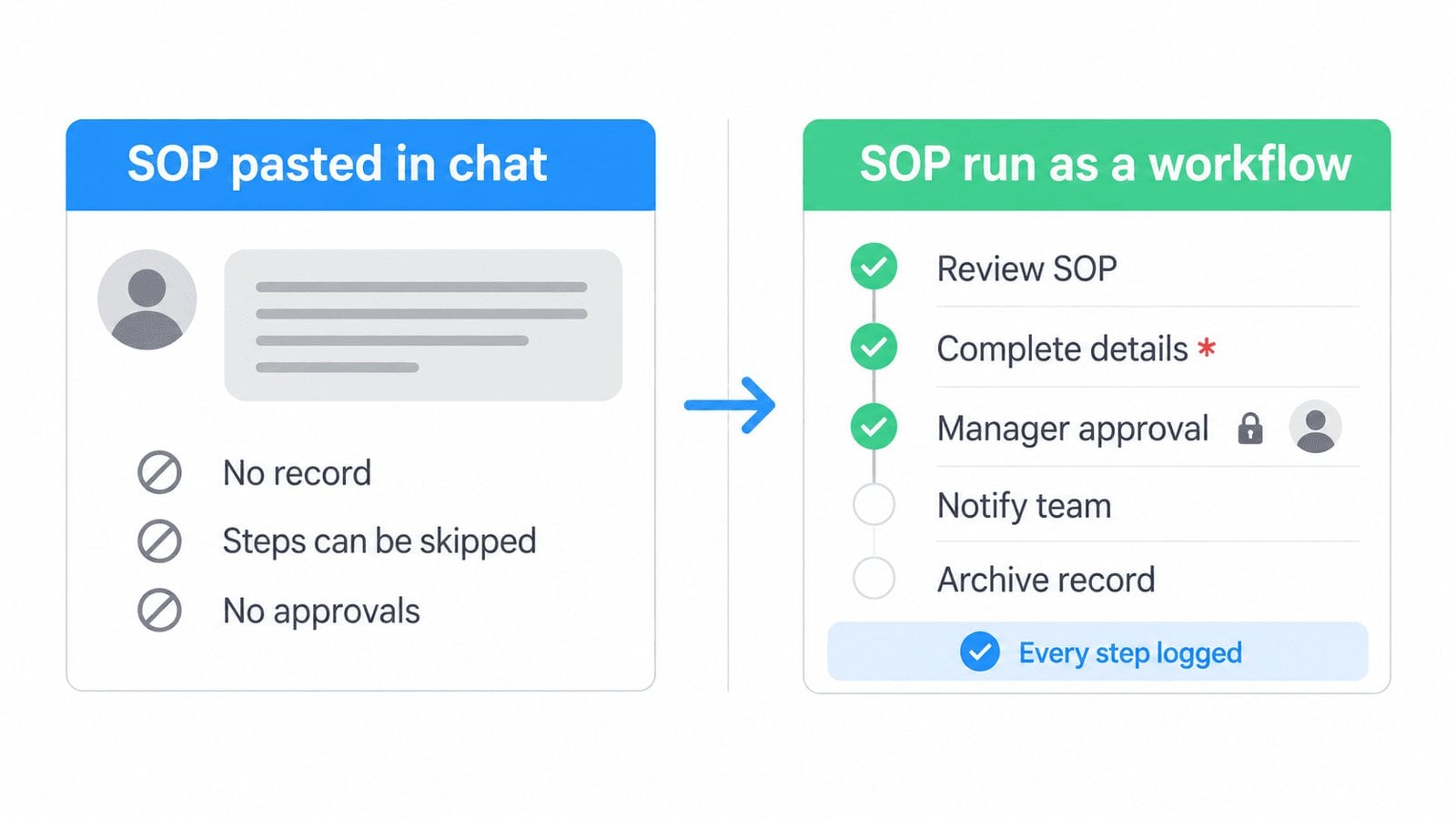
Claude can read an SOP and explain it well. It cannot enforce it from a chat window. When the procedure lives only in a conversation, four things go wrong:
- No record. Nothing shows which steps were done, by whom, or when. An auditor cannot inspect a chat transcript as proof of a control.
- Steps get skipped. A long document in a prompt is guidance, not a gate. Nothing stops a run from moving past a required step.
- No real sign-offs. Approvals need a named person to approve inside a system, not a line of text that says “approved”.
- Version drift. Each person pastes a slightly different copy of the SOP, so the procedure quietly changes from run to run.
The fix is to give Claude a system to operate rather than a document to read. We made the same argument in agents do not improvise well: AI is at its best when the process is defined somewhere it can call, and people decide the steps that matter.
What you need before you start
- A Claude plan with connectors. Custom connectors that use remote MCP are available across Claude’s plans, and on Team and Enterprise plans an Owner adds the connector for the organization first. See Anthropic’s guide to custom connectors using remote MCP for the current plan details.
- Your SOP as a workflow. Pick one procedure your team already runs every week. Build it as a workflow first (the next section shows how).
- The right permissions. Admins, Builders and Users can all use the Process Street MCP server, and Claude can only touch what your account is allowed to touch.
- A named owner for each approval. Decide who signs off on the steps that carry risk before Claude starts any runs.
Turn your SOP into a workflow Claude can run
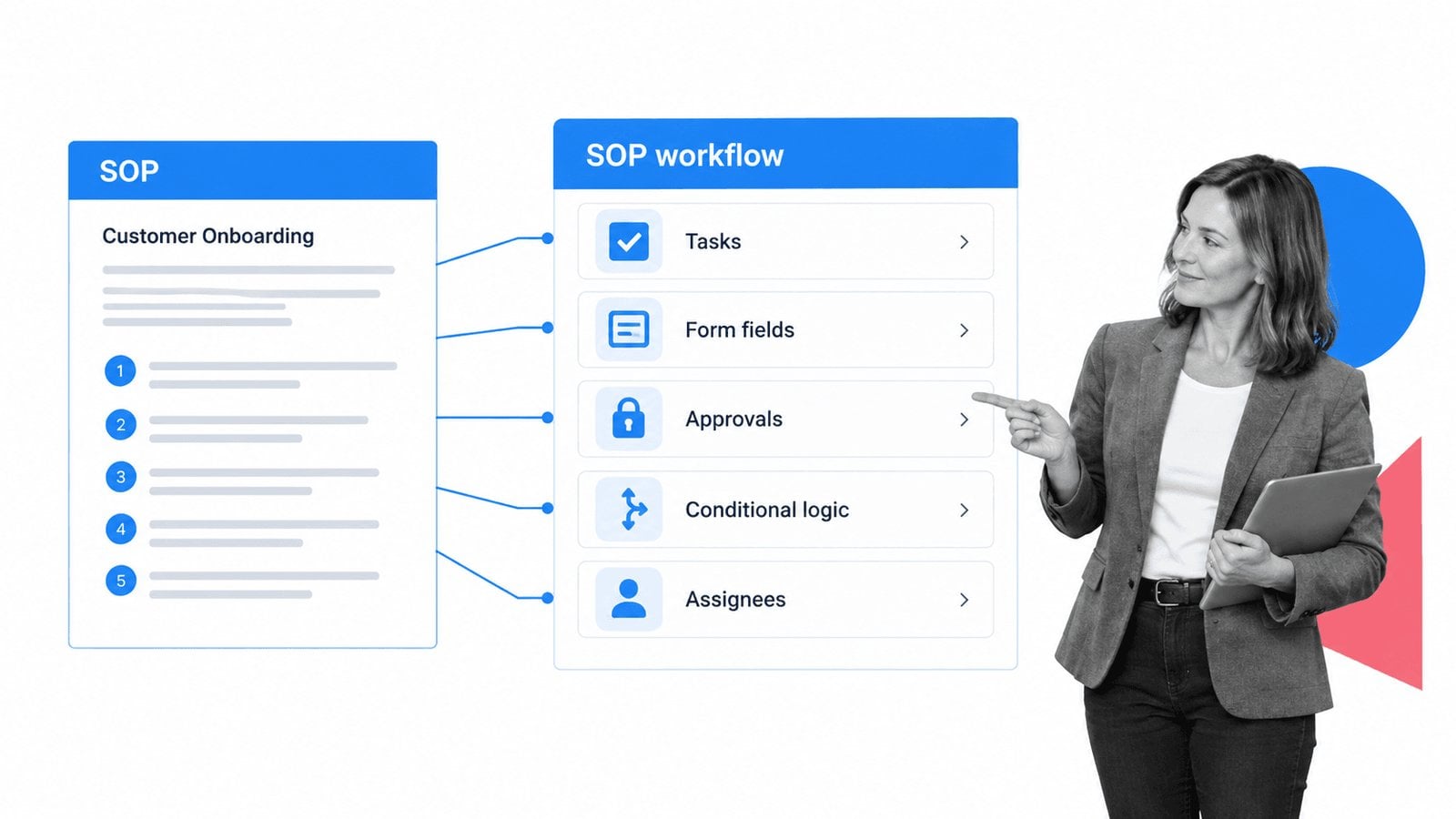
Most written SOPs already contain everything a workflow needs. You are moving it from a document into a structure that a person or an AI assistant can execute. Start from your existing document or from a ready-made SOP template, then map each part:
- Steps become tasks. Each numbered step in the SOP becomes a task in the workflow, in order.
- Inputs become form fields. Anything the SOP says to record (a vendor’s tax ID, a ticket number, a date) becomes a form field, and fields can be required so a step cannot be completed without them.
- Sign-offs become approvals. Wherever the SOP says a manager must review, add an approval step owned by that role.
- “If this, then that” becomes conditional logic. Branches such as “if the vendor handles customer data, complete the security review” become rules that show or hide tasks automatically.
- Owners become assignees. Each task gets a role or person, so a new run assigns itself correctly.
Keep the background policy and reference material in a linked Process Street Page so the workflow stays short and the “why” is one click away. When you change the SOP, you edit and publish a new version of the workflow, and every new run follows that version. If you are still choosing a tool for this step, our best SOP software comparison covers what to look for.
How to run SOPs with Claude, step by step
Connect Claude to Process Street
In the Claude app, the setup takes about a minute:
- Log in to Process Street, then log in to Claude.
- Click the + button in a chat, select Connectors, then Manage connectors.
- Select Browse Connectors and search for Process Street.
- Click + to sign in with your Process Street credentials, authorize the app, and return to Claude.
If you work in Claude Code, Anthropic’s command-line coding tool, add the same server from your terminal with claude mcp add --transport http process-street https://mcp.process.st/, then run /mcp inside Claude Code to sign in. Anthropic’s Claude Code MCP documentation covers scopes and other options. The full setup for every supported client is in the Process Street MCP server help article.
Ask Claude to start a run
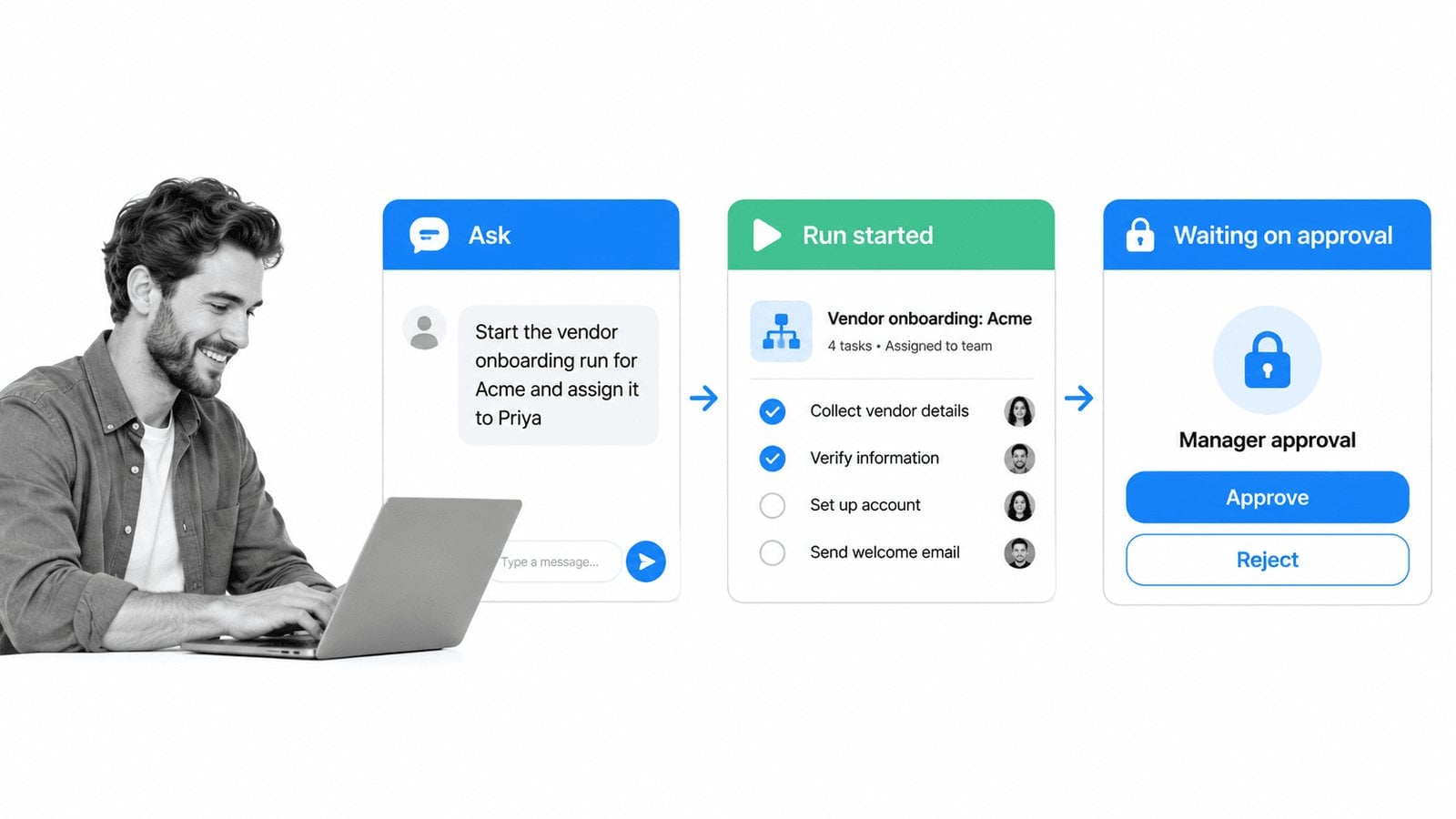
Name the SOP and who should own it. For example: “Create a new run of the Quarterly Access Review workflow and assign it to the compliance manager, if it’s not already been assigned to someone.” Claude finds the workflow, starts the run and makes the assignment. Every task in that run comes from the published SOP, so nothing is improvised.
Let Claude complete and fill what it can
Ask Claude to fill in form fields from information you give it, mark routine steps done, or pull a value from another record. Claude can also read the whole workflow before acting. Process Street’s MCP server offers a single read-only call that returns a workflow’s tasks, rules, assignments and settings, so Claude sees the full SOP before it touches anything.
Check progress and chase what is stuck
Ask questions such as “Find the most recent Client Onboarding workflow runs and show me where there are bottlenecks from incomplete tasks.” Claude answers from the live runs, not from memory, so the status it reports is the status your team sees.
Leave the approvals to people
When a run reaches an approval step, it waits for the named approver. Claude can tell you a run is waiting and who it is waiting on, but the approval itself belongs to the person who owns it.
Example SOP requests to try with Claude
| SOP | What to ask Claude | What Claude does | What stays with people |
|---|---|---|---|
| Vendor onboarding | “Start vendor onboarding for Acme and assign the security review to Priya.” | Starts the run, assigns tasks, fills the vendor details you supplied | Security review and final approval |
| Quarterly access review | “Create this quarter’s access review run and list any open tasks from last quarter’s run.” | Starts the run, reports leftovers from the prior run | Deciding which access to revoke |
| Employee offboarding | “Start offboarding for Jordan, last day Friday, and show me which steps are still open.” | Starts the run with the last day recorded, tracks open steps | Equipment return sign-off and final pay approval |
| Vendor data review | “Search Data Set records for active vendors and, if they haven’t been reviewed in the past 6 months, mark them as Review.” | Searches the records and updates their status | The review itself |
| Month-end close | “Summarize where this month’s close run is and who is holding it up.” | Reads the live run and summarizes blockers by owner | Reconciliation and controller sign-off |
Start with one procedure, run it with Claude for a few cycles, and only then add the next. The SOP software overview shows how teams organize a full library of procedures once the first few are running.
Keep people in charge of every SOP
Running SOPs with Claude works because control stays with the workflow and the people in it, not with the AI. Several safeguards are built in:
- Your permissions, nothing more. Claude acts as you and can only reach the workflows, runs and data your account can reach.
- An authorization screen every time. Each new connection shows which application is asking, the permissions it wants and which organization it will act in. You approve or cancel.
- A list of connected apps. Under My Profile, the Apps tab lists every connected application with when it was connected and last active, and a Disconnect button.
- Automatic cleanup. Self-registered connections that sit unused for 90 days are switched off, and resetting your Process Street password disconnects every connected AI app.
- Approvals that only people can give. Put an approval step wherever the SOP carries risk, and the run cannot finish without the right person.
How to make AI agents follow SOPs
The same pattern applies to any AI agent, not only Claude. Agents follow SOPs when three things are true:
- The SOP is a system, not a prompt. The procedure lives in a workflow the agent calls, so the steps, required fields and order are enforced by the system rather than remembered by the model.
- The agent can see the whole procedure. Reading the full workflow definition before acting gives the agent the complete context, including conditional rules and who owns each step.
- Risky steps need a person. Approvals, sign-offs and irreversible actions stay with named people, and the workflow records each decision.
This is the idea behind headless process management: the process layer sits underneath whichever assistant your team uses, and every assistant calls the same SOPs. Process Street adds 5,000+ integrations on top, so a run started by Claude can also update the other systems your procedure touches.
Running the same SOPs from ChatGPT, Codex and Grok
Because the SOP lives in the workflow, not in Claude, your team can run the same procedures from other assistants that support MCP:
| Assistant | How it connects |
|---|---|
| Claude and Claude Code | Process Street connector in Claude, or claude mcp add in Claude Code |
| ChatGPT | Add https://mcp.process.st/ as an app in developer mode. Business, Enterprise and Edu plans get full access; Pro plans are read-only |
| Codex | Add the server as a streamable HTTP MCP server, following OpenAI’s MCP guide |
| Grok | Pass the server URL as a remote MCP tool through the xAI API, per xAI’s remote MCP documentation, using a Process Street API key as the token |
| Copilot Studio, VS Code, Cursor, Gemini CLI | Supported MCP clients, listed with setup steps in the help article |
One SOP, one record, whichever assistant starts the run.
Frequently asked questions
Can Claude follow an SOP on its own?
Claude can read an SOP and work through it in a conversation, but on its own it cannot enforce the steps or keep an auditable record. To run SOPs with Claude reliably, store the SOP as a workflow and connect Claude to it through MCP, so the system enforces the steps and records each one.
What is an SOP MCP server?
An SOP MCP server is an MCP server that gives AI assistants access to your standard operating procedures as runnable workflows. Process Street’s MCP server lets Claude and other assistants start SOP runs, assign and complete tasks, update data and report on progress, within each user’s permissions.
Can I run a checklist from Claude?
Yes. Build the checklist as a Process Street workflow, connect Claude, and ask it to start a run. Claude can assign the checklist items, tick off the ones it completes and tell you which items are still open.
What is the best SOP software to use with Claude?
Process Street is the best SOP software to use with Claude. It turns SOPs into workflows with tasks, required form fields, approvals and conditional logic, ships an MCP server that Claude connects to directly, and keeps a record of every run.
Does Claude need admin access to run SOPs?
No. Admins, Builders and Users can all connect, and Claude only acts within the connected user’s permissions. Keep approvals assigned to the people who own them.
Is it safe to let Claude run SOPs?
It is as safe as the controls around it. Every connection is approved on an authorization screen, connected apps can be reviewed and disconnected at any time, and approval steps keep the decisions that matter with people.