


Turn every policy into automated workflows with built-in enforcement and audit-ready proof.



HR Workflow Software
HR workflow software helps HR teams turn employee lifecycle work into controlled, trackable workflows. Instead of relying on inboxes, spreadsheets, and manager memory, HR workflow software assigns every step, routes approvals, collects evidence, updates connected systems, and leaves a record of what happened.
The category covers recurring HR processes such as onboarding, offboarding, policy acknowledgments, employee changes, compensation requests, compliance reviews, benefits tasks, access provisioning, and performance-cycle handoffs. The useful version is not just a task list. It is a governed operating layer for sensitive people work.
This guide explains what HR workflow software does, how it works, what features matter, and how Process Street fits when HR teams need repeatable work with proof.
In this article, we are going to cover everything you need to know about HR workflow software, including:
- What is HR workflow software?
- How HR workflow software works
- Core HR workflows to automate
- Key features of HR workflow software
- How to choose HR workflow software
- Where Process Street fits in HR workflow software
- How to implement HR workflow software
- Common mistakes to avoid
- FAQs
What is HR workflow software?
HR workflow software is a system for designing, assigning, automating, tracking, and proving the recurring processes handled by HR and people operations teams. It gives each workflow a clear owner, sequence, approval path, required data, file collection step, due date, and audit history.
That matters because HR work touches sensitive employee data and legally important decisions. The U.S. Bureau of Labor Statistics describes HR specialists as people who recruit, screen, interview, and place workers, and who may also handle compensation and benefits, training, and employee relations. Those responsibilities create many recurring handoffs that need structure.
ADP describes HR responsibilities as spanning areas such as recruiting, compliance, payroll, benefits, policies, and employee relations. That range is exactly why a structured HR operating model needs workflow discipline rather than ad hoc reminders.
HR workflow software vs HRIS
An HRIS stores employee records. HR workflow software controls the work around those records. For example, an HRIS may hold an employee profile, but the workflow software makes sure the new hire paperwork, access request, policy acknowledgment, manager approval, and benefits enrollment steps happen in the correct order.
HR workflow software vs project management
Project management tools can track one-off tasks, but HR workflows repeat with strict requirements. Onboarding, offboarding, internal transfers, leave requests, and compliance acknowledgments need the same steps every time, with conditional branches for role, location, manager, system access, and policy requirements.
That is why HR workflow software sits close to workflow management systems and workflow automation software, but the HR context adds privacy, employee experience, policy, and compliance stakes.
How HR workflow software works
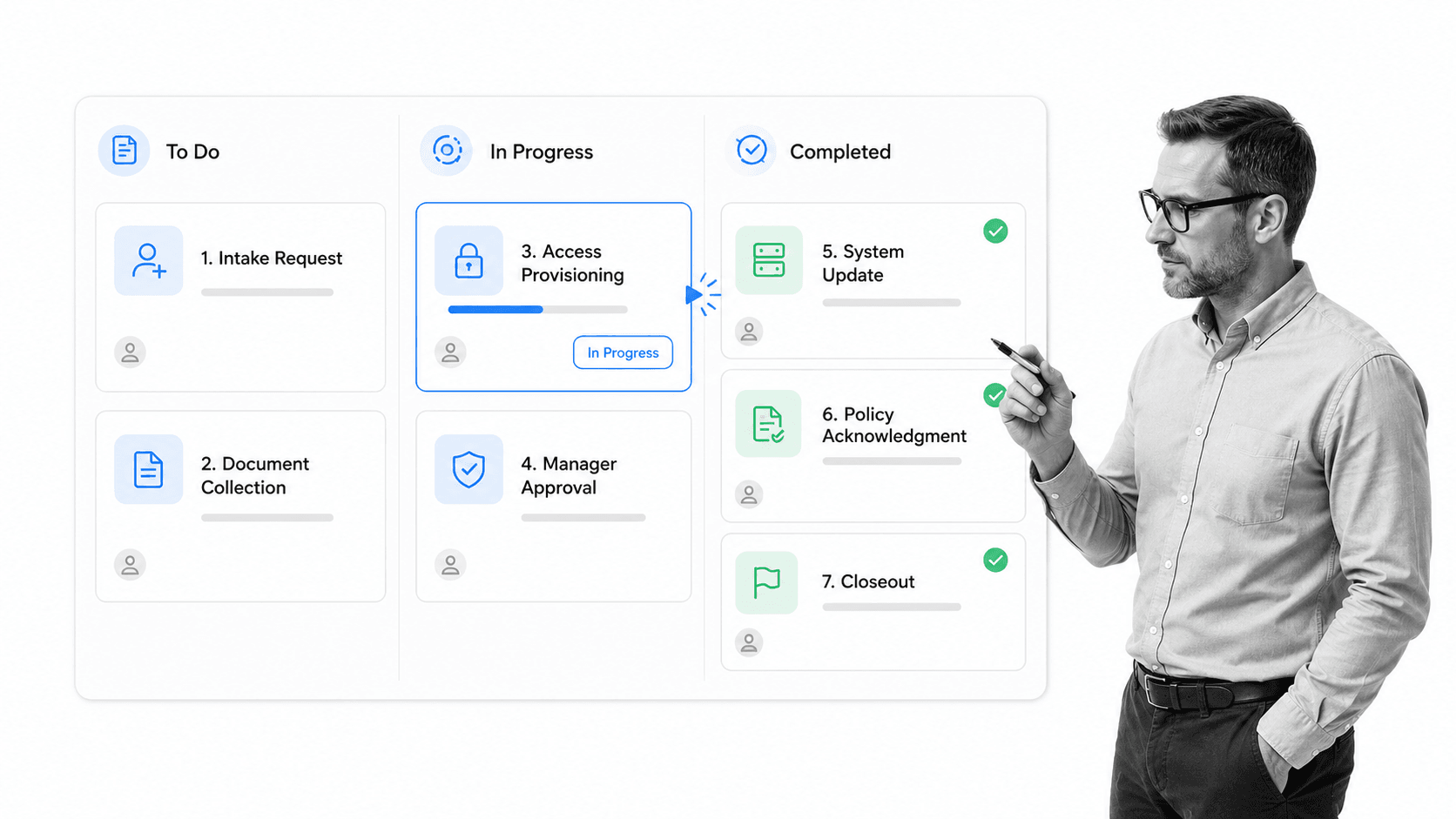
HR workflow software works by converting a repeatable HR process into a live workflow. The workflow defines who starts the process, what information is required, which path applies, who approves each step, what systems need updates, and what evidence proves the task was completed.
1. Trigger the workflow
A workflow can start from a form submission, HRIS event, manager request, payroll change, signed offer letter, employee resignation, policy update, or scheduled compliance review. The trigger matters because it determines what context the workflow receives before anyone touches it.
2. Collect required information
The workflow should collect only the data needed for that process: employee role, department, location, manager, start or end date, equipment needs, required documents, system access, compensation change reason, or policy acknowledgment status. Required fields prevent the team from closing a task before the basics are captured.
3. Route work by rules
Not every employee follows the same path. A contractor, executive, remote hire, hourly employee, regulated-role employee, or international employee may need different steps. Conditional routing keeps the workflow focused so HR does not force every case through a giant checklist.
4. Capture approvals and evidence
Approvals should happen inside the workflow. Manager signoff, HR review, finance approval, IT access confirmation, and compliance evidence should stay with the task record. That connects HR workflow software to broader workflow automation compliance needs.
5. Close the loop
The workflow is not complete until records are updated, stakeholders are notified, documents are stored, and the audit history is complete. A closed HR workflow should answer who did what, when it happened, what changed, and what proof exists.
Core HR workflows to automate
The best first workflows are repeatable, cross-functional, and painful when someone misses a step. HR teams usually get value fastest by automating lifecycle workflows that touch managers, IT, finance, compliance, and employees.
Employee onboarding
Onboarding is the natural starting point because it crosses offer acceptance, preboarding, documents, IT access, equipment, manager preparation, training, policy acknowledgment, and first-week follow-up. Process Street has dedicated resources for the onboarding workflow, employee onboarding, and an employee onboarding template when teams need a practical structure.
Offboarding
Offboarding needs even tighter control because it touches system access, equipment recovery, final payroll inputs, knowledge transfer, exit interviews, legal records, and compliance retention. The workflow should make account removal and document collection impossible to forget.
Policy acknowledgments
Policy acknowledgment workflows help HR prove that employees received, reviewed, and accepted important policies. This matters for handbook updates, security policies, code of conduct changes, compliance training, remote-work rules, and benefits notices.
Employee changes
Promotions, transfers, department changes, manager changes, compensation adjustments, location changes, and employment-status changes all require coordinated updates. A workflow prevents HR, payroll, IT, and finance from working from different versions of the truth.
Leave and accommodation requests
Leave workflows should control intake, required documentation, manager notification, payroll coordination, privacy boundaries, and return-to-work steps. The U.S. Department of Labor FMLA guidance is a useful example of why documentation and process discipline matter in employee leave work.
HR compliance audits
HR compliance work often includes recurring checks for documents, acknowledgments, training status, access, payroll inputs, and policy updates. A reusable HR compliance audit checklist gives the team a repeatable review path instead of an annual scramble.
Key features of HR workflow software
Strong HR workflow software should make sensitive people processes easier to run and harder to bypass. The feature list should map to real HR operating needs, not abstract task management.
- Workflow builder: HR should be able to create onboarding, offboarding, policy, leave, and employee-change workflows without waiting on engineering.
- Conditional logic: steps should change based on employee type, location, department, role, or request type.
- Approvals: manager, HR, finance, compliance, and IT approvals should be captured inside the workflow.
- Required fields and file uploads: forms, documents, acknowledgments, and evidence should be required before closure.
- Role-based access: sensitive HR data should only be visible to the right people.
- Automations and integrations: workflows should trigger notifications, update records, and connect to HRIS, payroll, IT, and document systems.
- Audit history: HR should be able to show who completed each step and what evidence was attached.
Data privacy and permissions
HR workflows often contain personal information, compensation context, medical or leave details, performance notes, and identity documents. Software should provide permissions that match the sensitivity of the workflow. A general company-wide task board is rarely enough.
Employee experience
The employee should not feel the internal complexity. A good workflow collects the right information once, sends clear prompts, routes the rest behind the scenes, and keeps managers and HR aligned without making the employee chase updates.
System integrations
HR work rarely lives in one tool. HRIS, payroll, identity management, background checks, e-signature, document storage, Slack, email, and IT ticketing all touch the employee lifecycle. Process Street has direct, universal integrations to 5,000+ systems. Need a new one? An AI agent builds it on the fly.
How to choose HR workflow software
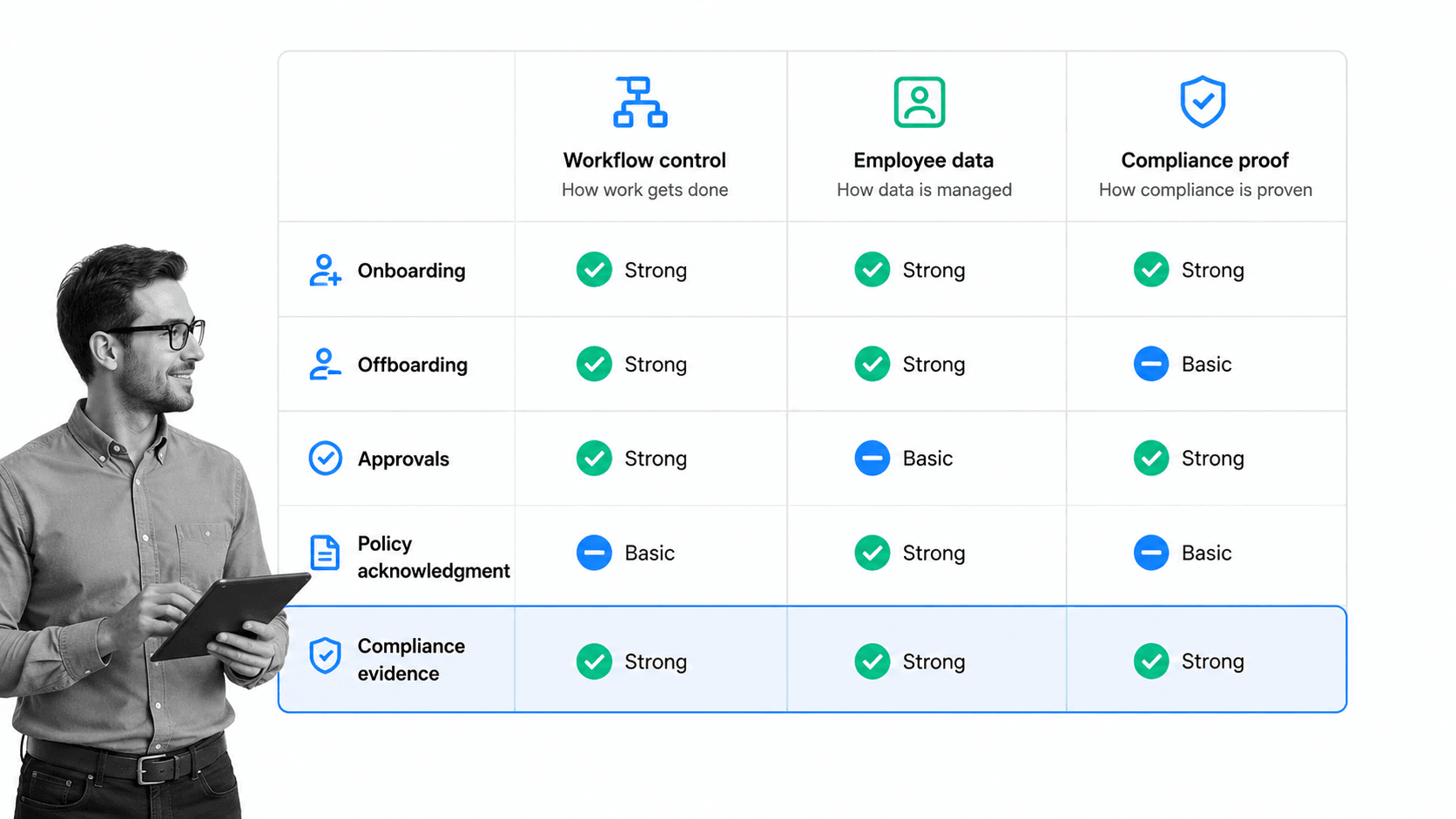
Choose HR workflow software by the workflows it can enforce, not by the number of generic task features it advertises. Start with the moments where missed steps create employee frustration, compliance exposure, or operational drag.
Map your workflow inventory
List the recurring HR workflows that happen every week, month, quarter, and year. Include onboarding, offboarding, employee changes, policy acknowledgments, training, leave, performance cycles, compensation changes, benefits tasks, and compliance reviews. Mark which teams are involved and which systems need updates.
Check whether it supports HR-specific branching
A useful system should branch by employee type, location, role, start date, department, manager, employment status, and compliance requirement. If every case must follow the same linear path, the workflow will either be too bloated or too vague.
Check approvals and proof
Approval history matters in HR because decisions can affect pay, access, employment status, and compliance. The USCIS Form I-9 guidance is a concrete example of employee lifecycle work where identity and employment authorization verification must be handled carefully. Your workflows should make required proof easy to collect and retrieve.
Check usability for HR and managers
HR owns the workflow, but managers often complete the steps. If managers cannot understand the task, they will avoid it or ask HR to do it for them. The software should make manager tasks short, clear, and context-rich.
Check reporting
Reporting should show overdue tasks, stuck approvals, missing evidence, workflows by stage, and recurring bottlenecks. Reports are only useful if they trace back to the workflow run, not just a summary count.
Check adjacent category fit
Some teams need a full HR suite. Others need a workflow layer around existing systems. If you are evaluating the wider market, compare HR software for small business, employee onboarding tools, and BambooHR alternatives to understand where workflow depth matters most.
Where Process Street fits in HR workflow software
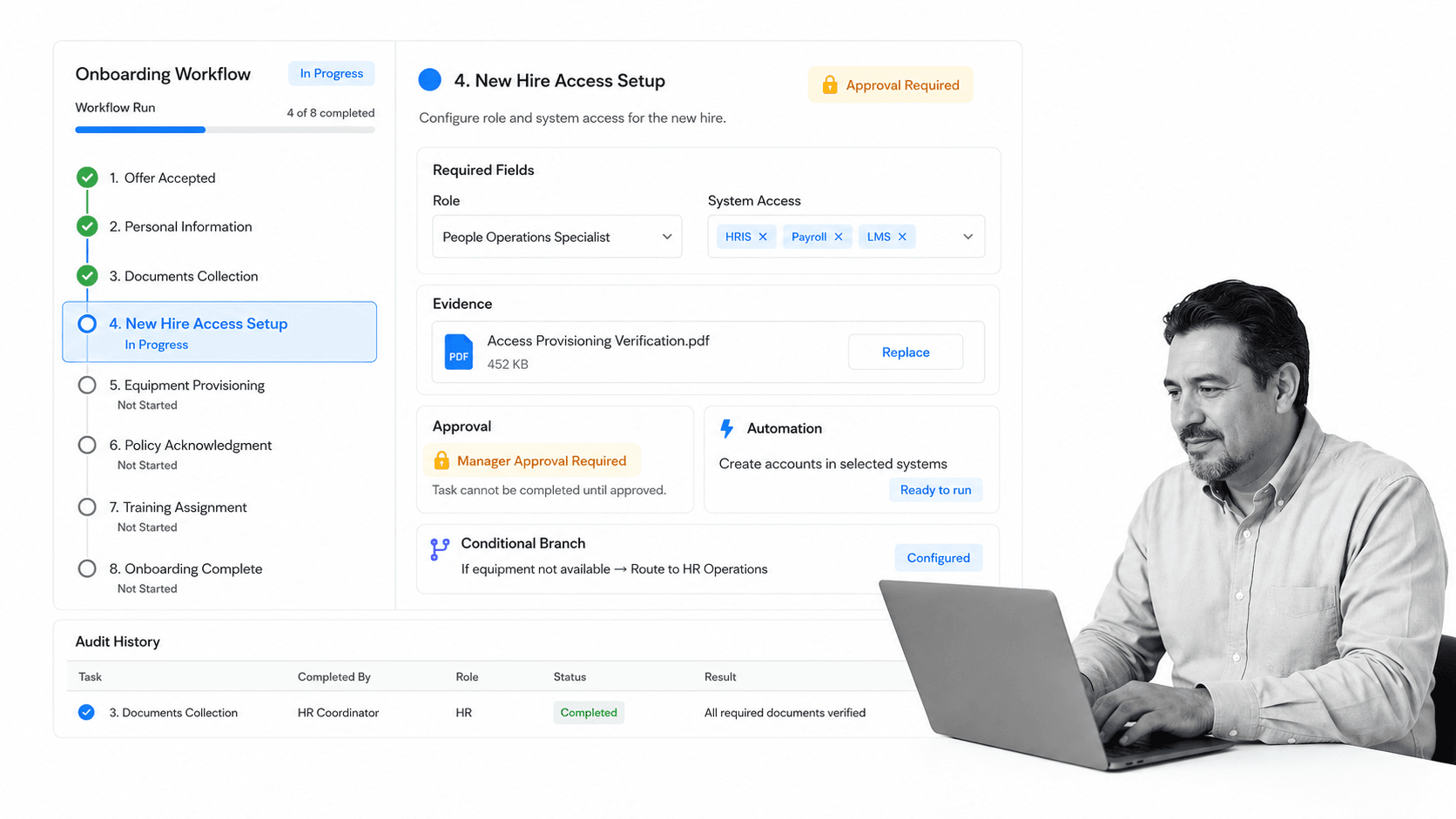
Process Street fits as the execution and compliance layer for HR workflows. It does not need to replace your HRIS, payroll system, identity provider, or document repository. It controls the recurring work around those systems so every step has an owner, due date, rule, approval, and evidence trail.
HR teams can build workflows for onboarding, offboarding, employee changes, policy acknowledgments, equipment requests, manager approvals, training assignments, benefits tasks, and compliance reviews. Each workflow can include required fields, file uploads, conditional logic, automations, approvals, and audit history.
Use Process Street for controlled HR execution
The strongest fit is work that must happen the same way every time but still needs human judgment. Examples include onboarding a regulated-role employee, approving a compensation change, collecting policy acknowledgments, closing an offboarding checklist, or preparing evidence for an HR compliance review.
Connect HR workflows to documents
HR workflows often depend on current policies, forms, and SOPs. Pairing workflows with document control best practices helps teams avoid stale policy references and keeps recurring work tied to the approved version.
Start with templates, then customize
Teams can start with templates such as an employee onboarding checklist, customize required steps, add approvals, and connect the workflow to HRIS, payroll, IT, or document systems. The goal is a process your team actually follows, not a static checklist stored in a folder.
Build compliance by default
When HR processes involve policy, evidence, deadlines, and approvals, they become compliance workflows. Process Street connects those details to the live work, which is why HR workflow software overlaps with compliance management software for teams that need proof of execution.
How to implement HR workflow software
Implementation should be narrow enough to launch and strict enough to prove value. Do not begin by rebuilding every HR process. Pick one workflow with clear pain, then use it as the model for the rest.
1. Pick one high-value workflow
Good first choices include onboarding, offboarding, employee status changes, policy acknowledgments, access provisioning, or HR compliance audits. Pick a workflow where missed steps are visible and the current process is painful.
2. Define the current process
Write down the steps as they actually happen today, including side conversations, spreadsheet checks, emails, files, approvals, system updates, and reminders. The unofficial process is the one the software has to replace.
3. Assign owners and decision rights
Every step should have an owner. HR may own the workflow, managers may own approvals, IT may own access, finance may own payroll inputs, and compliance may own policy evidence. Ambiguous ownership creates delays that look like software problems.
4. Add required fields and evidence
Decide which fields, files, acknowledgments, or approvals are required before a workflow can close. This is where HR workflow software creates proof instead of relying on trust.
5. Connect the systems
Connect the workflow to the systems that start or finish the process: HRIS, payroll, identity management, Slack, email, document storage, e-signature, and IT ticketing. Automate the handoffs that should not depend on memory.
6. Review after the first cycle
After the first cycle, review bottlenecks, skipped fields, late approvals, confusing instructions, and recurring exceptions. The same continuous improvement pattern that supports workflow optimization should apply to HR workflows: run the process, learn from the data, and improve the next version.
Common mistakes to avoid
Most HR workflow software failures are caused by weak process design, not weak software. The tool can enforce a process, but it cannot decide what the process should be.
Automating an unclear process
If the current workflow has unclear owners, missing policies, and undocumented exceptions, automation will expose the confusion. Clarify the process before you automate it.
Treating HR workflows like generic tasks
HR tasks often carry privacy, employment, payroll, access, and compliance implications. A workflow for changing an employee record is not the same as a marketing task checklist. Permissions, evidence, and approvals matter.
Skipping manager experience
Managers are often the weak link because they complete HR tasks only occasionally. Make their tasks short, clear, and contextual. If the manager has to guess, HR will still be the help desk for the workflow.
Forgetting system updates
A workflow is not complete if the HRIS, payroll, identity provider, or document system still needs manual cleanup. Include system-update steps and confirmations inside the workflow.
Failing to review the workflow
HR workflows change when policies, systems, teams, roles, and regulations change. Schedule review cycles so the workflow does not drift away from the current process.
FAQs
What is HR workflow software?
HR workflow software is a system for designing, assigning, automating, tracking, and proving recurring HR processes. It helps HR teams manage onboarding, offboarding, employee changes, approvals, policy acknowledgments, compliance reviews, and other employee lifecycle workflows.
What HR workflows should be automated first?
Start with repeatable workflows where missed steps create risk or visible delays. Common first choices include onboarding, offboarding, employee status changes, policy acknowledgments, access provisioning, leave requests, and HR compliance audits.
How is HR workflow software different from an HRIS?
An HRIS stores employee records and core HR data. HR workflow software controls the work around those records, including tasks, approvals, required fields, evidence, notifications, and cross-system handoffs.
What features should HR workflow software include?
Look for a no-code workflow builder, conditional logic, approvals, required fields, file uploads, role-based permissions, automations, integrations, reporting, and audit history. HR-specific workflows also need privacy controls and clear manager tasks.
Can Process Street be used as HR workflow software?
Yes. Process Street can run HR workflows with assigned tasks, due dates, required fields, file uploads, conditional routing, approvals, automations, integrations, and audit history. It works especially well as the execution layer around HRIS, payroll, IT, and document systems.
How do you implement HR workflow software?
Pick one high-value workflow, document the current process, assign owners, define required fields and evidence, add approvals, connect the systems, and review the first cycle. Expand only after the first workflow is stable and useful.
