


Turn every policy into automated workflows with built-in enforcement and audit-ready proof.



6 Best Jitterbit Alternatives & Competitors in 2026

Jitterbit alternatives give teams different ways to connect applications, automate data movement, orchestrate technical workflows, or run recurring human processes. Jitterbit remains a capable low-code platform for integration, orchestration, automation, API exposure, app development, and EDI. Its official Harmony documentation describes the applications available through the Harmony portal and the platform services that execute those designs. A replacement only makes sense when another product matches your actual operating model better.
Teams usually evaluate alternatives because the scope has changed. Some need a lighter no-code builder with a public free plan. Some want a visual canvas that makes branches and mappings easier to inspect. Technical teams may prefer code steps, self-hosting, or execution-based pricing. Microsoft-centered organizations may value Power Platform alignment. Operations and compliance teams may discover that their real problem is not integration at all. They need enforceable recurring procedures with owners, approvals, evidence, and an audit trail.
This comparison uses five practical criteria: fit for the core job, ease of ownership, governance and observability, pricing model, and ability to handle exceptions. The ranked list includes six products, with Process Street first for teams whose primary requirement is controlled process execution. For enterprise integration architecture, Boomi or Workato can be closer substitutes. For visual no-code automation, Make may be easier. For developer-led automation, n8n is often the better fit. For Microsoft environments, Power Automate deserves a serious evaluation.
The Process Street team maintains this guide, but the recommendations are use-case specific. No tool wins every category. The goal is to help you separate integration, orchestration, and process execution so you can buy the right layer instead of forcing one platform to do every job.
In this guide:
- Jitterbit alternatives at a glance
- The incumbent: Jitterbit
- How we evaluated Jitterbit alternatives
- 1. Process Street
- 2. Make
- 3. n8n
- 4. Microsoft Power Automate
- 5. Boomi
- 6. Workato
- A practical pilot scorecard
- Jitterbit migration checklist
- FAQs
- Choose Process Street for recurring operational workflows
The incumbent: Jitterbit
Jitterbit Harmony is a unified low-code platform for integrating systems, exposing integrations as APIs, building applications, and processing EDI transactions. Its official getting-started documentation describes Harmony applications, cloud services, environments, and private infrastructure options. Jitterbit is the baseline for this comparison, not a ranked alternative. Teams evaluating a change should separate what they value in Harmony from the specific operating problem they want a replacement to solve.
Jitterbit is likely the better choice than Process Street when the central problem is low-code enterprise integration, API exposure, EDI, or application development inside one Harmony environment. Process Street is the stronger fit when the core requirement is recurring work that people must follow, approve, and prove. Process Street ranks first here for a different job. It is designed to make recurring procedures executable and accountable. If your process must tell people what to do, require evidence, route approvals, enforce order, and preserve a readable record, a process-first platform is the stronger fit.
Jitterbit alternatives at a glance
At a glance: Process Street is the best overall Jitterbit alternative for operations, HR, onboarding, quality, and compliance-adjacent teams that need repeatable work to be followed and proven. It is not a direct iPaaS replacement. Boomi and Workato are closer choices for enterprise integration architecture, while Make, n8n, and Power Automate each win in narrower implementation contexts.
| Tool | Best for | Standout feature | Free plan | Starting price |
|---|---|---|---|---|
| Process Street | Compliance operations and recurring business processes | Governed workflow runs with approvals, conditional logic, audit trails, and data handoff | 14-day trial | Contact sales |
| Make | Visual scenario building and branching automation | Canvas-based scenarios with routers, module-level mapping, and run monitoring | Yes | $9/month for 10,000 credits |
| n8n | Technical teams that want node-based workflows | Node editor, code steps, execution logs, and self-hosted deployment options | Self-hosted community edition | EUR 20/month billed annually |
| Microsoft Power Automate | Microsoft 365-heavy teams | Cloud flows, attended desktop flows, approvals, and Microsoft ecosystem governance | 30-day trial | $15/user/month paid yearly |
| Boomi | Enterprise integration, API management, data, and EDI | Low-code integration with mapping, APIs, monitoring, and deployment options | 30-day trial | $99/month plus usage |
| Workato | Enterprise integration and orchestration with governed recipes | Recipe-based automation with application connectivity, lifecycle controls, and usage monitoring | Yes | $75/month for 2,500 credits |
How we evaluated Jitterbit alternatives
A useful evaluation starts with the unit of work. Integration platforms usually treat an event, message, task, operation, or workflow execution as the metered unit. Process platforms treat a business procedure and each run of that procedure as the unit people manage. The distinction affects design, ownership, reporting, and cost.
Core capability fit
Start by naming the job in one sentence. If the sentence begins with connect, synchronize, transform, expose, or move data, prioritize integration products. If it begins with onboard, review, approve, investigate, verify, close, or certify, prioritize a process execution product. Many programs need both, but one layer should own the business record.
Builder and maintainer fit
The person who builds the first workflow is not always the person who maintains it. A developer may prefer code and deployment controls. A systems analyst may prefer a visual mapping canvas. An operations manager needs readable steps, owners, deadlines, and exception handling. Evaluate the tool with the long-term owner in the room, not only the implementation team.
Governance and observability
Ask what happens when credentials expire, a field changes, a request is rejected, or a person misses a deadline. Integration observability should show failed runs and technical diagnostics. Process observability should show human ownership, evidence, approvals, and current status. A tool can be strong in one type of visibility and weak in the other.
Pricing model
Compare the billable unit against real volume. Task-based, credit-based, execution-based, message-based, user-based, and custom enterprise plans behave differently as workflows grow. Build three scenarios: current volume, expected twelve-month volume, and a high-volume month. Include testing, retries, branches, and administrative seats rather than pricing only the happy path.
Migration and operating risk
A migration is not finished when the new automation runs once. It is finished when owners know how to monitor it, exceptions have a route, credentials have custodians, documentation is current, and the old workflow is retired safely. Favor the product that your team can operate consistently after consultants or project staff leave.
Human work versus system work
Draw a line between actions performed by software and decisions or tasks performed by people. System work includes receiving events, transforming fields, calling APIs, synchronizing records, and routing messages. Human work includes reviewing context, exercising judgment, collecting evidence, approving exceptions, and accepting accountability. A business process automation tools design can automate both categories, but the two need different control surfaces.
When human work is buried inside an integration workflow, process owners may depend on notifications and destination applications to reconstruct status. When technical integration is forced into a human checklist, people may copy data manually and introduce delay. The best architecture lets an integration platform handle reliable machine actions while a process platform presents the decisions, tasks, and proof that people need.
Reporting and the system of record
Decide which questions leaders will ask after launch. Integration leaders may need execution volume, latency, failures, retries, connector health, and environment status. Operations leaders may need cycle time, overdue tasks, approval outcomes, exception categories, workload, and evidence completeness. A product that reports one set well may still require another layer for the other set.
Name the authoritative record for each workflow before selecting a tool. A CRM might own the customer record, an ERP might own the transaction, and a workflow management software platform might own the procedure used to review or approve it. Clear ownership prevents teams from treating logs, chat messages, and spreadsheets as competing versions of the truth.
Security and access boundaries
Review how each product stores credentials, scopes connections, separates environments, assigns roles, and exposes sensitive data in logs. Least privilege should apply to both builders and runtime connections. A workflow that can update payroll, customer records, or production systems needs tighter controls than an automation that posts a public notification.
Also consider who can change business logic. A secure connection can still produce the wrong outcome if an unauthorized editor changes a condition or destination. Pair technical access controls with a change process that identifies the owner, reviewer, test evidence, deployment date, and rollback path for material workflows.
Finally, inspect data retention and export options. Teams should know how long execution details remain available, whether evidence can be exported, how deleted users affect historical records, and what happens when the subscription ends. These details rarely drive a demo, but they determine whether the platform can support investigations, audits, and orderly transitions later.
Separate integration architecture from process execution
Begin by naming the outcome that the replacement must own. Integration architecture moves, transforms, secures, and exposes data across systems. Process execution tells people which work to complete, captures required evidence, routes decisions, and preserves a readable history. A single business initiative can require both layers, but evaluating them as one undifferentiated workflow creates confusing requirements. Write separate acceptance criteria for machine connectivity and human accountability, then decide whether one product or a paired architecture should satisfy them.
This distinction changes the shortlist. A platform with mature API lifecycle controls may be the right foundation for reusable services, hybrid runtimes, and central integration governance. It may still be an awkward place for an HR manager to run onboarding or for a compliance reviewer to approve evidence. Conversely, an approachable recurring-workflow product may give process owners excellent visibility while leaving enterprise data transformation to a dedicated integration layer. Neither boundary is a defect when it is explicit and intentional.
Map APIs, integrations, and operational dependencies
Create an inventory before comparing demonstrations. For each Jitterbit application or API, record its trigger, source and destination systems, transformation logic, authentication method, runtime location, expected volume, failure path, owner, and downstream consumers. Add the business process that depends on it. This reveals whether the asset is shared infrastructure, a local point-to-point connection, a human procedure with a small automation step, or a mixed workflow that needs coordinated ownership across teams.
Dependency mapping also prevents a misleading one-for-one migration. Several existing integrations may support the same reusable business capability and belong behind one governed API. Other assets may be obsolete, duplicated, or used only by a retired process. A replacement project is an opportunity to simplify the estate, but deletion should follow verified usage evidence. Mark uncertain dependencies for observation during the pilot instead of assuming that a quiet integration is safe to remove.
Test governance at design time and runtime
Governance is more than an administrator permission screen. At design time, inspect how the product separates environments, reviews changes, manages reusable connections, versions logic, and restricts production deployment. At runtime, inspect policy enforcement, credential scope, logging, alerting, replay controls, and access to sensitive payloads. The right model depends on risk. A public notification workflow does not need the same controls as an integration that changes financial, identity, health, or customer records.
For human processes, governance must also cover task ownership and proof. Check whether required fields can be skipped, whether approvals show the evidence available at decision time, whether exceptions remain visible, and whether historical records preserve who did what. Technical logs and operational records answer different questions. An API log can prove that a request succeeded, while a process record can prove that a reviewer examined the case and accepted responsibility for the outcome.
Model the full operating cost
Compare costs using a representative production workload, not a headline unit. Estimate users, tasks, credits, operations, executions, API calls, data volume, runtime capacity, environments, connectors, support, and implementation services according to each vendor’s current model. Include testing, retries, polling, branching, error handling, and seasonal peaks. A low entry price can become less predictable at scale, while a custom proposal can be reasonable if it replaces substantial infrastructure and specialist labor.
Then model ownership. Count the people needed to build, review, deploy, monitor, troubleshoot, document, and improve the system. Consider the cost of training a new maintainer and the time required for a process owner to request a small change. The cheapest license is not the cheapest operating model if routine changes create a queue for scarce integration engineers. The most capable platform is also not automatically the best value if most workflows need only transparent assignments and approvals.
Evaluate migration and coexistence
Few enterprise migrations should begin with an abrupt platform switch. Classify assets by criticality and coupling, then choose a low-risk workflow that still exercises authentication, transformation, an exception, monitoring, and a human handoff. Run the old and new paths in parallel where duplicate actions can be controlled. Compare outputs, timing, error behavior, and the effort required to diagnose differences. Record who makes the cutover decision and what evidence is required before the old path is disabled.
Coexistence can be a durable architecture, not merely a transition. Jitterbit or another integration platform can continue to manage shared APIs and complex system connectivity while Process Street governs the recurring procedure that invokes those services. A Microsoft team may keep Power Automate for local application flows. A developer group may use n8n for technical jobs. The goal is not to minimize the number of tools at any cost. It is to give each layer a clear owner, boundary, and source of truth.
Score maintainability after the pilot
A successful pilot must survive handoff. Ask the expected long-term owner to explain the design, change one condition, rotate a test credential, diagnose a failed run, and locate the evidence needed for a review. Measure how much vendor documentation or specialist help is required. This exposes the difference between a workflow that works in a demonstration and a workflow that the organization can safely operate after the original builder moves to another project.
Use a weighted scorecard agreed before the demonstration. Capability fit, security, governance, observability, recovery, maintainability, user comprehension, and cost predictability are useful categories. Weight them according to the actual workload. An integration center may prioritize deployment controls and reusable APIs. An operations team may prioritize clear assignments and exceptions. Fixed criteria reduce the chance that an impressive interface or isolated feature outweighs the operating qualities that determine long-term success.
Document the decision in operational terms. Name the workflows that will move, the assets that will remain, the team responsible for each layer, the expected support path, and the next review date. Include explicit reasons for rejecting close alternatives so the organization does not repeat the same evaluation when staff changes. A concise architecture record, ownership map, and migration sequence give procurement, security, engineering, and process owners a shared basis for approving the choice and measuring whether it delivers the intended result.
Plan the first ninety days after selection as carefully as the pilot. Set baseline measures for failed runs, recovery time, manual interventions, overdue human tasks, approval delays, and support requests. Review them weekly during migration and monthly after stabilization. Use the findings to retire duplicate logic, improve alerts, tighten access, and update operating documentation. A platform decision creates value only when the new system becomes easier to understand and safer to change. Continued measurement turns the comparison from a procurement exercise into a controlled improvement program with visible ownership and evidence.
1. Process Street
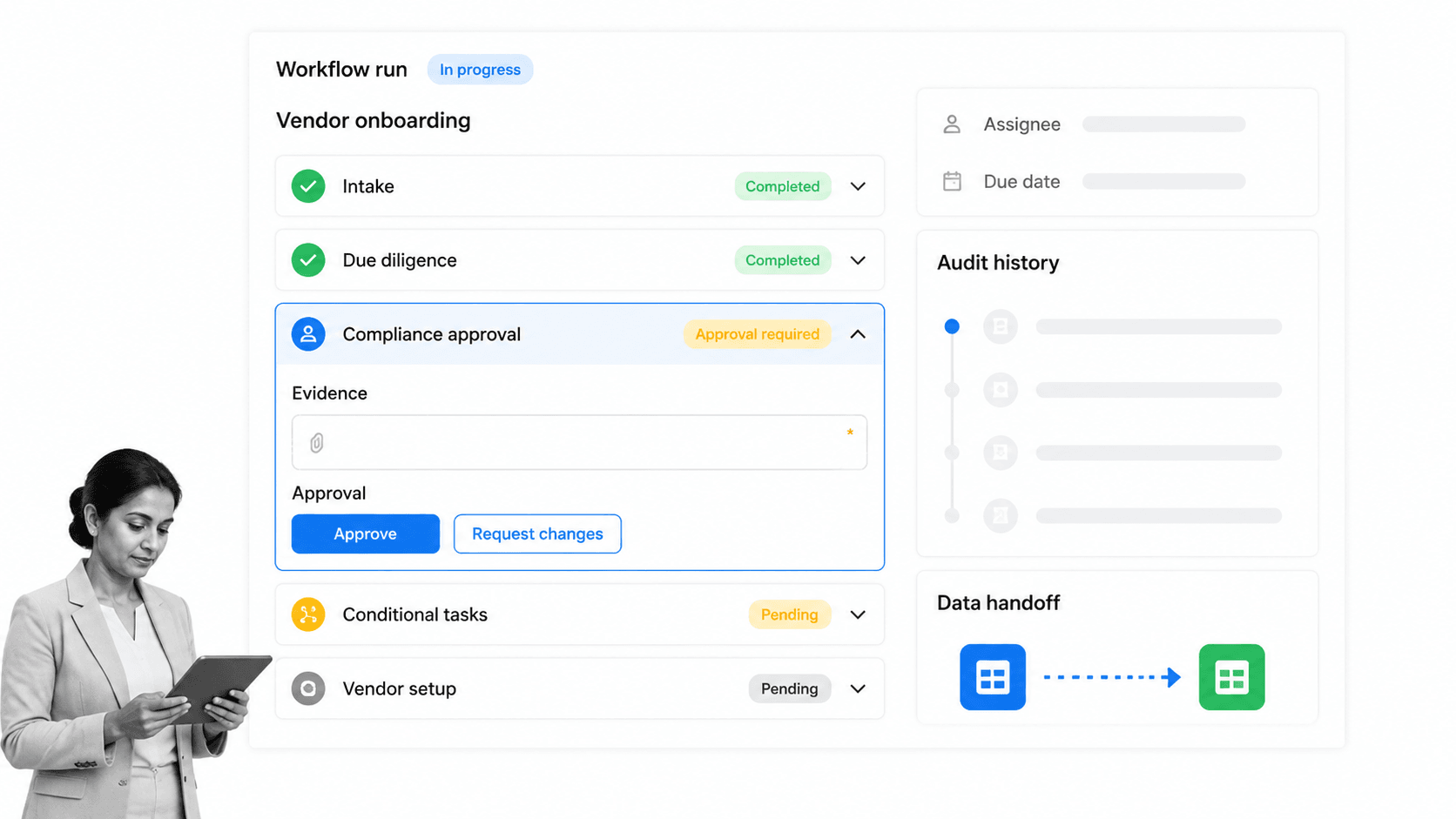
Best for: Compliance operations and recurring business processes.
Process Street is the strongest choice when a Jitterbit workflow is standing in for a recurring business procedure. It turns an SOP into a workflow that people run, with assigned tasks, required inputs, conditional paths, approvals, schedules, and a history of what happened. That makes it especially relevant to operations, employee and client onboarding, vendor management, finance controls, quality assurance, and compliance-adjacent work.
The difference is visible in day-to-day ownership. A systems automation can move a record from one application to another, but it does not automatically tell a team member what evidence to collect, which decision requires approval, or why a case is waiting. Process Street puts those responsibilities in the workflow run. A manager can see progress, a reviewer can approve or reject, and an auditor can follow the record without translating technical integration logs.
Process Street can still participate in an integrated stack. Its pricing page lists automation apps and connectors, and its platform supports API-driven work around the controlled process. Teams can use workflow automations to move data while keeping the human procedure visible. That pattern works well when integrations are supporting actors and the operational workflow is the system people rely on.
This is why Process Street earns the number one ranking for its ICP. It gives process owners a maintainable surface for enforcing how work is done. A reusable employee onboarding checklist or client onboarding checklist can provide a starting structure, while conditional logic and approval tasks handle variation and control. The result is closer to an operating system for repeatable work than to a general-purpose iPaaS.
The boundary matters. Process Street is not a BPMN modeling and simulation suite, a robotic process automation platform, or a full enterprise integration backbone. If you need high-volume data transformation, API lifecycle management, EDI, or deeply technical integration architecture, Boomi or Workato is a better fit. If you mainly need visual no-code connections between common SaaS applications, Make may be simpler.
Key features
- Reusable workflows and workflow runs
- Required fields, assignments, due dates, and enforced task order
- Conditional logic and approvals
- Forms, Pages, Data Sets, and workflow analytics
- Automations, integration apps, and API access
Pros
- Designed around recurring procedures that people can understand
- Makes ownership, evidence, and approvals visible in one record
- Strong fit for operations and compliance-adjacent process owners
- Templates and structured runs support repeatability
- Integrations can support the process without replacing its control layer
Cons
- Not intended to replace a full enterprise iPaaS
- Not a BPMN simulation or desktop RPA product
Pricing model
Process Street offers a 14-day Pro trial and custom-quoted plans. Review the current details on the Process Street pricing page.
2. Make
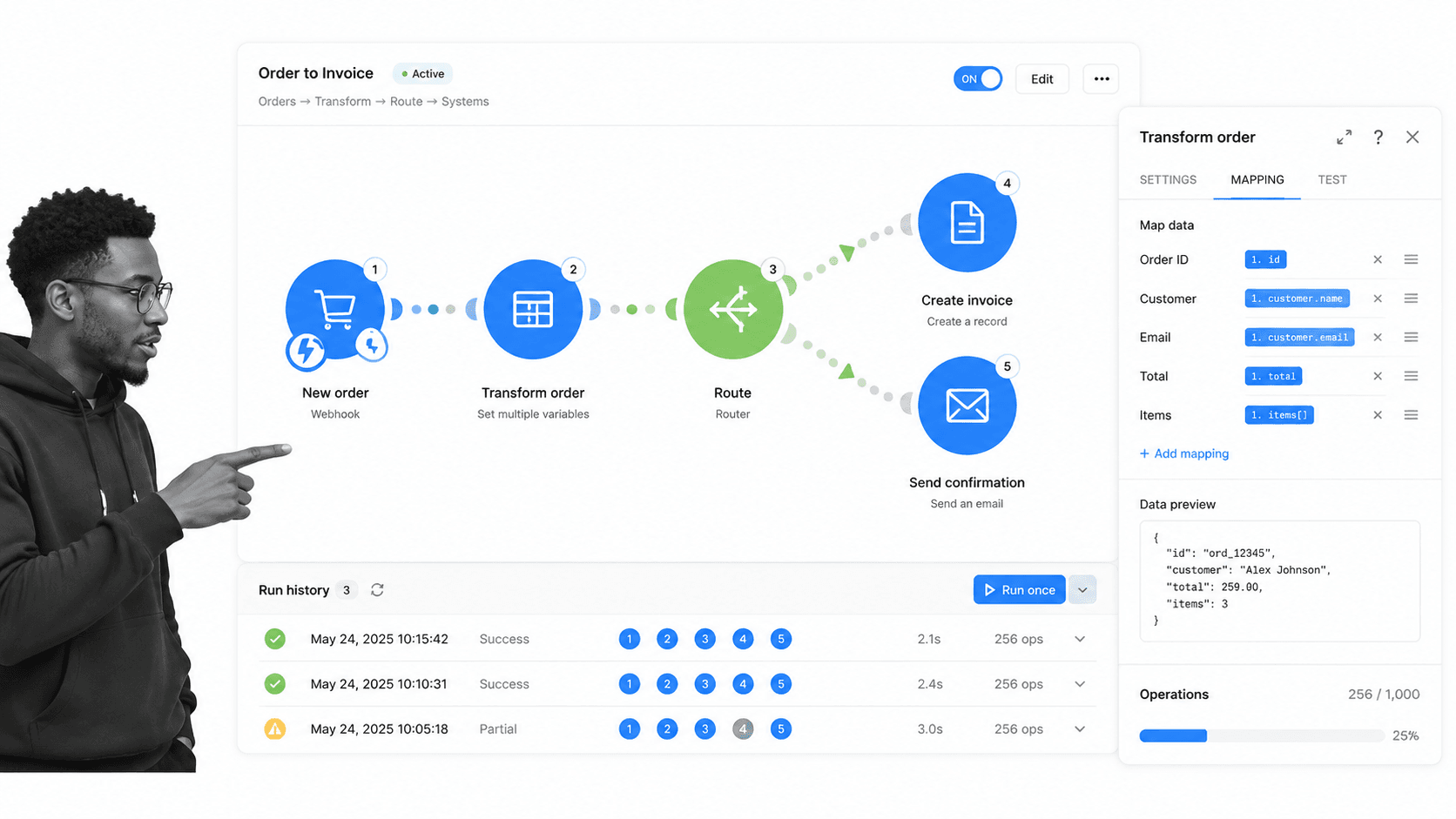
Best for: Visual scenario building and branching automation.
Make is a visual automation platform built around scenarios. Its canvas shows modules, connections, routes, filters, and mappings, which helps builders understand how data moves through branches. It is a strong Jitterbit alternative for teams that want substantial no-code control without buying a sales-led enterprise integration platform.
Make beats Process Street when the main job is multi-step app automation and data transformation. Marketing operations, sales operations, ecommerce, and support teams can inspect a scenario visually and adjust how records move. Process Street remains the better fit when human task execution, evidence, and procedural accountability are the center of the workflow.
Key features
- Visual scenario canvas
- Routers and filters
- Data mapping between modules
- Scheduling and run history
- API access on paid plans
Pros
- Clear visual representation of branches
- Public free plan
- Accessible entry pricing
- Useful for complex no-code mappings
Cons
- Credit use can grow with module activity
- Human procedure governance is not its main design center
Pricing model
Make offers a free plan with 1,000 credits per month. Its official pricing page lists Core from $9 per month for 10,000 credits at the selected tier.
3. n8n
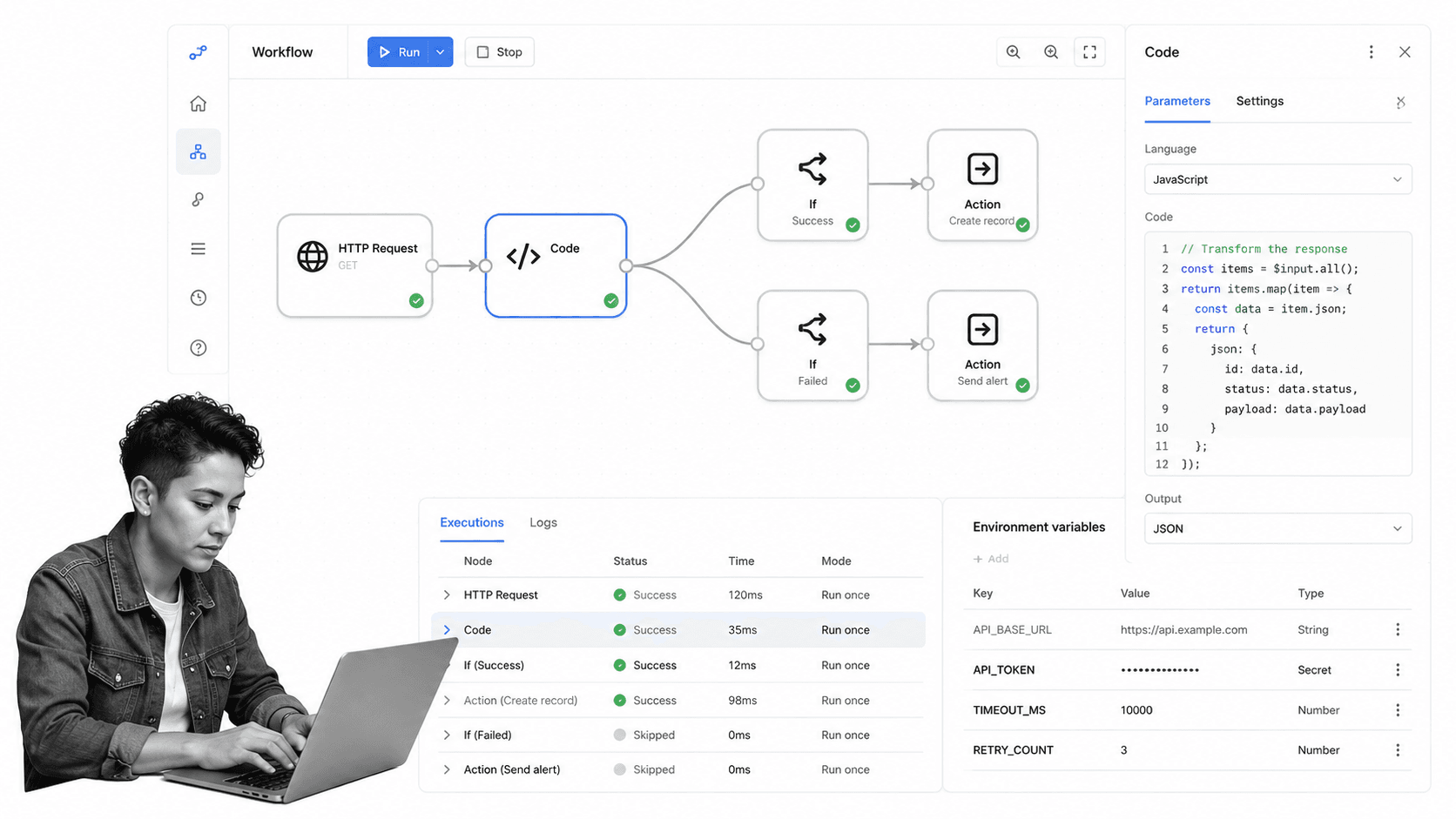
Best for: Technical teams that want node-based workflows.
n8n combines a visual node editor with technical flexibility. Builders can connect nodes, inspect inputs and outputs, add JavaScript or Python, and deploy in n8n Cloud or on their own infrastructure. It is a practical alternative for engineering, IT operations, security operations, and technical automation teams.
n8n beats Process Street when developers need code-level control, self-hosting, custom API work, or technical workflow diagnostics. Process Street is easier for non-technical process owners who need tasks, approvals, deadlines, and audit-friendly execution rather than a node graph maintained by engineers.
Key features
- Node-based workflow editor
- JavaScript and Python steps
- Cloud and self-hosted deployment
- Execution logs and diagnostics
- Workflow-execution pricing for cloud plans
Pros
- High flexibility for technical teams
- Self-hosting option
- Unlimited steps within an execution
- Strong debugging surface
Cons
- Requires more technical ownership
- Business users may find node workflows harder to maintain
Pricing model
n8n offers a self-hosted community edition and paid cloud plans. Its official pricing page lists Starter at EUR 20 per month when billed annually.
4. Microsoft Power Automate
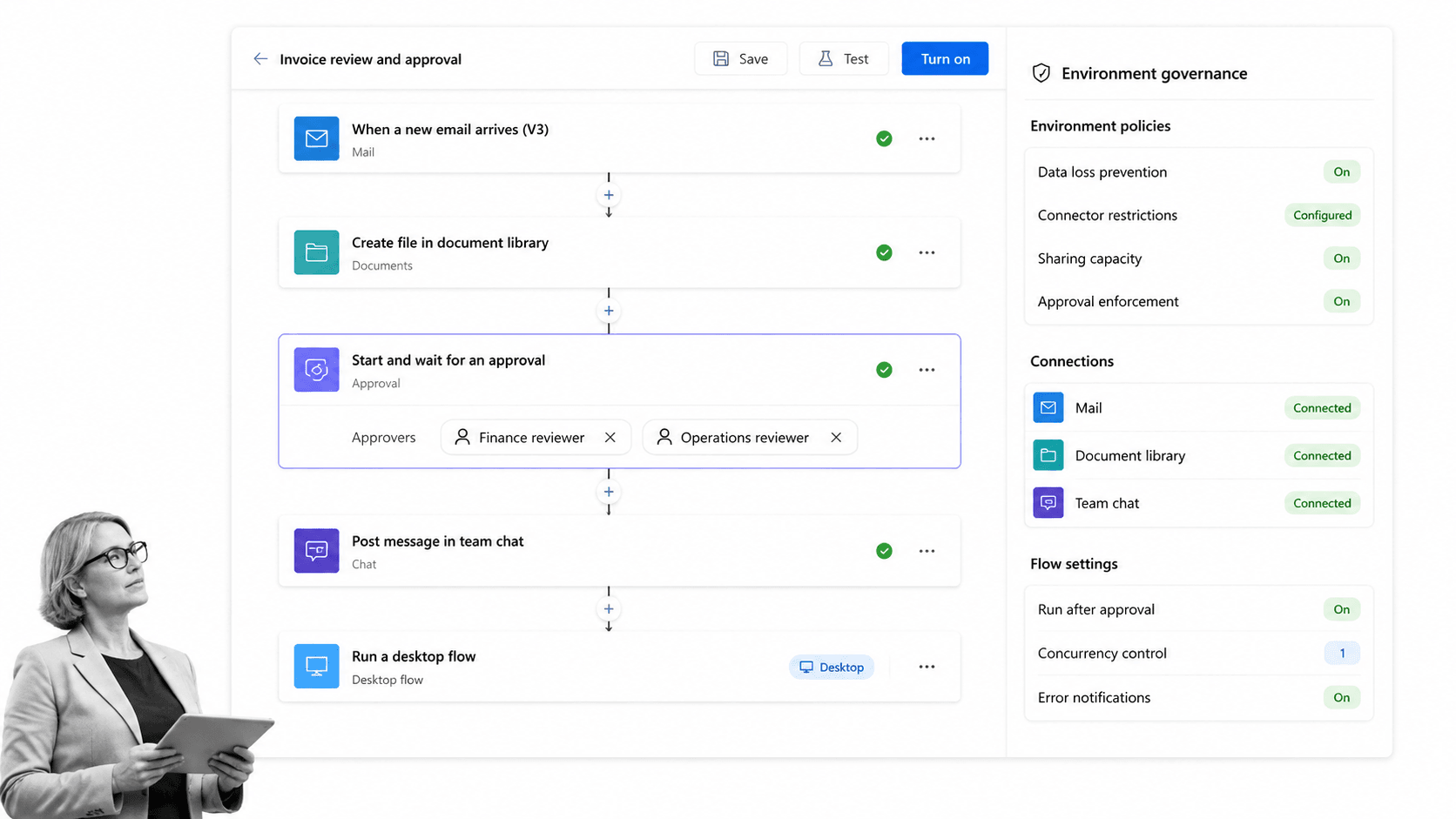
Best for: Microsoft 365-heavy teams.
Microsoft Power Automate provides cloud flows, attended desktop flows, connectors, approvals, and process-related capabilities within the Power Platform ecosystem. It is a natural Jitterbit alternative for organizations that already standardize on Microsoft 365, Teams, SharePoint, Dynamics, Azure, and Dataverse.
Power Automate beats Process Street when Microsoft identity, Power Platform governance, desktop automation, or Microsoft-native data services drive the architecture. Process Street is often easier when the workflow must remain application-neutral and readable to process owners outside a Power Platform center of excellence.
Key features
- Cloud flows
- Attended desktop flows
- Standard, premium, and custom connectors
- Microsoft Dataverse integration
- Process and task mining entitlements on Premium
Pros
- Strong Microsoft ecosystem alignment
- Cloud and desktop automation options
- Established enterprise administration model
- Useful for teams already licensed around Microsoft
Cons
- Licensing becomes more complex across user, process, hosted process, and add-on needs
- Best experience depends on Microsoft ecosystem commitment
Pricing model
Microsoft offers a 30-day trial. The official Power Automate pricing page lists Premium at $15 per user per month, paid yearly.
5. Boomi
Best for: Enterprise integration, API management, data, and EDI.
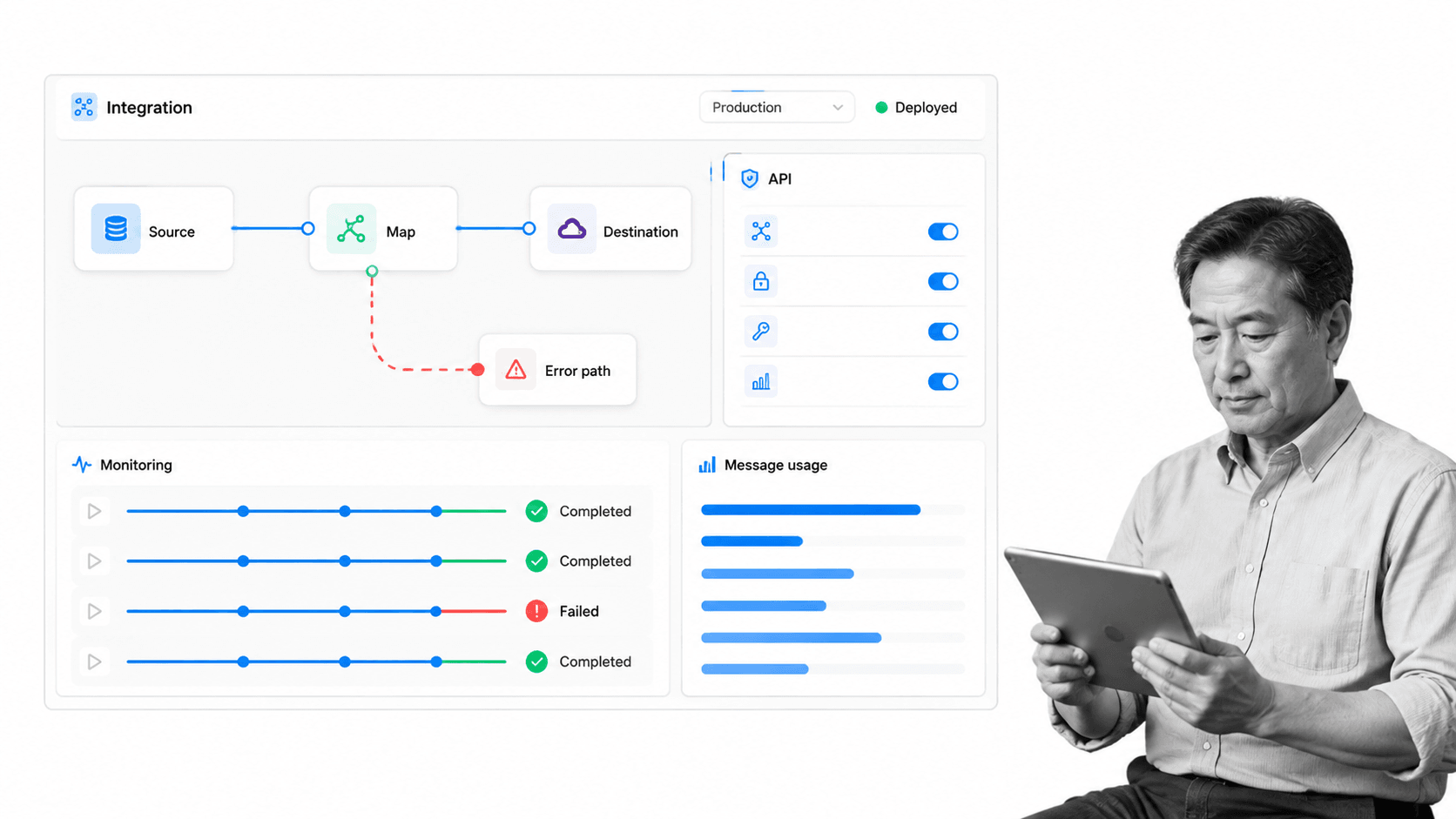
Boomi is an enterprise integration platform covering application and data integration, API management, and related capabilities. Its low-code process canvas, mapping tools, deployment options, and monitoring make it a closer architectural alternative to Jitterbit than a process execution product is.
Boomi beats Process Street when the organization needs an integration backbone, API management, EDI, data synchronization, or hybrid deployment across technical systems. Process Street beats Boomi when the business problem is making a recurring SOP easy for people to follow, own, approve, and audit.
Key features
- Application and data integration
- Low-code mapping and transformation
- API management
- Cloud and behind-the-firewall runtime options
- Pay-as-you-go and subscription purchasing paths
Pros
- Broad enterprise integration scope
- Public pay-as-you-go entry option
- Useful mapping and monitoring capabilities
- Strong fit for integration specialists
Cons
- More platform than a small operations team may need
- Not primarily a human SOP execution experience
Pricing model
Boomi offers a 30-day free trial. Its official pricing page lists pay-as-you-go access from $99 per month plus usage.
6. Workato
Best for: Enterprise integration and orchestration with governed recipes.
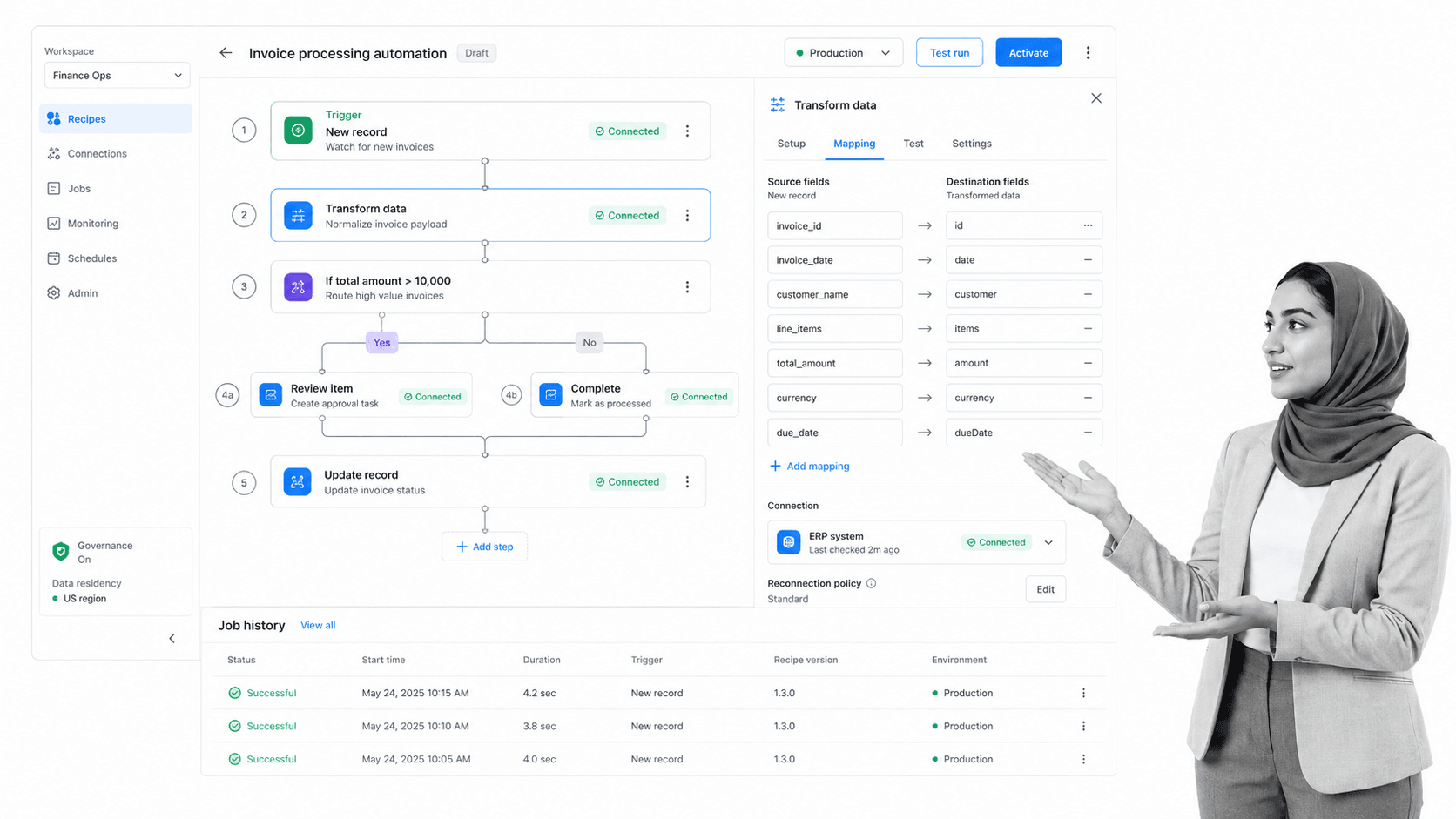
Workato is an enterprise integration and orchestration platform built around recipes. Its platform connects applications and data, supports business process automation, and provides security, governance, lifecycle, and operations capabilities for integration teams. It is a close Jitterbit alternative when the central requirement is governed enterprise orchestration.
Workato beats Process Street when the main job is technical integration across many systems, data transformations, API-led orchestration, or shared integration architecture. Process Street remains the better fit when process owners need readable procedures, assigned human work, approvals, evidence, deadlines, and an audit-friendly operating record.
Key features
- Recipe-based integration and automation
- Application and data connectivity
- Lifecycle and environment controls
- Usage monitoring
- Security and governance capabilities
Pros
- Strong fit for enterprise integration teams
- Self-service free option is available
- Governed recipe lifecycle
- Broad orchestration scope
Cons
- Direct-customer pricing includes platform and usage components
- Technical integration ownership may exceed what small operations teams need
- Not a dedicated SOP execution system
Pricing model
Workato offers a self-service Free plan and Pro options starting at $75 per month for 2,500 credits. Direct customers use a platform-edition fee plus usage model, as described in the official Workato pricing documentation.
A practical pilot scorecard
A vendor demonstration shows what a product can do under controlled conditions. A pilot shows whether your team can own it. Use one representative workflow that includes a normal path, a decision, an exception, a human handoff, and a downstream system update. Avoid the easiest automation in your backlog because it will not expose the differences that matter.
Choose a representative workflow
Pick work that is important enough to deserve attention but safe enough to test. A client onboarding handoff, vendor intake, employee access request, finance review, or recurring quality check can reveal both integration and human-process requirements. If the workflow is mostly procedural, compare the pilot against a checklist builder and a structured workflow run. If it is mostly system-to-system movement, use a data synchronization or API scenario.
Write down the expected outcome before configuring any tool. Define the trigger, required inputs, decision rules, responsible roles, service-level expectations, evidence, destination systems, and failure response. The scorecard should measure whether the product supports that outcome clearly, not how many unrelated features appeared in the sales presentation.
Measure build effort and comprehension
Track how long it takes to create the first working version, but also ask a second person to explain the workflow without help from the builder. A fast build that only one specialist understands creates long-term dependency. A readable workflow may take slightly longer to configure and still be cheaper to operate because ownership can move with the business.
Have the expected maintainer make a real change during the pilot. Add a condition, update a field mapping, change an approver, and revise a notification. Note which changes are safe for a process owner and which require a developer or platform administrator. This separates builder usability from operator usability.
Test normal and exceptional paths
Run clean records first, then test missing fields, duplicate events, rejected approvals, expired credentials, delayed responses, API errors, and unexpected data formats. Record whether the tool prevents bad input, retries safely, creates a visible exception, and preserves enough context for someone to recover. Strong automation reduces manual work without making failures mysterious.
For human workflows, verify that required tasks cannot be bypassed accidentally, ownership is unambiguous, and a reviewer can see evidence before approval. These are the same qualities that distinguish a dependable automated workflow system from a chain of notifications. For technical integrations, verify idempotency, error handling, replay behavior, monitoring, and environment separation.
Model real pricing
Use pilot logs to estimate billable activity. Count tasks, credits, operations, executions, messages, users, bots, or other units exactly as the vendor defines them. Include branches, polling, tests, retries, transformations, and duplicate prevention. A workflow that looks inexpensive at ten test records may behave differently at production volume.
Create low, expected, and high-volume scenarios. Add the cost of implementation, administration, premium connectors, environments, support, and the people required to maintain the platform. Custom-quoted enterprise pricing is not automatically expensive, and public entry pricing is not automatically cheap. Total operating cost depends on workload and ownership.
Check governance and change control
Confirm who can create connections, edit production workflows, view sensitive fields, publish changes, and access logs. Ask whether the platform supports separate environments, reusable credentials, role-based access, revision history, approvals for changes, and centralized monitoring. Match these controls to the risk of the workflows, not to a generic enterprise checklist.
For regulated or compliance-adjacent processes, governance also includes the business record. A technical log can show that an API call succeeded, while a workflow automation tools surface can show that a person reviewed evidence and approved the case. Decide which proof the organization will need months later and make that artifact part of the pilot.
Evaluate support and handoff
Ask the pilot team to solve one issue using only product documentation and normal support channels. Record the time to diagnosis, clarity of guidance, and whether the platform exposes enough information to ask a precise question. Then create a one-page operating guide and hand the workflow to its future owner for a week.
At the end, score each tool from one to five on capability fit, builder fit, maintainer fit, observability, governance, recovery, cost predictability, and business-record quality. Weight the categories before seeing the result. That prevents a visually impressive feature from outweighing the operational qualities the team actually needs.
Jitterbit migration checklist
Moving away from Jitterbit requires more than rebuilding workflows. Treat the change as an operating-model migration. Inventory what each automation does, who depends on it, which credentials it uses, how often it runs, what failures look like, and which evidence must survive. Then decide whether each workflow belongs in an integration platform, a process platform, or both.
Inventory and classify workflows
Group current workflows into data synchronization, event-driven integration, API exposure, scheduled transfer, human approval, recurring SOP, and exception management. The first four usually belong in an integration tool. Human approvals and SOPs may belong in a workflow management system. Mixed workflows should have a clear boundary between system automation and human process control.
Record dependencies and owners
List every connected account, custom connector, webhook, environment, lookup table, and downstream report. Assign an owner for the business outcome and another for the technical integration where appropriate. A migration with no named owner will eventually fail silently, regardless of platform.
Rebuild the smallest safe version
Do not copy every branch automatically. Reconfirm which steps still create value, which controls are required, and which retries or workarounds accumulated because of old limitations. Build a narrow version in the new platform, test it with representative data, and add complexity only when evidence justifies it.
Test failure and recovery
Deliberately expire a test credential, send malformed data, reject an approval, exceed a deadline, and interrupt a dependent service. Confirm that alerts reach the right owner and that someone can recover without editing production data by hand. The failure test is more informative than a perfect demonstration run.
Run in parallel and retire safely
Use a controlled parallel period for high-risk automations. Compare outputs, monitor volume, and reconcile differences. When the new workflow is stable, disable the old trigger, preserve required records, update documentation, and confirm that dashboards and downstream consumers point to the new source.
FAQs
What are the best Jitterbit alternatives?
The best Jitterbit alternatives are Process Street for recurring SOP and compliance workflows, Make for visual no-code scenarios, n8n for technical and self-hosted automation, Microsoft Power Automate for Microsoft-centered organizations, Boomi for enterprise integration, and Workato for governed enterprise orchestration. Choose based on the job rather than looking for one universal replacement.
Is there a free Jitterbit alternative?
Make and Workato offer public free plans, while n8n provides a self-hosted community edition. Process Street, Microsoft Power Automate, and Boomi offer trial paths. Review current limits on each vendor’s official pricing page because free allowances and packaging can change.
What is the closest alternative to Jitterbit?
Workato and Boomi are the closest options in this list when you need enterprise application and data integration, mapping, monitoring, governance, and deployment choices. If your Jitterbit use case is actually recurring human process execution, Process Street is the closer functional match for the work people need to complete.
Why is Process Street ranked first?
Process Street is ranked first for operations, HR, onboarding, quality, and compliance-adjacent teams whose core need is enforceable, trackable, recurring process execution. It is not ranked first for pure iPaaS. Boomi is the stronger choice when enterprise integration architecture is the main requirement.
Which Jitterbit alternative is best for small teams?
Make or n8n may be practical starting points for small teams that need app automation and transparent entry pricing. Process Street is the better small-team choice when the work includes repeatable procedures, assignments, approvals, or evidence rather than only data movement.
Which Jitterbit alternative is best for developers?
n8n is a strong choice for developers because it combines a node editor with code steps, diagnostics, and self-hosted deployment. Boomi may fit better when a larger enterprise integration team needs broader platform governance and API capabilities.
Is there a Microsoft equivalent to Jitterbit?
Microsoft Power Automate is the closest Microsoft-centered option in this list. It supports cloud flows, desktop flows, connectors, and Power Platform governance. It is especially relevant when Teams, SharePoint, Dynamics, Dataverse, and Azure already shape the operating environment.
How do you migrate from Jitterbit?
Start by inventorying workflows, owners, connections, volumes, and failure paths. Classify each workflow as integration, process execution, or mixed. Rebuild the smallest safe version, test failures, run critical workflows in parallel, and retire old triggers only after outputs and ownership are verified.
Choose Process Street for recurring operational workflows
If your Jitterbit evaluation started because recurring processes are hard to follow, exceptions are invisible, or approvals and evidence are scattered, choose Process Street. It gives operations teams a clear workflow record while integrations handle the surrounding data movement.
The dividing line is simple. Use an iPaaS when systems and data are the primary actors. Use Process Street when people, procedures, controls, and proof are the primary actors. When the workflow needs both, connect the systems but keep one readable process record for the team.
Comparing something else? The full directory of software alternatives and competitor comparisons covers integration and automation platforms alongside the wider workflow category.
