


Turn every policy into automated workflows with built-in enforcement and audit-ready proof.



8 Best Make Alternatives & Competitors in 2026
Make alternatives are workflow automation platforms that help teams connect apps, route data, trigger actions, and manage recurring work when Make is not the right fit for pricing, governance, technical control, Microsoft alignment, or process accountability.
Make is strong at visual automation. Its pricing page describes a free plan with a no-code visual workflow builder, 3,000+ apps, routers, and filters, and paid plans that start with the Core plan at $9/mo for 10k credits. source
The best alternative depends on the job. If the workflow is really an enforceable SOP, start with Process Street. If it is app-to-app automation, compare Zapier and Integrately. If it needs code, compare n8n and Pipedream. If the company standardizes on Microsoft 365, Power Automate may fit better. If the program is enterprise integration-led, Workato or Tray.ai belong on the shortlist.
This guide uses five practical criteria: core workflow fit, ease of ownership, governance, pricing model, and failure handling. The goal is not to crown one universal winner. Process Street is ranked first for teams whose real need is enforceable, trackable, recurring process execution. Other tools may be the better fit when the work is pure app integration, developer workflow automation, or enterprise iPaaS.
In this article, we are going to cover:
- Make alternatives at a glance
- Why teams look for Make alternatives
- How to choose Make alternatives
- Best Make alternatives and competitors
- 1. Process Street
- 2. Zapier
- 3. n8n
- 4. Pipedream
- 5. Microsoft Power Automate
- 6. Workato
- 7. Tray.ai
- 8. Integrately
- Make alternatives by use case
- FAQs
Make alternatives at a glance
The fastest way to shortlist Make alternatives is to separate process execution from app automation. Make is excellent when the builder wants a visual scenario canvas. It is less complete when the workflow needs owners, required evidence, approvals, a durable task record, and proof that every recurring step happened correctly.
| Tool | Best for | Standout feature | Free plan | Starting price |
|---|---|---|---|---|
| Process Street | Enforceable recurring processes and SOP workflows | Workflow runs with approvals, required fields, audit trails, and data handoff | 14-day Pro trial | Contact sales |
| Zapier | Broad app-to-app automation for business teams | Zaps, Tables, Forms, Canvas, Agents, Chatbots, and Paths | Yes | $19.99/mo annually for Professional |
| n8n | Technical teams that want node-level control | Node editor, code steps, execution logs, and self-hosting context | Free trial | 20 EUR/mo annually for Starter |
| Pipedream | Developers building event-driven API workflows | Event sources, code steps, API requests, logs, and credit-based execution | Yes | Free plan, paid plans available |
| Microsoft Power Automate | Microsoft 365 and Dynamics-heavy teams | Cloud flows, attended desktop flows, approvals, and process mining | Free trial | $15/user/month paid yearly |
| Workato | Enterprise iPaaS and governed automation programs | Recipe builder, platform editions, usage-based pricing, and governance controls | Not listed | Usage-based, contact sales |
| Tray.ai | Governed integration, MCP, and agent orchestration | Agent Gateway, Merlin Agent Builder, observability, and 700+ connectors | Not listed | Contact sales |
| Integrately | Small teams that want simple ready-made automations | Ready automations, task quotas, webhooks, branching, and auto-retry | Yes | $19.99/mo annually for Starter |
Why teams look for Make alternatives
Most teams look for Make alternatives when the visual scenario builder stops being the only decision factor. A team may need a simpler builder, more predictable billing, stronger governance, native Microsoft coverage, developer control, or a real workflow management system for recurring work.
The trigger is often operational, not technical. A marketing automation breaks silently. A customer onboarding workflow has no accountable owner. A finance approval is scattered between forms, Slack, and a scenario log. A compliance process needs evidence later, but the automation only moved data. These are signs that the team needs to evaluate the workflow model, not just the connector catalog.
For recurring work, map the process before picking the tool. List the trigger, inputs, owner, decision points, systems touched, proof required, and exception path. If that map looks like an SOP with accountability, use a workflow management software or process platform. If it is mostly data movement, an app automation tool may be enough.
- Process control: Required fields, assigned owners, due dates, and approvals matter when people are part of the work.
- Builder fit: Business teams may want no-code setup, while developers may want code, logs, environments, and API control.
- Governance: IT and compliance teams need permissions, change control, logs, and a clear system of record.
- Pricing model: Task, credit, execution, usage, and contact-sales models behave differently at scale.
- Failure handling: Mature automation stacks make errors visible and route exceptions to the right owner.
How to choose Make alternatives
Use these questions before you compare demos or pricing pages. They keep the decision tied to the workflow, not to a generic feature checklist.
What starts the workflow?
Some workflows start from a form, webhook, row update, ticket, message, schedule, or manual launch. Trigger clarity tells you whether you need polling, webhooks, scheduled runs, a person launching a checklist, or a workflow event from another system.
Who owns the next step?
If a person has to review, approve, attach evidence, or answer a required question, choose a surface that makes ownership visible. A pure integration log can show that data moved, but it may not prove that the right person completed the right step.
What has to be proven later?
When someone asks who approved a request, what evidence was attached, and whether required controls were followed, the answer should come from the workflow record. If the answer lives across chats, spreadsheets, and scenario logs, the process is hard to audit.
How technical is the owner?
No-code builders are faster for business teams. Node-based builders and code steps give technical teams more control. Enterprise iPaaS tools help IT govern shared integrations across departments.
What happens when a run fails?
Every automation eventually breaks. Strong Make alternatives show the failure, explain the affected step, and help the team rerun, repair, or escalate without guessing.
Where should the source of truth live?
Many workflows touch several apps, but the team needs one place to see status, owner, proof, and next action. If no system owns that record, the automation may save time while creating operational ambiguity.
Best Make alternatives and competitors
1. Process Street
Best for: Enforceable recurring processes and SOP workflows.
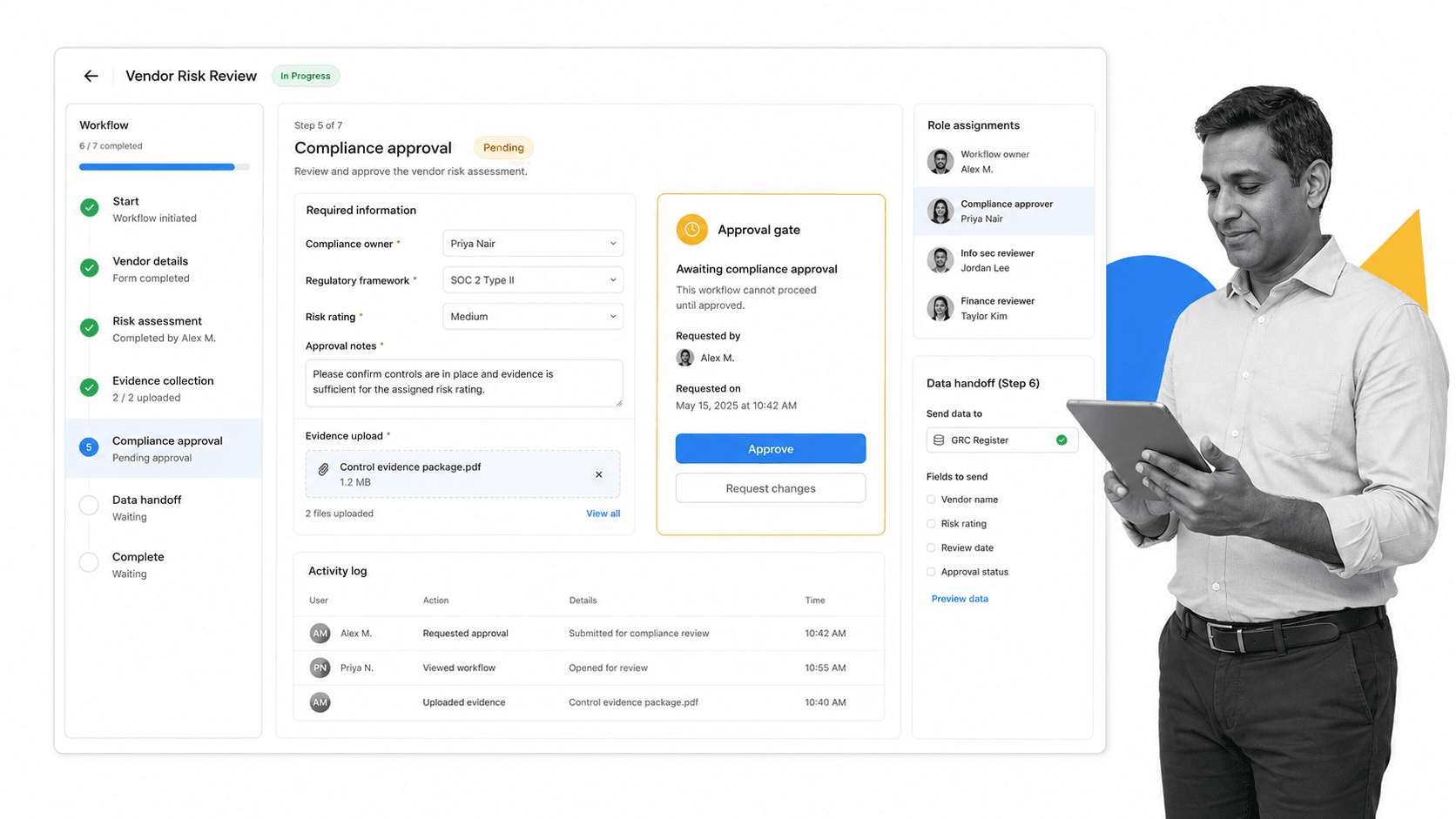
Process Street is the best Make alternative for teams whose automation problem is really a recurring business process. It turns SOPs into workflow runs with assigned owners, required inputs, approvals, conditional routing, audit trails, and structured handoffs. That matters when the work has compliance, quality, onboarding, finance, customer, or operational risk attached.
Make can move data across a visual scenario. Process Street makes sure the underlying work is followed correctly. That is the difference between connecting apps and running the process. A vendor review, employee onboarding flow, recurring compliance check, or client implementation process needs more than modules and routers. It needs a record of who did what, when it happened, and what evidence supports the outcome.
Process Street also connects to the broader stack. The pricing page lists Zapier, Microsoft Power Automate, Tray.io, Make, trigger-from-email, and public API access among automation and integration options. For teams evaluating automated workflow tools, that means Process Street can own the controlled process while connected tools move data around it.
The limitation is important: Process Street is not trying to be a visual scenario canvas like Make, and it is not a developer-first event runtime like Pipedream. If the main job is low-level API orchestration, a developer tool may fit better. If the main job is enforcing recurring work with people, policy, approvals, and proof, Process Street is the stronger fit.
For operations leaders, this distinction changes maintenance. A visual scenario can become difficult to explain once exceptions, retries, approvals, and manual checks pile up. Process Street keeps the process readable for the person responsible for the outcome. That makes it easier to train new teammates, review exceptions, and show leadership where work is stuck.
For compliance-adjacent teams, the record matters as much as the automation. Required fields, approvals, evidence, task history, and audit trails help a team prove the work was done. App connectors can update systems around the workflow, but the workflow run remains the place where accountability is visible.
Key features
- Workflow runs with assigned steps, due dates, and role-based ownership.
- Required form fields, conditional logic, and enforced task order for controlled execution.
- Approvals, audit trails, task history, and evidence capture inside the workflow.
- Scheduled workflows, workflow run links, email triggers, and API access for launch flexibility.
- Direct, universal integrations to 5,000+ systems. Need a new one? An AI agent builds it on the fly.
Pros
- Strongest fit when the workflow includes humans, SOPs, approvals, evidence, or compliance risk.
- Readable for business owners, not only automation specialists.
- Keeps the process record in one place instead of splitting it across automation logs.
- Works well for onboarding, vendor reviews, quality checks, finance controls, and recurring operations.
- Pairs process control with automation rather than replacing every integration tool.
Cons
- Not a visual module-by-module scenario canvas like Make.
- Not a full enterprise iPaaS or developer event runtime.
Pricing is plan-based with Startup, Pro, and Enterprise options. Use Process Street pricing for current plan details and limits. Start with Process Street if you need Make alternatives for enforceable recurring operations, not just app connections.
2. Zapier
Best for: Broad app-to-app automation for business teams.
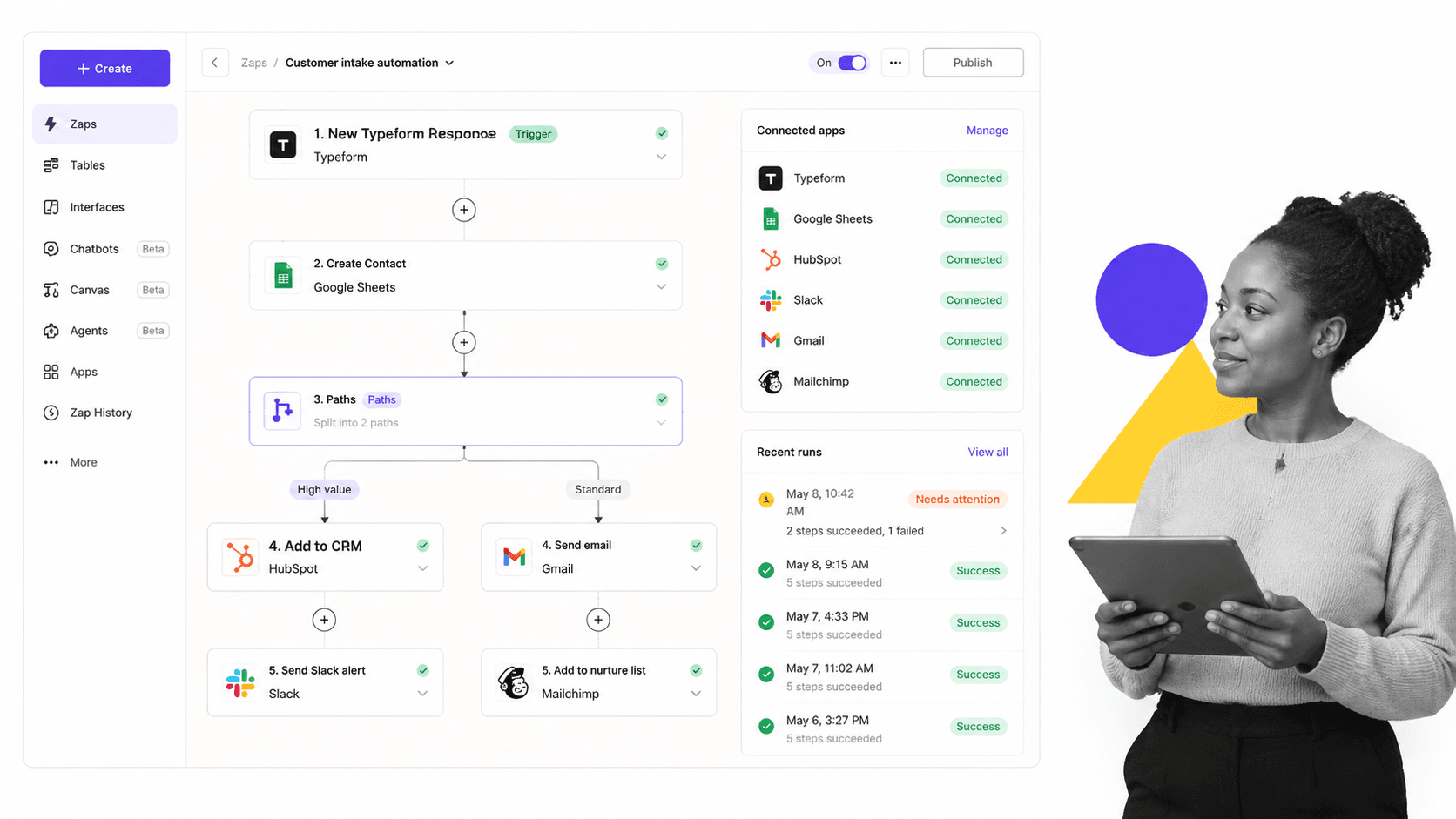
Zapier is the most familiar Make alternative for broad app-to-app automation. Its product navigation includes Zaps, Tables, Forms, Canvas, Agents, and Chatbots, and its pricing page lists a free plan plus Professional starting at $19.99/mo when billed annually. source
It fits better than Process Street when the workflow is a simple SaaS sync with little human accountability. It is weaker when the process needs SOP enforcement, evidence, approvals, and a durable operational record.
Use Zapier when the workflow owner matches its center of gravity. The strongest Make alternatives are not interchangeable. A tool that is excellent for API events may frustrate an operations manager, while a tool built for SOP execution may be unnecessary for a simple app sync. This section is framed around fit so the buying decision stays practical.
The main tradeoff against Process Street is accountability. Zapier can be the better choice for its own lane, but teams should ask where approvals, evidence, exceptions, and process ownership will live. If those records matter, keep Process Street in the architecture even when another tool handles the integration work.
Before migrating from Make to Zapier, test one real scenario end to end. Include the happy path, a failed run, an owner handoff, and a change request. That small pilot will reveal whether the builder, logs, pricing model, and governance controls match the team that will maintain the workflow after launch.
Pros
- Clear fit for its target use case.
- Useful when the workflow owner matches the builder audience.
- Can sit alongside Process Street when integration and process layers are separated.
Cons
- May need another system for recurring human accountability.
- Pricing and limits should be checked against real run volume before migration.
Pricing model: $19.99/mo annually for Professional. Check the official pricing page for current details before buying.
3. n8n
Best for: Technical teams that want node-level control.
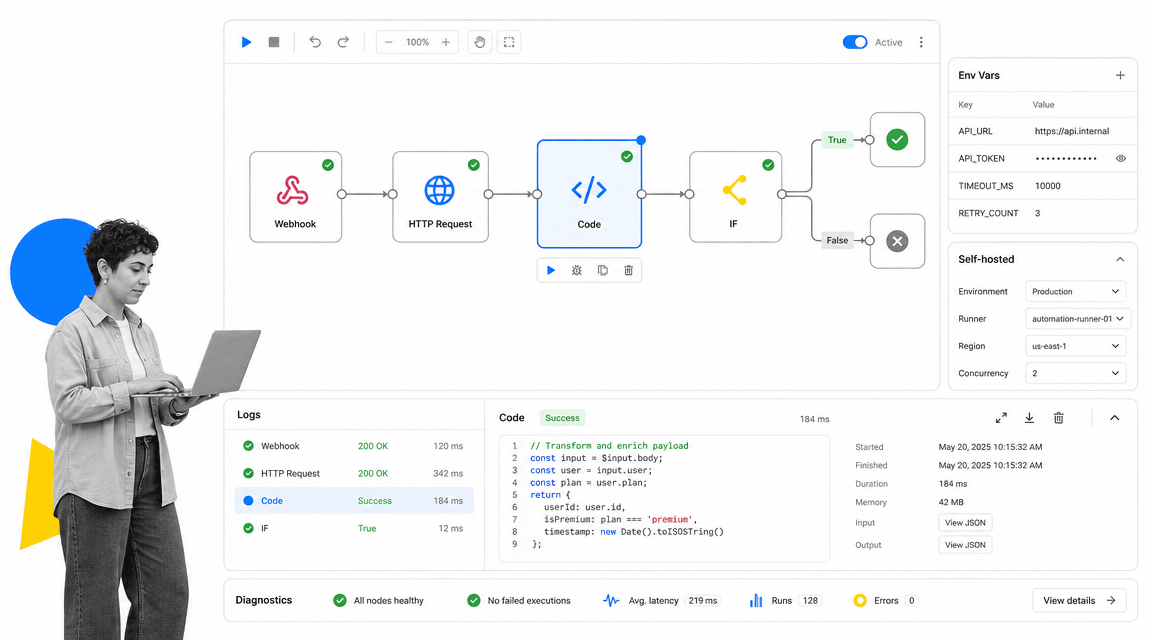
n8n is a strong Make alternative for technical teams that want node-level control. Its pricing page says all plans include unlimited users and workflows, every integration, and pricing based on monthly workflow executions. The Starter plan is listed at 20 EUR/mo when billed annually. source
It fits better than Process Street when developers need code steps, logs, environment control, and self-hosting context. It is less natural when non-technical owners need recurring work, assigned tasks, approvals, and business-readable proof.
Use n8n when the workflow owner matches its center of gravity. The strongest Make alternatives are not interchangeable. A tool that is excellent for API events may frustrate an operations manager, while a tool built for SOP execution may be unnecessary for a simple app sync. This section is framed around fit so the buying decision stays practical.
The main tradeoff against Process Street is accountability. n8n can be the better choice for its own lane, but teams should ask where approvals, evidence, exceptions, and process ownership will live. If those records matter, keep Process Street in the architecture even when another tool handles the integration work.
Before migrating from Make to n8n, test one real scenario end to end. Include the happy path, a failed run, an owner handoff, and a change request. That small pilot will reveal whether the builder, logs, pricing model, and governance controls match the team that will maintain the workflow after launch.
Pros
- Clear fit for its target use case.
- Useful when the workflow owner matches the builder audience.
- Can sit alongside Process Street when integration and process layers are separated.
Cons
- May need another system for recurring human accountability.
- Pricing and limits should be checked against real run volume before migration.
Pricing model: 20 EUR/mo annually for Starter. Check the official pricing page for current details before buying.
4. Pipedream

Best for: Developers building event-driven API workflows.
Pipedream is a developer-first Make alternative for event-driven workflows. Its documentation describes a free plan, paid plans, and credit-based workflow billing where compute time during workflow execution drives usage. source
It fits better than Process Street when engineers are building API workflows, developer automations, or event-driven integrations with custom code. It is not the natural choice for SOP execution, assigned tasks, approvals, and evidence.
Use Pipedream when the workflow owner matches its center of gravity. The strongest Make alternatives are not interchangeable. A tool that is excellent for API events may frustrate an operations manager, while a tool built for SOP execution may be unnecessary for a simple app sync. This section is framed around fit so the buying decision stays practical.
The main tradeoff against Process Street is accountability. Pipedream can be the better choice for its own lane, but teams should ask where approvals, evidence, exceptions, and process ownership will live. If those records matter, keep Process Street in the architecture even when another tool handles the integration work.
Before migrating from Make to Pipedream, test one real scenario end to end. Include the happy path, a failed run, an owner handoff, and a change request. That small pilot will reveal whether the builder, logs, pricing model, and governance controls match the team that will maintain the workflow after launch.
Pros
- Clear fit for its target use case.
- Useful when the workflow owner matches the builder audience.
- Can sit alongside Process Street when integration and process layers are separated.
Cons
- May need another system for recurring human accountability.
- Pricing and limits should be checked against real run volume before migration.
Pricing model: Free plan, paid plans available. Check the official pricing page for current details before buying.
5. Microsoft Power Automate

Best for: Microsoft 365 and Dynamics-heavy teams.
Microsoft Power Automate is the natural Make alternative for Microsoft 365-heavy organizations. Microsoft lists Power Automate Premium at $15/user/month paid yearly, with cloud flows, attended desktop flows, and process mining for individual users. source
It fits better than Process Street when the workflow lives mostly inside Microsoft identity, SharePoint, Outlook, Teams, Dynamics, Dataverse, or desktop automation. Process Street is stronger as a neutral SOP execution layer.
Use Microsoft Power Automate when the workflow owner matches its center of gravity. The strongest Make alternatives are not interchangeable. A tool that is excellent for API events may frustrate an operations manager, while a tool built for SOP execution may be unnecessary for a simple app sync. This section is framed around fit so the buying decision stays practical.
The main tradeoff against Process Street is accountability. Microsoft Power Automate can be the better choice for its own lane, but teams should ask where approvals, evidence, exceptions, and process ownership will live. If those records matter, keep Process Street in the architecture even when another tool handles the integration work.
Before migrating from Make to Microsoft Power Automate, test one real scenario end to end. Include the happy path, a failed run, an owner handoff, and a change request. That small pilot will reveal whether the builder, logs, pricing model, and governance controls match the team that will maintain the workflow after launch.
Pros
- Clear fit for its target use case.
- Useful when the workflow owner matches the builder audience.
- Can sit alongside Process Street when integration and process layers are separated.
Cons
- May need another system for recurring human accountability.
- Pricing and limits should be checked against real run volume before migration.
Pricing model: $15/user/month paid yearly. Check the official pricing page for current details before buying.
6. Workato

Best for: Enterprise iPaaS and governed automation programs.
Workato is a Make alternative for enterprise integration programs. Its docs describe a usage-based model with a platform edition fee and a usage fee, and edition options such as Standard, Business, Enterprise, and Workato One. source
It fits better than Process Street when IT owns a broad enterprise iPaaS program with shared connections, lifecycle management, and centralized governance. It is usually more platform than a small team needs for recurring human workflow execution.
Use Workato when the workflow owner matches its center of gravity. The strongest Make alternatives are not interchangeable. A tool that is excellent for API events may frustrate an operations manager, while a tool built for SOP execution may be unnecessary for a simple app sync. This section is framed around fit so the buying decision stays practical.
The main tradeoff against Process Street is accountability. Workato can be the better choice for its own lane, but teams should ask where approvals, evidence, exceptions, and process ownership will live. If those records matter, keep Process Street in the architecture even when another tool handles the integration work.
Before migrating from Make to Workato, test one real scenario end to end. Include the happy path, a failed run, an owner handoff, and a change request. That small pilot will reveal whether the builder, logs, pricing model, and governance controls match the team that will maintain the workflow after launch.
Pros
- Clear fit for its target use case.
- Useful when the workflow owner matches the builder audience.
- Can sit alongside Process Street when integration and process layers are separated.
Cons
- May need another system for recurring human accountability.
- Pricing and limits should be checked against real run volume before migration.
Pricing model: Usage-based, contact sales. Check the official pricing page for current details before buying.
7. Tray.ai

Best for: Governed integration, MCP, and agent orchestration.
Tray.ai is a Make alternative for teams combining integration, intelligent automation, MCP, and agent orchestration. Its pricing page describes one governed platform for agents, MCP, intelligent automation, and integration, including Pro, Team, and Enterprise plans, 700+ connectors, Agent Gateway, and Merlin Agent Builder. source
It fits better than Process Street when the roadmap includes governed agent tool access and enterprise integration architecture. Process Street is stronger when workflow execution, SOP control, approvals, and audit proof are the primary system of record.
Use Tray.ai when the workflow owner matches its center of gravity. The strongest Make alternatives are not interchangeable. A tool that is excellent for API events may frustrate an operations manager, while a tool built for SOP execution may be unnecessary for a simple app sync. This section is framed around fit so the buying decision stays practical.
The main tradeoff against Process Street is accountability. Tray.ai can be the better choice for its own lane, but teams should ask where approvals, evidence, exceptions, and process ownership will live. If those records matter, keep Process Street in the architecture even when another tool handles the integration work.
Before migrating from Make to Tray.ai, test one real scenario end to end. Include the happy path, a failed run, an owner handoff, and a change request. That small pilot will reveal whether the builder, logs, pricing model, and governance controls match the team that will maintain the workflow after launch.
Pros
- Clear fit for its target use case.
- Useful when the workflow owner matches the builder audience.
- Can sit alongside Process Street when integration and process layers are separated.
Cons
- May need another system for recurring human accountability.
- Pricing and limits should be checked against real run volume before migration.
Pricing model: Contact sales. Check the official pricing page for current details before buying.
8. Integrately

Best for: Small teams that want simple ready-made automations.
Integrately is a Make alternative for small teams that want fast, ready-made automations. Its pricing page lists a free plan with 100 tasks and a Starter plan at $19.99 per month billed annually, plus features such as webhooks, multiple steps, search, modify data, scheduler, auto-retry, and branching on higher tiers. source
It fits better than Process Street when the job is a simple one-click app connection and the team wants to launch quickly. It is not the right replacement for controlled SOP execution, approvals, or audit-sensitive recurring workflows.
Use Integrately when the workflow owner matches its center of gravity. The strongest Make alternatives are not interchangeable. A tool that is excellent for API events may frustrate an operations manager, while a tool built for SOP execution may be unnecessary for a simple app sync. This section is framed around fit so the buying decision stays practical.
The main tradeoff against Process Street is accountability. Integrately can be the better choice for its own lane, but teams should ask where approvals, evidence, exceptions, and process ownership will live. If those records matter, keep Process Street in the architecture even when another tool handles the integration work.
Before migrating from Make to Integrately, test one real scenario end to end. Include the happy path, a failed run, an owner handoff, and a change request. That small pilot will reveal whether the builder, logs, pricing model, and governance controls match the team that will maintain the workflow after launch.
Pros
- Clear fit for its target use case.
- Useful when the workflow owner matches the builder audience.
- Can sit alongside Process Street when integration and process layers are separated.
Cons
- May need another system for recurring human accountability.
- Pricing and limits should be checked against real run volume before migration.
Pricing model: $19.99/mo annually for Starter. Check the official pricing page for current details before buying.
Make alternatives by use case
Use a process-first tool when the automation has human accountability. Employee onboarding, client onboarding, vendor reviews, compliance checks, finance approvals, and quality controls need a record of work, not only a scenario canvas. Templates such as an employee onboarding checklist or client onboarding checklist are useful starting points when the workflow repeats across people or customers.
Use app automation when the workflow is mostly data movement. Zapier and Integrately are easier choices for straightforward SaaS connections. Use Make itself if the visual canvas is still the main advantage and the team is comfortable with credits, routers, and scenario debugging.
Use developer automation when the workflow requires custom code, API control, or event-driven logic. n8n and Pipedream both give technical teams more control than a typical business no-code tool. They fit teams that can maintain code, logs, environments, and failure handling.
Use enterprise iPaaS when IT owns shared integration architecture. Workato and Tray.ai fit governance-heavy programs that need lifecycle controls, managed connections, observability, or agent tool access. Those needs are different from a department choosing a checklist builder for recurring execution.
The cleanest stack often combines layers. A process platform owns the accountable workflow. App automation moves data. Developer tools handle custom events. Enterprise iPaaS governs cross-company integration. When those layers are clear, workflow automation tools reduce manual work without hiding who owns the next action.
If the workflow needs conditional routing, conditional logic and approval tasks should be visible to the process owner. If it needs background system updates, workflow automations should support the workflow without becoming the only place work is understood. That distinction is what separates a reliable automated workflow system from a fragile chain of app triggers.
The final test is simple: choose the tool that makes the risk legible. If the risk is missed human work, pick Process Street. If the risk is app data not syncing, pick a strong app automation tool. If the risk is custom event logic, pick a developer workflow runtime. If the risk is enterprise integration sprawl, pick a governed iPaaS. If you need to compare broader categories, start with process platforms, business process automation tools, and what a workflow is before you commit to a single automation product.
FAQs
What are the best Make alternatives?
The best Make alternatives are Process Street, Zapier, n8n, Pipedream, Microsoft Power Automate, Workato, Tray.ai, and Integrately. Process Street is strongest for enforceable recurring process execution, while the others fit app automation, developer workflows, Microsoft teams, or enterprise integration.
Why is Process Street ranked first for Make alternatives?
Process Street is ranked first because many teams looking for Make alternatives are trying to operationalize recurring work, not only connect apps. It gives teams workflows, assigned steps, required fields, approvals, evidence, and audit trails in one process record.
Is there a free Make alternative?
Yes. Zapier, Pipedream, and Integrately list free plans, and Make itself lists a free plan. n8n lists free trials for cloud plans. Free plans are useful for testing, but review limits carefully before using them for recurring business-critical workflows.
What is the closest alternative to Make?
Zapier is the closest mainstream alternative for no-code app automation, while n8n is closer for teams that want a visual workflow builder with more technical control. Pipedream is closer for developers, and Power Automate is closest when the workflow lives inside Microsoft 365.
What Make alternative is best for compliance workflows?
Process Street is the best fit when a workflow needs required steps, assigned owners, approvals, evidence, and audit trails. App automation tools can move data, but compliance workflows also need proof that the right work was completed in the right order.
What Make alternative is best for developers?
Pipedream and n8n are the strongest options for developers. Pipedream fits event-driven API workflows and code-heavy automation. n8n fits technical teams that want a node editor, execution logs, code steps, and workflow-level control.
What Make alternative is best for Microsoft teams?
Microsoft Power Automate is usually the best Make alternative for teams already standardized on Microsoft 365, SharePoint, Teams, Outlook, Dynamics, Dataverse, and desktop automation.
How should teams migrate from Make to another tool?
Start by inventorying active scenarios, triggers, owners, failure paths, and business risk. Move simple data syncs to an app automation tool, developer workflows to a technical runtime, and recurring human processes to a workflow execution platform like Process Street.
If your Make alternative search is really about repeatable work, start with Process Street. Process Street helps teams enforce policy, track steps, and prove execution without turning every business process into a brittle automation chain.
Comparing something else? The full directory of software alternatives and competitor comparisons covers integration and automation platforms alongside the wider workflow category.
