


Turn every policy into automated workflows with built-in enforcement and audit-ready proof.



Microsoft Workflow Software
Microsoft workflow software is not one product. It is a family of services that each solve a different slice of the problem, and the slice they solve is rarely the one a buyer has in mind when they start looking. Someone who wants a repeatable onboarding process, a controlled approval chain, or an audit trail for a recurring review is usually shown an automation builder, an app builder, and a document library, and left to work out which one owns the process.
That gap is worth understanding before you commit. Each service in the stack is genuinely good at its job. Automation moves data between systems. App builders put a form and a table in front of a user. Document libraries store the output. None of them was designed to hold a multi step, multi team procedure together and prove it ran.
This guide walks through what each layer of the stack is for, how the layers connect in a real process, where the seams show, and how to decide what belongs in a Microsoft tool and what belongs in a dedicated process layer above it. Everything below is grounded in what Microsoft itself documents about each service.
Here is what this guide covers:
- What Microsoft Workflow Software Actually Covers
- The Microsoft Workflow Stack, Layer by Layer
- How the Layers Fit Together in One Process
- Where Microsoft Workflow Software Hits Its Limits
- How to Choose the Right Microsoft Workflow Tool
- Run Process Work on Top of Your Microsoft Tools
- A Rollout Plan That Survives the First Quarter
- Mistakes to Avoid When You Standardize on Microsoft
- FAQs
What Microsoft Workflow Software Actually Covers
There is no single product called workflow software at Microsoft. What exists is a set of services that together cover most of what buyers mean by the phrase. Understanding which service covers which part of the job is the whole exercise.
It helps to separate three things people bundle together when they say workflow. The first is automation, which is a machine doing something when a condition is met. The second is an application, which is a screen a person uses to enter or review data. The third is a process, which is the ordered set of steps, owners, checks, and evidence that carries work from a request to a finished, provable outcome.
Microsoft covers the first two thoroughly. The third is where organizations usually find themselves building scaffolding by hand, because a process is not the same shape as either a trigger and action pair or a data entry screen. If you want a fuller definition of the third category before going further, the guide to automation workflow tools sets out what a process layer has to do that an automation builder does not.
Who typically searches for this
- IT and operations leads who already pay for the productivity suite and want to avoid buying another tool
- Compliance and risk owners who need a defensible record that a review actually happened
- Department managers whose team lives in chat and email and who want the process to meet people there
- Solution architects deciding whether a given process belongs in a low code tool or a coded integration
Each of those readers wants a different answer, which is exactly why the stack looks confusing from the outside. The tools are not competing with each other. They are aimed at different jobs.
The Microsoft Workflow Stack, Layer by Layer
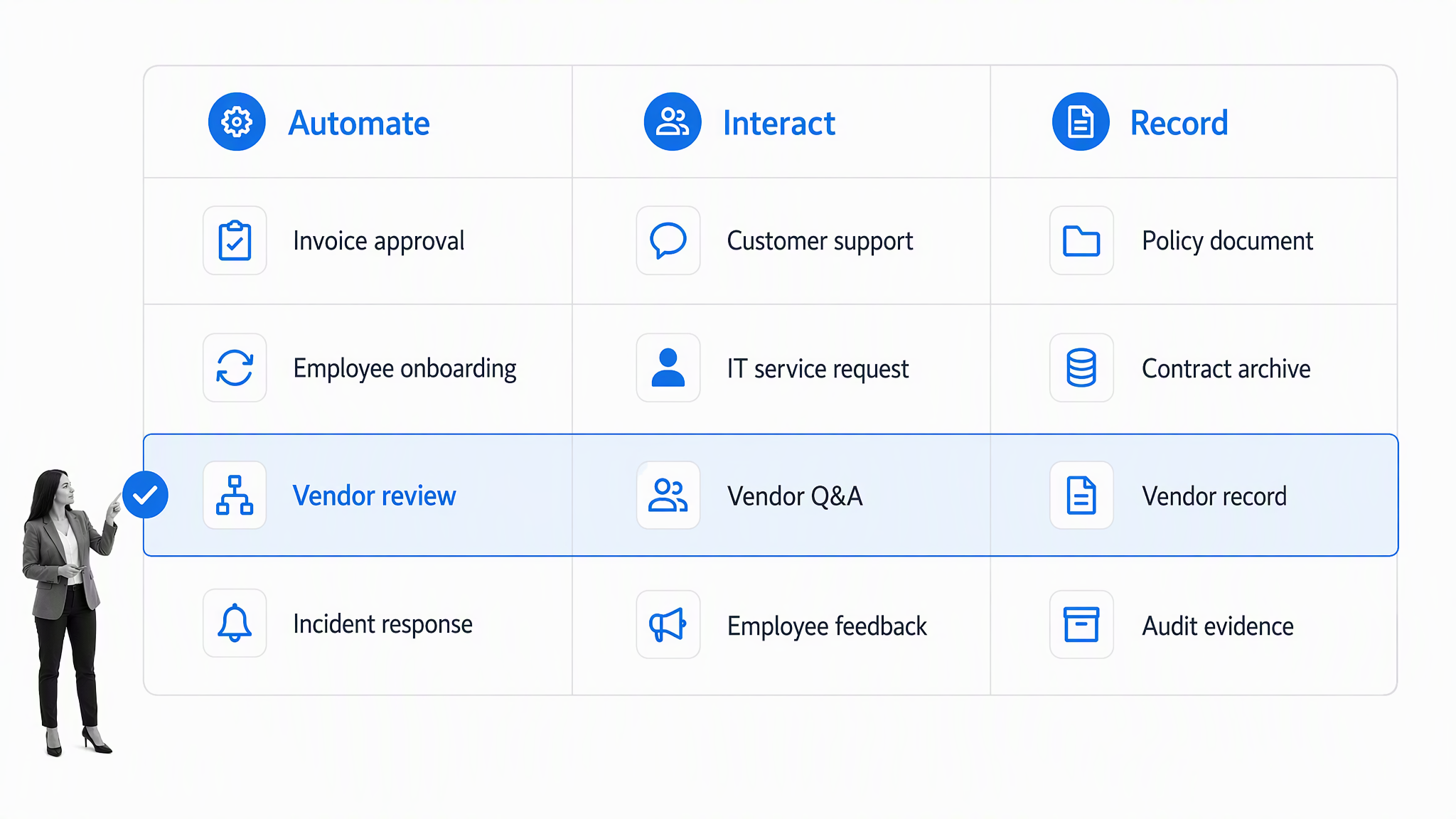
The layers below are listed the way a process actually moves through them, from the automation that fires to the records that survive afterward. Nothing here is a ranking. It is a map of what each service is built to own.
Power Automate: the automation layer
Power Automate is the service most people mean when they say Microsoft workflow software. Microsoft describes it as a way to optimize business processes and automate repetitive tasks by creating automated workflows between apps and services, with cloud flows, desktop flows, approvals, and process mining sitting in the same product. Flows are built from a trigger and a chain of actions, and connections to other services are made through connectors.
It is strong at the moment of automation. A file lands, a record changes, a form is submitted, and something happens as a result. It is weaker as a home for a procedure that a human has to walk through over days, because the unit it works in is a run rather than a documented set of steps with named owners. Teams comparing it against dedicated process tools often start with alternatives to Power Automate to see where that boundary sits.
Power Apps: the application layer
Power Apps exists for the cases where a flow is not enough because someone needs a screen. Microsoft positions it as a suite of apps, services, and connectors plus a data platform for building custom business apps, in two shapes: canvas apps and model driven apps. Data can sit in Dataverse or in external sources.
Reach for it when the process needs a bespoke interface or a structured record type that does not exist anywhere else. Do not reach for it to hold a checklist. Building a process tracker as a custom app means you now own an application, including its permissions, its releases, and whoever maintains it after the person who built it moves on.
SharePoint and lists: the records layer
SharePoint is where the output of the process usually lands. Microsoft describes SharePoint and OneDrive as cloud based services that help organizations share and manage content, knowledge, and applications, with retention policies, sensitivity labels, and data loss prevention available for governance. Files stored in chat channels live in SharePoint sites underneath.
This makes it excellent storage and weak orchestration. A document library records that a file exists. It does not record that a named person completed a review, on what basis, before the next step was allowed to start. Teams who have pushed a library past that point often end up reviewing SharePoint alternatives for the process side of the work.
Teams and chat: the participation layer
Chat is where most requests actually begin, which is why so many processes start as a message and never become anything more formal. SharePoint is deeply integrated with the chat product, so the conversation and the file end up in related places, and approvals can be surfaced directly in the channel.
Treat this as the participation surface rather than the system of record. It is the right place to notify, nudge, and collect a decision. It is the wrong place for the decision itself to live, because a channel has no concept of a step that cannot be skipped.
Azure Logic Apps: the integration layer
Azure Logic Apps is the heavier sibling of the automation layer. Microsoft describes it as a cloud platform for creating and running automated workflows across the software ecosystems in an organization, with 1,400+ connectors, built in and managed connector types, Consumption and Standard hosting options, and first class support for enterprise integration message standards.
It is the correct choice when the work is system to system, high volume, or has to run inside a controlled network boundary. It is the wrong choice when the work is a person following steps, because nothing in it is designed for a human to read a procedure and mark it done.
Dynamics 365: the business application layer
Dynamics 365 is a set of business applications for running sales, service, finance, and operations, built to work together and with existing systems. Its apps sit on the same underlying data platform that Power Apps uses.
Where a process is fully inside one of those business domains, the process often belongs in the application that already owns the records. Where a process crosses domains, which most operational processes do, it needs a home that is not tied to any single application.
Copilot Studio: the agent layer
Copilot Studio is the newest layer. Microsoft describes it as a low code studio for building and managing AI powered agents and workflows, with agents that follow instructions and use tools to take action, workflows built in a drag and drop designer with built in testing and human in the loop controls, and agent flows that can run as standalone automations or as a tool attached to an agent.
This closes a real gap around conversational and reasoning heavy requests. It does not remove the need for a defined process underneath, because an agent that can decide what to do next still needs a documented standard for what good looks like and a record of what it did.
How the Layers Fit Together in One Process
On paper the layers stack cleanly. A request arrives in chat, a flow picks it up, an app captures the structured detail, the approval fires, and the result files into a document library. In practice a single process rarely stays inside one layer for long.
Take a vendor onboarding checklist as a worked example. Procurement raises the request. Security reviews the vendor and attaches evidence. Legal reviews the contract. Finance sets up payment. Someone files the signed agreement. That is five owners in four functions, and it will touch the chat layer, the automation layer, at least one application, and the records layer before it finishes.
The four things every crossing process needs
- A single ordered definition of the steps, visible to everyone involved rather than implied by whoever built the automation
- A named owner per step, so a stalled item has someone to chase rather than a queue with no name on it
- A gate that cannot be skipped, so a later step physically cannot start before the required check is complete
- An evidence trail that records who did what, when, and on what basis, without anyone reconstructing it afterward
Any one of those can be built by hand across the stack. Building all four, and keeping them working as the process changes, is where the effort compounds. The pattern is the same whether the process is an invoice approval workflow or a change management process for a production system.
Where Microsoft Workflow Software Hits Its Limits
None of what follows is a criticism of the individual services. Each does its own job well. The limits show up at the joins, and they show up in predictable places.
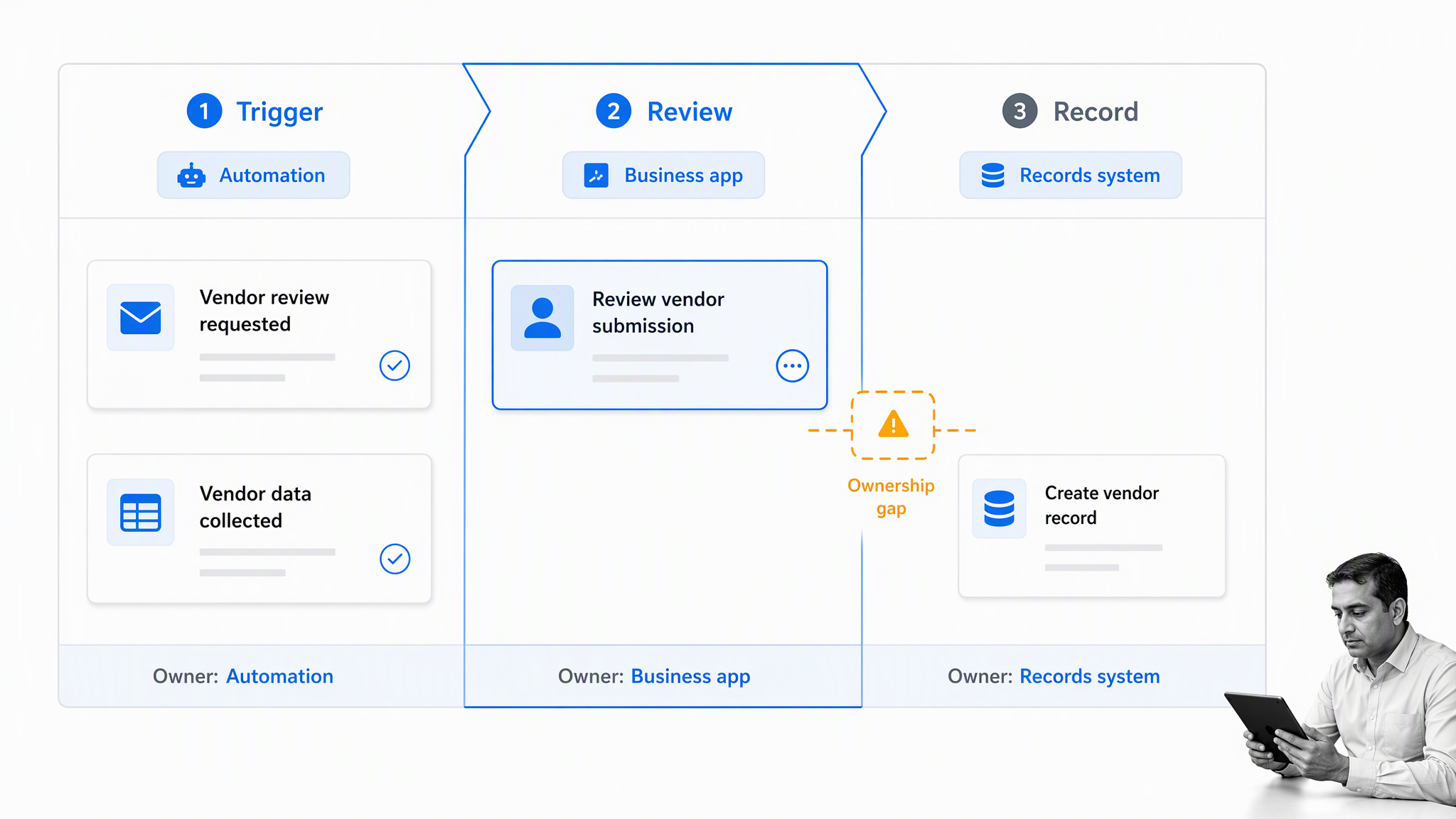
Ownership evaporates at the handoff
Inside one tool, ownership is clear. At the boundary between two tools it is not. A request that has cleared finance and is waiting for a security sign off sits in a state that no single system reports on, which is why the honest answer to where is this stuck is so often nobody knows. Making that visible is the core job of workflow tracking software.
The process definition lives in the builder, not in the open
When the procedure is expressed as a flow, the only complete description of it is the flow itself. The people who follow the process cannot read it, the people who audit it cannot review it without opening a design surface, and changing it means editing production logic. Written procedure and executed procedure drift apart quietly.
Evidence is scattered across four places
The approval sits in one service, the attachment in a library, the conversation in a channel, and the automation history in a run log with a retention window. Assembling that into an answer for an auditor is a manual exercise every single time. The output is a reconstruction rather than a record.
Exceptions have nowhere to go
Real processes have exceptions, and an automation branch is a poor place to put them. A flow can route an edge case somewhere, but it cannot hold the reasoning, assign it to a person, set an expectation for resolution, and keep the parent item visibly open in the meantime.
Governance becomes a sprawl problem
Low code tools succeed by letting many people build. That success creates a long tail of flows and apps owned by individuals, some of which quietly become load bearing. When the builder changes role, the process they encoded becomes an unowned dependency that nobody can safely modify.
These are the same failure modes that show up on any distributed stack, not just this one. Broader comparisons of workflow automation platforms describe the same seams appearing wherever automation is asked to carry a process.
How to Choose the Right Microsoft Workflow Tool
The choice gets much easier when you stop asking which tool is best and start asking what shape the work is. These four questions settle most cases.
Does a person have to make a judgement?
If no, it is automation, and it belongs in the automation or integration layer. If yes, the judgement needs a step with an owner, a due expectation, and somewhere to record the basis for the decision. That is process work, not a flow.
Does the work cross a team boundary?
Single team work can live comfortably inside whichever tool that team already uses. The moment work crosses a boundary, it needs a definition that is not owned by either side, or the handoff becomes the weakest point in the chain.
Will someone need to prove it happened?
If a regulator, a customer, an auditor, or an incident review will ever ask for the record, decide where that record lives before you build anything. Retrofitting an evidence trail is far more expensive than designing one in. Dedicated approval workflow software exists largely because this question gets asked too late.
How often will the process change?
Stable, high volume, system to system work justifies the engineering effort of the integration layer. Work that changes every quarter needs to be editable by the person who owns the process, without a release.
Answer those four honestly and the split usually resolves itself. Automation and integration handle the machine work. A process layer handles the human work. The two are complements, not substitutes.
Run Process Work on Top of Your Microsoft Tools
This is where Process Street fits. It is not a replacement for the productivity suite and it does not try to be. It is the process layer that sits above those tools and holds the part they were never built to hold: the ordered steps, the named owners, the checks that cannot be skipped, and the evidence that the work actually happened.
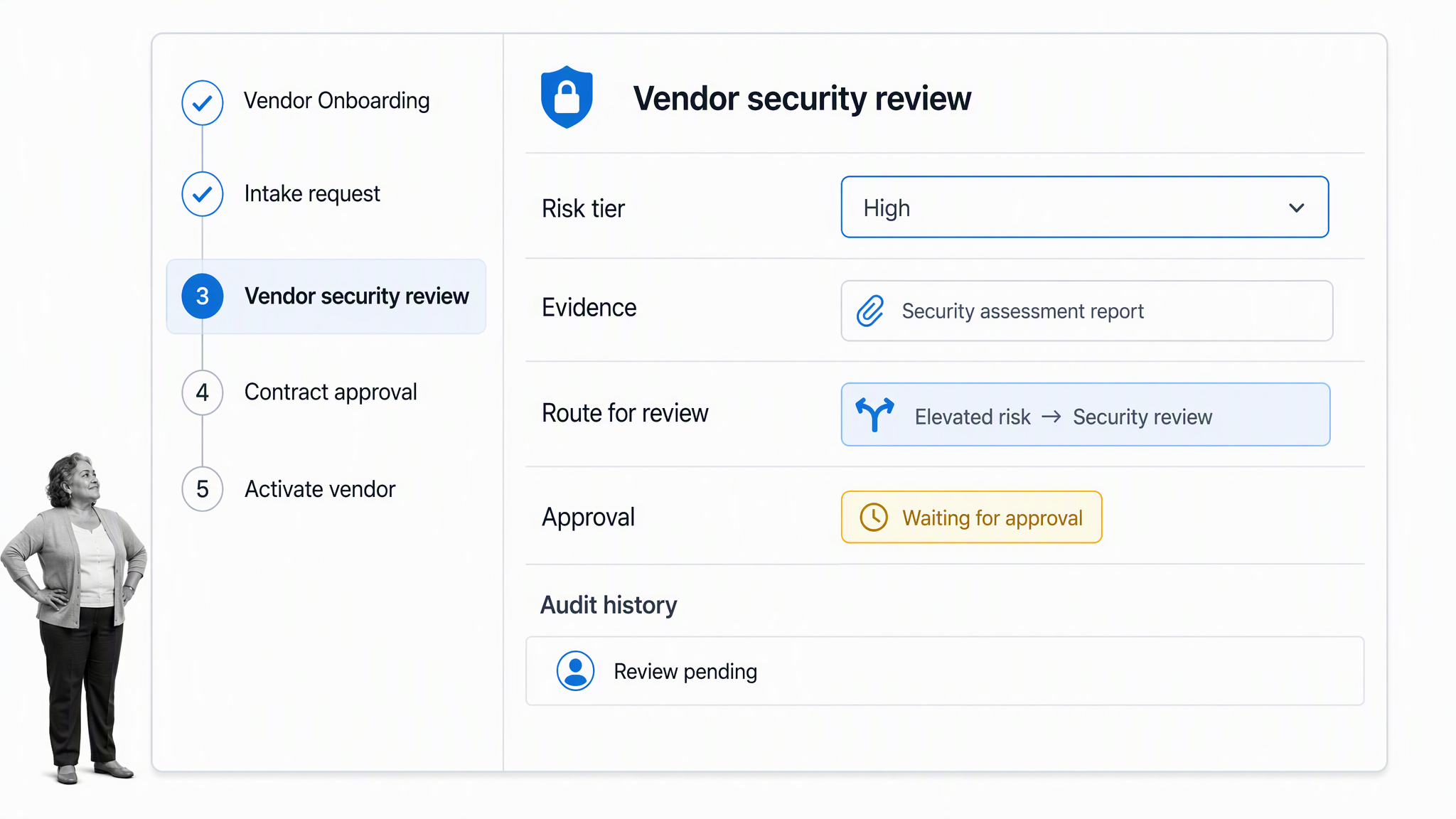
The division of labour is straightforward. Storage stays where it is. Chat stays where it is. Integrations keep firing. What changes is that the procedure itself becomes a first class object rather than something implied by a flow diagram and a folder structure.
What the process layer owns
- The written procedure and the running instance are the same thing, so what people read is what actually executes
- Owners, due dates, and required fields per step, so a stalled item always has a name attached to it
- Approvals as gates, so a task cannot be marked complete until the required sign off exists
- Conditional logic, so the same procedure adapts to a low risk and a high risk case without two separate versions
- A complete audit history, captured as work happens rather than assembled afterward
Process Street connects to 5,000+ apps through Zapier. In practice that means the process layer triggers and receives work from the tools you already run, so adding it does not mean unpicking anything.
What it looks like in a real process
A new employee onboarding checklist is the clearest example. IT provisions accounts, facilities issues equipment, the manager runs the first week plan, and HR confirms the paperwork. Each of those steps stays in the tool that does it best. The difference is that the run itself is visible end to end, the person who has not finished their step is named, and the completed record is produced automatically rather than compiled by someone the following quarter.
The same shape applies to a client onboarding process, a software deployment checklist, or any recurring review that has to be defensible. For the approval mechanics specifically, the walkthrough on how to automate approvals covers the patterns that work.
A Rollout Plan That Survives the First Quarter
Most rollouts fail on scope rather than on tooling. This sequence keeps the first quarter honest.
Weeks one and two: inventory what already exists
List the flows, apps, and shared libraries that carry real work today, and note who owns each one. Expect to find load bearing automations built by people who no longer work on that team. That inventory is the actual starting position, not the architecture diagram.
Weeks three and four: pick one crossing process
Choose a process that crosses at least two teams, runs often enough to generate feedback, and has a visible failure mode. Onboarding, vendor review, and access requests all qualify. Avoid the process everyone argues about, because you are testing the model rather than settling a political question.
Weeks five to eight: define, then automate
Write the steps, owners, and required evidence first, and only then decide which steps should fire automatically. Doing it in that order stops the automation from silently becoming the definition, which is the root cause of most of the seams described earlier.
Weeks nine to twelve: measure and expand
Track completion time, the step where items stall most often, and how long it takes to answer a question about a completed run. Those three numbers tell you whether the process layer earned its place before you extend it to the next process.
Mistakes to Avoid When You Standardize on Microsoft
- Treating a chat channel as the system of record. Conversation is participation, not evidence. Decide early where the durable record lives.
- Rebuilding a checklist as a custom application. You gain a screen and inherit an application to maintain, permission, and release.
- Letting the automation become the only documentation. If the flow is the only description of the procedure, nobody outside the builder can read or audit it.
- Skipping owner assignment because the tool does not force it. Unowned steps are where processes stall, and they stall silently.
- Deferring the evidence question. Reconstructing an audit trail after the fact costs far more than capturing it as work happens.
- Assuming one layer will eventually cover everything. The stack is deliberately modular. Design for the seams rather than waiting for them to close.
Avoiding those six is most of the work. The organizations that get the best result from this stack are the ones that let each service do the job it was designed for and put the process itself somewhere it can be read, owned, and proven.
FAQs
What workflow software does Microsoft offer?
There is no single workflow product. The workflow software Microsoft offers is a set of services: Power Automate for automation, Power Apps for custom applications, Azure Logic Apps for system to system integration, SharePoint for documents and records, Teams for participation, Dynamics 365 for business applications, and Copilot Studio for agents and conversational requests.
Is Power Automate enough to manage a business process?
It is enough for the automation inside a process, and often not enough for the process itself. Power Automate works in triggers and actions, which fits machine steps well. A multi step procedure with named owners, gates that cannot be skipped, and an evidence trail usually needs a process layer above it.
What is the difference between Power Automate and Azure Logic Apps?
They share a heritage and a connector ecosystem, but they aim at different users. Power Automate is oriented to business users automating their own work inside the productivity suite. Azure Logic Apps is oriented to integration engineers building system to system workflows, with hosting, networking, and enterprise messaging options that the business focused tool does not expose.
Can SharePoint be used as workflow software?
SharePoint is a strong records and document layer and a weak orchestration layer. It stores what a process produced and supports retention and sensitivity controls, but a library cannot enforce that a named reviewer completed a check before the next step began. Most teams pair it with something that owns the steps.
Do I need another tool if I already pay for Microsoft 365?
Not for automation, storage, or chat, which are already covered. The question is whether your processes cross teams and need proof that they ran. If they do, a dedicated process layer is usually cheaper than hand building ownership, gates, and evidence across several services and then maintaining it.
How do I decide what to automate and what to make a process step?
Ask whether a person has to make a judgement. If no judgement is required, automate it. If a judgement is required, make it a step with an owner, a due expectation, and a place to record the basis for the decision. That single test resolves most of the ambiguity.
