


Turn every policy into automated workflows with built-in enforcement and audit-ready proof.



6 Best Otto by Workato Alternatives & Competitors in 2026

If you need an alternative to Otto by Workato, start by deciding what kind of work the replacement must own. Teams comparing Otto by Workato alternatives should begin with the same question. Otto is an autonomous AI teammate that accepts a goal, works across connected apps, and returns to the user for approvals. That broad promise overlaps with several product categories, but those categories solve different operating problems.
Some buyers want another conversational teammate that lives in Slack. Others want a no-code agent that can browse, research, and update applications. Enterprise teams may need governed agent building inside Microsoft. Technical teams may prefer a node canvas and self-hosting. Operations leaders often need something more deterministic: a recurring process that assigns work, requires evidence, routes approvals, and preserves an audit record every time it runs.
This guide compares six credible options using current vendor documentation. The products span recurring process execution, conversational delegation, connected-app agents, Microsoft-centered agent governance, technical workflow orchestration, and coordinated specialist-agent teams. The right category depends on whether the buyer values repeatability, flexibility, platform alignment, technical control, or agent specialization most.
The comparison is editorially maintained by the Process Street team and was checked against primary product and pricing sources before publication. Each recommendation is tied to a use case. A tool can be the right choice outside Process Street’s core fit, and the sections below say where that is true.
The evaluation emphasizes five practical criteria: fit with the primary unit of work, ease of supervision, connected action surface, approval and recovery controls, and the pricing unit a team must model. Public prices are included only when the vendor currently publishes them. The order reflects suitability for recurring operational work, not a claim that one product is best for every buyer.
In this guide:
- What is Otto by Workato?
- How we evaluated Otto by Workato alternatives
- Alternative to Otto by Workato at a glance
- Best Otto by Workato alternatives, ranked
- 1. Process Street
- 2. Lindy
- 3. Zapier Agents
- 4. Microsoft Copilot Studio
- 5. n8n
- 6. Relevance AI
- How to choose the right Otto alternative
- Otto migration checklist
- FAQs
- Choose Process Street as your alternative to Otto by Workato
What is Otto by Workato?
Otto by Workato is an autonomous AI teammate designed to receive goals and complete multi-step work across connected applications. The official Otto product page describes a teammate that works inside Slack, acts across business systems through Workato Enterprise MCP, and includes approvals, auditability, and control.
Otto is the incumbent and the baseline for this comparison. It is not ranked as one of its own alternatives. Its product promise is broader than a conventional chatbot because it is meant to take action, not only answer questions. It is also broader than a simple trigger-action automation because the user can assign a goal and allow the system to work out intermediate steps.
That breadth is why teams should avoid asking which product is most similar in the abstract. The useful question is which part of Otto’s promise matters most. If the answer is a conversational teammate in Slack, Lindy is close. If it is autonomous app actions, Zapier Agents or n8n may fit. If it is enterprise agent governance, Copilot Studio or Relevance AI may fit. If it is controlled recurring execution, Process Street is the stronger operating system.
Workato currently presents Otto through an early-access path rather than a public self-service price table. Buyers should verify access, commercial terms, connected systems, approval behavior, and team-sharing expectations before comparing total cost with another agentic AI platform.
How we evaluated Otto by Workato alternatives
We evaluated each product against five questions: What unit of work does it own? How does a user start and supervise work? Which systems can it act through? How does it handle approval and failure? What operating model does its pricing encourage? These questions matter more than a long feature checklist because two products can both claim AI agents while expecting completely different builders, users, and controls.
1. Unit of work
The unit of work may be a conversation, goal, agent run, workflow execution, or recurring process. A conversational teammate begins with intent expressed in natural language. A node-based builder begins with explicit triggers and steps. A workflow management system begins with a defined business procedure and creates a record for each run. Match the unit to the outcome that someone must own.
2. Human control
Approval is not one universal feature. A product may ask before sending an email, restrict which app actions are available, route a decision to an assigned approver, or require a builder to create a custom human-in-the-loop step. We looked for a control model that is visible to the person accountable for the outcome, not only the developer who configured the agent.
3. Action surface
Some tools act through connected APIs. Some add browser or computer use. Some coordinate people inside a structured automated workflow system. The broadest action surface is not automatically the best. High-stakes work benefits from a deliberately bounded surface where permissions, inputs, expected outputs, and exception paths are clear.
4. Observability and recovery
An agent that succeeds most of the time still needs a recovery path. We looked for execution history, status, ownership, visible inputs, error context, and a way to resume or correct work. Technical logs help builders debug. Operational records help managers understand what happened, who approved it, and what remains open. Many teams need both.
5. Pricing model
The products use different units, including users, credits, activities, workflow executions, and custom enterprise commitments. We compare public starting points only where the vendor currently publishes them. Buyers should model a normal month, a peak month, testing, retries, and the people required to configure and supervise the system. The lowest entry price can produce the highest operating cost when ownership is unclear.
Alternative to Otto by Workato at a glance
The short version: Choose Process Street when the outcome must follow a repeatable procedure with required steps, owners, approvals, evidence, deadlines, and a readable history. Choose Lindy when you want the closest Slack-native delegated teammate experience. Choose Zapier Agents for lightweight agents that act through connected apps. Choose Copilot Studio for a Microsoft agent program, n8n for technical control and self-hosting, or Relevance AI for coordinated specialist agents.
| Tool | Best for | Standout feature | Free plan | Starting price | Primary surface | Approval model |
|---|---|---|---|---|---|---|
| Process Street | Enforceable, trackable, recurring process and SOP workflows | Workflow runs with required steps, approvals, evidence, and audit history | 14-day trial | Contact sales | Workflow runs | Native approval tasks |
| Lindy | Slack-native personal and team delegation | Persistent workspace context, routines, skills, computer use, and approvals | 7-day trial | $49.99/month | Slack, iMessage, and web | Approval before outside impact |
| Zapier Agents | Quick agents that act through connected business apps | Agent behaviors with live data, web browsing, and configured app actions | Yes | $33.33/month billed annually | Agent builder and Chrome | Actions limited to configured apps |
| Microsoft Copilot Studio | Microsoft-centered enterprise agent programs | Autonomous agent authoring with internal and external publishing channels | Trial available | Pay as you go or prepaid credits | Agent authoring studio | Power Platform governance |
| n8n | Technical teams that want code, nodes, and self-hosting | Node workflows, code steps, execution logs, and self-hosted deployment | Community Edition | EUR 20/month billed annually | Node workflow canvas | Custom human-in-the-loop patterns |
| Relevance AI | Teams building coordinated specialist AI workforces | Plain-language agent creation, workforce orchestration, tools, and evaluations | Yes | $19/month billed annually | Agent workforce builder | Configurable workforce controls |
Best Otto by Workato alternatives, ranked
1. Process Street
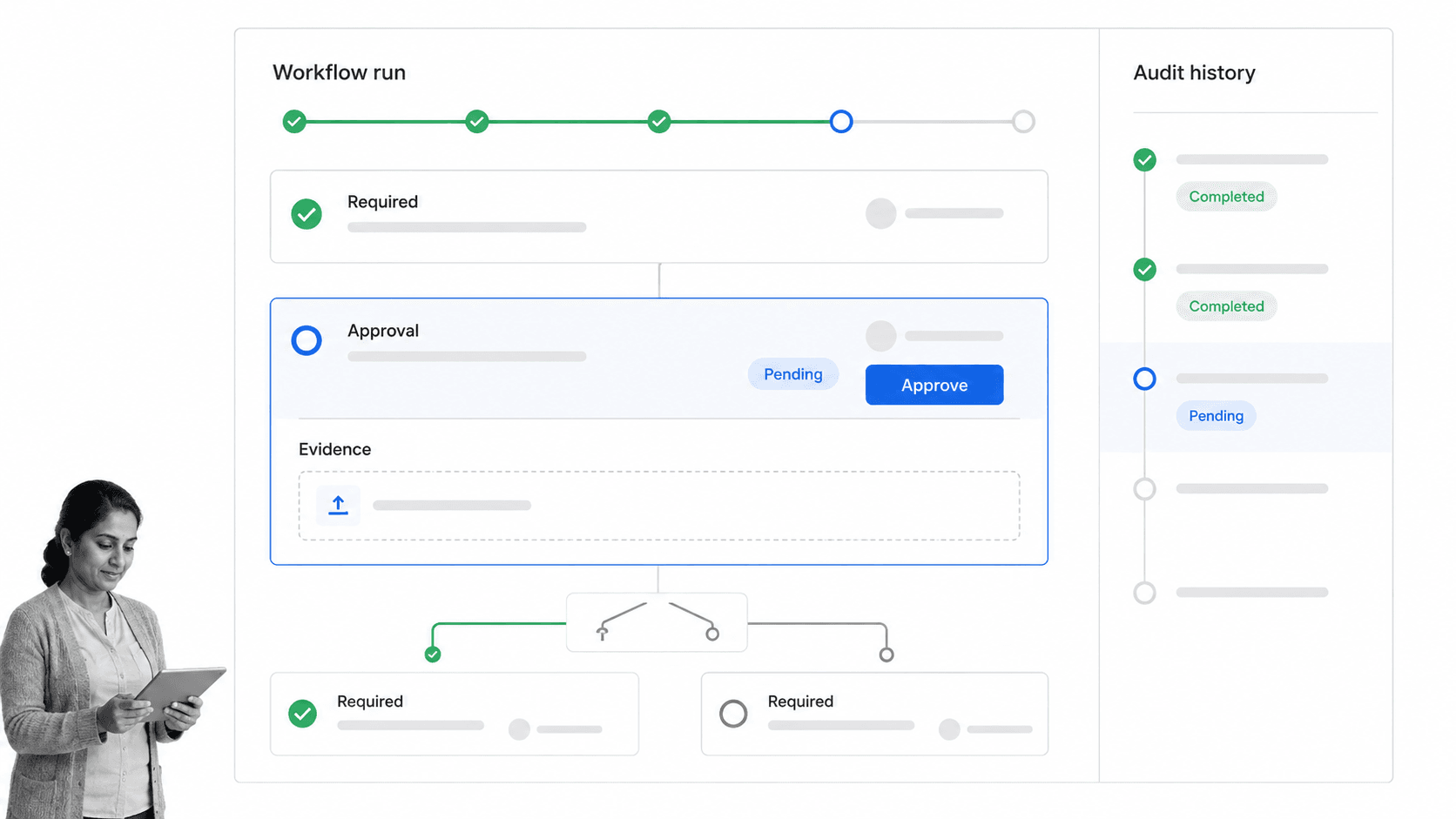
Best for: Enforceable, trackable, recurring process and SOP workflows.
Bottom line: Best overall for teams that need recurring work to run the same controlled way, with people and agents operating inside one auditable process.
Process Street is an agentic process automation platform for high-stakes operations. It turns a procedure into an executable workflow run with assigned work, required fields, conditional paths, approvals, deadlines, automations, and a record of completion. That makes it a strong alternative when an Otto evaluation reveals that the team needs repeatability and proof more than a general personal assistant.
The key distinction is structure. Otto begins with a goal and determines how to pursue it. Process Street begins with the approved way work should happen, then lets people, automations, and AI execute inside that boundary. A vendor onboarding run, employee onboarding run, incident review, monthly close, policy review, or quality check can use the same controlled design every time. The workflow keeps the owner, evidence, exceptions, and outcome together instead of distributing them across chat threads and app histories.
Process Street is especially useful when skipped steps create risk. Required fields can make inputs mandatory. Conditional logic can show the right path for the case. Approval tasks can pause work until an assigned reviewer decides. Due dates and assignments keep responsibility visible. The resulting history gives an operations or compliance leader a readable account of what happened.
It also connects process execution to surrounding systems. Direct integrations and agent-built connections can trigger actions and move information, while the process run remains the control record people understand. Workflow automations can sit inside that governed process instead of becoming the process itself.
Process Street does not try to be the best personal assistant for ad hoc errands, an open-ended research companion, or a general multi-agent development environment. Lindy is closer for personal delegation. n8n gives developers more control over node logic and self-hosting. Relevance AI is more purpose-built for coordinating teams of specialist agents. Those are real strengths when the work falls outside Process Street’s core job.
For the target ICP, however, Process Street earns the first position. Operations, HR, onboarding, finance, quality, and compliance-adjacent teams often need an operational workflow management surface that business owners can read and improve. They need to know which task is next, which input is missing, who owns the exception, what was approved, and whether the procedure finished correctly.
The fit becomes clearest when a process crosses roles. A requester supplies information, a specialist reviews it, a manager approves an exception, and a system action closes the loop. Each participant needs a different view of the same run, while the process owner needs one coherent record. Process Street keeps those handoffs explicit without asking every participant to understand an agent builder or automation graph.
Agent tools can still contribute inside this model. An agent can research a vendor, draft a summary, classify an intake, or update another system, then return its output to the governed workflow. The process remains the source of ownership, timing, approval, and evidence. This combination is useful when teams want the speed of AI but cannot allow an autonomous action history to become the only explanation of what happened.
A representative pilot should test a complete recurring process rather than one isolated automation. Include a normal case, an exception, a required attachment, a deadline, an approval, and a system handoff. Ask a second operator to run it without the builder’s help, then ask a manager to reconstruct the decision from the record. This exposes the practical difference between a workflow that merely moves data and an operational system that guides people through accountable work. It also gives the buying team evidence about adoption, not only builder speed.
Process owners should also test change management. Update one rule, add one field, change one approver, and confirm that future runs follow the new design without corrupting completed records. Recurring processes evolve as policies, teams, and systems change. A useful platform makes that evolution understandable to the business owner while preserving the history needed to explain earlier decisions. That lifecycle discipline is a major reason Process Street ranks first for its stated ICP.
Key features
- Executable workflow runs with assignments and due dates
- Required form fields and evidence capture
- Conditional paths and enforced task order
- Native approvals and readable audit history
- Automations, integrations, Data Sets, forms, and Pages
Pros
- Strong fit for recurring SOP and process execution
- Controls are visible to business owners
- Human work and system actions share one record
- Approvals and evidence are native workflow elements
- Works across many operational departments
Cons
- Not a general personal assistant for open-ended errands
- Not a visual code environment for building arbitrary agent systems
- Pricing is custom quoted after the trial
Choose it if
Choose Process Street if the work must be repeatable, assignable, enforceable, measurable, and provable. It is the best fit when the organization already knows the required procedure or needs to turn an SOP into a system that actually runs.
Skip it if
Skip it if the central need is an unstructured personal AI companion, a developer-first self-hosted agent graph, or a broad multi-agent experimentation lab. Lindy, n8n, or Relevance AI will fit those jobs more directly.
Pricing model
Process Street offers a 14-day Pro trial and custom-quoted plans. Review the current plan details on the Process Street pricing page and explore the platform at Process Street. No fixed dollar amount is baked into this comparison.
2. Lindy
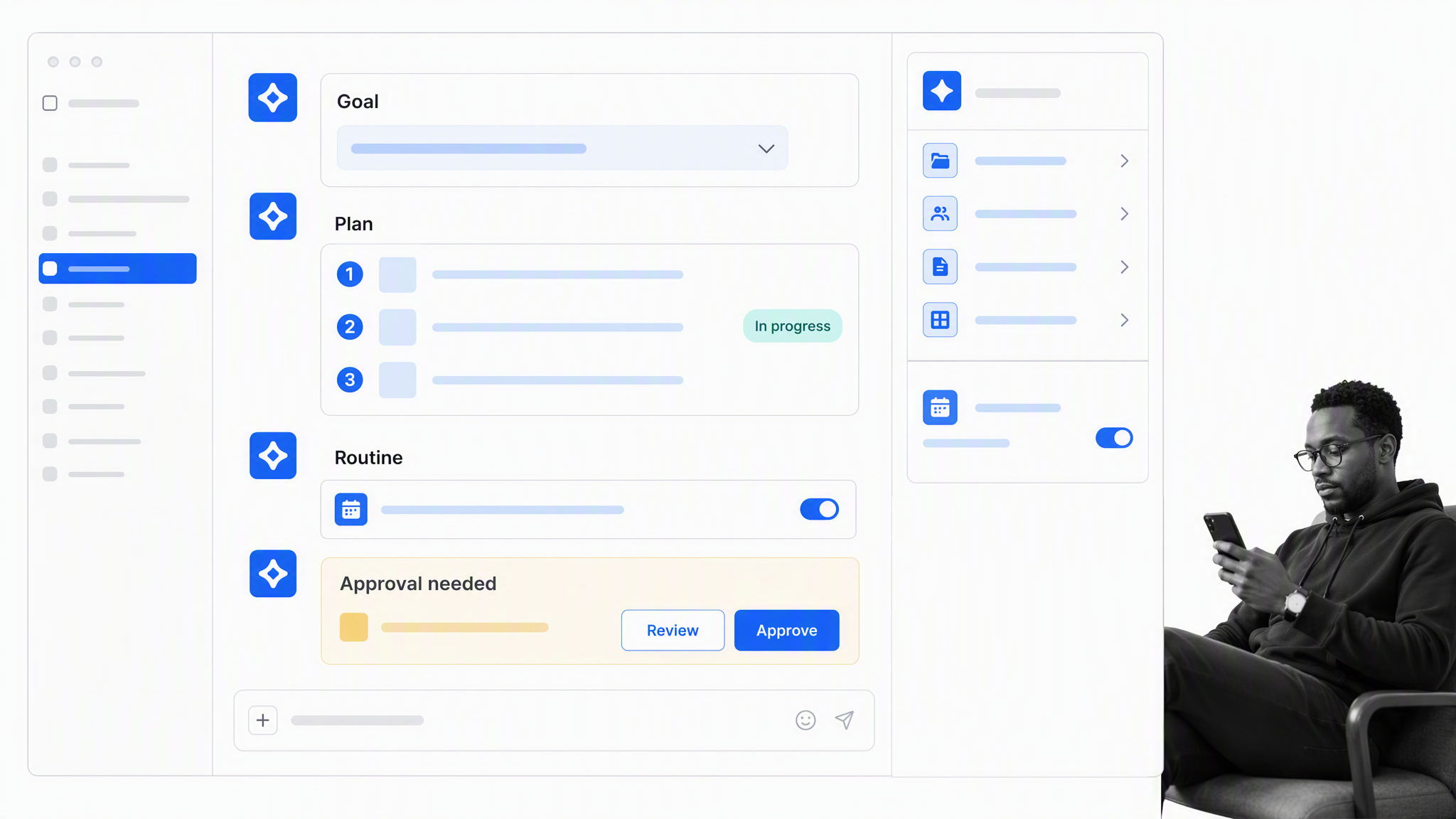
Best for: Slack-native personal and team delegation.
Bottom line: Closest fit for teams that want a conversational teammate in Slack with persistent context, scheduled routines, and approvals.
Lindy is the closest alternative in this list to Otto’s conversational teammate experience. Its current product and pricing materials describe a Slack-native teammate that can work in threads and mentions, retain workspace context, run scheduled routines, use skills, operate a computer, connect through integrations and MCP, and wait for approval before actions with outside impact.
That makes Lindy attractive for executives, founders, and functional teams that want to delegate inbox work, meeting follow-up, research, scheduling, briefs, and cross-app tasks without designing a formal process first. The interaction model feels like handing work to a colleague. A user can ask for an outcome in ordinary language, then supervise the result through the same communication surfaces already used during the day.
Lindy is a better fit than Process Street when the work is personal, varied, and difficult to standardize. It is also a closer Otto substitute when Slack is the primary front door. Process Street is better when the organization must guarantee that the same approved steps, evidence, and decisions occur every time across many operators.
Key features
- Slack-native threads and mentions
- Scheduled routines and persistent workspace context
- Skills, computer use, integrations, and MCP support
- Inbox, meeting, calendar, and follow-up workflows
- Approval before actions with outside impact
Pros
- Conversational delegation is easy to understand
- Strong fit for individual and team productivity
- Slack is a native operating surface
- Approval behavior is stated clearly
Cons
- Credit usage varies with task complexity
- Less deterministic than a fixed SOP workflow
- Each active teammate requires a paid seat after the trial
Choose it if
Choose Lindy if your main goal is to hand varied work to an AI teammate from Slack or personal communication channels and keep context across those requests.
Skip it if
Skip it if every run must follow a fixed approved procedure, expose mandatory controls, and create a standardized process record for many operators.
Pricing model
Lindy offers a 7-day trial. Its official pricing documentation lists Plus at $49.99 per month, with higher Pro, Max, and custom Enterprise options. Teams should verify current packaging before purchase.
3. Zapier Agents
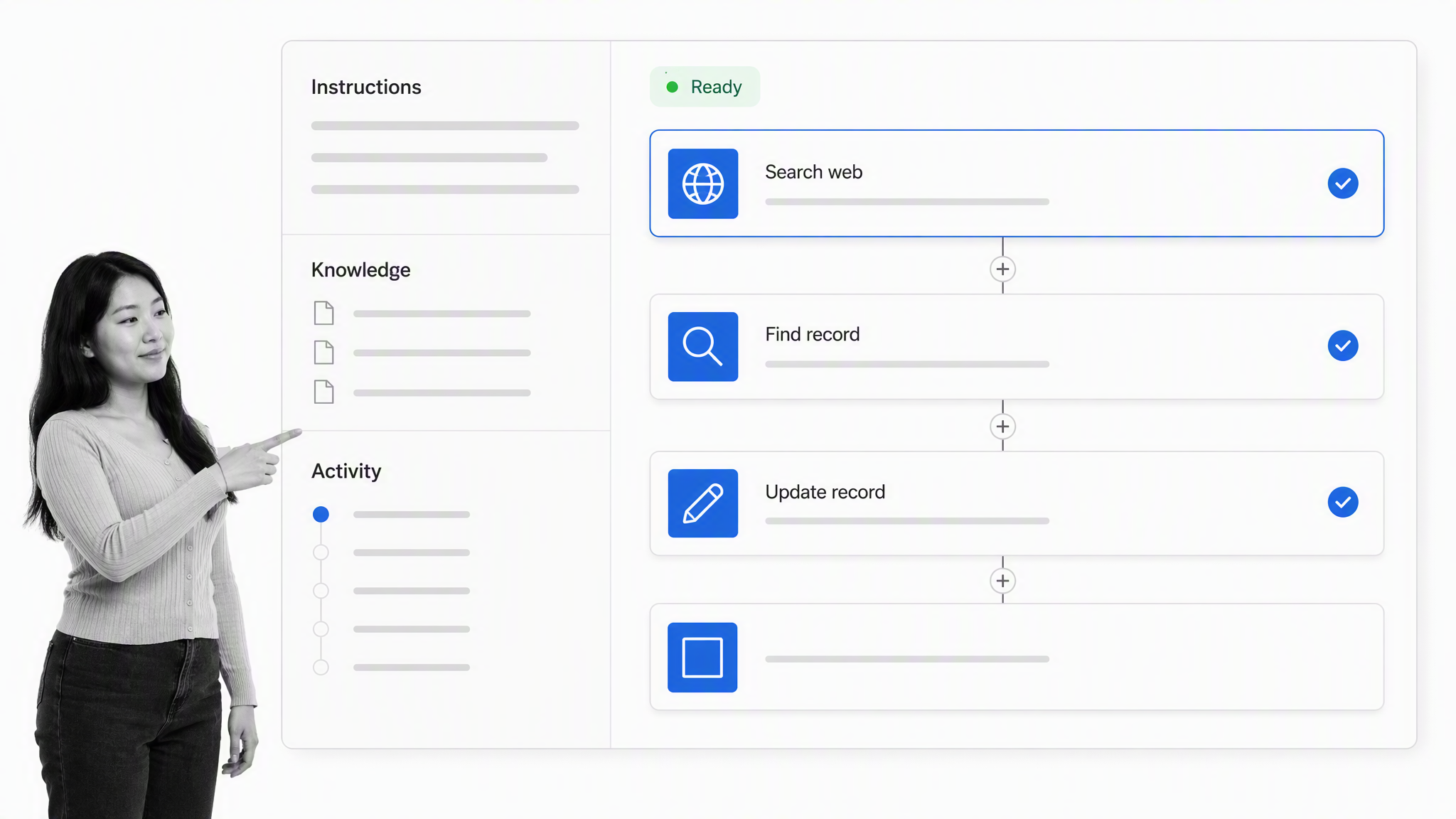
Best for: Quick agents that act through connected business apps.
Bottom line: Best for quickly configuring agents that research and act through connected business applications.
Zapier Agents lets users create AI-powered teammates with instructions, live data sources, web browsing, and actions in connected applications. The product is a practical choice when the required job can be expressed as an agent behavior and the surrounding systems already expose the actions the agent needs.
The product is easier to evaluate than a broad enterprise platform because its unit is an activity. Agents can search, browse, use knowledge, and perform configured app actions. A Chrome extension provides another interaction surface. This suits research, lead enrichment, record updates, monitoring, and other tasks where the agent needs a bounded set of tools.
Zapier Agents beats Process Street when the goal is a lightweight autonomous behavior that moves through apps without a substantial human procedure. Process Street is stronger when that automation is only one part of a recurring process that also requires assignments, approvals, evidence, exceptions, and a clear accountable owner.
Key features
- Agent instructions and behaviors
- Live data sources and web browsing
- Actions through configured connected apps
- Activity history and usage limits
- Chrome extension interaction
Pros
- Fast path from idea to working agent
- Public free plan
- Clear activity-based limits
- Strong fit for connected-app work
Cons
- Agent usage is separate from core Zapier task usage
- Configured app boundaries may limit unusual workflows
- Complex human procedures need an additional process layer
Choose it if
Choose Zapier Agents when you want a small number of agents to research and act through common SaaS applications with a low setup burden.
Skip it if
Skip it if the primary requirement is enterprise-wide process governance, self-hosting, or a standardized SOP record that business teams review run by run.
Pricing model
The Zapier pricing page lists an Agents Free plan and Agents Pro at $33.33 per month when billed annually. The free and paid tiers use monthly activity allowances, so estimate searches, chat actions, and connected-app actions together.
4. Microsoft Copilot Studio
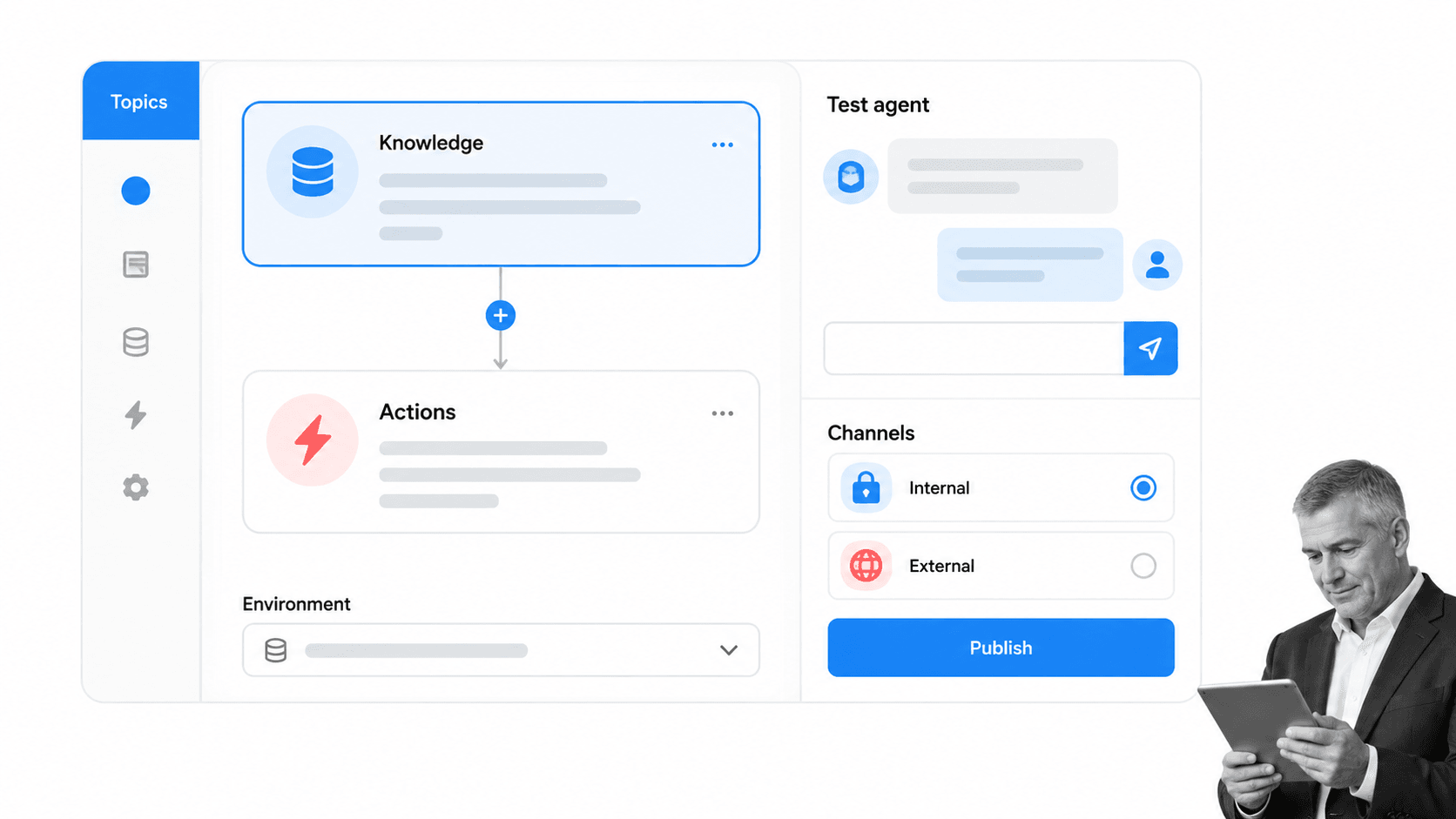
Best for: Microsoft-centered enterprise agent programs.
Bottom line: Best for enterprises that want governed agent creation and publishing inside the Microsoft ecosystem.
Microsoft Copilot Studio is an enterprise agent authoring product. Microsoft describes the ability to create autonomous agents, connect knowledge and actions, and publish agents to internal or external channels. It is a serious Otto alternative for organizations where Teams, Microsoft 365, Power Platform, Dataverse, and Azure already shape identity, data, governance, and procurement.
The strongest reason to choose Copilot Studio is not conversational similarity. It is platform alignment. Agent builders can work inside a Microsoft control plane, use familiar connectors and environments, and publish to channels that fit the organization’s architecture. The product also supports usage-based options, which lets teams begin without committing to one fixed conversational teammate pattern.
Copilot Studio beats Process Street when the objective is to build and distribute custom enterprise agents across Microsoft and external channels. Process Street is better when the objective is to run recurring operational procedures with visible tasks, approvals, evidence, and accountable owners. The products can also coexist, with an agent performing actions inside a controlled process.
Key features
- Autonomous agent authoring
- Knowledge, actions, topics, and test chat
- Internal and external publishing channels
- Power Platform connectors and governance
- Pay-as-you-go and prepaid licensing options
Pros
- Strong Microsoft ecosystem fit
- Enterprise governance context
- Flexible channel publishing
- Supports custom agent programs
Cons
- Licensing and Copilot Credit consumption require modeling
- Best value depends on Microsoft platform adoption
- More setup than a ready-made personal teammate
Choose it if
Choose Copilot Studio if Microsoft identity, data, connectors, Teams, and Power Platform governance are already central to the organization and you need custom agents rather than one preconfigured teammate.
Skip it if
Skip it if you want the fastest conversational assistant for personal work or if a process owner needs to configure a simple recurring procedure without becoming an agent platform builder.
Pricing model
Microsoft’s Copilot Studio pricing page lists pay-as-you-go and prepaid Copilot Credit options. An Azure subscription is required for these plans, so a representative pilot is necessary before projecting cost.
5. n8n
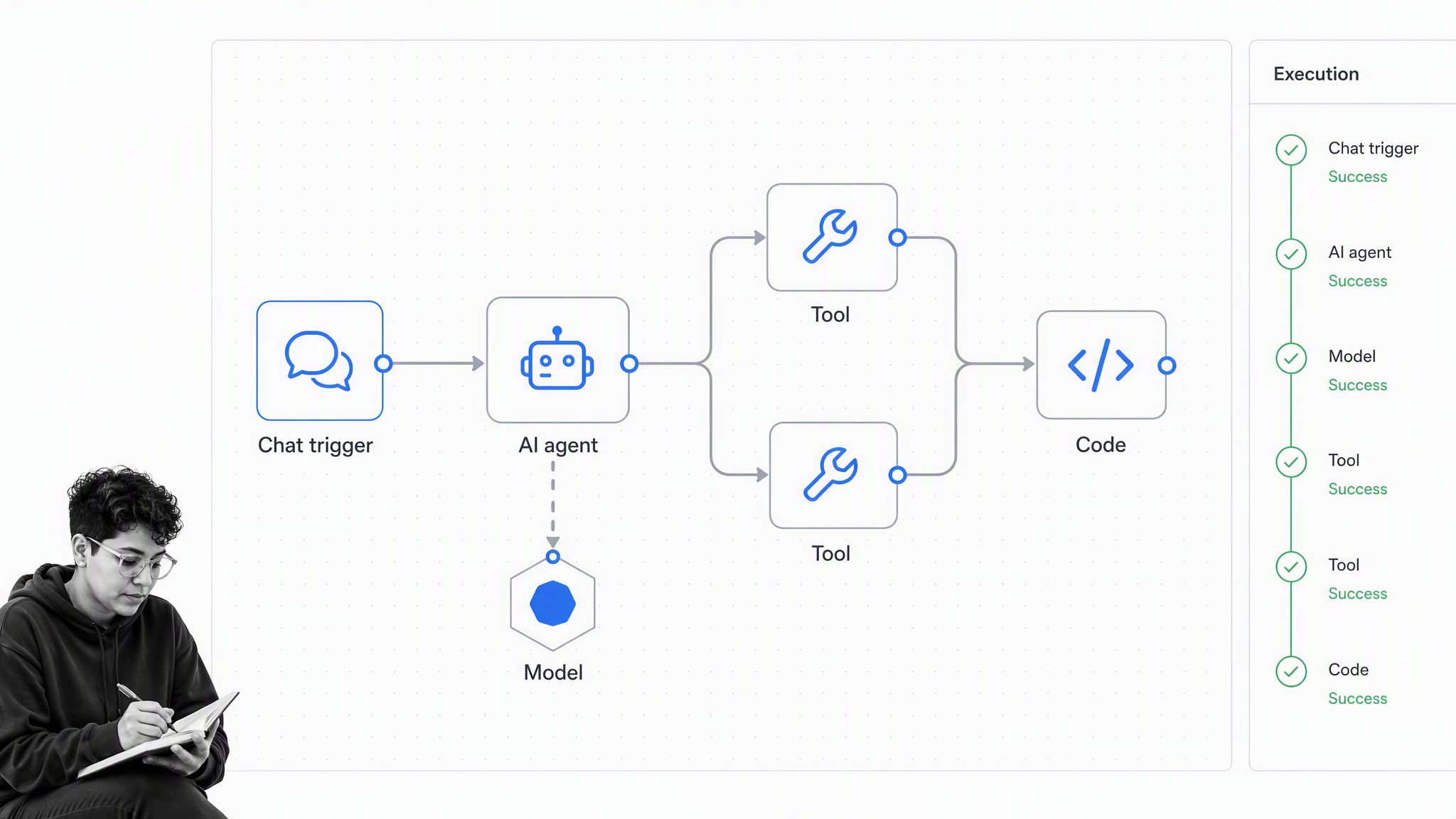
Best for: Technical teams that want code, nodes, and self-hosting.
Bottom line: Best for technical teams that want explicit node logic, code steps, execution diagnostics, and self-hosting.
n8n is a workflow automation platform for technical teams. Its node canvas can combine triggers, application nodes, AI agent nodes, models, tools, code, branching, and execution diagnostics. It is a strong Otto alternative when the team wants to see and control the orchestration graph rather than delegate a broad goal to a teammate product.
The builder can keep logic visual, add JavaScript or Python where necessary, call APIs, and inspect execution data. A Community Edition provides a self-hosted route, while cloud plans reduce infrastructure work. This flexibility is valuable for engineering, data, systems, and automation teams that treat agents as software they must own and debug.
n8n beats Process Street for developer-led automation, custom code, self-hosting, and detailed node-level orchestration. Process Street beats n8n when nontechnical process owners must run and supervise human procedures, assign tasks, collect proof, and interpret the record without reading an automation graph.
Key features
- Node-based workflow editor
- AI agent, model, and tool patterns
- JavaScript and Python code steps
- Execution logs and debugging
- Cloud and self-hosted deployment
Pros
- High technical flexibility
- Self-hosted Community Edition
- Pricing based on full workflow executions
- Strong diagnostics and code escape hatches
Cons
- Requires more technical ownership
- Human approvals often need custom workflow design
- A node graph is not an SOP interface for business operators
Choose it if
Choose n8n if developers or automation engineers will own the system and need to combine agent reasoning with explicit tools, code, data transformations, and deployment control.
Skip it if
Skip it if the main users are operations managers who need an immediately readable procedure with assigned human tasks and native process governance.
Pricing model
The n8n pricing page lists a self-hosted Community Edition and cloud Starter at EUR 20 per month billed annually. Paid cloud pricing is based on monthly workflow executions rather than charging for each individual step.
6. Relevance AI
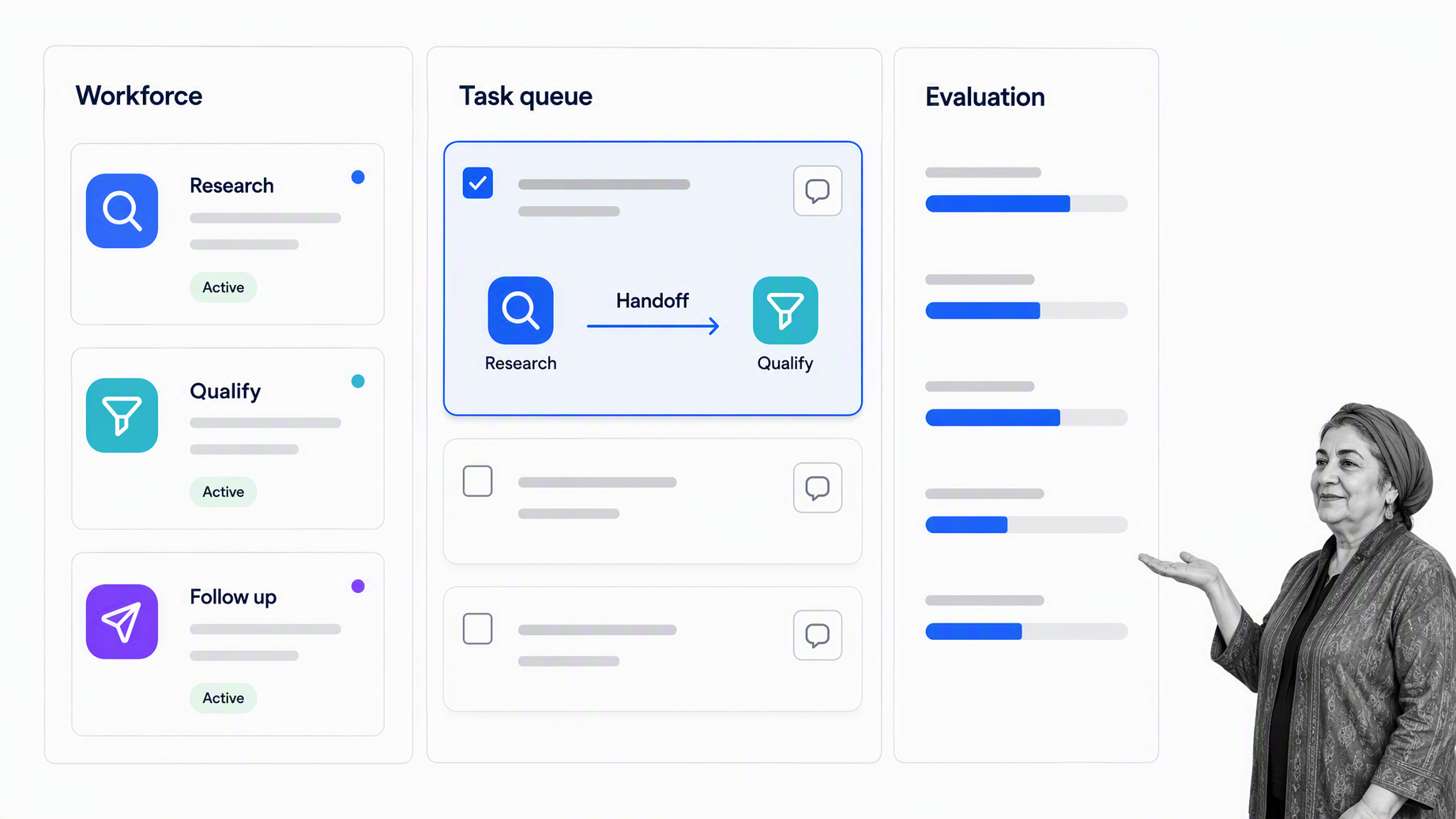
Best for: Teams building coordinated specialist AI workforces.
Bottom line: Best for organizations designing coordinated workforces of specialist agents rather than one general teammate.
Relevance AI is positioned around AI workforces. Its official product page describes building teams of specialist agents in plain language, assigning tools, and coordinating work across roles. That is a different model from Otto’s single trusted teammate. It becomes attractive when the desired system has distinct agent roles such as researcher, qualifier, support specialist, or follow-up agent.
The workforce model gives leaders a way to divide work by specialization and evaluate how agent teams perform. Relevance AI also publishes enterprise capabilities such as tools, integrations, evaluations, analytics, identity controls, and audit logs. It is a broader agent operations choice than a single assistant experience.
Relevance AI beats Process Street when the goal is to design and operate teams of specialist AI agents. Process Street is stronger when one approved business process must coordinate people, agents, deadlines, controls, and evidence. A multi-agent workforce can execute tasks, but the process layer still answers why the work exists and what proof closes it.
Key features
- Plain-language specialist agent creation
- Agent workforce orchestration
- Tools, integrations, and shared projects
- Agent evaluations and analytics
- Enterprise identity and audit controls
Pros
- Purpose-built multi-agent workforce model
- Clear specialization across agent roles
- Enterprise evaluation and analytics options
- Broad agent-building scope
Cons
- Action and model-credit usage require workload estimation
- More platform design than a ready-made assistant
- Recurring human SOP execution may need a separate process system
Choose it if
Choose Relevance AI if the operating model calls for several specialist agents with explicit roles, handoffs, tools, and performance evaluation.
Skip it if
Skip it if you need a simple personal teammate or if the real requirement is one controlled recurring process that people can run without designing an AI workforce.
Pricing model
Relevance AI’s official pricing page lists a free plan and Pro at $19 per month when billed annually, with higher Team and custom Enterprise options. Its current model separates Actions from vendor model credits.
How to choose the right Otto alternative
The fastest way to choose is to write one sentence that describes the outcome, the actor, the control, and the proof. For example: When a vendor submits an application, the system validates required evidence, assigns a reviewer, pauses for approval, updates the vendor record, and preserves the decision. That sentence describes a process. A different sentence, such as research this account and update the CRM when useful information appears, describes an agent behavior.
Choose by the primary actor
When people are the primary actors, use a process-first system. The workflow should show their assignments, decisions, deadlines, and evidence. When software agents are the primary actors, choose an agent builder or teammate surface. When systems are the primary actors, use workflow automation tools with explicit triggers, data, error handling, and monitoring.
Choose by variability
High-variability work benefits from a conversational teammate or agent that can interpret context and choose a path. Low-variability, high-stakes work benefits from an explicit procedure. Many real workflows are mixed. Use agent judgment inside bounded steps, then return to a deterministic control point before the next consequential action.
Choose by consequence
The higher the consequence, the more explicit the control should be. Sending a private research summary can tolerate a lighter review model. Approving a vendor, changing payroll data, granting access, publishing a policy, or closing a compliance case should expose required evidence and decision ownership. This is where business process automation must include governance, not only speed.
Choose by long-term owner
A founder may happily delegate through chat. A revenue operations analyst may configure an agent behavior. A platform team may build in Copilot Studio. An automation engineer may own n8n. A compliance or operations manager may need Process Street. Put the long-term maintainer in the pilot and ask them to modify a condition, investigate a failure, and explain the result to someone else.
Run a representative pilot
Do not pilot the easiest possible task. Select a workflow with one normal path, one exception, one approval, one system action, and one piece of evidence. Compare how quickly each product builds it, how clearly a second person understands it, and how safely the team recovers from failure. A structured checklist builder should make required work obvious, while an agent builder should make tools and decisions observable.
Model the full cost
Count the product’s actual billable unit, then add implementation, administration, review, error recovery, and maintenance. Credit-based agents can vary with task complexity. Activity-based agents vary with searches and actions. Execution-based automation varies with workflow volume. Per-user process software varies with who builds and runs work. Custom enterprise pricing may be reasonable if it replaces several platforms, but only a representative workload can prove that.
| Decision signal | Process-first fit | Agent-first fit | Technical orchestration fit |
|---|---|---|---|
| Primary actor | People following an approved procedure | An AI teammate interpreting goals | Developers and systems executing explicit logic |
| Work variability | Repeatable with controlled exceptions | Highly variable and conversational | Variable but encoded in nodes, tools, and code |
| Required proof | Tasks, approvals, evidence, and completion history | Conversation and action history | Execution logs and technical traces |
| Long-term owner | Operations or process owner | Functional team or individual user | Engineering or automation team |
Otto migration checklist
Moving away from Otto should begin with a work inventory, not a tool inventory. List the goals users delegate, the systems Otto touches, the approvals it requests, the context it remembers, the schedules it runs, and the outputs people depend on. Separate experiments from production responsibilities so a casual trial does not receive the same migration effort as a business-critical routine.
| Migration asset | What to capture | Why it matters |
|---|---|---|
| Goals and routines | Owner, trigger, frequency, expected result | Defines the workload being replaced |
| Instructions and context | Prompts, reference sources, acceptance criteria | Prevents important operating logic from staying trapped in chat history |
| Connections and permissions | Accounts, scopes, approvers, revocation plan | Limits access and supports a safe cutover |
| Failure handling | Retries, exceptions, alerts, recovery owner | Shows whether the replacement can recover in production |
| Records | Outputs, evidence, retention needs, audit history | Preserves proof and continuity after retirement |
1. Inventory goals and routines
Record each recurring or important goal in plain language. Add its owner, trigger, expected result, frequency, connected systems, approval points, and failure consequence. Mark whether the work is personal, team-shared, process-driven, system-driven, or agent-driven.
2. Export the operating logic
Capture prompts, instructions, schedules, connected accounts, permissions, reference material, and acceptance criteria. Do not assume conversation history is a durable specification. Convert critical behavior into a clear process, behavior definition, or node design that another person can review.
3. Reclassify each workload
Move recurring SOPs into a controlled workflow platform. Move lightweight connected-app behaviors into an agent product. Move technical orchestration into n8n or another developer-owned system. Move Microsoft enterprise agents into Copilot Studio when platform alignment matters. Avoid forcing every Otto workload into one replacement.
4. Test permissions and approval
Create test accounts with the minimum required access. Confirm which actions happen automatically, which pause for approval, who receives the request, what evidence appears, and how a denied action is recorded. Test expired credentials and revoked permissions before production cutover.
5. Run in parallel
For important routines, run the incumbent and replacement side by side with duplicate external actions disabled. Compare outputs, timing, missed edge cases, human effort, and cost. Cut over only after the replacement produces acceptable results and the future owner can recover a failed run.
6. Retire safely
Disable old schedules, remove unnecessary connections, preserve required records, update documentation, and tell users which surface now owns the work. Review the replacement after thirty days. A clean retirement prevents two agents or process platforms from quietly acting on the same trigger.
FAQs
What is the best alternative to Otto by Workato?
Process Street is the best alternative for enforceable, trackable, recurring process and SOP workflows. Lindy is closer for a conversational Slack teammate, Zapier Agents for connected-app behaviors, Copilot Studio for Microsoft enterprises, n8n for technical teams, and Relevance AI for specialist agent workforces.
Is there a free alternative to Otto by Workato?
Zapier Agents offers a free plan, and n8n provides a self-hosted Community Edition. Other products offer trials or try-for-free paths. Check the vendor’s current pricing page because usage allowances, credits, and packaging can change.
What is the closest Otto by Workato alternative for Slack?
Lindy is the closest option in this list for a Slack-native teammate. It supports threads and mentions, persistent workspace context, scheduled routines, skills, integrations, and approvals for actions with outside impact.
Which Otto alternative is best for Microsoft teams?
Microsoft Copilot Studio is the strongest fit for organizations centered on Microsoft 365, Teams, Power Platform, Dataverse, and Azure. It supports custom autonomous agents and publishing to internal and external channels.
Which Otto alternative is best for developers?
n8n is the best developer-oriented choice in this comparison because it combines a node editor, code steps, APIs, execution logs, and self-hosting. Relevance AI is stronger when the development goal is a coordinated workforce of specialist agents.
Why is Process Street ranked first?
Process Street ranks first for its ICP: teams that need enforceable, trackable, recurring process and SOP execution. It is not the top pick for every AI assistant use case. Lindy is better for personal conversational delegation, and n8n is better for self-hosted technical orchestration.
Can you migrate projects from Otto to another AI agent?
Yes, but treat the migration as an operating-model redesign. Inventory goals, routines, connected systems, prompts, approvals, schedules, owners, and required records. Rebuild representative workloads, test failures, run critical routines in parallel, and retire old connections safely.
Is Otto by Workato still worth considering?
Yes, especially if you want an autonomous teammate that works through Slack, web, and SMS and can act across systems through Workato Enterprise MCP. An alternative is more appropriate when you need a different primary surface, governance model, technical deployment model, or recurring process record.
Choose Process Street as your alternative to Otto by Workato
Choose Process Street when the work cannot disappear into a chat thread or an opaque agent history. A recurring operational process should show the approved steps, responsible people, required evidence, exceptions, decisions, deadlines, system actions, and final outcome in one place.
That is the dividing line in this comparison. If you need a flexible teammate for varied requests, choose Lindy. If you need a quick connected-app agent, choose Zapier Agents. If you need Microsoft agent governance, choose Copilot Studio. If you need developer control, choose n8n. If you need specialist agent teams, choose Relevance AI. If you need every important process to run correctly and produce proof, use Process Street and build the procedure as an executable workflow.
Comparing something else? The full directory of software alternatives and competitor comparisons covers AI agents, workflow and BPM platforms, integration tools, and more.
