


Turn every policy into automated workflows with built-in enforcement and audit-ready proof.



10 Best Pega Alternatives & Competitors in 2026

Pega alternatives searches usually come from teams that like Pega’s enterprise ambition but are questioning fit. Pega is built for complex case management, workflow automation, AI decisioning, and customer-facing transformation programs. For large organizations with the budget, architecture, and implementation appetite for that kind of platform, Pega can make sense.
The alternative question starts when the job is narrower or different. Some teams do not need an enterprise CRM and decisioning platform. Some need a lighter workflow layer for recurring SOPs. Others need developer-led process orchestration, Microsoft-native automation, service-management apps, low-code custom app development, or no-code request workflows.
This comparison uses practical criteria: core capability fit, who can own the workflow, implementation weight, pricing model clarity, governance, integrations, and how well each tool supports recurring operational work. It is neutral by design. Process Street ranks first for teams whose main need is enforceable, trackable, recurring process and SOP execution. For BPMN modeling, Microsoft-stack automation, ServiceNow-native workflows, CRM-led service operations, or custom enterprise app development, another product can be the better fit.
This list avoids review scores and unsupported claims. Every material competitor claim is tied to a primary vendor source checked during this run.
In this article, we are going to cover:
- Pega alternatives at a glance
- How to choose a Pega alternative
- Best Pega alternatives and competitors
- Which Pega alternative fits your use case
- FAQs
Pega alternatives at a glance
The table below gives the short version before the deep dives. The ranking is based on teams evaluating Pega alternatives for process ownership, recurring workflow execution, governance, and implementation fit. It is not a universal claim that one product wins every BPM, low-code, CRM, or automation scenario.
| Tool | Best for | Standout feature | Free plan | Starting price |
|---|---|---|---|---|
| Process Street | enforceable recurring SOP, checklist, approval, and compliance workflows | workflow runs with required fields, conditional logic, approvals, automations, and audit trails | 14-day Pro trial | Contact sales |
| Appian | enterprise AI process automation and complex regulated operations | process automation, AI and agents, intelligent document processing, and process intelligence | Demo available | Contact sales |
| ServiceNow App Engine | ServiceNow-native workflow apps and enterprise service operations | low-code workflow apps built on the ServiceNow platform | Demo available | Request pricing |
| Microsoft Power Automate | Microsoft 365 and Power Platform workflow automation | cloud flows, desktop automation, process mining, AI Builder, and Dataverse entitlements on paid plans | Free trial | $15/user/month paid yearly |
| Camunda | technical process orchestration across people, systems, and AI agents | agentic orchestration for AI agents, people, and systems across end-to-end processes | Try free | Contact sales |
| Nintex | process automation, document automation, RPA, and process intelligence | workflow automation, robotic process automation, document automation, and process intelligence | Trial or demo available | Contact sales |
| Creatio | AI CRM and no-code workflow apps | AI CRM and workflow platform with no-code tools and composable pricing | Demo available | Per-seat or Unlimited pricing |
| OutSystems | enterprise app development with a low-code foundation | AI development platform with low-code foundations for apps and agents | Free version available | Personalized quote |
| Kissflow | enterprise no-code workflow and app building | AI-powered low-code and no-code platform for custom apps, workflows, and case management | Demo available | Enterprise pricing |
| Pipefy | no-code request, intake, approval, and departmental processes | workflow automation with Pipefy AI, process templates, automations, request tracking, and visual customization | Free Starter plan | Free |
How to choose a Pega alternative
Before you compare demos, decide what Pega is being asked to replace. If you need case management and decisioning across a customer operation, you are in enterprise BPM and CRM territory. If you need recurring checklists, reviews, approvals, and audit evidence, you are closer to SOP software and controlled workflow execution.
Teams often get into trouble when they buy a business process management software platform for a problem that really needs a clear workflow management system. A low-code platform can build almost anything, but that flexibility creates implementation work. A governed workflow layer can be faster when the process is known and the problem is execution.
Use these questions to narrow the shortlist:
- Does the team need to model a complex process, or run a known recurring process?
- Will business users maintain the workflow, or will developers and architects own it?
- Does the process need approvals, required fields, files, and evidence on every run?
- Is the system of record Microsoft, ServiceNow, Salesforce, a CRM, or a standalone workflow layer?
- Do you need a workflow app, a process orchestration engine, a case management platform, or an SOP execution system?
A hybrid stack can also be correct. You might use a low-code platform for custom apps, Power Automate for Microsoft actions, and Process Street as the governed process platform where recurring operations, approvals, and evidence live.
Best Pega alternatives and competitors
1. Process Street
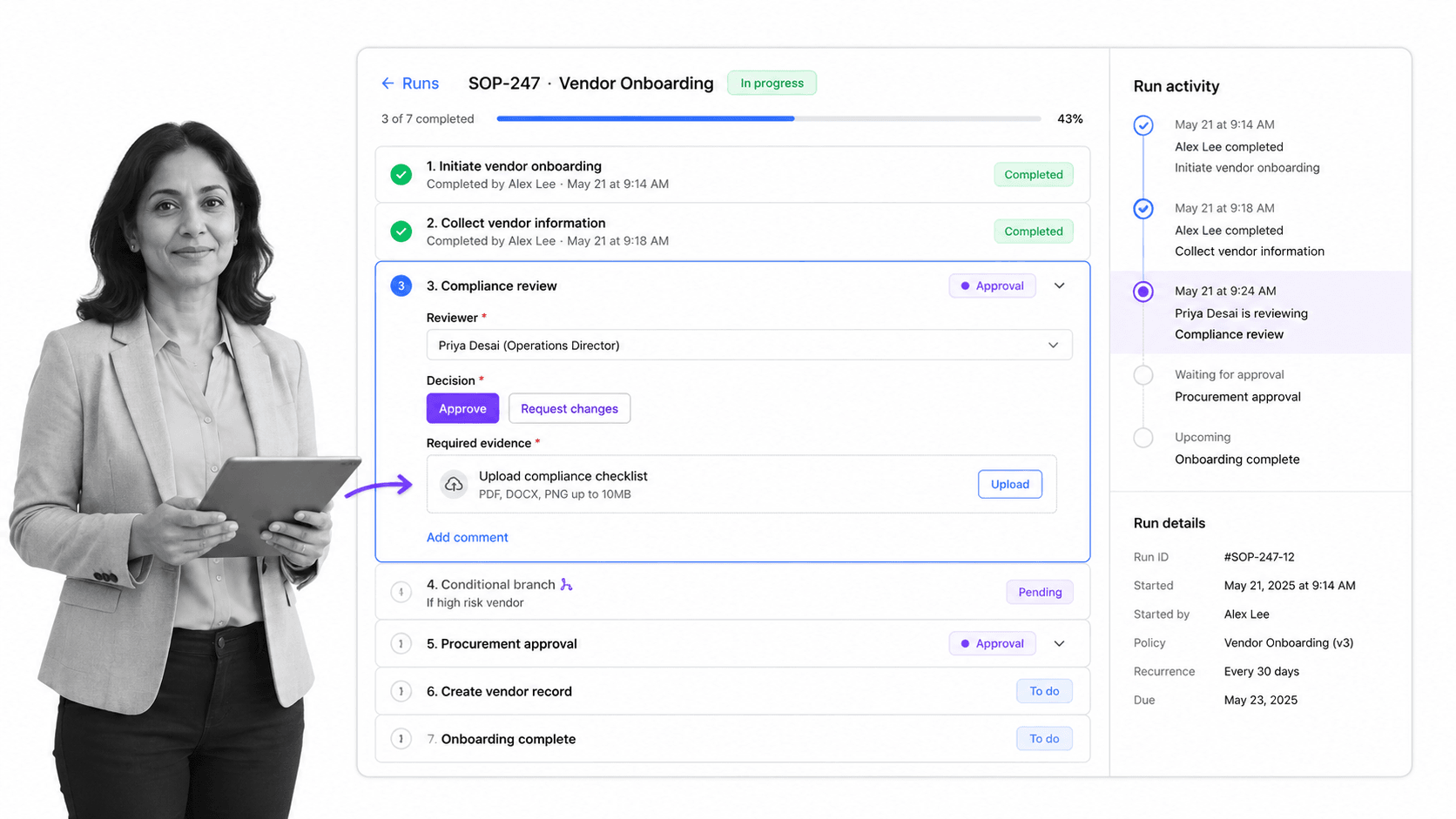
Best for: enforceable recurring SOP, checklist, approval, and compliance workflows.
Process Street is the best Pega alternative when the work is recurring, human-owned, and needs to be enforced the same way every time. It is built for SOPs, checklists, onboarding, vendor reviews, approvals, finance close work, quality checks, and compliance-adjacent operations where each run needs owners, fields, files, statuses, and proof.
That is a different job from Pega’s enterprise case-management and decisioning center of gravity. Pega can be right for large transformation teams that need a broad low-code platform for customer operations. Process Street is right when the team already knows the process and needs it to run cleanly, repeatedly, and visibly.
Process Street turns procedures into workflow runs with assigned tasks, required fields, conditional logic, due dates, automations, and approval tasks. The first Process Street mention links to the homepage because the product itself is the category answer for recurring SOP execution.
The strongest use cases are operational workflows where a skipped step creates real risk: employee onboarding, client onboarding, vendor due diligence, policy reviews, quality assurance, audit preparation, customer handoffs, internal approvals, and recurring compliance checks.
For current package details, use Process Street pricing. The public pricing page lists a 14-day Pro trial and asks buyers to contact sales for current packages.
Process Street key features:
- Workflow runs that assign owners, due dates, steps, and evidence in one place.
- Required fields and file collection so the process cannot move forward on vague status updates.
- Approvals that happen inside the workflow instead of in a separate inbox chase.
- Conditional logic for routing different cases through different procedural paths.
- Automations and integrations that support the controlled process record.
Process Street pros:
- Strong fit for operations, HR, compliance, finance, customer management, and IT process owners.
- Readable enough for non-technical teams to build and maintain workflows.
- Keeps process execution and evidence together instead of scattering proof across tools.
- Better for recurring SOPs than a generic project board or static documentation system.
- Clear ICP fit when the buyer wants enforcement, tracking, and proof more than a custom app platform.
Process Street cons:
- Not a BPMN process modeling and simulation suite.
- Not a CRM of record or enterprise customer decisioning platform.
- Not the best choice when developers need to orchestrate many backend services with code-level control.
2. Appian

Best for: enterprise AI process automation and complex regulated operations.
Appian is closest to Pega when the buyer wants a full enterprise process automation platform rather than a departmental checklist tool. Its own platform messaging centers on AI process automation, process orchestration, agents, intelligent document processing, and process intelligence.
It beats Process Street when the organization needs complex process app development with enterprise governance across many systems. Process Street is the better fit when the operating team wants recurring SOP runs, required fields, approvals, and proof without a heavier low-code implementation program.
Appian key features:
- AI process automation platform
- Process orchestration across people, systems, and agents
- Intelligent document processing
- Process intelligence
Appian pros:
- Strong enterprise process automation positioning
- Good fit for complex regulated workflows
- Broad platform scope beyond task checklists
Appian cons:
- Likely more platform than a team needs for simple SOP execution
- Business teams may need implementation support for complex builds
For current package details, see Appian pricing. Appian is a stronger fit when enterprise process orchestration, low-code app delivery, and complex regulated work are the primary requirements.
3. ServiceNow App Engine

Best for: ServiceNow-native workflow apps and enterprise service operations.
ServiceNow App Engine is the natural Pega alternative for companies already running work through ServiceNow. The official product page frames it around building and extending workflow apps on the Now Platform.
It beats Process Street when the workflow should live inside ServiceNow service operations, data, identity, and platform controls. Process Street is usually simpler when the team wants a standalone process layer for SOPs, approvals, onboarding, reviews, and compliance evidence.
ServiceNow App Engine key features:
- Low-code app building on the Now Platform
- Digital workflow applications
- Service operations alignment
- Sales-led pricing packages
ServiceNow App Engine pros:
- Strong if ServiceNow is already the operational backbone
- Good for service-management workflows
- Enterprise platform consistency
ServiceNow App Engine cons:
- Less attractive outside a ServiceNow-centered stack
- Can be heavy for smaller recurring process teams
For current package details, use the official ServiceNow App Engine pricing page. ServiceNow App Engine is a stronger fit when the organization already standardizes service workflows on ServiceNow.
4. Microsoft Power Automate

Best for: Microsoft 365 and Power Platform workflow automation.
Microsoft Power Automate is a strong Pega alternative for Microsoft-first teams. Microsoft positions it around process automation, AI authoring, AI insights, cloud flows, desktop automation, process mining, and Power Platform integration.
It beats Process Street when the automation is mostly between Microsoft systems, Dataverse, Dynamics, Teams, or desktop tasks. Process Street is stronger when the work is a human procedure that needs clear ownership, required evidence, approvals, and run history.
Microsoft Power Automate key features:
- Cloud flows and desktop flows
- Copilot-assisted authoring
- Process and task mining
- Published Premium plan at $15/user/month paid yearly
Microsoft Power Automate pros:
- Strong Microsoft ecosystem fit
- Clear public entry pricing
- Useful for app-to-app and desktop automation
Microsoft Power Automate cons:
- Automation logic can become hard for non-technical process owners to audit
- Not a dedicated SOP execution surface
For current package details, see Microsoft Power Automate pricing. Power Automate is a stronger fit when Microsoft 365, Dynamics, Teams, and Dataverse are the center of the operating stack.
5. Camunda

Best for: technical process orchestration across people, systems, and AI agents.
Camunda is a technical alternative for teams that need process orchestration rather than checklist execution. Its official platform page describes orchestration for AI agents, people, and systems across end-to-end processes.
It beats Process Street when developers need orchestration across distributed systems and BPMN-style process control. Process Street is the better fit when operations, HR, compliance, finance, or customer teams need workflows they can run and maintain directly.
Camunda key features:
- Process orchestration for people, systems, and AI agents
- SaaS and self-managed options
- Process and decision modeling
- Governed process execution
Camunda pros:
- Strong technical orchestration fit
- Useful for complex system handoffs
- Good option for developer-led process programs
Camunda cons:
- Requires more technical ownership than typical SOP teams want
- Not designed as a simple operator checklist interface
For current package details, see Camunda pricing. Camunda is a stronger fit when developers need BPMN-style process orchestration across distributed systems.
6. Nintex

Best for: process automation, document automation, RPA, and process intelligence.
Nintex is a broad automation platform for teams comparing Pega against workflow automation, document automation, RPA, and process intelligence. Its official site positions the platform around process automation and intelligence.
It beats Process Street when the required package includes document generation, RPA, and process intelligence in one automation suite. Process Street is the cleaner fit when teams want recurring human workflows, approvals, SOPs, and evidence capture as the center of gravity.
Nintex key features:
- Workflow automation
- Robotic process automation
- Document automation
- Process intelligence
Nintex pros:
- Broad automation suite
- Document automation can be a major advantage
- Good fit when RPA sits beside workflow
Nintex cons:
- May be broader than needed for recurring SOP execution
- Pricing details are sales-led on current official pages
For current package details, see Nintex pricing. Nintex is a stronger fit when document generation, RPA, and process intelligence need to sit beside workflow automation.
7. Creatio

Best for: AI CRM and no-code workflow apps.
Creatio is a Pega alternative for teams evaluating CRM-led workflow and no-code automation. Creatio describes itself as an AI CRM and workflow platform with no-code tools and composable pricing.
It beats Process Street when the workflow belongs directly in sales, marketing, or service CRM operations. Process Street is stronger when the team needs cross-functional SOP execution that is not primarily a CRM record lifecycle.
Creatio key features:
- AI CRM and workflow platform
- No-code Studio for workflow automation
- Composable pricing
- Unlimited plan option for broad adoption
Creatio pros:
- Strong customer-facing workflow fit
- No-code app composition
- Good for CRM-centric operations
Creatio cons:
- CRM breadth can be unnecessary for internal SOP workflows
- Teams outside customer operations may not need the full platform shape
For current package details, see Creatio pricing. Creatio is a stronger fit when CRM, service workflows, and no-code app composition belong in one customer-facing platform.
8. OutSystems

Best for: enterprise app development with a low-code foundation.
OutSystems is a Pega alternative when the buying question is enterprise app development. Its official site describes an AI development platform built on a low-code foundation for enterprise apps and custom agents.
It beats Process Street when the team needs to build custom software, not just run recurring processes. Process Street is the better fit when a procedure already exists and the goal is to enforce it, route it, collect evidence, and improve it over time.
OutSystems key features:
- Low-code foundation for enterprise apps
- AI development platform positioning
- Free version available
- Personalized quote pricing
OutSystems pros:
- Strong custom app development fit
- Useful for developer and business collaboration
- Good for enterprise-grade software delivery
OutSystems cons:
- Overkill when the work is a recurring SOP
- App delivery requires more design and implementation effort than checklist execution
For current package details, see OutSystems pricing. OutSystems is a stronger fit when the goal is custom enterprise application development, not recurring SOP execution.
9. Kissflow
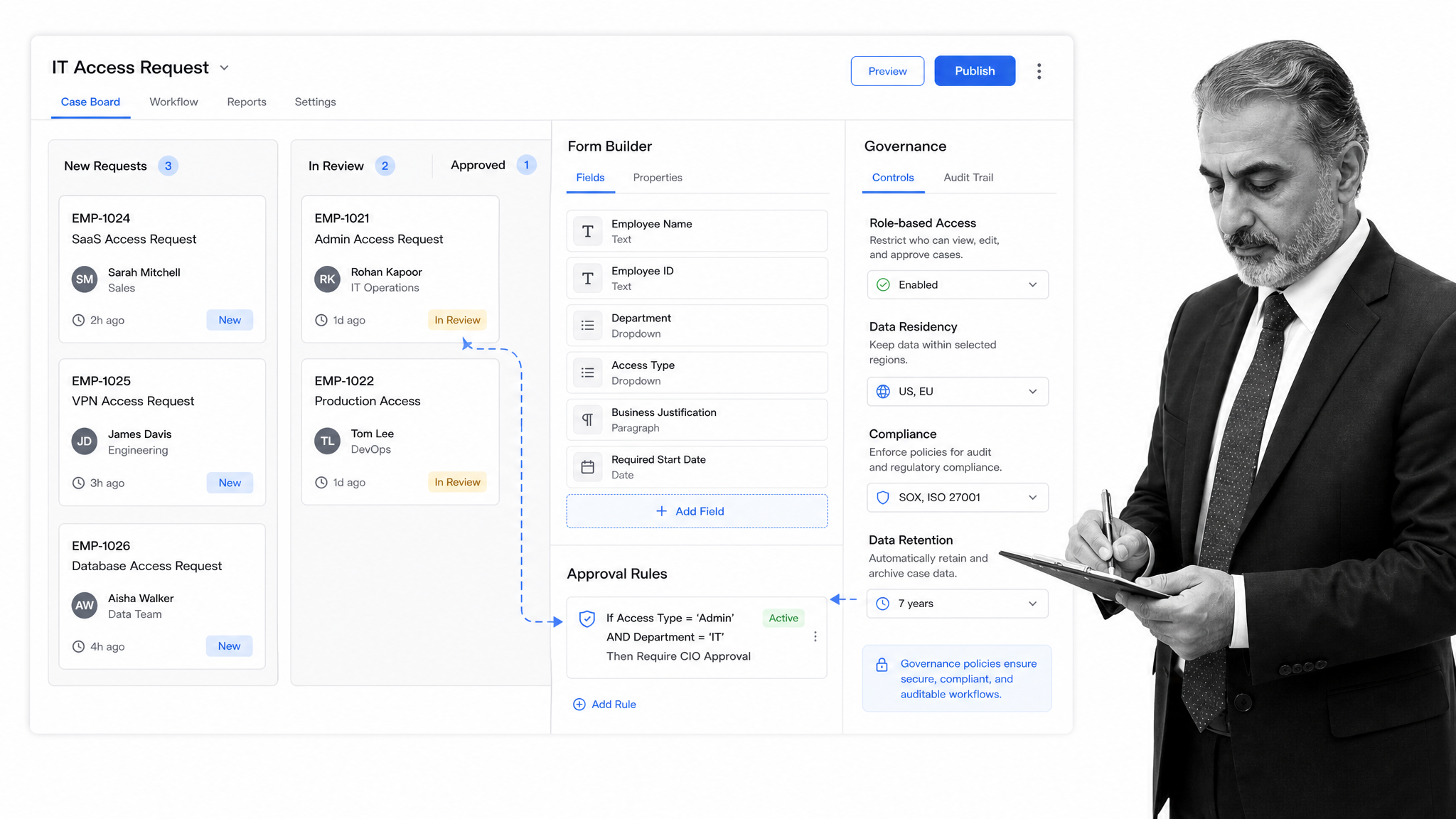
Best for: enterprise no-code workflow and app building.
Kissflow is a no-code and low-code platform for business apps, workflow automation, and case management. Its official pages frame it around custom enterprise apps and workflow automation for business teams.
It beats Process Street when IT and business teams want one broad no-code platform for apps, boards, and workflows. Process Street is stronger when repeatable SOPs, approvals, and audit trails are the central job.
Kissflow key features:
- Low-code and no-code app building
- Workflow automation platform
- Case management boards
- Enterprise pricing
Kissflow pros:
- Good fit for no-code app programs
- Broad workflow and case surface
- Business-friendly platform story
Kissflow cons:
- Enterprise platform shape can be more than SOP teams need
- Current public pricing pages are less specific than per-seat tools
For current package details, see Kissflow pricing. Kissflow is a stronger fit when IT and business teams want one no-code platform for apps, workflows, and case boards.
10. Pipefy

Best for: no-code request, intake, approval, and departmental processes.
Pipefy is a lighter no-code alternative for request, intake, approval, and departmental process workflows. Its pricing page publishes a free Starter plan with Pipefy AI, up to 5 processes, up to 10 users, basic automations, templates, request tracking, and visual customization.
It beats Process Street when a team wants a simple, free entry point for intake queues and departmental request processes. Process Street is stronger when the workflow must enforce every step, approval, owner, and evidence point as a repeatable SOP.
Pipefy key features:
- Free Starter plan
- Request tracker
- Basic automations
- Plug-and-play process templates
Pipefy pros:
- Accessible free entry point
- Good request-management surface
- Helpful for small teams and departmental intake
Pipefy cons:
- May be lighter than needed for compliance-heavy workflows
- Advanced governance needs may require higher packages
For current package details, see Pipefy pricing. Pipefy is a stronger fit when teams want lightweight no-code request workflows with a free starter path.
Which Pega alternative fits your use case
The right Pega alternative depends on which part of Pega you are replacing. Treat the list as a decision map, not a scoreboard.
- Choose Process Street when recurring human workflows need required steps, approvals, evidence, and audit trails.
- Choose Appian when enterprise process automation and regulated low-code operations are the main requirement.
- Choose ServiceNow App Engine when workflow apps should live on the Now Platform.
- Choose Microsoft Power Automate when the automation layer should live inside Microsoft 365, Dynamics, Teams, and Dataverse.
- Choose Camunda when developers need technical process orchestration across distributed systems.
- Choose Nintex when document automation, RPA, and process intelligence need to sit beside workflow automation.
- Choose Creatio when CRM workflows and no-code customer-facing operations are central.
- Choose OutSystems when custom enterprise app development is the goal.
- Choose Kissflow or Pipefy when no-code workflow and request management matter more than enterprise BPM depth.
If the buying team is replacing Pega because the platform feels too heavy for known procedures, start with a controlled workflow layer and compare adjacent workflow automation software and automated workflow tools. If the team is replacing Pega because it needs deeper orchestration or app development, Process Street may still be useful for SOP execution, but it should not pretend to be the orchestration engine.
For repeatable onboarding and customer handoff work, template-led starts can also help. A team can begin from an employee onboarding checklist or client onboarding checklist and adapt the run structure before connecting external systems.
FAQs
What is the best Pega alternative?
The best Pega alternative depends on the job. Process Street is best when the core need is enforceable recurring SOP and compliance workflows. Appian, ServiceNow App Engine, Camunda, Power Automate, and OutSystems can fit better for enterprise low-code, technical orchestration, Microsoft automation, or custom app development.
Why is Process Street ranked first?
Process Street is ranked first for the ICP this page is judging: teams that need enforceable, trackable, recurring process and SOP workflows. It is not ranked first for every Pega use case. If you need BPMN modeling, CRM decisioning, or enterprise app development, another tool may be the better fit.
Is there a free Pega alternative?
Some Pega alternatives publish free plans, free trials, or free versions. Microsoft Power Automate publishes a free trial, Camunda offers a try-free path, OutSystems says a free version is available, and Pipefy publishes a free Starter plan. Always verify current limits on the vendor pricing page.
What is the closest alternative to Pega?
Appian is one of the closest broad enterprise alternatives to Pega for AI process automation and complex regulated operations. ServiceNow App Engine can be close for ServiceNow-native workflow apps, while Creatio can be closer when CRM and customer workflows are central.
Which Pega alternative is best for small teams?
Small teams usually do not need a full enterprise BPM platform unless the process is highly complex. Process Street, Pipefy, Kissflow, and Power Automate are often easier starting points depending on whether the job is SOP execution, request management, no-code workflow apps, or Microsoft automation.
Which Pega alternative is best for enterprise teams?
Enterprise teams should compare Appian, ServiceNow App Engine, Microsoft Power Automate, Camunda, Nintex, Creatio, OutSystems, and Process Street based on ownership. Process Street fits enterprise teams when the specific problem is recurring SOP execution and operational proof.
Can Process Street replace Pega?
Process Street can replace Pega for recurring SOPs, approval workflows, onboarding, reviews, compliance checklists, and operational procedures. It should not be positioned as a full replacement for Pega’s broader customer decisioning, CRM, or enterprise BPM app-development scope.
How should a team migrate from Pega to an alternative?
Start by mapping the process into triggers, owners, tasks, required data, decisions, approvals, evidence, exceptions, and systems of record. Then choose the tool that matches the ownership model. If operators own the process, Process Street may fit. If architects own orchestration or app development, a low-code or BPM platform may fit better.
If your Pega replacement project is really about enforcing recurring operations, start with Process Street. Build the workflow run, make the required evidence explicit, then connect the systems around the process.
Comparing something else? The full directory of software alternatives and competitor comparisons covers AI agents, workflow and BPM platforms, integration tools, and more.
