


Turn every policy into automated workflows with built-in enforcement and audit-ready proof.



Process Builder
A process builder is a tool that lets a team design a repeatable process visually, then run it as real work. Instead of describing steps in a document, you assemble them on a canvas: add tasks, set the order, assign owners, add rules, and connect the systems the work touches. The result is a process people can follow the same way every time.
The term covers a range of tools. A lightweight process builder might arrange steps into a checklist. A more capable one adds branching, approvals, required fields, automation, and a record of what happened. The common thread is that you build the process once and reuse it, rather than rebuilding it from memory on every run. That is what separates a process builder from a plain process document.
This guide explains what a process builder is, how one works, which features matter, how it differs from a workflow builder and a form builder, how to build a process step by step, and how to choose the right tool for the work in front of you.
In this article, we are going to cover everything you need to know about a process builder, including:
- What is a process builder?
- How a process builder works
- Key features of a process builder
- Process builder vs workflow builder vs form builder
- How to build a process step by step
- How to choose a process builder
- Build your processes with Process Street
- FAQs
What is a process builder?
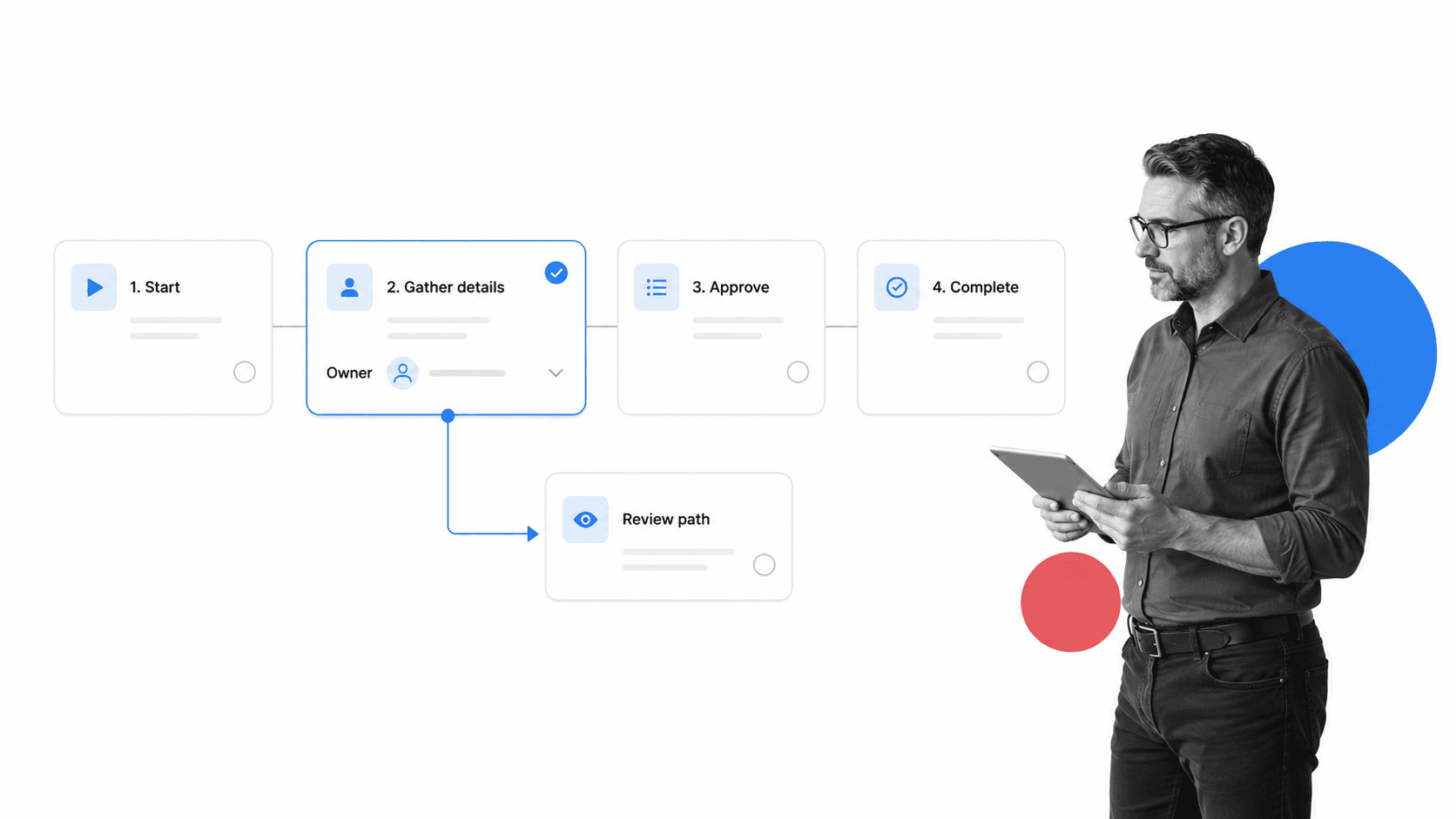
A process builder is software that helps you turn a repeatable procedure into a structured, runnable workflow. You define the steps, decide the order, set who is responsible, and add the rules that keep the work consistent. Once built, the process can run again and again without someone reinventing it each time. In practice, a process builder is where a workflow goes from an idea in someone’s head to a system the whole team can use.
The discipline behind this is business process management. IBM describes BPM as a practice used to discover, model, analyze, measure, improve, and optimize business processes. A process builder is the practical surface where that modeling and improvement happen, because it gives people a place to design the work and then actually run it.
Building versus documenting
Documenting a process captures how work should happen. Building a process makes that work executable. A document can sit in a folder and drift out of date. A built process assigns tasks, tracks status, enforces rules, and produces a record. The gap between the two is where most process failures live, because people follow what the tool makes easy, not what the document says.
Who uses a process builder
Process builders are used by operations, compliance, HR, finance, customer success, quality, and IT teams. Anyone responsible for recurring work that has to happen the same way every time benefits from building it once. The person who builds the process is often the process owner, not a developer, which is why modern process builders are designed for non-technical users.
How a process builder works
A process builder works by letting you assemble a process from a small set of building blocks, then run copies of that process whenever the work needs to happen. You design a template, and each run is a live instance with its own owners, status, and data.
Design the template
You start on a build surface, usually a canvas or an ordered list of steps. You add each task, write short instructions, set the order, and mark dependencies. Most builders use drag and drop or simple add-a-step controls so the design stays close to how people describe the work out loud.
Add logic and data
Next you add the rules that make the process reliable: required fields, conditional paths, approvals, and due dates. BPMN, a standard notation for representing business processes, exists precisely because sequence, gateways, and decisions are the parts that make a process behave predictably. A good process builder lets you express that logic without drawing formal diagrams.
Run the process
When the work needs to happen, you run the template. Each run assigns tasks to owners, tracks completion, and moves the work forward. IBM describes a workflow as a system that manages repetitive processes and tasks that occur in a particular order, which is exactly what a run is: the designed order, made live.
Automate and connect
Mature process builders connect the run to other systems, so data moves without copy and paste. Microsoft describes BPMS as software that helps a business define, deploy, and manage automated business processes. That automation layer is what turns a built process from a checklist into an operating system for the work.
Improve from real runs
Because every run is tracked, a process builder shows where work stalls, which steps get skipped, and where exceptions repeat. Those signals feed back into the design, so the process gets better with use instead of decaying. Building is not a one-time act; it is a loop of design, run, and refine.
Key features of a process builder
The features that matter in a process builder are the ones that make correct work easy and incorrect work hard. A long feature list means little if the process owner cannot build and change the workflow without help.
Visual step design
You should be able to add, reorder, and edit steps without technical skills. Clear step design keeps the built process close to reality, which is what makes people trust and follow it.
Conditional logic and branching
Real work is not always linear. A process builder should route different cases down different paths, so a simple request and a high-risk exception do not follow the same steps. Support for conditional logic is what lets one template handle many scenarios without becoming a maze.
Forms and required fields
Processes collect information. A process builder should let you add form fields, mark them required, and capture structured data inside the run. Required fields prevent the most common failure, which is a step marked done with the important information missing.
Approvals and controls
When work needs signoff, approval should happen inside the process, not in a separate email thread. Built-in workflow approvals, rejection paths, and role-based ownership turn a step into a real control with a decision and a record.
Automation and integrations
A process rarely lives in one tool. The builder should trigger actions, send notifications, and update records in the systems the work touches, so people are not moving data by hand between apps.
Evidence and audit trail
Every run should leave proof: completed tasks, captured fields, approvals, and a history of what happened. Without that record, managers see activity but cannot verify that the process was actually followed.
Reporting and reuse
The builder should make a process reusable across teams and show how runs are performing. A reusable template plus clear reporting is what turns a single workflow document into an operating standard the business can scale.
Process builder vs workflow builder vs form builder
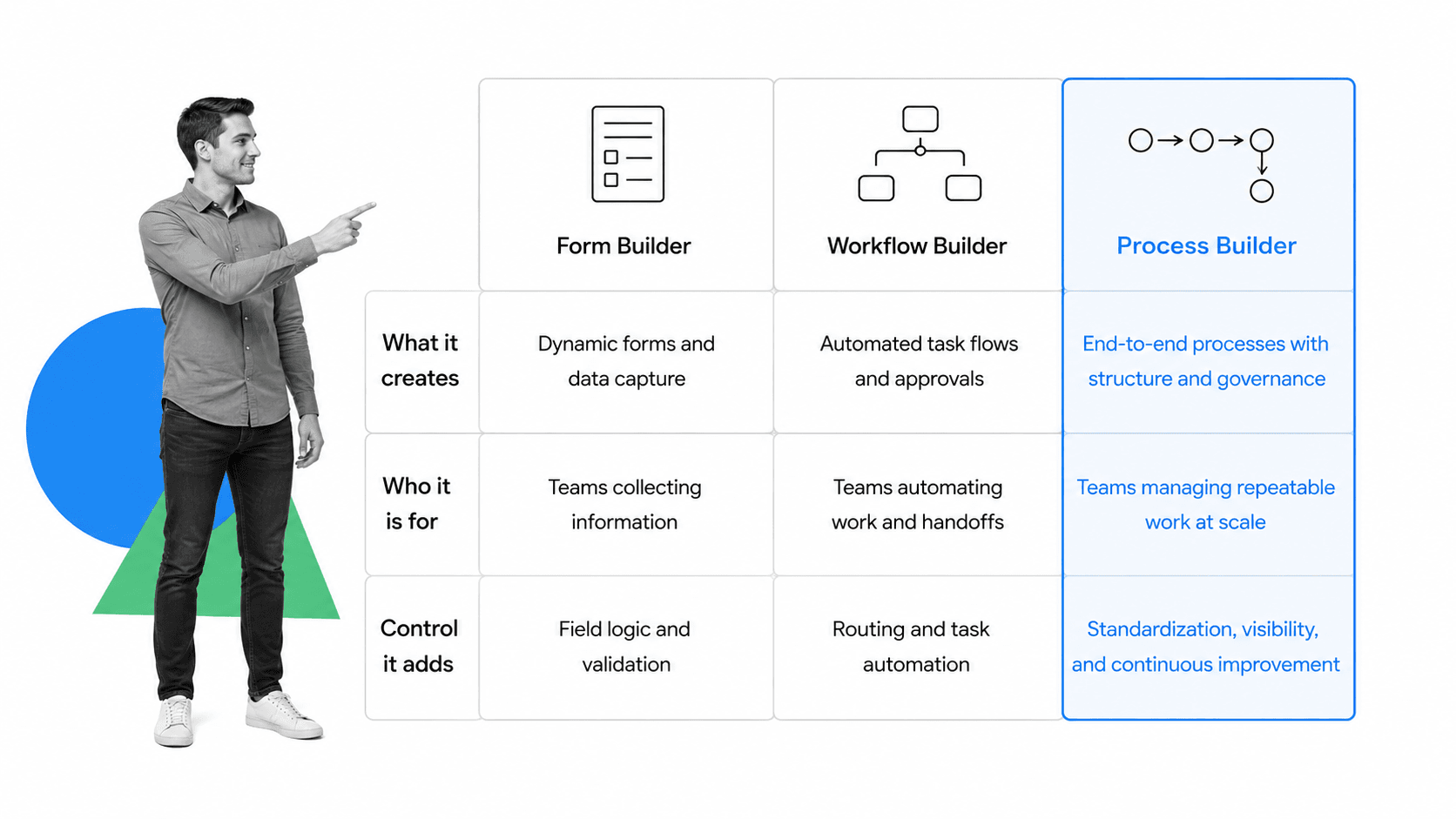
These terms overlap, which is why the category can feel confusing. The clearest way to tell them apart is to ask what each one produces and how much control it adds to the work.
Form builder
A form builder creates a single point of data capture: an intake form, a request, a survey. It is excellent for gathering structured information, but a form on its own does not assign the follow-up work, route approvals, or track what happens after submission. A form is often the first step of a process, not the process itself.
Workflow builder
A workflow builder connects steps and automations so that one action triggers the next. It is strong at moving data and tasks between people and systems. The line between a workflow builder and a process builder is thin, and many tools do both. In practice, a workflow builder leans toward automation and routing, while a process builder also emphasizes the human procedure, ownership, and proof. When the routing gets rich, it starts to look like a workflow management system.
Process builder
A process builder is the broadest of the three. It combines the data capture of a form, the routing of a workflow, and the structure of a documented procedure, with the accountability and evidence that recurring work needs. It is built for processes that must happen the same way every time, run by the people who own them.
Which one you need
If you only need to collect information, a form builder is enough. If you need to move data and trigger actions between systems, a workflow builder fits. If you need people to run a repeatable procedure with ownership, control, and proof, you need a process builder. Many teams end up with a process platform that includes all three so the pieces work together instead of as separate tools.
How to build a process step by step
Build your first process by starting with one important, repeatable workflow rather than trying to model everything at once. The goal of the first build is a template that can run end to end, not a perfect diagram.
1. Choose one repeatable process
Pick work with a clear trigger, a clear owner, and real pain when it goes wrong. Employee onboarding, client onboarding, vendor approval, monthly close, content review, and incident response are all good first candidates because they repeat and cross handoffs.
2. Capture the real steps
Talk to the people who do the work today. Write down the actual steps, the order, where they wait, what they chase, and which information is missing. Build the process you have before you build the process you wish you had.
3. Add the steps to the builder
Create the template and add each task in order with short, clear instructions. Templates speed this up. A reusable standard operating procedure template gives you a structure to start from, and a purpose-built new employee onboarding template can jump-start a common workflow rather than starting from a blank canvas.
4. Assign owners and due dates
For each step, set who is responsible and when it is due. Ownership is what turns a list of tasks into work that actually gets done, because every step has a name attached and a clear expectation of timing.
5. Add rules where mistakes are costly
Add required fields, conditional paths, and approvals at the moments that affect quality, cost, or compliance. Do not try to control every click. Control the few points where a skipped step creates real risk, and let the rest stay light.
6. Connect your tools
Wire the process to the systems that hold your data, so the run updates records, sends notifications, and collects files without manual copying. This is the step that stops your built process from becoming an island.
7. Run it, then refine
Run the process for real, then review where it stalled, where owners had questions, and where evidence was added outside the tool. Those signals tell you what to change. Atlassian describes workflow automation as predefined rules and actions that reduce manual effort, and the refine step is where you decide which of those rules are worth adding.
How to choose a process builder
Choose a process builder by matching the tool to the work, not to the longest feature list. A powerful builder still fails if the process owner cannot use it without a developer.
Match the control level to the risk
Decide how much control the work needs. A simple internal routine may only need ordered steps and owners. A regulated or high-value process needs approvals, required fields, and a full audit trail. SAP Signavio describes BPM software as a shared environment for documenting, managing, analyzing, and improving processes, and the more your work depends on proof, the more that shared, governed environment matters.
Check non-technical ownership
The people who own the process should be able to build and change it themselves. If every edit requires a specialist, the process will fall out of date the moment reality shifts. No-code building keeps the process living instead of frozen.
Test a real handoff
Before committing, run one real handoff through the tool. If the next owner is unclear, the status is hard to read, or required data lives in another system, the built process will still break where it matters.
Validate integrations
Confirm the builder connects to the systems your process already depends on, including HR, CRM, finance, storage, and support tools. A process that cannot reach your data forces people back into manual work and undoes the point of building it.
Prefer plan-to-run in one place
The strongest process builders let a team move from documentation to live execution without switching tools. A tool that keeps the process definition and the running work together avoids the gap where documented and actual practice drift apart. A process resource that names the people, systems, and controls a workflow needs is easier to maintain when it lives beside the runs it governs.
Build your processes with Process Street
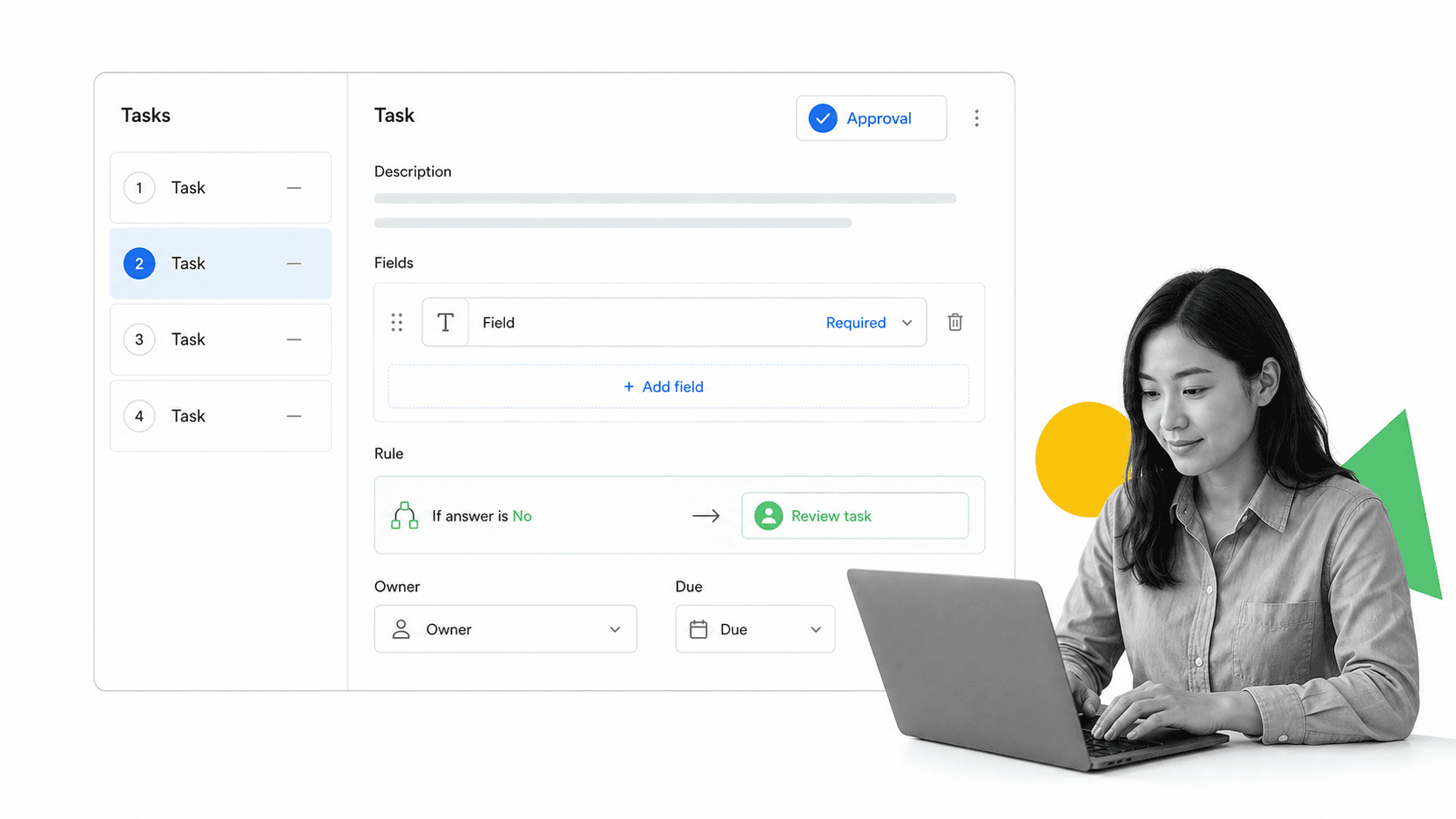
Process Street is a Compliance Operations Platform with a no-code process builder at its core. You build a workflow by adding tasks, instructions, form fields, conditional logic, approvals, owners, and due dates, then run it as many times as the work needs. The same place you build the process is the place it runs, so what people follow and what you designed stay in sync.
That matters when a process builder has to do more than store steps. If your team needs role ownership, required evidence, review gates, task history, and repeatable runs, the process needs an operating surface, not another document. Process Street is built for exactly that kind of recurring, controlled work.
Process Street has direct, universal integrations to 5,000+ systems. Need a new one? An AI agent builds it on the fly. That matters because a built process has to reach the surrounding stack: HR, CRM, finance, support, storage, chat, security, and compliance systems. The workflow moves with the work instead of forcing people to update every system by hand.
Process Street also connects documentation, building, and execution. Written procedures become workflow management software runs, approvals happen inside the workflow through approval steps, and every run leaves an audit history. You can start from the template library or build from a blank workflow, then improve the design from what real runs reveal.
The practical outcome is simple: the team knows what to do, the process owner sees what is happening, and the business has proof the work was done correctly. That is the difference between a process that exists on paper and a process you actually built to run, the same reliable way, every time.
FAQs
What is a process builder?
A process builder is software that lets you design a repeatable process visually and then run it as real work. You add steps, set the order, assign owners, and add rules such as required fields, conditional logic, and approvals. Instead of describing a process in a document, you build it once and reuse it every time the work happens.
What features should a process builder have?
A strong process builder should include visual step design, conditional logic and branching, forms with required fields, approvals and role-based ownership, automation and integrations, evidence and audit history, and reporting. The right mix depends on how much risk and complexity the recurring work carries.
Is a process builder the same as a workflow builder?
They overlap, and many tools do both. A workflow builder leans toward routing tasks and automating actions between systems. A process builder also emphasizes the human procedure, ownership, and proof, and is built for repeatable work that must happen the same way every time. A process builder is usually the broader category.
Do you need to code to use a process builder?
No. Modern process builders are designed for non-technical users, so the person who owns a process can build and change it without a developer. No-code building matters because it keeps the process current as the work changes, rather than requiring a specialist for every edit.
Can Process Street be used as a process builder?
Yes. Process Street is a Compliance Operations Platform with a no-code process builder. You add tasks, form fields, conditional logic, approvals, owners, and due dates, then run the workflow repeatedly with tracking and an audit trail. It is built for recurring work that needs consistency, accountability, and proof.
How do you build a process from scratch?
Start with one important repeatable workflow, capture the real steps from the people who do the work, then add those steps to the builder in order. Assign owners and due dates, add rules where mistakes are costly, connect your tools, run it for real, and refine the design from what each run reveals.
