


Turn every policy into automated workflows with built-in enforcement and audit-ready proof.



Process Operation

Process operation is the active management of a repeatable business process while work is being done. It turns a documented process into daily execution: owners know what to do, standards are enforced, exceptions are handled, evidence is captured, and outputs are checked before the process is considered complete.
The phrase can sound abstract because teams use process, operation, workflow, SOP, and procedure in overlapping ways. The useful distinction is simple: a process describes how work should move, while a process operation is the controlled running of that process in real conditions.
For operations, compliance, quality, finance, HR, IT, and customer teams, process operation is where consistency becomes visible. A process that only exists in a document cannot prevent missed handoffs. A process operation gives the work an owner, a cadence, a system of record, and a way to prove what happened.
This guide explains what process operation means, how it differs from nearby terms, what a strong operating model includes, how to run one, and how Process Street helps teams turn process documentation into controlled execution.
In this article, we are going to cover everything you need to know about process operation, including:
- What process operation means
- Process operation vs process management, workflow, SOP, and procedure
- Core parts of a process operation
- How to run a process operation
- Process operation examples
- Common process operation failure points
- How Process Street supports process operation
- How to improve process operation over time
- FAQs
What process operation means
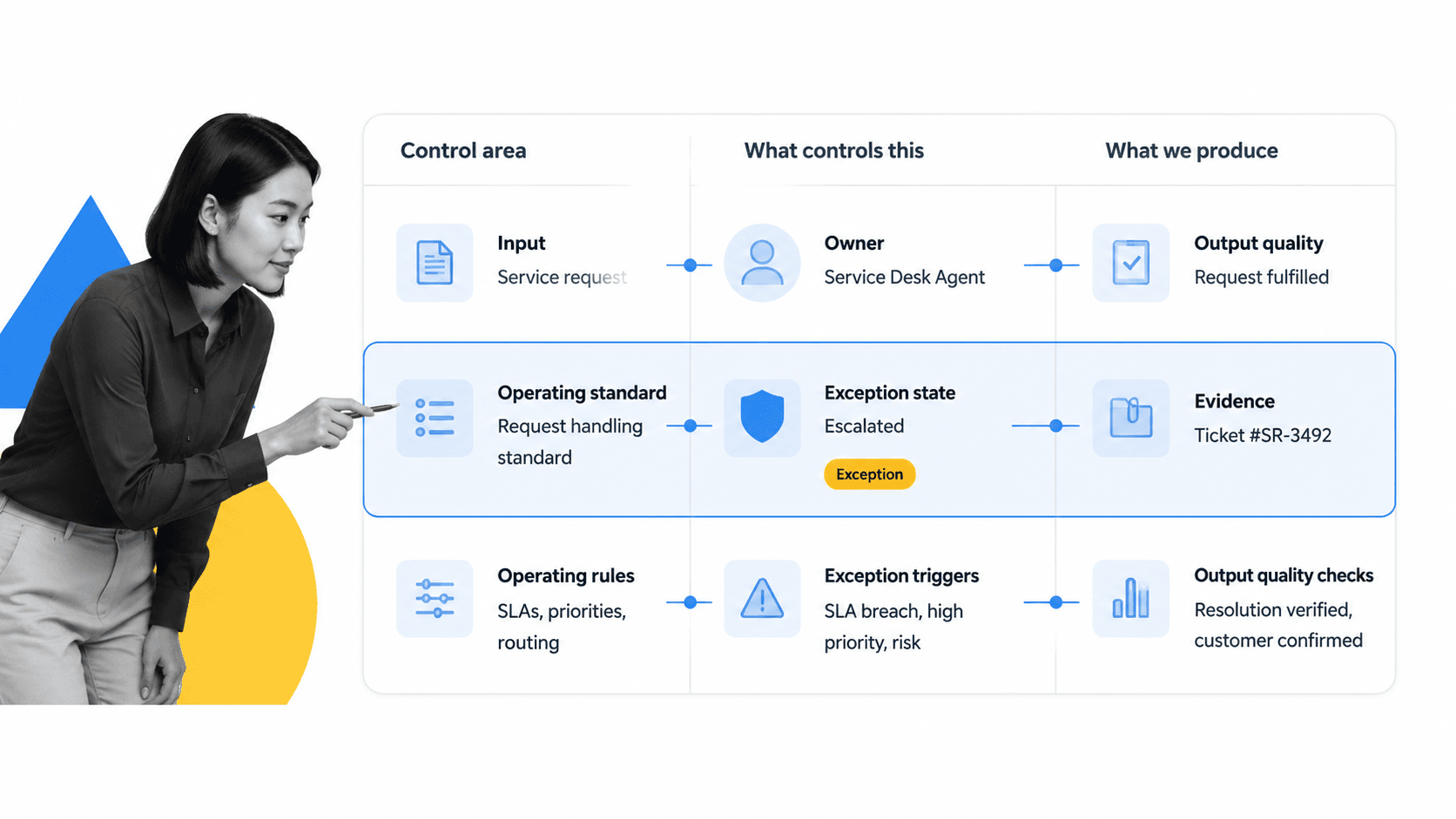
A process operation is the operating layer around a business process. It answers the questions that matter once work leaves the diagram and enters the real business: who owns this step, what standard applies, what evidence is required, what happens if the work stalls, and how do we know the output is good enough?
Process operation turns design into execution
A process design says how work should happen. A process operation makes sure it actually happens that way. That is why a practical process checklist is usually more useful than a static flowchart. The checklist gives each step a completion state, a responsible owner, and a clear definition of done.
The same idea appears in quality management. ISO guidance on the process approach in ISO 9001 emphasizes processes, their interactions, resources, responsibilities, monitoring, and improvement. In plain terms, a process is not just a sequence. It is a managed system that needs inputs, controls, outputs, measures, and corrective action.
Process operation is not just task completion
Task completion is necessary, but it is not enough. A team can complete tasks while still missing the intent of the process. Process operation adds control: the operating standard is visible, exceptions are escalated, approvals happen at the right point, and evidence is attached while the work is still fresh.
That operating layer is what lets a manager trust the process without watching every step manually. The system shows whether the work is on track, who is blocked, which exceptions are open, and whether the final output meets the required standard.
Process operation vs process management, workflow, SOP, and procedure
The fastest way to understand process operation is to separate it from the terms around it. These terms overlap, but each one has a different job.
Process operation vs process management
Business process management is the broader discipline of identifying, designing, improving, and governing processes across the organization. Process operation is narrower. It is what happens when one process is being run, monitored, and controlled in day-to-day work.
If process management is the operating philosophy, process operation is the execution system. Teams still need process maps, owners, metrics, and improvement cycles, but the process operation is where those elements become live work. For adjacent structure, a page like types of process management can help clarify which management lens fits the work.
Process operation vs workflow
A workflow is the path work follows from trigger to completion. Process operation includes the workflow, but it also includes the controls around it: standards, handoffs, approval rules, monitoring, exception handling, evidence, and performance review. A workflow process management approach is strongest when the workflow is tied to those operating controls.
Process operation vs SOP
A standard operating procedure explains how work should be performed. A process operation uses that procedure while the work is active. The SOP may live in an operations manual template, but the operation needs assigned tasks, due dates, forms, approvals, and proof. Without that execution layer, the SOP is a reference document, not an operating system.
Process operation vs procedure
A procedure usually gives instructions for a specific activity. Process operation coordinates the full repeatable flow across procedures, people, systems, and decisions. A hiring process operation might include job approval, offer review, background checks, equipment setup, access provisioning, and onboarding. Each procedure matters, but the operation is the controlled flow that connects them.
Core parts of a process operation
A process operation works when every critical part is explicit. If one part is missing, the process may still run, but it will depend on memory, heroics, or manual follow-up.
Trigger
Every process operation starts with a trigger. The trigger might be a form submission, a signed contract, a support escalation, a recurring schedule, a new vendor request, or a control review. A clean trigger prevents duplicate work and makes the start of the process auditable.
Owner
Every operation needs an accountable owner. That does not mean one person does every task. It means one person or role is responsible for the process reaching the intended outcome. Without an owner, exceptions become nobody's problem.
Operating standard
The operating standard defines how good work looks. It can come from a policy, SOP, checklist, service level target, regulatory requirement, customer promise, or internal quality bar. Teams often use a process library to keep those standards organized instead of scattering them across documents and chat threads.
Workflow
The workflow defines the sequence of work. It should be specific enough that people know what to do next, but not so rigid that normal exceptions break it. The best workflows show the main path, decision points, required evidence, and escalation rules.
Evidence
Evidence proves the work happened and supports future review. It may be a completed form field, an uploaded file, an approval decision, a timestamped comment, or a system update. Compliance and quality teams should treat evidence capture as part of the work, not an after-the-fact cleanup task.
Exception handling
Exceptions are not edge cases to ignore. They are part of the operating model. A strong process operation defines which exceptions can be resolved by the operator, which need approval, and which should stop the process until the risk is reviewed.
Output check
The output check confirms the process produced what it was supposed to produce. That might mean a customer is onboarded, a vendor is approved, a report is filed, a system access request is complete, or a quality review has passed.
How to run a process operation
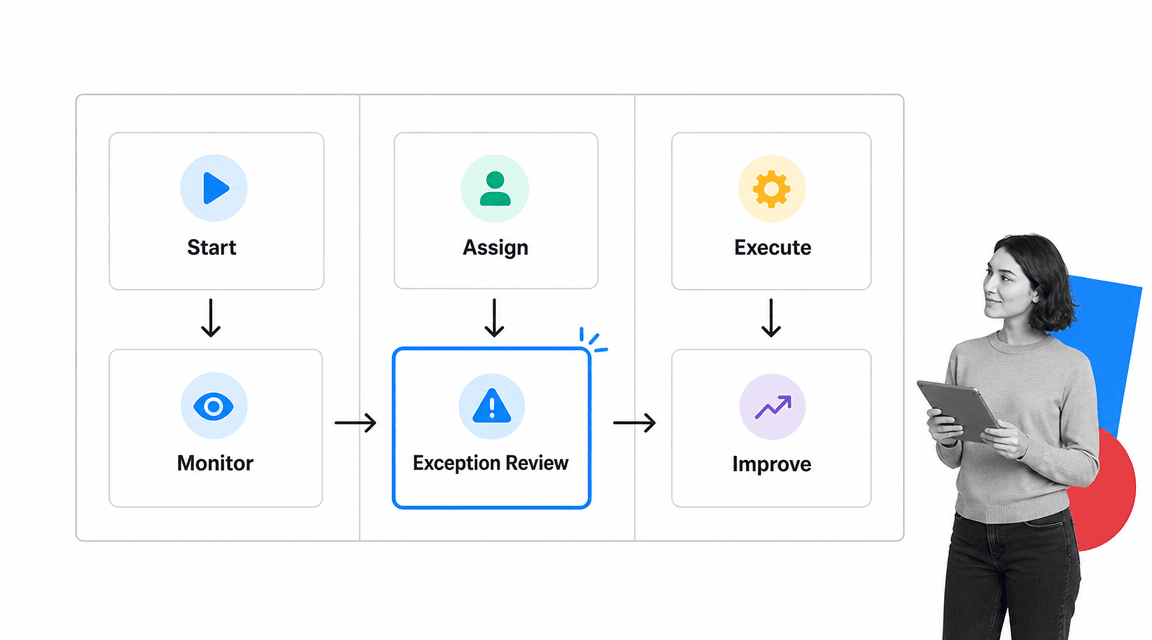
Running a process operation is a repeatable management routine. The goal is not to watch every task. The goal is to build a system that makes status, ownership, evidence, and exceptions visible while work is happening.
1. Define the outcome and boundary
Start by naming the outcome. A vague process like vendor management is too broad to operate. A process like approve a new vendor for purchasing is specific enough to trigger, assign, monitor, and complete. Define where the operation starts, where it ends, and what output proves completion.
2. Map the live workflow
Map what actually happens, not what the policy says should happen. If the current process is messy, capture that reality first, then improve it. A structured resource like a creating a new process template helps teams move from informal steps to a workflow that can be assigned and tracked.
When the work is complex, modeling standards can help. The Object Management Group maintains the BPMN specification, which gives teams a shared notation for process flows, events, gateways, and handoffs. You do not need full BPMN for every operation, but a shared language prevents teams from inventing a new diagram style every time.
3. Assign owners and roles
Separate process ownership from task ownership. The process owner is accountable for the operation. Task owners are accountable for individual steps. Approvers are accountable for decisions. Reviewers are accountable for quality and evidence. If those roles blur, handoffs slow down and exceptions disappear.
4. Add control points
Control points are the places where the operation checks quality, risk, or completeness before moving forward. They can include required fields, file uploads, manager approvals, compliance attestations, automated system checks, or conditional routing. Control points should be placed where a missed step would create real risk.
5. Monitor the process while it runs
A process operation should expose live status. Teams need to see what is active, blocked, overdue, approved, rejected, and complete. Status reporting should come from the workflow itself, not from a weekly manual update assembled after the fact.
6. Review exceptions
Build a habit around exception review. Look at stalled tasks, skipped evidence, rejected approvals, reopened items, and work that took longer than expected. Exceptions reveal where the process design, ownership model, training, or system support needs improvement.
7. Improve the operation
Improvement should be part of the cadence. ASQ describes PDCA, plan, do, check, act, as a cycle for testing and improving processes. In process operation, that means using live execution data to adjust the workflow, simplify controls, remove bottlenecks, and update the operating standard.
Process operation examples
The phrase process operation applies to any repeatable workflow where execution quality matters. Here are common examples across business teams.
Vendor approval
A vendor approval process operation starts when a team requests a new vendor. The operation collects business justification, risk information, security review, legal review, finance approval, and final onboarding evidence. The operating controls prevent someone from using an unapproved vendor because the work cannot move forward until required checks are complete.
Employee onboarding
An onboarding process operation starts when a new hire accepts an offer. HR, IT, finance, legal, and the hiring manager each own steps. The process operation coordinates documents, equipment, system access, training, policy acknowledgments, and first-week tasks. The output is not simply a completed checklist. It is a new employee who is ready to work with the right access, context, and proof of completion.
Monthly close
A finance close process operation coordinates reconciliations, approvals, supporting evidence, review tasks, and reporting deadlines. The controls matter because a missed review can create reporting risk. A live operation lets finance leaders see which reconciliations are complete, which approvals are pending, and where evidence is missing.
Incident response
An incident response process operation turns a runbook into coordinated action. The trigger is an incident. The operation assigns triage, investigation, containment, communication, root cause review, and remediation. A runbook automation approach helps teams move faster because the steps, roles, and escalation paths are already structured before the incident happens.
Common process operation failure points
Most process operation failures are not caused by people ignoring the process. They happen because the operation was never designed to survive real work.
The process lives in a document
A document can explain the process, but it cannot run the process. If the work depends on someone remembering to open a doc, copy steps into a task manager, ask for approval in a chat thread, and save proof in a folder, the operation is fragile from the start.
Owners are unclear
When a process has many contributors and no accountable owner, exceptions drift. People complete their own tasks but nobody owns the outcome. Every process operation needs a named owner or role that watches completion, risk, and improvement.
Evidence is captured too late
Evidence collected after the work is done is often incomplete. People forget why a decision was made, files go missing, and approval context disappears. Evidence belongs inside the workflow, at the step where the work happens.
The process has no exception path
Real work rarely follows the happy path every time. If there is no exception path, people invent one outside the system. That creates hidden risk. A strong process operation says what to do when information is missing, a task is late, a reviewer rejects the item, or an approval requires escalation.
Improvement is disconnected from execution
APQC's Process Classification Framework gives organizations a common process language for benchmarking and improvement. That kind of structure matters because improvement work needs a stable reference point. If execution data is disconnected from the process model, teams argue from anecdotes instead of improving the actual operating system.
How Process Street supports process operation
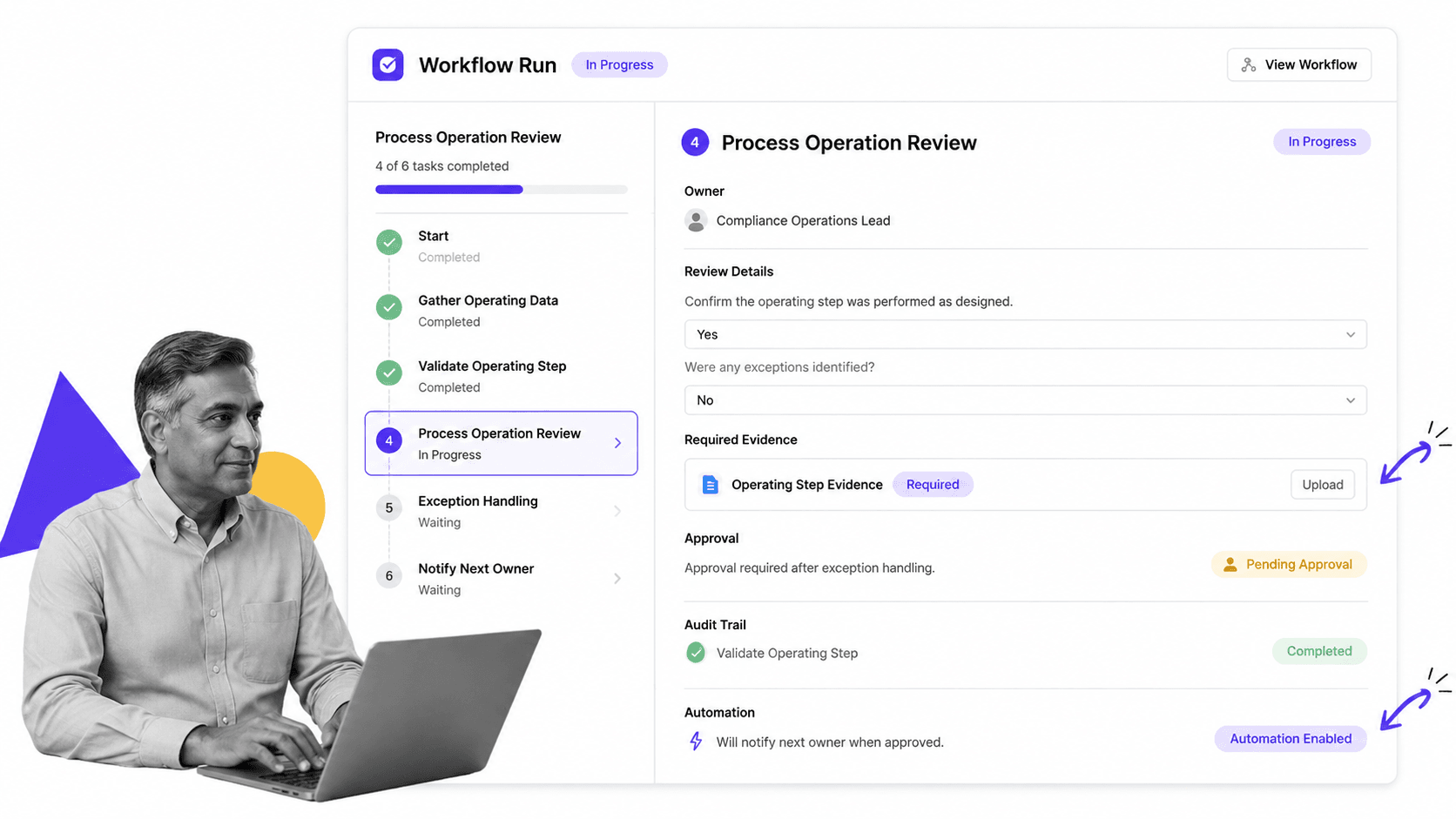
Process Street supports process operation by connecting documentation, execution, evidence, approvals, automation, and review in one workflow system. Instead of asking teams to read an SOP and then coordinate the work somewhere else, the process becomes the place where work happens.
Turn operating standards into executable workflows
Teams can start from a template, a documented procedure, or a blank workflow. The public operations templates library gives teams a starting point for recurring work, while pages like process management examples help map the broader operating model. Once the workflow is built, each step can have an owner, instructions, form fields, files, approvals, and conditional logic.
Capture proof while work happens
Process operation depends on proof. Process Street workflows can require evidence at the task level, which keeps proof attached to the step it supports. That gives managers, auditors, and process owners a cleaner record than scattered files, email approvals, or spreadsheet notes.
Escalate exceptions before they become failures
A process operation should surface exceptions early. In Process Street, teams can design approval gates, required fields, conditional paths, task assignments, and notifications so exceptions are routed to the right owner. The result is less chasing and more controlled execution.
Manage the operation as a system
Process Street fits best when teams want a process system, not another static repository. If you are comparing operating models, resources like process management systems, process platform, and automated operations software explain how process operations mature from documentation into controlled execution.
How to improve process operation over time
A process operation should get better as it runs. The work itself creates signals: late steps, repeated exceptions, unclear instructions, missing evidence, rejected approvals, and manual rework.
Review the operating data
Look at the data the operation already creates. Which step stalls most often? Which approval takes longest? Which evidence field is usually incomplete? Which exception repeats? These signals show where the process design needs attention.
Separate process problems from training problems
Do not assume every miss is a people problem. A missed step can mean the instruction was unclear, the form field was confusing, the owner was wrong, the approval gate was placed too late, or the system did not notify the right person. Fix the system before blaming the operator.
Keep the process close to the work
Lean operations emphasizes understanding the specific work and the flow of value through that work. The Lean Enterprise Institute's overview of lean operations is useful here: process improvement starts by seeing how work actually moves. In process operation, that means improving the workflow where execution happens, not maintaining a separate improvement document that nobody uses.
Standardize what works
When a process operation stabilizes, standardize the useful parts. Templates like a process analysis and improvement checklist help teams inspect the operation and capture what should become the new standard. The goal is not bureaucracy. The goal is to make the best-known way of working easy to repeat.
Use tools when the process needs control
Simple work can run from a lightweight checklist. Higher-risk operations need stronger controls: assignments, due dates, approvals, automations, audit trails, and reporting. If the process spans teams or affects compliance, quality, customers, or money movement, it belongs in an operating system rather than a loose task list. Teams evaluating tool support can compare patterns in operations management tools.
FAQs
What is process operation?
Process operation is the active running and control of a repeatable business process. It includes the workflow, owners, standards, evidence, approvals, exceptions, monitoring, and output checks needed to make sure the process is completed correctly.
Why is process operation important?
Process operation matters because documented processes do not enforce themselves. A strong process operation helps teams complete work consistently, catch exceptions early, capture proof, and improve the process using real execution data.
What is the difference between process operation and process management?
Process management is the broader discipline of designing, governing, measuring, and improving processes. Process operation is the live execution layer for one process or process family while work is happening.
What should a process operation include?
A process operation should include a clear trigger, accountable owner, operating standard, workflow, task owners, evidence requirements, exception paths, approval rules, monitoring, output checks, and an improvement cadence.
How do you improve process operation?
Improve process operation by reviewing live execution data, finding repeated exceptions, simplifying unclear steps, moving evidence capture into the workflow, tightening ownership, and updating the operating standard when the team finds a better way to work.
Can Process Street be used for process operation?
Yes. Process Street lets teams turn SOPs and policies into executable workflows with assignments, required fields, evidence capture, approvals, automation, and audit trails, which are the core mechanics of process operation.
