


Turn every policy into automated workflows with built-in enforcement and audit-ready proof.



Process Tools
Process tools are the methods, templates, software, workflows, and control surfaces teams use to understand how work happens and make it run better.
Some process tools help you map the current process. Others help you diagnose problems, assign work, automate handoffs, monitor performance, or prove the right steps were followed. The mistake is treating all of them as the same kind of tool.
This guide breaks process tools into practical categories, explains when to use each one, and shows how to turn process improvement ideas into controlled execution instead of another diagram that nobody follows.
In this article, we are going to cover:
- What process tools are
- Why process tools matter
- The main types of process tools
- How to choose the right process tools
- Common process tool mistakes
- How Process Street turns process tools into execution
- How to roll out process tools
- FAQs
What process tools are
Process tools are practical instruments for improving repeatable work. They can be as simple as a checklist or as advanced as an automated workflow with approvals, integrations, and audit history.
The useful definition is not tied to a single format. A flowchart, SIPOC diagram, root-cause worksheet, workflow run, quality control chart, automation rule, approval gate, and dashboard can all be process tools when they help a team make work clearer, safer, faster, or more consistent.
A process tool should change behavior
A tool that only documents how work should happen is incomplete. Documentation matters, but the real test is whether the tool changes what people do on Monday morning.
That is why mapping tools and execution tools work best together. A process mapping tools helps a team see the path. A workflow tool helps the team follow it.
A process tool should match the problem
You do not need a full BPM suite to run a two-step approval. You do not need a sticky-note workshop when the real problem is that nobody owns the next task. The right process tool depends on the job: visibility, diagnosis, standardization, automation, compliance, or improvement.
Good operators start by naming the problem. Then they choose the lightest tool that creates the behavior change they need.
A process tool should have an owner
A process tool without an owner becomes shelfware. Someone needs to maintain the map, update the checklist, review the metrics, watch exceptions, and decide when the process has changed enough to require a new version.
Ownership is what separates a working process system from a collection of templates. The tool can make work visible, but an accountable owner keeps the standard current.
Why process tools matter
Process tools matter because most operational problems are not caused by one bad employee or one missing app. They come from unclear handoffs, inconsistent standards, hidden exceptions, and work that depends on memory.
They make invisible work visible
A team cannot improve a process it cannot see. Mapping and analysis tools expose the steps, decisions, queues, loops, delays, and failure points that are usually trapped in people’s heads.
The Lean Enterprise Institute value stream mapping overview describes value-stream mapping as a way to see the material and information flows required to deliver value. The same principle applies outside manufacturing: make the flow visible before you try to improve it.
They turn standards into repeatable work
A process tool is useful when it helps every person follow the same standard without relying on tribal knowledge. Checklists, forms, required fields, and approval gates turn expectations into observable steps.
This connects directly to quality management. The ISO quality management standards emphasizes a process-oriented approach and continuous improvement as quality management principles. The process tool should make those principles operational.
They create evidence while work happens
Teams in regulated or high-stakes environments need proof. If the only evidence is a meeting note or a spreadsheet updated after the fact, the control is weak.
That is why compliance as proof of control matters. The best process tools create proof as a byproduct of execution: who did the work, what they checked, what they approved, and what changed.
The main types of process tools
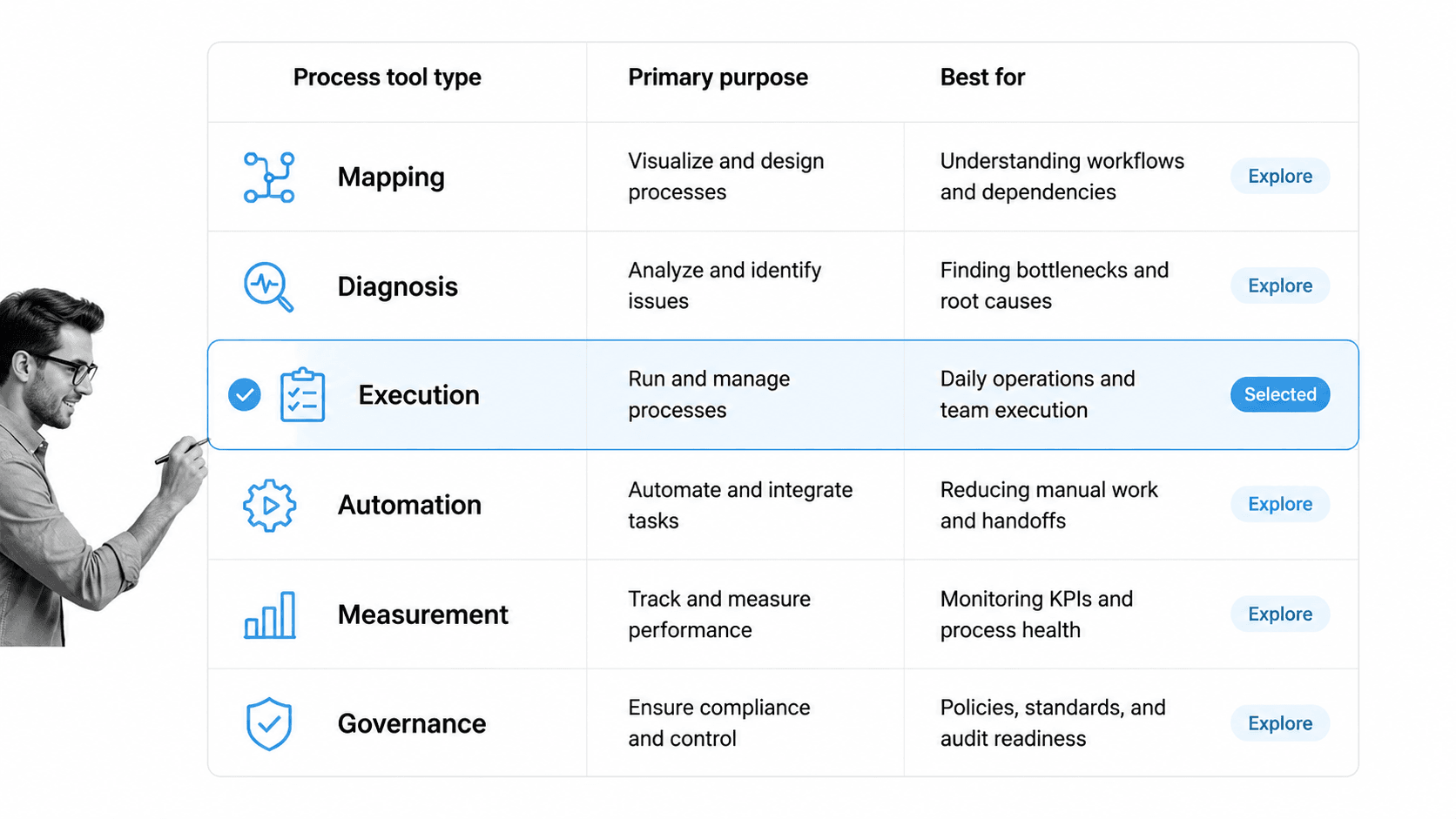
The main types of process tools cover different stages of operational improvement. A healthy process system usually uses several categories together.
Mapping tools
Mapping tools show how work moves from trigger to outcome. Flowcharts, SIPOC diagrams, value-stream maps, swimlane diagrams, and journey maps help teams agree on the current process before changing it.
Use mapping tools when people disagree about what happens, when handoffs are unclear, or when a process is too complex to explain in prose.
Diagnosis tools
Diagnosis tools help teams understand why a process fails. Common examples include root-cause analysis, 5 Whys, fishbone diagrams, Pareto charts, check sheets, and control charts.
The ASQ seven basic quality tools is a useful reference for classic quality tools such as cause-and-effect diagrams, check sheets, control charts, histograms, Pareto charts, scatter diagrams, and flowcharts.
Execution tools
Execution tools make the process happen. Checklists, task assignments, workflow runs, forms, approvals, due dates, and role-based responsibilities turn the map into action.
Execution is where a workflow management system becomes useful. The process no longer depends on someone remembering the next step.
Automation tools
Automation tools remove manual handoffs. They send notifications, update records, route requests, generate documents, collect signatures, and trigger follow-up based on what happened in the workflow.
Broader business process automation tools is valuable when the repeated work spans multiple tools or teams.
Measurement tools
Measurement tools show whether the process is improving. Dashboards, run charts, control charts, SLA reports, cycle-time views, exception logs, and bottleneck reports help teams see performance over time.
Governance tools
Governance tools protect the standard. They include approvals, version control, access controls, policy links, audit trails, evidence requirements, and review cadences.
Process-heavy teams often pair governance with an operations framework so the operating model stays coherent as work scales.
How to choose the right process tools
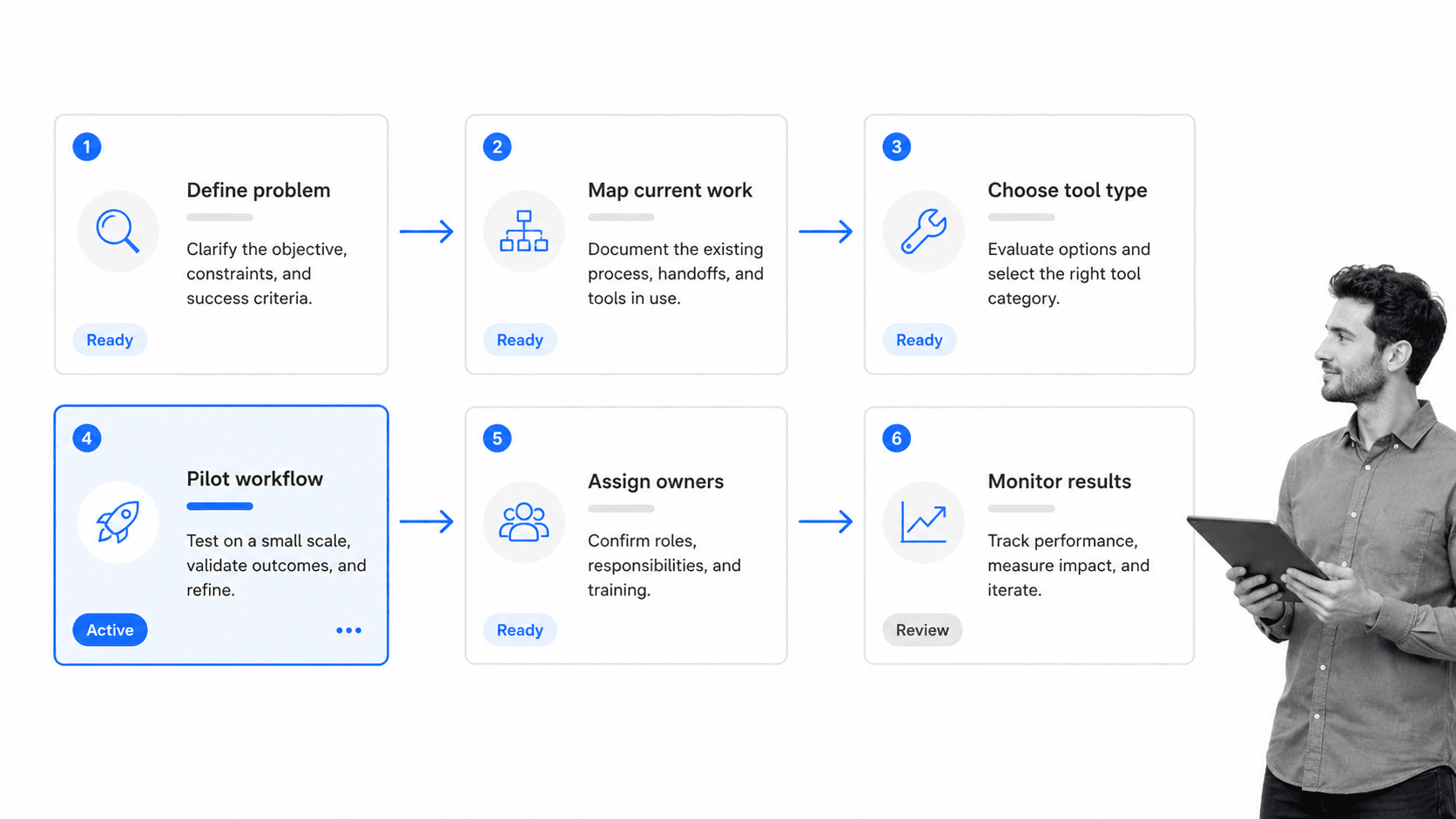
Choose process tools by starting with the operational failure, not with the software category. The same team may need a map, a checklist, an approval workflow, and an automation, but not all at once.
Start with the process problem
Ask what is broken. Is the process unclear? Are people skipping steps? Are approvals slow? Is work trapped in email? Are errors recurring? Is the audit trail weak? Each answer points to a different tool category.
Decide whether you need discovery or execution
Discovery tools help you understand what is happening. Execution tools help you make the right thing happen. If the team does not know the process, start with discovery. If the team knows the process but does not follow it, start with execution.
This distinction prevents a common mistake: using process planning software when the real need is an owned workflow with tasks, approvals, and evidence.
Match tool weight to process risk
Low-risk processes can use lightweight checklists and simple templates. High-risk processes need role-based ownership, approval gates, audit history, exception paths, and stronger controls.
For regulated or quality-sensitive work, procedure management software may be part of the stack because procedures need governance as well as execution.
Pilot before standardizing
Do not roll out a process tool to the whole company because it looks good in a workshop. Pilot it with one workflow, one team, one measurable outcome, and one owner.
A pilot reveals whether the tool creates behavior change. If it only creates more admin, the process design is wrong or the tool is too heavy for the job.
Score the tool against the operating model
Before choosing, score the option against five questions: does it fit the trigger, does it assign ownership, does it capture required evidence, does it route exceptions, and does it show improvement data?
That simple scorecard keeps teams from buying a tool because it has a long feature list. A process tool should earn its place by making a specific workflow easier to run and easier to trust.
It also gives leaders a clean way to compare different process tools without collapsing every option into one category. A mapping app, checklist, automation builder, and audit trail may all matter, but each one should be judged against the specific operating gap it closes.
Common process tool mistakes
The most common process tool mistakes happen when teams confuse documentation, analysis, automation, and control.
Mapping work but never running it
A process map can clarify reality, but it cannot assign a task, enforce a due date, collect evidence, or block an approval. If the map is the final artifact, the improvement work is probably unfinished.
Automating a broken process
Automation makes a process faster. It does not make a bad process good. If the routing logic, owner model, or evidence requirements are unclear, automation spreads the defect faster.
Measuring everything except the constraint
Dashboards are easy to overbuild. A useful measurement tool focuses on the few signals that show whether the process is working: cycle time, rework, blocked tasks, missed approvals, exception rate, and customer impact.
Treating compliance as a separate step
Compliance should be embedded into the workflow. If evidence collection happens after the work is complete, people scramble. If evidence is captured in the task itself, audit readiness becomes a byproduct of normal execution.
This is where continuous improvement principles and types of process management become practical, not theoretical.
Buying too many disconnected tools
Teams often accumulate separate tools for diagrams, forms, checklists, approvals, automation, documents, reporting, and compliance. A list of operations tools can help with discovery, but the operating model still needs a center of gravity.
How Process Street turns process tools into execution
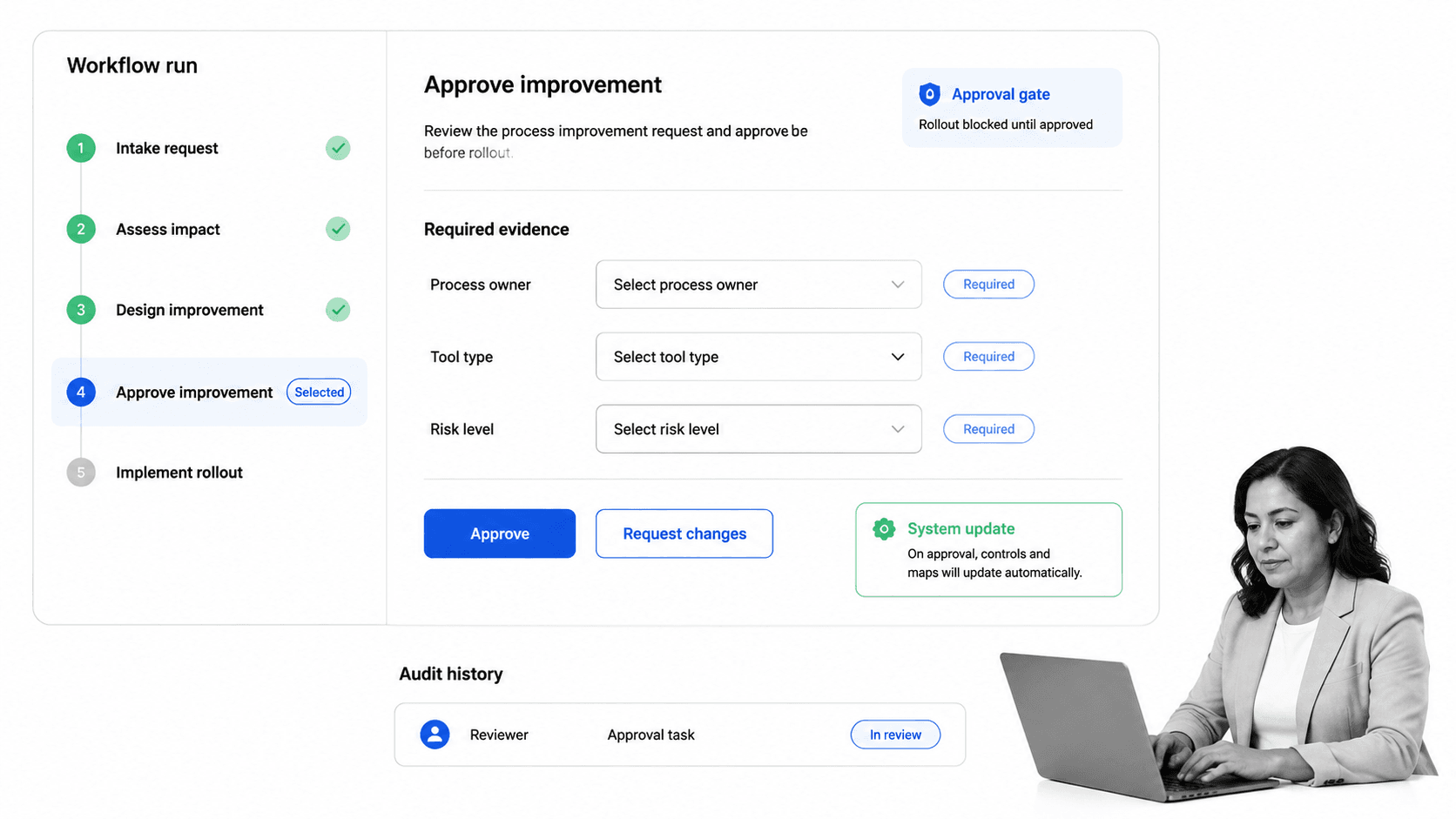
Process Street turns process tools into execution by giving teams one place to document the steps, assign the work, collect evidence, route approvals, automate handoffs, and preserve the audit trail.
A flowchart can show the path. A checklist can define the standard. A root-cause tool can identify the issue. Process Street helps the team run the corrected process every time.
Run the process as a workflow
Teams can build workflows for onboarding, audits, vendor reviews, customer handoffs, finance approvals, HR requests, IT access, quality checks, compliance reviews, and recurring operations.
Each workflow run gives owners a clear task sequence. Required fields collect structured data. Due dates and assignments make ownership visible. Comments and task history preserve context.
Add control where risk appears
Features like approvals and conditional logic help teams route work based on risk, request type, or completion state.
That means the process can stay simple for routine work and add review when the situation requires it.
Connect process tools to the rest of the stack
Process Street has direct, universal integrations to 5,000+ systems. Need a new one? An AI agent builds it on the fly. That lets a process trigger updates, collect information, notify the right team, and keep the workflow record current without manual copying.
For AI-assisted work, the NIST AI Risk Management Framework is a useful reminder that speed needs governance. AI should act inside a controlled process, not outside it.
Use the process as the improvement loop
When the work runs through a workflow, the team can see where tasks stall, what gets skipped, which approvals repeat, and where exceptions appear. That data feeds the next improvement cycle.
How to roll out process tools
Rolling out process tools works best as a controlled change program. Start small, prove the behavior change, then scale the pattern.
Pick one high-friction workflow
Choose a process where the pain is obvious: repeated errors, unclear ownership, audit exposure, rework, slow approvals, customer friction, or manual status chasing.
A team improving recurring work can borrow patterns from automations to remove manual updates once the workflow is stable.
Define the standard
Write the minimum standard the process must follow: trigger, owner, required fields, decision points, evidence, approval rules, exception paths, and completion criteria.
Keep the standard tight enough to enforce and clear enough for a new team member to follow without private context.
Build the workflow and test it with real work
Run the workflow with real cases, not imaginary examples. Real work exposes missing fields, unclear roles, bad routing, and control gaps faster than a whiteboard session.
Measure adoption and friction
Track whether people use the tool, where tasks stall, which fields are skipped, how often exceptions appear, and how long the process takes before and after rollout.
External guides such as the Planview process improvement tools guide are useful for brainstorming options, but the rollout succeeds only when the chosen tool changes daily execution.
Turn lessons into the next version
A process tool should not freeze the process. It should make the process easier to improve. Review the workflow after a few cycles, remove unnecessary steps, strengthen weak controls, and automate the handoffs that keep repeating.
Create a tool retirement path
Every process tool should have a retirement path. If a template is unused, a dashboard is ignored, or an automation is no longer connected to the current workflow, remove it or fold it into the active process system.
Tool sprawl is a process problem too. The goal is not to own more tools. The goal is to make the right work happen with less ambiguity and stronger proof.
Set a review cadence
A lightweight review cadence keeps process tools alive. Review critical workflows monthly, lower-risk workflows quarterly, and dormant templates before they are reused. The review should ask whether the owner is still correct, whether the tool reflects current work, whether evidence is captured in the right place, and whether any steps can be automated or removed.
This cadence gives the team permission to improve the system without waiting for a crisis. It also prevents process tools from becoming stale documentation that everyone quietly works around.
FAQs
What are process tools?
Process tools are methods, templates, software, workflows, and control surfaces that help teams map, analyze, run, automate, monitor, and improve repeatable work. A process tool is useful when it changes how work gets done, not just how work is documented.
What are the main types of process tools?
The main types include mapping tools, diagnosis tools, execution tools, automation tools, measurement tools, and governance tools. Most teams need a combination because each category solves a different operational problem.
How do process tools improve operations?
Process tools make work visible, standardize execution, reduce manual handoffs, expose bottlenecks, and create proof that the right steps were followed. They help teams move from tribal knowledge to repeatable execution.
How do you choose the right process tools?
Start with the process problem. If the process is unclear, use mapping or diagnosis tools. If people know the process but miss steps, use execution and governance tools. If handoffs are repetitive, add automation.
What is the difference between process mapping tools and workflow execution tools?
Process mapping tools show how work should flow. Workflow execution tools make that work happen by assigning tasks, collecting information, routing approvals, triggering automations, and recording evidence.
How does Process Street support process tools?
Process Street supports process tools by turning maps, checklists, controls, and improvement ideas into assigned workflows with required fields, conditional logic, approvals, automations, integrations, and audit history.
