


Turn every policy into automated workflows with built-in enforcement and audit-ready proof.



Project Management Software Online Free
If you are searching for project management software online free, you probably want a tool your team can start using in a browser without budget approval, installation work, or a long implementation cycle.
That is a useful starting point, but free is not the whole decision. A free online project tool can make tasks visible, assign owners, and collect deadlines. It may not prove that the right steps happened, that approvals happened before completion, or that recurring work followed the same path every time.
This guide explains what project management software online free should do, how free plans usually differ, when a free tool is enough, and when your project work needs a stronger workflow layer.
In this article, we are going to cover:
- What project management software online free should do
- What free online project management software includes
- How to choose project management software online free
- Where free online project management software breaks down
- Project management software vs. workflow software
- How Process Street fits repeatable projects
- Implementation checklist for a free online project system
- FAQs
What project management software online free should do
Project Management Software Online Free should give a team one shared place to plan work, assign owners, track status, discuss tasks, and see what is blocked. The value is not just that the software is free. The value is that the work becomes visible without forcing everyone into a heavy project management system.
The basic idea maps closely to the way the PMI definition of project management describes the discipline: projects need coordinated people, resources, scope, and goals. Online software gives that coordination a live surface instead of leaving it scattered across email, chat, spreadsheets, and meeting notes.
Process Street is a Compliance Operations Platform, but the same operating question applies: is this work only a project, or is it a repeatable process that needs proof? A launch plan, website redesign, migration, or campaign may start in project management software. The handoffs around that project may eventually need a workflow that runs the same way every time.
The minimum standard
A free online project tool should cover task creation, owners, due dates, comments, project views, notifications, and basic permissions. If those pieces are missing, the team will recreate the missing structure somewhere else.
- Tasks should have one clear owner, not a vague team label.
- Dates should separate due date, start date, and review date when the tool allows it.
- Status should show what is planned, active, blocked, and done.
- Comments should keep decisions near the work instead of hidden in chat.
- Views should let people scan the same work as a list, board, calendar, or timeline.
The difference between visible and controlled
Visibility tells you that a task exists. Control tells you whether the task was completed the right way. This is where free online project management software starts to separate from workflow management software. A project board can show a compliance review card. A workflow can require the evidence, route the approval, and record the completion history.
Why free tools feel productive at first
Free tools remove the first layer of friction. People stop asking where the plan lives, who owns the next step, and whether a task has moved. That alone can be a big improvement for teams that are still coordinating projects in email threads or spreadsheet tabs.
The second layer of friction appears later. Once the board is full, people need naming standards, intake rules, review gates, and a clean way to archive finished work. If those rules are not designed early, the free workspace becomes another place where work goes stale.
What free online project management software includes
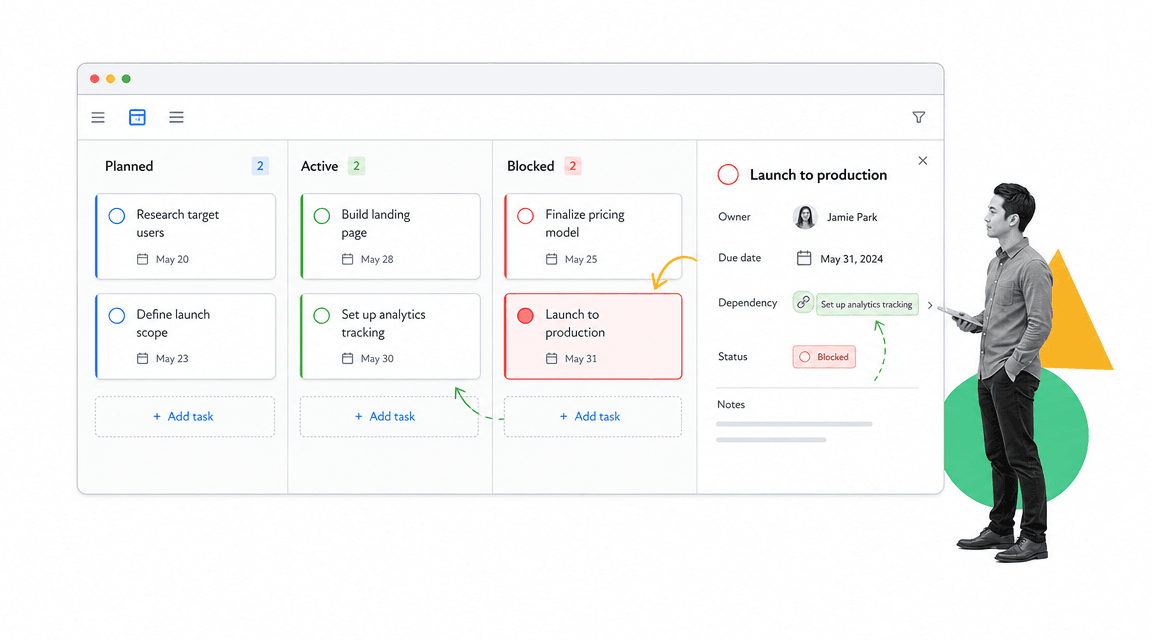
Free online project management software usually includes a handful of core surfaces. The exact names change by vendor, but the operating jobs are consistent: capture work, organize work, assign work, discuss work, and report on progress.
That is why many teams compare free plan details on vendor pages such as Asana pricing, Trello pricing, ClickUp pricing, and monday.com pricing. The important part is not which page has the longest feature list. The important part is whether the free plan supports the way your team actually works.
Task and project views
Most free plans include a list or board. Some include calendar, timeline, workload, or table views. A small team may only need one view. A cross-functional project usually needs more because managers, operators, and reviewers scan work differently.
Collaboration limits
Free tools often limit the number of users, guests, projects, automations, storage, advanced views, or permission settings. These limits matter when projects cross teams. If the free plan forces people to keep important work outside the system, the tool stops being the source of truth.
Templates and recurring work
Templates are the bridge between one-time projects and repeatable execution. A project management template can help a team start quickly, while a project planning calendar template gives recurring planning work a clearer rhythm. The risk is that a copied project template still relies on people to remember the right steps.
The collaboration test
Before you commit to a free tool, run a collaboration test with the people who will actually use it. Ask one person to create a task, one to update it, one to review it, and one to report on it. If the tool only works when one organized person maintains the whole workspace, it is not a team system yet.
This test also reveals whether comments, files, notifications, and status changes are easy enough for occasional users. Many free tools work well for daily users but fall apart when executives, clients, contractors, or approvers only enter the system once a week.
How to choose project management software online free
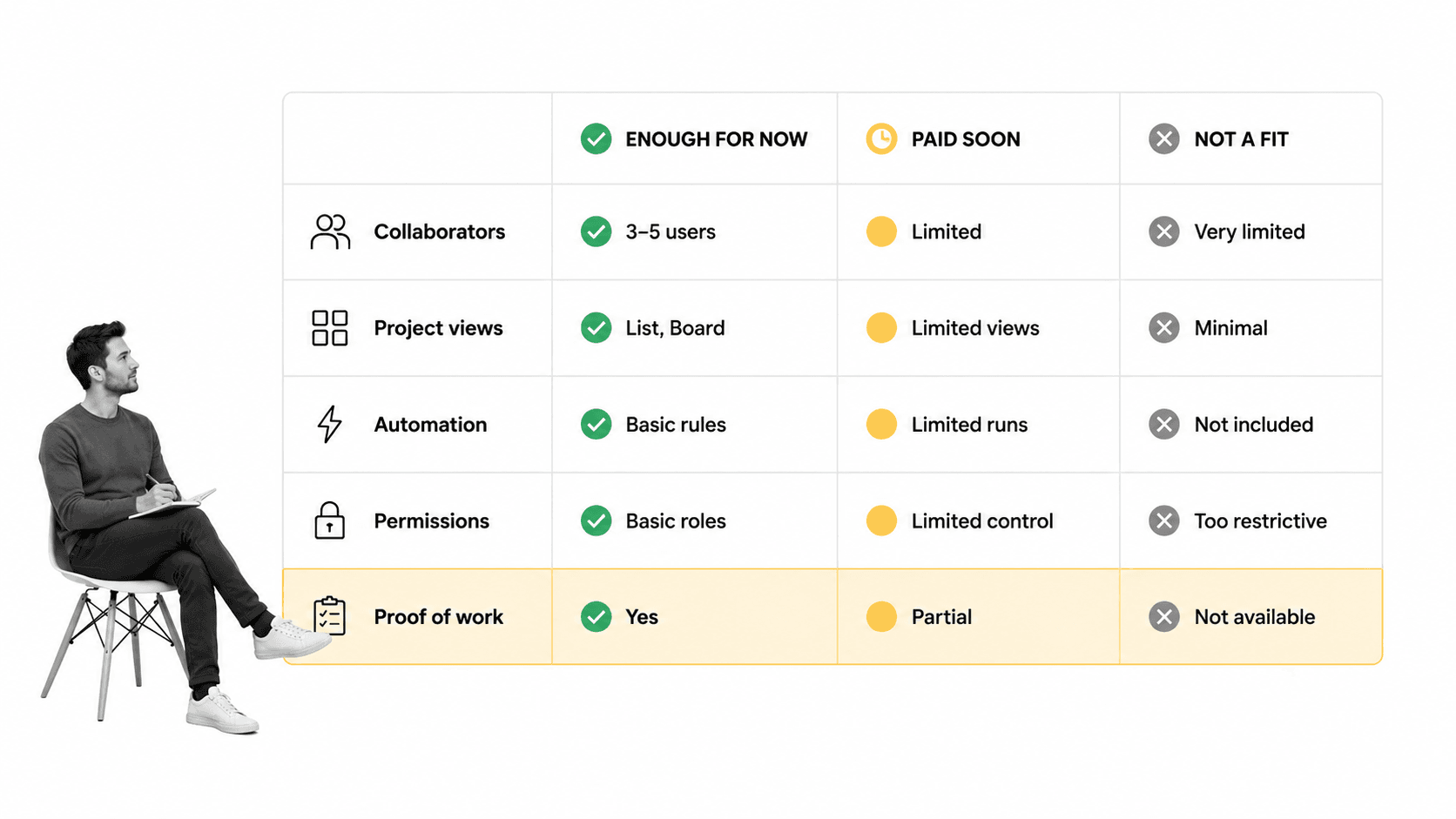
Choosing project management software online free starts with the work shape. Do not begin with the longest free feature list. Start with the project pattern you need to support.
Map the project before you pick the tool
Write down the work that happens before the project starts, during execution, and after completion. Include requests, approvals, handoffs, review steps, documents, and any evidence the team needs to keep. This makes the software decision concrete.
If the project is mostly a set of deadlines and owners, a simple free project board may be enough. If the project includes recurring operating procedures, the team should also understand what a workflow is and how workflows differ from tasks.
Check the free plan boundary
A free plan can be a real operating surface, or it can be a trial that becomes painful after a few weeks. Check collaborators, project limits, storage, automations, permissions, reporting, history, and integrations before migrating work.
Open source options can also matter for technical teams. The OpenProject pricing page is one example of how a vendor explains community and paid plan boundaries. The same evaluation logic applies: know what is included, what is capped, and what your team will need next.
Decide what must be proved
This is the most important question. Many project tasks only need ownership and status. Others need proof. Did a manager approve the work? Was the risk review completed before launch? Was the file attached before signoff? Was the exception recorded? Free project software often tracks the card, not the control.
Score the tool against failure modes
A useful buying question is: what would break first? For a small internal project, the first failure may be a missed comment or a late date. For a regulated workflow, the first failure may be missing evidence, weak permissions, or no reliable approval record. The same free tool can be acceptable for one failure mode and risky for another.
Score each candidate against your most likely failure modes instead of generic feature lists. If your main risk is lost handoffs, prioritize ownership and notifications. If your main risk is unapproved work, prioritize approval history. If your main risk is process drift, prioritize templates, required fields, and workflow enforcement.
Where free online project management software breaks down
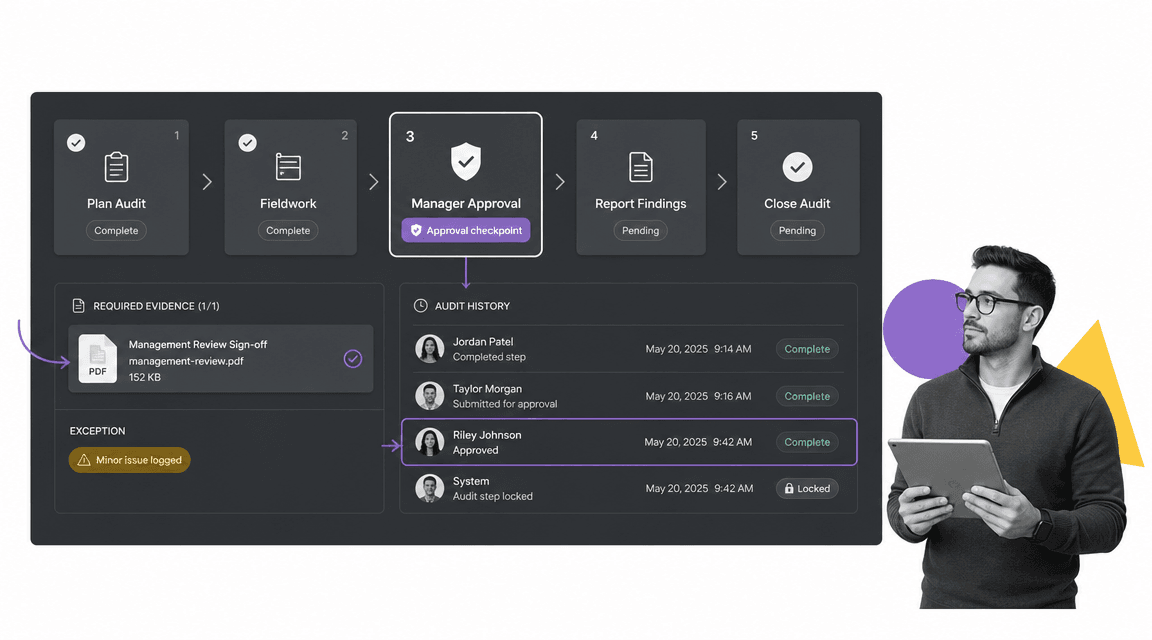
Free online project management software breaks down when the cost of a missed step is higher than the cost of the paid system. That usually happens before the team realizes it because the board still looks organized.
The danger is false confidence. A task can be marked complete even if the review never happened, the file was not attached, the right person was not assigned, or the exception was handled in a side conversation. The project appears done, but the operating record is weak.
Common signs you have outgrown the free plan
- People create duplicate projects because they cannot find the right template.
- Approvals happen in comments, chat, or meetings instead of in the work record.
- Managers ask for status screenshots because dashboards are not trusted.
- Tasks are completed without required evidence or review.
- Permissions are too broad for sensitive work.
- Recurring projects keep drifting from the intended process.
When the workflow layer becomes necessary
When a project repeats, affects customers, touches compliance, or creates risk, it needs more than a project board. It needs project management workflows connected to process rules, approvals, and evidence. That is where workflow management system thinking becomes more useful than task tracking alone.
The cost of staying free too long
The cost is not only paid software. The hidden cost is the manual coordination that grows around the free tool: reminder messages, status meetings, duplicate trackers, spreadsheet exports, and managers checking whether people followed the process. Those costs do not show up on a pricing page, but they show up in operating drag.
A practical threshold is simple. If your team spends more time policing the project system than doing the project work, the free plan has stopped being free. At that point, paying for stronger controls or moving repeatable work into a workflow is usually cheaper than maintaining the workaround.
Project management software vs. workflow software
Project management software and workflow software overlap, but they solve different problems. Project tools are best for planning temporary work with goals, dates, owners, and deliverables. Workflow tools are best for repeatable procedures that need consistency, routing, accountability, and proof.
Use project software when the work has a finish line
A product launch, migration, creative campaign, office move, or implementation project usually needs task coordination. A page on project management tools and techniques can help teams think through the planning methods, views, and collaboration patterns that make this kind of work easier.
Use workflow software when the work must run the same way
Vendor onboarding, security review, finance close, customer onboarding, access approval, compliance review, and quality checks are different. They repeat. They need a standard path. They often need a record that the right steps were completed by the right people.
The most practical stack is mixed. Use project tools for initiative planning. Use workflow tools for repeatable execution. Use process documentation for the rules behind the work. Connect the surfaces so the team does not manage the same status in three places.
How Process Street fits repeatable projects
The first mention matters: Process Street is useful when project work turns into repeatable operations. It helps teams turn procedures into workflows with task assignments, due dates, required fields, conditional paths, automations, and approval steps.
That matters for teams that start with project management software online free and then discover that the same project pattern repeats every week or every month. A free board can coordinate the first run. A workflow can make the next run consistent.
Approval and exception handling
Built-in approvals let reviewers approve work inside the workflow instead of chasing confirmation in a comment thread. conditional logic lets the workflow change based on project type, risk level, department, or requested outcome.
Integrations and automation
Process Street has direct, universal integrations to 5,000+ systems. Need a new one? An AI agent builds it on the fly. That is important when project work needs to trigger tasks across forms, documents, CRM records, ticketing systems, file storage, or approval tools.
Proof of work
A project board can show that work moved from active to done. A controlled workflow can show what happened inside the work. For teams evaluating process management software, this distinction is the real buying criterion.
Use free planning and controlled execution together
The decision does not have to be either project software or workflow software. Many teams use a project tool to plan milestones, then use Process Street to run the repeatable procedure behind each milestone. The board shows the initiative. The workflow proves the work.
This split keeps lightweight planning lightweight while giving sensitive work the controls it deserves. It also lets teams adopt stronger process management without asking every casual collaborator to live inside a more controlled system all day.
Implementation checklist for a free online project system
You do not need a complex rollout to test a free online project system. Start with one real project that has enough moving parts to expose gaps, but not so much risk that the test creates operational damage.
Step 1: Pick one project pattern
Choose a project that repeats or has a known structure: onboarding a client, launching a small campaign, preparing a monthly report, coordinating a vendor review, or planning a release. Avoid starting with every project at once.
Step 2: Define the required fields
- Project name
- Owner
- Due date
- Status
- Priority
- Dependency
- Approval owner
- Evidence or file link
Step 3: Decide what stays outside the free tool
Some work should stay outside a free tool if the plan does not support permissions, retention, evidence, or audit needs. That is not a failure. It is a boundary. Put casual coordination in the project tool and controlled execution in a workflow.
Step 4: Review the system after two cycles
After two real cycles, check what people avoided, duplicated, or handled in chat. Those workarounds tell you whether the free tool is enough or whether the team needs stronger free online project management software, free online project management tools, or workflow enforcement.
Step 5: Write the upgrade rule before you need it
Agree on the upgrade trigger while the system is still calm. For example: upgrade when the team needs more than five active collaborators, when approvals move outside the tool twice in one month, when a required file is missing from a completed task, or when recurring work needs a controlled template.
A clear upgrade rule keeps the conversation operational. The team is not debating whether software is expensive. It is deciding whether the current system still protects the work.
FAQs
What is project management software online free?
Project management software online free is a browser-based tool that lets teams plan, assign, track, and discuss project work without paying for a subscription at the start. It usually includes task lists, boards, owners, due dates, comments, and basic notifications.
Is free online project management software enough for a team?
It can be enough when the team needs lightweight task coordination, simple boards, and clear ownership. It is usually not enough when work needs strict permissions, approval gates, evidence collection, automations, or audit history.
What should I check before choosing a free project management tool?
Check user limits, project limits, task views, storage, automations, permissions, reporting, integrations, and how much history the free plan keeps. Also check whether the tool supports the actual way your team reviews and completes work.
How is project management software different from workflow software?
Project management software plans and tracks temporary work. Workflow software runs repeatable procedures with standard steps, routing, approvals, required fields, and proof that the work was completed correctly.
When should a team upgrade from free project management software?
Upgrade when the free plan blocks real collaboration, hides important history, limits permissions, or forces approvals and evidence into side channels. Upgrade sooner if missed steps create customer, compliance, finance, or security risk.
Can Process Street replace free online project management software?
Process Street is best when the work is repeatable and needs controlled execution. Teams may still use a free project tool for lightweight planning, then use Process Street for procedures, approvals, evidence, automations, and audit-ready history.
