





Project Management Tools and Techniques
Project management tools and techniques are the software, templates, workflows, and management practices teams use to plan work, assign owners, control risk, and prove progress. The tools store and move the work. The techniques decide how the work should be planned, reviewed, changed, and completed.
The trap is treating tools and techniques as the same thing. A project board can show overdue tasks, but it cannot decide whether a scope change deserves approval. A critical path method can identify a risky dependency, but it needs a system of record to assign owners and capture proof. Strong project management needs both.
This guide explains the most useful project management tools and techniques, how to combine them, and where Process Street fits when the project depends on repeatable steps, approvals, and audit-ready evidence.
In this article, we are going to cover:
- Project management tools and techniques: how they work together
- Project management tools you actually need
- Project management techniques that keep work under control
- How to choose the right tools and techniques
- How to set up your project management system
- How Process Street connects tools and techniques
- Common mistakes to avoid
- Project management tools and techniques FAQs
Project management tools and techniques: how they work together

A project management tool is the place where work is captured, routed, updated, and reported. A project management technique is the way a team decides what matters, how work should flow, who owns each decision, and what proof is required before the project moves forward.
The PMI PMBOK Guide separates project management into principles, domains, models, methods, and artifacts. That distinction matters because the same tool can support very different operating styles. A Kanban board can support software delivery, hiring, finance close, facilities work, or compliance remediation. The board is the tool. The operating rules around work-in-progress, ownership, escalation, and approval are the technique.
Tools store the work
Tools are useful when they reduce ambiguity. A good project system gives every task an owner, a status, a due date, and a place for supporting context. That can include a project board, checklist, calendar, Gantt view, document repository, risk register, workflow automation tool, or reporting dashboard. If you are still deciding where work should live, compare broad best project management tools, specialized task management software guide, and recurring workflow management software guide options before you standardize.
Techniques govern the work
Techniques are the management decisions that stop the tool from becoming a messy task dump. They include work breakdown structures, RACI, critical path analysis, risk scoring, change control, stakeholder mapping, retrospectives, and approval gates. These techniques make the work inspectable. They tell the team which tasks matter most, which decisions need signoff, and which records prove the project was handled properly.
Proof connects the two
The strongest project systems connect each tool action to a technique and each technique to proof. A kickoff task should link to the project charter. A risk review should capture the risk rating and mitigation owner. A change request should show who approved it, what changed, and which downstream tasks were updated. Without proof, project management becomes status theater.
Project management tools you actually need
The best project management tool stack is usually smaller than the team expects. You need enough structure to run the work, but not so many systems that people spend more time syncing tools than finishing tasks.
1. Project board or task tracker
The project board is the visible operating surface. It shows the current work, the owner, the status, and the next action. Kanban boards are especially useful when work moves continuously across stages; the Atlassian Kanban guide explains how visual cards and work-in-progress limits help teams see bottlenecks. Use a board when the team needs clarity on flow, blockers, and ownership.
2. Timeline or milestone plan
A timeline shows sequencing. It answers a different question than a board: not just what is open, but what depends on what. Use a timeline when dates, dependencies, vendors, launches, or external commitments matter. A timeline does not need to be complex, but it does need to show milestones, dependency risk, and the decisions that can move dates.
3. Checklist or workflow system
Recurring project work needs a checklist or workflow, not just a task card. Kickoffs, approvals, handoffs, quality checks, implementation reviews, and closeouts repeat across projects. A reusable workflow like the project management process template or project kickoff meeting workflow prevents the team from reinventing steps every time.
4. Document and decision repository
Projects create decisions: scope choices, stakeholder approvals, risk acceptances, requirement changes, and lessons learned. A document repository gives those decisions a home. The important part is not storage alone. The repository needs version control, naming discipline, and links back to the tasks where decisions were made.
5. Reporting dashboard
Dashboards are useful when they expose the few signals that change behavior: blocked work, overdue approvals, scope changes, budget risk, and upcoming milestones. A dashboard that tracks every possible metric becomes noise. Pick metrics that force a decision.
6. Automation layer
Automation connects systems and reduces follow-up work. It can assign the next owner, notify a stakeholder, create a folder, collect a form, request approval, or update a record. For recurring operations, process management tools and workflow automation matter more than a prettier project board because they help the process run the same way each time.
Project management techniques that keep work under control
Project management techniques give structure to uncertainty. The point is not to use every technique on every project. The point is to choose the few that match the project risk, team size, and decision load.
Work breakdown structure
A work breakdown structure turns a large objective into deliverables, work packages, and tasks. Use it when the team is unclear about scope or when a project has many contributors. A good breakdown does not list activity for its own sake. It clarifies what needs to exist at the end.
RACI
RACI defines who is responsible, accountable, consulted, and informed. It is most useful when decisions cross departments. Without a RACI, project tools often show multiple watchers but no real owner. Use it for approval-heavy work, compliance projects, vendor work, and launches with executive stakeholders.
Critical path method
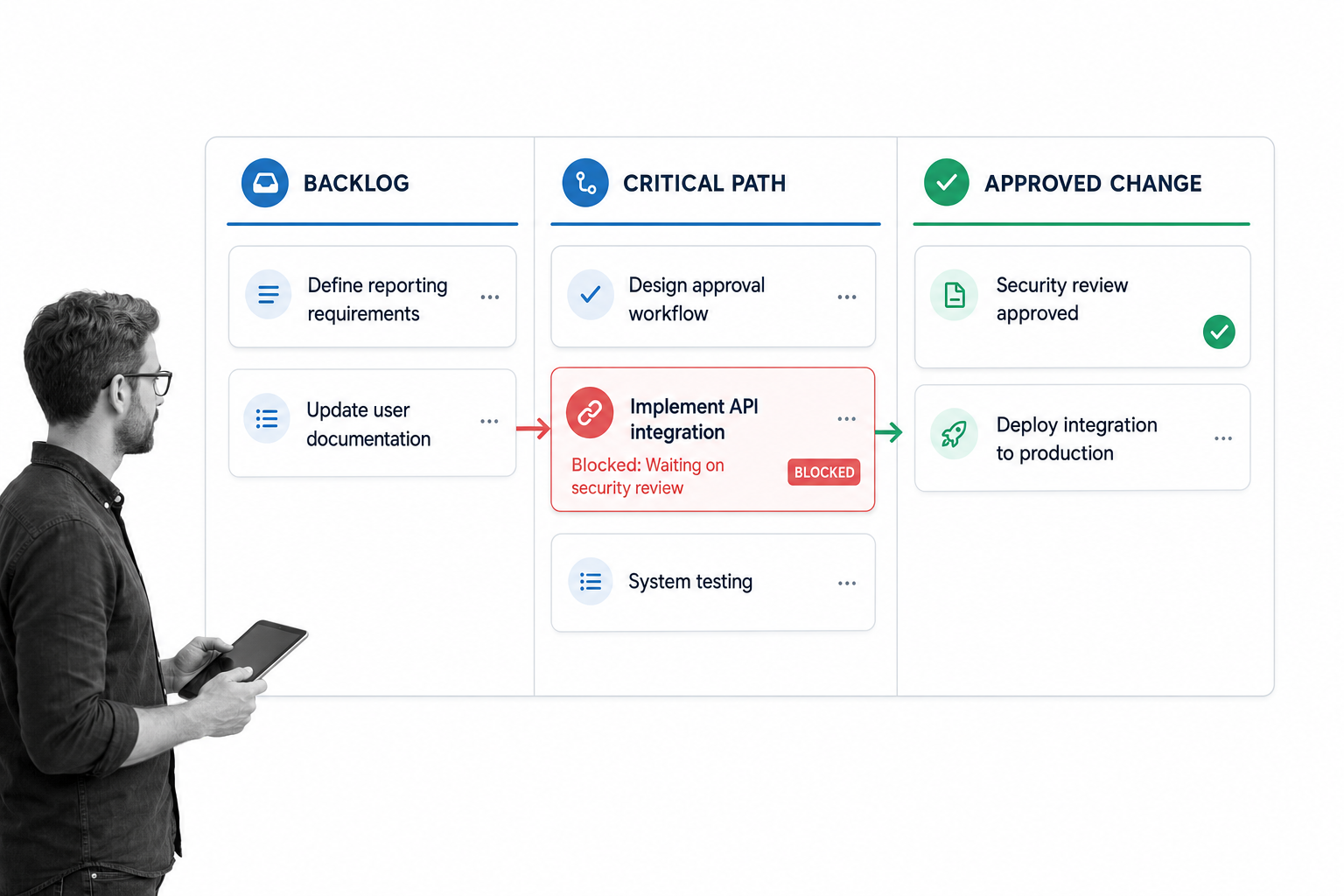
Critical path analysis identifies the dependent tasks that determine the project finish date. It is useful when one delay can push the whole project. The technique works best when the project manager keeps dependencies visible and updates the plan whenever scope changes.
Risk register
A risk register captures what could go wrong, how likely it is, what impact it would have, who owns it, and what mitigation is in place. The register should be reviewed on a schedule. If it only exists at kickoff, it is documentation, not management.
Change control
Change control defines how scope, timeline, budget, or quality changes get reviewed and approved. It matters when work has compliance, budget, customer, or operational consequences. The change management process template is a useful example of how approvals, impact analysis, training, implementation, and post-implementation review can live in one controlled flow.
Agile ceremonies and feedback loops
Agile techniques are useful when teams need short feedback cycles. The Atlassian agile project management guide describes Scrum and Kanban as common agile frameworks, while the Scrum Guide defines Scrum roles, events, and artifacts. Use agile techniques when learning speed matters more than locking the full plan upfront.
Retrospectives
A retrospective turns delivery experience into process improvement. It should ask what worked, what slowed the team down, what needs to change, and who owns the next improvement. The output should become a workflow update, not a meeting note that disappears.
How to choose the right tools and techniques
Choosing project management tools and techniques starts with the type of project, not with a vendor list. A simple internal content project does not need the same controls as a regulated system change. A cross-functional compliance remediation project does not belong in a lightweight personal task app.
Match the technique to the risk
- Low-risk, repeatable work: use checklists, templates, owners, due dates, and lightweight reporting.
- Dependency-heavy work: use critical path analysis, milestone planning, and change control.
- Cross-functional work: use RACI, stakeholder mapping, and escalation rules.
- Compliance-sensitive work: use approval gates, evidence capture, version control, and audit trails.
- Ambiguous product or creative work: use agile planning, short review cycles, and retrospectives.
Match the tool to the behavior you need
A tool should make the desired behavior easier than the workaround. If the team needs approvals, the tool should route approvals in the workflow. If the team needs proof, the tool should capture evidence where the task happens. If the team needs recurring execution, the tool should launch the same process reliably every time.
Avoid buying one tool for every technique
Teams often create tool sprawl by buying a separate system for tasks, timelines, approvals, docs, forms, and reports. That creates integration work and weakens accountability. Start with the few surfaces that must be controlled, then add tools only when the existing system cannot support the technique.
Use templates when the work repeats
Templates are useful when a process has a known shape. For planning work, start with a process planning template. For change-heavy work, use a change management models reference or a structured change workflow. For improvement projects, the Six Sigma project kickoff template can help teams define scope, baseline data, risks, and approvals before execution begins.
How to set up your project management system
Once you have chosen the tools and techniques, the next job is implementation. A clean system is specific enough to enforce standards and flexible enough to survive real project work.
Step 1: Define the project operating model
Write down how projects will move from request to kickoff, planning, execution, change review, closure, and retrospective. Name the required artifacts at each stage. Keep it simple enough that the team can explain it without a diagram.
Step 2: Create reusable workflow stages
Turn recurring stages into reusable workflows. A kickoff workflow should collect goals, scope, stakeholders, risks, and approvals. A change workflow should capture the reason, impact, owner, decision, implementation plan, and post-change review. Browse project management templates when you need a starting point instead of a blank page.
Step 3: Set ownership rules
Every project task needs one accountable owner. Contributors can collaborate, review, or advise, but the system should make accountability visible. This is where RACI becomes practical: the tool should show who owns the next move.
Step 4: Define evidence requirements
For project work that affects customers, compliance, finance, security, or operations, define what proof is required. Proof can be an approval, attachment, comment, completed checklist, test result, signoff, or exported report. If proof is required, capture it in the workflow rather than asking people to reconstruct it later.
Step 5: Review and improve the system
Project systems should improve as work happens. Use retrospectives, workflow analytics, and examples from completed work to remove weak steps. If you need ideas for translating real work into repeatable process design, use these workflow examples as a reference point.
How Process Street connects tools and techniques
Process Street is useful when project management is not just about tracking tasks. It is useful when projects require repeatable steps, approvals, evidence, handoffs, and proof that the right process was followed.
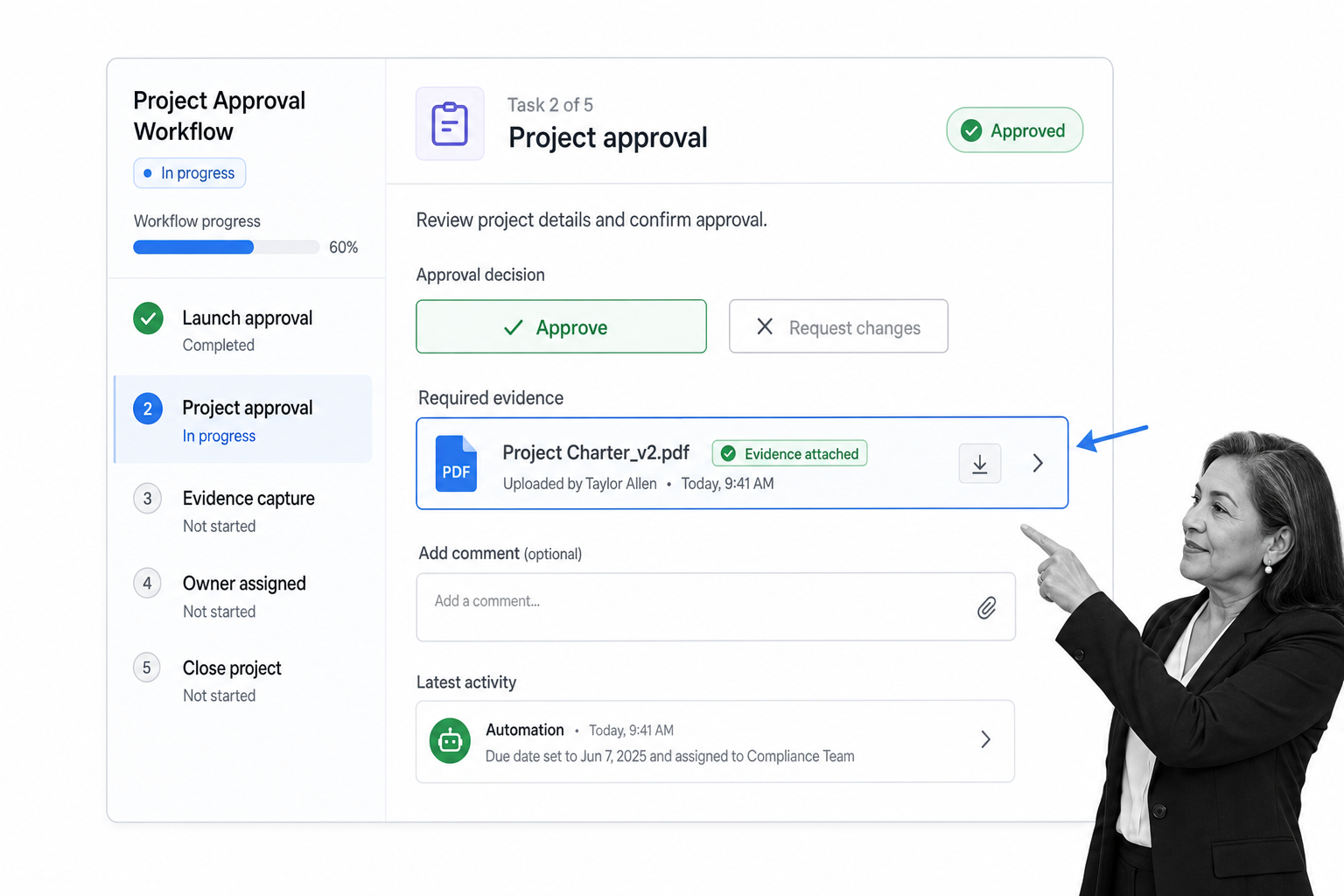
Most project management tools are good at showing work. Process Street is built to run recurring work. A project kickoff can launch as a workflow. A change request can route for approval. A risk review can require evidence before completion. A closeout can collect lessons learned and update the next version of the process.
Enforce the technique inside the tool
If the technique says every scope change needs impact analysis, the workflow can make that field required. If the technique says a stakeholder must approve a milestone, the workflow can route the approval before the next task unlocks. If the technique says evidence is required, the workflow can capture the attachment inside the task history.
Connect project work to compliance operations
For regulated or high-stakes teams, projects are often part of a larger compliance system. A missed approval, skipped review, or undocumented change can create risk. Process Street helps teams enforce policy, track steps, and prove execution without relying on memory or status meetings.
Use Process Street alongside your project board
You do not need to replace every project board to use Process Street. Many teams keep a planning board for visibility and use Process Street for the repeatable workflows that need structure: kickoff, onboarding, QA, change control, approval, vendor review, launch readiness, and post-project review.
Common mistakes to avoid
The wrong setup can make project management harder. These mistakes show up when teams focus on software before operating discipline.
Mistake 1: Treating a task list as a process
A task list says what needs to be done. A process says how it should be done, who approves it, what evidence is required, and what happens next. If the same work repeats across projects, it should become a workflow.
Mistake 2: Adding techniques without owners
A risk register without risk owners is a spreadsheet. A RACI without accountability is a chart. A retrospective without assigned improvements is a conversation. Techniques only work when each output creates an owned next action.
Mistake 3: Reporting everything
Reporting should help leaders make decisions. Track the signals that change action: blocked work, overdue approvals, dependency risk, scope change, resource constraint, and missing evidence. More metrics do not create more control.
Mistake 4: Letting exceptions live outside the system
Every team has exceptions. The question is whether exceptions are visible and approved. If people handle urgent changes in chat, email, or side documents, the project record becomes incomplete. Build an exception path inside the workflow.
Mistake 5: Using project tools for recurring operations
Project tools are useful for unique work, but recurring operations need stronger structure. When the work repeats, build a process. When the process needs prioritization, use a prioritization matrix guide. When the process needs enforcement, use workflow automation and approvals.
Project management tools and techniques FAQs
What are project management tools and techniques?
Project management tools and techniques are the software, workflows, templates, and management methods teams use to plan, run, control, and review projects. Tools hold and route the work. Techniques define how the team makes decisions, assigns owners, manages risk, and proves progress.
What is the difference between a project management tool and a technique?
A project management tool is the system used to track tasks, timelines, documents, approvals, and reports. A technique is the method used to manage the work, such as RACI, critical path analysis, Kanban, risk registers, or change control. Strong teams connect both so the technique is enforced inside the tool.
Which project management techniques are most useful?
The most useful techniques are the ones that match the project risk. Common high-value techniques include work breakdown structures, RACI, critical path analysis, risk registers, change control, agile planning, stakeholder mapping, and retrospectives. You do not need all of them for every project.
How do I choose the right project management tools and techniques?
Start with the project type, risk level, dependencies, and approval requirements. Use lightweight tools and techniques for simple work. Add workflow automation, approval gates, risk registers, and evidence capture when the project has compliance, customer, budget, or operational consequences.
Can Process Street be used as a project management tool?
Yes. Process Street can be used for project work that depends on repeatable workflows, approvals, evidence, and handoffs. It is especially useful alongside a project board when the team needs to enforce kickoff steps, change control, launch readiness, QA, or post-project review.
Why do project management tools fail without good techniques?
Tools fail when they collect tasks but do not define how decisions are made. Without techniques, teams still need to guess priorities, chase approvals, manage scope changes manually, and reconstruct proof later. Techniques turn the tool into an operating system for project execution.
