


Turn every policy into automated workflows with built-in enforcement and audit-ready proof.



Software Release Management Process Document
A software release management process document defines how a team plans, approves, deploys, validates, and closes a software release. It turns release knowledge into a controlled path with named owners, readiness criteria, evidence requirements, rollback rules, and decision records.
The document should do more than describe a policy. It should tell each participant what to do, when to do it, what proof to attach, who can approve the next step, and what happens when a release is delayed, rejected, or rolled back.
This guide shows you the structure to use, the release stages to document, the roles to assign, the controls to enforce, and the review loop that keeps the process useful as your delivery system changes.
In this article, we are going to cover:
- What is a software release management process document?
- What a software release management process document should include
- Software release management process steps
- Release roles and decision rights
- How to write a software release management process document
- How to run the document as a live control
- Run release management in Process Street
- Measure and improve release management
- FAQs
What is a software release management process document?
This release management document is the approved source of truth for moving a defined software package into a live environment. It connects process documentation with daily execution, so the written standard and the actual release path stay aligned.
A process document is not the same as a release plan
The process document is reusable. It defines the standard method, decision rights, controls, and evidence for many releases. A release plan applies that method to one release, with its scope, dates, environments, dependencies, owners, communication, and rollout sequence.
A release is not the same as a deployment
A deployment moves a build into an environment. A release makes an approved version available to users or customers. One release may involve several deployments, progressive exposure, feature controls, data changes, documentation updates, and support preparation. Atlassian makes the same distinction in its product release guide.
The document creates operational memory
Release decisions often happen across tickets, chat threads, pipeline logs, test systems, and meetings. The document defines where the durable record lives. Useful process documentation examples make ownership and evidence obvious enough that a new release manager can run the process without reconstructing tribal knowledge.
What a software release management process document should include
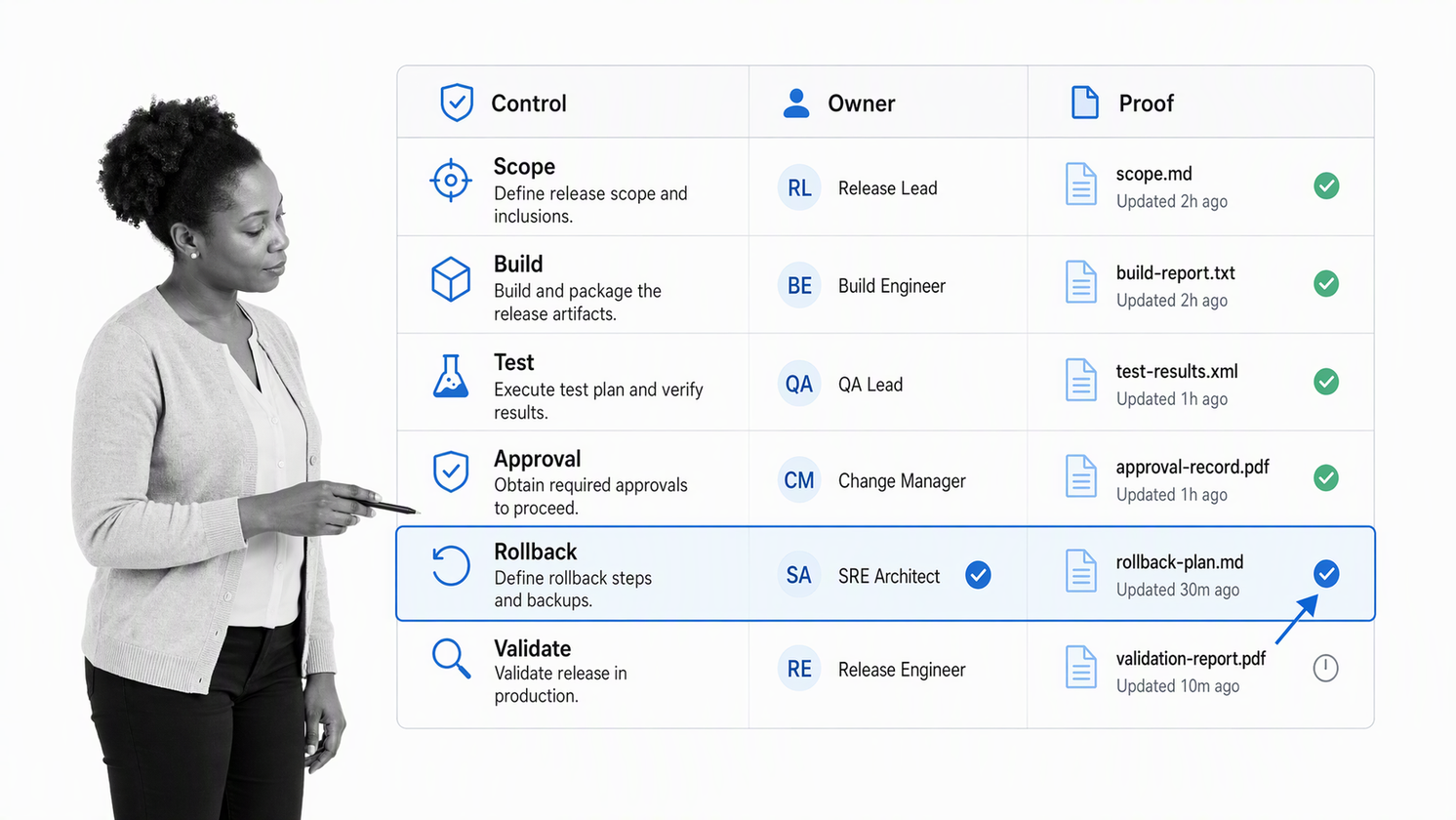
A useful document tells the team how to act. Keep the structure compact enough to scan during a release, but specific enough that two different teams would make the same decision from the same evidence.
Purpose, scope, and release types
Start with the purpose of the process, the products and environments it covers, and the release types it recognizes. Define how the path changes for a routine release, a high-risk release, an emergency fix, a data migration, or a release that changes customer-facing behavior.
Entry and exit criteria
Each phase needs a visible entry condition and exit condition. A release should not enter readiness review until scope is stable, required testing is complete, known risks are classified, and a rollback approach exists. It should not close until production validation, monitoring, communication, and follow-up work are recorded.
Required fields and evidence
- Release identifier, owner, scope, affected services, and target environment
- Build and artifact references, version-control state, test results, and unresolved defects
- Security, privacy, compliance, data-migration, and operational-readiness evidence
- Deployment procedure, monitoring plan, communication plan, rollback trigger, and rollback steps
- Approval record, implementation log, production validation, incidents, and closure decision
Exception and escalation rules
Define which requirements are mandatory, who may approve an exception, how long an exception remains valid, and what retrospective review is required. Emergency work needs a faster path, but it still needs an owner, risk statement, verification, and a durable record.
Document control
Name the process owner, approver, review interval, current version, and change history. ServiceNow release templates use phases, tasks, exit criteria, key dates, and approvals, which is a practical reminder that reusable release documentation needs both workflow structure and governance.
Software release management process steps
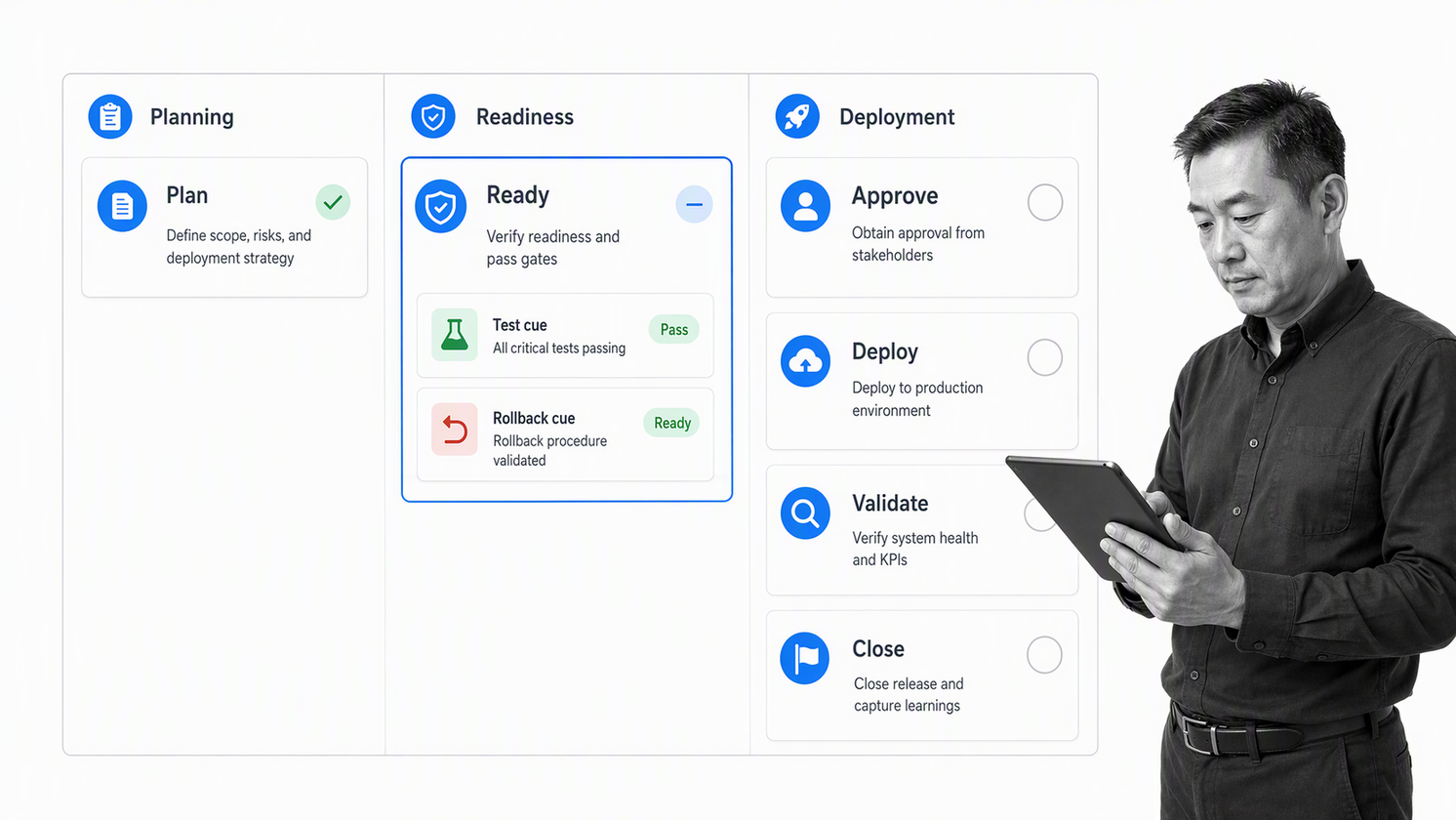
The software release management process should show one connected lifecycle. The exact labels may differ, but the path usually combines planning, readiness, authorization, deployment, validation, and closure. A related software change management process helps control the individual changes that feed the release.
1. Register and classify the release
Create a release record with a unique identifier, owner, purpose, scope, target users, target environments, dependencies, expected impact, and release type. Classification determines the approval path and the depth of evidence required later.
2. Plan scope, sequence, and dependencies
Confirm which changes are included and excluded. Map dependency order, data changes, infrastructure work, documentation updates, customer communication, support readiness, and any coordinated work outside engineering. A release with ambiguous scope is not ready for scheduling.
3. Build and verify the release candidate
Create the candidate from controlled source and preserve its provenance. Record the artifact reference, build results, test evidence, security checks, configuration state, and unresolved defects. The NIST Secure Software Development Framework includes provenance data for software release components as a secure-development practice.
4. Run the readiness review
Use explicit readiness criteria instead of asking whether the team feels ready. The software release readiness process provides a starting point for testing, bug review, compatibility, documentation, rollout, rollback, risk, communication, and support preparation.
5. Approve, schedule, and communicate
The authorized reviewer evaluates the release against the documented criteria, not against deadline pressure. Record approval, rejected conditions, scheduled window, coordination requirements, customer impact, and the communication owner.
6. Deploy with checkpoints
Follow the approved deployment procedure, capture actual start and finish times, record deviations, and monitor the signals tied to release health. A structured deployment checklist keeps backups, trial deployment, approvals, production steps, verification, and documentation connected.
7. Validate, roll back, or continue
Compare production behavior with the validation criteria and rollback triggers. The release owner should have authority to stop exposure or initiate rollback without waiting for an improvised meeting. Record the decision and the evidence used.
8. Close and review
Confirm that validation passed, communication was completed, incidents and follow-up tasks were opened, and the release record is complete. Close the release only when the team can explain what shipped, how it was verified, who approved it, and what should change next time.
Release roles and decision rights
A process document works when decision rights are explicit. Avoid assigning every step to the release manager. The release manager coordinates the system, while specialists own the evidence and decisions in their areas.
Process owner
The process owner maintains the standard, approves structural changes, reviews performance, and resolves repeated exceptions. This role owns the quality of the release system, not every individual release.
Release manager
The release manager creates or coordinates the release record, confirms dependencies, drives readiness review, obtains decisions, manages the schedule, coordinates communication, and makes sure the record closes with evidence.
Engineering, QA, security, and operations
Engineering owns the candidate and technical implementation. QA owns test evidence and quality risks. Security owns required security review. Operations or reliability owns environment readiness, deployment execution, monitoring, rollback support, and production validation.
Product, support, and business owners
Product confirms scope and acceptance. Support prepares for user impact and known issues. Business owners approve material risk when a release affects contractual, regulatory, financial, or customer commitments.
Decision matrix
For each release type, name who recommends, who approves, who executes, who validates, and who must be informed. Keep one accountable approver for each gate. A committee can advise, but unclear shared approval creates delay without creating ownership.
How to write a software release management process document
Write the first version from observed work. A process assembled from policy language alone will miss the real handoffs, tools, queues, and exception paths that decide whether releases are safe and repeatable.
1. Collect evidence from recent releases
Review one routine release, one difficult release, and one emergency release. Identify where information arrived late, which decisions were repeated, what evidence was missing, where people waited, and what caused rollback or rework.
2. Map the minimum controlled path
Map the release from registration to closure. A software development workflow can supply upstream work, but release management needs its own readiness, authorization, deployment, and validation controls.
3. Define the data model
List the fields every release record needs. Separate fixed process rules from release-specific data. Keep links to external evidence where it is authoritative, but make the release record clear enough that reviewers can see whether required evidence exists.
4. Add risk-based branches
Use the release classification to route additional security, privacy, data, compliance, customer, or executive review. Keep the normal path lean. Add steps only when they protect a real decision, reduce a known risk, or create required proof.
5. Test the document with a real candidate
Run the draft process against an upcoming release. Compare it with a software release checklist and a software testing checklist to catch missing readiness and validation work. Revise unclear instructions before declaring the document approved.
How to run the document as a live control
A static document can define the standard, but release control needs an active record for every release. Turn the standard into a repeatable workflow that assigns work, blocks incomplete gates, collects evidence, records decisions, and preserves the execution history.
Create one run per release
Each release should have its own record. That record inherits the approved process but carries the specific scope, risk, owners, evidence, schedule, approvals, deployment log, validation, and closure outcome.
Keep evidence close to the decision
Collect test results before readiness approval, rollback proof before deployment approval, and production evidence before closure. Do not ask the release manager to reconstruct proof at the end. Evidence captured at the point of work is more complete and easier to review.
Use conditional paths instead of separate documents
A single governed workflow can route routine, high-risk, and emergency releases through different steps. Conditional logic keeps the core standard consistent while applying the controls that match each release.
Make approval a real gate
An approval should stop the release until the right reviewer decides. Workflow approvals let the team collect the decision inside the release record, beside the evidence being reviewed.
Connect monitoring to closure
Use defined production signals and observation windows. Process monitoring helps reveal where releases wait, which gates create rework, and which exceptions repeat across release records.
Run release management in Process Street
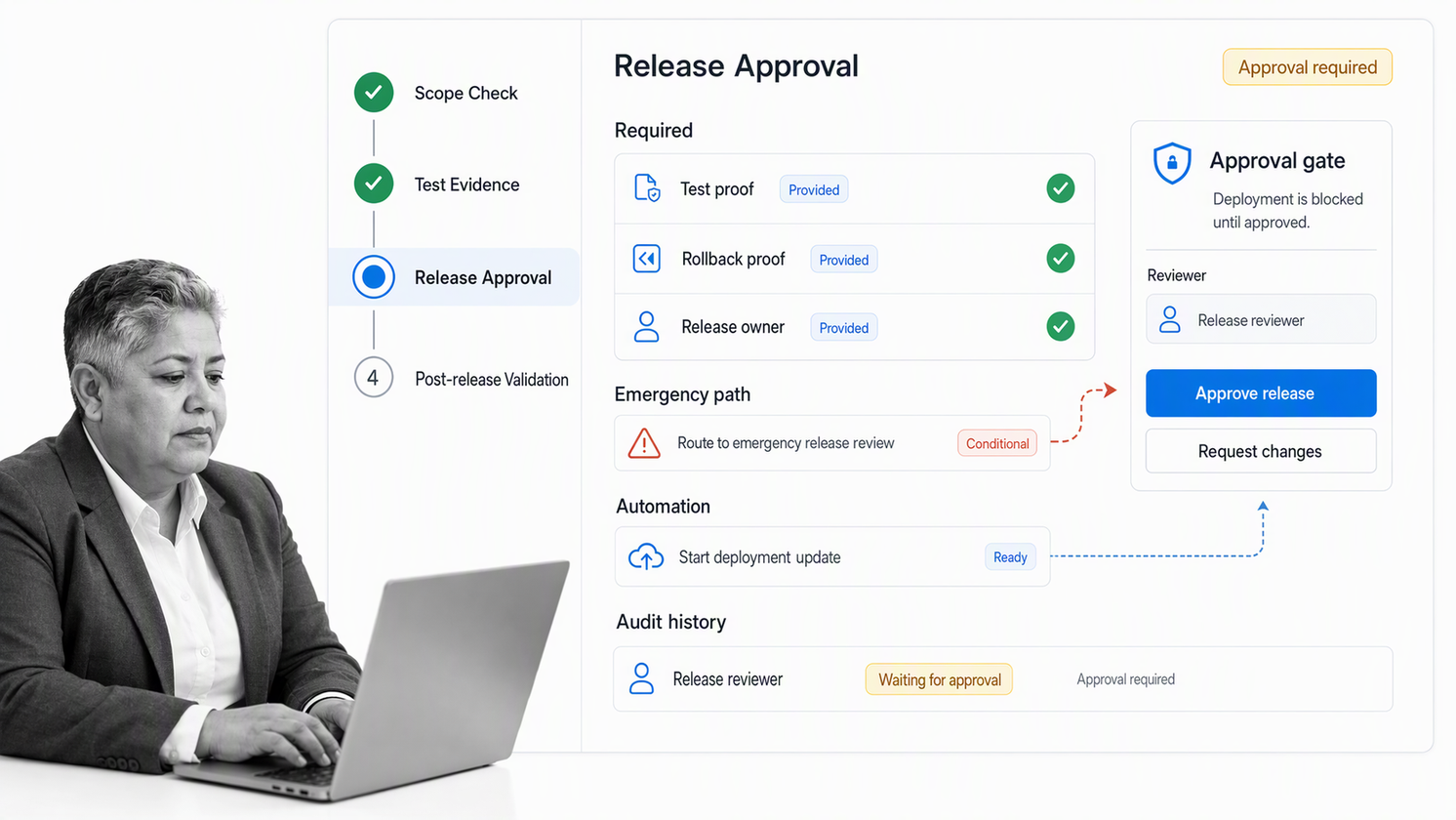
Process Street turns the controlled release document into an executable workflow with assignments, required fields, approvals, conditional paths, automations, evidence, and audit history.
Build the controlled release workflow
Create tasks for registration, scope review, build evidence, testing, readiness, authorization, deployment, validation, communication, and closure. Add instructions and required fields where the process needs consistent inputs.
Route work by release risk
Use release type, affected system, data impact, user impact, or emergency status to route the right reviewers. Lower-risk work can move quickly. Higher-risk work can collect additional evidence and approvals without creating a different unmanaged process.
Automate handoffs without hiding control
Use workflow automation to assign owners, notify reviewers, update connected systems, and open follow-up work. Keep the approval and evidence rules visible so automation speeds the process without weakening accountability.
Connect the release stack
Process Street has direct, universal integrations to 5,000+ systems. Need a new one? An AI agent builds it on the fly. Release workflows can coordinate work across source control, testing, service management, communication, monitoring, and documentation systems while preserving one governed record.
Preserve proof
A completed run shows who performed each task, what evidence was supplied, which path the release followed, and who approved it. That supports compliance as proof of control when releases affect regulated or high-stakes operations.
Measure and improve release management
Review the release system with evidence from completed runs. The goal is not to maximize the number of gates. The goal is to make safe releases easier to run, risky releases easier to identify, and every important decision easier to explain.
Track flow and reliability
- Lead time from release registration to production validation
- Waiting time at readiness and approval gates
- Percentage of releases delayed, rejected, rolled back, or reopened
- Defects and incidents linked to releases
- Missing evidence, manual exceptions, and repeated follow-up work
Separate process defects from product defects
A product defect is a problem in the released software. A process defect is a missing control, unclear instruction, wrong owner, late dependency, weak evidence rule, or ineffective gate. Fixing the software without fixing the process allows the same failure pattern to return.
Review exceptions for patterns
A single exception may be reasonable. Repeated exceptions show that the standard and the work no longer match. Change the classification rule, evidence requirement, owner, or branch when the same workaround appears across several releases.
Use outside control sets as a challenge test rather than copying them wholesale. The GitLab release documentation makes stakeholder roles visible, while the OWASP secure release management control emphasizes testing, authorization, tracking, validation, and rollback. Compare those concerns with your own risk model, then keep only controls that have a clear owner and decision purpose.
Update the controlled document
Record why the process changed, who approved the new version, when it becomes effective, and how active releases should handle the transition. Retire obsolete instructions so teams do not execute different versions of the release process at the same time.
Schedule a periodic process review, and trigger an immediate review after a failed rollback, serious incident, repeated exception, or major platform change. Compare the written control with completed release records so each revision addresses observed work instead of adding policy for its own sake.
The practical test is simple: can the team start a release, see what is required, make decisions from evidence, recover safely, and prove what happened without chasing messages? If yes, the document is working as an operational control.
FAQs
What is a software release management process document?
It is the approved standard for planning, reviewing, authorizing, deploying, validating, and closing software releases. It defines the stages, owners, evidence, gates, rollback rules, and records required for repeatable release control.
What should a software release process document include?
It should include purpose and scope, release types, roles, entry and exit criteria, required fields, test and readiness evidence, approval rules, deployment steps, communication, rollback triggers, production validation, closure, exceptions, and document control.
What is the difference between release management and deployment management?
Deployment management moves a build into an environment. Release management coordinates the wider decision to make an approved version available, including scope, readiness, authorization, communication, deployment, validation, support, rollback, and closure.
How do you write a release management process document?
Review recent releases, map the minimum controlled path, define the release record and decision rights, add risk-based branches, specify evidence and rollback rules, then test the document with a real release candidate before approval.
Who owns the software release management process?
A process owner maintains the standard, while a release manager coordinates each release. Engineering, QA, security, operations, product, support, and business owners provide evidence or decisions for the gates they own.
How does Process Street support software release management?
Process Street turns the release process into executable workflows with assignments, required fields, approvals, conditional logic, automations, integrations, evidence capture, and audit history. Each release gets a governed record from registration through closure.
