


Turn every policy into automated workflows with built-in enforcement and audit-ready proof.



Workflow Collaboration Software
Workflow collaboration software gives people, systems, and AI agents one controlled place to move shared work from request to completion. It combines workflow structure with the context teams need to decide, review, approve, hand off, and prove that work was completed correctly.
The difference is simple. Communication tools help people talk about work. Task tools help people list work. Workflow collaboration software makes the work move. It carries the request, owner, instructions, discussion, evidence, decision, automation, and history together through every stage.
This guide explains how the category works, which capabilities matter, how it differs from neighboring tools, and how to choose and implement a platform without creating another disconnected layer.
In this article, we are going to cover:
- What workflow collaboration software is
- Why workflow collaboration software matters
- How workflow collaboration software works
- Core capabilities of workflow collaboration software
- Workflow collaboration vs. chat, task, and project tools
- How to choose workflow collaboration software
- How to implement workflow collaboration software
- Workflow collaboration in Process Street
- FAQs
What workflow collaboration software is
Workflow collaboration software is a system for coordinating repeatable work across multiple contributors while keeping context, ownership, and rules attached to the work itself. A collaborative workflow may involve employees, customers, vendors, connected applications, and AI agents. The software defines how their contributions fit together and what must happen before the work can advance.
The category combines the control of a workflow management system with the shared context people expect from collaboration software. It supports conversations and files, but it does not leave the process buried in those conversations. Every message, decision, and attachment serves a specific step in the workflow.
Shared work with an operating model
A team can collaborate inside a chat channel, document, spreadsheet, or project board, but those spaces rarely define what happens next. Workflow collaboration adds an operating model. The system knows which stage the work is in, who owns the next action, which information is required, which decision route applies, and what completion means.
Collaboration that stays attached to execution
The most useful collaboration happens in context. A reviewer should see the request, instructions, prior comments, evidence, and decision options together. A downstream owner should inherit the completed context without searching through a separate channel. This is the core promise of collaborative workflow: the conversation travels with the work.
A system for human and agent teamwork
Modern workflows also include software agents that gather information, update systems, draft responses, or execute routine steps. Workflow collaboration software gives those agents the same constraints as human contributors: a defined task, approved inputs, permission boundaries, review gates, and a recorded result. Automation becomes part of the team process rather than an invisible side effect.
Why workflow collaboration software matters
Workflow collaboration software matters because cross-functional work usually fails between teams, not inside a single task. The request starts in one tool, discussion happens in another, files live somewhere else, and approval arrives by email. Every handoff creates a chance to lose context, delay a decision, or skip a control.
It replaces coordination by memory
When the process lives in people’s heads, experienced operators become the routing layer. They remember who reviews a request, which exception needs legal input, where the latest file lives, and when to escalate. That works until volume increases, someone is away, or the team changes. Workflow collaboration software stores those decisions in the process itself.
It makes ownership visible and enforceable
Clear ownership is more than an assignee field. The right person must know what they own, why the task reached them, what information they need, and what result unlocks the next stage. A strong platform assigns work based on role and data, sets deadlines, escalates stalled steps, and prevents ambiguous handoffs.
It preserves decision context
Teams often approve a request without preserving the reasoning behind the decision. Later, nobody remembers which evidence was reviewed or why an exception was accepted. Workflow collaboration software keeps comments, files, form data, approvals, and history connected to the exact run. The record is useful for customer service, training, improvement, and audit review.
It reduces work about work
Status meetings, reminder messages, duplicate data entry, and manual follow-up are work about work. They consume time without advancing the outcome. Once workflow rules assign tasks, send reminders, update connected systems, and route exceptions, the team can spend its attention on judgment and delivery.
How workflow collaboration software works
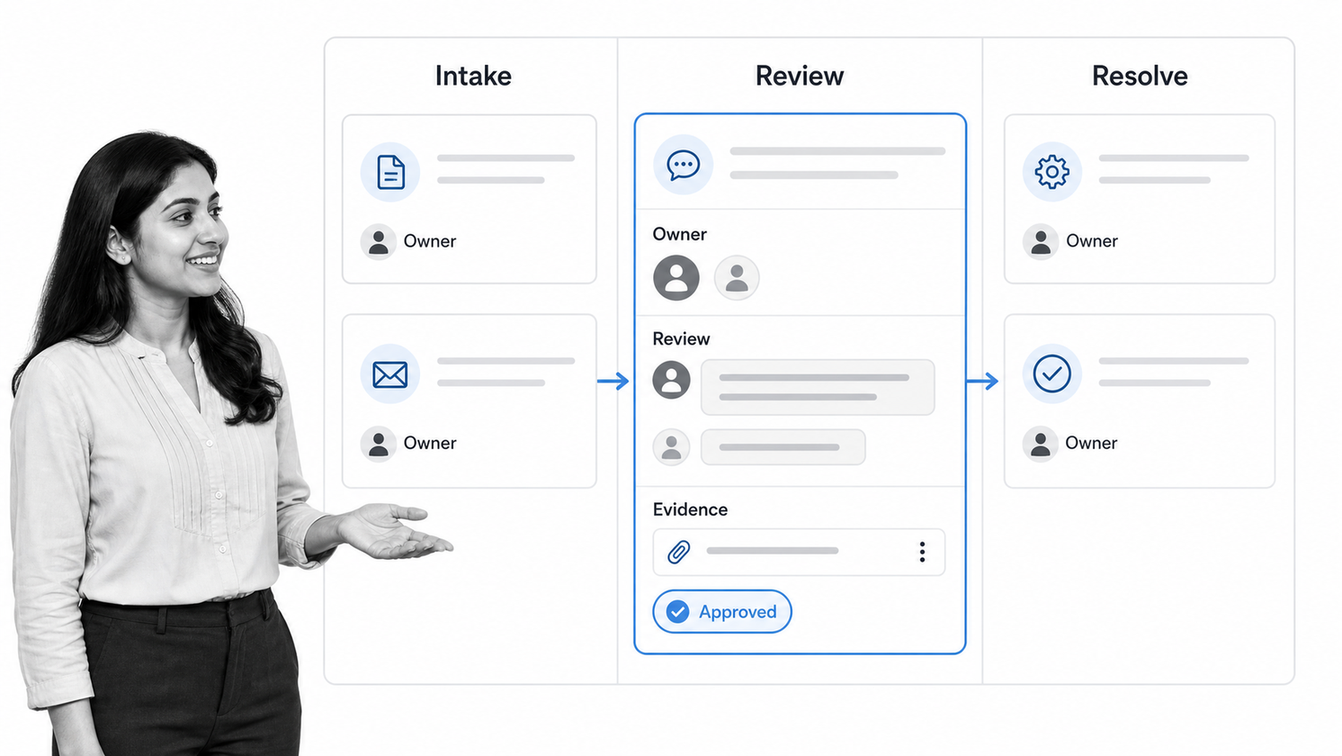
Workflow collaboration software works by turning a repeatable coordination pattern into a live workflow. The template defines the stages, roles, instructions, data, rules, and decisions. Each run carries the real request and records how contributors completed it.
1. Structured intake starts the right path
A form, event, schedule, system update, or agent can start the workflow. Structured intake captures enough information to choose the route. A vendor request might collect service type, risk level, data access, contract value band, owner, and required date. The workflow can use those inputs immediately instead of asking the coordinator to interpret an unstructured message.
2. Roles and rules assign the next contribution
The workflow assigns the first task to a person, team, system, or agent. Role-based assignment makes the process reusable even when individual names change. Dependencies keep downstream work closed until prerequisites are complete, while service levels and escalations prevent requests from disappearing in a queue.
3. Context stays inside the work item
Contributors review the same structured record. Instructions, comments, files, prior decisions, and evidence appear where the task is completed. This reduces context switching and stops the team from maintaining a second narrative in chat. A comment is no longer a detached conversation. It is part of a decision at a specific workflow stage.
4. Approvals and conditions control movement
Approval steps hold work until the designated reviewer accepts or rejects it. Conditional logic sends each request through the right path based on its data. A low-risk request may proceed automatically, while a higher-risk case receives security, legal, or executive review.
5. Automations and agents execute routine actions
The workflow can create records, notify stakeholders, collect signatures, generate documents, update systems, or ask an agent to complete a bounded task. Human review remains available at the points where judgment, accountability, or risk requires it. This balance is what turns collaboration into controlled execution.
6. History becomes operational proof
Every completed task, field update, approval, file, comment, and automated action contributes to the run history. Leaders can see where work stands. Reviewers can inspect what happened. Process owners can find recurring delays and improve the template instead of rebuilding the process after every problem.
Core capabilities of workflow collaboration software
The best workflow collaboration software does not win by offering the longest feature list. It wins by keeping context and control together while work crosses boundaries. Evaluate the capabilities that determine whether the system can coordinate a real process end to end.
Workflow builder and reusable templates
A no-code builder should let process owners define stages, tasks, forms, instructions, assignments, deadlines, decisions, and routes. Reusable templates make the operating model consistent, while each workflow run preserves the unique details of the request. Teams can begin with a workflow management template and adapt it to their own roles and controls.
Contextual comments, files, and evidence
Discussion should happen at the task or record where the decision is made. The platform should support comments, mentions, attachments, structured fields, and required evidence without turning the workflow into a generic chat room. Searchable context helps new contributors understand the history without another meeting.
Role-based ownership and guest participation
Cross-functional workflows often include people outside the core team. Look for assignments by role, group, or request data, plus controlled ways for customers, vendors, or contractors to provide information. Permissions should expose only the work and data each participant needs.
Approvals, conditions, and escalation
Workflow collaboration software should support formal approvals, branching logic, deadlines, reminders, and escalation. These controls turn a shared checklist into an execution system. A process should not rely on somebody noticing that a comment contains an approval.
Automation and universal integrations
The platform should connect collaboration to the rest of the stack. Process Street has direct, universal integrations to 5,000+ systems. Need a new one? An AI agent builds it on the fly. The important outcome is that a handoff can update the system of record without a person copying data between screens.
Agent governance and human review
AI agents can accelerate research, data entry, drafting, and system updates, but they need process boundaries. The NIST AI Risk Management Framework emphasizes managing AI risk across the lifecycle. In workflow collaboration software, that means clear instructions, least-privilege access, approval gates, observable actions, and a durable record.
Reporting and process improvement
Dashboards should show workload, cycle time, overdue steps, rework, approval delays, and exception patterns. Those signals help the process owner improve how work flows between teams. Reporting is valuable when it leads to a better workflow, not when it simply produces another status view.
These capabilities should share one operating model. A broader workflow management software evaluation can help teams test whether design, execution, collaboration, automation, and reporting stay connected instead of becoming separate modules.
Workflow collaboration vs. chat, task, and project tools
Several software categories support collaboration, but they coordinate different layers of work. Choosing the right category starts with the failure you need to prevent.
Compared with chat and team communication
Chat is ideal for fast conversation, questions, and informal coordination. It is weak as a system of record for repeatable work. Important decisions scroll away, ownership is implied, and the process depends on people reading the right message. As the concept of collaborative workflow suggests, workflow structure and social collaboration are related but distinct. Atlassian’s working agreements guidance also shows why teams need explicit norms for how they collaborate.
Compared with document collaboration
Shared documents are ideal for creating and reviewing content together. They do not automatically route a request, enforce a review sequence, assign the next owner, or prove the approved version followed the required path. Workflow collaboration software can link or attach the document while controlling the work around it.
Compared with task management
Task tools answer who is doing what and when. They work well for personal organization and lightweight team coordination. A task workflow management system goes further by attaching rules, forms, approvals, evidence, and history to the sequence of tasks.
Compared with project management
Project management software is strongest for unique initiatives with scope, milestones, resources, and schedules. Workflow collaboration software is strongest when the method of delivery repeats. A product launch may be a project, while security review, content approval, vendor onboarding, and launch readiness can each run as controlled workflows. Teams that need both can connect the workflow layer to their workflow project management software.
Compared with integration automation
Integration automation moves data and triggers actions between applications. It may not provide the human task context, approval, discussion, evidence, and audit history a cross-functional process needs. Automated workflow tools are most useful when system actions and human decisions share one process model.
How to choose workflow collaboration software
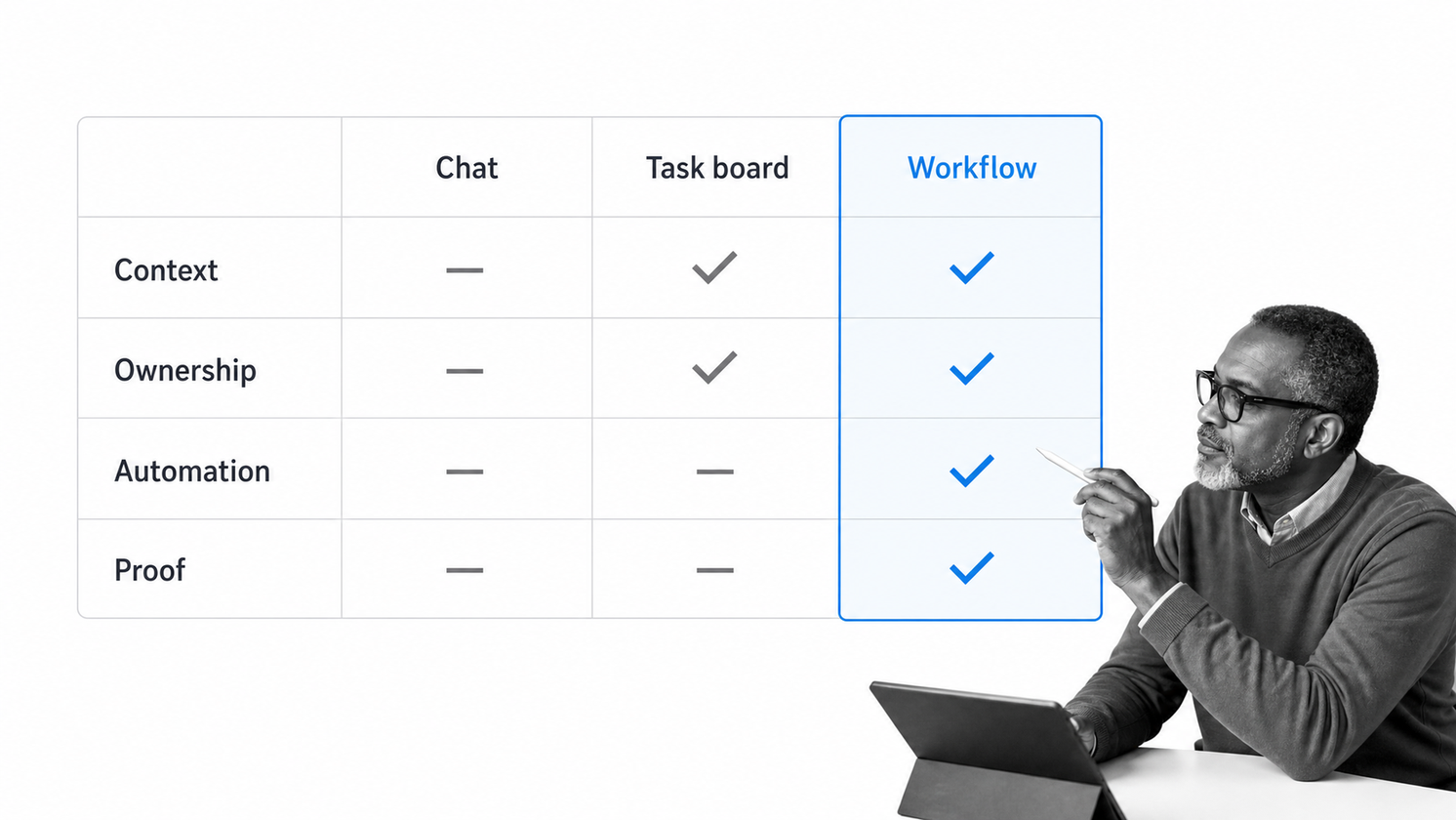
Choose workflow collaboration software by testing a real cross-functional process, not a polished demo. The evaluation should reveal whether the platform preserves context, controls movement, and reduces coordination across the messy parts of work.
Map the collaboration failure first
Start with a process where handoffs already hurt: vendor approval, customer onboarding, incident response, policy review, employee onboarding, or change control. Use workflow mapping to identify participants, systems, decision points, delays, exceptions, and evidence requirements.
Define must-have coordination depth
Decide whether the team only needs conversation, visible tasks, or controlled execution. If missing a step creates rework, customer impact, security risk, or compliance exposure, prioritize required data, approval gates, permissions, escalations, and history over decorative collaboration features.
Test the exception path
A happy-path demo proves little. Ask the platform to handle a rejected approval, missing evidence, unavailable owner, overdue task, external participant, and failed automation. The tool should make the exception visible and route it deliberately without requiring the coordinator to improvise.
Check administration and adoption
The people who understand the process should be able to maintain it. Evaluate how quickly a non-technical owner can change a route, field, role, or approval rule. At the same time, the contributor experience should stay simple. People should see the work they own and the context they need without learning the entire workflow model.
If a process crosses many applications, compare the collaboration layer with business process automation software. IBM’s workflow automation overview is a useful external reference for separating rules-based automation from the human coordination around it.
Evaluate security, governance, and proof
Review role-based access, authentication, data handling, guest controls, audit logs, agent permissions, retention, and administrative history. Collaboration increases the number of participants in a process. Governance ensures that wider participation does not create uncontrolled access or untraceable decisions.
Measure the cost of coordination
Compare tools using cycle time, handoff delay, overdue work, rework, manual status updates, duplicate entry, and time spent chasing decisions. A platform creates value when the work moves with less management effort and stronger proof, not when it simply centralizes more notifications.
How to implement workflow collaboration software
Implementation succeeds when the team starts with one meaningful workflow, makes ownership explicit, and improves the process from real runs. Avoid trying to standardize every collaboration pattern at once.
Document the current path
Capture how the work runs today, including side-channel reviews and manual workarounds. Process documentation exposes the hidden routing logic before software makes it permanent. Mark which steps create value and which exist only because systems are disconnected.
Build the smallest complete workflow
The first version should include intake, at least two contributors, one decision, one exception, one connected system, and a clear completion record. That is enough to test real collaboration without turning configuration into a long transformation program.
Assign a process owner
Every production workflow needs one accountable owner. That person reviews performance, updates instructions, resolves design questions, and decides when a pattern should change. Shared execution does not mean shared ambiguity. One owner keeps the operating model coherent.
Pilot with live work
Run actual requests through the workflow and observe where contributors hesitate. Confusion usually points to missing instructions, unclear ownership, unnecessary fields, or an exception the model did not anticipate. Fix those problems in the template and run the workflow again.
Expand through reusable patterns
Once the first workflow works, reuse its patterns for intake, role assignment, approvals, escalations, agent gates, and evidence. Standard components make later workflows faster to build while preserving differences between business processes.
Review and improve continuously
Use completion data and contributor feedback to remove friction. A continuous improvement rhythm keeps the workflow aligned with changing teams, systems, policies, and risk. The process should get easier to follow and harder to break after every review.
Workflow collaboration in Process Street
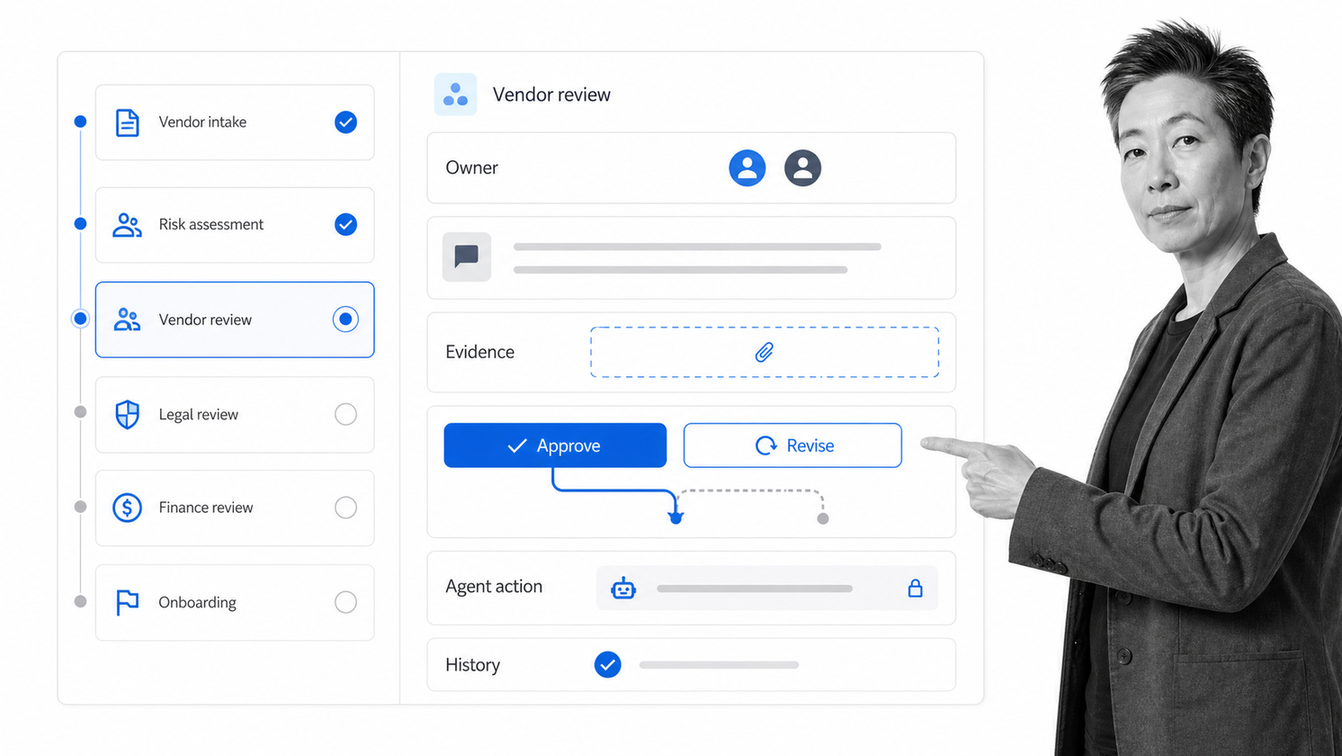
Process Street is an Agentic Process Automation platform for high-stakes operations. It coordinates people, systems, and AI agents inside workflows where steps, decisions, permissions, and proof stay connected from request to completion.
One shared run for every contributor
Each workflow run gives contributors the task, instructions, fields, files, comments, owners, and prior decisions they need. The process owner designs the operating model once. Every new request follows that model with its own data and history.
Rules enforce the handoffs
Assignments, due dates, dependencies, conditional logic, approvals, reminders, and escalations control how work moves. Contributors do not need to memorize the route or monitor a separate chat channel. The workflow presents the right action to the right participant at the right point.
Agents act inside governed boundaries
Process Street can place AI actions inside the same workflow as human tasks. An agent can collect information, prepare an artifact, or update a connected system, while approval gates hold high-stakes actions for review. The run history shows the action and its result, so agent work remains observable.
Execution produces proof
Required evidence, decisions, and history stay attached to the workflow run. This is the practical bridge between collaboration and compliance as proof of control. The team does not reconstruct what happened after the fact because correct execution created the record automatically.
FAQs
What is workflow collaboration software?
Workflow collaboration software coordinates repeatable work across people, systems, and AI agents. It keeps tasks, ownership, instructions, comments, files, approvals, automations, and history attached to one workflow from request to completion.
How is workflow collaboration software different from team chat?
Team chat helps people communicate, but it does not reliably control a repeatable process. Workflow collaboration software defines the stages, owners, required information, approval rules, exception routes, and completion record while keeping discussion connected to the exact work item.
What features should workflow collaboration software include?
Look for a no-code workflow builder, structured intake, role-based assignments, contextual comments and files, conditional logic, approvals, deadlines, escalations, integrations, agent governance, reporting, permissions, and audit history. The features should work together as one execution system.
When should a team use workflow collaboration software?
Use it when work repeats across people or systems and missed handoffs create delay, rework, customer impact, security risk, or compliance exposure. Common examples include vendor approval, onboarding, policy review, incident response, content approval, and change control.
Can workflow collaboration software coordinate AI agents?
Yes. A strong platform can assign bounded actions to AI agents, provide structured context, control permissions, require human approval, and record the result. Agents should operate inside the workflow rather than outside the process and its governance.
How do you choose workflow collaboration software?
Map one real cross-functional process and test the platform against its intake, roles, handoffs, decisions, exception paths, connected systems, and proof requirements. Evaluate the rejected or delayed path as carefully as the happy path.
