


Turn every policy into automated workflows with built-in enforcement and audit-ready proof.



8 Best Wrike Alternatives & Competitors in 2026

Wrike alternatives give teams different ways to manage projects, resources, requests, recurring processes, engineering delivery, client work, and lightweight task coordination. Wrike itself combines folders, projects, tasks, Gantt charts, workload planning, request forms, approvals, automation, reporting, and multiple views. That breadth is useful, but it also means the best replacement depends on which part of Wrike is actually essential to your team.
This guide compares eight credible options without pretending that one tool wins every use case. Process Street ranks first for its specific ideal customer profile: operations, HR, onboarding, compliance-adjacent, finance, and customer teams that need enforceable, trackable, recurring process and SOP workflows. Asana, monday.com, ClickUp, Smartsheet, Jira, Teamwork.com, and Trello can be better choices when portfolio planning, visual boards, tool consolidation, spreadsheet control, software delivery, client profitability, or simple Kanban coordination matters more.
The list is editorially maintained by the Process Street team and was last verified on August 26, 2026. Every material competitor claim comes from the vendor’s current product, pricing, or support pages. No review ratings, customer counts, acquisition commentary, private pricing, or sensitive company data are used. Starting prices reflect public annual-billing figures where vendors show them, and regional pricing is labeled rather than converted.
Use the comparison table to narrow the field, then read the full tradeoffs. Do not start with a feature-count contest. Start by deciding whether the work is a recurring procedure, a portfolio of projects, a flexible board, an engineering backlog, a client delivery operation, or a lightweight task flow. That operating model determines which migration will reduce friction instead of simply recreating Wrike in a different interface.
In this guide:
- What is Wrike?
- Wrike alternatives at a glance
- How we picked these Wrike alternatives
- 1. Process Street
- 2. Asana
- 3. monday.com
- 4. ClickUp
- 5. Smartsheet
- 6. Jira
- 7. Teamwork.com
- 8. Trello
- Which Wrike alternative fits your use case?
- How to plan a Wrike migration
- Wrike alternatives FAQs
- Final verdict
What is Wrike?
Wrike is an intelligent work management platform for planning, resourcing, executing, and reporting on work. Its official feature pages organize the product around idea intake, project and resource planning, execution, reporting, adaptation, integrations, and security. Teams can structure work through spaces, folders, projects, tasks, and subtasks, then view it through boards, tables, Gantt charts, calendars, dashboards, and reports.
Wrike is the incumbent in this comparison, not a ranked alternative. Its feature set is the baseline for evaluating every replacement. A serious migration should account for request forms, blueprints, dependencies, workloads, time tracking, proofing, approvals, dashboards, reports, custom item types, automations, permissions, and integrations, but only if your team actually relies on those capabilities. Rebuilding unused complexity is not a migration success.
Wrike’s current pricing page lists a Free plan, a Team plan at $10 per user per month billed annually, a Business plan at $25 per user per month billed annually, and sales-led Pinnacle and Apex plans. The Free plan covers essential task management, while higher plans add Gantt charts, templates, workflows, integrations, advanced resource planning, budgeting, reporting, and broader AI capabilities. Packaging can change, so validate your required features against the current plan table before signing a replacement contract.
Teams usually evaluate Wrike alternatives for one of four reasons: they want a simpler surface for everyday users, a pricing model that better matches their seat mix, a product specialized for a distinct operating model, or stronger enforcement for recurring procedures. Those are different problems. A tool that simplifies project boards may not improve auditability. A tool that excels at software issues may confuse HR users. A tool that manages client margins may be irrelevant to internal operations.
Wrike alternatives at a glance
Process Street is the strongest overall Wrike alternative when the real requirement is dependable recurring execution. Asana is the closest fit for cross-functional project and portfolio coordination. monday.com leads with visual board flexibility, ClickUp with workspace breadth, Smartsheet with spreadsheet-style control, Jira with engineering delivery, Teamwork.com with client profitability, and Trello with simplicity.
| Tool | Best for | Standout feature | Free plan | Starting price | Primary view | Best migration fit |
|---|---|---|---|---|---|---|
| Process Street | enforceable, trackable, recurring process and SOP workflows | guided workflow runs with assignments, required fields, approvals, conditional routing, evidence, and run history | No public free plan listed | See pricing page | Guided workflow run | Recurring procedures and operational controls |
| Asana | cross-functional projects connected to goals and portfolios | projects, workflows, goals, portfolios, workload, forms, and reporting | Yes, for up to 2 users | $10.99 per user/month billed annually | List, board, timeline, and portfolio | Cross-functional project coordination |
| monday.com | visual work management with configurable boards and dashboards | boards, columns, automations, dashboards, forms, Gantt, Kanban, and connected workflows | Yes, for up to 2 seats | From €9 per seat/month billed annually | Configurable board | Visual department workflows |
| ClickUp | teams consolidating tasks, docs, chat, goals, and project views | tasks, docs, dashboards, time tracking, forms, whiteboards, goals, and 15+ views | Yes, Free Forever | $7 per user/month billed annually | Multi-view task workspace | All-in-one productivity workspace |
| Smartsheet | spreadsheet-oriented project, program, and portfolio management | grid, table, board, Gantt, calendar, forms, reports, dashboards, and automation | Free trial, no permanent free tier shown | $9 per member/month billed yearly | Grid and sheet | Structured portfolio data and reporting |
| Jira | software teams using Scrum, Kanban, backlogs, and issue workflows | Scrum and Kanban boards, backlog, customizable workflows, roadmaps, dashboards, and automation | Yes, for up to 10 users | Paid pricing varies by user count | Backlog and issue board | Engineering and product delivery |
| Teamwork.com | client-service teams tracking delivery, time, budgets, and profitability | client projects, resource planning, time tracking, budgets, proofs, forms, and profitability reporting | Yes, limited free plan | $9.99 per user/month billed yearly | Client project workspace | Agency and professional-services delivery |
| Trello | simple Kanban planning and lightweight team coordination | boards, lists, cards, checklists, automation, Power-Ups, Inbox, Planner, and optional views | Yes, for up to 10 collaborators per Workspace | $5 per user/month billed annually | Kanban board | Simple, low-administration task tracking |
How we picked these Wrike alternatives
This ranking uses a weighted operating-fit method, not crowdsourced ratings. Recurring process control carries the most weight because Process Street serves teams that cannot afford skipped steps, missing evidence, or untracked exceptions. Project structure, resource planning, ease of administration, collaboration, reporting, pricing transparency, and specialist use-case fit complete the evaluation.
- 30% recurring execution and workflow control: required steps, owners, approvals, branching, evidence, schedules, and history.
- 20% project and portfolio fit: dependencies, timelines, resource planning, goals, rollups, and executive reporting.
- 15% usability and administration: how easily builders create standards and operators follow them.
- 15% specialist strength: engineering, client delivery, spreadsheet-style programs, or simple Kanban work.
- 10% pricing model and evaluation access: public plan clarity, free plan, trial, and seat structure.
- 10% migration practicality: whether Wrike projects, fields, requests, dependencies, and history can map cleanly.
The method separates workflow management systems from broad project management software. That matters because the same task card can represent very different risk. A marketing idea may only need a board. A customer onboarding handoff may need a repeatable process. A compliance control may need required evidence and approval. An engineering issue may belong in a backlog with release context.
The shortlist also reflects the tools that appear consistently across current Wrike alternatives results, while keeping the total focused. Readers comparing wider markets can review project management tools, workflow management software, and free task management software. Those pages answer adjacent category questions without turning this comparison into an unfiltered directory.
Every competitor section states where that product can beat Process Street. That is intentional. Process Street earns the first position for enforceable, trackable, recurring procedures, not for every form of work management. A credible evaluation should identify the specialist that wins when the buying job changes.
1. Process Street
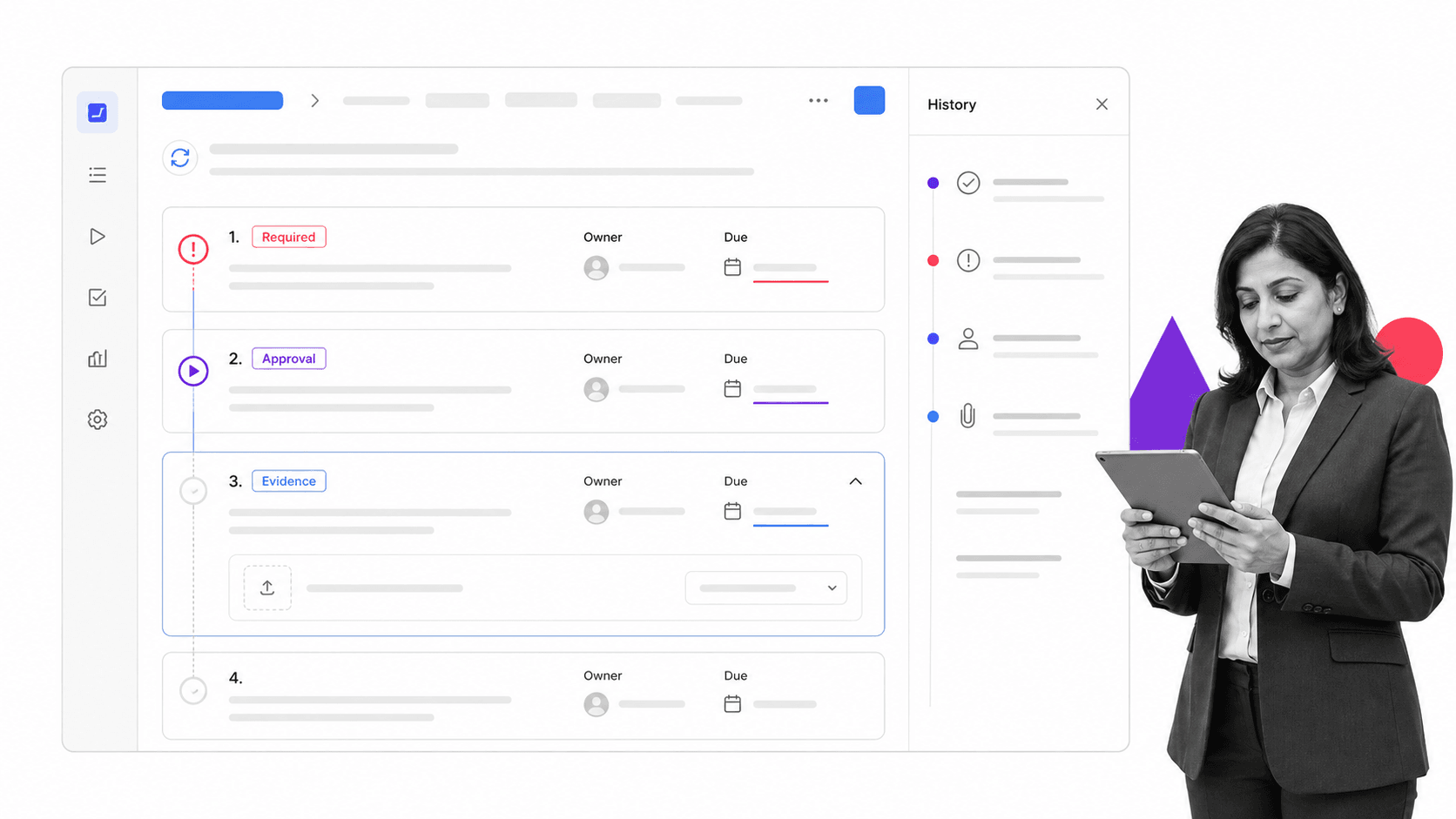
Best for: enforceable, trackable, recurring process and SOP workflows.
Process Street is the best overall Wrike alternative for teams whose core problem is not project visibility but process reliability. It turns an SOP into a guided workflow run where owners see the work in sequence, required fields capture the right information, approvals pause progress at the right point, conditional logic routes exceptions, due dates create accountability, and the history shows what happened. That structure is designed for recurring operations that must run correctly every time.
Wrike can model recurring projects through templates, blueprints, tasks, automation, and approvals. The distinction is the primary product experience. Wrike starts from collaborative work management and project structure. Process Street starts from the procedure itself. For employee onboarding, customer onboarding, vendor reviews, finance close, quality checks, incident follow-up, recurring compliance controls, and multi-team handoffs, a guided run can be easier for operators and easier to audit than a project workspace.
The ranking is conditional. Process Street is not a replacement for every Wrike capability. It is not the stronger choice for a PMO that primarily needs portfolio roadmaps, complex resource bookings, detailed budget forecasting, or broad visual project reporting. Asana, monday.com, Smartsheet, or Wrike itself may fit those jobs better. It is also not an engineering issue tracker, where Jira is the specialist, or a client-profitability platform, where Teamwork.com can fit more naturally.
Process Street is strongest when the cost of inconsistency is higher than the cost of administration. Required steps prevent silent omissions. Approval tasks keep review inside the workflow. Evidence fields keep artifacts tied to the run that produced them. Conditional routes adapt the procedure without asking operators to interpret a separate policy. Recurring schedules start work on time. Ownership and due dates make the current responsibility visible.
The integration story supports that operating model. Process Street has direct, universal integrations to 5,000+ systems. Need a new one? An AI agent builds it on the fly. The point is not to replace every system of record. It is to orchestrate the procedure across them while preserving human review, control, and proof where those matter.
Process Street key features
- Guided workflow runs with task owners, due dates, and recurring schedules.
- Required form fields, file collection, and evidence capture inside the run.
- Approval tasks that pause work until the designated reviewer decides.
- Conditional logic that routes the next steps from collected information.
- Activity history and run-level records for operational proof.
- Templates that standardize repeatable work across teams.
- Agentic integrations that connect the workflow to the wider stack.
Process Street pros
- Excellent fit for SOPs and recurring operations.
- Readable operator experience for non-technical teams.
- Strong enforcement through required fields, approvals, owners, and routing.
- Keeps procedure, execution, evidence, and history together.
- Useful across operations, HR, finance, compliance-adjacent, customer, and IT processes.
Process Street cons
- Not a full portfolio planning and resource forecasting suite.
- Not a software backlog and release management specialist.
- Not designed around client billing and project profitability.
Choose Process Street if: the workflow repeats, mistakes create risk, operators need a clear next step, approvals must be enforced, evidence must stay with the work, and leaders need to prove the procedure was followed.
Skip it if: the central need is a one-off project portfolio, engineering backlog, spreadsheet model, or client margin system rather than recurring process execution.
Process Street uses sales-led current packaging. Review Process Street pricing for current plan details, then start from the Process Street workflow you need to control rather than recreating every Wrike folder and custom field.
2. Asana
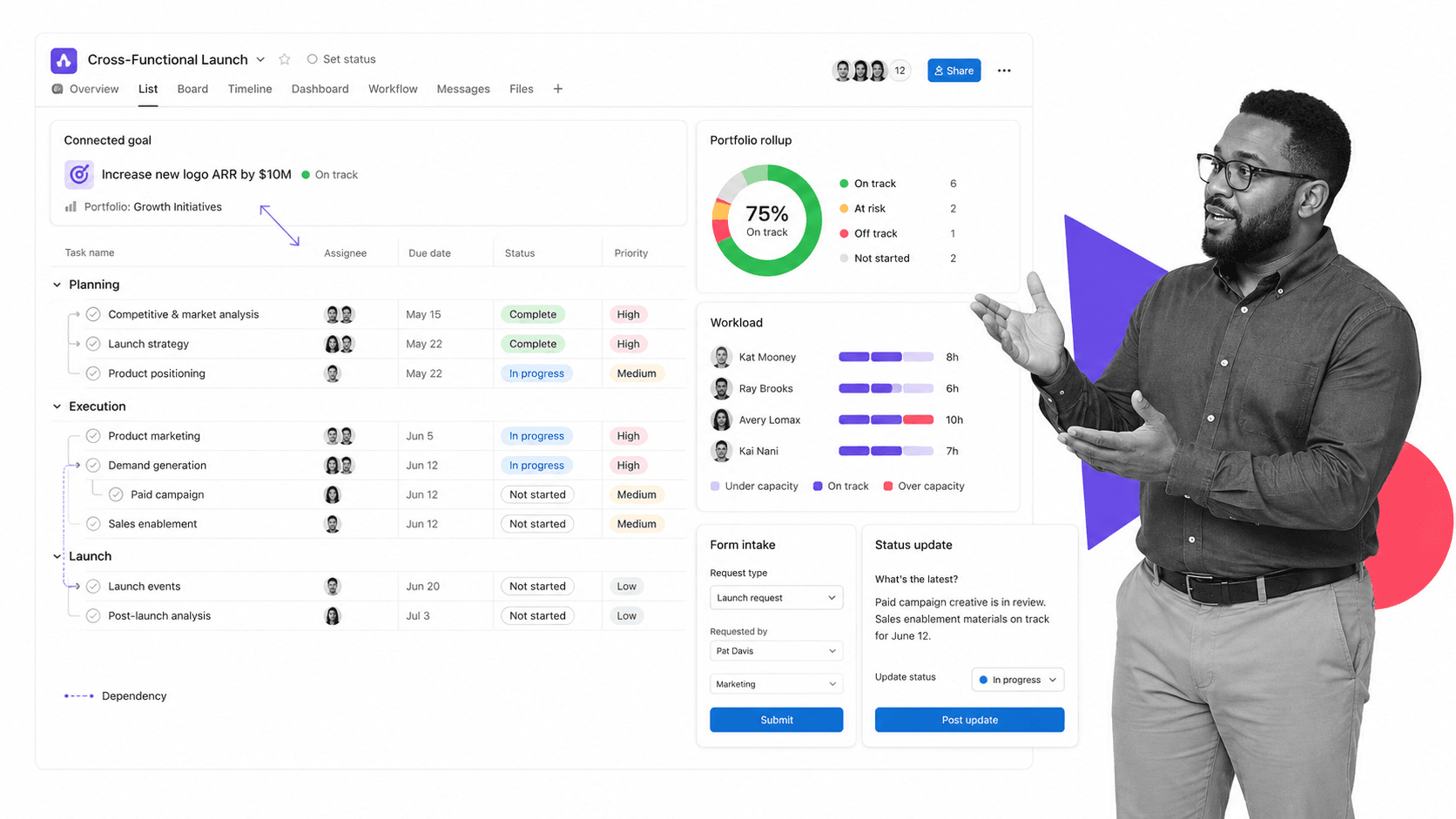
Best for: cross-functional projects connected to goals and portfolios.
Asana is a work management platform for coordinating projects, workflows, goals, portfolios, and resources across teams. Its official product page emphasizes cross-functional work, goal alignment, project tracking, workflow automation, and resource management. The structure is familiar to teams moving from Wrike because both products organize work through projects, tasks, ownership, dates, status, and multiple visual views.
Asana fits better than Process Street when the core requirement is connecting a broad portfolio of one-off and cross-functional projects to goals and executive reporting. Process Street fits better when the center of gravity is a recurring procedure that must guide operators through required steps, approvals, evidence, and exceptions. A migration from Wrike to Asana is usually a project-model decision, while a migration to Process Street is usually an execution-control decision.
Asana key features
- Projects with list, board, calendar, timeline, and Gantt views.
- Goals and portfolios that connect daily work to larger objectives.
- Forms, custom fields, templates, and workflow automations.
- Workload and capacity planning on higher plans.
- Reporting dashboards and structured status updates.
Asana pros
- Strong cross-functional project structure.
- Clear connection between projects, portfolios, and goals.
- Useful mix of task views, forms, automations, and reporting.
- A free Personal plan supports basic evaluation for up to two users.
Asana cons
- The free plan is intentionally limited for team collaboration.
- Flexible project tracking does not automatically enforce every procedural step or evidence requirement.
- Teams can still create inconsistent project patterns without governance.
Choose Asana if: portfolio visibility, goals, resource planning, and cross-functional project coordination are the primary buying criteria.
Skip it if: the failure you must prevent is a skipped SOP step, missing approval, absent evidence, or an exception that needs controlled routing.
Pricing model: Yes, for up to 2 users. Public paid entry: $10.99 per user/month billed annually. Confirm current packaging on the official Asana pricing page before migration.
Bottom line: Asana is the stronger specialist when your priority is cross-functional projects connected to goals and portfolios, while Process Street remains the better fit for enforceable recurring procedures with approvals, evidence, and run history.
3. monday.com
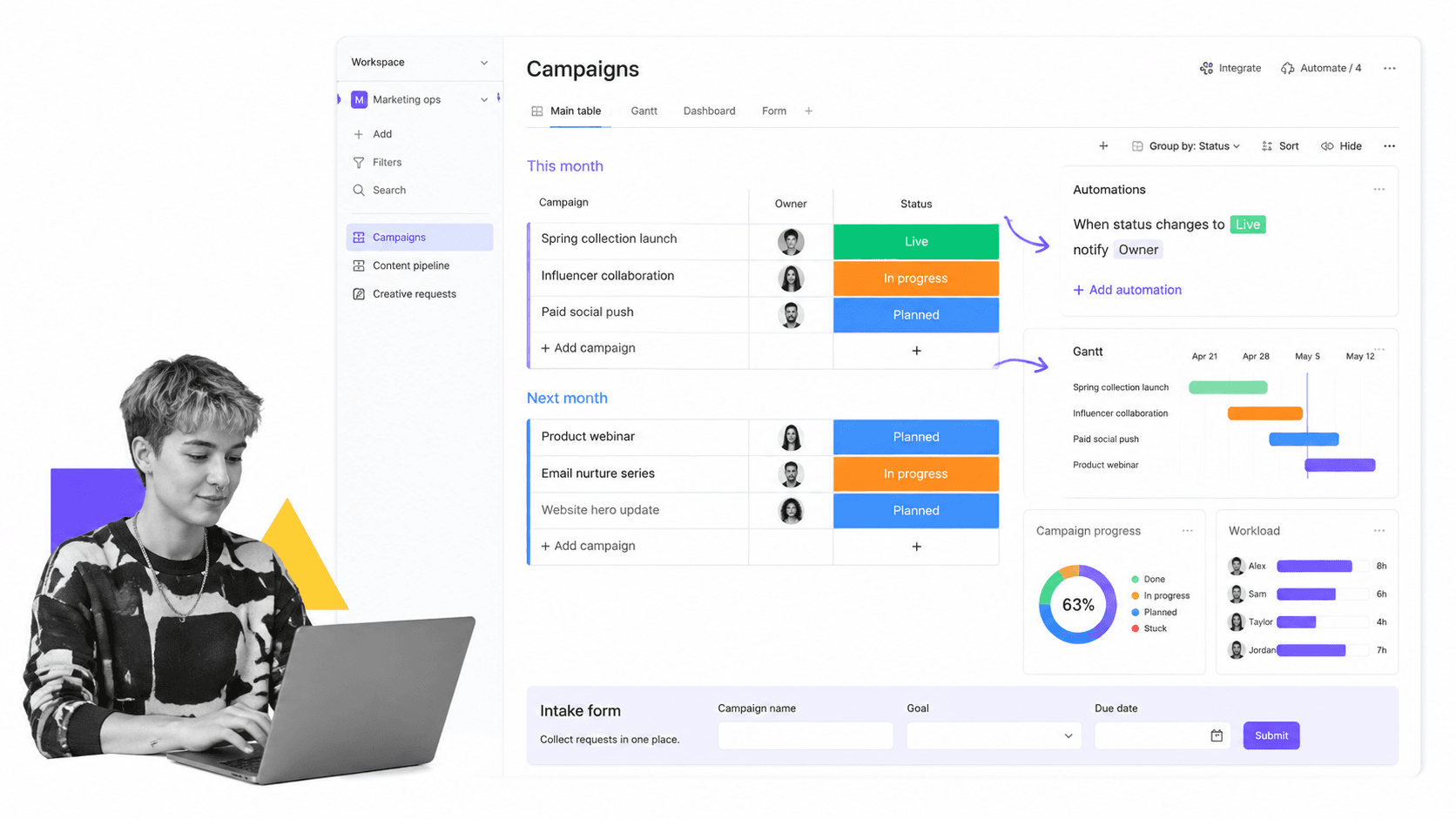
Best for: visual work management with configurable boards and dashboards.
monday.com is a visual work management platform built around configurable boards, columns, views, dashboards, forms, automations, and connected workflows. Its official pricing page offers a free plan for up to two seats, then paid tiers that add unlimited items, more views, workflows, automations, integrations, dashboards, and administration.
monday.com can be a better fit than Process Street when teams want a flexible visual canvas that can represent campaigns, projects, requests, client pipelines, and department work in the same board-oriented system. Process Street is stronger when the workflow should guide each run step by step and produce evidence that the procedure was followed. The tradeoff is visual flexibility versus process enforcement.
monday.com key features
- Configurable boards with owners, statuses, dates, and custom columns.
- Kanban, Gantt, calendar, dashboard, form, and document surfaces.
- Automations and workflows that connect changes across boards.
- Dashboards that aggregate information from multiple boards.
- AI capabilities offered through plan-specific credits and tools.
monday.com pros
- Highly visual and adaptable for many departments.
- Strong board and dashboard experience.
- Free plan gives very small teams a practical test environment.
- Useful for consolidating diverse work into one configurable surface.
monday.com cons
- Seat minimums and plan packaging need careful review.
- Too much local board customization can fragment operating standards.
- A board item is not the same thing as a guided, auditable workflow run.
Choose monday.com if: adoption depends on colorful boards, flexible columns, dashboards, and department-specific views.
Skip it if: every recurring run needs strict step order, required evidence, approval gates, and a defensible history by default.
Pricing model: Yes, for up to 2 seats. Public paid entry: From €9 per seat/month billed annually. Confirm current packaging on the official monday.com pricing page before migration.
Bottom line: monday.com is the stronger specialist when your priority is visual work management with configurable boards and dashboards, while Process Street remains the better fit for enforceable recurring procedures with approvals, evidence, and run history.
4. ClickUp
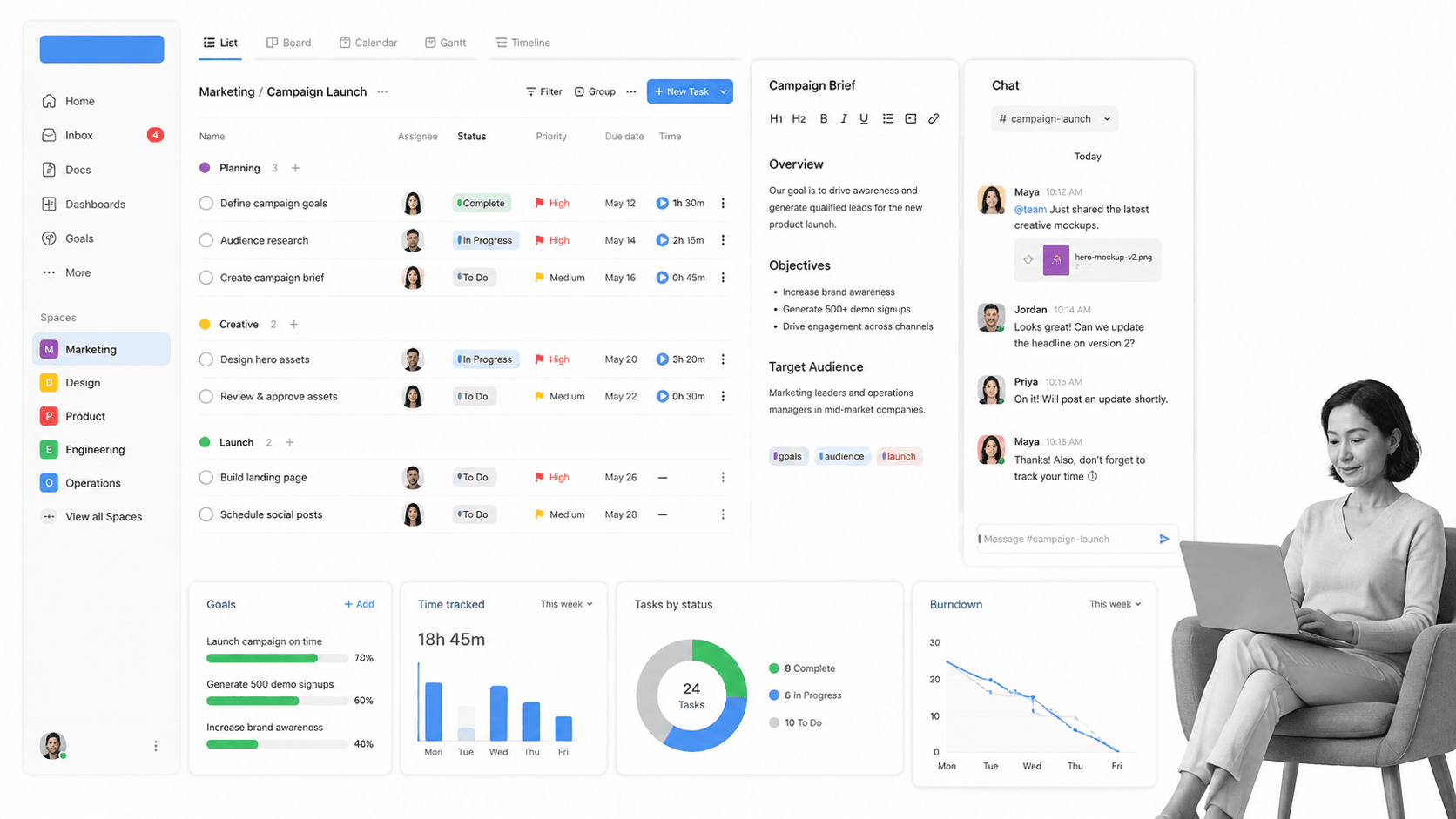
Best for: teams consolidating tasks, docs, chat, goals, and project views.
ClickUp combines task management, documents, chat, dashboards, goals, forms, time tracking, whiteboards, automation, and many project views in one workspace. The official features page highlights more than fifteen layouts, including List, Board, and Gantt, while the pricing page lists a Free Forever plan and a paid Unlimited tier with broader spaces, forms, Gantt charts, integrations, storage, custom fields, time tracking, goals, and resource management.
ClickUp fits better than Process Street when a team is trying to consolidate several productivity tools into one broad workspace. It gives managers many ways to model and view work. Process Street fits better when the goal is narrower and more operational: turn a repeatable procedure into a guided run with required fields, approvals, evidence, ownership, due dates, and a record of what happened.
ClickUp key features
- Tasks with List, Board, Gantt, Calendar, and other configurable views.
- Collaborative Docs, whiteboards, chat, dashboards, and goals.
- Native time tracking, custom fields, forms, and resource management.
- Automations and integrations that expand with paid plans.
- Free Forever plan with unlimited tasks and members, subject to feature limits.
ClickUp pros
- Broad feature coverage in one workspace.
- Competitive published entry pricing.
- Useful for teams that want tasks, docs, goals, time, and chat together.
- Many visual options for different working styles.
ClickUp cons
- Breadth can increase configuration and administration effort.
- Teams may struggle to define one canonical way of working.
- A multipurpose task workspace does not inherently guarantee procedural compliance.
Choose ClickUp if: tool consolidation and a wide range of task, document, communication, and planning surfaces matter most.
Skip it if: your main requirement is a focused operator experience that makes required process steps difficult to bypass.
Pricing model: Yes, Free Forever. Public paid entry: $7 per user/month billed annually. Confirm current packaging on the official ClickUp pricing page before migration.
Bottom line: ClickUp is the stronger specialist when your priority is teams consolidating tasks, docs, chat, goals, and project views, while Process Street remains the better fit for enforceable recurring procedures with approvals, evidence, and run history.
5. Smartsheet
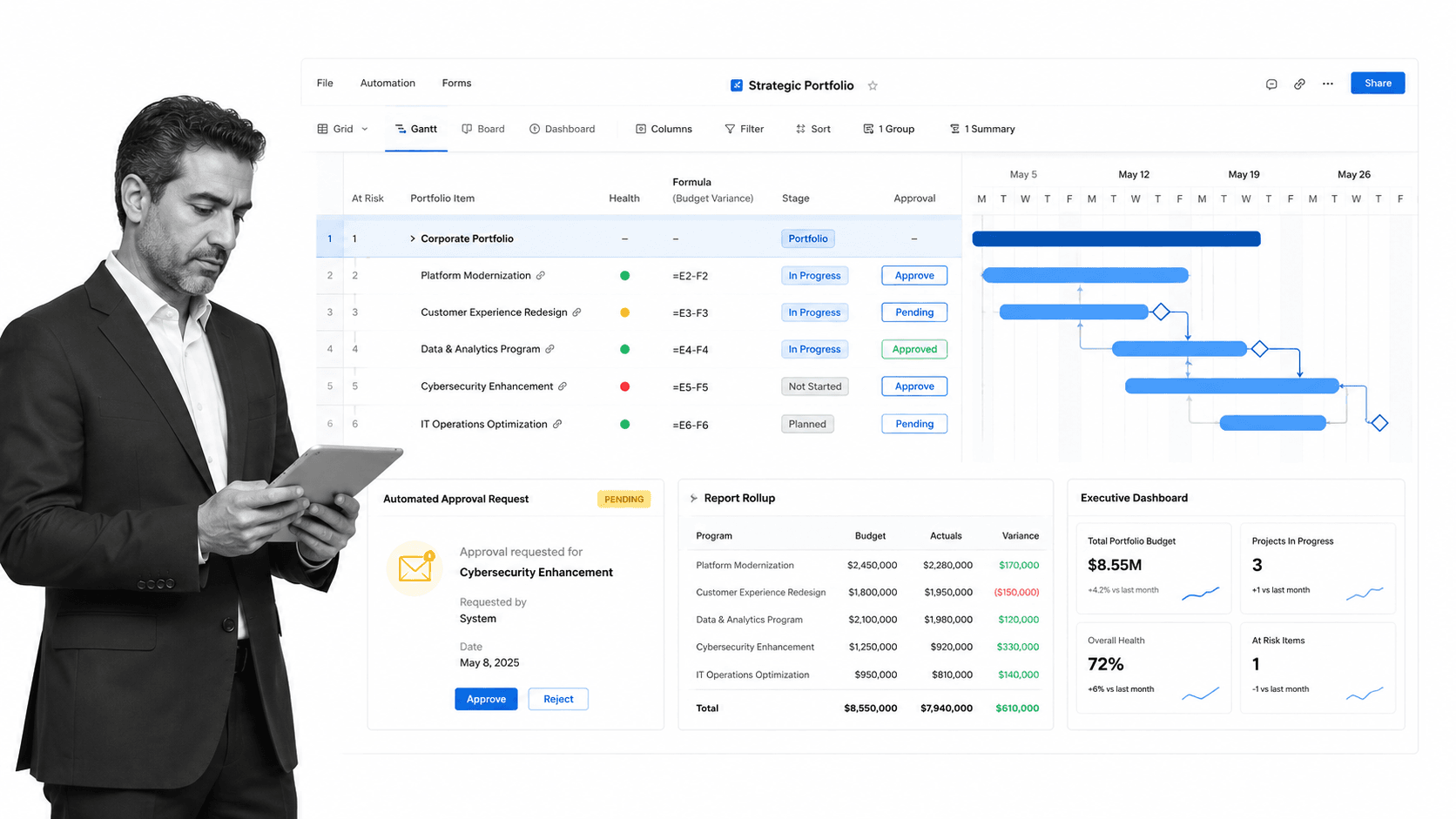
Best for: spreadsheet-oriented project, program, and portfolio management.
Smartsheet is an AI-enabled work management platform that uses grid and sheet structures to manage projects, programs, portfolios, requests, reports, dashboards, content, and automations. Its official product page highlights Timeline, Grid, Card, Gantt, and Calendar views, along with automated workflows, portfolio management, secure request management, dashboards, reporting, and resource management.
Smartsheet can beat Process Street when the operating model is fundamentally spreadsheet-oriented and leaders need formulas, row-level structure, cross-sheet reporting, portfolio rollups, and executive dashboards. Process Street is the better fit when frontline users should run a procedure through a guided checklist rather than interpret a grid. Both can automate work, but they put the human operator in a different primary surface.
Smartsheet key features
- Grid, table, board, Gantt, calendar, and timeline views.
- Forms, reports, dashboards, formulas, dependencies, and row history.
- Automated alerts, reminders, approvals, update requests, and row actions.
- Portfolio and advanced work management capabilities on higher plans.
- Resource management, content proofing, and integrations by plan.
Smartsheet pros
- Familiar mental model for spreadsheet-heavy organizations.
- Strong project and portfolio reporting.
- Flexible forms, formulas, dependencies, and dashboards.
- Useful for large structured datasets tied to programs and projects.
Smartsheet cons
- Grid-centric work can feel indirect for frontline procedure execution.
- Advanced portfolio capabilities may require higher plans or add-ons.
- Complex sheet systems need governance to avoid duplication and brittle logic.
Choose Smartsheet if: spreadsheet familiarity, formulas, portfolio rollups, and executive reporting are more important than a guided checklist experience.
Skip it if: operators need one clear next step, required evidence, controlled approvals, and a simple per-run record.
Pricing model: Free trial, no permanent free tier shown. Public paid entry: $9 per member/month billed yearly. Confirm current packaging on the official Smartsheet pricing page before migration.
Bottom line: Smartsheet is the stronger specialist when your priority is spreadsheet-oriented project, program, and portfolio management, while Process Street remains the better fit for enforceable recurring procedures with approvals, evidence, and run history.
6. Jira
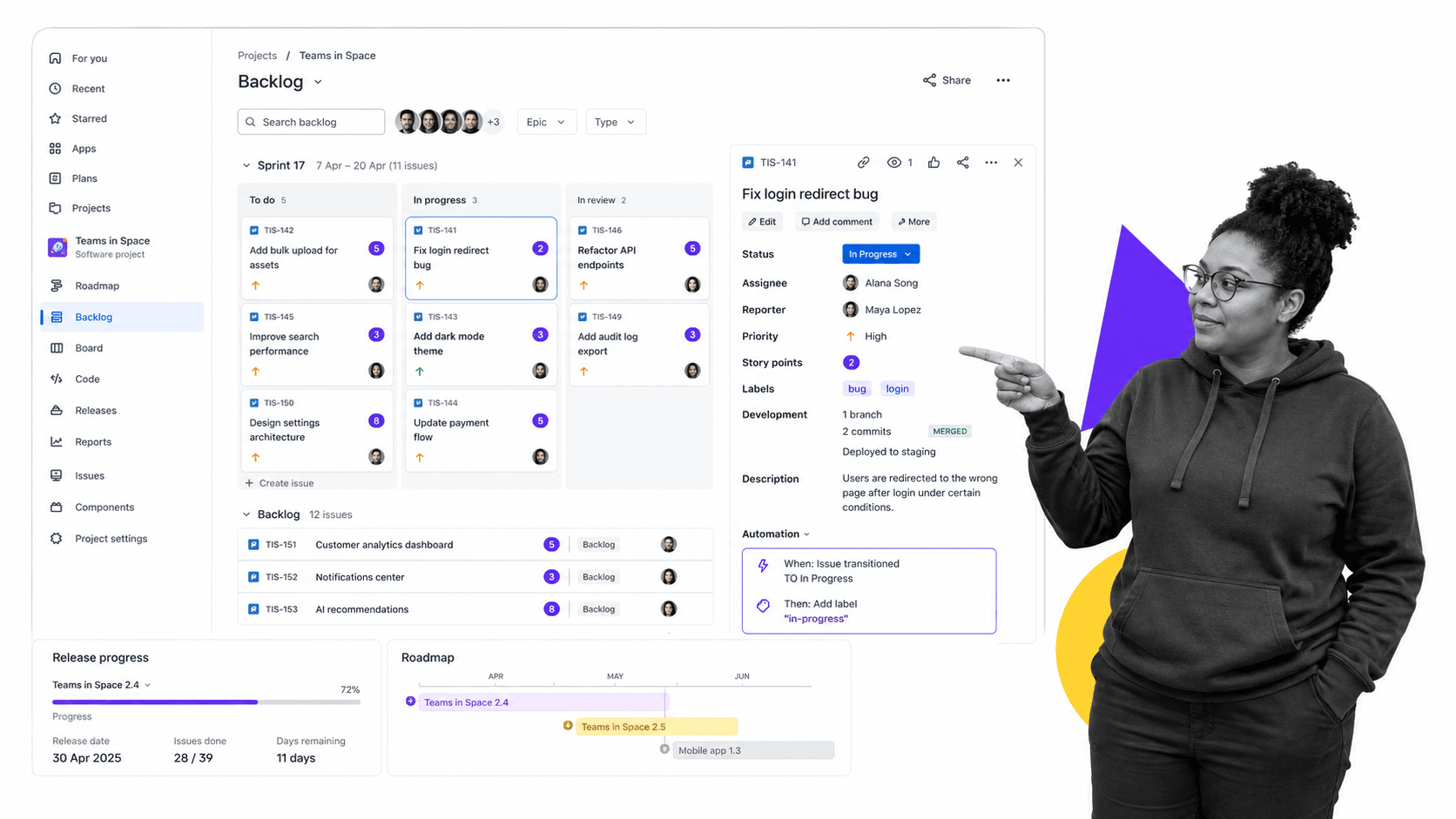
Best for: software teams using Scrum, Kanban, backlogs, and issue workflows.
Jira is Atlassian’s project and issue tracking platform, with a strong fit for software teams using Scrum, Kanban, backlogs, customizable workflows, roadmaps, dashboards, reports, and integrations. Atlassian’s current Cloud plan documentation describes a Free plan for up to ten users, with Standard, Premium, and Enterprise options for larger teams and stronger administration.
Jira beats Process Street when the work is engineering delivery: bugs, stories, epics, sprints, releases, development status, and technical dependencies. Process Street is usually easier for HR, finance, compliance, customer operations, and other business teams that need readable recurring procedures. The right answer can be both, with Jira owning engineering issues and Process Street owning cross-functional operating procedures around them.
Jira key features
- Scrum and Kanban boards with backlog management.
- Customizable issue types, fields, and workflows.
- Roadmaps, release progress, dashboards, and reporting.
- Automation rules and a large app marketplace.
- Free Cloud plan for small teams, with paid governance options.
Jira pros
- Excellent fit for engineering and product delivery.
- Deep issue and backlog structure.
- Flexible workflows and extensive extension ecosystem.
- Natural connection to the wider Atlassian toolset.
Jira cons
- Can feel technical and administratively heavy for business operators.
- Issue tracking language is not always intuitive for recurring SOPs.
- Advanced permissions, storage, support, and governance require paid plans.
Choose Jira if: software planning, backlog control, issue tracking, sprint delivery, and release coordination are central.
Skip it if: non-technical operators need a simple, guided procedure with forms, approvals, evidence, and recurring schedules.
Pricing model: Yes, for up to 10 users. Public paid entry: Paid pricing varies by user count. Confirm current packaging on the official Jira pricing page before migration.
Bottom line: Jira is the stronger specialist when your priority is software teams using Scrum, Kanban, backlogs, and issue workflows, while Process Street remains the better fit for enforceable recurring procedures with approvals, evidence, and run history.
7. Teamwork.com
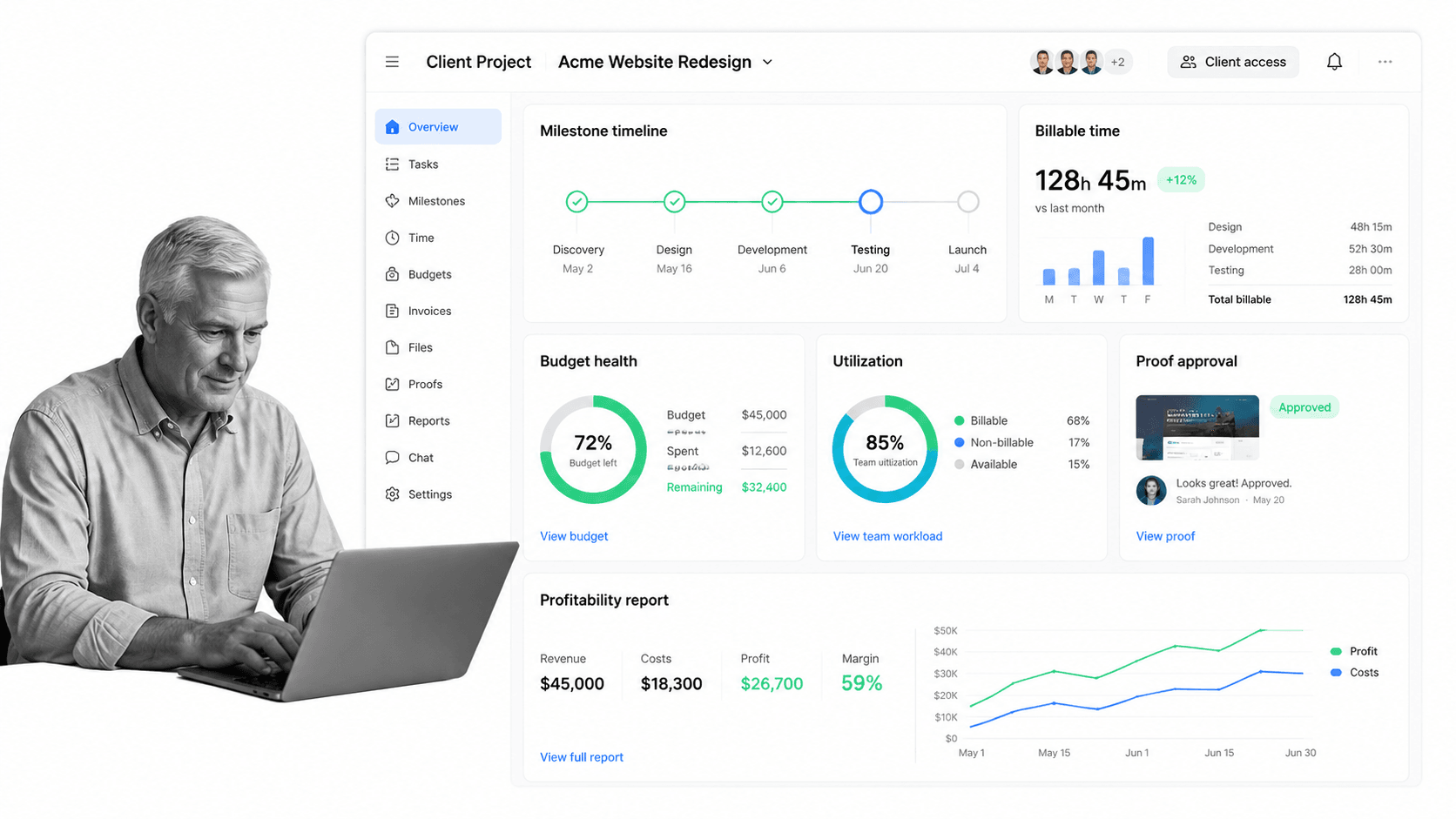
Best for: client-service teams tracking delivery, time, budgets, and profitability.
Teamwork.com is project management software built around client work. Its official product pages emphasize client projects, intake, resource planning, utilization, time tracking, budgets, profitability, proofs, forms, milestones, reporting, and integrations. The pricing page lists a limited free plan, a paid Basics plan, and higher tiers for more advanced delivery and reporting needs.
Teamwork.com fits better than Process Street when a service business needs to connect project delivery to clients, billable time, utilization, budgets, rates, and profitability. Process Street fits better when the work is an internal recurring process whose success depends on required steps and evidence, not on project margin. Agencies may use Teamwork.com for commercial delivery and Process Street for the standard operating procedures behind that delivery.
Teamwork.com key features
- Client projects with task lists, milestones, files, comments, and permissions.
- Native time tracking, rates, budgets, and profitability views.
- Resource capacity, utilization, forecasting, and project health.
- Proofs, forms, automations, and client reporting.
- List, board, table, timeline, Gantt, and client views.
Teamwork.com pros
- Strong client-service and agency orientation.
- Connects project work to billable time and profitability.
- Useful resource planning and utilization surfaces.
- Client access and proofing support external collaboration.
Teamwork.com cons
- Commercial delivery features add little value to purely internal SOPs.
- The strongest capabilities may require paid tiers.
- Client project structure is not a substitute for enforced procedure runs.
Choose Teamwork.com if: client delivery, billable utilization, budget control, proofs, and profitability are the core buying reasons.
Skip it if: the work is primarily internal, recurring, compliance-adjacent, and measured by whether every required step happened.
Pricing model: Yes, limited free plan. Public paid entry: $9.99 per user/month billed yearly. Confirm current packaging on the official Teamwork.com pricing page before migration.
Bottom line: Teamwork.com is the stronger specialist when your priority is client-service teams tracking delivery, time, budgets, and profitability, while Process Street remains the better fit for enforceable recurring procedures with approvals, evidence, and run history.
8. Trello
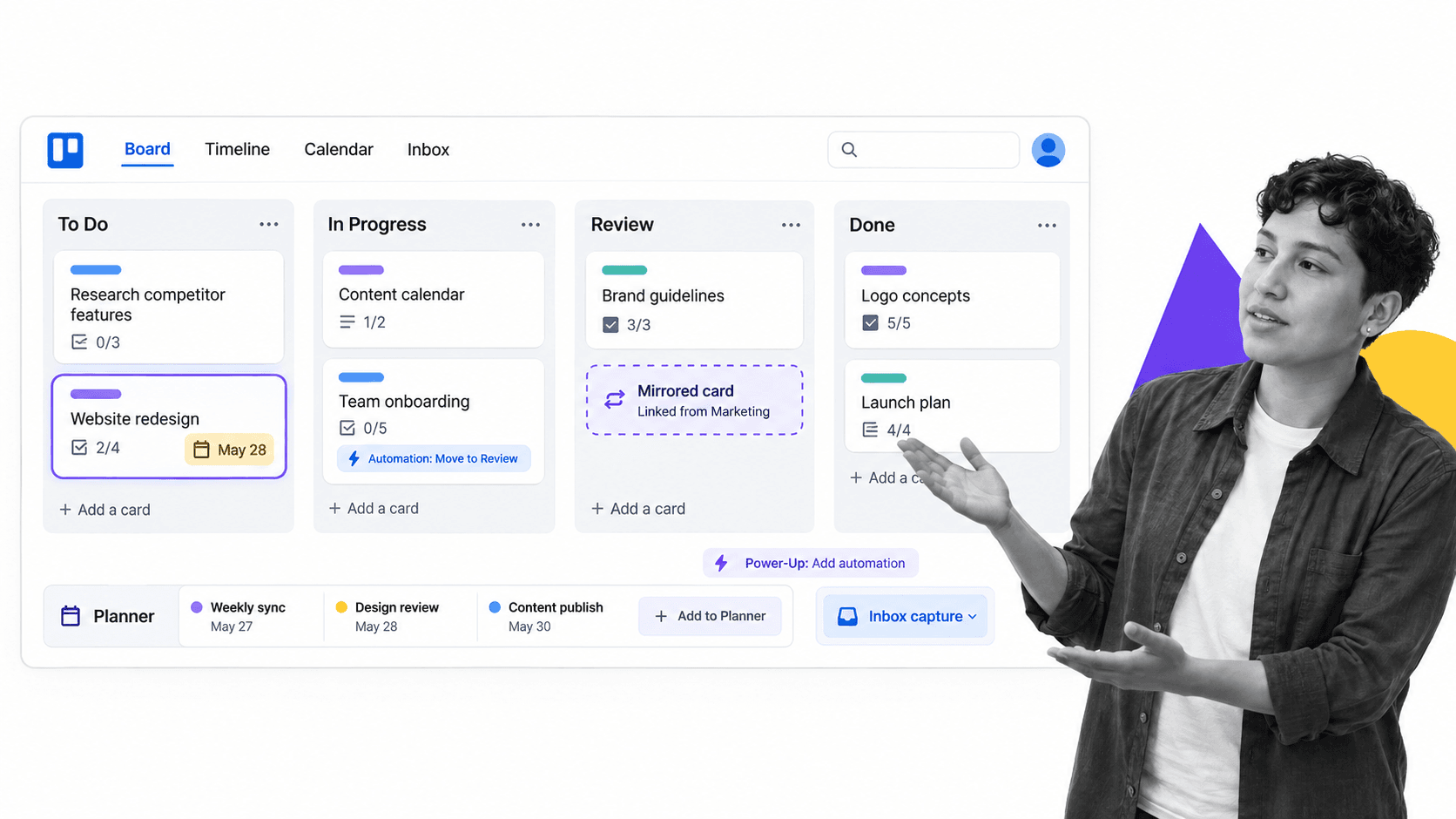
Best for: simple Kanban planning and lightweight team coordination.
Trello is a Kanban-first work organizer built around boards, lists, cards, checklists, assignees, due dates, Inbox capture, Planner, automation, Power-Ups, and optional project views. Its current pricing page lists a Free plan for up to ten collaborators per Workspace and a Standard plan that adds unlimited boards, more automation, card mirroring, custom fields, and other controls.
Trello beats Process Street when the team wants the simplest possible visual board and does not need much process governance. A card can move from To do to Doing to Done with almost no setup. Process Street is the stronger option when a recurring procedure needs required fields, approvals, branching, evidence, scheduling, and a complete history. Trello optimizes for lightweight coordination, while Process Street optimizes for dependable execution.
Trello key features
- Boards, lists, cards, labels, assignees, and due dates.
- Card checklists, custom fields, mirroring, and attachments by plan.
- Built-in no-code automation on every board.
- Power-Ups and integrations for connected tools.
- Timeline, Table, Calendar, Dashboard, Map, and Workspace views on higher plans.
Trello pros
- Very fast to understand and adopt.
- Strong visual clarity for simple work.
- Useful free plan for small teams.
- Low published starting price for paid collaboration features.
Trello cons
- Boards can become crowded as process complexity grows.
- Limited native enforcement compared with a dedicated process platform.
- Portfolio, reporting, and advanced views require higher plans.
Choose Trello if: a lightweight board, cards, checklists, and simple automation are enough to keep work moving.
Skip it if: the team needs governed recurring workflows, audit evidence, approval gates, or cross-run reporting.
Pricing model: Yes, for up to 10 collaborators per Workspace. Public paid entry: $5 per user/month billed annually. Confirm current packaging on the official Trello pricing page before migration.
Bottom line: Trello is the stronger specialist when your priority is simple Kanban planning and lightweight team coordination, while Process Street remains the better fit for enforceable recurring procedures with approvals, evidence, and run history.
Which Wrike alternative fits your use case?
The best Wrike alternative is the one whose default object matches the work. Process Street defaults to a workflow run. Asana defaults to coordinated projects and portfolios. monday.com defaults to a configurable board. ClickUp defaults to a broad productivity workspace. Smartsheet defaults to a grid. Jira defaults to an issue and backlog. Teamwork.com defaults to a client project. Trello defaults to a card on a board.
- Choose Process Street for recurring SOPs, onboarding, reviews, approvals, evidence collection, and operational controls.
- Choose Asana for cross-functional projects tied to portfolios, goals, status, and workload.
- Choose monday.com for visual, configurable department boards and dashboards.
- Choose ClickUp when consolidating tasks, docs, chat, goals, time, and views matters most.
- Choose Smartsheet when formulas, grids, cross-sheet reports, and portfolio rollups are central.
- Choose Jira for software backlogs, sprints, issues, roadmaps, and releases.
- Choose Teamwork.com for client delivery, billable time, utilization, budgets, and profitability.
- Choose Trello for lightweight Kanban work with minimal administration.
A hybrid stack is often more honest than a forced one-tool decision. Engineering can keep Jira while company-wide procedures run in Process Street. A PMO can use Smartsheet for portfolio reporting while approval workflows run in a controlled process. A client-services team can use Teamwork.com for delivery economics and Process Street for the standard operating procedures behind onboarding, quality review, and project closeout.
If your buying question still feels broad, map it against workflow automation software, automated workflow tools, and the broader process platform category. The goal is to reduce ambiguity before product demos, not after implementation.
How to plan a Wrike migration
A Wrike migration should preserve business meaning, not duplicate every field. Start with an inventory of spaces, folders, projects, blueprints, request forms, custom item types, workflows, approval rules, automations, dashboards, reports, permissions, integrations, and active work. Mark each item as required, replaceable, redundant, or obsolete. Only required items belong in the first migration wave.
- Define the target operating model: procedure, project, board, grid, backlog, client project, or simple task flow.
- Map Wrike owners, statuses, dates, custom fields, dependencies, approvals, and request forms to the target system.
- Separate active work from historical records and define the retention requirement for each.
- Rebuild one representative workflow before bulk migration, including exceptions and permissions.
- Run both systems for a short controlled period with clear ownership and a fixed cutover date.
- Test reporting, notifications, integrations, exports, and audit evidence with real users.
- Train operators on the new default behavior, not merely the location of old fields.
- Close or archive the old workspace only after the new process is producing trustworthy records.
For recurring operations, use a concrete project management process template as a mapping exercise, then extend it into the real procedure. For customer-facing work, test the handoffs in a full customer onboarding process. The hardest migration defects usually appear at ownership changes, approval gates, exception branches, and reporting boundaries.
Wrike alternatives FAQs
What is the best Wrike alternative?
Process Street is the best Wrike alternative for enforceable, trackable, recurring process and SOP workflows. Asana is stronger for cross-functional projects and portfolios, monday.com for visual boards, ClickUp for workspace consolidation, Smartsheet for grid-based programs, Jira for engineering, Teamwork.com for client delivery, and Trello for simple Kanban work.
Is there a free Wrike alternative?
Yes. Asana, monday.com, ClickUp, Jira, Teamwork.com, and Trello publish free plans, although limits differ by users, boards, projects, storage, permissions, or features. Process Street does not list a permanent public free plan. Always check the current vendor pricing page before deciding.
What is the cheapest paid Wrike alternative?
Among the public prices verified for this comparison, Trello Standard starts at $5 per user per month billed annually and ClickUp Unlimited starts at $7. monday.com shows regional pricing from €9 per seat per month billed annually. The cheapest viable option still depends on seat minimums and required features.
What is the closest alternative to Wrike?
Asana is one of the closest broad alternatives for cross-functional projects, portfolios, workload, goals, forms, and reporting. monday.com, ClickUp, and Smartsheet are also close in different ways. Process Street is closer when the part of Wrike you want to replace is recurring workflow execution.
Which Wrike alternative is best for small teams?
Trello works well for simple boards, ClickUp offers a broad free workspace, and monday.com or Asana can fit very small teams within their free-plan limits. Process Street is the stronger small-team choice when even a small operation needs dependable recurring procedures and approvals.
Which Wrike alternative is best for enterprise teams?
The answer depends on the enterprise operating model. Asana and Smartsheet fit broad portfolio coordination, Jira fits large software organizations, and Process Street fits governed recurring procedures. monday.com and ClickUp also offer enterprise administration, while Teamwork.com is specialized for client-service operations.
Is there an open source alternative to Wrike?
This ranking focuses on hosted products with current first-party product and pricing documentation, so it does not rank an open source option. Teams requiring self-hosting should add deployment model, update ownership, security maintenance, support, and migration tooling to their evaluation criteria.
Why is Process Street ranked first among Wrike alternatives?
Process Street ranks first for the specific audience this comparison prioritizes: teams that need enforceable, trackable, recurring processes and SOPs. It is not claimed as the best tool for every use case. Jira is better for software backlogs, Teamwork.com for client profitability, and Smartsheet for spreadsheet-style portfolio control.
Final verdict
Wrike is broad enough that no replacement should be chosen from a generic feature checklist. Decide what your team is really managing, then choose the product whose default surface matches that work. Process Street is the first choice when recurring procedures must be followed, tracked, approved, evidenced, and improved. The other seven alternatives are stronger when the job is primarily project portfolios, visual boards, all-in-one productivity, spreadsheet control, engineering delivery, client profitability, or lightweight Kanban coordination.
Before signing a contract, run the same representative workflow in two finalists. Include a normal case, an exception, a late approval, a reassignment, and the report a manager needs afterward. Ask operators to complete the work without coaching, then compare setup effort, execution clarity, evidence quality, and administrative overhead. A short realistic trial reveals more than a long feature checklist because it tests the behavior your team must repeat after migration.
If missed steps, inconsistent execution, and weak proof are the real reasons you are leaving Wrike, start with Process Street. Build one high-risk recurring workflow, test it with the people who perform the work, and compare the resulting control and clarity against your current Wrike process before expanding.
Comparing something else? The full directory of software alternatives and competitor comparisons covers AI agents, workflow and BPM platforms, integration tools, and more.
