


Turn every policy into automated workflows with built-in enforcement and audit-ready proof.



Onboarding App

An onboarding app is software that guides a new employee, user, or customer through the steps that turn a fresh signup into real, repeatable value. It combines a guided flow, clear tasks, reminders, and progress tracking so the right person completes the right actions in the right order, without depending on someone remembering every step.
The label covers a wide range of products. Some onboarding apps welcome new hires and coordinate HR, IT, and manager tasks. Others walk a new software user toward a first meaningful action, and others guide a new customer through setup, training, and activation. The common thread is the same: a structured, trackable path replaces a scattered mix of email, spreadsheets, and memory.
A good onboarding app is more than a welcome screen. It needs intake, guided steps, ownership, reminders, conditional paths for different roles, and a record of what happened. That is why the idea fits teams building an operating layer on Process Street: the value is not just showing the steps, it is making the steps run correctly every time.
In this guide, you will learn:
- What is an onboarding app?
- Types of onboarding apps
- Core features of an onboarding app
- An onboarding app vs. a manual checklist
- How to choose an onboarding app
- How to roll out an onboarding app
- Onboarding app metrics that matter
- Common onboarding app mistakes to avoid
- Run onboarding with Process Street
- Onboarding app FAQs
What is an onboarding app?
An onboarding app is a tool that structures and guides the first stretch of a relationship, whether that relationship is with a new hire, a new user, or a new customer. Instead of leaving people to figure out what to do next, the app presents a clear sequence, assigns responsibility, and shows progress toward a first success milestone.
A direct definition
Think of an onboarding app as a guided path plus an operating system. The path shows the newcomer what to do and why it matters. The operating system underneath assigns tasks, routes exceptions, and records completion. Screens, checklists, messages, and reminders are mechanisms. The app is the coordinated experience they create together.
The job it does
The job of an onboarding app is to shorten the distance between arrival and value. For a new employee, value might be a productive first week. For a new user, it might be the first time the product solves a real problem. Practical user onboarding recognizes that two people who sign up on the same day may need different guidance because their goals are different.
More than a welcome tour
A tour can point out where things are, but navigation is rarely the outcome someone signed up for. Appcues frames effective onboarding around helping people reach value rather than pushing them through a feature tour. A useful onboarding app connects each guided step to a real result, such as inviting a teammate, completing a required form, importing data, or finishing a first task.
Types of onboarding apps
Onboarding apps cluster into a few types based on who they welcome. The mechanics overlap, but the goals, owners, and success milestones differ. Naming the type keeps teams from optimizing one journey while assuming another team owns the rest.
Employee onboarding apps
An employee onboarding app coordinates the tasks that make a new hire productive and compliant: paperwork, equipment, access, introductions, and early training. Guidance from SHRM on employee onboarding stresses that a structured first experience improves retention and speed to productivity. Many teams start from an employee onboarding checklist and then add ownership, routing, and reminders.
User onboarding apps
A user onboarding app guides a new software user toward a first valuable action. It uses checklists, contextual prompts, empty states, and progress cues inside or alongside the product. Nielsen Norman Group research on mobile app onboarding is a useful reminder that shorter, benefit-led guidance beats long instructional walls that people skip.
Customer onboarding apps
A customer onboarding app coordinates the account-level journey: kickoff, setup, data migration, training, and activation. It often spans several teams and systems, so it needs clear ownership and handoffs. A customer onboarding process template gives teams a baseline they can adapt to each segment.
Where the types meet
The types meet at shared milestones and shared data. A new employee cannot start until access is granted, and a new customer cannot activate until an administrator approves setup. A broader digital onboarding strategy connects those dependencies so guidance, identity, and account requirements move together instead of living in separate tools.
Core features of an onboarding app
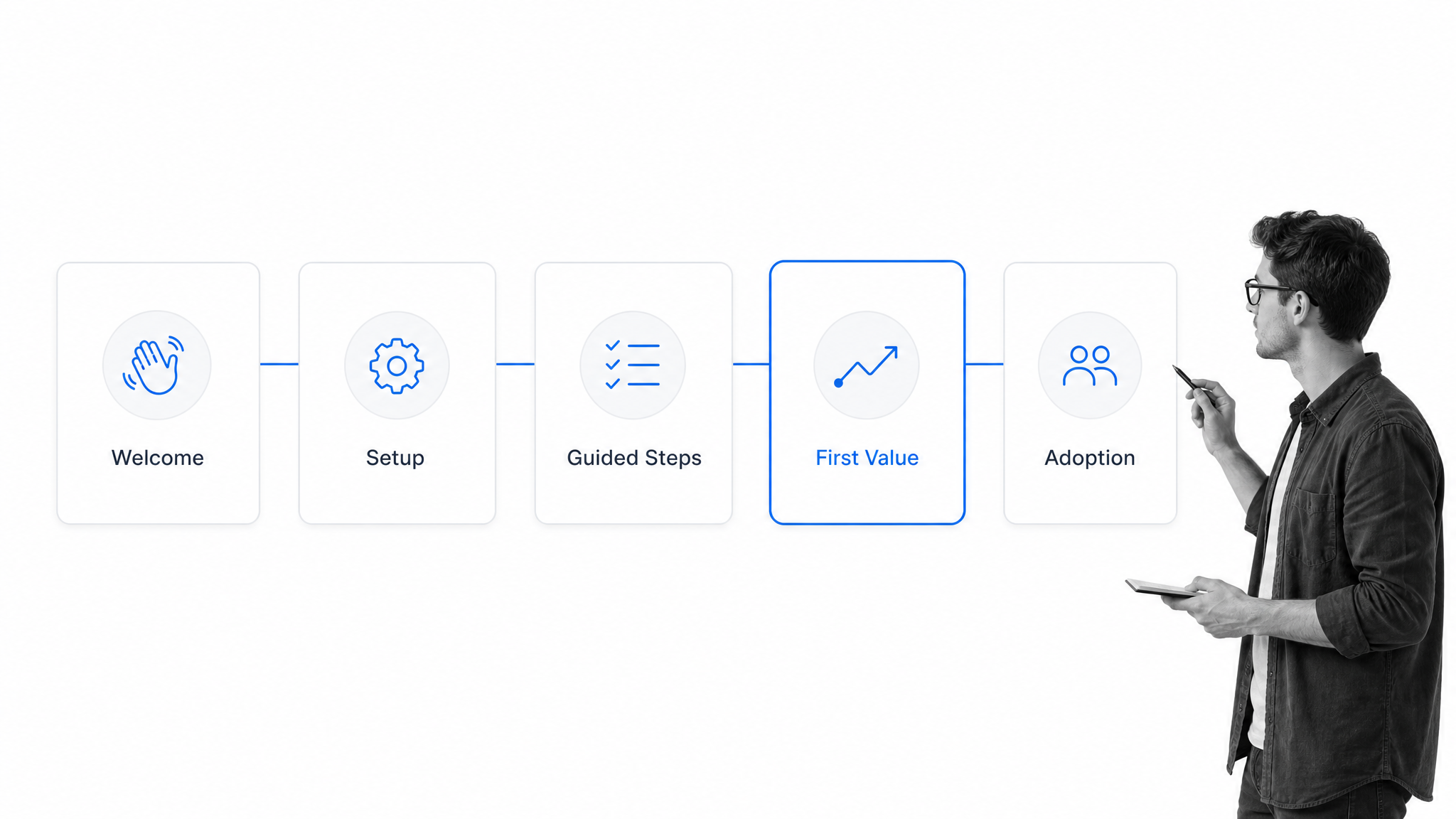
The exact interface varies, but strong onboarding apps share a set of features that make the path clear, measurable, and maintainable. Missing one usually shows up later as confusion, stalled progress, or work that quietly falls through the cracks.
A guided, sequenced flow
The core feature is a guided flow that presents steps in a sensible order. Understanding what a workflow is helps here, because a good onboarding app depends on the structured movement of work rather than loose coordination. Each step should have an entry point, a clear action, and a completion signal.
Task ownership and assignment
Guidance without ownership stalls. Every task needs an owner, whether that is the newcomer, a manager, an IT admin, or a success contact. Clear assignment turns a vague expectation into accountable work and prevents the common failure where everyone assumes someone else will handle a step.
Conditional paths
New people differ by role, plan, region, and risk. A remote hire needs different equipment steps than an office hire, and an enterprise customer needs approvals a self-serve user does not. Conditional paths keep simple cases fast while revealing the extra checks complex cases require, which is a hallmark of mature onboarding workflow software.
Reminders and automation
Onboarding involves timing. Access must be ready on day one, training should happen in the first week, and follow-up should not depend on someone remembering. Reminders, due dates, and automated handoffs keep the path moving without constant manual chasing.
Progress tracking and records
A newcomer wants to know how far they have come, and a manager wants to see where things stand. Progress indicators, status views, and a record of completed steps give both. When onboarding supports compliance or security, that record also becomes proof that the required steps actually happened.
An onboarding app vs. a manual checklist
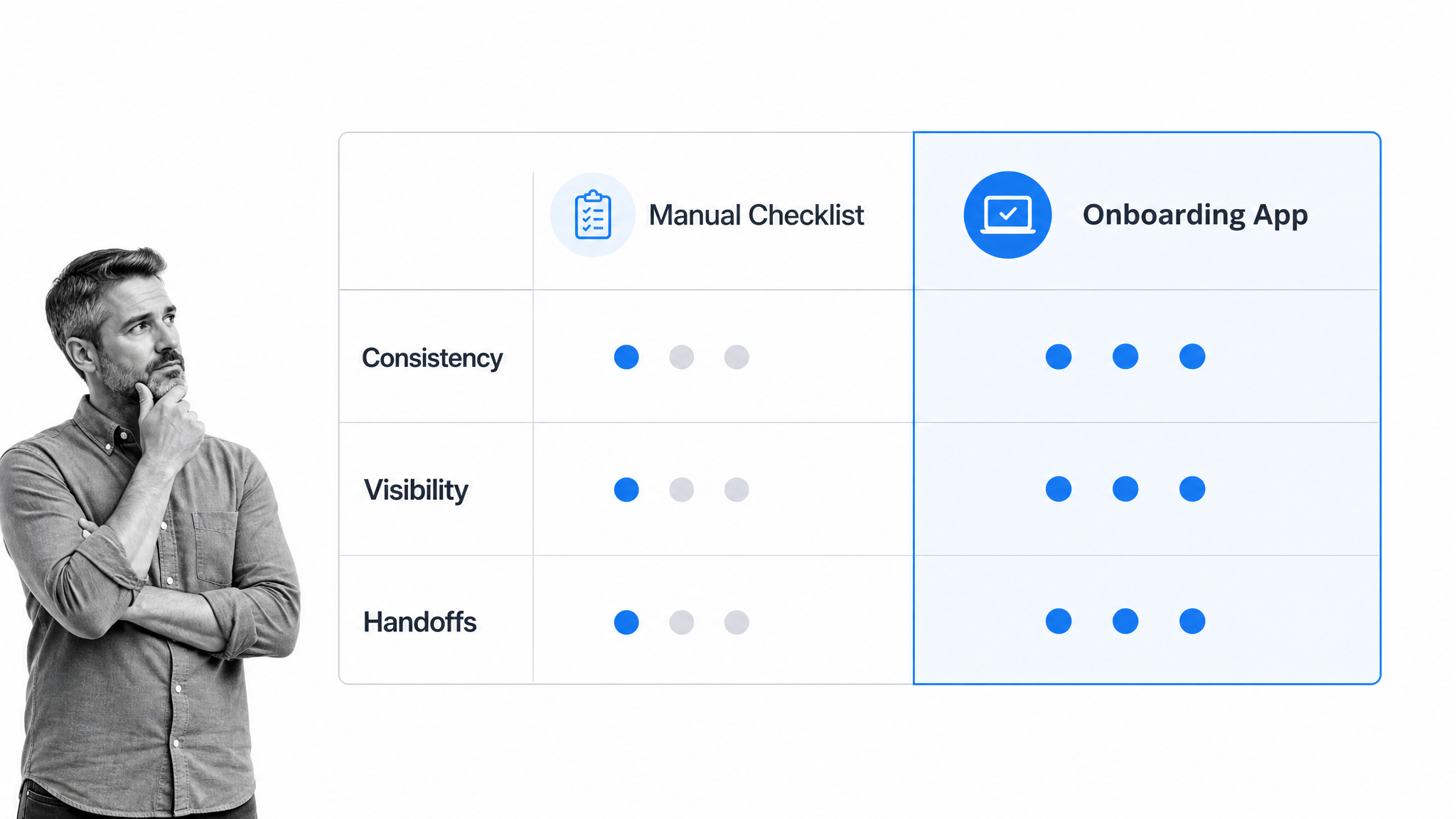
Many teams start onboarding with a document or spreadsheet checklist. That is a reasonable first step, but a static checklist and an onboarding app behave very differently as volume grows and more people get involved.
Consistency
A manual checklist depends on each person following it the same way. An onboarding app makes the standard path the default, so every new hire or customer gets the same baseline experience while exceptions are handled deliberately rather than improvised.
Visibility
With a manual checklist, status lives in someone’s head or a stale cell in a spreadsheet. An onboarding app shows real-time progress, overdue steps, and blockers. A workflow management system gives leaders that view without chasing updates across email and chat.
Handoffs
Onboarding almost always crosses teams. A checklist rarely says who is next or carries context to them. An onboarding app routes the work, notifies the right owner, and brings the relevant information along, so people do not repeat themselves at every boundary.
Recovery when steps break
Real onboarding hits snags: missing paperwork, a failed access request, a delayed approval. A static checklist stays silent. A good app surfaces the stuck step, routes it for help, and keeps the record intact so nothing is lost when a task needs manual attention.
How to choose an onboarding app
Choosing an onboarding app starts with the outcome, not the feature list. Define who the app serves, what a successful first experience looks like, and how the app will handle variation. Then evaluate options against that definition.
Start with your onboarding goal
Decide which journey you are improving first: new hires, new users, or new customers. Write down the milestone that signals success and the handful of steps that lead to it. A tool that fits an employee journey may not fit a product-led user journey, so match the app to the goal you can measure.
Check the fit for your process
Look for an app that can model your real path, including conditional branches, required inputs, approvals, and recurring runs. If the tool forces every case down one rigid path, it will either overwhelm simple users or underserve complex ones. Teams comparing options often review onboarding management tools against these criteria before committing.
Evaluate integrations and automation
Onboarding touches many systems: HR records, identity and access, email, and the product itself. Favor an app that can trigger work from those systems and pass context back to them, which is where business process automation software and reliable integrations matter. The goal is fewer manual handoffs and less copy-paste.
Weigh accessibility and ease of use
The app should be easy for a nervous newcomer on day one. Clear labels, plain language, sensible defaults, and accessible forms reduce friction. The W3C forms tutorial offers practical accessibility patterns that help everyone, not only users with a disclosed disability.
Confirm reporting and proof
Finally, make sure the app reports what you need to improve: completion rates, time to milestone, drop-off points, and a record of who did what. If onboarding carries compliance or security weight, that evidence is part of the product, not a nice-to-have.
How to roll out an onboarding app
Rolling out an onboarding app is a change project, not just a software install. The tool only helps if people adopt it and the process behind it is sound. A staged rollout keeps risk low and builds momentum.
Step 1: Map the current journey
Document how onboarding actually happens today, including the trigger, the steps, the owners, the systems, and the points where things stall. Map reality first, then improve it. A messy current process copied into an app is still a messy process.
Step 2: Design the standard path
Define the normal route clearly enough for a new team member to follow: tasks, owners, due dates, required fields, and the success milestone. Keep it specific. For customer journeys, a new customer onboarding checklist can provide a baseline to adapt rather than starting from a blank page.
Step 3: Add conditional branches
Identify the handful of variations that truly change the path, such as role, location, plan, or risk level. Build those branches deliberately so the standard path stays simple and the exceptions still get the right steps. Avoid branching for differences that do not change the work.
Step 4: Automate the handoffs
Connect the app to the systems that start and finish onboarding work. Assign tasks automatically, send reminders automatically, and pass context between teams automatically. Automation is what makes the app feel reliable instead of like another place to check.
Step 5: Pilot, measure, and expand
Start with one journey and a small group. Watch where people hesitate, not just where they fail. Read the completion data and the feedback, fix the weak steps, then expand to more roles or segments. Iteration should test a defined change, not simply add more prompts.
Onboarding app metrics that matter
Onboarding app metrics should connect the quality of the experience to a real outcome. The Mixpanel view of successful onboarding is a useful reminder to track behavior that leads to value, not just clicks. No single number tells the whole story, so combine a few.
Time to first value
Time to first value measures how long it takes a new person to reach the milestone that matters. Use medians and distributions rather than a single average, and separate active work from waiting, so you can tell whether delays come from confusing steps, missing inputs, or slow approvals.
Completion and drop-off
Track entry, completion, and abandonment at each step. A high drop-off at one step usually means it is unclear, unnecessary, or technically broken. Reviewing drop-off by role or segment shows whether the standard path fits everyone or needs a branch.
Activation and early adoption
Completing steps is not the same as getting value, so pair completion with an activation signal and early adoption of the capabilities that matter. Data from customer success software can connect onboarding progress to retention and account health without treating a finished checklist as the final outcome.
Qualitative feedback
Ask new people what they expected, what felt hard, and whether the result matched their goal. Combine short surveys, open comments, and support themes, and tag each note to a specific step so it can inform a precise change rather than a vague sense that onboarding needs work.
Common onboarding app mistakes to avoid
Most onboarding app problems come from treating the tool as the whole solution while neglecting the process, the ownership, or the definition of success. Watch for these patterns.
Teaching everything at once
A long guided tour creates exposure, not competence. Introduce features and steps when they help the newcomer reach a goal, and keep advanced material discoverable for later. The best onboarding path is usually shorter than the team first expects.
Forcing one path on everyone
A single path either overwhelms simple cases or underserves complex ones. Branch only where needs truly differ, and make sure the branch creates real work, not just a different message. If the app promises a tailored path but no task changes, the branch is cosmetic.
Measuring completion instead of value
Checklist completion is useful process data, but it is not proof of value. Pair completion with an activation event and a check that the person understood the outcome. Confirm that the milestone actually predicts later success instead of assuming it does.
Leaving ownership unclear
Newcomers experience the company as one thing, so internal ambiguity becomes their delay. Assign every task and handoff to a clear owner with a due date and an escalation route. Ownership should follow the person’s state, not depend on someone noticing an email.
Run onboarding with Process Street
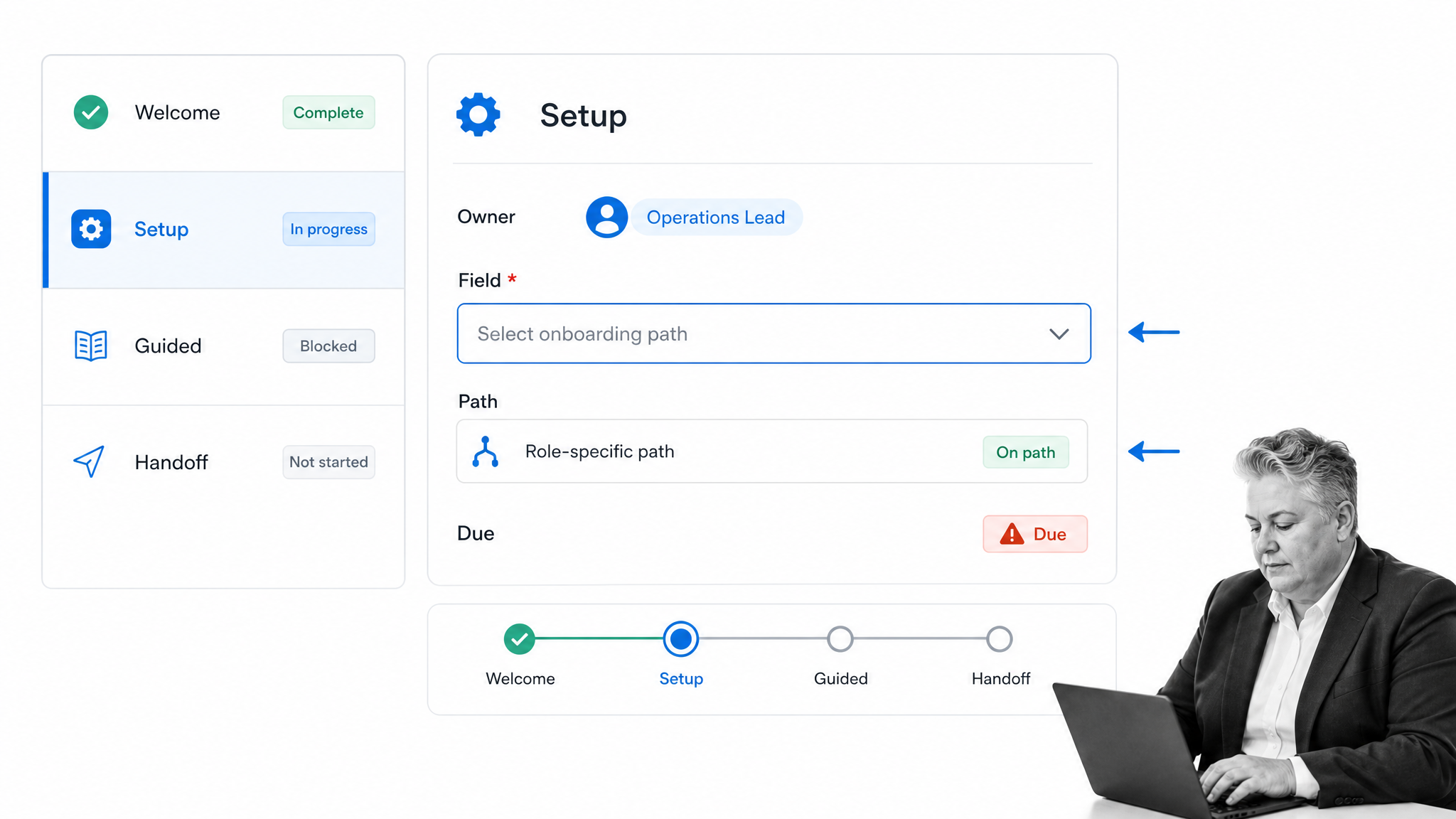
Process Street is a Compliance Operations Platform that can run the repeatable work behind onboarding. It does not replace an in-product welcome experience. It gives HR, IT, customer success, implementation, and operations teams one executable workflow for the tasks, approvals, branches, and records that make onboarding reliable.
Run a reusable onboarding workflow
Start from a standard flow, then adapt it to the role, segment, and success milestone. Each run keeps the current person or account attached to the work, so tasks, owners, and inputs stay in one place instead of scattered across tools.
Branch by role and risk
With conditional logic, a workflow can show or hide tasks based on answers and completed work. A self-serve path stays compact, while enterprise, regulated, or stalled cases reveal the right approvals, checks, and human handoffs.
Assign work and control handoffs
Assignments, due dates, required fields, and approvals turn a vague handoff into accountable work. A product signup or a form submission can start a run, and automation can pass context to other systems. The receiving owner sees the goal, the completed steps, and the next required action. Process Street has direct, universal integrations to 5,000+ systems. Need a new one? An AI agent builds it on the fly.
See progress and exceptions
The workflow dashboard shows runs, task status, assignments, and activity in one place. That operating view helps leaders spot overdue setup, repeated blockers, and uneven experiences across onboarding segments before they turn into churn or a frustrated new hire.
The result is onboarding that connects the guided experience a newcomer sees with the operational work required to deliver it consistently. People get a clearer path to value, and teams get the ownership and evidence needed to keep improving that path over time.
Onboarding app FAQs
What is an onboarding app?
An onboarding app is software that guides a new employee, user, or customer through the steps that turn a signup into real value. It combines a guided flow, task ownership, reminders, conditional paths, and progress tracking so the right actions happen in the right order.
What are the main types of onboarding apps?
The main types are employee onboarding apps that coordinate HR, IT, and manager tasks, user onboarding apps that guide a new software user to a first valuable action, and customer onboarding apps that coordinate account-level setup, training, and activation. Many teams need more than one.
What features should an onboarding app have?
A strong onboarding app should include a guided sequenced flow, task ownership and assignment, conditional paths for different roles or segments, reminders and automation, and progress tracking with a record of completed steps. Those features make the path clear, measurable, and reliable.
Is an onboarding app better than a checklist?
A checklist is a fine starting point, but an onboarding app adds consistency, real-time visibility, routed handoffs, and recovery when steps break. As volume grows and more teams get involved, an app keeps the process reliable in a way a static checklist cannot.
How do you measure onboarding success?
Measure time to first value, step completion and drop-off, activation and early adoption, and qualitative feedback. Report results by role or segment, and confirm that the success milestone actually predicts later retention rather than assuming that a finished checklist equals value.
How does Process Street support onboarding?
Process Street runs the repeatable work behind onboarding through reusable workflows, task assignments, conditional paths, approvals, required fields, automation, and progress visibility. It connects HR, IT, success, and operations responsibilities without replacing the in-product welcome experience.
