Turn every policy into automated workflows with built-in enforcement and audit-ready proof.


Form Platform

A form platform is a workflow-backed way to collect structured information, validate it, route it to the right owner, track decisions, and preserve the record. It is more than a blank form. It is the operating layer around a submitted request, application, intake, or approval packet.
Teams use form platforms when a submission should trigger work. A customer intake form may launch onboarding. A job application may route to review. A purchase request may need budget approval. A vendor application may need security, legal, and finance checks. The form captures the input, but the platform controls what happens next.
This guide explains what a form platform is, how it differs from nearby tools, which components matter, and how Process Street turns submitted forms into workflows with assignments, approvals, automations, and proof.
In this article, we are going to cover:
- What a form platform is
- Why form platforms matter
- Form platform components
- Form platform vs form builder, database, and workflow tool
- How to build a form platform
- Build a form platform in Process Street
- Form platform examples
- Form platform FAQs
What a form platform is
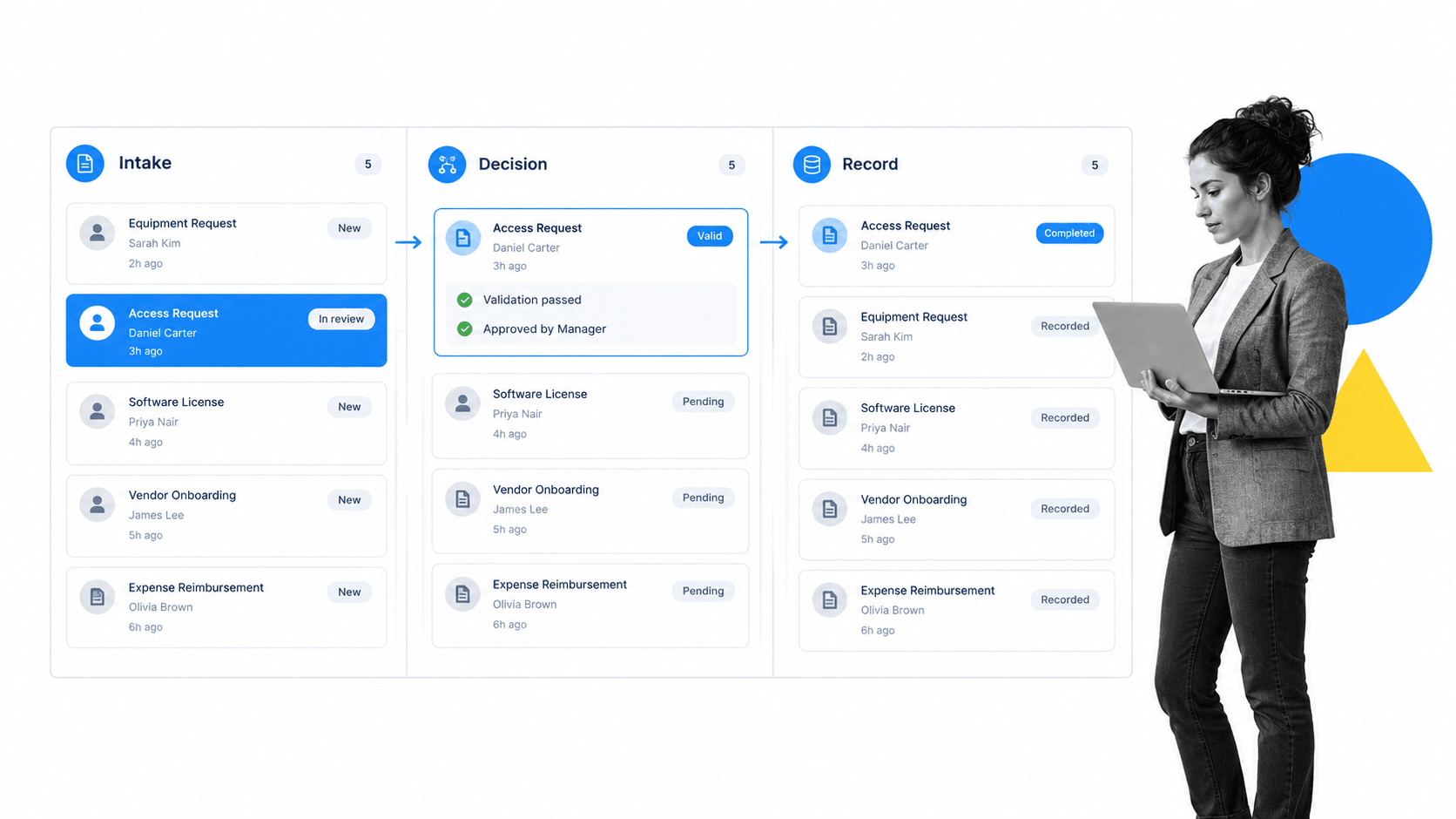
A form platform is the system that wraps a form in workflow logic. It defines the fields users complete, the validation rules that make submissions usable, the routing rules that decide who reviews the submission, and the record trail that proves what happened.
A simple definition
A form platform is a digital business application built around one or more forms. It collects data, applies rules, assigns follow-up work, and stores the result. A form editor helps design the form itself. A form platform governs the full journey after someone submits it.
That journey can be short or complex. A simple application might collect a request and notify one reviewer. A controlled application might validate required fields, route by risk level, require approval, create tasks in another system, generate a record, and preserve audit history.
What the application adds
- Validation, so required information is captured before the process starts.
- Routing, so each submission reaches the right owner or review group.
- Assignments, so follow-up work is owned instead of left in a shared inbox.
- Approvals, so decisions are documented inside the process.
- Records, so completed submissions can be inspected later.
- Automation, so approved submissions can update connected systems without manual copying.
That is why a form platform often sits beside a form repository. The repository stores and governs approved forms. The application runs the submitted form through a business process.
Common form platform pattern
Most form platforms follow the same operating pattern: collect, validate, route, review, approve, record, and improve. The field names change, but the control problem stays the same. A submitted form should create clarity, not more coordination work.
Where the term creates confusion
The phrase form platform is often confused with form builder or online form tool. A form builder usually creates the questionnaire someone fills out. A form platform is the broader shared software layer around that questionnaire, including governance, workflow, integrations, administration, and records. The distinction matters when the form creates operational responsibility. If the submission only needs to be read once, a simple form may be enough. If the submission starts work across people, systems, approvals, or records, the team needs a form platform.
That is why the strongest form platforms are designed around the business outcome, not around the field layout. The first design question is not which fields look good on the screen. It is what the organization must do once the completed form arrives.
Why form platforms matter
Form platforms matter because forms are often the front door to important work. If the front door is weak, everything downstream becomes manual. People chase missing fields, ask who owns the request, make decisions in chat, copy data between tools, and rebuild the record when someone asks what happened.
They reduce intake chaos
Intake chaos appears when every team collects information differently. Sales asks for one format. Finance needs another. HR stores a PDF. IT uses a spreadsheet. Compliance wants evidence. Without a form platform, the same submission may be copied, re-entered, corrected, and re-explained several times.
Strong form automation software solves this by connecting the form to the workflow that uses it. The form is not an endpoint. It is the first controlled step.
They improve review quality
Review quality depends on context. If reviewers see only a partial answer, they either guess or pause the process. A form platform can require the right fields, show conditional questions, request attachments, and route high-risk submissions to the right reviewer before a decision is made.
Clarity also matters for the people completing the form. The W3C form accessibility guidance covers practical form design patterns such as labels, grouping, instructions, and errors. Those patterns help submissions arrive complete and understandable.
They preserve proof
For routine work, proof may mean knowing that the request was handled. For regulated or high-stakes work, proof means seeing who submitted the information, who reviewed it, what decision was made, what evidence was attached, which exception path ran, and whether the final record was stored correctly.
Public guidance from the FTC data security guidance reinforces a practical principle: collect what you need, protect what you keep, and limit unnecessary exposure. A form platform should make those rules easier to follow.
They make improvement visible
A form platform creates data about the process itself. Teams can see which fields create confusion, which submissions get returned, where approvals stall, and which exceptions happen repeatedly. That feedback turns the form from a static questionnaire into a system that can improve over time.
They reduce hidden handoffs
Hidden handoffs are the quiet failure mode in form-driven work. One person receives the submission, forwards it to another person, asks a third person for context, saves the attachment somewhere else, and later updates a tracker by hand. The form looked digital, but the process stayed manual. A form platform makes those handoffs explicit so the next owner, next decision, and next record update are part of the workflow.
Form platform components
A useful form platform has several connected components. You can start simple, but each component needs a clear purpose.
1. Form interface
The interface is what users complete. It should ask clear questions, group related fields, explain required evidence, and avoid unnecessary inputs. The goal is not to collect every possible detail. The goal is to collect the information needed for the workflow to move.
2. Validation rules
Validation protects the process from unusable submissions. Required fields, field formats, attachment checks, duplicate detection, and conditional questions can all reduce rework. Validation should be strict where risk is high and lighter where speed matters more.
3. Routing logic
Routing decides what happens next. A form controller can help govern this logic by determining which owner, approval path, task list, or record destination applies after submission.
Routing should be visible enough that owners understand why they received the work. If a submission routes to legal because the user selected a high-risk vendor category, that reason should be clear inside the workflow.
4. Review and approval
Review steps turn a submitted form into a decision. Approval routing should happen inside the workflow, not in an untracked side conversation. Process Street supports approvals for exactly this kind of controlled decision point.
5. Workflow tasks
A form platform becomes operational when it creates assigned work. Tasks can handle triage, document checks, manager review, customer follow-up, IT setup, finance approval, or final record storage. That is where the platform connects to a broader workflow management system.
6. Records and audit history
Records should include the submitted fields, files, comments, owner activity, approval decisions, timestamps, and completion state. The record trail should be created while the work happens, not reconstructed later.
7. Integration and automation
A finished submission often needs to update another system. The form platform might create a CRM record, send an email, generate a document, update a spreadsheet, open a ticket, or notify a stakeholder. Manual copying is the first sign the application is incomplete.
8. Access and permissions
Access rules decide who can submit, view, edit, approve, export, and archive the form platform. These rules should match the sensitivity of the data. A public intake form, internal HR request, vendor risk application, and compliance attestation should not all share the same access model.
9. Maintenance ownership
Every form platform needs a named owner who can update fields, retire obsolete questions, review routing, and respond when downstream teams report bad intake. Without ownership, even a well-built application slowly turns into another stale form.
A platform also adds shared administration across many forms: reusable components, ownership, access rules, publishing controls, integrations, reporting, and lifecycle management. A form organizer helps keep the active catalog usable, while a form service can expose the collection layer to other systems. The form process defines the work that follows, and a workflow platform provides the wider execution model.
Form platform vs form builder, database, and workflow tool
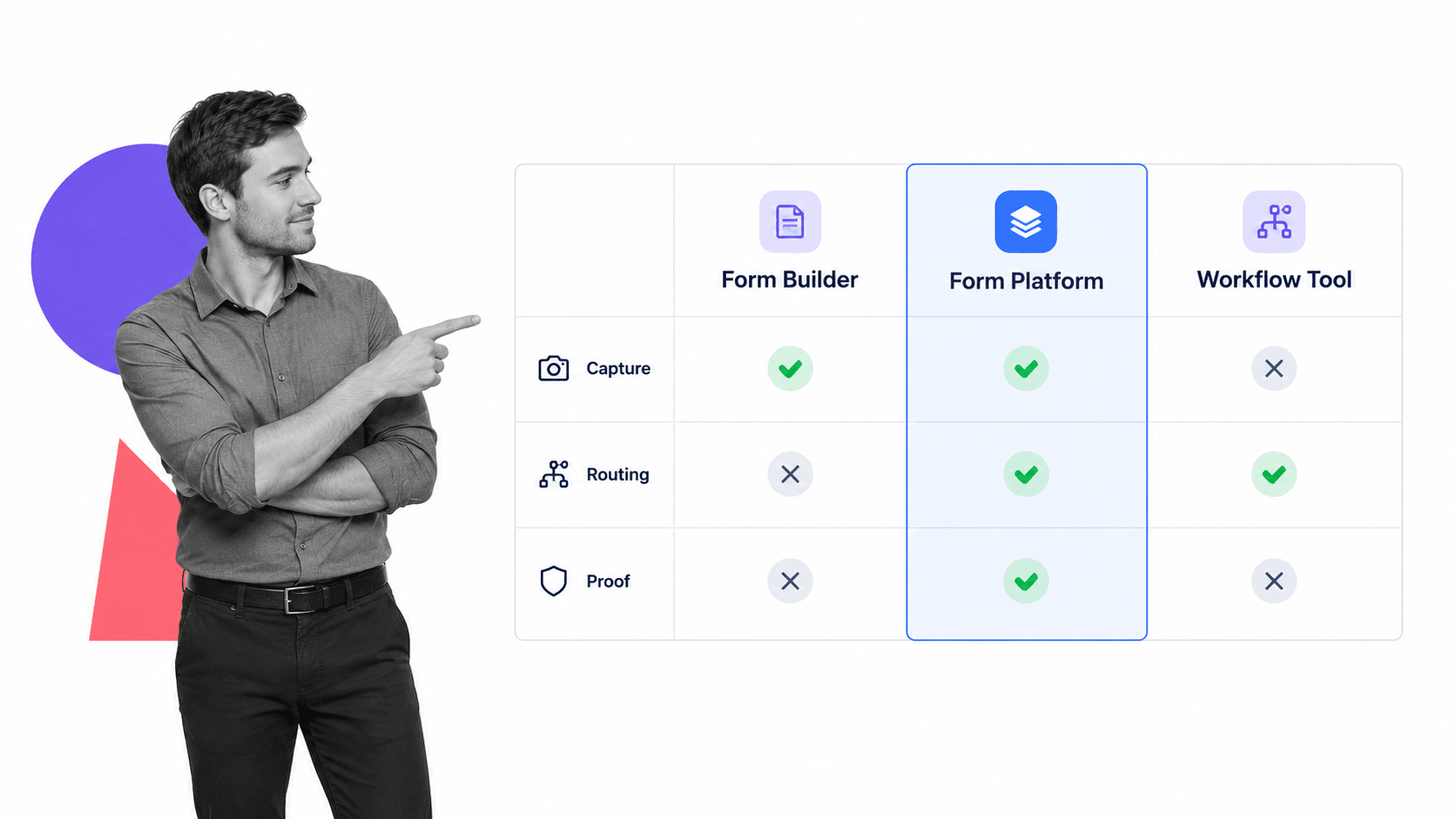
A form platform overlaps with forms, form builders, and databases, but it is not the same thing. The difference is whether the system only captures data or also controls the work that follows.
Form
A form is the structured set of questions or fields. It may be paper, PDF, web-based, or embedded in another tool. A form can collect information, but by itself it does not guarantee review, approval, follow-up, or proof.
Form builder
A form builder helps create the form interface. It can be excellent for layout, conditional questions, uploads, and basic notifications. The form platform includes the workflow around that interface.
Database
A database stores the submitted information. It can power reporting, searching, and integration. A database alone does not define who reviews the submission, which controls apply, or what happens when a field triggers an exception.
Form platform
A form platform combines the form, the workflow, the decision path, and the record trail. It is the right mental model when submissions are not just data. They are requests, applications, reviews, approvals, cases, incidents, checks, or operating events.
That is why form platforms often look like workflow applications. They turn a business input into a managed sequence of work.
How to build a form platform
Build a form platform around one recurring submission type. The narrower the first use case, the faster you can make the application useful.
Step 1: Define the application outcome
Start with the final decision or completed record. Are you approving an applicant, qualifying a vendor, reviewing a purchase, opening an incident, onboarding a customer, or collecting audit evidence? The form should serve that outcome.
Step 2: Identify the required information
List the fields reviewers need to make a decision and operators need to complete the work. Remove fields that do not change the path, decision, record, or follow-up action.
Step 3: Design the validation rules
Decide which fields are required, which formats are valid, which attachments are mandatory, and which answers should trigger extra questions. For higher-risk work, validation should happen before the workflow proceeds.
Step 4: Map the workflow
Map the sequence from submission to completion. Simple diagrams can be enough, but standards like BPMN 2.0 overview can help teams describe flows when the process has many paths.
Step 5: Assign owners and approvers
Every step needs an owner. Every decision needs an approver or rule. Every exception needs a path. If a form platform cannot assign work, the team will create the workflow manually in email.
Step 6: Connect the record destination
Decide where the completed submission lives. That might be a workflow run, document repository, CRM, HRIS, ticketing tool, database, or archive. A useful form platform should make the record easy to retrieve.
Step 7: Review real submissions
The ISO process approach guidance frames a process approach around responsibilities, criteria, resources, risks, and improvement. Apply that mindset after launch: review real submissions, fix confusing fields, simplify routing, and remove unnecessary handoffs.
The Business Forms Management Association forms guide also emphasizes periodic review because forms need to keep matching workflow requirements. That is the maintenance habit that keeps a form platform useful.
Build a form platform in Process Street
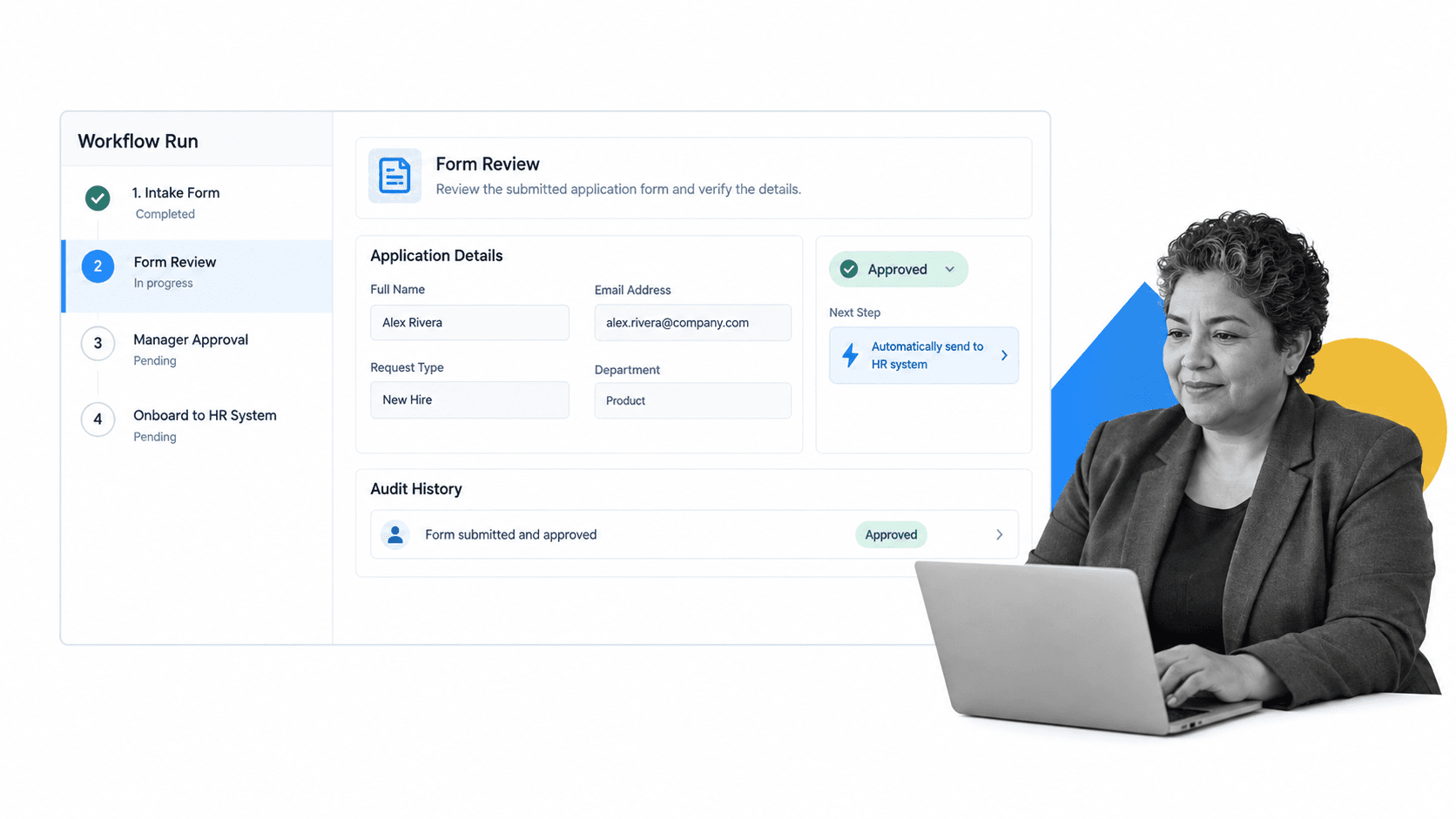
Process Street works as a form platform platform when the goal is to make submissions actionable. You can collect structured inputs, route decisions, assign follow-up work, automate updates, and preserve the record in one workflow run.
Use workflows as application containers
A Process Street workflow can contain the fields, instructions, required files, tasks, approvals, and evidence needed for a submitted application. Users can launch work through running workflows, scheduled runs, run links, email, CSV, or automations.
Use fields and conditional logic
Form fields capture the submission. conditional logic can show or hide steps based on the answers, so low-risk submissions move quickly while higher-risk submissions get extra review.
Use approvals to document decisions
Approvals keep the decision inside the workflow. A manager, compliance owner, finance reviewer, HR lead, security reviewer, or customer operations owner can approve or reject the application with the context attached.
Use automations to move the work
After approval, automations can update connected systems, notify stakeholders, create follow-up tasks, generate documents, or send the result to another operational record. Process Street has direct, universal integrations to 5,000+ systems. Need a new one? An AI agent builds it on the fly.
Use the workflow run as proof
The workflow run should hold the submitted fields, files, comments, task owners, approval decisions, automation activity, and completion state. That makes the application easier to inspect later.
Teams can also start from templates. A job application form template, purchase order template, or employee onboarding checklist can become the first version of a controlled form platform.
Form platform examples
Form platforms are useful anywhere a submitted form should trigger review, action, or evidence collection.
Job and hiring applications
Hiring teams can use a form platform to collect applicant details, screen required information, route submissions to reviewers, schedule next steps, and preserve hiring records.
Vendor applications
Procurement and security teams can collect vendor details, request documents, route risk reviews, approve onboarding, and send approved vendors into finance or legal workflows.
Purchase requests
Finance teams can collect request details, validate budget context, route approvals by amount or department, create purchase records, and preserve approval evidence.
Customer onboarding intake
Customer teams can collect implementation details, route technical questions, create onboarding tasks, and track required approvals before work begins.
Compliance attestations
Compliance teams can collect policy acknowledgments, control evidence, exception requests, audit packets, and reviewer decisions. The form platform makes the submission part of the control record.
Incident and exception requests
Operations, IT, quality, and compliance teams can use form platforms for incident reports, exception requests, corrective actions, and escalation packets. These submissions usually need more than capture. They need triage, owner assignment, evidence review, approval, and closure.
Grant, scholarship, and program applications
Program teams can use form platforms to collect eligibility information, route reviewer scoring, request missing evidence, issue decisions, and preserve applicant records. This pattern is especially useful when many applicants move through the same review stages but require different decisions.
Each example is stronger when connected to process automation and business process documentation, because the form is only one part of the operating system.
Form platform FAQs
What is a form platform?
A form platform is a workflow-backed system for collecting structured information, validating it, routing it to the right owner, tracking decisions, and preserving the completed record.
How is a form platform different from a form?
A form collects information. A form platform controls what happens after submission, including validation, routing, assignments, approvals, automation, and recordkeeping.
When should you use a form platform?
Use a form platform when a submitted form should trigger work, review, approval, or evidence collection. Common examples include job applications, vendor onboarding, purchase requests, customer intake, and compliance attestations.
What should a form platform include?
A form platform should include clear fields, validation rules, routing logic, assigned tasks, approval steps, automation, access controls, and a record trail that shows what happened.
Can a form platform replace a database?
Not always. A database stores structured records, while a form platform manages the submission workflow. Many teams use both: the form platform controls the process, then sends approved data to the database or system of record.
Can Process Street work as a form platform?
Yes. Process Street can work as a form platform by turning submitted forms into workflow runs with required fields, assignments, approvals, conditional logic, automations, and audit history.