


Turn every policy into automated workflows with built-in enforcement and audit-ready proof.


Call Center Workforce Management Software
Last updated:
Call center workforce management software helps contact centers predict workload, schedule the right skills, monitor real-time adherence, and adjust staffing as demand changes. It turns historical interaction data and operating rules into interval-level staffing decisions, then gives workforce teams a way to compare the plan with what is happening now.
The software is part of a larger operating system. A call center software platform handles conversations and routing, while workforce management coordinates who should be available, when they should work, and how leaders respond when actual demand diverges from the forecast. The result is a closed loop across planning, execution, and improvement.
In this guide, you will learn how the category works, which capabilities matter, how to evaluate vendors without relying on feature checklists alone, and where Process Street fits alongside a specialist workforce management platform.
In this article, we are going to cover everything you need to know about call center workforce management software, including:
- What call center workforce management software is
- How call center workforce management software works
- Core capabilities to evaluate
- Call center WFM metrics that matter
- How to choose a platform
- Where Process Street fits
- How to implement call center WFM software
- Common mistakes to avoid
- FAQs
What is call center workforce management software?
Call center workforce management software is a system for forecasting contact demand, calculating staffing requirements, building agent schedules, tracking schedule adherence, and managing intraday changes. It is designed around the time-sensitive nature of contact center work, where a staffing gap in one interval can affect wait times, abandonment, employee workload, and service outcomes.
What WFM means in a call center
WFM stands for workforce management. In a call center, the term usually describes the operating discipline that connects demand forecasting, capacity planning, scheduling, real-time management, and performance analysis. The software supports that discipline, but it does not replace the judgment of planners, supervisors, or operations leaders.
Broader workforce management tools may focus on time capture, attendance, payroll preparation, or leave across many work environments. Call center WFM goes deeper on interval forecasts, queue and skill coverage, schedule adherence, and intraday decisions. It should also connect to longer-range workforce planning so hiring and training decisions reflect expected demand.
How it differs from contact center and HR systems
A contact center platform routes voice and digital interactions. A CRM stores customer context. An HRIS maintains employee records. A payroll system calculates pay. WFM software uses data from several of these systems to build and monitor staffing plans. The boundaries can overlap, but a buyer should identify the system of record for each decision before selecting a platform.
Who uses the software
Workforce planners create forecasts and schedules. Real-time analysts monitor coverage and adherence. Supervisors handle agent-level exceptions. Operations leaders set service and cost priorities. Agents use self-service tools to view schedules, request time off, or exchange shifts. Finance, HR, compliance, and IT may also govern data, labor rules, access, and integrations.
How call center workforce management software works
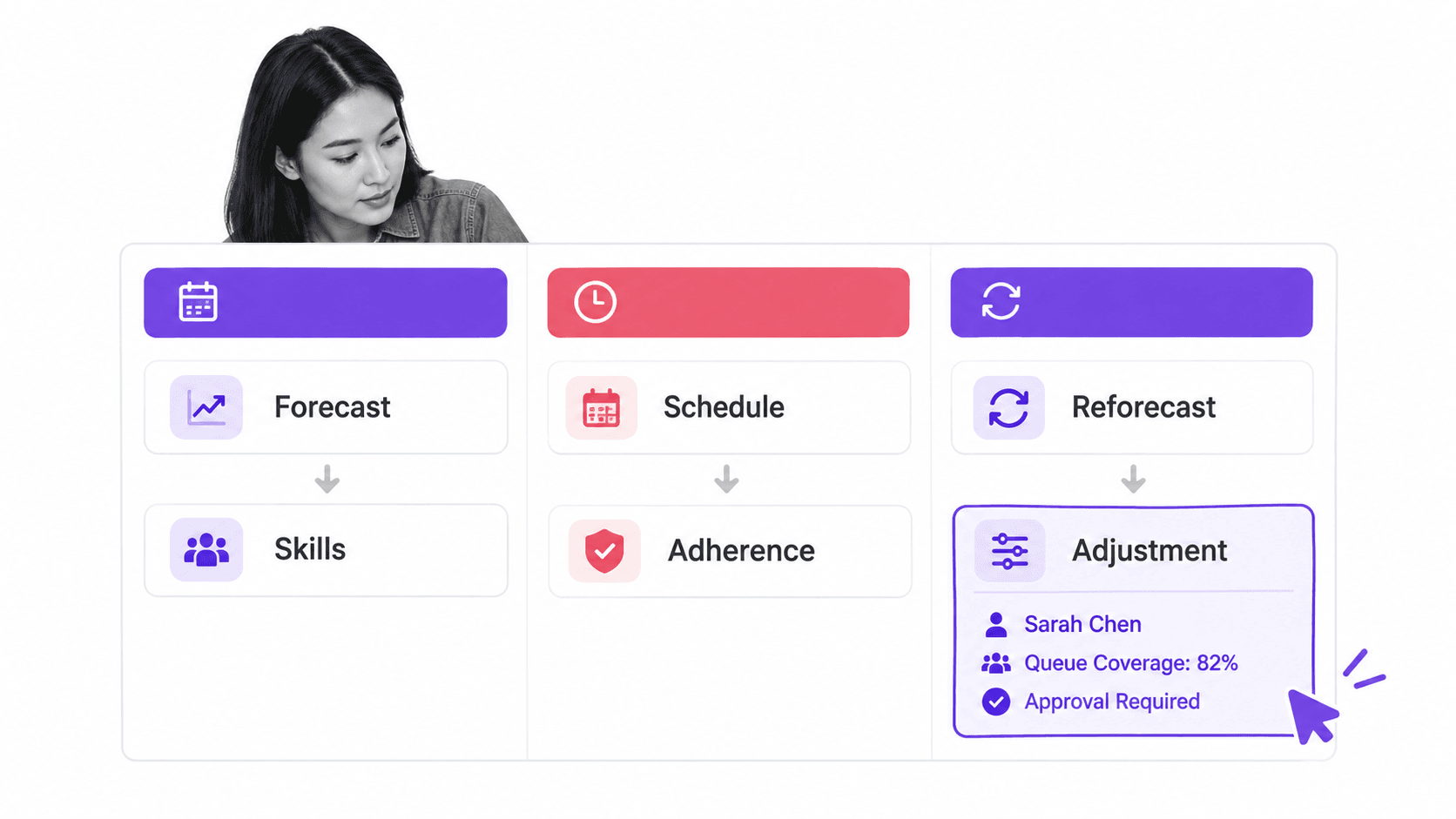
A mature WFM operation runs as a continuous cycle. Each stage creates an input for the next stage, and actual performance feeds the next forecast. The software should make assumptions visible so planners can explain why staffing changed rather than treating the schedule as an unexplained output.
1. Forecast interval demand
The platform combines historical interaction volumes with patterns such as day of week, seasonality, campaigns, outages, product launches, billing cycles, and known events. Forecasts should be segmented at the level where staffing decisions are made, such as queue, channel, language, skill, location, or customer group.
Salesforce describes contact center workforce management as the process of forecasting demand, scheduling agents, and monitoring performance. The contact center WFM overview is useful context, but teams still need to test whether a vendor can model their real routing and skill structure.
2. Convert workload into staffing requirements
Volume alone does not determine staffing. The model also needs expected handle time, service objectives, concurrency assumptions for digital channels, shrinkage, occupancy limits, and skill constraints. The output is a requirement by interval, not yet a schedule assigned to specific people.
3. Build skill-based schedules
Scheduling matches required coverage with contracts, availability, skills, breaks, time zones, labor rules, preferences, and planned absences. Strong systems make tradeoffs visible. A schedule may cover total headcount while still leaving a language, channel, or specialized queue exposed.
4. Monitor adherence and intraday conditions
Real-time feeds compare scheduled activity with actual agent state and compare forecast demand with actual arrivals. The goal is not constant surveillance. It is to identify material gaps early enough to act, distinguish system or routing issues from individual exceptions, and keep supervisors focused on decisions that affect service.
5. Reforecast and adjust
Intraday management may include moving trained agents between queues, changing offline work, offering voluntary time off, requesting overtime, adjusting breaks, or escalating a wider capacity issue. Zoom’s explanation of workforce management in call centers emphasizes this continuous adjustment between forecast, schedule, and actual conditions.
Core capabilities in call center workforce management software
Feature names vary, so evaluate each capability by the decision it supports and the evidence it produces. A polished dashboard is less important than accurate inputs, usable workflows, explainable outputs, and reliable integration with the systems that create operational data.
Forecasting and scenario planning
Look for interval forecasts, queue and skill segmentation, multi-channel workload models, event adjustments, manual overrides with audit history, and scenario comparison. Planners should be able to see baseline assumptions, record why an override was made, and compare forecast accuracy over time.
Scheduling and optimization
Scheduling should support fixed and flexible shifts, breaks, split shifts where appropriate, multiple skills, location and time-zone rules, contracts, availability, and local labor constraints. Optimization must respect hard rules while showing the cost and service effect of softer preferences.
Real-time adherence and exception management
Useful adherence views show the planned activity, actual state, duration, reason, and operational impact. Alerts should be configurable and prioritized. Without clear thresholds and ownership, real-time teams can become overloaded with low-value notifications while important exceptions remain unresolved.
Agent self-service
Agents should be able to view current schedules, submit availability, request leave, volunteer for additional hours, and exchange eligible shifts without creating uncontrolled manual work. Rules, approvals, and eligibility checks must be understandable to both agents and supervisors.
Analytics, integrations, and auditability
The platform should connect to routing, telephony, digital engagement, HR, identity, and payroll data as required by the operating model. Evaluate latency, failure handling, field mapping, permissions, and audit history. Operational reports should help leaders inspect trends without obscuring the assumptions behind each measure.
Call center workforce management metrics that matter
No single metric proves that a workforce plan is healthy. Leaders need a balanced view of customer access, workload, employee sustainability, forecast quality, and cost. Metrics should be interpreted in context rather than used as universal targets.
Service level and abandonment
Service level measures how many interactions meet a defined response-time objective. Abandonment measures customers who leave before service. Both depend on demand, routing, staffing, handle time, and customer behavior. A change in either measure should trigger diagnosis, not an automatic conclusion about agent performance.
Occupancy, shrinkage, and schedule adherence
Occupancy indicates how much logged-in time is spent handling contacts or related work. Shrinkage accounts for paid time unavailable for handling demand, such as training, meetings, breaks, leave, and absence. Schedule adherence compares actual activity with the planned schedule. These measures work together and can conflict if optimized in isolation.
Forecast accuracy and average handle time
Forecast accuracy compares predicted and actual workload. Average handle time contributes to staffing requirements but can change with contact complexity, training, product issues, or process friction. Use a repeatable call center metrics calculation checklist so definitions, time windows, and owners remain consistent.
How to choose call center workforce management software
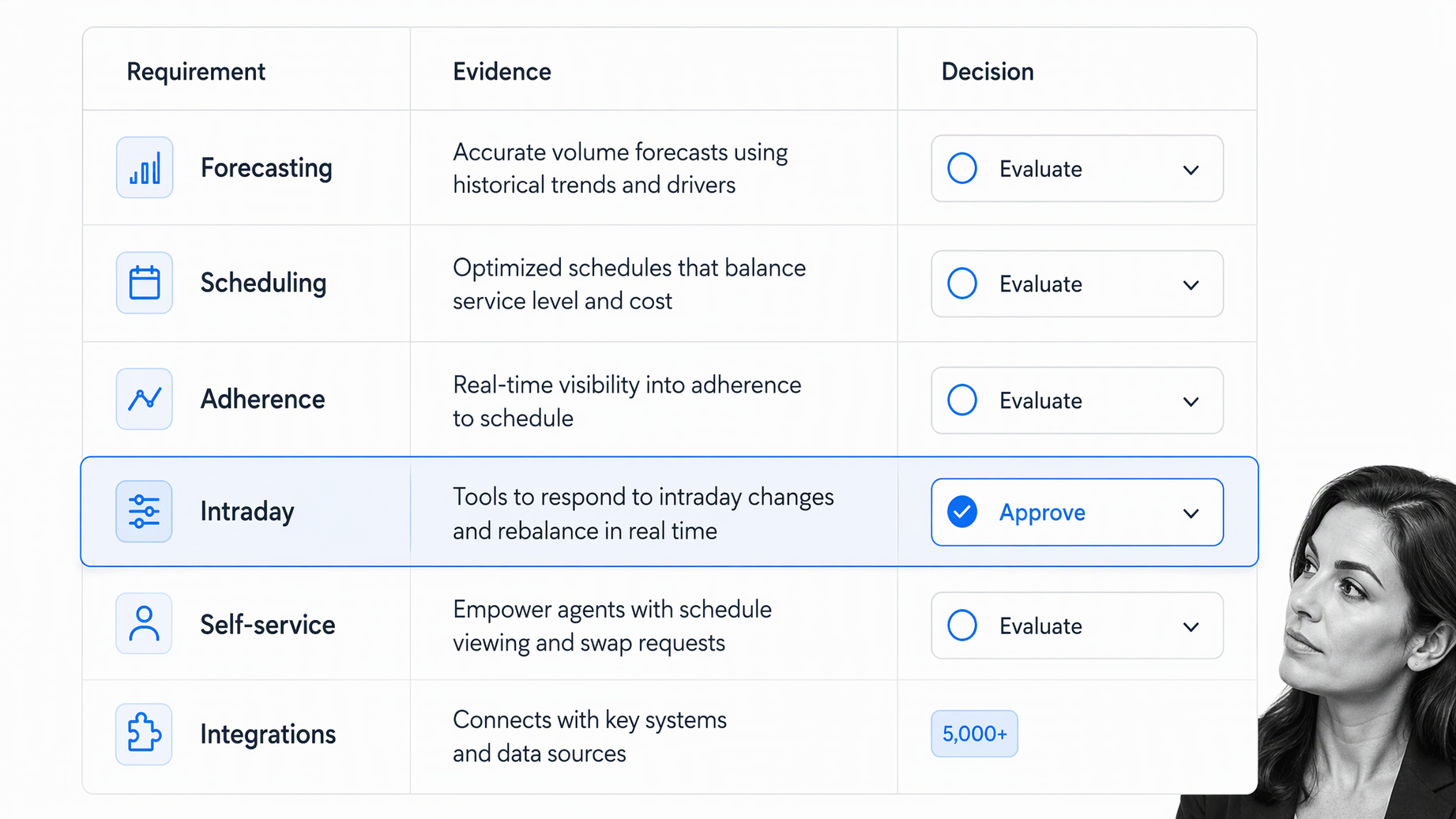
Start with operating requirements, then use realistic scenarios to test whether the product can support them. Avoid ranking vendors by the number of features on a web page. The selection should reveal data dependencies, workflow gaps, administrative effort, and the quality of decisions the system enables.
Map requirements to operating decisions
Document queues, channels, skills, locations, contracts, forecast horizons, schedule patterns, labor rules, self-service policies, and intraday actions. Separate must-have controls from preferences. Include uncommon but consequential cases such as system outages, sudden demand spikes, skill shortages, and partial-site closures.
Run evidence-based product scenarios
Ask each vendor to configure a representative forecast, generate a schedule, process an absence, detect an adherence exception, and reforecast a disrupted interval. Use your terminology and sample structure. Record which steps require vendor services, custom code, exports, or manual reconciliation.
Evaluate the administrator and agent experience
Planners need bulk actions, transparent calculations, safe overrides, version history, and fast investigation. Agents need a clear schedule and predictable request process. Supervisors need context without navigating several disconnected screens. Test each role on realistic devices and under time pressure.
Inspect controls, security, and integration behavior
Review role-based access, data retention, audit logs, identity integration, change approval, export controls, monitoring, and incident support. Confirm how integrations recover from missing or delayed data. Labor and recordkeeping needs vary by jurisdiction, so legal review should use current primary guidance such as the Department of Labor FLSA guidance and its recordkeeping fact sheet.
Where Process Street fits in call center workforce management
Process Street is an Agentic Process Automation platform. It complements specialist WFM software by coordinating the repeatable work that surrounds forecasts, schedules, exceptions, approvals, training, quality reviews, and operational evidence. It is not a replacement for an interval forecasting engine, automatic scheduler, telephony platform, or payroll calculator.
Turn staffing exceptions into controlled workflows
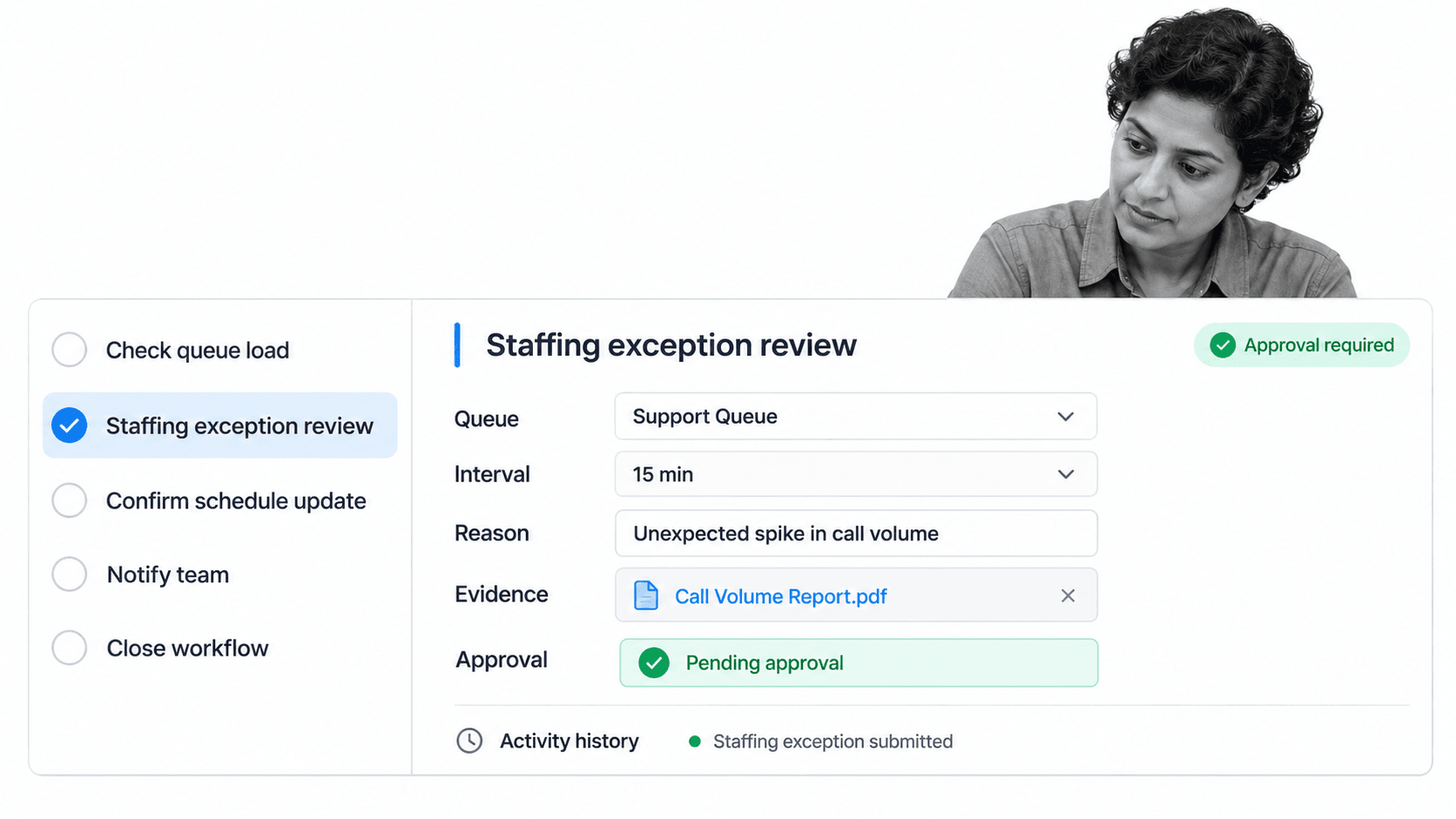
When actual demand exceeds plan, a workflow can capture the affected queue and interval, assign an owner, collect evidence, record the chosen action, request approvals, and preserve the decision history. conditional logic can route different exception types to the right path without exposing every step to every user.
Standardize onboarding, training, and readiness
Workforce plans depend on people being trained and ready for the skills assigned to them. A call center employee onboarding checklist can coordinate access, policy acknowledgement, equipment, and role readiness. A customer service training workflow or call center agent training program can preserve completion evidence before an agent is scheduled into a new queue.
Connect quality signals to workforce actions
Quality findings can reveal coaching needs, knowledge gaps, process failures, or workload patterns that affect staffing. A structured call center quality assurance audit can route findings to coaching, retraining, process repair, or schedule adjustments. This keeps call center quality assurance from becoming an isolated scoring exercise.
Coordinate work across systems
Process Street has 5,000+ integrations. Teams can connect workflow steps with the systems in their operating environment while keeping owners, approvals, evidence, and status visible in one repeatable process. Integration design should still define the system of record and the response to delayed or missing data.
How to implement call center workforce management software
Implementation should prove an operating cycle, not merely complete a technical configuration. Begin with a bounded scope, validate data and decisions, and expand only after planners, supervisors, and agents can run the process reliably.
1. Baseline the current operation
Document forecast methods, data sources, schedule creation, adherence rules, intraday actions, handoffs, approvals, and reporting. Capture where spreadsheets or messaging tools fill system gaps. Establish metric definitions and identify the decisions that are slow, inconsistent, or difficult to audit.
2. Define a pilot with real complexity
Choose a queue group or business unit that is important enough to be representative but contained enough to support close observation. Include multiple skills, schedule patterns, expected exceptions, and at least one intraday disruption. A pilot that avoids complexity can create false confidence.
3. Prepare data and integrations
Validate historical volume, handle time, agent records, skills, availability, schedule rules, and actual-state feeds. Define ownership for every integration and reconciliation step. Test missing values, late files, duplicate events, time-zone changes, and identity mismatches before relying on automated decisions.
4. Configure governance and change control
Decide who may change forecast models, staffing assumptions, schedule rules, adherence thresholds, permissions, and integrations. Use a workflow management system approach to record requests, tests, approvals, release notes, and rollback plans. Safety-related staffing practices should also align with current guidance such as OSHA safety and health program guidance where applicable.
5. Train roles and expand in stages
Train planners on model assumptions and overrides, supervisors on exception handling, agents on self-service, and leaders on metric interpretation. Run parallel cycles long enough to identify meaningful differences. Expand by queue, site, or channel only after support ownership and operating controls are stable.
If a center uses external partners, include ownership and data-sharing rules in the same rollout plan. The governance questions described for call center outsourcing also apply when forecasts, schedules, or adherence decisions cross organizational boundaries.
Common call center WFM mistakes to avoid
Optimizing one metric at the expense of the system
Driving occupancy higher can reduce recovery time and increase fatigue. Tightening adherence thresholds can create noise without improving service. Cutting staffing can appear efficient until demand changes. Use a balanced set of measures and make the tradeoffs explicit.
Treating the forecast as a fixed answer
Forecasts are models built on assumptions. They should be monitored, explained, and revised as new evidence appears. Preserve overrides and outcomes so the team can learn which signals improved the plan and which created bias.
Automating decisions without ownership
Alerts, schedule recommendations, and automated workflows still need accountable owners and escalation rules. workflow automation software should reduce coordination work while making responsibility clearer, not create silent actions that no one reviews.
Ignoring agent experience
A schedule can be mathematically efficient and operationally fragile. Include predictable communication, usable self-service, fair rule application, and sufficient training. Broader staff management software decisions should support the same employee experience rather than forcing agents through conflicting systems.
FAQs
What is call center workforce management software?
Call center workforce management software forecasts interaction demand, calculates staffing requirements, builds skill-based schedules, monitors schedule adherence, supports agent self-service, and helps operations teams adjust coverage when actual conditions change.
What are the main features of call center WFM software?
Core features include interval forecasting, capacity planning, schedule optimization, skills and availability management, real-time adherence, intraday reforecasting, agent self-service, workforce analytics, integrations, permissions, and audit history.
What is the difference between WFM and call center software?
Call center software manages interaction routing, channels, and agent conversations. WFM software uses workload and workforce data to plan who should be available, build schedules, compare planned and actual activity, and coordinate staffing adjustments.
How do you choose call center workforce management software?
Define the queues, channels, skills, labor rules, schedule patterns, self-service policies, and decisions the system must support. Then test vendors with realistic forecast, scheduling, adherence, exception, and integration scenarios rather than relying on feature lists.
Which metrics should call center WFM teams track?
Teams commonly track forecast accuracy, service level, abandonment, occupancy, shrinkage, schedule adherence, staffing variance, average handle time, and intraday actions. The right set should balance customer access, employee sustainability, operational resilience, and cost.
Can Process Street replace call center WFM software?
No. Process Street does not replace specialist interval forecasting, automatic scheduling, telephony, or payroll systems. It complements WFM software by coordinating staffing exceptions, approvals, evidence, onboarding, training, quality reviews, change control, and other repeatable operational workflows.
